> ## Documentation Index
> Fetch the complete documentation index at: https://documentation.onesignal.com/llms.txt
> Use this file to discover all available pages before exploring further.
# 使用 API custom_data 个性化消息
> 通过 Create Message API 使用 custom_data 发送动态的、消息级别的数据。使用 Liquid 语法在模板中引用值,实现实时个性化。
使用 [Create Message API](/reference/create-message) 中的 `custom_data` 字段从后端发送动态数据,并使用 [Liquid 语法](./using-liquid-syntax)在模板中渲染。
`custom_data`:
* 是**消息级别**的
* **不会被存储**
* 仅在 API 请求期间存在
* 必须与 `template_id` 配合使用
在模板中引用值:
```liquid Liquid theme={null}
{{ message.custom_data.key_name }}
```
`custom_data` 是临时性的。数据不会保存到用户配置文件中,也无法在后续消息中重复使用。如果您需要持久化数据,请参阅[消息个性化](./message-personalization)。
***
## 何时使用 `custom_data`
在以下情况下使用 `custom_data`:
* 数据随消息变化(订单总额、购物车商品、余额)
* 您需要数组(产品列表、订单明细、推荐内容)
* 数据不应持久化(一次性验证码、临时 URL)
* 您从后端触发消息发送
* 您希望在一个 API 请求中实现批量个性化
***
## `custom_data` 个性化的工作原理
向消息添加 `custom_data` 需要以下几个步骤:
在仪表板中或通过 [Create Template API](/reference/create-template) 创建推送、邮件或短信 [Templates](./templates)。
使用必需的前缀插入引用:
```liquid Liquid theme={null}
Hi {{ message.custom_data.first_name }},
Order {{ message.custom_data.order_id }} is confirmed.
```
调用 [Create Message API](/reference/create-message),包含以下内容:
* `template_id` - 模板的 ID
* `custom_data` - 数据对象
* 受众定向(`include_player_ids`、`include_aliases` 或 segments)
OneSignal 在发送时使用您的数据渲染模板。
如果 Liquid 语法无效或键不存在,这些字段将渲染为空字符串,但消息仍会发送。
***
## 数据模式
可与 `custom_data` 配合使用的常见数据模式示例。
### 扁平 JSON 示例
使用简单的键值对进行基本个性化,如姓名、ID、URL 或任何单值数据。
**使用场景:** 事务性消息(发票、收据、确认通知),其中每个字段包含单个值。
**模板:**
```liquid Liquid theme={null}
Invoice {{ message.custom_data.invoice_id }} for {{ message.custom_data.product_name }} is ready.
```
**API 请求:**
```json JSON theme={null}
{
"app_id": "YOUR_APP_ID",
"template_id": "YOUR_TEMPLATE_ID",
"include_email_tokens": ["user@example.com"],
"custom_data": {
"invoice_id": "463246732",
"product_name": "Widget"
}
}
```
**客户看到的内容:**
```liquid Text theme={null}
Invoice 463246732 for Widget is ready.
```
***
### 数组数据示例
传递对象数组以处理多个项目,如购物车产品、订单明细或推荐内容。数组支持直接访问(索引)和迭代(循环)。
**使用场景:** 展示产品列表、排行榜、订单摘要或任何多项数据。
**索引模板(访问第一个项目):**
```liquid Liquid theme={null}
Your {{message.custom_data.cart_items[0].item_name}} is waiting for you!
Image: {{message.custom_data.cart_items[0].img_url}}
```
**数组索引从 0 开始**,而不是 1。第一个项目是 `[0]`,第二个是 `[1]`,以此类推。访问不存在的索引将返回空值(不会抛出错误)。
**循环模板(访问所有项目):**
```liquid Liquid theme={null}
{% for item in message.custom_data.cart_items %}
- {{ item.item_name }} — {{ item.img_url }}
{% endfor %}
```
**API 请求:**
```json theme={null}
{
"app_id": "YOUR_APP_ID",
"template_id": "YOUR_TEMPLATE_ID",
"include_email_tokens": ["user@example.com"],
"custom_data": {
"cart_items": [
{
"item_name": "sweater",
"img_url": "https://.../sweater.png"
},
{
"item_name": "socks",
"img_url": "https://.../socks.png"
}
]
}
}
```
**客户看到的内容:**
```liquid Text theme={null}
Your sweater is waiting for you!
Image: https://.../sweater.png
- sweater — https://.../sweater.png
- socks — https://.../socks.png
```
**实用的数组属性:**
* `{{message.custom_data.cart_items.size}}` — 数组中的项目数量(此示例返回 `2`)
* `{{message.custom_data.cart_items.first.item_name}}` — 第一个项目的名称(等同于 `[0]`)
* `{{message.custom_data.cart_items.last.item_name}}` — 最后一个项目的名称
***
### 批量个性化示例
发送单个 API 请求给多个用户,每个收件人根据其 `external_id` 看到个性化内容。
**工作原理:**
1. 将 `custom_data` 构造为一个对象,其中**键是 external\_id**,**值是用户特定的数据**
2. 在模板中,使用 `subscription.external_id` 查找当前收件人的数据
3. OneSignal 为每个收件人使用其特定数据渲染一次模板
**模板:**
```liquid theme={null}
{% assign user = message.custom_data.users[subscription.external_id] %}
Hi {{ user.first_name }}, you have {{ user.points }} points. Your level is {{ user.level }}.
```
**详细说明:**
* `subscription.external_id` 包含当前收件人的 external\_id(例如 "user123")
* `message.custom_data.users[subscription.external_id]` 从 custom\_data 对象中查找该用户的数据
* `user` 成为该用户数据的简写变量
* 每个收件人只能看到自己的个性化内容
**API 请求:**
```json theme={null}
{
"app_id": "YOUR_APP_ID",
"template_id": "YOUR_TEMPLATE_ID",
"include_aliases": {
"external_id": ["user123", "user456"]
},
"custom_data": {
"users": {
"user123": { "first_name": "John", "points": "150", "level": "Gold" },
"user456": { "first_name": "Sarah", "points": "200", "level": "Platinum" }
}
}
}
```
**每个用户看到的内容:**
* **John** (user123):"Hi John, you have 150 points. Your level is Gold."
* **Sarah** (user456):"Hi Sarah, you have 200 points. Your level is Platinum."
**批量个性化的要求:**
* 所有收件人必须在 OneSignal 中设置了 `external_id`
* `include_aliases` 中的每个 `external_id` 必须在 `custom_data.users` 中有对应的键
* 如果收件人的 external\_id 在 `custom_data` 中不存在,其消息中的字段将为空
***
## 示例:使用 custom\_data 的弃购挽回消息
如何使用 `custom_data` 为邮件和推送构建弃购挽回消息。
**何时使用此方法:**
* 您的服务器检测到购物车放弃行为(例如,最后一次活动后 1 小时)
* 实时购物车数据存储在您的数据库中
* 您希望展示多个产品及其图片、名称和价格
* 每个用户可能有不同的商品和数量
* 您希望从后端编排消息发送
### 示例 `custom_data` 有效负载
这是此示例的 [Create Message API](/reference/create-message) 请求。
```json JSON theme={null}
{
"custom_data": {
"cart_url": "https://yourdomain.com/cart",
"cart": [
{
"product_name": "24 Pack of Acorns",
"product_image": "https://i.imgur.com/ssPCfbC.png",
"product_price": "$12.99",
"product_quantity": "1"
},
{
"product_name": "Fancy Sweater",
"product_image": "https://i.imgur.com/8QWTfV4.png",
"product_price": "$9.99",
"product_quantity": "1"
}
]
},
"app_id": "YOUR_APP_ID",
"template_id": "YOUR_TEMPLATE_ID",
"include_aliases": {
"external_id": ["YOUR_EXTERNAL_ID"]
}
}
```
**字段说明:**
| 字段 | 类型 | 用途 |
| ------------------ | ------ | ----------------------- |
| `cart_url` | string | 客户的唯一购物车链接(用于按钮/启动 URL) |
| `cart` | array | 产品列表——支持计数、循环和详情展示 |
| `product_image` | string | 产品图片(数组中每个项目) |
| `product_name` | string | 产品名称(每个项目) |
| `product_quantity` | string | 数量(每个项目) |
| `product_price` | string | 带格式的价格(每个项目) |
您可以随意命名字段——只需确保模板中的 Liquid 语法与之匹配即可。
**保持在 2KB 以内:** 如果购物车商品较多,建议限制为前 3-5 个商品,或仅发送必要字段,以避免超出大小限制。
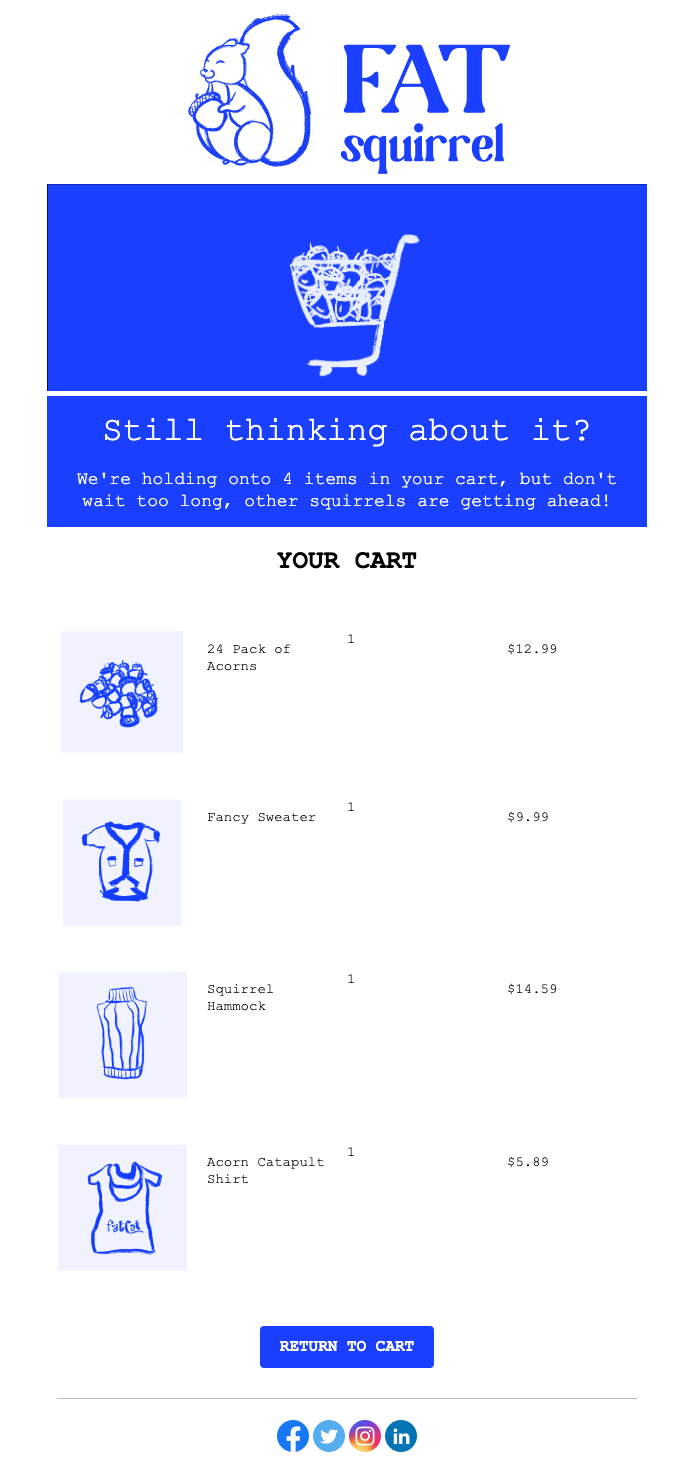
### 邮件模板
此示例展示如何构建一个邮件模板,显示:
* 购物车商品数量
* 使用 for 循环展示每个产品的图片、名称、数量和价格
* 链接到客户唯一购物车 URL 的按钮
 导航到 **Messages > Templates > New Email Template**,然后打开拖放编辑器。
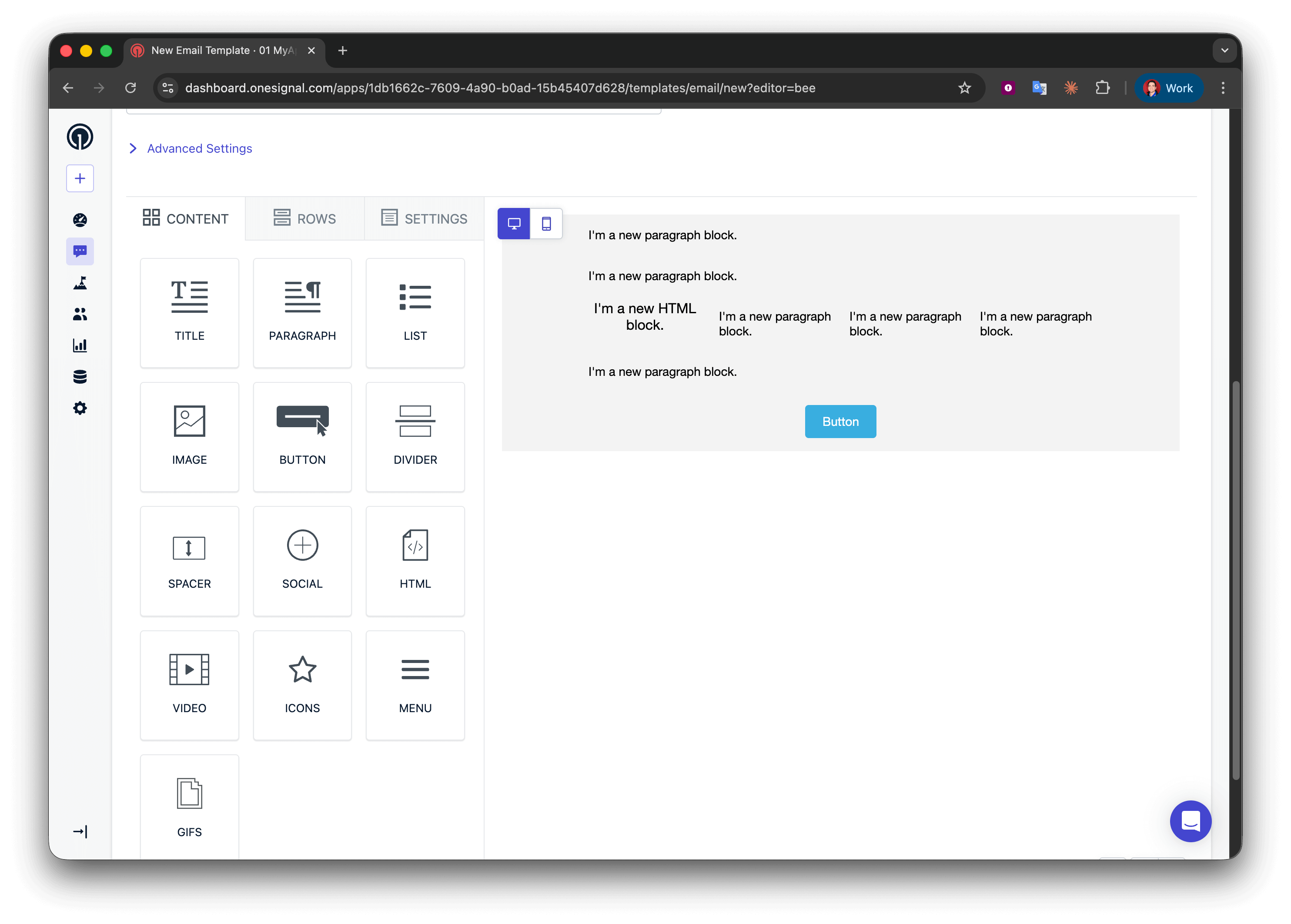
创建五行:
* 第 1、2 和 4 行:一列,包含一个 **Paragraph** 块
* 第 3 行:四列,包含 **HTML | Paragraph | Paragraph | Paragraph**
* 第 5 行:一列,包含一个 **Button** 块
导航到 **Messages > Templates > New Email Template**,然后打开拖放编辑器。
创建五行:
* 第 1、2 和 4 行:一列,包含一个 **Paragraph** 块
* 第 3 行:四列,包含 **HTML | Paragraph | Paragraph | Paragraph**
* 第 5 行:一列,包含一个 **Button** 块
 在第 1 行中添加:
```liquid Liquid theme={null}
We're holding onto {{message.custom_data.cart.size}} items in your cart, but don't wait too long, other squirrels are getting ahead!
```
为了更好的语法表达,您可以使用条件语句来区分 "1 item" 和 "2 items",但对于弃购挽回邮件,使用复数形式通常是可以接受的。
```liquid Liquid theme={null}
{% assign cart = message.custom_data.cart %}
{% assign item_count = cart.size | plus: 0 %}
{% if item_count == 1 %}
We're holding onto {{item_count}} item in your cart, but don't wait too long, other squirrels are getting ahead!
{% endif %}
{% if item_count > 1 %}
We're holding onto {{item_count}} items in your cart, but don't wait too long, other squirrels are getting ahead!
{% endif %}
```
使用 [for 循环](./using-liquid-syntax#for-loops)为购物车中的每个商品重复产品展示行。
在第 2 行(循环开始),将以下内容添加到文本块中:
```liquid Text theme={null}
{% for product in message.custom_data.cart %}
```
**这段代码的作用:**
* 开始一个循环,遍历 `cart` 数组中的每个对象
* 创建一个名为 `product` 的临时变量,代表当前项目
* `{% for %}` 和 `{% endfor %}` 之间的所有内容会为每个购物车项目重复一次
* 您可以将 `product` 命名为任何名称(例如 `item`、`cartItem`)——保持一致即可
for 循环的位置:确保 `{% for %}` 语法位于其单独的文本块行中。不要将其放在包含其他内容的多列行中,因为这可能会导致某些邮件客户端的渲染问题。
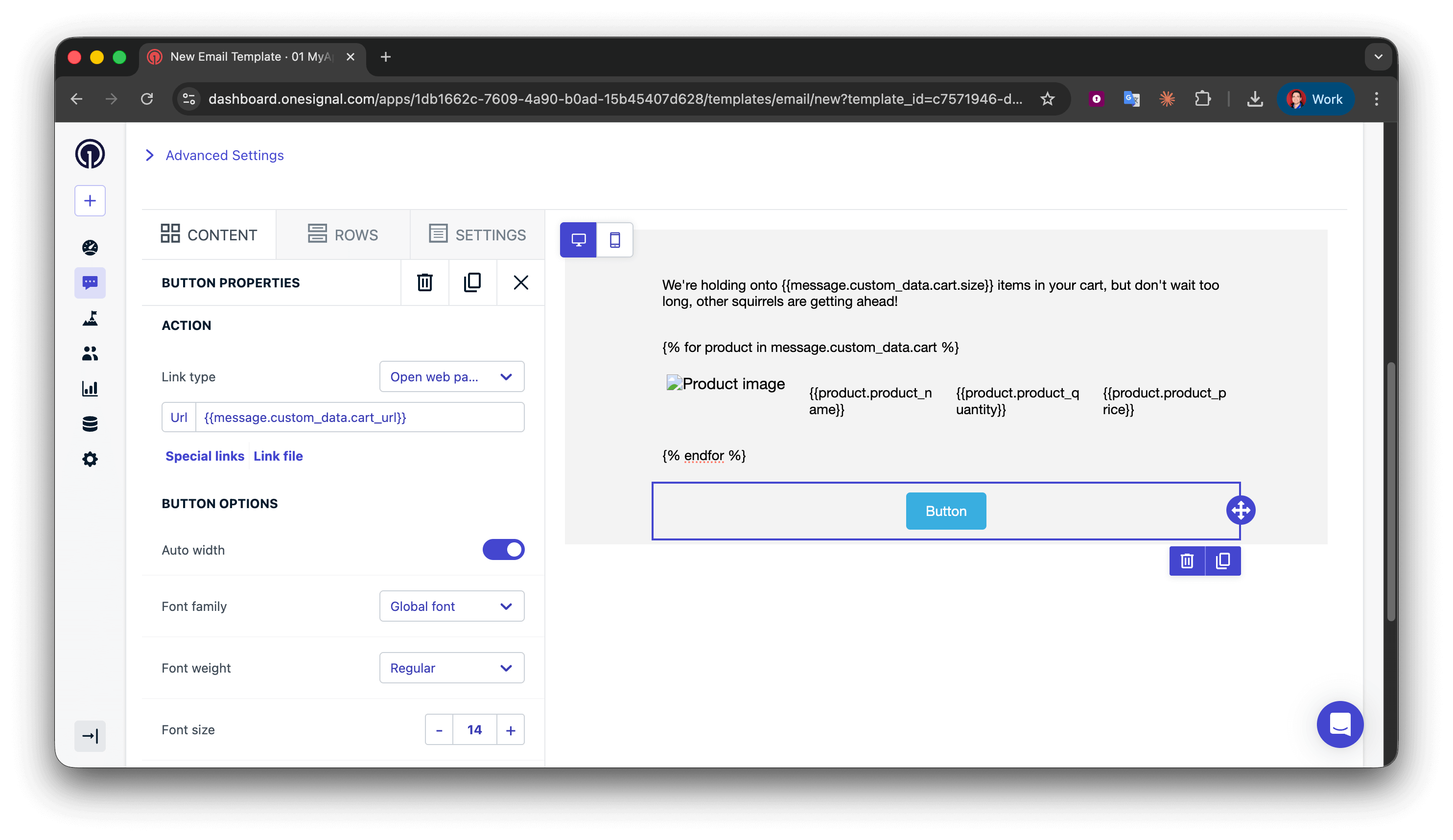
这个 4 列行展示图片、名称、数量和价格。由于它在循环内,会为每个购物车商品重复。
在第 3 行(产品详情),配置:
**第 1 列 - HTML 块**(产品图片):
```html HTML theme={null}
在第 1 行中添加:
```liquid Liquid theme={null}
We're holding onto {{message.custom_data.cart.size}} items in your cart, but don't wait too long, other squirrels are getting ahead!
```
为了更好的语法表达,您可以使用条件语句来区分 "1 item" 和 "2 items",但对于弃购挽回邮件,使用复数形式通常是可以接受的。
```liquid Liquid theme={null}
{% assign cart = message.custom_data.cart %}
{% assign item_count = cart.size | plus: 0 %}
{% if item_count == 1 %}
We're holding onto {{item_count}} item in your cart, but don't wait too long, other squirrels are getting ahead!
{% endif %}
{% if item_count > 1 %}
We're holding onto {{item_count}} items in your cart, but don't wait too long, other squirrels are getting ahead!
{% endif %}
```
使用 [for 循环](./using-liquid-syntax#for-loops)为购物车中的每个商品重复产品展示行。
在第 2 行(循环开始),将以下内容添加到文本块中:
```liquid Text theme={null}
{% for product in message.custom_data.cart %}
```
**这段代码的作用:**
* 开始一个循环,遍历 `cart` 数组中的每个对象
* 创建一个名为 `product` 的临时变量,代表当前项目
* `{% for %}` 和 `{% endfor %}` 之间的所有内容会为每个购物车项目重复一次
* 您可以将 `product` 命名为任何名称(例如 `item`、`cartItem`)——保持一致即可
for 循环的位置:确保 `{% for %}` 语法位于其单独的文本块行中。不要将其放在包含其他内容的多列行中,因为这可能会导致某些邮件客户端的渲染问题。
这个 4 列行展示图片、名称、数量和价格。由于它在循环内,会为每个购物车商品重复。
在第 3 行(产品详情),配置:
**第 1 列 - HTML 块**(产品图片):
```html HTML theme={null}
 ```
**第 2-4 列 - 文本块**(产品名称、数量、价格):
* 第 2 列:`{{product.product_name}}`
* 第 3 列:`{{product.product_quantity}}`
* 第 4 列:`{{product.product_price}}`
**循环的工作原理:**
* 在第一次迭代中,`product` = 购物车数组中的第一个对象
* `{{product.product_image}}` 获取第一个商品的图片 URL
* 在第二次迭代中,`product` = 第二个对象
* 此行会自动为所有购物车商品重复
**字段名称匹配:** 像 `product_image` 这样的键必须与事件有效负载完全匹配(区分大小写)。不匹配将渲染为空字符串。
关闭循环以标记重复停止的位置。
在第 4 行(循环结束),添加:
```liquid Liquid theme={null}
{% endfor %}
```
每个 `{% for %}` 必须有一个匹配的 `{% endfor %}`。缺少它将导致邮件渲染出错。
在第 5 行的 **Button** 块中,将 Action URL 设置为:
```liquid Text theme={null}
{{message.custom_data.cart_url}}
```
```
**第 2-4 列 - 文本块**(产品名称、数量、价格):
* 第 2 列:`{{product.product_name}}`
* 第 3 列:`{{product.product_quantity}}`
* 第 4 列:`{{product.product_price}}`
**循环的工作原理:**
* 在第一次迭代中,`product` = 购物车数组中的第一个对象
* `{{product.product_image}}` 获取第一个商品的图片 URL
* 在第二次迭代中,`product` = 第二个对象
* 此行会自动为所有购物车商品重复
**字段名称匹配:** 像 `product_image` 这样的键必须与事件有效负载完全匹配(区分大小写)。不匹配将渲染为空字符串。
关闭循环以标记重复停止的位置。
在第 4 行(循环结束),添加:
```liquid Liquid theme={null}
{% endfor %}
```
每个 `{% for %}` 必须有一个匹配的 `{% endfor %}`。缺少它将导致邮件渲染出错。
在第 5 行的 **Button** 块中,将 Action URL 设置为:
```liquid Text theme={null}
{{message.custom_data.cart_url}}
```
 * 使用[示例 `custom_data` 有效负载](#example-custom-data-payload)设置您的 API 请求
* 向自己发送邮件。
* 验证数据是否正确显示。
成功!现在您可以为模板应用自己的样式。请参阅[使用拖放设计邮件](./design-emails-with-drag-and-drop)。
### 推送模板
推送通知有字符限制和操作系统限制,因此不要展示所有商品,而是显示第一个产品并用正确的语法标示总数量。
以下是我们将构建的推送通知示例:
* 使用[示例 `custom_data` 有效负载](#example-custom-data-payload)设置您的 API 请求
* 向自己发送邮件。
* 验证数据是否正确显示。
成功!现在您可以为模板应用自己的样式。请参阅[使用拖放设计邮件](./design-emails-with-drag-and-drop)。
### 推送模板
推送通知有字符限制和操作系统限制,因此不要展示所有商品,而是显示第一个产品并用正确的语法标示总数量。
以下是我们将构建的推送通知示例:
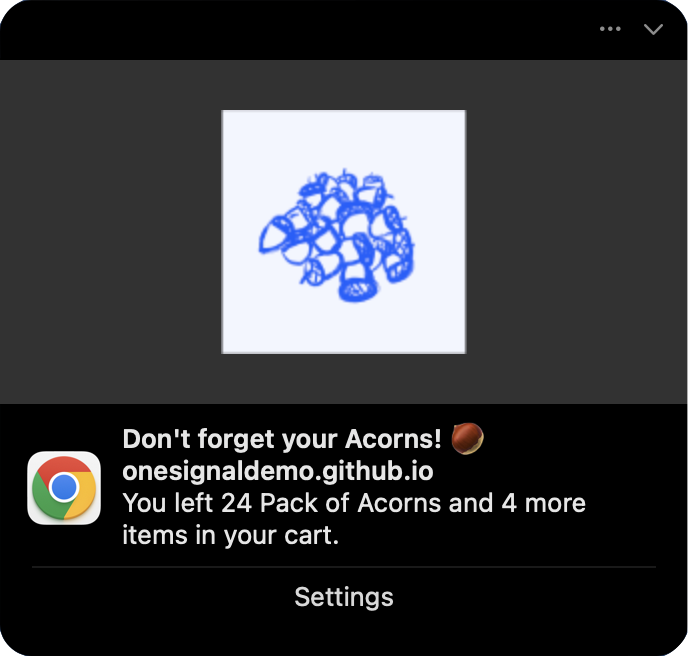 **消息字段:**
```liquid Liquid theme={null}
{% assign cart = message.custom_data.cart %}
{% assign item_count = cart.size | plus: 0 %}
{% if item_count == 1 %}
You left {{cart.first.product_name}} in your cart.
{% endif %}
{% if item_count == 2 %}
You left {{cart.first.product_name}} and {{item_count | minus: 1}} more item in your cart.
{% endif %}
{% if item_count > 2 %}
You left {{cart.first.product_name}} and {{item_count | minus: 1}} more items in your cart.
{% endif %}
```
请参阅[使用 Liquid 语法](./using-liquid-syntax#if-elsif-else)了解更多信息。
**图片字段:**
```liquid Liquid theme={null}
{{message.custom_data.cart.first.product_image | default: "https://i.imgur.com/ssPCfbC.png"}}
```
请参阅[通知图片和富媒体](./rich-media)了解更多信息。
**启动 URL 字段:**
```liquid Liquid theme={null}
{{cart_url | default: "https://yourdomain.com/cart"}}
```
成功!保存模板并在 [Create message](/reference/create-message) API 请求中使用其 `template_id` 和 `custom_data` 属性进行测试。
***
## 故障排除和最佳实践
* **保持简单**:仅包含您在模板中实际使用的数据
* **保持在 2KB 以内**:监控有效负载大小,特别是使用数组时
* **使用一致的命名**:全程坚持使用 `snake_case` 或 `camelCase`
* **发送前验证**:检查空值、空数组和必填字段
**模板设计:**
* **始终为可选字段使用 default 过滤器**:
```liquid Liquid theme={null}
{{message.custom_data.user_name | default: "there"}}
```
* **循环前检查数组大小**:
```liquid Liquid theme={null}
{% if message.custom_data.items.size > 0 %}
{% for item in message.custom_data.items %}
{{item.name}}
{% endfor %}
{% endif %}
```
* **使用边界情况测试**:空数组、缺失字段、最大项目数量
**错误处理:**
* 在服务器端记录 API 响应以捕获验证错误
* 监控消息送达率——突然下降可能表示 Liquid 错误
* 为关键的事务性消息准备备用模板
**性能:**
* **在后端预格式化复杂数据**,而不是使用复杂的 Liquid 逻辑
* **缓存模板**并在多个 API 调用中重复使用
* 考虑将高频事务性消息与营销活动分开
**原因:** Liquid 语法错误或字段名称不匹配
**解决方案:**
* 验证 `custom_data` 和模板之间的字段名称完全匹配(区分大小写)
* 检查拼写错误:`{{message.custom_data.name}}` 而不是 `{{message.custm_data.name}}`
* 使用 [default 过滤器](./using-liquid-syntax#default)来捕获缺失字段
* 在生产环境使用前,使用实际的 `custom_data` 结构测试模板
**原因:** `custom_data` 超过 2KB 限制
**解决方案:**
* 从有效负载中移除不必要的字段
* 尽可能缩短字段名称和值
* 将数组限制为前 3-5 个项目
* 将大型静态内容(如完整 HTML)移至模板中
***
## 相关页面
OneSignal 中所有个性化选项的概述,包括 Tags、用户属性和分群。
完整的 API 参考,用于发送包含 custom\_data、定向选项和所有可用字段的消息。
完整的 Liquid 语法参考,包括过滤器、条件语句、循环和字符串操作。
为推送、邮件、短信和应用内渠道创建和管理可复用的消息模板。
需要帮助?
与我们的支持团队聊天或发送邮件至 `support@onesignal.com`
请包含以下信息:
* 您遇到的问题详情以及复现步骤(如有)
* 您的 OneSignal 应用 ID
* 外部 ID 或订阅 ID(如适用)
* 您在 OneSignal 控制台中测试的消息 URL(如适用)
* 任何相关的[日志或错误信息](/docs/cn/capturing-a-debug-log)
我们很乐意为您提供帮助!
***
**消息字段:**
```liquid Liquid theme={null}
{% assign cart = message.custom_data.cart %}
{% assign item_count = cart.size | plus: 0 %}
{% if item_count == 1 %}
You left {{cart.first.product_name}} in your cart.
{% endif %}
{% if item_count == 2 %}
You left {{cart.first.product_name}} and {{item_count | minus: 1}} more item in your cart.
{% endif %}
{% if item_count > 2 %}
You left {{cart.first.product_name}} and {{item_count | minus: 1}} more items in your cart.
{% endif %}
```
请参阅[使用 Liquid 语法](./using-liquid-syntax#if-elsif-else)了解更多信息。
**图片字段:**
```liquid Liquid theme={null}
{{message.custom_data.cart.first.product_image | default: "https://i.imgur.com/ssPCfbC.png"}}
```
请参阅[通知图片和富媒体](./rich-media)了解更多信息。
**启动 URL 字段:**
```liquid Liquid theme={null}
{{cart_url | default: "https://yourdomain.com/cart"}}
```
成功!保存模板并在 [Create message](/reference/create-message) API 请求中使用其 `template_id` 和 `custom_data` 属性进行测试。
***
## 故障排除和最佳实践
* **保持简单**:仅包含您在模板中实际使用的数据
* **保持在 2KB 以内**:监控有效负载大小,特别是使用数组时
* **使用一致的命名**:全程坚持使用 `snake_case` 或 `camelCase`
* **发送前验证**:检查空值、空数组和必填字段
**模板设计:**
* **始终为可选字段使用 default 过滤器**:
```liquid Liquid theme={null}
{{message.custom_data.user_name | default: "there"}}
```
* **循环前检查数组大小**:
```liquid Liquid theme={null}
{% if message.custom_data.items.size > 0 %}
{% for item in message.custom_data.items %}
{{item.name}}
{% endfor %}
{% endif %}
```
* **使用边界情况测试**:空数组、缺失字段、最大项目数量
**错误处理:**
* 在服务器端记录 API 响应以捕获验证错误
* 监控消息送达率——突然下降可能表示 Liquid 错误
* 为关键的事务性消息准备备用模板
**性能:**
* **在后端预格式化复杂数据**,而不是使用复杂的 Liquid 逻辑
* **缓存模板**并在多个 API 调用中重复使用
* 考虑将高频事务性消息与营销活动分开
**原因:** Liquid 语法错误或字段名称不匹配
**解决方案:**
* 验证 `custom_data` 和模板之间的字段名称完全匹配(区分大小写)
* 检查拼写错误:`{{message.custom_data.name}}` 而不是 `{{message.custm_data.name}}`
* 使用 [default 过滤器](./using-liquid-syntax#default)来捕获缺失字段
* 在生产环境使用前,使用实际的 `custom_data` 结构测试模板
**原因:** `custom_data` 超过 2KB 限制
**解决方案:**
* 从有效负载中移除不必要的字段
* 尽可能缩短字段名称和值
* 将数组限制为前 3-5 个项目
* 将大型静态内容(如完整 HTML)移至模板中
***
## 相关页面
OneSignal 中所有个性化选项的概述,包括 Tags、用户属性和分群。
完整的 API 参考,用于发送包含 custom\_data、定向选项和所有可用字段的消息。
完整的 Liquid 语法参考,包括过滤器、条件语句、循环和字符串操作。
为推送、邮件、短信和应用内渠道创建和管理可复用的消息模板。
需要帮助?
与我们的支持团队聊天或发送邮件至 `support@onesignal.com`
请包含以下信息:
* 您遇到的问题详情以及复现步骤(如有)
* 您的 OneSignal 应用 ID
* 外部 ID 或订阅 ID(如适用)
* 您在 OneSignal 控制台中测试的消息 URL(如适用)
* 任何相关的[日志或错误信息](/docs/cn/capturing-a-debug-log)
我们很乐意为您提供帮助!
***