> ## Documentation Index
> Fetch the complete documentation index at: https://documentation.onesignal.com/llms.txt
> Use this file to discover all available pages before exploring further.
# 通知图像和媒体
> 了解如何使用 OneSignal 的仪表板和 API 向移动推送通知添加图像、GIF 和多媒体,包括推荐格式、设备特定行为和媒体自定义选项。
本指南说明如何使用 **图像和富媒体** 增强移动推送通知,包括 OneSignal 中的平台支持、技术限制和自定义选项。
其他渠道的图像指南:
向网页推送通知添加图像。
向应用内消息添加图像。
向邮件添加图像。
添加图像制作彩信消息。
***
## 移动应用图像
您可以通过 OneSignal 仪表板或 API 向推送通知添加图像。有两种主要类型:
### 通知图标
* **iOS**:自动使用应用图标。
* **Android**:允许自定义大小图标。
* See [Notification icons](./notification-icons) for setup instructions.
### 大图像(大格式)
* **Android**:在大多数设备上默认显示展开。
* **iOS**:需要用户向下滑动或长按。
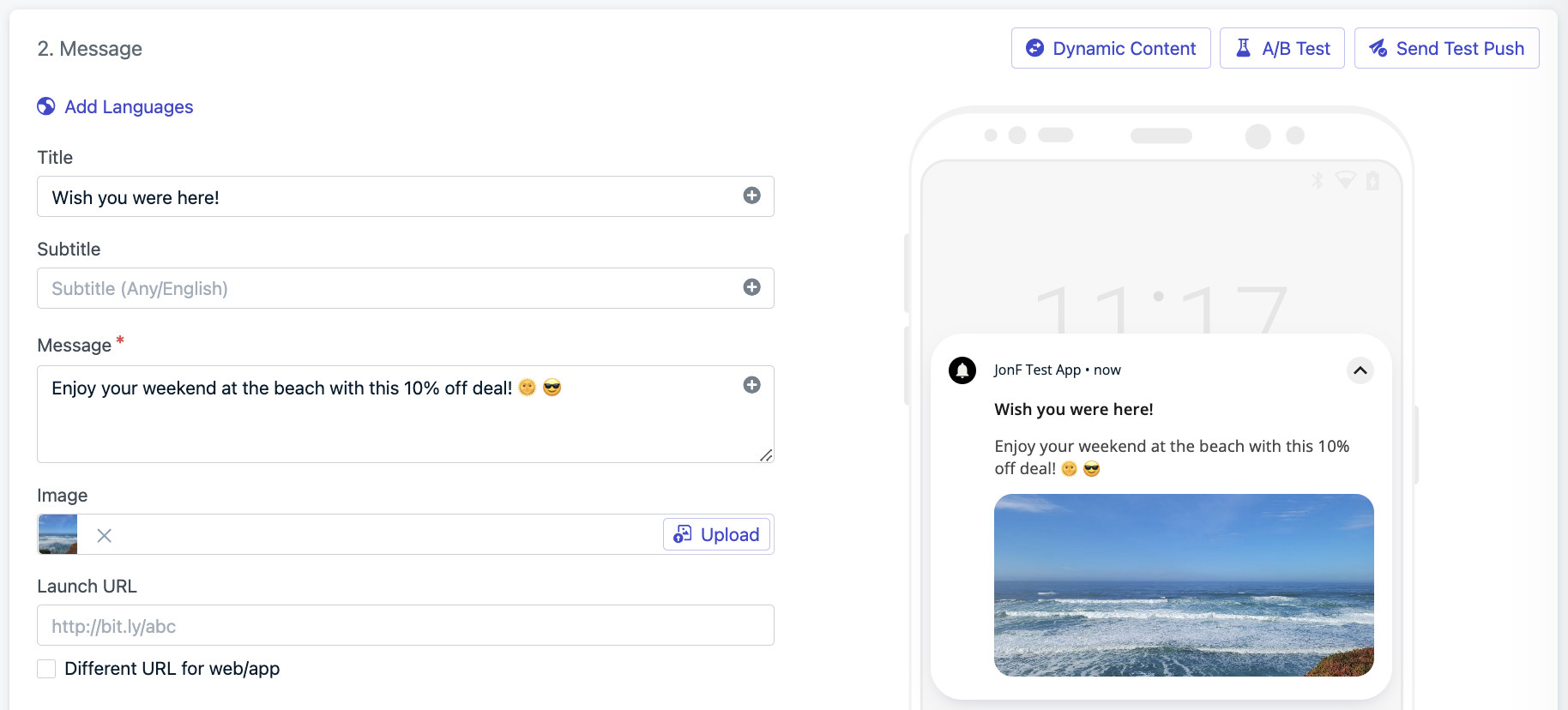
添加图像:
* 在仪表板中:**消息 > 新推送 > 图像字段中的“上传”**
* 或使用 API 参数:`big_picture` (Android) 和 `ios_attachments` (iOS)
 ***
## 图像规格
使用 2:1 纵横比的横向图像。
| | iOS | Android |
| ----------------- | ------------------------------------------------------------------------------------------------------------------------------- | ------------------------------------------------------------------------------------------ |
| **Filetypes** | `jpg`, `jpeg`, `png`, `gif` | `jpg`, `jpeg`, `png`, `gif`\* |
| **Resolution** | 1:1 aspect ratio or 2:1 aspect ratio (e.g., `1038x1038px` or `1024×512px`)
***
## 图像规格
使用 2:1 纵横比的横向图像。
| | iOS | Android |
| ----------------- | ------------------------------------------------------------------------------------------------------------------------------- | ------------------------------------------------------------------------------------------ |
| **Filetypes** | `jpg`, `jpeg`, `png`, `gif` | `jpg`, `jpeg`, `png`, `gif`\* |
| **Resolution** | 1:1 aspect ratio or 2:1 aspect ratio (e.g., `1038x1038px` or `1024×512px`)
**Max Width:** 2000px
**Min Width:** 300px | 2:1 aspect ratio (e.g., `1024×512px`)
**Max Width:** 2000px
**Min Width:** 300px |
| **API Parameter** | `ios_attachments` | `big_picture` |
* \*Android does **not** support animated GIFs.
* Adding [Action Buttons](./action-buttons) may reduce image display area.
* See [Notification Images Not Showing](./notification-images-not-showing) if images don't appear.
OneSignal 强制执行 5MB 上传限制,不支持音频或视频上传。托管的图像在 33 天后过期。对于长期使用,请上传到您自己的静态 URL 或使用模板。
***
## 富通知自定义
OneSignal 支持使用原生平台功能进行更深层次的视觉和交互自定义。
### Android 自定义通知布局
Android 12+ enforces system templates for custom notifications. However, you can still customize your layout using Android’s standard notification styles. See [behavior changes](https://developer.android.com/about/versions/12/behavior-changes-12#custom-notifications) for details.
自定义您的布局:
* Follow [Android's custom notification guide](https://developer.android.com/develop/ui/views/notifications/custom-notification)
* 通过 [通知服务扩展](./service-extensions) 应用更改
* See [Notification.DecoratedCustomViewStyle](https://developer.android.com/reference/android/app/Notification.DecoratedCustomViewStyle) for available customizations.
### iOS 内容扩展
iOS uses [`UNNotificationContentExtension`](https://developer.apple.com/documentation/usernotificationsui/unnotificationcontentextension?language=objc) to enable rich media and interactivity in notifications.
支持的功能:
* Image carousels
* Embedded video playback
* 自定义视图,如日历或聊天预览
See our [iOS Carousel Guide](./ios-image-carousel-push-notifications) for setup instructions.
***
## 支持的媒体附件
可以通过指向外部托管内容的 URL 添加富媒体。这在 iOS 上与 `UNNotificationContentExtension` 一起工作。
* 确保您的 URL 是文件的直接链接并以正确的扩展名结尾。如果不是,请附加查询(例如,`?file=video.mp4`),以便 SDK 可以检测媒体类型。
* OneSignal 对上传图像有 5MB 限制。视频和音频必须在外部托管。直接链接到媒体文件,而不是网页。
| Attachment | File Type | Max Size | Requirements |
| ---------- | -------------------------------------- | -------- | ---------------------------------------------------------------------------------------------------------------------------------------------- |
| **Audio** | `aif`, `aiff`, `wav`, `mp3` | 5MB | None |
| **Video** | `mp4`, `mpeg`, `mpeg2`, `mpeg4`, `avi` | 50MB | [`UNNotificationContentExtension`](https://developer.apple.com/documentation/usernotificationsui/unnotificationcontentextension?language=objc) |
| **Image** | `jpg`, `jpeg`, `png`, `gif` | 10MB | [OneSignalNotificationServiceExtension](./service-extensions) |
The [OneSignalNotificationServiceExtension](./service-extensions) is included in the OneSignal SDK and required for image support, delivery tracking, and badge updates.
***
## 测试提示
确保您的媒体在各种设备上正确显示:
* 始终在真实设备上测试(而不是模拟器)。
* iOS 需要长按或向下滑动才能显示富媒体。
* Android 渲染因设备、操作系统版本和操作按钮的存在而异。
* 在启动活动之前在 OneSignal 中使用 **“发送测试”** 按钮。
### 示例用例
* 在废弃购物车提醒中显示产品照片
* 通过视频预览推广新电影预告片(仅 iOS)
* 为闪购发送动态横幅
***
## 故障排除
如果您的图像未按预期显示,请参阅 [通知图像不显示](./notification-images-not-showing) 指南以了解常见原因和修复方法。
***