> ## Documentation Index
> Fetch the complete documentation index at: https://documentation.onesignal.com/llms.txt
> Use this file to discover all available pages before exploring further.
# Amplitude
> Integrate OneSignal with Amplitude to sync behavioral cohorts, track message events, and target Users across push, email, SMS, and in-app channels.
Integrate OneSignal with [Amplitude](https://amplitude.com) to enable real-time, behavior-based targeting across push, in-app, email, and SMS. This app-level integration supports three data flows:
* **Message events → Amplitude**: Track delivery, clicks, failures, and more for all channels.
* **Custom events → OneSignal**: Send Amplitude events into OneSignal to trigger Journeys or Segments.
* **Cohorts → OneSignal**: Sync behavior-based Amplitude cohorts as targeting filters in OneSignal.
***
## Requirements
* [Amplitude Account](https://amplitude.com/pricing)
* [OneSignal Paid Plan](https://onesignal.com/pricing)
* OneSignal app with [Users](./users) and External ID set.
This integration does not create Users. It maps Users in Amplitude to existing Users in OneSignal by matching identifiers.
***
## Setup
### Add Amplitude to OneSignal (Outbound)
Sends OneSignal message events into your Amplitude project.
1. In OneSignal, navigate to **Data > Integrations > Catalog** and select **Amplitude**.
2. Click **Settings**, then open the **Outbound** tab.
3. Enter your Amplitude API token, select the message events you want to send, and click **Save**.
#### In Amplitude
1. Find your project API Key then copy-paste it into OneSignal.
2. If using Amplitude's EU servers, check **Send events exclusively to Amplitude's EU Residency Endpoint**. You can verify this by your Amplitude URL. If you see `eu.amplitude.com` then you are using Amplitude's EU servers.
### Add OneSignal to Amplitude (Inbound)
In your Amplitude Destinations, search for **OneSignal**.
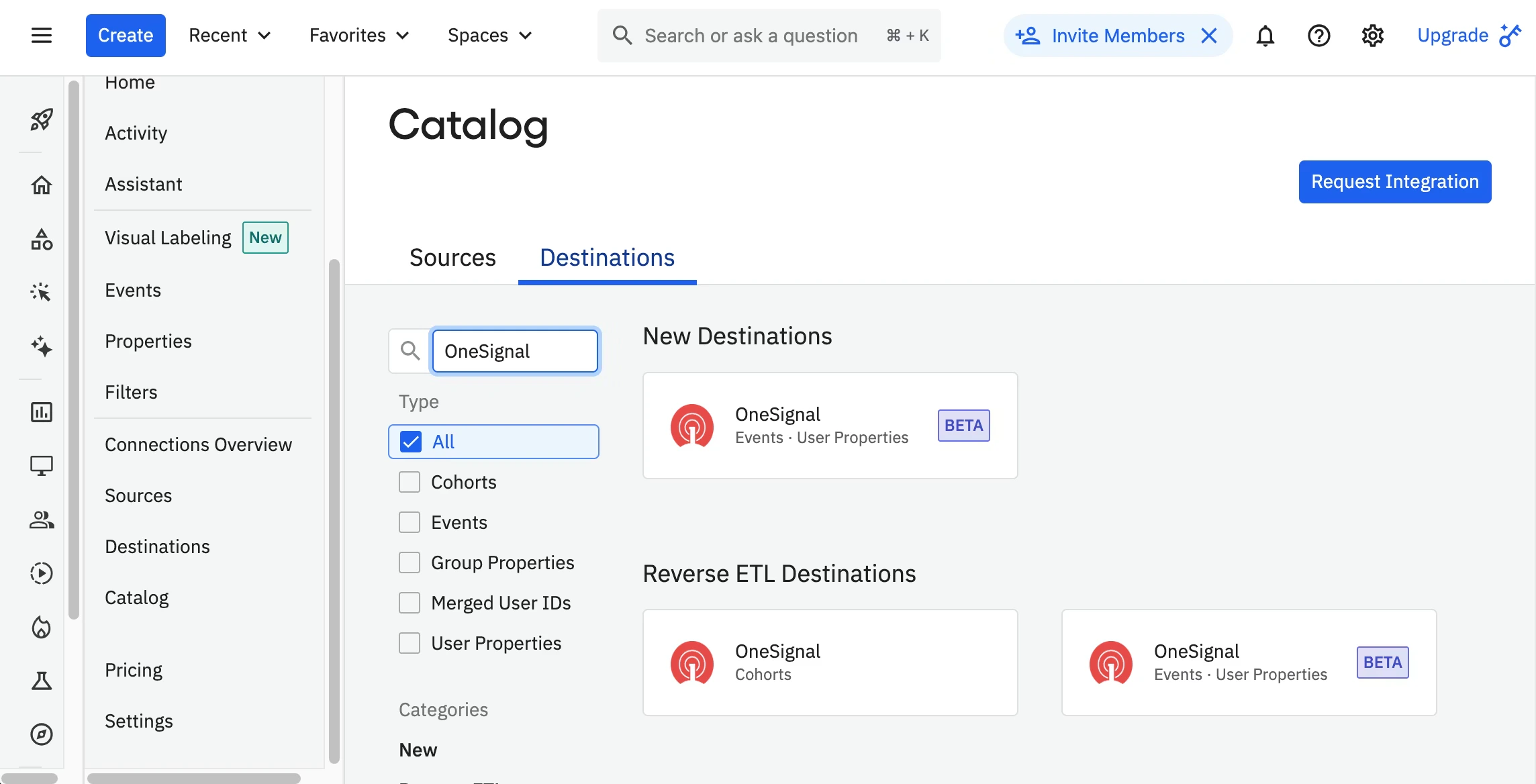 Amplitude provides two OneSignal destination types in the catalog:
* **Cohorts**: Sync cohorts from Amplitude to OneSignal.
* **Events User Properties**: Send custom events from Amplitude to OneSignal.
If you plan to use both cohort syncing and custom events, add both OneSignal destinations. Each destination is configured separately in Amplitude, so you will enter your OneSignal credentials for each one.
### User ID mapping
The **[External ID](./users)** in OneSignal must match the Amplitude user property you select (e.g., `user_id`). Verify this property is populated in both systems — cohort syncing and event tracking depend on an exact match.
#### Additional properties
You can include extra properties that will be attached to [custom events](./custom-events) in OneSignal. This is useful for conditional event processing.
Click **Save** when finished. You should now be able to export cohorts and custom events from Amplitude to OneSignal and collect message events from OneSignal to Amplitude.
***
## Testing custom events
1. In the Amplitude > OneSignal Events Destination, click the Test Connection button.
Amplitude provides two OneSignal destination types in the catalog:
* **Cohorts**: Sync cohorts from Amplitude to OneSignal.
* **Events User Properties**: Send custom events from Amplitude to OneSignal.
If you plan to use both cohort syncing and custom events, add both OneSignal destinations. Each destination is configured separately in Amplitude, so you will enter your OneSignal credentials for each one.
### User ID mapping
The **[External ID](./users)** in OneSignal must match the Amplitude user property you select (e.g., `user_id`). Verify this property is populated in both systems — cohort syncing and event tracking depend on an exact match.
#### Additional properties
You can include extra properties that will be attached to [custom events](./custom-events) in OneSignal. This is useful for conditional event processing.
Click **Save** when finished. You should now be able to export cohorts and custom events from Amplitude to OneSignal and collect message events from OneSignal to Amplitude.
***
## Testing custom events
1. In the Amplitude > OneSignal Events Destination, click the Test Connection button.
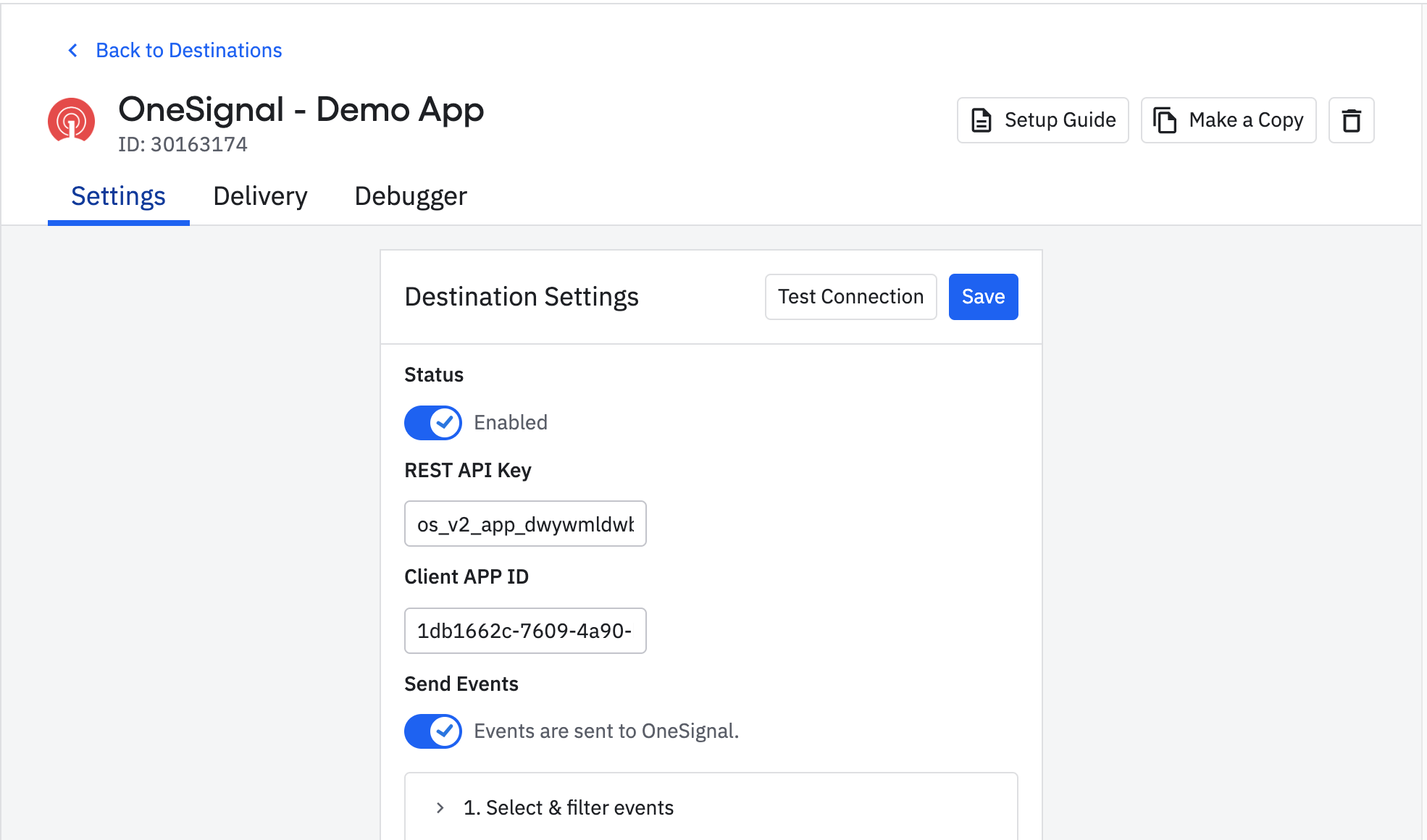 2. Make sure the `"user_id"` in the payload is set to an existing User’s External ID in your OneSignal App.
3. Click the **Send Test Event** button.
4. The Response box should remain empty and you should see `"OneSignal has successfully received test event."`
2. Make sure the `"user_id"` in the payload is set to an existing User’s External ID in your OneSignal App.
3. Click the **Send Test Event** button.
4. The Response box should remain empty and you should see `"OneSignal has successfully received test event."`
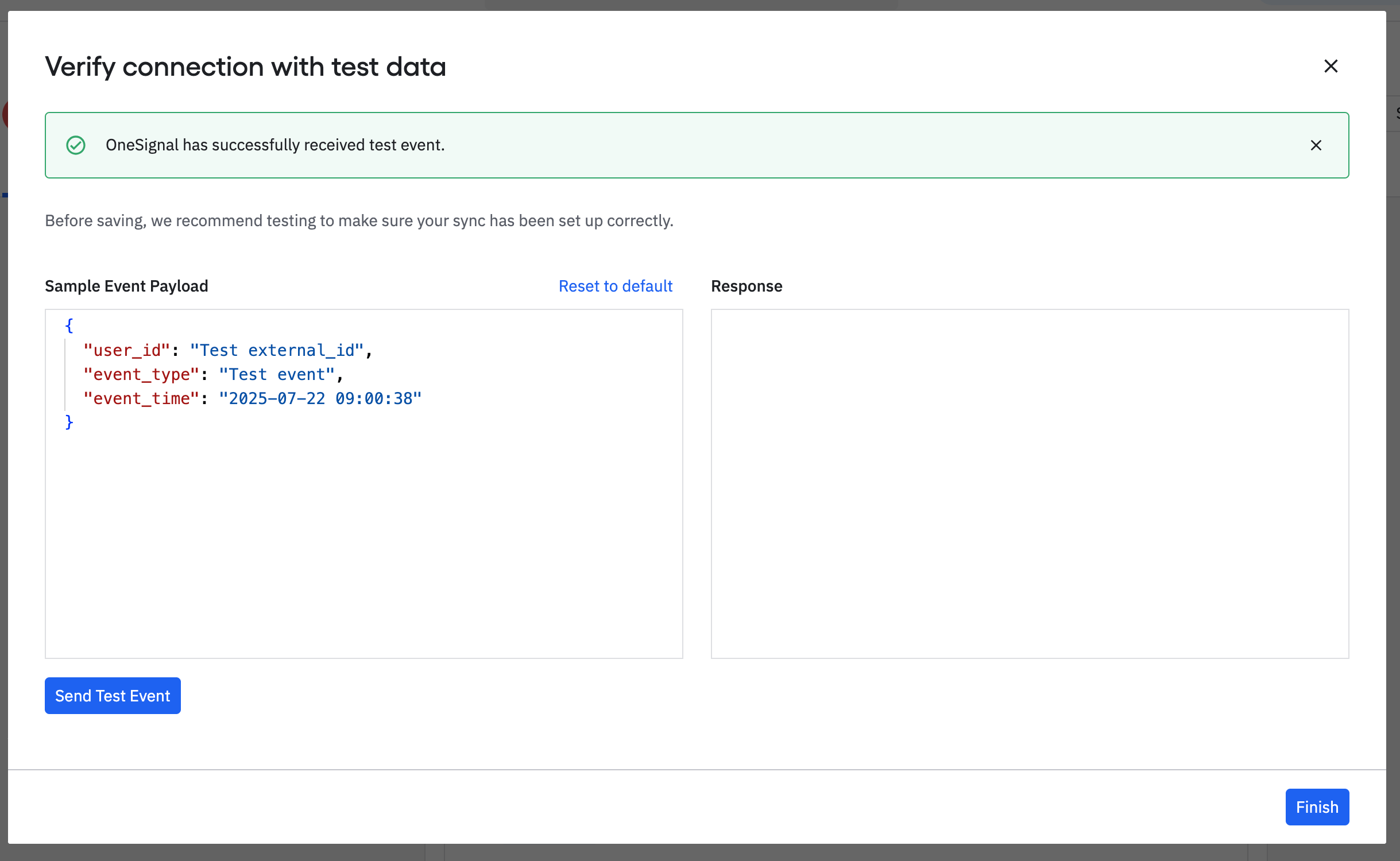 5. In OneSignal, navigate to **Data > Custom Events** and verify the test event appears in the list.
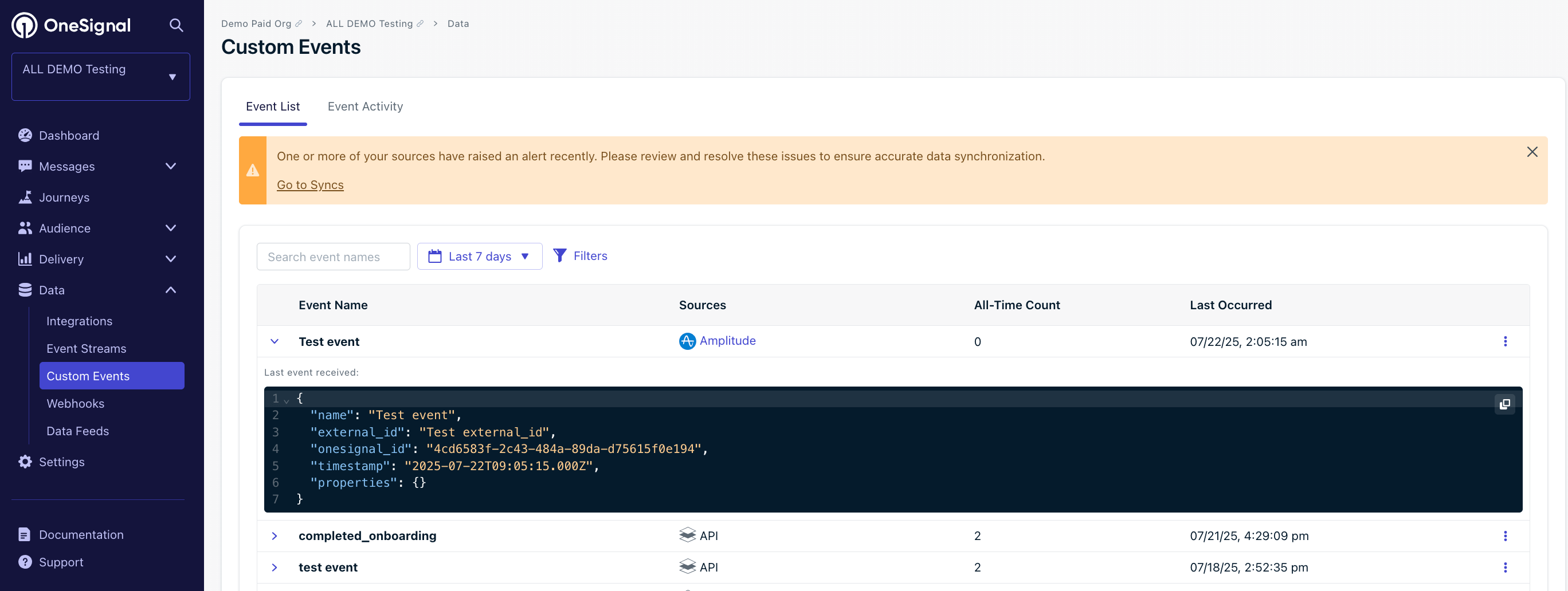 If the test fails or the event does not appear in OneSignal, verify that your OneSignal App ID and REST API key are entered correctly in Amplitude, your app is configured for [custom events](./custom-events), and the `"user_id"` matches an existing User’s External ID in your OneSignal App.
## Export Amplitude cohorts to OneSignal
Sync Amplitude cohorts to OneSignal using the matching External ID configured above. Exporting **does not create Users** — each User must already exist in OneSignal.
1. In Amplitude, create a cohort. See [Amplitude's docs on cohorts](https://amplitude.com/docs/analytics/behavioral-cohorts).
2. Click **Sync** and choose **OneSignal** as the destination.
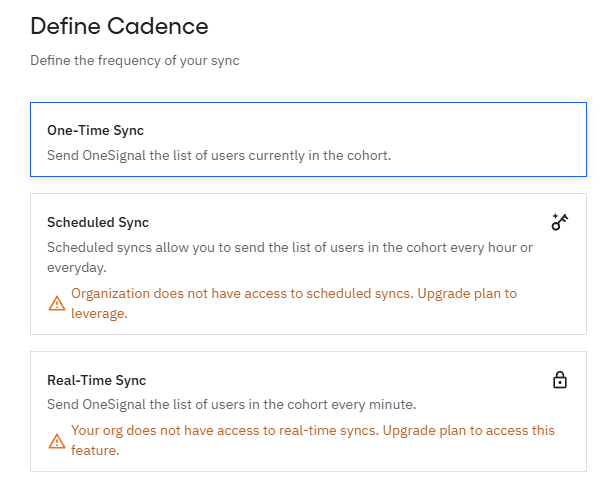
3. Choose sync frequency.
If the test fails or the event does not appear in OneSignal, verify that your OneSignal App ID and REST API key are entered correctly in Amplitude, your app is configured for [custom events](./custom-events), and the `"user_id"` matches an existing User’s External ID in your OneSignal App.
## Export Amplitude cohorts to OneSignal
Sync Amplitude cohorts to OneSignal using the matching External ID configured above. Exporting **does not create Users** — each User must already exist in OneSignal.
1. In Amplitude, create a cohort. See [Amplitude's docs on cohorts](https://amplitude.com/docs/analytics/behavioral-cohorts).
2. Click **Sync** and choose **OneSignal** as the destination.
3. Choose sync frequency.
 ### OneSignal Segment creation
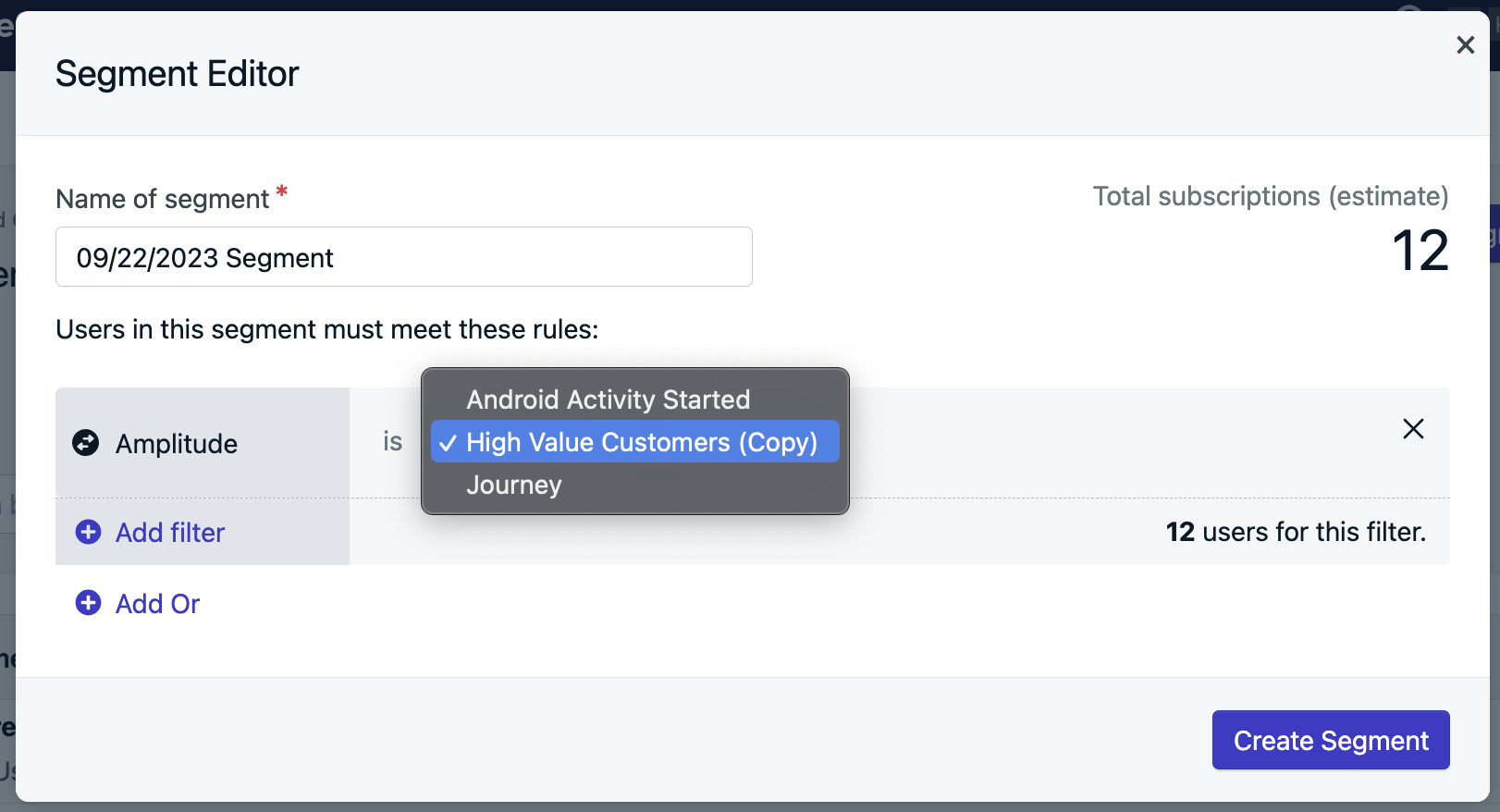
The synced cohort appears as an **Amplitude Segment filter**. OneSignal automatically creates a Segment for the cohort if:
* The Users in the Amplitude cohort also exist in OneSignal with a matching External ID.
* You have not exceeded your [Segment limit](./segmentation#segment-limit) in OneSignal.
### OneSignal Segment creation
The synced cohort appears as an **Amplitude Segment filter**. OneSignal automatically creates a Segment for the cohort if:
* The Users in the Amplitude cohort also exist in OneSignal with a matching External ID.
* You have not exceeded your [Segment limit](./segmentation#segment-limit) in OneSignal.
 ***
## Track message events in Amplitude
OneSignal sends the following message events to Amplitude in real time. Select which events to send in **Data > Integrations > Amplitude > Outbound**.
| Message Event Kind (OneSignal) | Message Event Name (Amplitude) | Event Description |
| ------------------------------ | ------------------------------------------------------------- | -------------------------------------------------------------------------------------- |
| Push Sent | \[Onesignal] Push Delivered | Push notification successfully sent. |
| Push Received | \[Onesignal] Push confirmed receipt | Push notification successfully received |
| Push Clicked | \[Onesignal] Push Clicked | Push notification touched on device |
| Push Failed | \[Onesignal] Push Failed | Push failed to be sent. Check the failed message report in OneSignal. |
| Push Unsubscribed | \[Onesignal] Push Unsubscribed | The [Subscription](./subscriptions) unsubscribed from push. |
| In-App Impression | \[Onesignal] IAM Displayed | In-App Message successfully displayed on device |
| In-App Clicked | \[Onesignal] IAM Clicked | In-App Message clicked on device |
| In-App Page Displayed | \[Onesignal] IAM Page Displayed | In-App Message page is displayed |
| Email Sent | \[Onesignal] Email Delivered | Email successfully sent |
| Email Received | \[Onesignal] Email confirmed receipt | Email received by recipient |
| Email Opened | \[Onesignal] Email Opened | Email opened by recipient |
| Email Link Clicked | \[Onesignal] Email Clicked | Email link clicked on |
| Email Unsubscribed | \[Onesignal] Email Unsubscribed | Email unsubscribed by recipient |
| Email Reported As Spam | \[Onesignal] Email Reported as SPAM | Email reported as spam by recipient |
| Email Bounced | \[Onesignal] Email Hard bounced | Email returned to sender due to permanent error |
| Email Failed | \[Onesignal] Email Failed delivery | Could not deliver the email to the recipient's inbox |
| Email Suppressed | \[Onesignal] Email Not delivering to suppressed email address | Email not delivered as the recipient had suppressed the email address it was sent from |
| SMS Sent | \[Onesignal] SMS Delivered | SMS sent to recipient |
| SMS Failed | \[Onesignal] SMS Failed delivery | SMS failed to send |
| SMS Delivered | \[Onesignal] SMS confirmed receipt | SMS successfully delivered |
| SMS Undelivered | \[Onesignal] SMS Failed delivery | The SMS could not be sent. |
### Event properties
Every event sent from OneSignal to Amplitude includes these properties:
| PROPERTY NAME | DESCRIPTION |
| -------------------- | ------------------------------------------------------- |
| **Distinct ID** | The external\_id associated with the message |
| **Message ID** | The identifier of the discrete message |
| **Message Name** | The message name |
| **Message Title** | The message title |
| **Message Contents** | The message contents |
| **message\_type** | The type of message sent, push, in-app, email, SMS |
| **template\_id** | The message template used (API and Journey Messages) |
| **subscription\_id** | The OneSignal set device/email/sms identifier |
| **device\_type** | The device type that received the message |
| **language** | The two-character language code of the device |
| **source** | `onesignal` (is indicated as the source for all events) |
Delivery counts may differ between Amplitude and OneSignal. See [Why doesn't delivery data match?](#why-doesnt-delivery-data-match) for details.
***
## FAQ
### Why isn't my Amplitude cohort showing up in OneSignal?
If a synced cohort is not appearing as a Segment in OneSignal, work through the following:
* **Wrong destination type.** Cohorts require the **Cohorts** destination in Amplitude. The **Events User Properties** destination is for custom events only. Verify you are using the correct destination.
* **Sync not complete.** Check the sync history in your Amplitude Cohorts destination to confirm the export completed. Syncs can take several minutes depending on cohort size.
* **No matching External IDs.** OneSignal only creates a Segment for users with a matching External ID in both systems. If no matches are found, the Segment will be empty or not created. See [User ID mapping](#user-id-mapping) for details.
* **Segment limit reached.** OneSignal enforces a per-plan segment limit, and only active (non-paused) segments count toward it. If you have reached the limit, new Segments from cohort syncs will not be created. Pause or delete unused Segments to free up capacity. See [Segment limit](./segmentation#segment-limit) for details.
If the Segment appears but counts look off, see [Why don't my cohort and segment counts match?](#why-dont-my-cohort-and-segment-counts-match).
### Why don't my cohort and segment counts match?
1. **Missing or mismatched External IDs**
Only Users with a matching OneSignal External ID and Amplitude User ID are included. This integration does not create Users or Subscriptions.
2. **Unsubscribed Users**
OneSignal Segments only display the count for subscribed [Subscriptions](./subscriptions). Unsubscribed Subscriptions are available for Journeys or In-App Messages.
For example, if an Amplitude cohort has 10 users but the OneSignal segment shows 8 Subscriptions, the 2 missing Users may:
* Not exist in OneSignal or have an incorrect External ID.
* Have unsubscribed Subscriptions.
To verify, check the **Audience > Users** tab in OneSignal to see if the Users exist and have active Subscriptions.
### Do unsubscribed Users sync from Amplitude?
Yes, but they are excluded from the OneSignal segment counts at this time. You can still message them via Journeys or In-App Messages if they have other [Subscriptions](./subscriptions) or their Subscription type supports it.
### Why doesn't delivery data match?
A single user may have multiple [Subscriptions](./subscriptions) (push devices, email addresses, phone numbers). Each Subscription generates its own delivery event. For example:
* 1 user = 2 Android + 1 iOS + 2 Web = 5 push Subscriptions
* 1 push message = up to 5 sent/received/clicked events
Use the `subscription_id` in event properties to trace the exact source.
To troubleshoot missing events:
* Ensure `OneSignal.login` is called whenever a user is identified to set the External ID.
* Verify that `OneSignal.logout` isn't removing the External ID.
* Check API requests or CSV uploads that may alter the External ID.
### How can we send user/subscription events?
User and subscription-level events (e.g., permission granted, user login/logout) are not automatically sent.
The OneSignal SDK has event listeners that can be used to track these events for you to send to Amplitude:
* User State Observer: [Mobile SDK](./mobile-sdk-reference#addobserver-user-state), [Web SDK](./web-sdk-reference#addeventlistener-user-state)
* Permission Observer: [Mobile SDK](./mobile-sdk-reference#addpermissionobserver-push), [Web SDK](./web-sdk-reference#permissionchange)
### Why is the OneSignal Subscription ID added to Amplitude as a device\_id?
Amplitude expects a `device_id` for deduplication. OneSignal uses `subscription_id` for this, which maps into `device_id` automatically.
See [Amplitude's docs](https://amplitude.com/docs/apis/analytics/http-v2#event-deduplication) for more information.
***
## Related pages
Overview of OneSignal analytics, delivery metrics, and event tracking.
Track User actions to trigger Journeys, personalization, and power analytics.
***
Need help?
Chat with our Support team or email `support@onesignal.com`
Please include:
* Details of the issue you're experiencing and steps to reproduce if available
* Your OneSignal App ID
* The External ID or Subscription ID if applicable
* The URL to the message you tested in the OneSignal Dashboard if applicable
* Any relevant [logs or error messages](/docs/en/capturing-a-debug-log)
We're happy to help!
***
## Track message events in Amplitude
OneSignal sends the following message events to Amplitude in real time. Select which events to send in **Data > Integrations > Amplitude > Outbound**.
| Message Event Kind (OneSignal) | Message Event Name (Amplitude) | Event Description |
| ------------------------------ | ------------------------------------------------------------- | -------------------------------------------------------------------------------------- |
| Push Sent | \[Onesignal] Push Delivered | Push notification successfully sent. |
| Push Received | \[Onesignal] Push confirmed receipt | Push notification successfully received |
| Push Clicked | \[Onesignal] Push Clicked | Push notification touched on device |
| Push Failed | \[Onesignal] Push Failed | Push failed to be sent. Check the failed message report in OneSignal. |
| Push Unsubscribed | \[Onesignal] Push Unsubscribed | The [Subscription](./subscriptions) unsubscribed from push. |
| In-App Impression | \[Onesignal] IAM Displayed | In-App Message successfully displayed on device |
| In-App Clicked | \[Onesignal] IAM Clicked | In-App Message clicked on device |
| In-App Page Displayed | \[Onesignal] IAM Page Displayed | In-App Message page is displayed |
| Email Sent | \[Onesignal] Email Delivered | Email successfully sent |
| Email Received | \[Onesignal] Email confirmed receipt | Email received by recipient |
| Email Opened | \[Onesignal] Email Opened | Email opened by recipient |
| Email Link Clicked | \[Onesignal] Email Clicked | Email link clicked on |
| Email Unsubscribed | \[Onesignal] Email Unsubscribed | Email unsubscribed by recipient |
| Email Reported As Spam | \[Onesignal] Email Reported as SPAM | Email reported as spam by recipient |
| Email Bounced | \[Onesignal] Email Hard bounced | Email returned to sender due to permanent error |
| Email Failed | \[Onesignal] Email Failed delivery | Could not deliver the email to the recipient's inbox |
| Email Suppressed | \[Onesignal] Email Not delivering to suppressed email address | Email not delivered as the recipient had suppressed the email address it was sent from |
| SMS Sent | \[Onesignal] SMS Delivered | SMS sent to recipient |
| SMS Failed | \[Onesignal] SMS Failed delivery | SMS failed to send |
| SMS Delivered | \[Onesignal] SMS confirmed receipt | SMS successfully delivered |
| SMS Undelivered | \[Onesignal] SMS Failed delivery | The SMS could not be sent. |
### Event properties
Every event sent from OneSignal to Amplitude includes these properties:
| PROPERTY NAME | DESCRIPTION |
| -------------------- | ------------------------------------------------------- |
| **Distinct ID** | The external\_id associated with the message |
| **Message ID** | The identifier of the discrete message |
| **Message Name** | The message name |
| **Message Title** | The message title |
| **Message Contents** | The message contents |
| **message\_type** | The type of message sent, push, in-app, email, SMS |
| **template\_id** | The message template used (API and Journey Messages) |
| **subscription\_id** | The OneSignal set device/email/sms identifier |
| **device\_type** | The device type that received the message |
| **language** | The two-character language code of the device |
| **source** | `onesignal` (is indicated as the source for all events) |
Delivery counts may differ between Amplitude and OneSignal. See [Why doesn't delivery data match?](#why-doesnt-delivery-data-match) for details.
***
## FAQ
### Why isn't my Amplitude cohort showing up in OneSignal?
If a synced cohort is not appearing as a Segment in OneSignal, work through the following:
* **Wrong destination type.** Cohorts require the **Cohorts** destination in Amplitude. The **Events User Properties** destination is for custom events only. Verify you are using the correct destination.
* **Sync not complete.** Check the sync history in your Amplitude Cohorts destination to confirm the export completed. Syncs can take several minutes depending on cohort size.
* **No matching External IDs.** OneSignal only creates a Segment for users with a matching External ID in both systems. If no matches are found, the Segment will be empty or not created. See [User ID mapping](#user-id-mapping) for details.
* **Segment limit reached.** OneSignal enforces a per-plan segment limit, and only active (non-paused) segments count toward it. If you have reached the limit, new Segments from cohort syncs will not be created. Pause or delete unused Segments to free up capacity. See [Segment limit](./segmentation#segment-limit) for details.
If the Segment appears but counts look off, see [Why don't my cohort and segment counts match?](#why-dont-my-cohort-and-segment-counts-match).
### Why don't my cohort and segment counts match?
1. **Missing or mismatched External IDs**
Only Users with a matching OneSignal External ID and Amplitude User ID are included. This integration does not create Users or Subscriptions.
2. **Unsubscribed Users**
OneSignal Segments only display the count for subscribed [Subscriptions](./subscriptions). Unsubscribed Subscriptions are available for Journeys or In-App Messages.
For example, if an Amplitude cohort has 10 users but the OneSignal segment shows 8 Subscriptions, the 2 missing Users may:
* Not exist in OneSignal or have an incorrect External ID.
* Have unsubscribed Subscriptions.
To verify, check the **Audience > Users** tab in OneSignal to see if the Users exist and have active Subscriptions.
### Do unsubscribed Users sync from Amplitude?
Yes, but they are excluded from the OneSignal segment counts at this time. You can still message them via Journeys or In-App Messages if they have other [Subscriptions](./subscriptions) or their Subscription type supports it.
### Why doesn't delivery data match?
A single user may have multiple [Subscriptions](./subscriptions) (push devices, email addresses, phone numbers). Each Subscription generates its own delivery event. For example:
* 1 user = 2 Android + 1 iOS + 2 Web = 5 push Subscriptions
* 1 push message = up to 5 sent/received/clicked events
Use the `subscription_id` in event properties to trace the exact source.
To troubleshoot missing events:
* Ensure `OneSignal.login` is called whenever a user is identified to set the External ID.
* Verify that `OneSignal.logout` isn't removing the External ID.
* Check API requests or CSV uploads that may alter the External ID.
### How can we send user/subscription events?
User and subscription-level events (e.g., permission granted, user login/logout) are not automatically sent.
The OneSignal SDK has event listeners that can be used to track these events for you to send to Amplitude:
* User State Observer: [Mobile SDK](./mobile-sdk-reference#addobserver-user-state), [Web SDK](./web-sdk-reference#addeventlistener-user-state)
* Permission Observer: [Mobile SDK](./mobile-sdk-reference#addpermissionobserver-push), [Web SDK](./web-sdk-reference#permissionchange)
### Why is the OneSignal Subscription ID added to Amplitude as a device\_id?
Amplitude expects a `device_id` for deduplication. OneSignal uses `subscription_id` for this, which maps into `device_id` automatically.
See [Amplitude's docs](https://amplitude.com/docs/apis/analytics/http-v2#event-deduplication) for more information.
***
## Related pages
Overview of OneSignal analytics, delivery metrics, and event tracking.
Track User actions to trigger Journeys, personalization, and power analytics.
***
Need help?
Chat with our Support team or email `support@onesignal.com`
Please include:
* Details of the issue you're experiencing and steps to reproduce if available
* Your OneSignal App ID
* The External ID or Subscription ID if applicable
* The URL to the message you tested in the OneSignal Dashboard if applicable
* Any relevant [logs or error messages](/docs/en/capturing-a-debug-log)
We're happy to help!