> ## Documentation Index
> Fetch the complete documentation index at: https://documentation.onesignal.com/llms.txt
> Use this file to discover all available pages before exploring further.
# Analytics overview
> Measure message performance, user engagement, and conversions in OneSignal. Covers dashboards, attribution models, trends, and data export.
## Overview
OneSignal provides analytics to measure message performance, track user engagement over time, and attribute downstream business outcomes like purchases and sign-ups. You can view analytics in the Dashboard, retrieve them through the API, stream real-time events to your own systems using Event Streams, or export data to CSV.
Message reports and aggregate trends are covered below. Jump to other analytics features:
Send real-time message events like sent, opened, clicked, and dismissed to your data warehouse or analytics tools.
Export message and user data to CSV for offline analysis.
Measure conversion, drop-off, and performance across multi-step Journeys.
Aggregate analytics across many messages sent from the same Template.
Measure business impact like revenue and sign-ups with cross-channel last-touch attribution.
Track actions like purchases or sign-ups from push and in-app messages. Being replaced by Conversion metrics.
Set a target metric on a Journey and track progress on the Journey report.
### Which analytics should I use?
Choose the right analytics tool based on your goal. Most teams use more than one depending on whether they are optimizing campaigns, debugging delivery, or analyzing long-term behavior.
| Your goal | Use this |
| ------------------------------------------------------------------------------- | -------------------------------------------------------------------------------------------------------------------------------------------------------------------------------- |
| Review performance of a single message in the dashboard | [Message reports](#message-reports) |
| Aggregate performance across similar messages, ideal for transactional messages | [Template analytics](./template-analytics) |
| Measure conversion across a Journey | [Journey analytics](./journeys-analytics) |
| Track engagement trends over time in the dashboard | [Engagement trends](./engagement-analytics) |
| Monitor user subscription status changes by channel | [Subscription trends](./subscription-trends) |
| Measure downstream actions like purchases or sign-ups | [Conversion metrics](./conversion-metrics) |
| Send real-time message events to your own analytics stack | [Event Streams](./event-streams) |
| Analyze data across multiple OneSignal apps | [Event Streams](./event-streams) to a centralized warehouse. See [cross-app analytics](./apps-organizations#how-can-we-access-analytics-messages-and-users-across-multiple-apps) |
| Export data for offline analysis | [Exporting data](./exporting-data) |
| Track whether a Journey met your target metric | [Goals](./goals) |
***
## Message reports
Every message sent through OneSignal has a message report showing delivery, engagement, and outcome metrics for that specific send. Message reports cover a single message — they do not aggregate data across multiple messages.
Navigate to **Dashboard > Messages** and select a message to view its report, or retrieve reports programmatically using the [View messages API](/reference/view-messages) and/or [Export audience activity CSV](/reference/export-csv-of-events).
If you send messages using Journeys or Templates, use [Journey analytics](./journeys-analytics) and/or [Template analytics](./template-analytics) to see aggregated performance instead of reviewing each message individually.
Delivery, opens, clicks, confirmed receipt, and outcomes for push notifications.
Impressions, clicks, dismissals, and conversion metrics for in-app messages.
Sends, opens, clicks, bounces, and unsubscribes for email messages.
Delivery, clicks, failures, and opt-outs for SMS/RCS messages.
Updates, clicks, engagement, and lifecycle events for Live Activities.
***
## Aggregate trends
Aggregate trends show how message and user activity changes over time across your entire app. These charts help you identify seasonality, spikes, or long-term engagement changes.
For [billing related](./billing-faq) plan usage (sends by channel, MAU, and billing limits), see:
* **App > Settings > Usage** for app-level message volume
* **Organizations > Billing** for plan limits and usage across apps
### Engagement trends
Engagement Trends track message sends, deliveries, opens, clicks, and unsubscribes across all messages. Engagement Trends do not show performance for individual messages — use [message reports](#message-reports) for that.
Navigate to **Dashboard > Analytics > Engagement Trends** to view these charts. Track:
* Sends and deliveries (labeled "Impressions" for in-app messages)
* Opens and clicks
* Unsubscribes
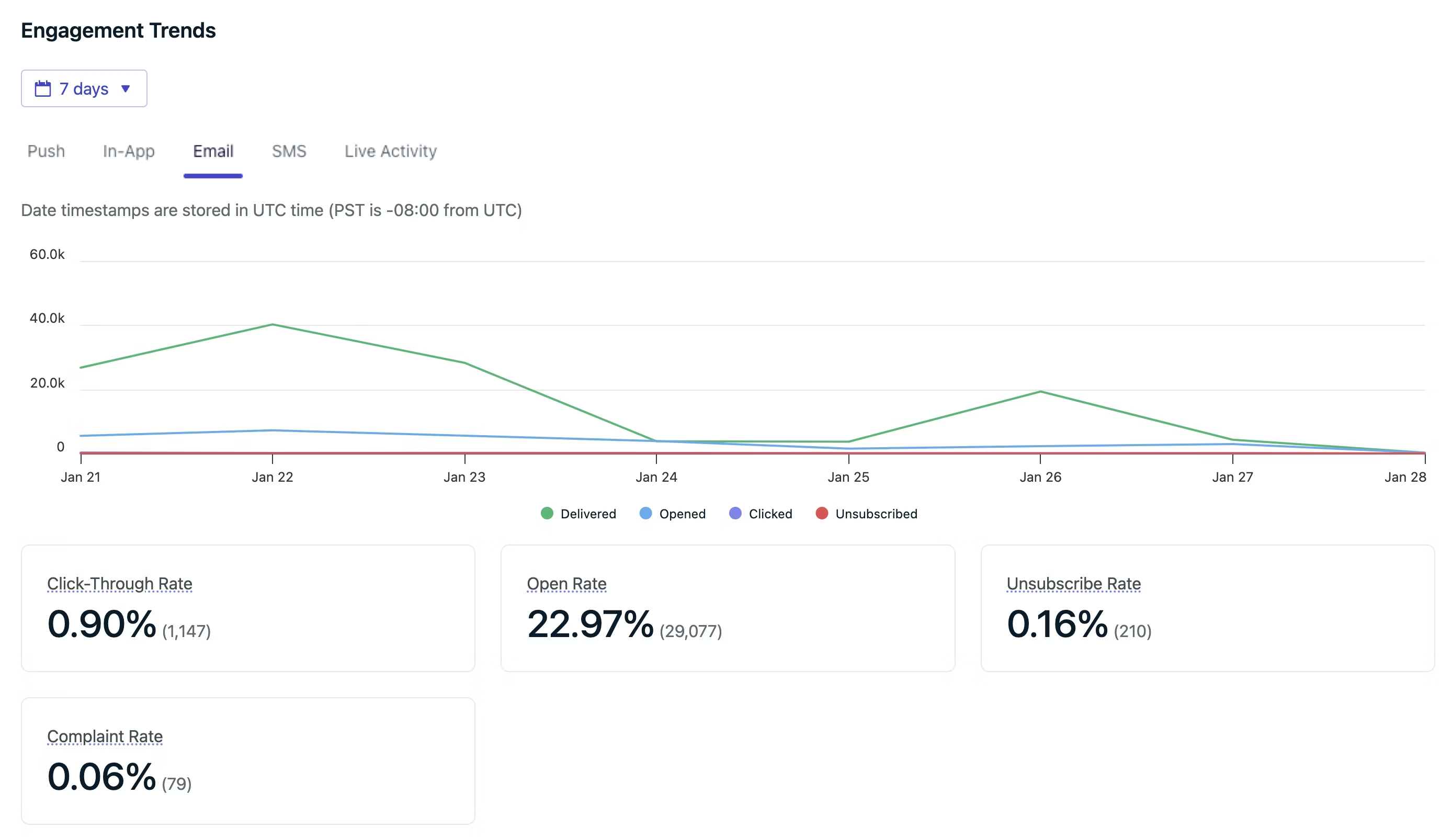 Track message sends, opens, clicks, and unsubscribes over time.
### Subscription trends
Subscription Trends show how Subscriptions subscribe and unsubscribe over time, broken down by channel. Subscription Trends track opt-in and opt-out activity. They do not track message engagement like opens or clicks (use [Engagement Trends](#engagement-trends) for that).
Navigate to **Dashboard > Analytics > Subscription Trends** to view these charts. Subscribes and unsubscribes are each presented in their own chart for clarity.
Track subscribe and unsubscribe activity over time, including Total subscribed, Subscribes, and Unsubscribes.
***
## Conversion metrics
Conversion metrics measure the business impact of your messaging by tracking what users do after interacting with messages — such as purchases, sign-ups, or content views.
You define which [Custom Events](./custom-events) count as conversions, and OneSignal attributes those conversions to messages using a **last-touch attribution** model across all channels (push, email, SMS, in-app, and RCS).
Conversion metrics is in **beta** and replaces the legacy [Custom Outcomes](./custom-outcomes) feature. If you are setting up conversion tracking for the first time, use [Conversion metrics](./conversion-metrics).
Full details on the attribution model, qualifying interactions per channel, attribution windows, and setup instructions.
### Legacy outcomes
[Custom Outcomes](./custom-outcomes) is being deprecated. Legacy outcomes data remains accessible as historical data but will not appear on the new conversion metrics charts.
The legacy Custom Outcomes feature uses a different attribution model that only covers push notifications and in-app messages:
| Attribution | When it applies |
| ---------------- | ----------------------------------------------------------------------------------------------------------------------------------------------------------------------------------------------- |
| **Direct** | The user clicked the in-app message block or push notification, which launched a new session (app was closed >30s), and triggered the outcome. |
| **Influenced** | The user did **not** click a push notification, but opened the app within the influence window (default: 24 hours) and triggered the outcome. Applies to the 10 most recent push notifications. |
| **Unattributed** | The outcome occurred outside of any attribution window or click. Not linked to a specific message. |
***
## FAQ
### How long is message data retained?
| Message Type | Retention Period |
| ----------------------- | ---------------------------------------------- |
| Dashboard-sent messages | Lifetime of the app |
| API-sent messages | 30 days |
| Audience activity CSV | 30 days |
| Journeys messages | See [Journeys analytics](./journeys-analytics) |
### How do I aggregate data across multiple messages?
Each message has a unique message ID, which makes manual aggregation via the API possible but inefficient.
**Recommended approach**:
* Use [Templates analytics](./template-analytics) to aggregate performance across related messages sent from the same Template.
* Use [Journeys analytics](./journeys-analytics) to aggregate performance across related Journeys.
### How do I view analytics across multiple apps?
OneSignal analytics are scoped to a single app — there is no built-in cross-app dashboard. To analyze data across multiple apps, use [Event Streams](./event-streams) to route message events from each app to a centralized data warehouse like Snowflake, BigQuery, or Amplitude. From there you can join and query across apps.
For more options including cross-app user data and messaging, see the full breakdown in [Apps, Organizations, & Accounts FAQ](./apps-organizations#how-can-we-access-analytics-messages-and-users-across-multiple-apps).
Track message sends, opens, clicks, and unsubscribes over time.
### Subscription trends
Subscription Trends show how Subscriptions subscribe and unsubscribe over time, broken down by channel. Subscription Trends track opt-in and opt-out activity. They do not track message engagement like opens or clicks (use [Engagement Trends](#engagement-trends) for that).
Navigate to **Dashboard > Analytics > Subscription Trends** to view these charts. Subscribes and unsubscribes are each presented in their own chart for clarity.
Track subscribe and unsubscribe activity over time, including Total subscribed, Subscribes, and Unsubscribes.
***
## Conversion metrics
Conversion metrics measure the business impact of your messaging by tracking what users do after interacting with messages — such as purchases, sign-ups, or content views.
You define which [Custom Events](./custom-events) count as conversions, and OneSignal attributes those conversions to messages using a **last-touch attribution** model across all channels (push, email, SMS, in-app, and RCS).
Conversion metrics is in **beta** and replaces the legacy [Custom Outcomes](./custom-outcomes) feature. If you are setting up conversion tracking for the first time, use [Conversion metrics](./conversion-metrics).
Full details on the attribution model, qualifying interactions per channel, attribution windows, and setup instructions.
### Legacy outcomes
[Custom Outcomes](./custom-outcomes) is being deprecated. Legacy outcomes data remains accessible as historical data but will not appear on the new conversion metrics charts.
The legacy Custom Outcomes feature uses a different attribution model that only covers push notifications and in-app messages:
| Attribution | When it applies |
| ---------------- | ----------------------------------------------------------------------------------------------------------------------------------------------------------------------------------------------- |
| **Direct** | The user clicked the in-app message block or push notification, which launched a new session (app was closed >30s), and triggered the outcome. |
| **Influenced** | The user did **not** click a push notification, but opened the app within the influence window (default: 24 hours) and triggered the outcome. Applies to the 10 most recent push notifications. |
| **Unattributed** | The outcome occurred outside of any attribution window or click. Not linked to a specific message. |
***
## FAQ
### How long is message data retained?
| Message Type | Retention Period |
| ----------------------- | ---------------------------------------------- |
| Dashboard-sent messages | Lifetime of the app |
| API-sent messages | 30 days |
| Audience activity CSV | 30 days |
| Journeys messages | See [Journeys analytics](./journeys-analytics) |
### How do I aggregate data across multiple messages?
Each message has a unique message ID, which makes manual aggregation via the API possible but inefficient.
**Recommended approach**:
* Use [Templates analytics](./template-analytics) to aggregate performance across related messages sent from the same Template.
* Use [Journeys analytics](./journeys-analytics) to aggregate performance across related Journeys.
### How do I view analytics across multiple apps?
OneSignal analytics are scoped to a single app — there is no built-in cross-app dashboard. To analyze data across multiple apps, use [Event Streams](./event-streams) to route message events from each app to a centralized data warehouse like Snowflake, BigQuery, or Amplitude. From there you can join and query across apps.
For more options including cross-app user data and messaging, see the full breakdown in [Apps, Organizations, & Accounts FAQ](./apps-organizations#how-can-we-access-analytics-messages-and-users-across-multiple-apps).