> ## Documentation Index
> Fetch the complete documentation index at: https://documentation.onesignal.com/llms.txt
> Use this file to discover all available pages before exploring further.
# Audit Logs
> Track and review user activity across your OneSignal organization for security, compliance, and accountability. Export to JSONL or query via the REST API.
## Overview
Audit Logs provide a **read-only** record of user actions across your OneSignal organization. Use audit logs to:
* **Investigate security incidents** by reviewing login activity, IP addresses, and user sessions.
* **Meet compliance requirements** by providing evidence for SOC 2, HIPAA, and internal audits.
* **Maintain accountability** by tracking who created, updated, or deleted templates, journeys, and notifications.
* **Export data** to JSONL for offline analysis, or **query the REST API** for programmatic access and SIEM integration.
Audit logs are **immutable**. You cannot edit or delete entries, ensuring an accurate and trustworthy audit trail.
 ### Plan availability
Audit log retention varies by plan.
| Plan | Retention Period | Notes |
| ------------ | ---------------- | ------------------------------------------------------- |
| Free | 48 hours | Included |
| Growth | 48 hours | Included |
| Professional | 48 hours | Upgrade to 90 days with Legal & Security Package add-on |
| Enterprise | 90 days | Included |
To increase retention or learn more about the Legal & Security Package, contact your Account Manager or our [Sales Team](https://onesignal.com/contact).
***
## Accessing Audit Logs
### Org Level Audit Logs
Audit logs are available at the **Organization level** and include activity across **all apps** in that organization.
**Requirements:**
* You must be an **Organization Admin**. See [Manage Team Members](./manage-team-members) to update roles.
To access audit logs:
1. Navigate to **Organizations**
2. Select your organization
3. Click **Audit Logs**
### App Level Audit Logs
In addition to organization-level audit logs, you can view audit logs for a specific app:
1. Navigate to your **App**
2. Go to **Settings**
3. Click **Audit Logs**
App-level audit logs show only activity for that specific app, making it easier to investigate app-specific changes.
**Requirements:**
* You must be an **App Admin** or **Organization Admin**
***
## Understanding the Audit Log
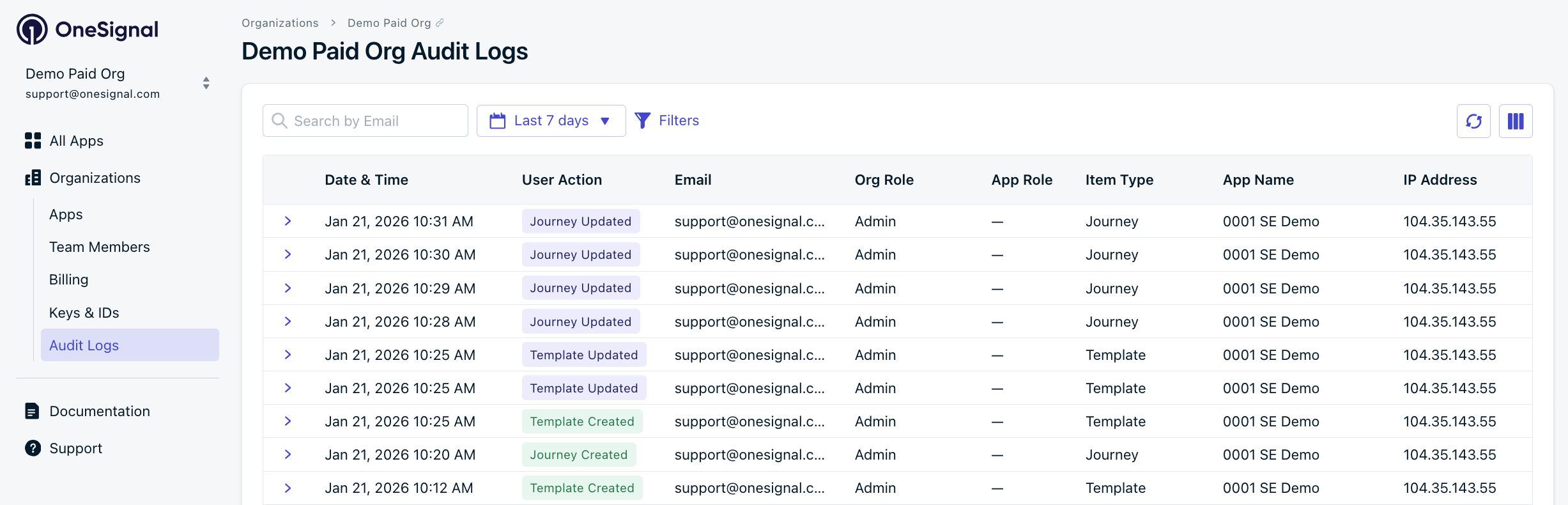
Each row represents a single user action. You can customize visible columns using the Columns button in the top-right corner.
### Plan availability
Audit log retention varies by plan.
| Plan | Retention Period | Notes |
| ------------ | ---------------- | ------------------------------------------------------- |
| Free | 48 hours | Included |
| Growth | 48 hours | Included |
| Professional | 48 hours | Upgrade to 90 days with Legal & Security Package add-on |
| Enterprise | 90 days | Included |
To increase retention or learn more about the Legal & Security Package, contact your Account Manager or our [Sales Team](https://onesignal.com/contact).
***
## Accessing Audit Logs
### Org Level Audit Logs
Audit logs are available at the **Organization level** and include activity across **all apps** in that organization.
**Requirements:**
* You must be an **Organization Admin**. See [Manage Team Members](./manage-team-members) to update roles.
To access audit logs:
1. Navigate to **Organizations**
2. Select your organization
3. Click **Audit Logs**
### App Level Audit Logs
In addition to organization-level audit logs, you can view audit logs for a specific app:
1. Navigate to your **App**
2. Go to **Settings**
3. Click **Audit Logs**
App-level audit logs show only activity for that specific app, making it easier to investigate app-specific changes.
**Requirements:**
* You must be an **App Admin** or **Organization Admin**
***
## Understanding the Audit Log
Each row represents a single user action. You can customize visible columns using the Columns button in the top-right corner.
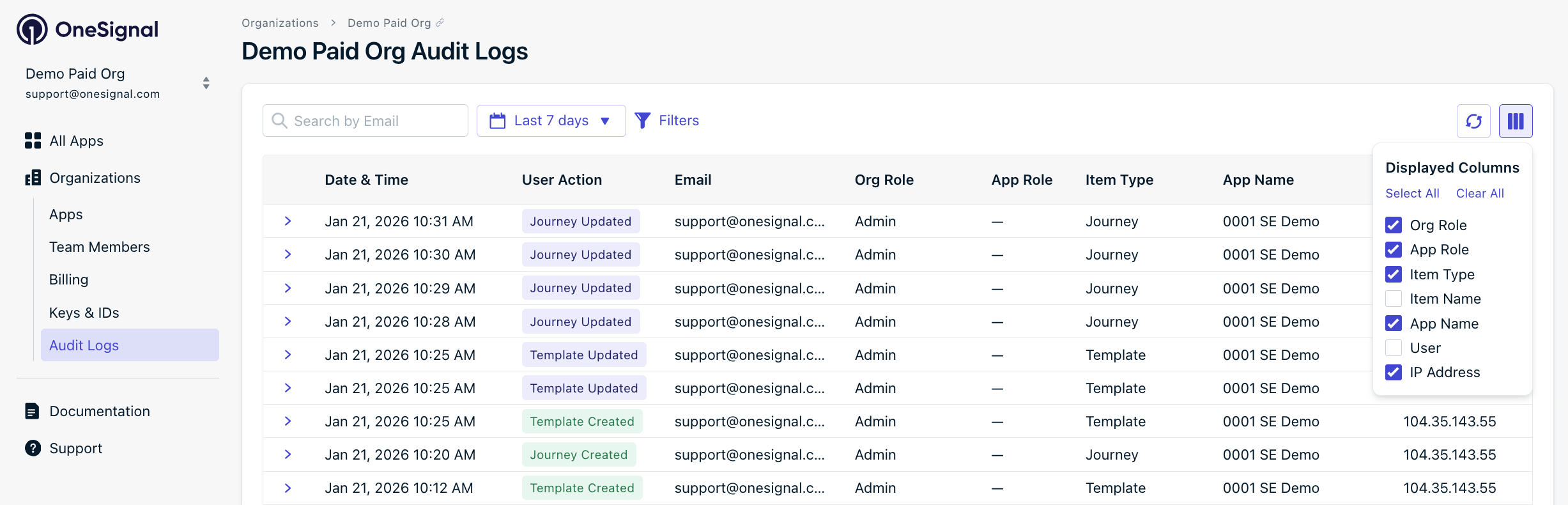 | Column | Description |
| --------------- | ---------------------------------------------------------------- |
| **Date & Time** | When the action occurred |
| **User Action** | The type of action performed (e.g., Logged In, Template Updated) |
| **Email** | Email address of the user who performed the action |
| **Org Role** | The user's organization-level role (Admin, Editor, Viewer) |
| **App Role** | The user's app-level role, if applicable |
| **Item Type** | The type of object affected (Template, Notification, Journey) |
| **Item Name** | The name of the affected object |
| **App Name** | The app where the action occurred |
| **User** | Display name of the user |
| **IP Address** | The IP address from which the action was performed |
***
## Tracked events
Audit logs track user actions across your organization, including logins, template changes, notification activity, journey updates, member management, billing events, and more.
For a comprehensive list of all tracked events, see the [Complete event reference](#complete-event-reference).
***
## Viewing event details
Click the expand arrow (›) next to any event to view additional details:
| Column | Description |
| --------------- | ---------------------------------------------------------------- |
| **Date & Time** | When the action occurred |
| **User Action** | The type of action performed (e.g., Logged In, Template Updated) |
| **Email** | Email address of the user who performed the action |
| **Org Role** | The user's organization-level role (Admin, Editor, Viewer) |
| **App Role** | The user's app-level role, if applicable |
| **Item Type** | The type of object affected (Template, Notification, Journey) |
| **Item Name** | The name of the affected object |
| **App Name** | The app where the action occurred |
| **User** | Display name of the user |
| **IP Address** | The IP address from which the action was performed |
***
## Tracked events
Audit logs track user actions across your organization, including logins, template changes, notification activity, journey updates, member management, billing events, and more.
For a comprehensive list of all tracked events, see the [Complete event reference](#complete-event-reference).
***
## Viewing event details
Click the expand arrow (›) next to any event to view additional details:
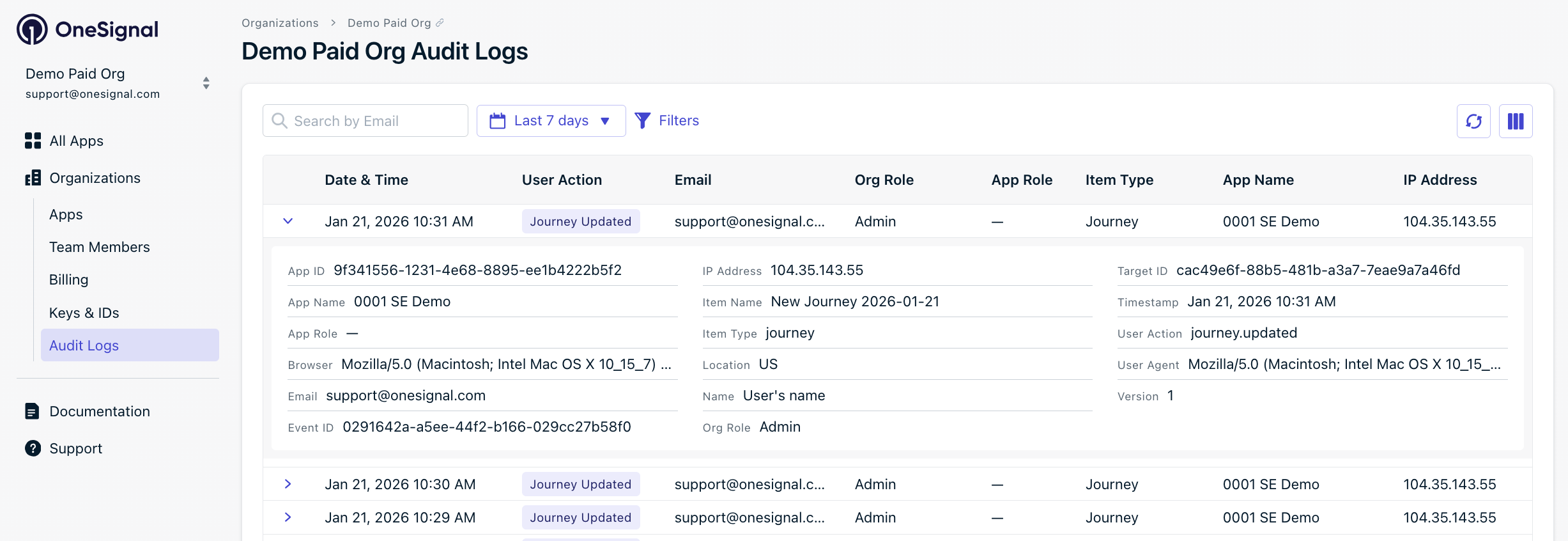 Expanded details include:
| Field | Description |
| --------------- | --------------------------------------------------------------- |
| **API Version** | API version used (when applicable) |
| **App ID** | Unique identifier for the app |
| **App Name** | Name of the app where the action occurred |
| **App Role** | User's role within the specific app |
| **Browser** | User agent string (browser and OS information) |
| **Channel** | Notification channel (push, email, sms) for notification events |
| **Email** | User's email address |
| **Event ID** | Unique identifier for this specific event |
| **IP Address** | Full IP address of the user |
| **Item Name** | Name of the affected object |
| **Item Type** | Type of object (template, notification, etc.) |
| **Location** | Geographic location based on IP address |
| **Name** | Display name of the user |
| **Org ID** | Unique identifier for the organization |
| **Org Role** | User's organization-level role |
| **Target ID** | Unique identifier for the affected object |
| **Target Role** | Role associated with the target (for member events) |
| **Timestamp** | Formatted date and time of the event |
| **User Action** | The action type (e.g., notification.sent) |
| **User Agent** | Full browser/client user agent string |
| **Version** | Event schema version |
***
## Search and filters
Use the search and filter options to find specific events:
### Search by email
Enter an email address in the search bar to find all actions performed by a specific user.
### Date range
Select from the following preset date ranges:
* **Last 24 hours**
* **Last 48 hours** (default)
* **Last 7 days**
* **Last 30 days**
* **Last 90 days** (requires extended retention)
* **Custom** - Select specific start and end dates
Date range options beyond your plan's retention period will display a lock icon. Contact sales for extended audit log history.
### Filters
Click **Filters** to narrow results by:
| Filter | Description |
| --------------- | --------------------------------------------------------- |
| **User Action** | Filter by action type (Logged In, Template Updated, etc.) |
| **App ID** | Filter by a specific app's unique identifier |
| **IP Address** | Filter by IP address |
| **Item Type** | Filter by object type (Template, Notification, Journey) |
| **Target ID** | Filter by the unique ID of the affected object |
### Item type values
Filter audit logs by the type of object affected:
| Item Type | Description |
| ----------------- | --------------------------------- |
| A/B Test | A/B test experiments |
| API Key | API keys and tokens |
| App | Application settings |
| Data Feed | Data feed configurations |
| Dynamic Content | Dynamic content blocks |
| Email Domain | Email sending domains |
| Email Suppression | Email suppression list entries |
| Event Stream | Event stream destinations |
| Export | Data exports |
| In-App Message | In-app message campaigns |
| Integration | Third-party integrations |
| Journey | Automated journey workflows |
| Member | Team members |
| Notification | Push, email, or SMS notifications |
| Organization | Organization settings |
| Segment | Audience segments |
| Subscription | User subscriptions |
| Template | Message templates |
| User | End users/subscribers |
| Webhook | Webhook configurations |
***
## Exporting audit logs
Export audit log data to a zipped `.json` file for offline analysis, compliance reporting, or integration with external tools.
To export audit logs:
1. Navigate to the **Audit Logs** page (at the organization or app level).
2. Apply any desired [filters](#search-and-filters) and date range.
3. Click **Export**.
4. The `.json.gz` file(s) will be emailed to you.
You'll have 3 days from creation to download your file before it expires.
### Export availability
The export window matches your plan's retention period.
| Plan | Export Window |
| ------------ | ---------------------------------------------------- |
| Free | 2 days |
| Growth | 2 days |
| Professional | 2 days (up to 90 days with Legal & Security Package) |
| Enterprise | Up to 90 days |
Combine exports with the [Audit Logs API](/reference/list-audit-logs) for automated, recurring data pulls.
***
## API access
Query audit logs programmatically using the REST API. The API supports pagination, time-scoped queries, and filtering by app, action type, actor, target, and IP address.
**Requirements:**
* **Enterprise plan** with the audit logs entitlement enabled
* **Organization API Key** for authentication (app-level keys are not accepted)
See the [List audit logs API reference](/reference/list-audit-logs) for endpoint details, parameters, and example responses.
***
## Data retention
Audit log data is retained based on your plan:
* **Free and Growth plans**: 48-hour retention
* **Professional plan**: 48-hour retention by default, or 90-day retention with the Legal & Security Package add-on
* **Enterprise plan**: 90-day retention included
After the retention period, audit log entries are automatically removed and cannot be recovered.
Need longer retention? Contact your Account Manager or our [Sales Team](https://onesignal.com/contact) to discuss upgrading your plan.
***
## Complete event reference
The following is a comprehensive list of all events tracked in audit logs, organized by category.
| Action | Description |
| ---------------------- | ------------------------------------ |
| App Created | A new app was created |
| App Renamed | An app was renamed |
| App Deleted | An app was deleted |
| App Settings Updated | App settings were modified |
| App API Key Reset | App API key was reset |
| App Auth Token Created | App authentication token was created |
| App Auth Token Updated | App authentication token was updated |
| App Auth Token Deleted | App authentication token was deleted |
| App Auth Token Rotated | App authentication token was rotated |
| Action | Description |
| ---------------- | ---------------------------------- |
| Template Created | A new message template was created |
| Template Updated | An existing template was modified |
| Template Deleted | A template was removed |
| Action | Description |
| ---------------------- | ------------------------------------- |
| Notification Created | A new notification was created |
| Notification Sent | A notification was sent |
| Notification Updated | A notification was modified |
| Notification Canceled | A scheduled notification was canceled |
| Notification Deleted | A notification was removed |
| Notification Previewed | A notification was previewed |
| Action | Description |
| ------------------------ | ------------------------------------- |
| A/B Test Created | A new A/B test was created |
| A/B Test Updated | An A/B test was modified |
| A/B Test Deleted | An A/B test was deleted |
| A/B Test Canceled | An A/B test was canceled |
| A/B Test Winner Selected | A winner was selected for an A/B test |
| Action | Description |
| ----------------- | -------------------------------- |
| Journey Created | A new journey was created |
| Journey Updated | An existing journey was modified |
| Journey Set Live | A journey was activated |
| Journey Archived | A journey was archived |
| Journey Resumed | A paused journey was resumed |
| Journey Scheduled | A journey was scheduled |
| Journey Deleted | A journey was deleted |
| Action | Description |
| ----------------------- | -------------------------------- |
| In-App Message Created | A new in-app message was created |
| In-App Message Updated | An in-app message was modified |
| In-App Message Deleted | An in-app message was deleted |
| In-App Message Enabled | An in-app message was enabled |
| In-App Message Disabled | An in-app message was disabled |
| Action | Description |
| ---------------------- | ---------------------------- |
| Segment Created | A new segment was created |
| Segment Updated | A segment was modified |
| Segment Deleted | A segment was deleted |
| Segment Paused | A segment was paused |
| Segment Resumed | A segment was resumed |
| Segment Set as Default | A segment was set as default |
| Action | Description |
| -------------------------- | ---------------------------------------------- |
| Member Created | A new team member was created |
| Member Deleted | A team member was deleted |
| Member Role Changed in App | A member's app-level role was changed |
| Member Role Changed in Org | A member's organization-level role was changed |
| Member Added to App | A member was added to an app |
| Member Removed from App | A member was removed from an app |
| Member Added to Org | A member was added to the organization |
| Member Removed from Org | A member was removed from the organization |
| Action | Description |
| --------------------- | ------------------------------------------- |
| Organization Created | A new organization was created |
| Organization Updated | Organization settings were modified |
| Organization Deleted | An organization was deleted |
| Organization Disabled | The organization was disabled |
| Organization Enabled | The organization was enabled |
| Logged In | A user logged in |
| Logged Out | A user logged out |
| User Added to Org | A user was added to the organization |
| User Removed from Org | A user was removed from the organization |
| User Role Changed | A user's role was changed |
| App Added to Org | An app was added to the organization |
| App Removed from Org | An app was removed from the organization |
| 2FA Required | Two-factor authentication was made required |
| 2FA Made Optional | Two-factor authentication was made optional |
| Auth Token Created | Organization auth token was created |
| Auth Token Updated | Organization auth token was updated |
| Auth Token Deleted | Organization auth token was deleted |
| Auth Token Rotated | Organization auth token was rotated |
| Action | Description |
| ---------------------- | ------------------------------ |
| Subscription Created | A new subscription was created |
| Subscription Updated | A subscription was modified |
| Subscription Canceled | A subscription was canceled |
| Payment Method Added | A payment method was added |
| Payment Method Updated | A payment method was updated |
| Action | Description |
| ------------------- | ------------------------- |
| Webhook Created | A new webhook was created |
| Webhook Updated | A webhook was modified |
| Webhook Deleted | A webhook was deleted |
| Webhook Tested | A webhook was tested |
| Webhook Activated | A webhook was activated |
| Webhook Deactivated | A webhook was deactivated |
| Action | Description |
| ------------------------ | ------------------------------- |
| Event Stream Created | A new event stream was created |
| Event Stream Updated | An event stream was modified |
| Event Stream Deleted | An event stream was deleted |
| Event Stream Activated | An event stream was activated |
| Event Stream Deactivated | An event stream was deactivated |
| Event Stream Tested | An event stream was tested |
| Action | Description |
| --------------------- | --------------------------- |
| Data Feed Created | A new data feed was created |
| Data Feed Updated | A data feed was modified |
| Data Feed Deleted | A data feed was deleted |
| Data Feed Activated | A data feed was activated |
| Data Feed Deactivated | A data feed was deactivated |
| Data Feed Tested | A data feed was tested |
| Action | Description |
| ---------------------------- | ---------------------------------- |
| Integration Activated | An integration was activated |
| Integration Deactivated | An integration was deactivated |
| Integration Settings Updated | Integration settings were modified |
| Action | Description |
| -------------- | ------------------------ |
| Import Created | A new import was created |
| Import Updated | An import was modified |
| Import Started | An import was started |
| Import Failed | An import failed |
| Action | Description |
| -------------- | ------------------------ |
| Export Created | A new export was created |
| Action | Description |
| ------------ | ---------------------- |
| User Created | A new user was created |
| User Updated | A user was modified |
| User Deleted | A user was deleted |
| Action | Description |
| -------------------- | ------------------------------ |
| Subscription Created | A new subscription was created |
| Subscription Updated | A subscription was modified |
| Subscription Deleted | A subscription was deleted |
| Action | Description |
| ------------------------------ | --------------------------------------------- |
| Custom Event Retention Updated | Custom event retention settings were modified |
| Action | Description |
| ----------------------- | --------------------------------------- |
| Dynamic Content Created | A new dynamic content block was created |
| Dynamic Content Updated | A dynamic content block was modified |
| Dynamic Content Deleted | A dynamic content block was deleted |
| Action | Description |
| --------------------------- | ---------------------------------------- |
| Email Domain Created | A new email sending domain was added |
| Email Domain Activated | An email domain was activated |
| Email Domain Deactivated | An email domain was deactivated |
| Email Domain Deleted | An email domain was removed |
| Email Domain Sends Canceled | Sending was canceled for an email domain |
| Action | Description |
| ------------------- | ------------------------------------------------------ |
| Suppression Created | An email address was added to the suppression list |
| Suppression Deleted | An email address was removed from the suppression list |
***
## FAQ
### Who can access audit logs?
**Organization-level audit logs:** Organization Admins can access audit logs for the entire organization.
**App-level audit logs:** App Admins can access audit logs for apps they administer. Organization Admins can also access app-level audit logs for all apps in their organization.
See [Manage Team Members](./manage-team-members) to update roles.
### Can I view audit logs for a specific app?
Yes. Navigate to your app's **Settings** page and select **Audit Logs** to view activity for that specific app only. This is useful for investigating changes to a particular app without seeing activity from other apps in your organization.
### Can I export audit logs?
Yes. Click **Export** on the Audit Logs page to download a `.jsonl` file of the currently filtered results. The export window depends on your plan — see [Export availability](#export-availability) for details. For programmatic access, use the [List audit logs API](/reference/list-audit-logs) (Enterprise plans only).
### Can audit logs be deleted?
No. Audit logs are immutable and cannot be deleted by any user.
### Are API actions logged?
Yes, for select actions. API actions performed with Organization and App API keys are logged for auth token management (create, update, rotate, delete), app management (create, update), segment management (create, update, delete), template management (create, update, delete, copy to app), and subscription CSV export. The actor type displays as "API Key" with the key's name and scope. Additional API actions are planned for future releases.
### How do I increase my retention period?
Enterprise customers receive 90-day retention automatically. Professional customers can upgrade to 90-day retention by adding the Legal & Security Package. Contact your Account Manager or our [Sales Team](https://onesignal.com/contact) to discuss your requirements.
***
Expanded details include:
| Field | Description |
| --------------- | --------------------------------------------------------------- |
| **API Version** | API version used (when applicable) |
| **App ID** | Unique identifier for the app |
| **App Name** | Name of the app where the action occurred |
| **App Role** | User's role within the specific app |
| **Browser** | User agent string (browser and OS information) |
| **Channel** | Notification channel (push, email, sms) for notification events |
| **Email** | User's email address |
| **Event ID** | Unique identifier for this specific event |
| **IP Address** | Full IP address of the user |
| **Item Name** | Name of the affected object |
| **Item Type** | Type of object (template, notification, etc.) |
| **Location** | Geographic location based on IP address |
| **Name** | Display name of the user |
| **Org ID** | Unique identifier for the organization |
| **Org Role** | User's organization-level role |
| **Target ID** | Unique identifier for the affected object |
| **Target Role** | Role associated with the target (for member events) |
| **Timestamp** | Formatted date and time of the event |
| **User Action** | The action type (e.g., notification.sent) |
| **User Agent** | Full browser/client user agent string |
| **Version** | Event schema version |
***
## Search and filters
Use the search and filter options to find specific events:
### Search by email
Enter an email address in the search bar to find all actions performed by a specific user.
### Date range
Select from the following preset date ranges:
* **Last 24 hours**
* **Last 48 hours** (default)
* **Last 7 days**
* **Last 30 days**
* **Last 90 days** (requires extended retention)
* **Custom** - Select specific start and end dates
Date range options beyond your plan's retention period will display a lock icon. Contact sales for extended audit log history.
### Filters
Click **Filters** to narrow results by:
| Filter | Description |
| --------------- | --------------------------------------------------------- |
| **User Action** | Filter by action type (Logged In, Template Updated, etc.) |
| **App ID** | Filter by a specific app's unique identifier |
| **IP Address** | Filter by IP address |
| **Item Type** | Filter by object type (Template, Notification, Journey) |
| **Target ID** | Filter by the unique ID of the affected object |
### Item type values
Filter audit logs by the type of object affected:
| Item Type | Description |
| ----------------- | --------------------------------- |
| A/B Test | A/B test experiments |
| API Key | API keys and tokens |
| App | Application settings |
| Data Feed | Data feed configurations |
| Dynamic Content | Dynamic content blocks |
| Email Domain | Email sending domains |
| Email Suppression | Email suppression list entries |
| Event Stream | Event stream destinations |
| Export | Data exports |
| In-App Message | In-app message campaigns |
| Integration | Third-party integrations |
| Journey | Automated journey workflows |
| Member | Team members |
| Notification | Push, email, or SMS notifications |
| Organization | Organization settings |
| Segment | Audience segments |
| Subscription | User subscriptions |
| Template | Message templates |
| User | End users/subscribers |
| Webhook | Webhook configurations |
***
## Exporting audit logs
Export audit log data to a zipped `.json` file for offline analysis, compliance reporting, or integration with external tools.
To export audit logs:
1. Navigate to the **Audit Logs** page (at the organization or app level).
2. Apply any desired [filters](#search-and-filters) and date range.
3. Click **Export**.
4. The `.json.gz` file(s) will be emailed to you.
You'll have 3 days from creation to download your file before it expires.
### Export availability
The export window matches your plan's retention period.
| Plan | Export Window |
| ------------ | ---------------------------------------------------- |
| Free | 2 days |
| Growth | 2 days |
| Professional | 2 days (up to 90 days with Legal & Security Package) |
| Enterprise | Up to 90 days |
Combine exports with the [Audit Logs API](/reference/list-audit-logs) for automated, recurring data pulls.
***
## API access
Query audit logs programmatically using the REST API. The API supports pagination, time-scoped queries, and filtering by app, action type, actor, target, and IP address.
**Requirements:**
* **Enterprise plan** with the audit logs entitlement enabled
* **Organization API Key** for authentication (app-level keys are not accepted)
See the [List audit logs API reference](/reference/list-audit-logs) for endpoint details, parameters, and example responses.
***
## Data retention
Audit log data is retained based on your plan:
* **Free and Growth plans**: 48-hour retention
* **Professional plan**: 48-hour retention by default, or 90-day retention with the Legal & Security Package add-on
* **Enterprise plan**: 90-day retention included
After the retention period, audit log entries are automatically removed and cannot be recovered.
Need longer retention? Contact your Account Manager or our [Sales Team](https://onesignal.com/contact) to discuss upgrading your plan.
***
## Complete event reference
The following is a comprehensive list of all events tracked in audit logs, organized by category.
| Action | Description |
| ---------------------- | ------------------------------------ |
| App Created | A new app was created |
| App Renamed | An app was renamed |
| App Deleted | An app was deleted |
| App Settings Updated | App settings were modified |
| App API Key Reset | App API key was reset |
| App Auth Token Created | App authentication token was created |
| App Auth Token Updated | App authentication token was updated |
| App Auth Token Deleted | App authentication token was deleted |
| App Auth Token Rotated | App authentication token was rotated |
| Action | Description |
| ---------------- | ---------------------------------- |
| Template Created | A new message template was created |
| Template Updated | An existing template was modified |
| Template Deleted | A template was removed |
| Action | Description |
| ---------------------- | ------------------------------------- |
| Notification Created | A new notification was created |
| Notification Sent | A notification was sent |
| Notification Updated | A notification was modified |
| Notification Canceled | A scheduled notification was canceled |
| Notification Deleted | A notification was removed |
| Notification Previewed | A notification was previewed |
| Action | Description |
| ------------------------ | ------------------------------------- |
| A/B Test Created | A new A/B test was created |
| A/B Test Updated | An A/B test was modified |
| A/B Test Deleted | An A/B test was deleted |
| A/B Test Canceled | An A/B test was canceled |
| A/B Test Winner Selected | A winner was selected for an A/B test |
| Action | Description |
| ----------------- | -------------------------------- |
| Journey Created | A new journey was created |
| Journey Updated | An existing journey was modified |
| Journey Set Live | A journey was activated |
| Journey Archived | A journey was archived |
| Journey Resumed | A paused journey was resumed |
| Journey Scheduled | A journey was scheduled |
| Journey Deleted | A journey was deleted |
| Action | Description |
| ----------------------- | -------------------------------- |
| In-App Message Created | A new in-app message was created |
| In-App Message Updated | An in-app message was modified |
| In-App Message Deleted | An in-app message was deleted |
| In-App Message Enabled | An in-app message was enabled |
| In-App Message Disabled | An in-app message was disabled |
| Action | Description |
| ---------------------- | ---------------------------- |
| Segment Created | A new segment was created |
| Segment Updated | A segment was modified |
| Segment Deleted | A segment was deleted |
| Segment Paused | A segment was paused |
| Segment Resumed | A segment was resumed |
| Segment Set as Default | A segment was set as default |
| Action | Description |
| -------------------------- | ---------------------------------------------- |
| Member Created | A new team member was created |
| Member Deleted | A team member was deleted |
| Member Role Changed in App | A member's app-level role was changed |
| Member Role Changed in Org | A member's organization-level role was changed |
| Member Added to App | A member was added to an app |
| Member Removed from App | A member was removed from an app |
| Member Added to Org | A member was added to the organization |
| Member Removed from Org | A member was removed from the organization |
| Action | Description |
| --------------------- | ------------------------------------------- |
| Organization Created | A new organization was created |
| Organization Updated | Organization settings were modified |
| Organization Deleted | An organization was deleted |
| Organization Disabled | The organization was disabled |
| Organization Enabled | The organization was enabled |
| Logged In | A user logged in |
| Logged Out | A user logged out |
| User Added to Org | A user was added to the organization |
| User Removed from Org | A user was removed from the organization |
| User Role Changed | A user's role was changed |
| App Added to Org | An app was added to the organization |
| App Removed from Org | An app was removed from the organization |
| 2FA Required | Two-factor authentication was made required |
| 2FA Made Optional | Two-factor authentication was made optional |
| Auth Token Created | Organization auth token was created |
| Auth Token Updated | Organization auth token was updated |
| Auth Token Deleted | Organization auth token was deleted |
| Auth Token Rotated | Organization auth token was rotated |
| Action | Description |
| ---------------------- | ------------------------------ |
| Subscription Created | A new subscription was created |
| Subscription Updated | A subscription was modified |
| Subscription Canceled | A subscription was canceled |
| Payment Method Added | A payment method was added |
| Payment Method Updated | A payment method was updated |
| Action | Description |
| ------------------- | ------------------------- |
| Webhook Created | A new webhook was created |
| Webhook Updated | A webhook was modified |
| Webhook Deleted | A webhook was deleted |
| Webhook Tested | A webhook was tested |
| Webhook Activated | A webhook was activated |
| Webhook Deactivated | A webhook was deactivated |
| Action | Description |
| ------------------------ | ------------------------------- |
| Event Stream Created | A new event stream was created |
| Event Stream Updated | An event stream was modified |
| Event Stream Deleted | An event stream was deleted |
| Event Stream Activated | An event stream was activated |
| Event Stream Deactivated | An event stream was deactivated |
| Event Stream Tested | An event stream was tested |
| Action | Description |
| --------------------- | --------------------------- |
| Data Feed Created | A new data feed was created |
| Data Feed Updated | A data feed was modified |
| Data Feed Deleted | A data feed was deleted |
| Data Feed Activated | A data feed was activated |
| Data Feed Deactivated | A data feed was deactivated |
| Data Feed Tested | A data feed was tested |
| Action | Description |
| ---------------------------- | ---------------------------------- |
| Integration Activated | An integration was activated |
| Integration Deactivated | An integration was deactivated |
| Integration Settings Updated | Integration settings were modified |
| Action | Description |
| -------------- | ------------------------ |
| Import Created | A new import was created |
| Import Updated | An import was modified |
| Import Started | An import was started |
| Import Failed | An import failed |
| Action | Description |
| -------------- | ------------------------ |
| Export Created | A new export was created |
| Action | Description |
| ------------ | ---------------------- |
| User Created | A new user was created |
| User Updated | A user was modified |
| User Deleted | A user was deleted |
| Action | Description |
| -------------------- | ------------------------------ |
| Subscription Created | A new subscription was created |
| Subscription Updated | A subscription was modified |
| Subscription Deleted | A subscription was deleted |
| Action | Description |
| ------------------------------ | --------------------------------------------- |
| Custom Event Retention Updated | Custom event retention settings were modified |
| Action | Description |
| ----------------------- | --------------------------------------- |
| Dynamic Content Created | A new dynamic content block was created |
| Dynamic Content Updated | A dynamic content block was modified |
| Dynamic Content Deleted | A dynamic content block was deleted |
| Action | Description |
| --------------------------- | ---------------------------------------- |
| Email Domain Created | A new email sending domain was added |
| Email Domain Activated | An email domain was activated |
| Email Domain Deactivated | An email domain was deactivated |
| Email Domain Deleted | An email domain was removed |
| Email Domain Sends Canceled | Sending was canceled for an email domain |
| Action | Description |
| ------------------- | ------------------------------------------------------ |
| Suppression Created | An email address was added to the suppression list |
| Suppression Deleted | An email address was removed from the suppression list |
***
## FAQ
### Who can access audit logs?
**Organization-level audit logs:** Organization Admins can access audit logs for the entire organization.
**App-level audit logs:** App Admins can access audit logs for apps they administer. Organization Admins can also access app-level audit logs for all apps in their organization.
See [Manage Team Members](./manage-team-members) to update roles.
### Can I view audit logs for a specific app?
Yes. Navigate to your app's **Settings** page and select **Audit Logs** to view activity for that specific app only. This is useful for investigating changes to a particular app without seeing activity from other apps in your organization.
### Can I export audit logs?
Yes. Click **Export** on the Audit Logs page to download a `.jsonl` file of the currently filtered results. The export window depends on your plan — see [Export availability](#export-availability) for details. For programmatic access, use the [List audit logs API](/reference/list-audit-logs) (Enterprise plans only).
### Can audit logs be deleted?
No. Audit logs are immutable and cannot be deleted by any user.
### Are API actions logged?
Yes, for select actions. API actions performed with Organization and App API keys are logged for auth token management (create, update, rotate, delete), app management (create, update), segment management (create, update, delete), template management (create, update, delete, copy to app), and subscription CSV export. The actor type displays as "API Key" with the key's name and scope. Additional API actions are planned for future releases.
### How do I increase my retention period?
Enterprise customers receive 90-day retention automatically. Professional customers can upgrade to 90-day retention by adding the Legal & Security Package. Contact your Account Manager or our [Sales Team](https://onesignal.com/contact) to discuss your requirements.
***