> ## Documentation Index
> Fetch the complete documentation index at: https://documentation.onesignal.com/llms.txt
> Use this file to discover all available pages before exploring further.
# BlueConic
> Sync data from BlueConic to OneSignal
## Overview
[BlueConic webhooks](https://support.blueconic.com/hc/en-us/articles/115004431305-Webhook-Connection) allow you to sync profile or segment data to OneSignal in real time whenever specific events occur on your site. This guide demonstrates how to configure BlueConic to send data to OneSignal via the [Update user](/reference/update-user) API.
## Setup
To sync user data between BlueConic and OneSignal, a common identifier must exist to associate users across both platforms. BlueConic generates a unique identifier called BlueConic ID, which can be linked to a user in OneSignal to synchronize data.
### Update script
We recommend creating a custom alias to identify your users using their BlueConic IDs. Before assigning a new alias, ensure the user is logged in to OneSignal first. The following code provides examples of associating a BlueConic ID with a OneSignal user using an Alias and an External ID.
```javascript javascript theme={null}
// Get the BlueConic ID
const blueConicId = blueConicClient.profile.getProfile().getId();
// Ensure the user is logged in
// Logged in users will have an External ID
if (!OneSignal.User.externalId) {
await OneSignal.login("EXTERNAL_ID_FROM_YOUR_BACKENED");
}
// External ID must exist before calling this method
OneSignal.User.addAlias('blueconic_profile_id', blueConicId);
```
If your system uses BlueConic IDs as the primary identifier, then pass it to `OneSignal.login`.
```javascript javascript theme={null}
// Get the BlueConic ID
const blueConicId = blueConicClient.profile.getProfile().getId();
// Set OneSignal External ID to BlueConic ID
OneSignal.login(blueConicId);
```
### Add webhooks
Use webhooks to synchronize data from BlueConic to OneSignal based on your specific needs. The examples below demonstrate how to use the [Update user](/reference/update-user) API to achieve this.
**API details**
| | |
| ------------- | -------------------------------------------------------------------------- |
| URL | `https://api.onesignal.com/apps//users/by/alias_label/alias_value` |
| Method | PATCH |
| Authorization | Basic \ |
If your system uses the BlueConic ID as the primary identifier...
Use the following URL instead:
`https://api.onesignal.com/apps//users/by/external_id/{{blueconic_profile_id}}`
### Syncing Profile properties
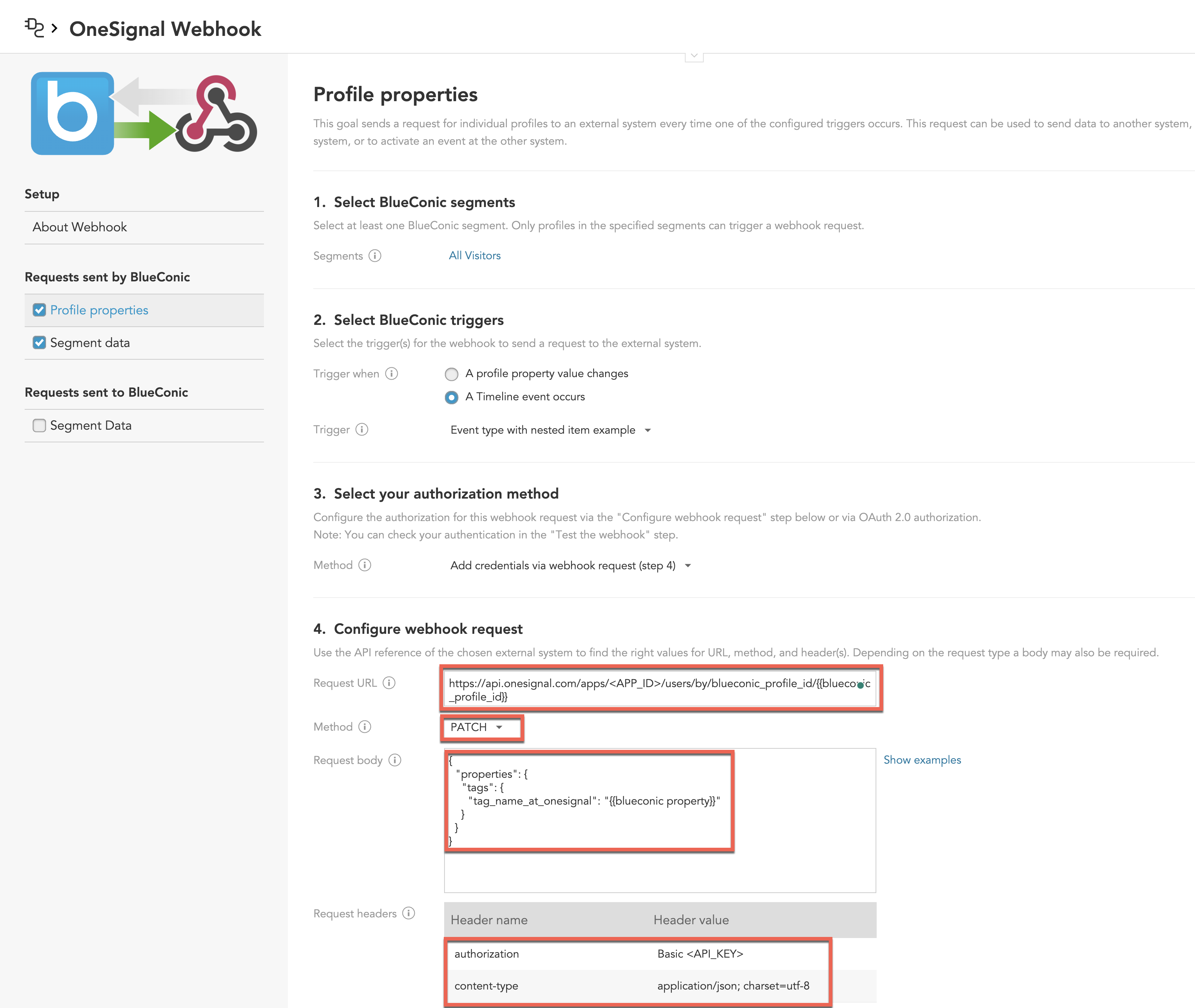
Synchronize BlueConic profile data to OneSignal by setting [Tags](./add-user-data-tags) and other user data.
 **Payload**
```json json theme={null}
{
"properties": {
"tags": {
"tag_name_at_onesignal": "{{BLUECONIC_PROPERTY}}"
}
}
}
```
#### Syncing segments
Synchronize BlueConic segment data to OneSignal by setting [Tags](./add-user-data-tags). Use these tags to create segments directly within OneSignal.
**Payload**
```json json theme={null}
{
"properties": {
"tags": {
"tag_name_at_onesignal": "{{BLUECONIC_PROPERTY}}"
}
}
}
```
#### Syncing segments
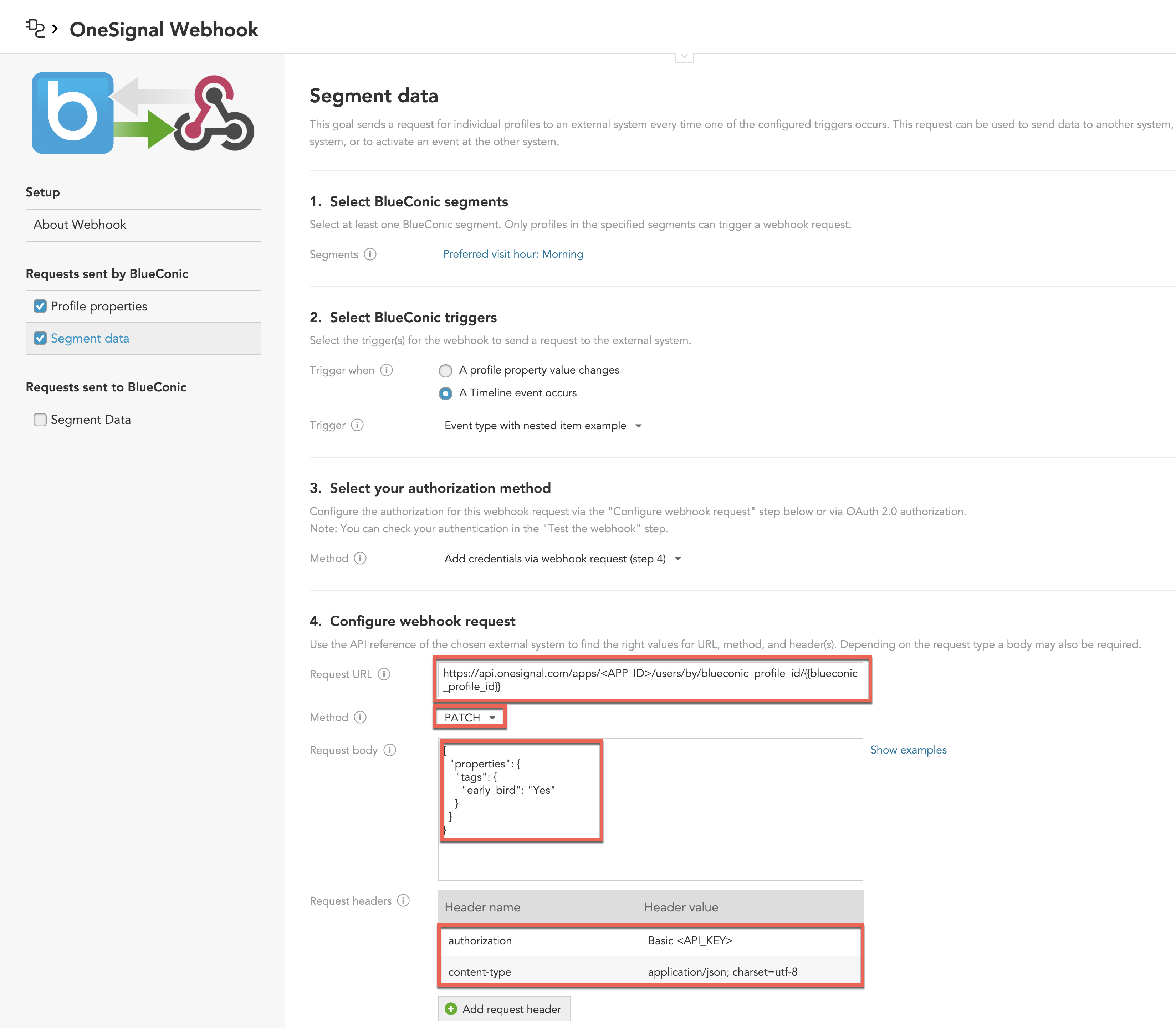
Synchronize BlueConic segment data to OneSignal by setting [Tags](./add-user-data-tags). Use these tags to create segments directly within OneSignal.
 **Payload**
```json json theme={null}
{
"properties": {
"tags": {
"early_bird": "Yes",
}
}
}
```
You can name tags based on specific needs, such as **early\_bird** or any other descriptive label. However, the value assigned to the tag should always be hard-coded, such as **Yes**, for consistency between segments in BlueConic and OneSignal.
***
**Payload**
```json json theme={null}
{
"properties": {
"tags": {
"early_bird": "Yes",
}
}
}
```
You can name tags based on specific needs, such as **early\_bird** or any other descriptive label. However, the value assigned to the tag should always be hard-coded, such as **Yes**, for consistency between segments in BlueConic and OneSignal.
***