> ## Documentation Index
> Fetch the complete documentation index at: https://documentation.onesignal.com/llms.txt
> Use this file to discover all available pages before exploring further.
# Delete users
> Delete users and subscriptions in OneSignal via the Dashboard or API for privacy compliance, cleanup, or bulk removal of inactive data.
## Why delete users or subscriptions?
You may want to delete [Users](./users) and [Subscriptions](./subscriptions) for a few reasons:
1. **Data privacy compliance** – to honor user requests for data removal.
2. **Cleanup inactive data** – remove old subscriptions from users who no longer use your app or website, or have switched devices.
Once you delete users, this action is irreversible. Deleted users can only receive messages again if they:
* **Web:** Clear browser cookies and revisit your site.
* **Mobile:** Reopen the app (ensure the app uses the latest OneSignal SDK).
* **Email/SMS:** Are re-added with the same email or phone number.
***
## Recommendations before deletion
1. [**Export user data**](./exporting-data)
Download a CSV containing all user data and custom fields for backup or compliance.
2. **Understand the difference** between [Users](./users) and [Subscriptions](./subscriptions).
3. **Double-check your audience** to prevent accidental deletion.
***
## Automatic subscription deletion (Free Plan only)
* On **Paid Plans**, Subscriptions are kept until manually deleted.
* On the **Free Plan**, OneSignal **automatically deletes dormant push subscriptions** after 18 months of inactivity.
**Dormancy means:**
* The app or site hasn't been opened in 18+ months, **or**
* No activity has been recorded in that time
See our [Privacy Policy](https://onesignal.com/privacy_policy) for more information.
***
## Automatic user deletion
OneSignal automatically deletes a User when their last Subscription is deleted and the User has no [External ID](./users#external-id) or [aliases](./aliases). Such a User can no longer be referenced by any identifier, so the User record and its properties (such as Tags) are removed.
Users with an External ID or alias are kept even when they have zero Subscriptions. Their properties are preserved, and a new Subscription with the same External ID reconnects to the same User profile. See [User lifecycle](./users#user-lifecycle).
***
## Delete Users and Subscriptions with the API
Use the [**Delete User API**](/reference/delete-user) to remove a user and all associated data.
* Supports deletion using `external_id`, `onesignal_id`, or other aliases.
* Best for privacy compliance or full user record removal.
Use the [**Delete Subscription API**](/reference/delete-subscription) to delete individual [Subscriptions](./subscriptions), such as old devices or sessions.
***
## Delete Users and Subscriptions in the Dashboard
### Individual deletion
1. Go to **Audience > Subscriptions**.
2. Search for the Subscription you want to delete.
3. Click **Options > Delete**.
The Subscription is permanently removed from the User.
### Bulk deletion
To delete multiple Users or Subscriptions:
* Follow the [Segmentation docs](./segmentation) to build your segment.
* To target a list, [upload a CSV](./import) and apply tags.
* To remove inactive users, filter by **Last Session > 4321 hours** (\~6 months). Ensure you're using "greater than" (not "less than").
Consider sending two re-engagement notifications to the segment before deletion.
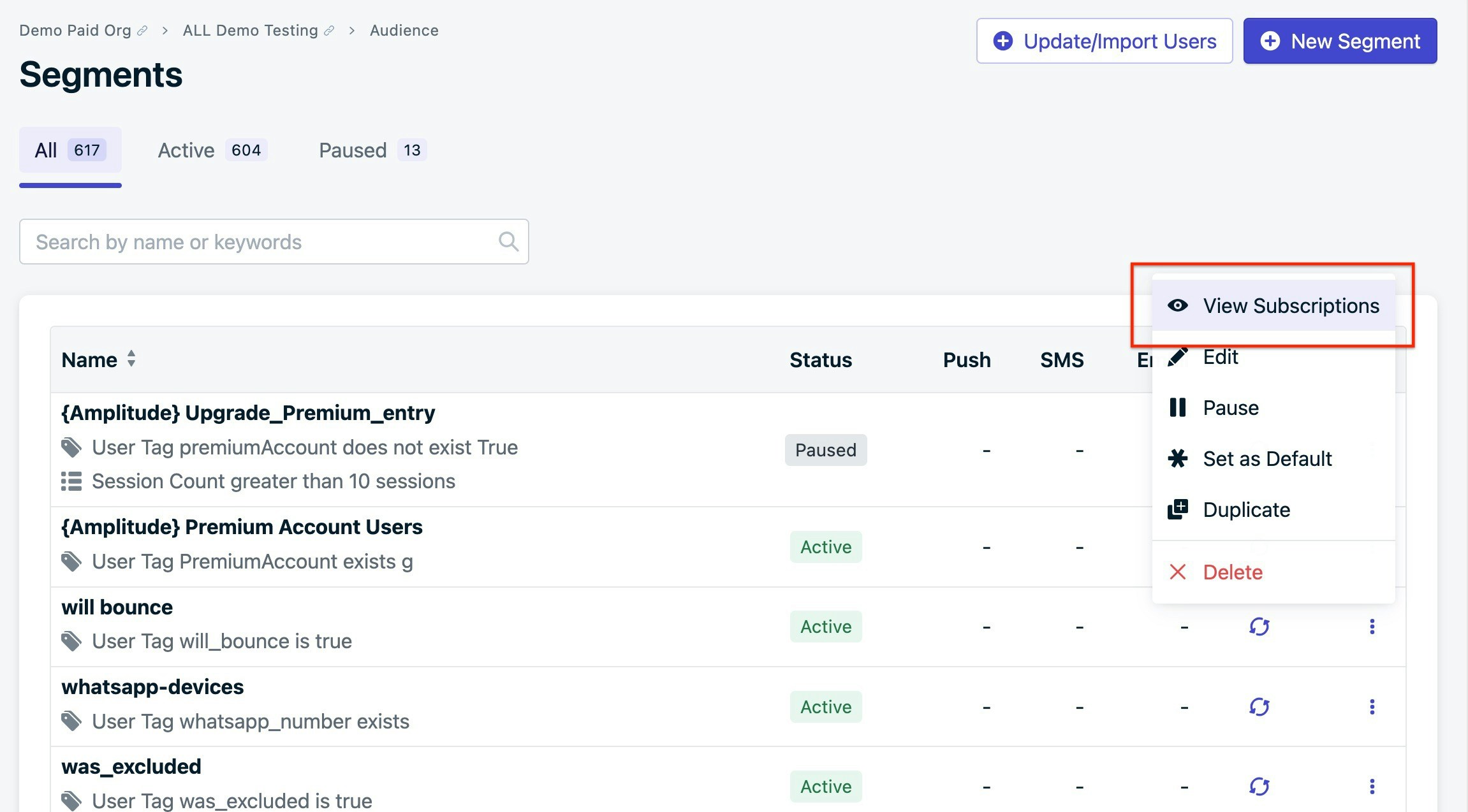
Navigate to **Options > View Subscriptions** from the segment view.
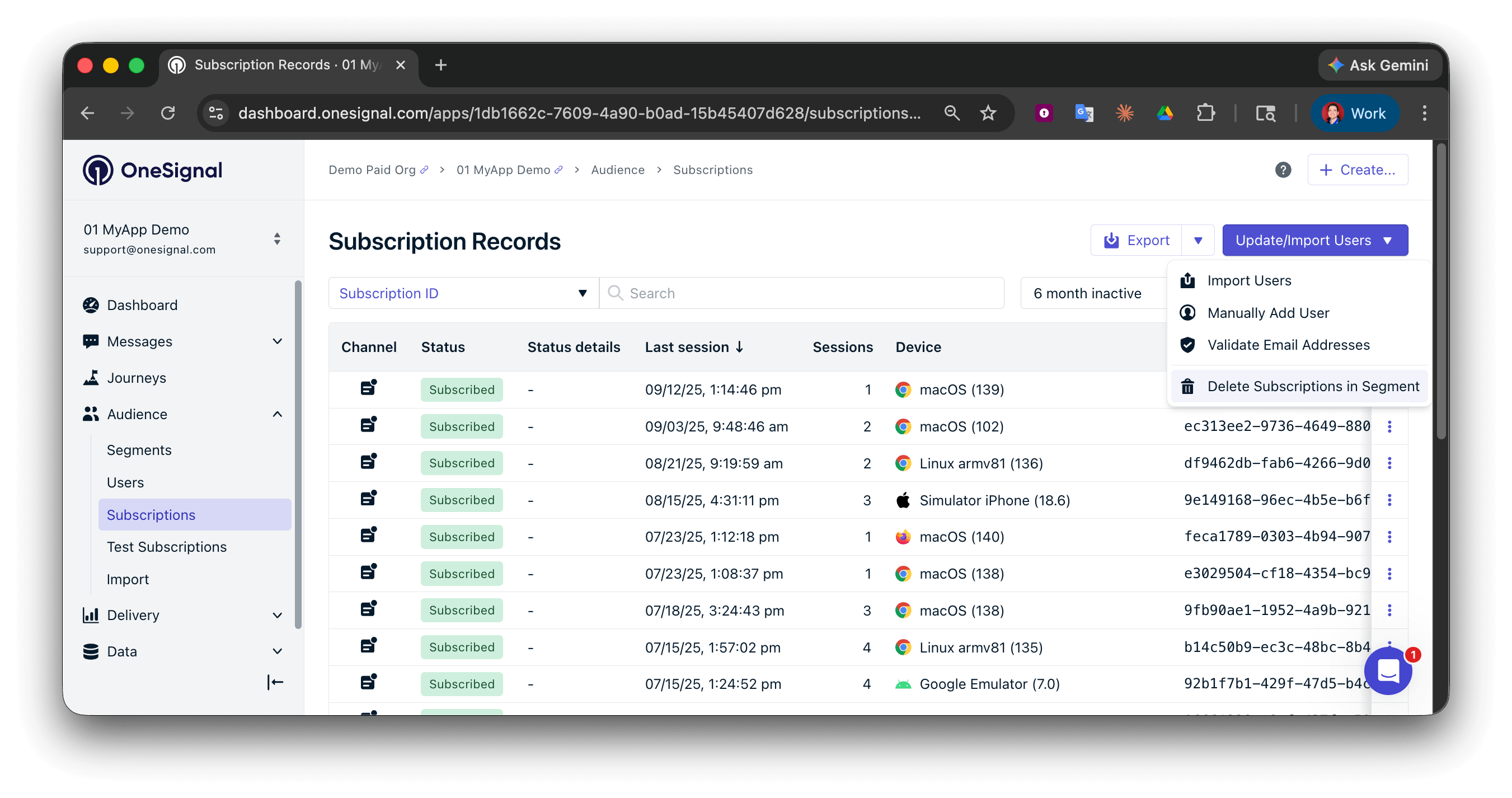
 In **Audience > Subscriptions**:
1. Select the segment.
2. Click the arrow next to **Update/Import Users**.
3. Choose **Delete Subscriptions In Segment**.
This will only delete subscribed users. See section below on removing all records that meet certain segment filters and rules.
In **Audience > Subscriptions**:
1. Select the segment.
2. Click the arrow next to **Update/Import Users**.
3. Choose **Delete Subscriptions In Segment**.
This will only delete subscribed users. See section below on removing all records that meet certain segment filters and rules.
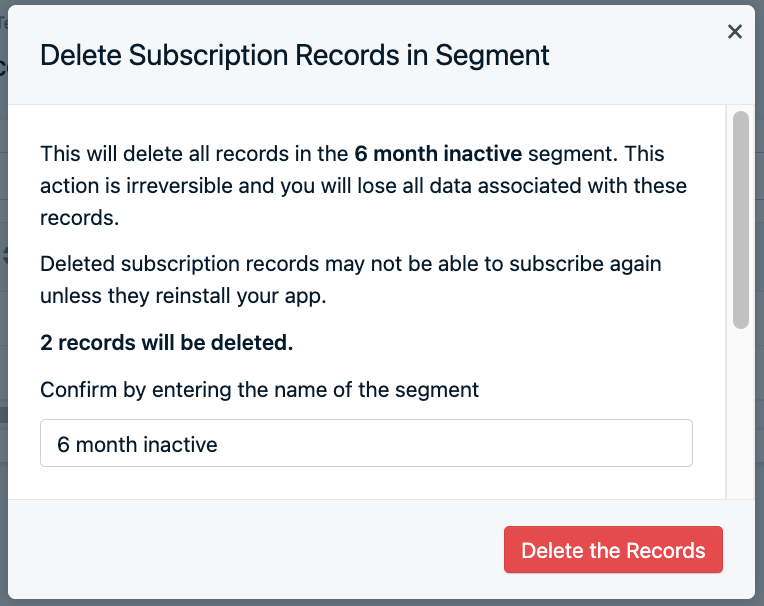
 You'll see a confirmation screen with the number of records and a prompt to input the segment name.
Once you confirm deletion, it cannot be undone.
You'll see a confirmation screen with the number of records and a prompt to input the segment name.
Once you confirm deletion, it cannot be undone.
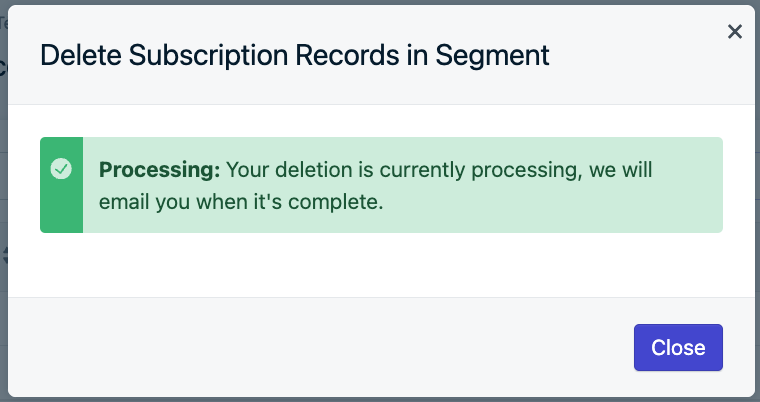
 After confirmation, a success screen appears and you receive a confirmation email. You can only delete one segment at a time per app.
 ### Deleting all records in a segment
Deleting records through the dashboard will not delete unsubscribed records that may match the segment criteria. In order to remove all records that meet the conditions of the segment, you must first get the full list of users.
**Dashboard export**
1. From the segments page, select the 3 vertical dots to the right of the segment you're looking to delete records from.
2. Select "View Subscriptions" to be taken to the Subscriptions page sorted by the records that meet the segment criteria.
3. Select "Export" on the top right of the page and check the box saying "Include unsubscribed records"
**API exports**
1. Make a request to the [Export Subscriptions endpoint](/reference/csv-export) with the following body parameters included:
* `"include_unsubscribed": true`
* `"segment_name": "your_segment_name"`
2. Open the gzip link returned from the request. Depending on the file size the link may be ready before it can actually be downloaded. In this case you would wait and try to open again, or poll the file url until it becomes available.
Once you have the list of subscription records, you can make a [**Delete User**](/reference/delete-user) or [**Delete Subscription**](/reference/delete-subscription) request to permanently delete the exported records. See [here](/reference/rate-limits#api-rate-limits) for limits when running delete requests in parallel.
If you are unable to make API requests, please reach out to `support@onesignal.com` with details on which steps you followed.
***
## FAQ
### Can I undo a user or subscription deletion?
No. Deletions are permanent and cannot be reversed. Always export your data and verify your audience before proceeding.
### How can a deleted user start receiving messages again?
Deleted users can re-subscribe through the following channels:
* **Web:** Clear browser cookies and revisit your site.
* **Mobile:** Reopen the app (the app must use the latest OneSignal SDK).
* **Email/SMS:** The user must be re-added with the same email address or phone number.
### When does OneSignal automatically delete subscriptions?
On the **Free Plan**, OneSignal automatically deletes dormant push subscriptions after 18 months of inactivity. On **Paid Plans**, subscriptions are kept until you manually delete them.
### When does OneSignal automatically delete users?
OneSignal deletes a User automatically when their last Subscription is deleted and the User has no External ID or aliases. Users with an External ID or alias are kept with all of their properties, even with zero Subscriptions. See [Automatic user deletion](#automatic-user-deletion).
***
Understand the OneSignal User model and how users relate to subscriptions.
Learn about subscription types and how they connect to users.
Build audience segments to target or manage groups of users.
Download a CSV of user data for backup or compliance purposes.
### Deleting all records in a segment
Deleting records through the dashboard will not delete unsubscribed records that may match the segment criteria. In order to remove all records that meet the conditions of the segment, you must first get the full list of users.
**Dashboard export**
1. From the segments page, select the 3 vertical dots to the right of the segment you're looking to delete records from.
2. Select "View Subscriptions" to be taken to the Subscriptions page sorted by the records that meet the segment criteria.
3. Select "Export" on the top right of the page and check the box saying "Include unsubscribed records"
**API exports**
1. Make a request to the [Export Subscriptions endpoint](/reference/csv-export) with the following body parameters included:
* `"include_unsubscribed": true`
* `"segment_name": "your_segment_name"`
2. Open the gzip link returned from the request. Depending on the file size the link may be ready before it can actually be downloaded. In this case you would wait and try to open again, or poll the file url until it becomes available.
Once you have the list of subscription records, you can make a [**Delete User**](/reference/delete-user) or [**Delete Subscription**](/reference/delete-subscription) request to permanently delete the exported records. See [here](/reference/rate-limits#api-rate-limits) for limits when running delete requests in parallel.
If you are unable to make API requests, please reach out to `support@onesignal.com` with details on which steps you followed.
***
## FAQ
### Can I undo a user or subscription deletion?
No. Deletions are permanent and cannot be reversed. Always export your data and verify your audience before proceeding.
### How can a deleted user start receiving messages again?
Deleted users can re-subscribe through the following channels:
* **Web:** Clear browser cookies and revisit your site.
* **Mobile:** Reopen the app (the app must use the latest OneSignal SDK).
* **Email/SMS:** The user must be re-added with the same email address or phone number.
### When does OneSignal automatically delete subscriptions?
On the **Free Plan**, OneSignal automatically deletes dormant push subscriptions after 18 months of inactivity. On **Paid Plans**, subscriptions are kept until you manually delete them.
### When does OneSignal automatically delete users?
OneSignal deletes a User automatically when their last Subscription is deleted and the User has no External ID or aliases. Users with an External ID or alias are kept with all of their properties, even with zero Subscriptions. See [Automatic user deletion](#automatic-user-deletion).
***
Understand the OneSignal User model and how users relate to subscriptions.
Learn about subscription types and how they connect to users.
Build audience segments to target or manage groups of users.
Download a CSV of user data for backup or compliance purposes.