> ## Documentation Index
> Fetch the complete documentation index at: https://documentation.onesignal.com/llms.txt
> Use this file to discover all available pages before exploring further.
# Email troubleshooting
> How to diagnose and fix common OneSignal email issues.
Use this guide to identify and resolve the most common OneSignal email issues, including setup problems, deliverability challenges, and design errors.
Before troubleshooting, review our [Email Setup](./email-setup) and [Email Deliverability](./email-deliverability) guides. These cover the most common causes of email issues.
## Setup issues
Most setup problems come from incorrect DNS records or limitations from your Email Service Provider (ESP).
### Verify DNS records
1. Open your DNS provider.
2. Confirm that SPF, DKIM, and MX records match our [Email DNS Configuration](./email-dns-configuration) guide.
3. Allow up to 24 hours for DNS changes to propagate.
If DNS records are misconfigured, emails may fail to send, bounce, or be marked as spam.
### Monthly send limits (non-OneSignal ESPs)
If you use SendGrid, Mailchimp, or Mailgun directly (not via OneSignal Email), your sending volume is limited by your ESP plan.\
Check your provider's logs:
* [SendGrid Activity Feed](https://www.twilio.com/docs/sendgrid/ui/analytics-and-reporting/email-activity-feed)
* [Mailchimp Activity & Reports](https://mailchimp.com/developer/transactional/docs/activity-reports/)
* [Mailgun Logs](https://www.mailgun.com/products/send/email-analytics/logs/)
### Too many DNS lookups
When testing SPF records with tools like [URI test](https://www.uriports.com/tools?method=spf\&domain=mail.daystrom-institute.com), you may see:
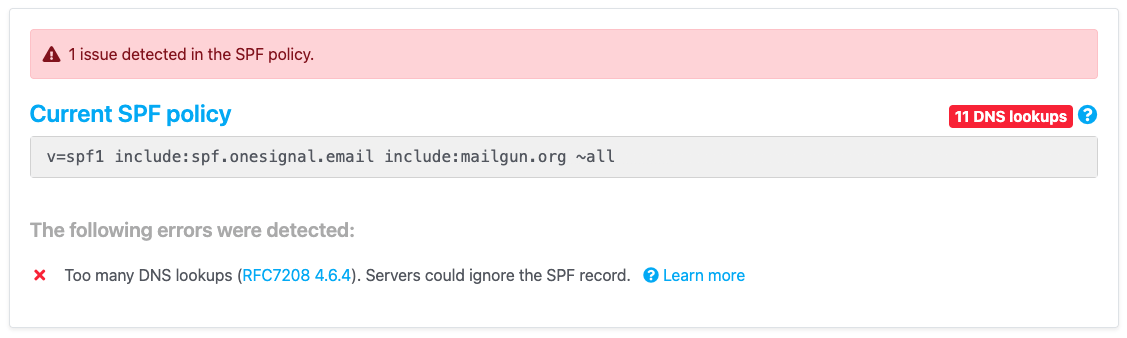 This is expected if you use the SPF record:
```
v=spf1 include:spf.onesignal.email include:mailgun.org ~all
```
OneSignal uses Mailgun "under the hood" as our Email Service Provider. This means the SPF lookups point to the same IP ranges and doesn't actually add any additional lookups. To remove the warning, you can simplify to:
```
v=spf1 include:mailgun.org ~all
```
This will prevent the error and not impact OneSignal email sending.
### Multiple TXT records for sender domain
You can only have **one** SPF record for your sending domain.\
Check with [WhatsMyDNS TXT lookup](https://www.whatsmydns.net/#TXT) to confirm you do not have multiple entries.
***
## Deliverability issues
Deliverability problems include slow sends, spam folder placement, and email bounces.
### Delayed emails
If your sending domain is new or has low reputation, ISPs (Gmail, Outlook, Yahoo) may delay delivery. This is called **rate limiting** or **greylisting**. When looking at your [Email Message Reports](./email-message-reports), you can check the details of how long it took us to send the message.
This is expected if you use the SPF record:
```
v=spf1 include:spf.onesignal.email include:mailgun.org ~all
```
OneSignal uses Mailgun "under the hood" as our Email Service Provider. This means the SPF lookups point to the same IP ranges and doesn't actually add any additional lookups. To remove the warning, you can simplify to:
```
v=spf1 include:mailgun.org ~all
```
This will prevent the error and not impact OneSignal email sending.
### Multiple TXT records for sender domain
You can only have **one** SPF record for your sending domain.\
Check with [WhatsMyDNS TXT lookup](https://www.whatsmydns.net/#TXT) to confirm you do not have multiple entries.
***
## Deliverability issues
Deliverability problems include slow sends, spam folder placement, and email bounces.
### Delayed emails
If your sending domain is new or has low reputation, ISPs (Gmail, Outlook, Yahoo) may delay delivery. This is called **rate limiting** or **greylisting**. When looking at your [Email Message Reports](./email-message-reports), you can check the details of how long it took us to send the message.
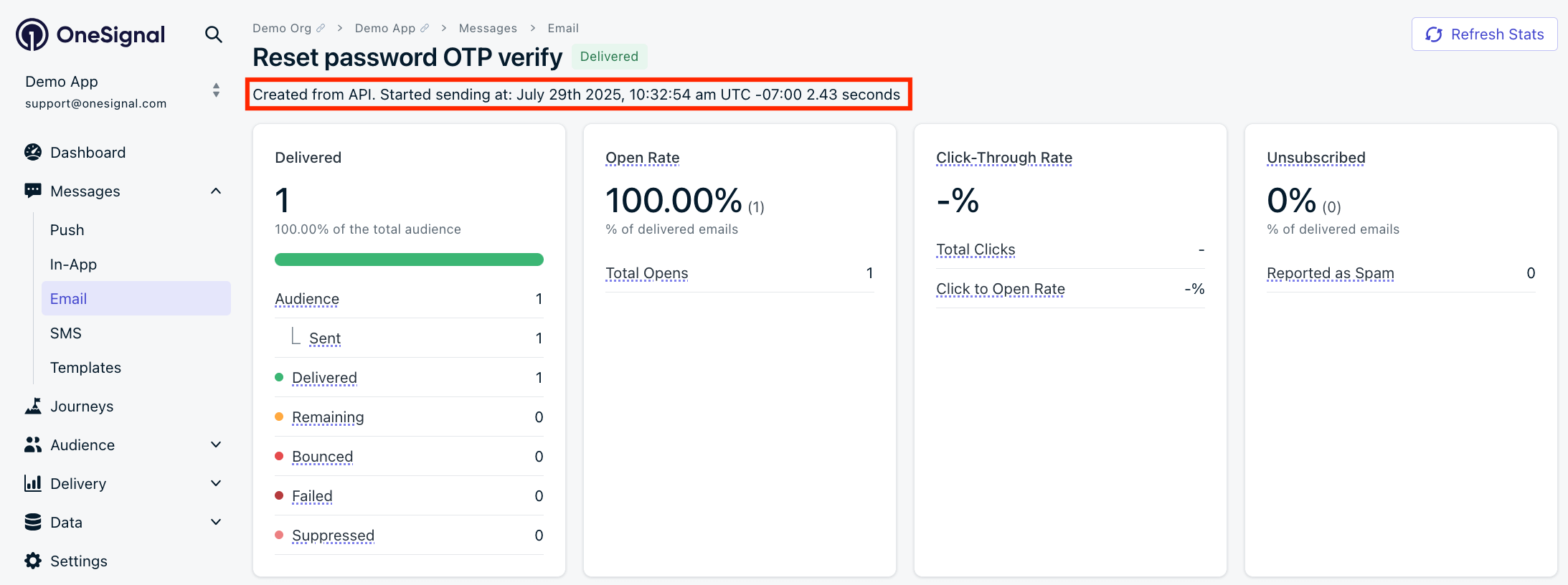 In this example, we see the email was sent from OneSignal in under 3 seconds. We send it to the Email Service Provider, which then goes to the recipient's ISP. These email servers may delay the email up to several hours before it gets delivered to the recipient.
Follow our [Email Reputation Best Practices](./email-reputation-best-practices) to speed up delivery.
### Too old failures
A "Too old" failure means the recipient's mail server did not accept the message within the 8-hour retry window. The most common cause is recipient-side email security policy, not your sending configuration.
If you see "Too old" failures in your [Email Message Reports](./email-message-reports), work through the steps below to identify the cause.
Export your failure logs and group the "Too old" failures by recipient domain. A concentrated pattern (many failures across multiple recipients at the same company or using the same email security vendor) points to a recipient-side gateway policy rather than a sender-side issue.
Recipients using corporate email security gateways like Barracuda, Mimecast, Proofpoint, or Cisco IronPort may have policies that defer or block mail from senders not on their allowlist. These gateways issue repeated 451 deferrals, and after 8 hours of retries the message is marked "Too old."
To confirm, check whether affected domains share a common email security vendor by looking up their MX records.
Confirm your sending IPs and domain are not on major blocklists:
* Barracuda: [Barracuda Central reputation lookup](https://www.barracudacentral.org/lookups/lookup-reputation)
* Spamhaus: [Spamhaus IP and domain lookup](https://check.spamhaus.org/)
* General: [MXToolbox blacklist check](https://mxtoolbox.com/blacklists.aspx)
A clean reputation confirms the deferrals are not caused by your sending infrastructure.
Send a test message to [About My Email](https://aboutmy.email/) to confirm SPF, DKIM, and DMARC are aligned. Authentication failures can cause some gateways to defer messages.
Filter your failure logs for domains that do not exist in DNS, such as `gmial.com` or `yaho.com`. These failures count against your sender reputation. Remove invalid addresses from your list and add [email address validation](./email-address-validation) to prevent future typos from entering your audience.
If your IPs and domain pass reputation checks and authentication is aligned, the failures are originating on the recipient side.
#### Resolving recipient-side blocks
When the cause is a recipient-side email security gateway, the fix is a policy change in the recipient's environment. You can either:
* Ask the affected recipient's IT admin to allowlist your sending domain, such as `mail.yourdomain.com`, in their email security gateway.
* Remove the affected addresses from your list if allowlisting is not possible.
Recipient-side policy blocks are not caused by your ESP and will behave the same way across any email service. OneSignal uses Mailgun to deliver email, and the underlying SMTP retry behavior follows standard industry conventions.
### Emails landing in spam
The most common cause is poor sender reputation. Follow our [Email Deliverability](./email-deliverability) guide.
If you are using a third-party ESP, see:
* [SendGrid: Deny lists](https://docs.sendgrid.com/ui/sending-email/deny-lists)
* [Mailgun: Blacklist info](https://help.mailgun.com/hc/en-us/articles/115005365027-What-Is-a-Blacklist-)
* [Mailchimp: Reputation & rejections](https://mailchimp.com/developer/transactional/docs/reputation-rejections/#rejected-emails)
### Sending & receiving from the same domain
A single domain cannot use the same MX records for sending and receiving mail simultaneously. If you want to **send** from `@yourdomain.com` and also **receive** on the same domain:
* Keep your sending DNS with OneSignal.
* Point your MX records to your inbound email provider (e.g., [Google Workspace MX records](https://support.google.com/a/topic/2683820?hl=en\&ref_topic=9202)).
### Suppression lists
If an address unsubscribed or marked you as spam, your ESP will suppress sends to it.\
To resubscribe:
1. Go to **Audience > Subscriptions** in OneSignal.
2. Search for the email address.
3. Click **Unsubscribe from Email** (if subscribed) then **Resubscribe to Email**.
4. Send a test email to confirm.
### Apple Private Relay
If you send to `@privaterelay.appleid.com` addresses, you must verify your sending domain in your [Apple Developer account](https://developer.apple.com/help/account/configure-app-capabilities/configure-private-email-relay-service/).\
Unverified domains will result in dropped emails.
### API key too restrictive
If using SendGrid or Mailchimp, ensure your API key has the [minimum required permissions](./sendgrid-setup#what-are-the-minimum-api-restrictions-i-can-allow).
***
## Email design
These are problems inside the email content itself.
### Links not working
Usually caused by missing or incorrect CNAME configuration.\
If using a third-party ESP, follow their tracking domain setup.
### Buttons not clickable
* Ensure the URL is correct and starts with `https://`.
* Avoid testing from your spam folder—some email clients block links there.
### Adding images to preheader
Gmail supports promotional images in preheaders (deal annotations, product carousels).\
See [Gmail Developer Portal](https://developers.google.com/gmail/promotab/overview) for setup.
***
## Email Service Providers (ESPs)
Common questions or issues related to using our integrations with SendGrid, Mailchimp, or Mailgun.
### Do I have to pay another provider for email?
If you use the [OneSignal Email Setup](./email-setup) then we will manage your email accounts and you do not need to use another email provider. If you plan to use Sendgrid, Mailchimp, or Mailgun, then you will need to continue to pay your email service provider directly.
## What is OneSignal's email throughput?
OneSignal generally sends messages at a rate of 1,000 to 5,000 per second to the Email Service Provider. It is up to your ESP to deliver the emails to your users.
OneSignal uses Mailgun for OneSignal Email and Mailgun advertises that they can support up to [15 million emails per hour](https://www.mailgun.com/blog/product/how-quickly-can-mailgun-process-my-messages-introducing-the-rapid-fire-throughput-sla/).
***
In this example, we see the email was sent from OneSignal in under 3 seconds. We send it to the Email Service Provider, which then goes to the recipient's ISP. These email servers may delay the email up to several hours before it gets delivered to the recipient.
Follow our [Email Reputation Best Practices](./email-reputation-best-practices) to speed up delivery.
### Too old failures
A "Too old" failure means the recipient's mail server did not accept the message within the 8-hour retry window. The most common cause is recipient-side email security policy, not your sending configuration.
If you see "Too old" failures in your [Email Message Reports](./email-message-reports), work through the steps below to identify the cause.
Export your failure logs and group the "Too old" failures by recipient domain. A concentrated pattern (many failures across multiple recipients at the same company or using the same email security vendor) points to a recipient-side gateway policy rather than a sender-side issue.
Recipients using corporate email security gateways like Barracuda, Mimecast, Proofpoint, or Cisco IronPort may have policies that defer or block mail from senders not on their allowlist. These gateways issue repeated 451 deferrals, and after 8 hours of retries the message is marked "Too old."
To confirm, check whether affected domains share a common email security vendor by looking up their MX records.
Confirm your sending IPs and domain are not on major blocklists:
* Barracuda: [Barracuda Central reputation lookup](https://www.barracudacentral.org/lookups/lookup-reputation)
* Spamhaus: [Spamhaus IP and domain lookup](https://check.spamhaus.org/)
* General: [MXToolbox blacklist check](https://mxtoolbox.com/blacklists.aspx)
A clean reputation confirms the deferrals are not caused by your sending infrastructure.
Send a test message to [About My Email](https://aboutmy.email/) to confirm SPF, DKIM, and DMARC are aligned. Authentication failures can cause some gateways to defer messages.
Filter your failure logs for domains that do not exist in DNS, such as `gmial.com` or `yaho.com`. These failures count against your sender reputation. Remove invalid addresses from your list and add [email address validation](./email-address-validation) to prevent future typos from entering your audience.
If your IPs and domain pass reputation checks and authentication is aligned, the failures are originating on the recipient side.
#### Resolving recipient-side blocks
When the cause is a recipient-side email security gateway, the fix is a policy change in the recipient's environment. You can either:
* Ask the affected recipient's IT admin to allowlist your sending domain, such as `mail.yourdomain.com`, in their email security gateway.
* Remove the affected addresses from your list if allowlisting is not possible.
Recipient-side policy blocks are not caused by your ESP and will behave the same way across any email service. OneSignal uses Mailgun to deliver email, and the underlying SMTP retry behavior follows standard industry conventions.
### Emails landing in spam
The most common cause is poor sender reputation. Follow our [Email Deliverability](./email-deliverability) guide.
If you are using a third-party ESP, see:
* [SendGrid: Deny lists](https://docs.sendgrid.com/ui/sending-email/deny-lists)
* [Mailgun: Blacklist info](https://help.mailgun.com/hc/en-us/articles/115005365027-What-Is-a-Blacklist-)
* [Mailchimp: Reputation & rejections](https://mailchimp.com/developer/transactional/docs/reputation-rejections/#rejected-emails)
### Sending & receiving from the same domain
A single domain cannot use the same MX records for sending and receiving mail simultaneously. If you want to **send** from `@yourdomain.com` and also **receive** on the same domain:
* Keep your sending DNS with OneSignal.
* Point your MX records to your inbound email provider (e.g., [Google Workspace MX records](https://support.google.com/a/topic/2683820?hl=en\&ref_topic=9202)).
### Suppression lists
If an address unsubscribed or marked you as spam, your ESP will suppress sends to it.\
To resubscribe:
1. Go to **Audience > Subscriptions** in OneSignal.
2. Search for the email address.
3. Click **Unsubscribe from Email** (if subscribed) then **Resubscribe to Email**.
4. Send a test email to confirm.
### Apple Private Relay
If you send to `@privaterelay.appleid.com` addresses, you must verify your sending domain in your [Apple Developer account](https://developer.apple.com/help/account/configure-app-capabilities/configure-private-email-relay-service/).\
Unverified domains will result in dropped emails.
### API key too restrictive
If using SendGrid or Mailchimp, ensure your API key has the [minimum required permissions](./sendgrid-setup#what-are-the-minimum-api-restrictions-i-can-allow).
***
## Email design
These are problems inside the email content itself.
### Links not working
Usually caused by missing or incorrect CNAME configuration.\
If using a third-party ESP, follow their tracking domain setup.
### Buttons not clickable
* Ensure the URL is correct and starts with `https://`.
* Avoid testing from your spam folder—some email clients block links there.
### Adding images to preheader
Gmail supports promotional images in preheaders (deal annotations, product carousels).\
See [Gmail Developer Portal](https://developers.google.com/gmail/promotab/overview) for setup.
***
## Email Service Providers (ESPs)
Common questions or issues related to using our integrations with SendGrid, Mailchimp, or Mailgun.
### Do I have to pay another provider for email?
If you use the [OneSignal Email Setup](./email-setup) then we will manage your email accounts and you do not need to use another email provider. If you plan to use Sendgrid, Mailchimp, or Mailgun, then you will need to continue to pay your email service provider directly.
## What is OneSignal's email throughput?
OneSignal generally sends messages at a rate of 1,000 to 5,000 per second to the Email Service Provider. It is up to your ESP to deliver the emails to your users.
OneSignal uses Mailgun for OneSignal Email and Mailgun advertises that they can support up to [15 million emails per hour](https://www.mailgun.com/blog/product/how-quickly-can-mailgun-process-my-messages-introducing-the-rapid-fire-throughput-sla/).
***