> ## Documentation Index
> Fetch the complete documentation index at: https://documentation.onesignal.com/llms.txt
> Use this file to discover all available pages before exploring further.
# Engagement trends
> Track user engagement across push, in-app, email, SMS, and Live Activities with the Engagement Trends chart in OneSignal. View delivery, click-through, and unsubscribe rates, and export to CSV.
The **Engagement Trends** chart on the OneSignal dashboard shows delivery and engagement rates across push, in-app, email, SMS/RCS, and Live Activities over time. It aggregates every message sent from the dashboard, API, or a Journey, and can be exported to CSV.
Engagement Trends retains up to two years of data depending on your pricing plan. Data is available starting January 10, 2025.
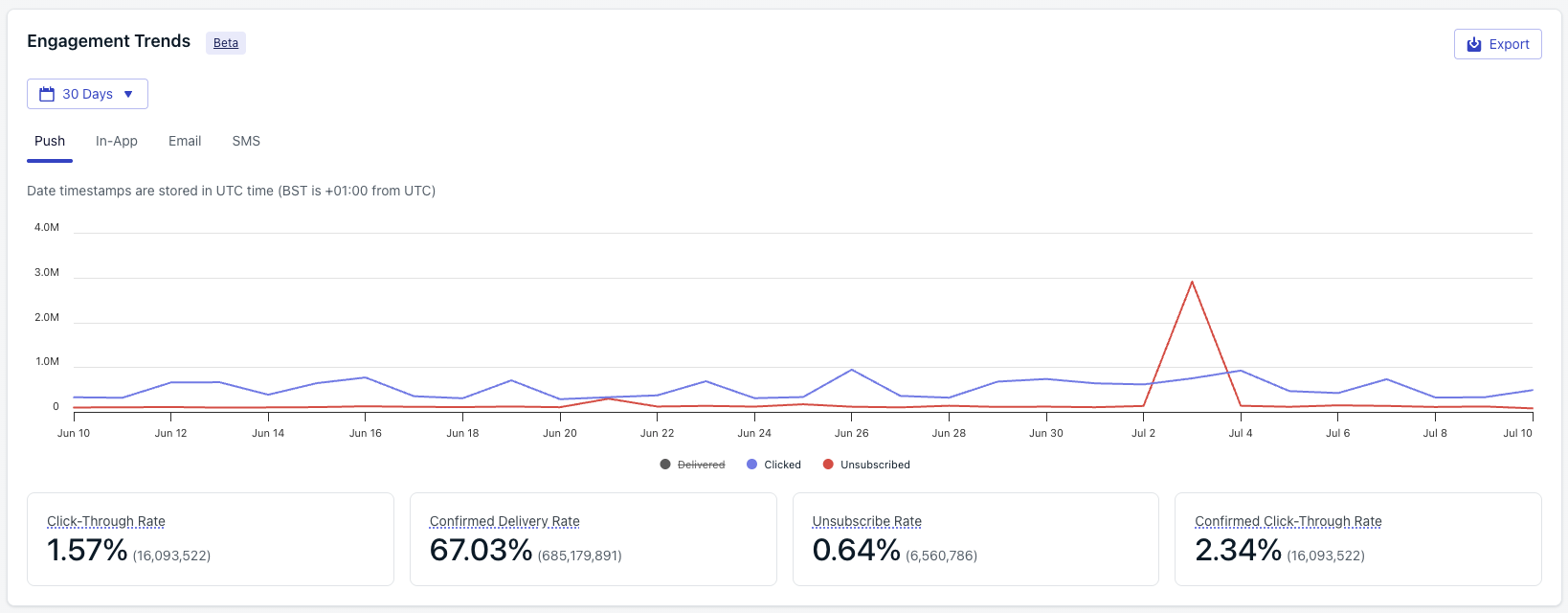 ## Metrics by channel
| Metric | Description |
| :--------------------------- | :----------------------------------------------------------------------------------------------------------------------------------------------------------------------------------------------------------------------------------------------------------------------------------------------- |
| Delivered | The number of push notifications successfully delivered to the push services (FCM, APNs). |
| Clicked | The number of clicks on push notifications. Push notifications can only be clicked once per Subscription. |
| Unsubscribed | The number of push Subscriptions marked unsubscribed because their push token was unregistered, either explicitly or due to [token expiration](./fcm-expired-token-faq). These Subscriptions won't receive further notifications unless they re-subscribe. See [Subscriptions](./subscriptions). |
| Click-Through Rate | Calculated as `(Clicked / Delivered) * 100%`. |
| Confirmed Receipt Rate | Percentage of delivered notifications confirmed as received by the device. Calculated as `(Confirmed Receipts / Delivered) * 100%`. |
| Unsubscribe Rate | Calculated as `(Unsubscribed / Delivered) * 100%`. |
| Confirmed Click-Through Rate | Calculated as `(Clicked / Confirmed Receipts) * 100%`. |
Per-message delivery, click, and confirmed-receipt breakdowns for push notifications.
| Metric | Description |
| :----------------- | :-------------------------------------------------------------------------------------------------------------------------------------------------------------------------- |
| Impressions | The number of times an in-app message successfully displayed to a Subscription. Depending on your in-app settings, a single Subscription may register multiple impressions. |
| Clicked | The number of unique in-app message clicks. Counted once per Subscription. |
| Click-Through Rate | The ratio of unique clicks to impressions, expressed as a percentage. |
Per-message impressions, clicks, and click-through rates for in-app messages.
| Metric | Description |
| :----------------- | :-------------------------------------------------------------------------------------------------------------------------------------------------------------------------------------------------------------- |
| Delivered | The number of emails successfully delivered to the recipient's inbox server. |
| Opened | The number of individual recipients who opened the email. User privacy settings can affect these numbers. See [Email message reports](./email-message-reports). |
| Clicked | The number of individual recipients who clicked a link in the email. |
| Unsubscribed | The number of recipients who opted out of further emails using the [unsubscribe link](./unsubscribe-links-email-subscriptions). Email subscriptions are marked unsubscribed immediately on receiving the event. |
| Click-Through Rate | Calculated as `(Clicked / Delivered) * 100%`. |
| Open Rate | Calculated as `(Opened / Delivered) * 100%`. |
| Unsubscribe Rate | Calculated as `(Unsubscribed / Delivered) * 100%`. |
| Complaint Rate | Calculated as `(Reported as Spam / Delivered) * 100%`. |
Per-message delivery, open, click, bounce, and unsubscribe breakdowns for emails.
| Metric | Description |
| :------------------ | :--------------------------------------------------------------------------------------------------------- |
| Delivered | The number of messages successfully delivered to the carrier as reported by Twilio. |
| Replied (keywords) | The number of [keywords](./keywords) received by OneSignal, excluding consent keywords. |
| Unsubscribed | The number of [opt-out keywords](./sms-consent-keyword-management#opt-out-keywords) received by OneSignal. |
| Keywords Reply Rate | Calculated as `(Replied (keywords) / Delivered) * 100%`. |
| Unsubscribe Rate | Calculated as `(Unsubscribed / Delivered) * 100%`. |
Per-message delivery, reply, and unsubscribe breakdowns for SMS and RCS messages.
| Metric | Description |
| :---------------- | :--------------------------------------------------------------------------------------------------------------------------------------------------------------------------------------------------------- |
| Sent | The number of Live Activity updates sent from OneSignal, including those successfully sent to APNs and failures. This is a composite metric and includes push-to-start and push-to-update notifications. |
| Delivered | The number of Live Activity updates successfully sent to and accepted by APNs. |
| Confirmed Receipt | The number of Live Activity updates confirmed as received by the device, verified by the OneSignal SDK. Requires iOS SDK 5.2.15+. See [Confirmed receipt](./confirmed-delivery) for platform requirements. |
| Failed | The number of push subscriptions that did not receive the Live Activity update because of an error. |
| Unsubscribed | The number of push subscriptions marked unsubscribed when users dismiss a Live Activity or disable Live Activities in device settings. |
| Clicked | The total number of clicks across all Live Activity updates, including repeat clicks from the same user. |
Delivery, confirmed receipt, and click breakdowns for iOS Live Activities.
Canonical definitions for every metric across the dashboard, API, CSV, and Event Streams.
## Export chart data
Set the time range and messaging channel you want to export.
Click the export button at the top right of the chart.
OneSignal emails the CSV to the address on your current OneSignal user account. The file contains per-day engagement statistics for the filtered range.
## FAQ
### How far back does Engagement Trends data go?
Data is available starting January 10, 2025. Retention is up to two years depending on your pricing plan.
### Why do my Engagement Trends numbers differ from an individual message report?
Engagement Trends aggregates every message sent in the filtered time range across the selected channel, including messages sent from the API and Journeys. Individual message reports show only that one send. Small rounding differences between the rate calculations shown here and on per-message reports can also occur because Engagement Trends groups by day.
### Why does SMS **Delivered** on this chart differ from the count in Twilio?
OneSignal's SMS **Delivered** reflects carrier-confirmed receipt reported back by Twilio. Differences usually come from messages still in flight at comparison time, late status callbacks from carriers, or messages that moved to **Provider Undelivered** after initial acceptance. See the [Metrics glossary](./analytics-metrics-glossary) for the full SMS lifecycle.
### Can I get raw per-event data instead of aggregated daily statistics?
Yes. Use [Event Streams](./event-streams) to forward real-time message events to your own analytics stack, or [Exporting data](./exporting-data) to download the Notifications CSV for a range of messages.
### Why is Live Activities **Unsubscribed** counted when a user dismisses the activity?
Once a user dismisses a Live Activity or disables Live Activities in device settings, APNs returns an error indicating the activity token is no longer valid. OneSignal counts these push subscriptions as unsubscribed for Live Activity delivery and stops sending further updates.
## Related
Canonical definitions for every metric across push, email, SMS/RCS, in-app, and Live Activities.
Tour the dashboards, APIs, and export tools OneSignal provides for measuring performance.
Send real-time message events to your warehouse for custom analysis.
Export message and subscription data to CSV for offline analysis.
## Metrics by channel
| Metric | Description |
| :--------------------------- | :----------------------------------------------------------------------------------------------------------------------------------------------------------------------------------------------------------------------------------------------------------------------------------------------- |
| Delivered | The number of push notifications successfully delivered to the push services (FCM, APNs). |
| Clicked | The number of clicks on push notifications. Push notifications can only be clicked once per Subscription. |
| Unsubscribed | The number of push Subscriptions marked unsubscribed because their push token was unregistered, either explicitly or due to [token expiration](./fcm-expired-token-faq). These Subscriptions won't receive further notifications unless they re-subscribe. See [Subscriptions](./subscriptions). |
| Click-Through Rate | Calculated as `(Clicked / Delivered) * 100%`. |
| Confirmed Receipt Rate | Percentage of delivered notifications confirmed as received by the device. Calculated as `(Confirmed Receipts / Delivered) * 100%`. |
| Unsubscribe Rate | Calculated as `(Unsubscribed / Delivered) * 100%`. |
| Confirmed Click-Through Rate | Calculated as `(Clicked / Confirmed Receipts) * 100%`. |
Per-message delivery, click, and confirmed-receipt breakdowns for push notifications.
| Metric | Description |
| :----------------- | :-------------------------------------------------------------------------------------------------------------------------------------------------------------------------- |
| Impressions | The number of times an in-app message successfully displayed to a Subscription. Depending on your in-app settings, a single Subscription may register multiple impressions. |
| Clicked | The number of unique in-app message clicks. Counted once per Subscription. |
| Click-Through Rate | The ratio of unique clicks to impressions, expressed as a percentage. |
Per-message impressions, clicks, and click-through rates for in-app messages.
| Metric | Description |
| :----------------- | :-------------------------------------------------------------------------------------------------------------------------------------------------------------------------------------------------------------- |
| Delivered | The number of emails successfully delivered to the recipient's inbox server. |
| Opened | The number of individual recipients who opened the email. User privacy settings can affect these numbers. See [Email message reports](./email-message-reports). |
| Clicked | The number of individual recipients who clicked a link in the email. |
| Unsubscribed | The number of recipients who opted out of further emails using the [unsubscribe link](./unsubscribe-links-email-subscriptions). Email subscriptions are marked unsubscribed immediately on receiving the event. |
| Click-Through Rate | Calculated as `(Clicked / Delivered) * 100%`. |
| Open Rate | Calculated as `(Opened / Delivered) * 100%`. |
| Unsubscribe Rate | Calculated as `(Unsubscribed / Delivered) * 100%`. |
| Complaint Rate | Calculated as `(Reported as Spam / Delivered) * 100%`. |
Per-message delivery, open, click, bounce, and unsubscribe breakdowns for emails.
| Metric | Description |
| :------------------ | :--------------------------------------------------------------------------------------------------------- |
| Delivered | The number of messages successfully delivered to the carrier as reported by Twilio. |
| Replied (keywords) | The number of [keywords](./keywords) received by OneSignal, excluding consent keywords. |
| Unsubscribed | The number of [opt-out keywords](./sms-consent-keyword-management#opt-out-keywords) received by OneSignal. |
| Keywords Reply Rate | Calculated as `(Replied (keywords) / Delivered) * 100%`. |
| Unsubscribe Rate | Calculated as `(Unsubscribed / Delivered) * 100%`. |
Per-message delivery, reply, and unsubscribe breakdowns for SMS and RCS messages.
| Metric | Description |
| :---------------- | :--------------------------------------------------------------------------------------------------------------------------------------------------------------------------------------------------------- |
| Sent | The number of Live Activity updates sent from OneSignal, including those successfully sent to APNs and failures. This is a composite metric and includes push-to-start and push-to-update notifications. |
| Delivered | The number of Live Activity updates successfully sent to and accepted by APNs. |
| Confirmed Receipt | The number of Live Activity updates confirmed as received by the device, verified by the OneSignal SDK. Requires iOS SDK 5.2.15+. See [Confirmed receipt](./confirmed-delivery) for platform requirements. |
| Failed | The number of push subscriptions that did not receive the Live Activity update because of an error. |
| Unsubscribed | The number of push subscriptions marked unsubscribed when users dismiss a Live Activity or disable Live Activities in device settings. |
| Clicked | The total number of clicks across all Live Activity updates, including repeat clicks from the same user. |
Delivery, confirmed receipt, and click breakdowns for iOS Live Activities.
Canonical definitions for every metric across the dashboard, API, CSV, and Event Streams.
## Export chart data
Set the time range and messaging channel you want to export.
Click the export button at the top right of the chart.
OneSignal emails the CSV to the address on your current OneSignal user account. The file contains per-day engagement statistics for the filtered range.
## FAQ
### How far back does Engagement Trends data go?
Data is available starting January 10, 2025. Retention is up to two years depending on your pricing plan.
### Why do my Engagement Trends numbers differ from an individual message report?
Engagement Trends aggregates every message sent in the filtered time range across the selected channel, including messages sent from the API and Journeys. Individual message reports show only that one send. Small rounding differences between the rate calculations shown here and on per-message reports can also occur because Engagement Trends groups by day.
### Why does SMS **Delivered** on this chart differ from the count in Twilio?
OneSignal's SMS **Delivered** reflects carrier-confirmed receipt reported back by Twilio. Differences usually come from messages still in flight at comparison time, late status callbacks from carriers, or messages that moved to **Provider Undelivered** after initial acceptance. See the [Metrics glossary](./analytics-metrics-glossary) for the full SMS lifecycle.
### Can I get raw per-event data instead of aggregated daily statistics?
Yes. Use [Event Streams](./event-streams) to forward real-time message events to your own analytics stack, or [Exporting data](./exporting-data) to download the Notifications CSV for a range of messages.
### Why is Live Activities **Unsubscribed** counted when a user dismisses the activity?
Once a user dismisses a Live Activity or disables Live Activities in device settings, APNs returns an error indicating the activity token is no longer valid. OneSignal counts these push subscriptions as unsubscribed for Live Activity delivery and stops sending further updates.
## Related
Canonical definitions for every metric across push, email, SMS/RCS, in-app, and Live Activities.
Tour the dashboards, APIs, and export tools OneSignal provides for measuring performance.
Send real-time message events to your warehouse for custom analysis.
Export message and subscription data to CSV for offline analysis.