> ## Documentation Index
> Fetch the complete documentation index at: https://documentation.onesignal.com/llms.txt
> Use this file to discover all available pages before exploring further.
# Identity verification
> Prevent user impersonation by requiring server-generated JWTs to verify External User IDs, email, and SMS subscriptions sent to OneSignal.
## Overview
OneSignal offers an enhanced security feature called Identity Verification to help prevent user impersonation. This feature utilizes JSON Web Tokens – or [JWTs](https://jwt.io/introduction), securely generated on your server. To verify subscription information, these tokens are passed to your app and OneSignal’s API.
Enable Identity Verification to secure:
* Logging in users
* Adding email subscriptions
* Adding SMS subscriptions
* Modifying user identities
Identity Verification is currently in beta. Contact `support@onesignal.com` to have it enabled for your account. Once support enables it, you activate it in your dashboard (see [Step 5](#enable-token-identity-verification-in-the-dashboard)).
## Prerequisites
* An existing OneSignal app with a configured push platform.
* A mobile app integrated with one of the supported SDKs:
* [OneSignal Android SDK 5.2.0+](https://github.com/OneSignal/OneSignal-Android-SDK/releases)
* [OneSignal iOS SDK 5.3.0+](https://github.com/OneSignal/OneSignal-iOS-SDK/releases)
Wrapper SDK support (Flutter, React Native, Unity, etc.) is coming soon.
## Setup
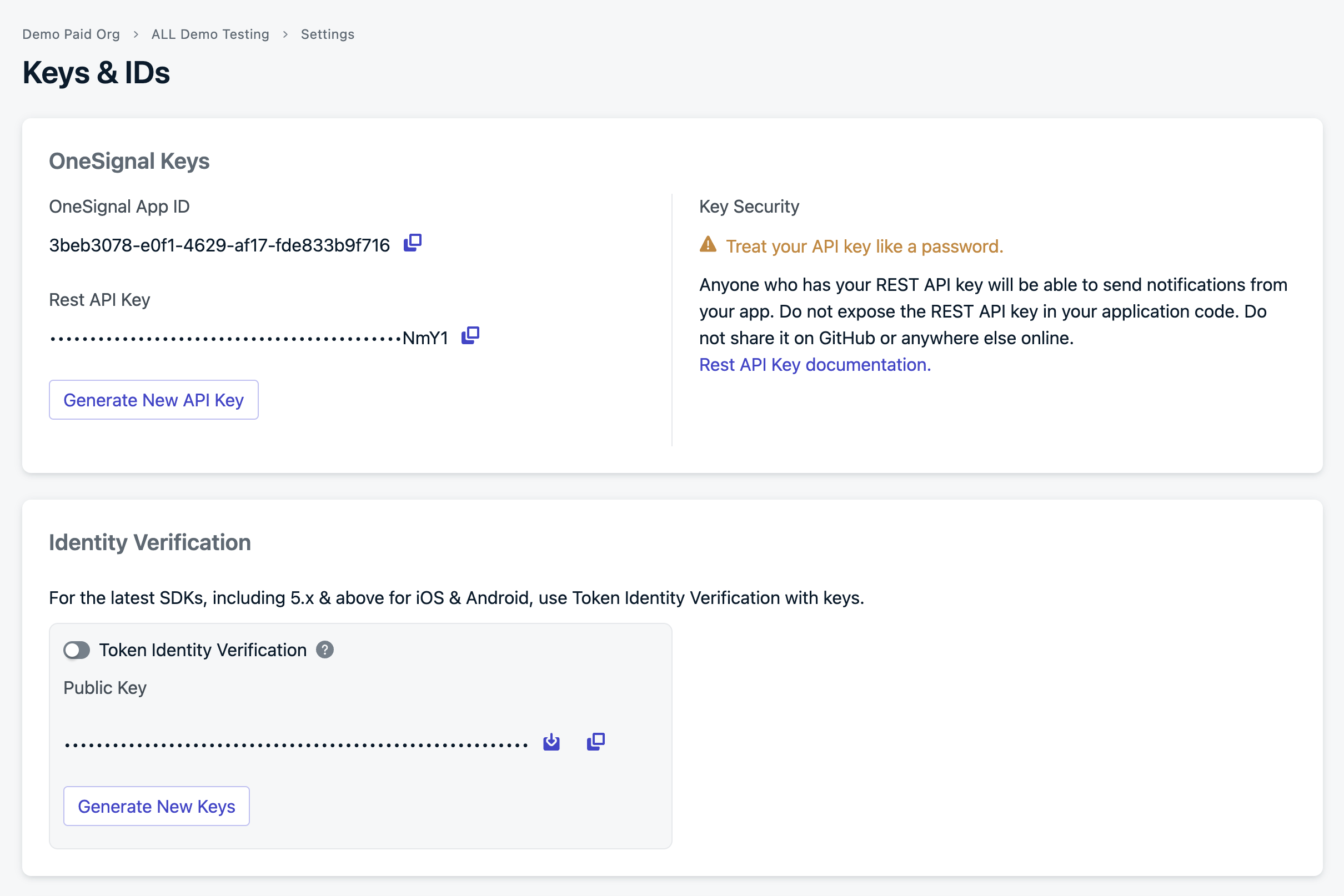
Log in to your OneSignal account and navigate to **Settings > Keys & IDs > Identity Verification**.
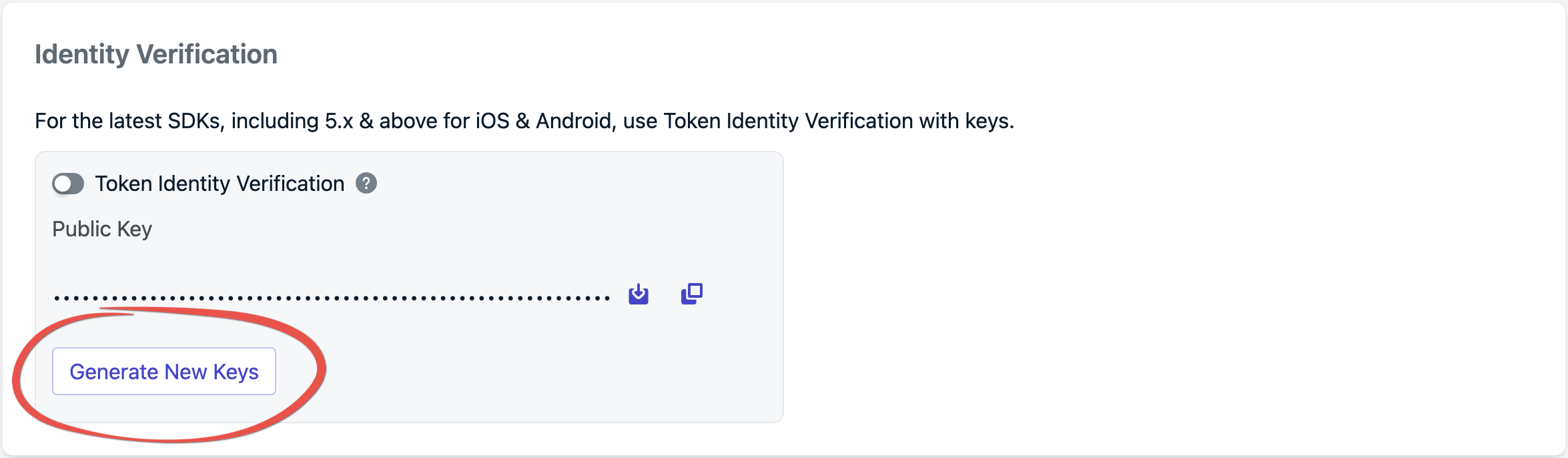
 Click **Generate New Keys** to create a new key pair.
 Download the PEM file or copy the private key, making sure to store the private key securely.
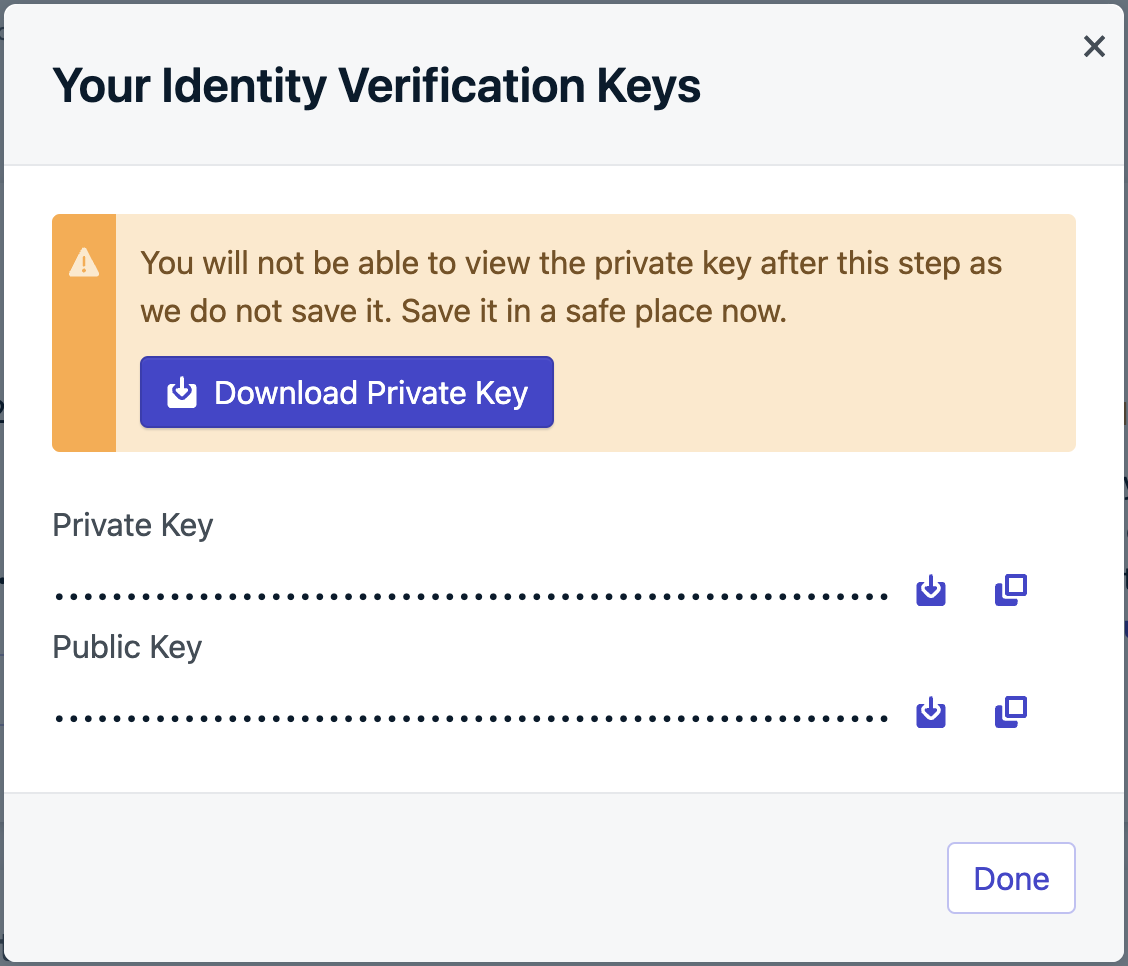 Always store your private keys in a secure environment, such as a key management system. Never expose private keys in client-side code, public repositories, or logs.
Identity verification requires authenticating the end-user with your authentication server **before** logging them into OneSignal. When the end-user authenticates with your backend, generate the token and include it in the auth response to the device. If your app doesn’t run a backend server, consider setting up a lightweight server to verify users and generate these tokens.
#### JWT payload
The JWT can have the following properties:
Your OneSignal App ID
The token expiration date.
The user's alias.
Required only when adding Email and SMS subscriptions to a user.
#### Signing the JWT
Sign the JWT using the ES256 algorithm. Ensure your backend is configured to use this signing method to avoid verification issues when sending the JWT to OneSignal. We recommend a [JWT Library](https://jwt.io/libraries) to do this.
Example using [jsonwebtoken](https://www.npmjs.com/package/jsonwebtoken):
```typescript Node.js theme={null}
import jwt from 'jsonwebtoken';
const APP_ID = process.env['ONESIGNAL_APP_ID']
const IDENTITY_VERIFICATION_SECRET = process.env['ONESIGNAL_IDENTITY_VERIFICATION_SECRET_KEY']
// Generates JWT, potentially with subscription claims, for the user identified by the External ID
function signOneSignalJWT(externalId, subscriptions) {
return jwt.sign({
iss: APP_ID,
exp: Math.floor(Date.now() / 1000) + 3600, // 1-hour expiration
identity: {
'external_id': externalId,
},
subscriptions
},
IDENTITY_VERIFICATION_SECRET,
{ algorithm: 'ES256' });
}
// Pass this token to your mobile app to use with the `login` SDK method
const onesignalJWT = signOneSignalJWT('EXTERNAL_ID');
```
The private key is in the previous step's file we downloaded from the Dashboard.
#### Verify your JWT
Before integrating with the SDK, verify your JWT is being generated correctly by starting your server and calling the endpoint:
```typescript Node.js theme={null}
node server.js
```
```bash cURL theme={null}
curl http://localhost:3000/generate-jwt/your-external-id
```
You should receive a response like:
```json theme={null}
{
"jwt": "eyJhbGciOiJFUzI1NiIsInR5cCI6IkpXVCJ9..."
}
```
Paste the JWT value at [jwt.io](https://jwt.io) and confirm the decoded payload contains the following parameters:
```json theme={null}
{
"iss": "your-onesignal-app-id",
"exp": 1234567890,
"identity": {
"external_id": "your-external-id"
}
}
```
Confirm the following before moving on to the next step:
* `iss` matches your OneSignal App ID from **Settings > Keys & IDs**
* `identity.external_id` is present and matches the value you will pass to `OneSignal.login()`
* `exp` is a future timestamp — an expired token will be rejected by OneSignal
#### Including subscriptions
Ideally, subscription details, such as email or phone number, get included in the JWT payload when logging a user in. If these details aren’t available upfront, your verification server must provide an endpoint to generate tokens dynamically as subscription information becomes available.
Example: Generating JWT to add subscriptions
```typescript Node.js theme={null}
const subscriptions = [
{
"type": "Email",
"token": "[email protected]"
},
{
"type": "SMS",
"token": "+12345678"
}
]
const onesignalJWT = signOneSignalJWT('EXTERNAL_ID', subscriptions)
```
Once your backend generates the JWT, call the `login` method with it. This token ensures the user’s identity is verified before any changes, such as adding an email or SMS subscription, can be made.
Example of logging in:
```java java theme={null}
String externalId = "YOUR_EXTERNAL_ID";
String onesignalJWT = "YOUR_JWT_TOKEN";
OneSignal.login(externalId, onesignalJWT);
```
```kotlin kotlin theme={null}
val externalId = "YOUR_EXTERNAL_ID"
val onesignalJWT = "YOUR_JWT_TOKEN"
OneSignal.login(externalId, onesignalJWT)
```
```swift Swift theme={null}
let externalId = "YOUR_EXTERNAL_ID"
let onesignalJWT = "YOUR_JWT_TOKEN"
OneSignal.login(externalId: externalId, token: onesignalJWT)
```
```c objective-c theme={null}
NSString* externalId = @"YOUR_EXTERNAL_ID";
NSString* onesignalJWT = @"YOUR_JWT_TOKEN";
[OneSignal login:externalId withToken:onesignalJWT];
```
You’ll need to implement a dedicated endpoint on your backend to handle scenarios like token invalidation. This endpoint should provide a refreshed JWT when OneSignal requests an update.
Example of handling token invalidation and refreshing the JWT:
```java java theme={null}
OneSignal.addUserJwtInvalidatedListener(event -> {
// Get the expired user's External ID
String externalId = event.getExternalId();
// Fetch a new JWT from your backend for the user
String onesignalJWT = "yourUpdatedToken";
// Provide the new JWT to the SDK
OneSignal.updateUserJwt(externalId, onesignalJWT);
});
```
```kotlin kotlin theme={null}
OneSignal.addUserJwtInvalidatedListener(
object : IUserJwtInvalidatedListener {
override fun onUserJwtInvalidated(event: UserJwtInvalidatedEvent) {
val externalId = event.externalId
val onesignalJWT = ""
updateUserJwt(externalId, onesignalJWT)
}
},
)
```
```swift Swift theme={null}
class AppDelegate: UIResponder, UIApplicationDelegate, OSUserJwtInvalidatedListener {
func application(_ application: UIApplication, didFinishLaunchingWithOptions launchOptions: [UIApplication.LaunchOptionsKey: Any]? = nil) -> Bool {
// Set self to listen for JWT invalidated events
OneSignal.addUserJwtInvalidatedListener(self)
// Remove the JWT listener as needed by calling:
// `OneSignal.removeUserJwtInvalidatedListener(self)`
}
// Required to conform to `OSUserJwtInvalidatedListener` protocol
func onUserJwtInvalidated(event: OneSignalUser.OSUserJwtInvalidatedEvent) {
// Get the expired user's External ID
let externalId = event.externalId
// Fetch a new JWT from your backend for the user
let onesignalJWT = "yourUpdatedToken"
// Provide the new JWT to the SDK
OneSignal.updateUserJwt(externalId: externalId, token: onesignalJWT)
}
}
```
```c objective-c theme={null}
@interface MyListener: NSObject
@end
@implementation MyListener
- (void)onUserJwtInvalidatedWithEvent:(OSUserJwtInvalidatedEvent * _Nonnull)event {
// Get the expired user's External ID
NSString *externalId = event.externalId;
// Fetch a new JWT from your backend for the user
NSString *onesignalJWT = @"yourUpdatedToken";
// Provide the new JWT to the SDK
[OneSignal updateUserJwt:externalId withToken:onesignalJWT];
}
// Add or remove your User Jwt Invalidated Listener
[OneSignal addUserJwtInvalidatedListener:myListener];
[OneSignal removeUserJwtInvalidatedListener:myListener];
```
This ensures that when a user’s JWT is invalidated, a new one can be fetched from your backend and passed to OneSignal. You can also use this function to generate a token with an email and phone number, allowing you to manage email and SMS subscriptions if the token created during authentication does not contain them.
From **Settings > Keys & IDs**, toggle **Token Identity Verification** to enable.
Always store your private keys in a secure environment, such as a key management system. Never expose private keys in client-side code, public repositories, or logs.
Identity verification requires authenticating the end-user with your authentication server **before** logging them into OneSignal. When the end-user authenticates with your backend, generate the token and include it in the auth response to the device. If your app doesn’t run a backend server, consider setting up a lightweight server to verify users and generate these tokens.
#### JWT payload
The JWT can have the following properties:
Your OneSignal App ID
The token expiration date.
The user's alias.
Required only when adding Email and SMS subscriptions to a user.
#### Signing the JWT
Sign the JWT using the ES256 algorithm. Ensure your backend is configured to use this signing method to avoid verification issues when sending the JWT to OneSignal. We recommend a [JWT Library](https://jwt.io/libraries) to do this.
Example using [jsonwebtoken](https://www.npmjs.com/package/jsonwebtoken):
```typescript Node.js theme={null}
import jwt from 'jsonwebtoken';
const APP_ID = process.env['ONESIGNAL_APP_ID']
const IDENTITY_VERIFICATION_SECRET = process.env['ONESIGNAL_IDENTITY_VERIFICATION_SECRET_KEY']
// Generates JWT, potentially with subscription claims, for the user identified by the External ID
function signOneSignalJWT(externalId, subscriptions) {
return jwt.sign({
iss: APP_ID,
exp: Math.floor(Date.now() / 1000) + 3600, // 1-hour expiration
identity: {
'external_id': externalId,
},
subscriptions
},
IDENTITY_VERIFICATION_SECRET,
{ algorithm: 'ES256' });
}
// Pass this token to your mobile app to use with the `login` SDK method
const onesignalJWT = signOneSignalJWT('EXTERNAL_ID');
```
The private key is in the previous step's file we downloaded from the Dashboard.
#### Verify your JWT
Before integrating with the SDK, verify your JWT is being generated correctly by starting your server and calling the endpoint:
```typescript Node.js theme={null}
node server.js
```
```bash cURL theme={null}
curl http://localhost:3000/generate-jwt/your-external-id
```
You should receive a response like:
```json theme={null}
{
"jwt": "eyJhbGciOiJFUzI1NiIsInR5cCI6IkpXVCJ9..."
}
```
Paste the JWT value at [jwt.io](https://jwt.io) and confirm the decoded payload contains the following parameters:
```json theme={null}
{
"iss": "your-onesignal-app-id",
"exp": 1234567890,
"identity": {
"external_id": "your-external-id"
}
}
```
Confirm the following before moving on to the next step:
* `iss` matches your OneSignal App ID from **Settings > Keys & IDs**
* `identity.external_id` is present and matches the value you will pass to `OneSignal.login()`
* `exp` is a future timestamp — an expired token will be rejected by OneSignal
#### Including subscriptions
Ideally, subscription details, such as email or phone number, get included in the JWT payload when logging a user in. If these details aren’t available upfront, your verification server must provide an endpoint to generate tokens dynamically as subscription information becomes available.
Example: Generating JWT to add subscriptions
```typescript Node.js theme={null}
const subscriptions = [
{
"type": "Email",
"token": "[email protected]"
},
{
"type": "SMS",
"token": "+12345678"
}
]
const onesignalJWT = signOneSignalJWT('EXTERNAL_ID', subscriptions)
```
Once your backend generates the JWT, call the `login` method with it. This token ensures the user’s identity is verified before any changes, such as adding an email or SMS subscription, can be made.
Example of logging in:
```java java theme={null}
String externalId = "YOUR_EXTERNAL_ID";
String onesignalJWT = "YOUR_JWT_TOKEN";
OneSignal.login(externalId, onesignalJWT);
```
```kotlin kotlin theme={null}
val externalId = "YOUR_EXTERNAL_ID"
val onesignalJWT = "YOUR_JWT_TOKEN"
OneSignal.login(externalId, onesignalJWT)
```
```swift Swift theme={null}
let externalId = "YOUR_EXTERNAL_ID"
let onesignalJWT = "YOUR_JWT_TOKEN"
OneSignal.login(externalId: externalId, token: onesignalJWT)
```
```c objective-c theme={null}
NSString* externalId = @"YOUR_EXTERNAL_ID";
NSString* onesignalJWT = @"YOUR_JWT_TOKEN";
[OneSignal login:externalId withToken:onesignalJWT];
```
You’ll need to implement a dedicated endpoint on your backend to handle scenarios like token invalidation. This endpoint should provide a refreshed JWT when OneSignal requests an update.
Example of handling token invalidation and refreshing the JWT:
```java java theme={null}
OneSignal.addUserJwtInvalidatedListener(event -> {
// Get the expired user's External ID
String externalId = event.getExternalId();
// Fetch a new JWT from your backend for the user
String onesignalJWT = "yourUpdatedToken";
// Provide the new JWT to the SDK
OneSignal.updateUserJwt(externalId, onesignalJWT);
});
```
```kotlin kotlin theme={null}
OneSignal.addUserJwtInvalidatedListener(
object : IUserJwtInvalidatedListener {
override fun onUserJwtInvalidated(event: UserJwtInvalidatedEvent) {
val externalId = event.externalId
val onesignalJWT = ""
updateUserJwt(externalId, onesignalJWT)
}
},
)
```
```swift Swift theme={null}
class AppDelegate: UIResponder, UIApplicationDelegate, OSUserJwtInvalidatedListener {
func application(_ application: UIApplication, didFinishLaunchingWithOptions launchOptions: [UIApplication.LaunchOptionsKey: Any]? = nil) -> Bool {
// Set self to listen for JWT invalidated events
OneSignal.addUserJwtInvalidatedListener(self)
// Remove the JWT listener as needed by calling:
// `OneSignal.removeUserJwtInvalidatedListener(self)`
}
// Required to conform to `OSUserJwtInvalidatedListener` protocol
func onUserJwtInvalidated(event: OneSignalUser.OSUserJwtInvalidatedEvent) {
// Get the expired user's External ID
let externalId = event.externalId
// Fetch a new JWT from your backend for the user
let onesignalJWT = "yourUpdatedToken"
// Provide the new JWT to the SDK
OneSignal.updateUserJwt(externalId: externalId, token: onesignalJWT)
}
}
```
```c objective-c theme={null}
@interface MyListener: NSObject
@end
@implementation MyListener
- (void)onUserJwtInvalidatedWithEvent:(OSUserJwtInvalidatedEvent * _Nonnull)event {
// Get the expired user's External ID
NSString *externalId = event.externalId;
// Fetch a new JWT from your backend for the user
NSString *onesignalJWT = @"yourUpdatedToken";
// Provide the new JWT to the SDK
[OneSignal updateUserJwt:externalId withToken:onesignalJWT];
}
// Add or remove your User Jwt Invalidated Listener
[OneSignal addUserJwtInvalidatedListener:myListener];
[OneSignal removeUserJwtInvalidatedListener:myListener];
```
This ensures that when a user’s JWT is invalidated, a new one can be fetched from your backend and passed to OneSignal. You can also use this function to generate a token with an email and phone number, allowing you to manage email and SMS subscriptions if the token created during authentication does not contain them.
From **Settings > Keys & IDs**, toggle **Token Identity Verification** to enable.
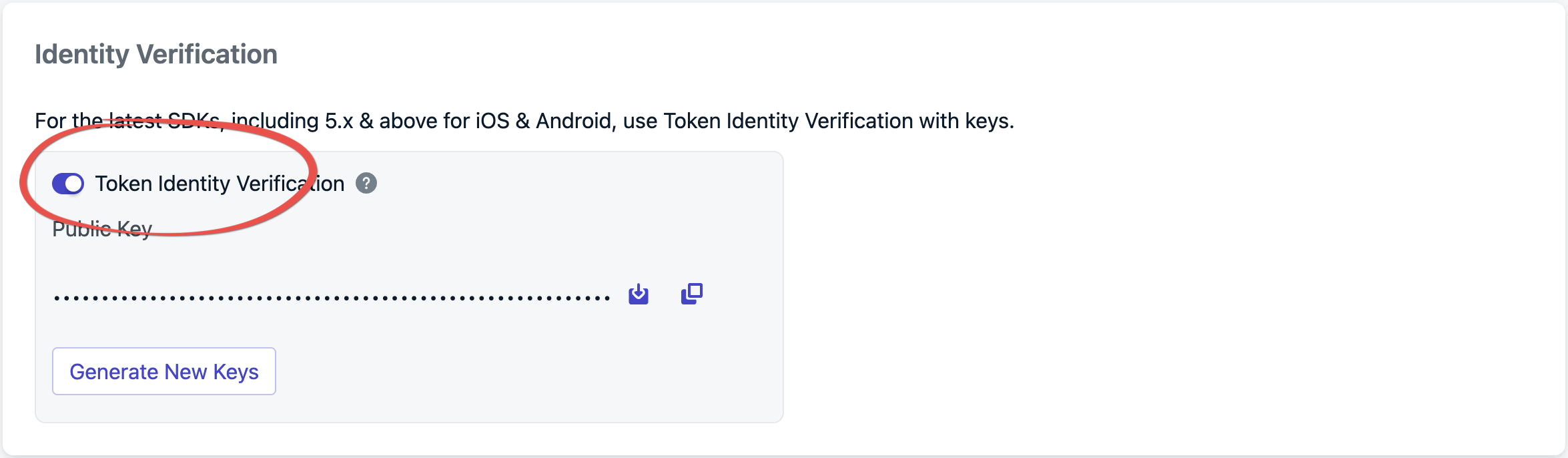 Once enabled, your app must send OneSignal JWTs to verify subscription authenticity. Additionally, your app is required to call the `login` method using a JWT generated by your identity verification token server.
## Adding subscriptions
You don’t need to take extra steps to add subscriptions from your mobile app; calling the login method automatically handles this for you.
```java java theme={null}
OneSignal.getUser().addEmail(emailAddress);
```
```kotlin kotlin theme={null}
OneSignal.getUser().addEmail(emailAddress)
```
```swift Swift theme={null}
// If you have not already included it in your JWT token, update the JWT with the email
let onesignalJWT = "newTokenThatContainsTheEmailToAdd"
OneSignal.updateUserJwt(externalId: externalId, token: onesignalJWT)
// Add the email
OneSignal.User.addEmail(emailAddress)
```
```c objective-c theme={null}
// If you have not already included it in your JWT token, update the JWT with the email
NSString *onesignalJWT = @"newTokenThatContainsTheEmailToAdd";
[OneSignal updateUserJwt:externalId withToken:onesignalJWT];
// Add the email
[OneSignal.User addEmail:emailAddress];
```
```java java theme={null}
OneSignal.getUser().addSms(smsNumber);
```
```kotlin kotlin theme={null}
OneSignal.getUser().addSms(smsNumber)
```
```swift Swift theme={null}
// If you have not already included it in your JWT token, update the JWT with the sms
let onesignalJWT = "newTokenThatContainsTheSmsToAdd"
OneSignal.updateUserJwt(externalId: externalId, token: onesignalJWT)
// Add the sms number
OneSignal.User.addSms(smsNumber)
```
```c objective-c theme={null}
// If you have not already included it in your JWT token, update the JWT with the sms
NSString *onesignalJWT = @"newTokenThatContainsTheSmsToAdd";
[OneSignal updateUserJwt:externalId withToken:onesignalJWT];
// Add the sms number
[OneSignal.User addSms:smsNumber];
```
***
## REST API
When Token Identity Verification is enabled, all requests to the following APIs must include a server-generated JWT in the headers as a bearer token, e.g., `Authorization: Bearer `.
* [Create user](/reference/create-user)
* [View user](/reference/view-user)
* [Update user](/reference/update-user)
* [Delete user](/reference/delete-user)
* [View user identity](/reference/fetch-aliases)
* [Create alias](/reference/create-alias)
* [Delete alias](/reference/delete-alias)
* [Create subscription](/reference/create-subscription)
* [Update subscription](/reference/update-subscription)
***
## FAQ
### Is identity verification required?
No, but it is strongly recommended. Without it, any client that knows a user's External ID can impersonate that user and modify their subscriptions or data.
### What happens if the JWT expires during a session?
The SDK triggers a JWT invalidation event. Implement the `addUserJwtInvalidatedListener` (see [Handle JWT lifecycle events](#handle-jwt-lifecycle-events)) to fetch a refreshed token from your backend and pass it to `updateUserJwt`.
### Which SDKs support identity verification?
Currently, the native Android SDK (5.2.0+) and iOS SDK (5.3.0+). Wrapper SDK support (Flutter, React Native, Unity, etc.) is coming soon.
### Do I need identity verification for the REST API?
When Token Identity Verification is enabled, all requests to the [supported APIs](#rest-api) must include a server-generated JWT as a bearer token in the `Authorization` header. The JWT is generated the same way as for SDK use.
### What algorithm does the JWT use?
Identity Verification requires JWTs signed with the **ES256** algorithm (ECDSA using P-256 and SHA-256). Other algorithms will be rejected.
***
Once enabled, your app must send OneSignal JWTs to verify subscription authenticity. Additionally, your app is required to call the `login` method using a JWT generated by your identity verification token server.
## Adding subscriptions
You don’t need to take extra steps to add subscriptions from your mobile app; calling the login method automatically handles this for you.
```java java theme={null}
OneSignal.getUser().addEmail(emailAddress);
```
```kotlin kotlin theme={null}
OneSignal.getUser().addEmail(emailAddress)
```
```swift Swift theme={null}
// If you have not already included it in your JWT token, update the JWT with the email
let onesignalJWT = "newTokenThatContainsTheEmailToAdd"
OneSignal.updateUserJwt(externalId: externalId, token: onesignalJWT)
// Add the email
OneSignal.User.addEmail(emailAddress)
```
```c objective-c theme={null}
// If you have not already included it in your JWT token, update the JWT with the email
NSString *onesignalJWT = @"newTokenThatContainsTheEmailToAdd";
[OneSignal updateUserJwt:externalId withToken:onesignalJWT];
// Add the email
[OneSignal.User addEmail:emailAddress];
```
```java java theme={null}
OneSignal.getUser().addSms(smsNumber);
```
```kotlin kotlin theme={null}
OneSignal.getUser().addSms(smsNumber)
```
```swift Swift theme={null}
// If you have not already included it in your JWT token, update the JWT with the sms
let onesignalJWT = "newTokenThatContainsTheSmsToAdd"
OneSignal.updateUserJwt(externalId: externalId, token: onesignalJWT)
// Add the sms number
OneSignal.User.addSms(smsNumber)
```
```c objective-c theme={null}
// If you have not already included it in your JWT token, update the JWT with the sms
NSString *onesignalJWT = @"newTokenThatContainsTheSmsToAdd";
[OneSignal updateUserJwt:externalId withToken:onesignalJWT];
// Add the sms number
[OneSignal.User addSms:smsNumber];
```
***
## REST API
When Token Identity Verification is enabled, all requests to the following APIs must include a server-generated JWT in the headers as a bearer token, e.g., `Authorization: Bearer `.
* [Create user](/reference/create-user)
* [View user](/reference/view-user)
* [Update user](/reference/update-user)
* [Delete user](/reference/delete-user)
* [View user identity](/reference/fetch-aliases)
* [Create alias](/reference/create-alias)
* [Delete alias](/reference/delete-alias)
* [Create subscription](/reference/create-subscription)
* [Update subscription](/reference/update-subscription)
***
## FAQ
### Is identity verification required?
No, but it is strongly recommended. Without it, any client that knows a user's External ID can impersonate that user and modify their subscriptions or data.
### What happens if the JWT expires during a session?
The SDK triggers a JWT invalidation event. Implement the `addUserJwtInvalidatedListener` (see [Handle JWT lifecycle events](#handle-jwt-lifecycle-events)) to fetch a refreshed token from your backend and pass it to `updateUserJwt`.
### Which SDKs support identity verification?
Currently, the native Android SDK (5.2.0+) and iOS SDK (5.3.0+). Wrapper SDK support (Flutter, React Native, Unity, etc.) is coming soon.
### Do I need identity verification for the REST API?
When Token Identity Verification is enabled, all requests to the [supported APIs](#rest-api) must include a server-generated JWT as a bearer token in the `Authorization` header. The JWT is generated the same way as for SDK use.
### What algorithm does the JWT use?
Identity Verification requires JWTs signed with the **ES256** algorithm (ECDSA using P-256 and SHA-256). Other algorithms will be rejected.
***