> ## Documentation Index
> Fetch the complete documentation index at: https://documentation.onesignal.com/llms.txt
> Use this file to discover all available pages before exploring further.
# Journey analytics
> Track Journey performance with delivery metrics, user activity, and conversion insights across push, email, SMS, and in-app channels.
For each Journey, you can view a report of its aggregated statistics over time or drill down into detailed reports for each message within the Journey. Both Journey-level and individual message reports can be exported via CSV.
These analytics are available for Journeys set live after December 13, 2023. If you do not see message reports for an existing Journey, duplicate and re-launch it to enable detailed insights.
**Users vs. Subscriptions:** Journey-level metrics are based on **Users**, while message-level metrics are based on **Subscriptions** (devices, email addresses, phone numbers). A single user may have multiple subscriptions across channels.
## Journey report
To view a report of the entire Journey, open the Journey and click **Journey Report** at the top. This report shows how your Journey performs over time and provides a high-level view of trends and success metrics. Metrics are based on the number of users moving through the Journey.
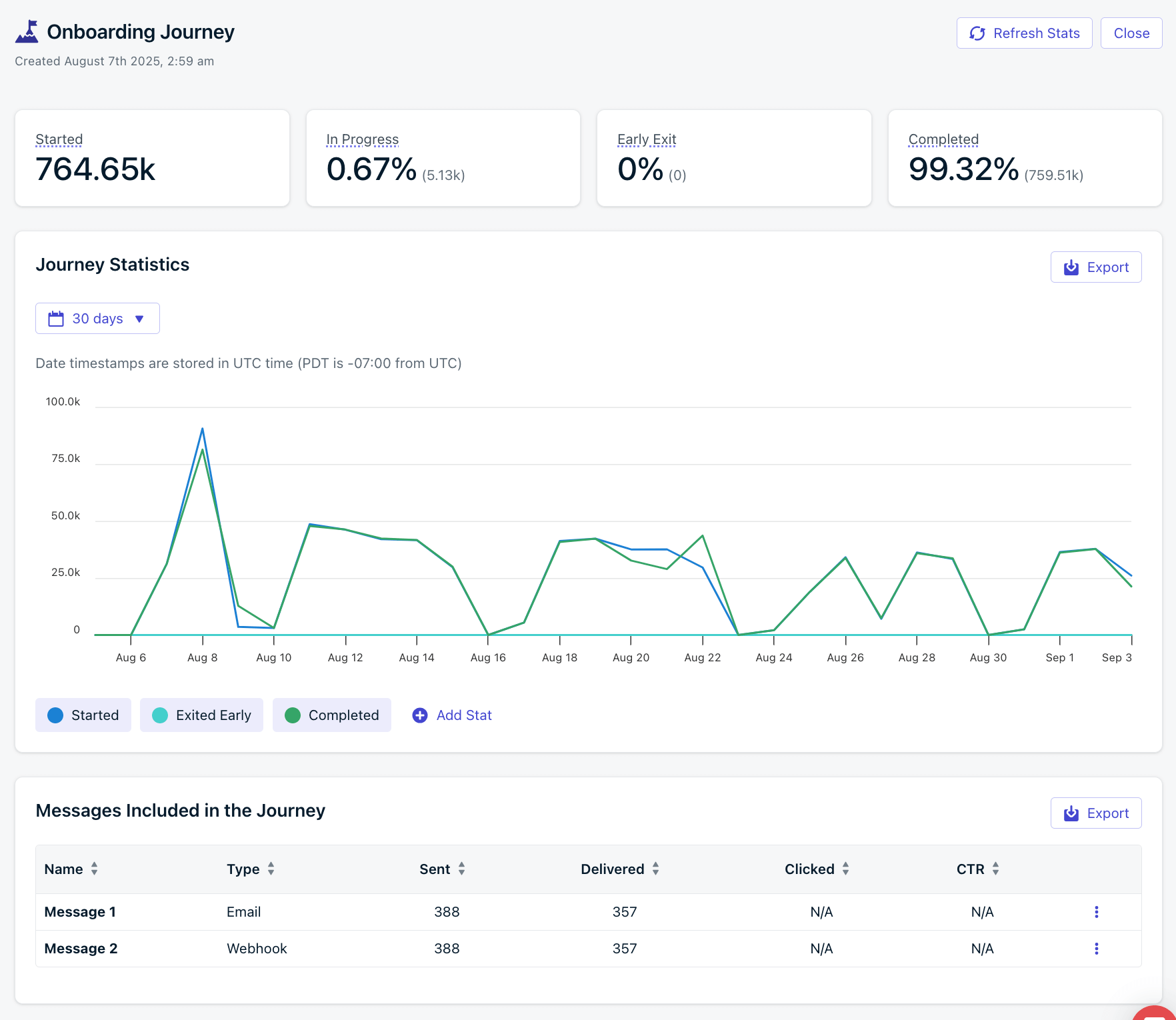 ### Journey stats
High-level stats for the entire Journey. Graph data and Audience Activity are only available for 30 days.
| Metric | Description |
| --------------- | ------------------------------------------------------------------------------------------------------------------------------------------------------------------------------------------- |
| **Started** | Total number of Users that started this Journey. Includes re-entries; a User who re-enters the Journey will increment this count again. |
| **In Progress** | Users currently in the Journey. |
| **Early Exit** | Users who exited due to an [exit rule](./journeys-settings#exit-rules). Calculated as `(early exits / total started) * 100`. Useful for tracking conversions such as upgrade segment entry. |
| **Completed** | Users who completed all Journey steps. Calculated as `(completed exits / total started) * 100`. |
## Journey step stats
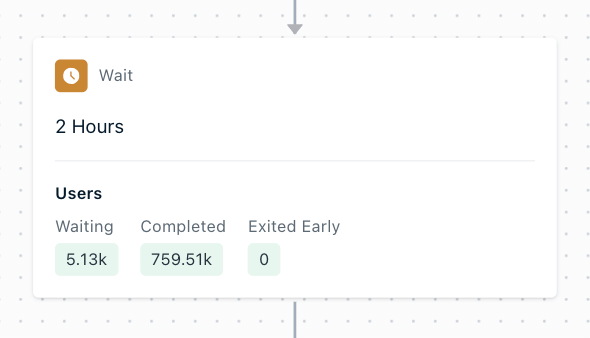
Each step in the Journey shows high-level stats for its lifetime.
### Journey stats
High-level stats for the entire Journey. Graph data and Audience Activity are only available for 30 days.
| Metric | Description |
| --------------- | ------------------------------------------------------------------------------------------------------------------------------------------------------------------------------------------- |
| **Started** | Total number of Users that started this Journey. Includes re-entries; a User who re-enters the Journey will increment this count again. |
| **In Progress** | Users currently in the Journey. |
| **Early Exit** | Users who exited due to an [exit rule](./journeys-settings#exit-rules). Calculated as `(early exits / total started) * 100`. Useful for tracking conversions such as upgrade segment entry. |
| **Completed** | Users who completed all Journey steps. Calculated as `(completed exits / total started) * 100`. |
## Journey step stats
Each step in the Journey shows high-level stats for its lifetime.
 | Metric | Description |
| ---------------- | ------------------------------------------------------------------------------------------------------------------------------------------------------------------------------------------------------------------------- |
| **Waiting** | Users currently waiting in this step. For message steps, this is usually 0 as messages are sent immediately. |
| **Completed** | Users who completed this step and moved forward. For the last **Exit** step, this shows total completions of the entire Journey. |
| **Exited Early** | Users who exited due to an [exit rule](./journeys-settings#exit-rules). For the last **Exit** step, this represents all early exits across the Journey. Helps track conversions tied to exit criteria like segment entry. |
### Push stats
Click a push message step to see detailed [message reports](#journey-message-reports).
| Metric | Description |
| ---------------- | ----------------------------------------------------------------------------------------------------------------------------------------------------------------- |
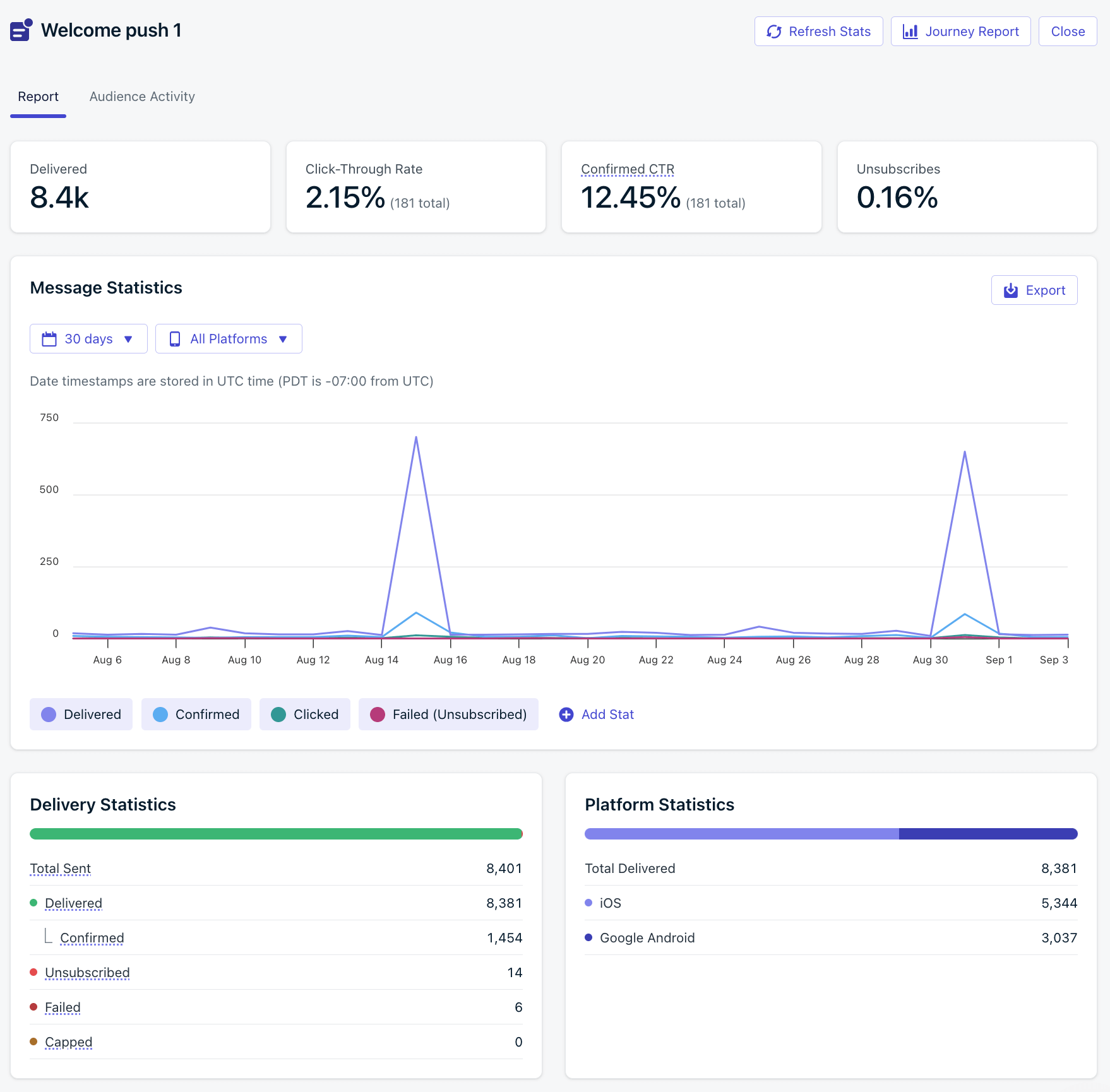
| **Sent** | Messages attempted to be sent to subscribed devices. May be limited by [frequency capping](./frequency-capping), unsubscribed users, or missing push permissions. |
| **Delivered** | Messages successfully sent to the push provider (APNs or FCM). |
| **Confirmed** | Messages confirmed as received by the user’s device. |
| **Clicked** | Total user clicks on the message. |
| **CTR** | Click-Through Rate = `(Unique Clicks / Deliveries) * 100`. |
| **Failed** | Messages that failed to send. |
| **Unsubscribed** | Devices that unsubscribed from push after receiving the message. |
| **Capped** | Messages not sent due to [frequency capping](./frequency-capping). |
### In-app message stats
Click an in-app message step to see detailed [message reports](#journey-message-reports).
| Metric | Description |
| --------------- | -------------------------------------------------------- |
| **Impressions** | Number of times the in-app card was displayed. |
| **Clicked** | Number of times an interactive block was clicked. |
| **CTR** | Click-Through Rate = `(Unique Clicks / Displays) * 100`. |
### Email stats
Click an email message step to see detailed [message reports](#journey-message-reports).
| Metric | Description |
| ---------------- | ------------------------------------------------------------------------------------------------------------------------------------------------------------------------------------------------------------ |
| **Sent** | Emails attempted to be sent. May be blocked by unsubscribed users or list errors. For diagnostics, check the [Delivery page](./email-deliverability). |
| **Delivered** | Emails confirmed as successfully delivered to inboxes. |
| **Opens** | Unique opens. May be affected by privacy protections. See [Why are Open events low?](./email-message-reports#why-are-open-events-low). |
| **Clicks** | Total number of link clicks (not unique). |
| **CTR** | Click-Through Rate = `(Unique Clicks / Deliveries) * 100`. |
| **CTOR** | Click-to-Open Rate = `(Unique Clicks / Unique Opens) * 100`. |
| **Bounced** | Messages that failed due to invalid addresses, domain issues, or spam reputation. Bounced addresses are added to the [suppression list](./suppressions). See [Email deliverability](./email-deliverability). |
| **Failed** | Emails that OneSignal could not deliver and dropped. See [Why are emails marked as failed?](./email-message-reports#why-are-my-emails-marked-as-failed). |
| **Spam** | Recipients who marked your email as spam. These addresses are added to the [suppression list](./suppressions). |
| **Suppressed** | Emails not sent because the address was already on the [suppression list](./suppressions) from a prior bounce or spam report. Available only when using [OneSignal Email](./email-setup) as your ESP. |
| **Unsubscribed** | Users who opted out via the unsubscribe link. Their subscription status is updated immediately. |
### SMS stats
Click an SMS message step to see detailed [message reports](#journey-message-reports).
| Metric | Description |
| ------------- | -------------------------------------------------------- |
| **Sent** | Messages OneSignal attempted to send to SMS subscribers. |
| **Delivered** | Messages successfully delivered. |
| **Failed** | Messages that failed to send. |
***
## Journey message reports
Within the Journey editor, click a message step to open its delivery report. These message-level reports are based on the number of [Subscriptions](./subscriptions) that were sent the message. For example, if 1 user entered the Journey and had 2 subscribed Subscriptions for the message channel (push, email, etc.), then 2 messages will be sent (one for each Subscription).
Top-level stats are for the lifetime of the message. For details on each metric, see:
* [Push message reports](./push-notification-message-reports)
* [In-app message reports](./in-app-message-reports)
* [Email message reports](./email-message-reports)
* [SMS message reports](./sms-message-reports)
Graph data and Audience Activity are only available for 30 days. This data is also available in [Template Analytics](./template-analytics).
| Metric | Description |
| ---------------- | ------------------------------------------------------------------------------------------------------------------------------------------------------------------------------------------------------------------------- |
| **Waiting** | Users currently waiting in this step. For message steps, this is usually 0 as messages are sent immediately. |
| **Completed** | Users who completed this step and moved forward. For the last **Exit** step, this shows total completions of the entire Journey. |
| **Exited Early** | Users who exited due to an [exit rule](./journeys-settings#exit-rules). For the last **Exit** step, this represents all early exits across the Journey. Helps track conversions tied to exit criteria like segment entry. |
### Push stats
Click a push message step to see detailed [message reports](#journey-message-reports).
| Metric | Description |
| ---------------- | ----------------------------------------------------------------------------------------------------------------------------------------------------------------- |
| **Sent** | Messages attempted to be sent to subscribed devices. May be limited by [frequency capping](./frequency-capping), unsubscribed users, or missing push permissions. |
| **Delivered** | Messages successfully sent to the push provider (APNs or FCM). |
| **Confirmed** | Messages confirmed as received by the user’s device. |
| **Clicked** | Total user clicks on the message. |
| **CTR** | Click-Through Rate = `(Unique Clicks / Deliveries) * 100`. |
| **Failed** | Messages that failed to send. |
| **Unsubscribed** | Devices that unsubscribed from push after receiving the message. |
| **Capped** | Messages not sent due to [frequency capping](./frequency-capping). |
### In-app message stats
Click an in-app message step to see detailed [message reports](#journey-message-reports).
| Metric | Description |
| --------------- | -------------------------------------------------------- |
| **Impressions** | Number of times the in-app card was displayed. |
| **Clicked** | Number of times an interactive block was clicked. |
| **CTR** | Click-Through Rate = `(Unique Clicks / Displays) * 100`. |
### Email stats
Click an email message step to see detailed [message reports](#journey-message-reports).
| Metric | Description |
| ---------------- | ------------------------------------------------------------------------------------------------------------------------------------------------------------------------------------------------------------ |
| **Sent** | Emails attempted to be sent. May be blocked by unsubscribed users or list errors. For diagnostics, check the [Delivery page](./email-deliverability). |
| **Delivered** | Emails confirmed as successfully delivered to inboxes. |
| **Opens** | Unique opens. May be affected by privacy protections. See [Why are Open events low?](./email-message-reports#why-are-open-events-low). |
| **Clicks** | Total number of link clicks (not unique). |
| **CTR** | Click-Through Rate = `(Unique Clicks / Deliveries) * 100`. |
| **CTOR** | Click-to-Open Rate = `(Unique Clicks / Unique Opens) * 100`. |
| **Bounced** | Messages that failed due to invalid addresses, domain issues, or spam reputation. Bounced addresses are added to the [suppression list](./suppressions). See [Email deliverability](./email-deliverability). |
| **Failed** | Emails that OneSignal could not deliver and dropped. See [Why are emails marked as failed?](./email-message-reports#why-are-my-emails-marked-as-failed). |
| **Spam** | Recipients who marked your email as spam. These addresses are added to the [suppression list](./suppressions). |
| **Suppressed** | Emails not sent because the address was already on the [suppression list](./suppressions) from a prior bounce or spam report. Available only when using [OneSignal Email](./email-setup) as your ESP. |
| **Unsubscribed** | Users who opted out via the unsubscribe link. Their subscription status is updated immediately. |
### SMS stats
Click an SMS message step to see detailed [message reports](#journey-message-reports).
| Metric | Description |
| ------------- | -------------------------------------------------------- |
| **Sent** | Messages OneSignal attempted to send to SMS subscribers. |
| **Delivered** | Messages successfully delivered. |
| **Failed** | Messages that failed to send. |
***
## Journey message reports
Within the Journey editor, click a message step to open its delivery report. These message-level reports are based on the number of [Subscriptions](./subscriptions) that were sent the message. For example, if 1 user entered the Journey and had 2 subscribed Subscriptions for the message channel (push, email, etc.), then 2 messages will be sent (one for each Subscription).
Top-level stats are for the lifetime of the message. For details on each metric, see:
* [Push message reports](./push-notification-message-reports)
* [In-app message reports](./in-app-message-reports)
* [Email message reports](./email-message-reports)
* [SMS message reports](./sms-message-reports)
Graph data and Audience Activity are only available for 30 days. This data is also available in [Template Analytics](./template-analytics).
 ### Audience activity
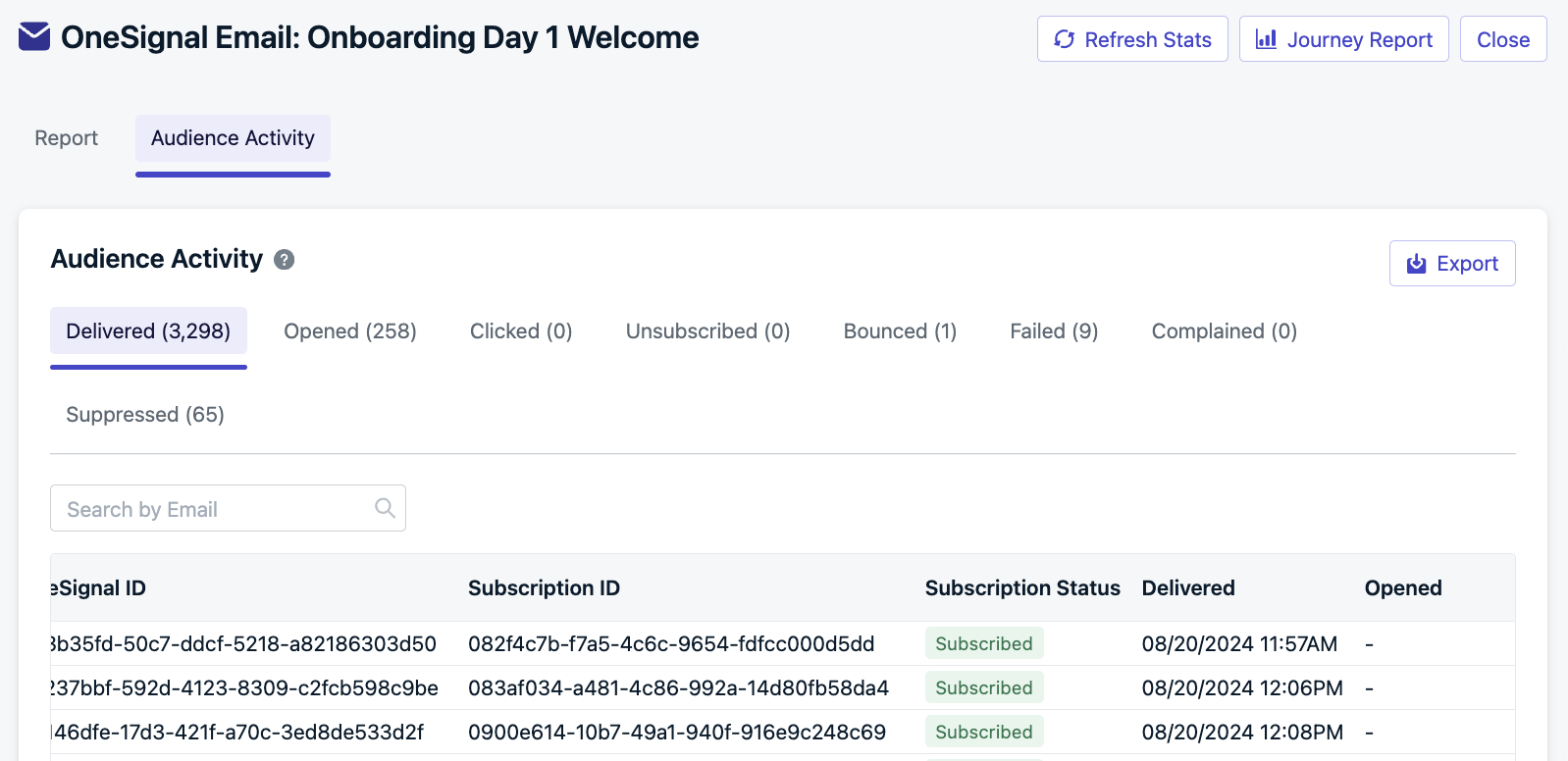
The **Audience Activity** section shows the users who were sent a message. You can export the full list of users for a given message step by clicking **Export**. This data is available for 30 days.
Each user appears only once per tab. If a user re-enters and receives the same message multiple times, they will only appear once in the export for that step.
### Audience activity
The **Audience Activity** section shows the users who were sent a message. You can export the full list of users for a given message step by clicking **Export**. This data is available for 30 days.
Each user appears only once per tab. If a user re-enters and receives the same message multiple times, they will only appear once in the export for that step.
 ***
## Conversion metrics
**Coming soon** — [Conversion metrics](./conversion-metrics) will be available on Journey reports. Once available, you will see attributed and influenced conversions at both the Journey level and the individual message level.
***
## FAQ
### How long is Journey analytics data retained?
Journey-level stats (Started, In Progress, Early Exit, Completed) and per-step stats are available for the lifetime of the Journey. Graph data and Audience Activity exports are retained for **30 days**. To keep historical data, export it before the 30-day window closes.
### What does a high early exit rate mean?
It depends on your [exit rules](./journeys-settings#exit-rules). If the exit rule is based on goal completion (for example, "user entered the Paid Customers segment"), a high early exit rate indicates successful conversions. If the exit rule is not goal-based, a high rate may mean users are dropping off before completing the Journey — review your audience targeting and message content.
### How can I improve a low CTR?
A low click-through rate usually means the message content or timing is not resonating. Try A/B testing different copy or templates using a [split branch](./journeys-actions#split-branch), personalizing messages with [tags or Liquid syntax](./message-personalization), or adjusting message timing with [wait steps](./journeys-actions#wait). Compare CTR across channels to identify which performs best.
### What do high bounce or failure rates mean?
High bounce rates usually indicate invalid email addresses, full inboxes, or domain issues. High failure rates mean OneSignal could not deliver the message at all. Review the Audience Activity export for specific failure reasons, and see [Email deliverability](./email-deliverability) and [Suppressions](./suppressions) for next steps.
### Why do Journey-level and message-level numbers not match?
Journey-level metrics count **users**, while message-level metrics count **subscriptions**. A single user with two email addresses subscribed to your app would count as 1 user at the Journey level but could generate 2 email sends at the message level.
***
## Related pages
Introduction to Journeys and how multichannel workflows operate.
Configure entry rules, exit rules, re-entry, and scheduling.
Detailed delivery, open, click, and error metrics for individual email sends.
Delivery and engagement metrics for individual push notification sends.
Aggregate performance metrics across all sends of a template.
Export Journey data, Audience Activity, and message reports via dashboard or API.
***
## Conversion metrics
**Coming soon** — [Conversion metrics](./conversion-metrics) will be available on Journey reports. Once available, you will see attributed and influenced conversions at both the Journey level and the individual message level.
***
## FAQ
### How long is Journey analytics data retained?
Journey-level stats (Started, In Progress, Early Exit, Completed) and per-step stats are available for the lifetime of the Journey. Graph data and Audience Activity exports are retained for **30 days**. To keep historical data, export it before the 30-day window closes.
### What does a high early exit rate mean?
It depends on your [exit rules](./journeys-settings#exit-rules). If the exit rule is based on goal completion (for example, "user entered the Paid Customers segment"), a high early exit rate indicates successful conversions. If the exit rule is not goal-based, a high rate may mean users are dropping off before completing the Journey — review your audience targeting and message content.
### How can I improve a low CTR?
A low click-through rate usually means the message content or timing is not resonating. Try A/B testing different copy or templates using a [split branch](./journeys-actions#split-branch), personalizing messages with [tags or Liquid syntax](./message-personalization), or adjusting message timing with [wait steps](./journeys-actions#wait). Compare CTR across channels to identify which performs best.
### What do high bounce or failure rates mean?
High bounce rates usually indicate invalid email addresses, full inboxes, or domain issues. High failure rates mean OneSignal could not deliver the message at all. Review the Audience Activity export for specific failure reasons, and see [Email deliverability](./email-deliverability) and [Suppressions](./suppressions) for next steps.
### Why do Journey-level and message-level numbers not match?
Journey-level metrics count **users**, while message-level metrics count **subscriptions**. A single user with two email addresses subscribed to your app would count as 1 user at the Journey level but could generate 2 email sends at the message level.
***
## Related pages
Introduction to Journeys and how multichannel workflows operate.
Configure entry rules, exit rules, re-entry, and scheduling.
Detailed delivery, open, click, and error metrics for individual email sends.
Delivery and engagement metrics for individual push notification sends.
Aggregate performance metrics across all sends of a template.
Export Journey data, Audience Activity, and message reports via dashboard or API.