> ## Documentation Index
> Fetch the complete documentation index at: https://documentation.onesignal.com/llms.txt
> Use this file to discover all available pages before exploring further.
# Journeys overview
> Automated multichannel messaging flows that send email, push, SMS, and in-app messages based on user behavior, time delays, or profile attributes.
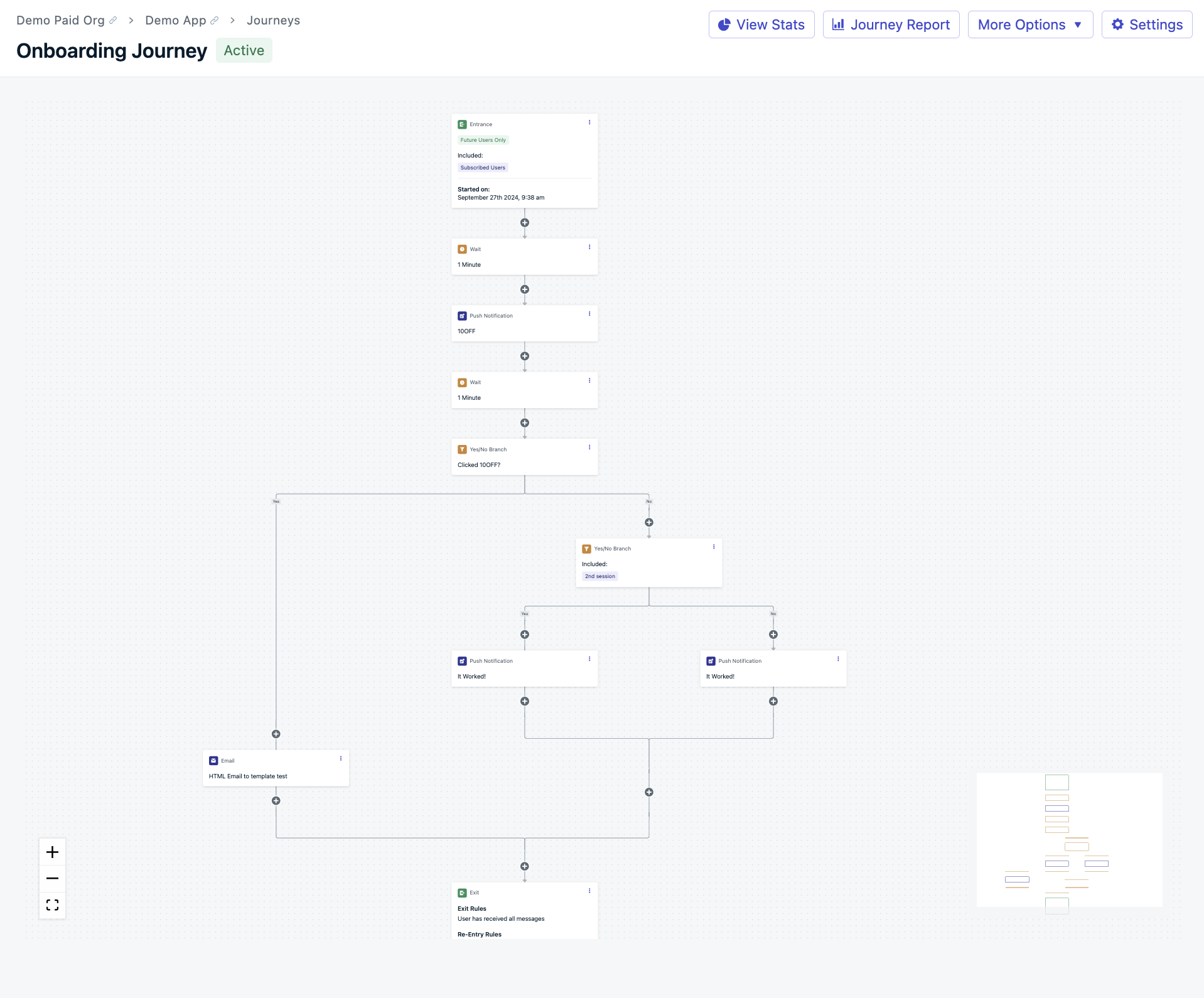
OneSignal Journeys let you build personalized, automated messaging flows across **email**, **push notifications**, **SMS**, **in-app messaging**, and **web push**—all without writing a single line of code.
***
## What you can do with Journeys
Journeys allow you to automate lifecycle messaging based on user behavior, time delays, or profile attributes. Common use cases include:
* **Onboarding sequences** to guide new users to their "aha" moment and ensure early success.
* **Re-engagement campaigns** that target users who haven’t returned after a certain period.
* **Abandoned cart flows** that remind users to complete purchases and recover lost revenue.
* **Upsells, cross-sells, and announcements** to increase feature adoption and promote new offerings.
* **Behavioral followups** that trigger messages when users perform specific actions or meet criteria.
***
## Best practices for multichannel journeys
Journeys work best when you combine multiple channels so each message reaches the user through the most effective format.
### Mix channels for maximum engagement
Use different messaging types strategically:
* Start with a **welcome email**
* Follow up with a **push notification**
* Announce promotions via **in-app message**
* Send time-sensitive reminders through **SMS**
Mixing channels improves visibility, reduces fatigue, and ensures messages are relevant in context.
### Use External IDs to unify your users
To avoid sending confusing or duplicate messages across channels, assign an **External ID** to every user.
If an External ID is **not set**:
* Each subscription (email, device, SMS number) is treated as a **separate user**
* You may **over-message or confuse** your users
With an External ID:
* OneSignal links all subscriptions to a **single user profile**
* You get accurate targeting and smoother Journeys
Define and manage users, assign External IDs, and track engagement across channels.
How OneSignal tracks activity across devices and channels and ties it to unified user profiles.
***
## Journey components
Journeys are made up of modular components that give you complete control over who enters, what they receive, and when.
Configure entry and exit rules, re-entry logic, and scheduling for your Journey.
Add push, email, SMS, and in-app message steps with personalized content.
Add branching logic, wait steps, split paths, and delays to build conditional flows.
Send real-time updates to CRMs, analytics platforms, and other external tools.
***
## Journey analytics and management
Understand how your Journeys are performing and keep them optimized over time.
Monitor completion rates, conversions, drop-offs, and per-message performance.
Pause, edit, duplicate, archive, and version-control your Journeys.
***
## Journeys examples
Need inspiration or a quick-start template? These examples walk through common Journey flows you can adapt for your use case.
Step-by-step walkthroughs for onboarding, re-engagement, abandoned carts, and more.
If you previously used Automated Messages, Journeys replace that feature with more powerful cross-channel orchestration. Migrate your existing automations to Journeys for branching logic, multichannel support, and analytics.
***
## FAQ
### How many Journeys can I have active at once?
The number of active Journeys depends on your plan. See [pricing](https://onesignal.com/pricing) for your plan's limit.
### Can a user be in multiple Journeys at the same time?
Yes. A user can be active in multiple Journeys simultaneously. Use [Journey settings](./journeys-settings) to control re-entry rules and prevent duplicate messages.
### What channels do Journeys support?
Journeys support **email**, **push notifications** (mobile and web), **SMS**, and **in-app messages**. You can combine all of these in a single Journey.
### What happens if a user unsubscribes from one channel mid-Journey?
The user continues through the Journey, but message steps for that channel are skipped. For example, if a user unsubscribes from email, they still receive push and SMS steps.
### Do I need External IDs for Journeys to work?
External IDs are strongly recommended. Without them, each subscription (email address, device, phone number) is treated as a separate user, which can lead to duplicate or conflicting messages. See [Users](./users) for setup details.
 ***
## Best practices for multichannel journeys
Journeys work best when you combine multiple channels so each message reaches the user through the most effective format.
### Mix channels for maximum engagement
Use different messaging types strategically:
* Start with a **welcome email**
* Follow up with a **push notification**
* Announce promotions via **in-app message**
* Send time-sensitive reminders through **SMS**
Mixing channels improves visibility, reduces fatigue, and ensures messages are relevant in context.
### Use External IDs to unify your users
To avoid sending confusing or duplicate messages across channels, assign an **External ID** to every user.
If an External ID is **not set**:
* Each subscription (email, device, SMS number) is treated as a **separate user**
* You may **over-message or confuse** your users
With an External ID:
* OneSignal links all subscriptions to a **single user profile**
* You get accurate targeting and smoother Journeys
***
## Best practices for multichannel journeys
Journeys work best when you combine multiple channels so each message reaches the user through the most effective format.
### Mix channels for maximum engagement
Use different messaging types strategically:
* Start with a **welcome email**
* Follow up with a **push notification**
* Announce promotions via **in-app message**
* Send time-sensitive reminders through **SMS**
Mixing channels improves visibility, reduces fatigue, and ensures messages are relevant in context.
### Use External IDs to unify your users
To avoid sending confusing or duplicate messages across channels, assign an **External ID** to every user.
If an External ID is **not set**:
* Each subscription (email, device, SMS number) is treated as a **separate user**
* You may **over-message or confuse** your users
With an External ID:
* OneSignal links all subscriptions to a **single user profile**
* You get accurate targeting and smoother Journeys