> ## Documentation Index
> Fetch the complete documentation index at: https://documentation.onesignal.com/llms.txt
> Use this file to discover all available pages before exploring further.
# Live Activities analytics
> Measure delivery, confirmed receipt, clicks, and unsubscribes for iOS Live Activities with OneSignal. Covers Key metrics, individual message reports, Audience Activity, and CSV export.
Measure how your Live Activities perform with per-message reports, aggregate trends, and Audience Activity exports. This page covers the metrics OneSignal records for Live Activities, where to find them in the dashboard, and how to export them for further analysis.
This page assumes you've already set up [Live Activities](./live-activities). For canonical metric definitions across every channel, see the [Metrics glossary](./analytics-metrics-glossary).
## Overview
Live Activities analytics help you:
* Measure how many Subscriptions receive your updates.
* Track whether users engage with your Live Activities.
* Identify delivery failures and their causes.
* Monitor subscription health over time.
## Key metrics
Live Activities record the following metrics. These are the same definitions used in individual message reports, [Audience Activity](#audience-activity), and [Engagement Trends](./engagement-analytics).
| Metric | Definition |
| --------------------- | ----------------------------------------------------------------------------------------------------------------------------------------------------------------------------------------------------------------------------------------------------------------------------------------------------- |
| **Sent** | The number of Live Activity updates sent from OneSignal, including those successfully sent to APNs and failures. This is a composite metric that includes push-to-start and push-to-update notifications. |
| **Delivered** | The number of Live Activity updates successfully sent to and accepted by APNs. |
| **Confirmed Receipt** | The number of Live Activity updates confirmed as received by the device, verified by the OneSignal SDK. Requires iOS SDK **5.2.15 or higher**. See [Confirmed receipt](./confirmed-delivery) for platform requirements. |
| **Failed** | The number of push Subscriptions that did not receive the Live Activity update because of an error. OneSignal retries these Subscriptions on subsequent updates. |
| **Unsubscribed** | The number of push Subscriptions marked unsubscribed for Live Activity updates. Triggered when a user dismisses the Live Activity, disables Live Activities in device settings, uninstalls the app, or opts out of push. OneSignal does not send future Live Activity updates to these Subscriptions. |
| **Clicked** | The total number of clicks on Live Activity updates, including repeat clicks from the same user. |
## Message reports
Individual message reports show the delivery breakdown for a single Live Activity send.
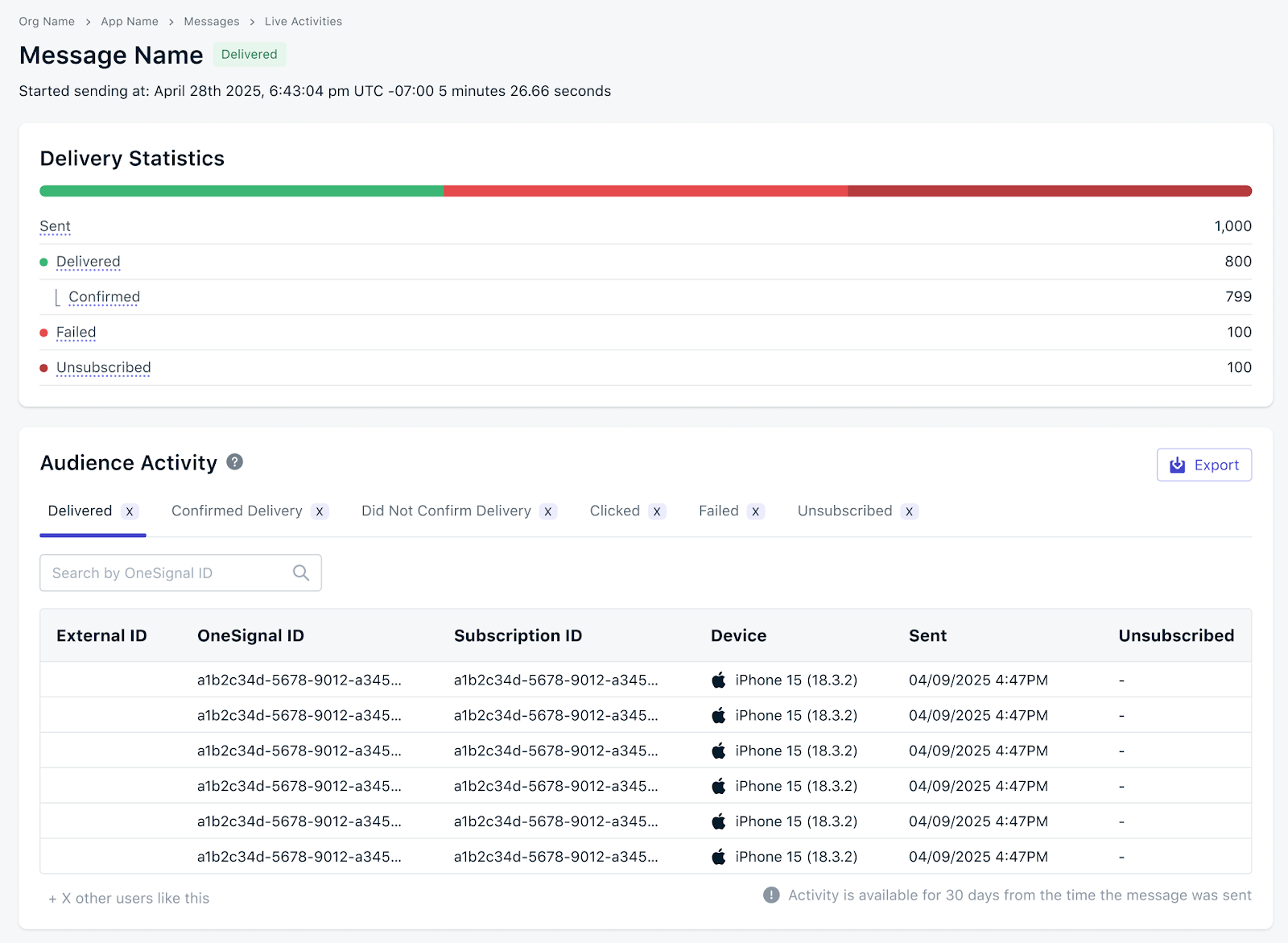 To open a Live Activity message report:
Go to **Sent Messages** in your OneSignal dashboard.
Filter the list to show only Live Activity messages.
Click any Live Activity to view its detailed report.
Individual message reports are retained for **30 days**. For longer-term analysis, use [Engagement Trends](./engagement-analytics) (retained up to 2 years depending on your pricing plan) or export the data.
## Audience activity
The Audience Activity panel on a Live Activity message report lists the Subscriptions that contributed to each metric, so you can investigate individual outcomes.
To view Audience Activity:
Open any Live Activity message report from **Sent Messages**.
Scroll to the **Audience Activity** panel on the report.
Choose which Subscriptions to list:
* **Deliveries** — Subscriptions counted as **Delivered** (accepted by APNs).
* **Clicks** — Subscriptions counted as **Clicked**.
* **Failures** — Subscriptions counted as **Failed**.
* **Unsubscribes** — Subscriptions counted as **Unsubscribed**.
Use Audience Activity to troubleshoot delivery issues for specific Subscriptions, identify segments with elevated failure or unsubscribe rates, and correlate engagement with content or timing.
## Export Audience Activity
Click the **Export** button above the Audience Activity panel to export the data. OneSignal emails the CSV to the email address on your current OneSignal user account.
Export options:
* **Single statistic** — Only the currently selected activity type (for example, just Clicks or just Failures).
* **All statistics** — All Audience Activity data for the message.
The export includes user identifiers, activity timestamp, activity type, and device and platform information where available.
Large exports may take several minutes to process. OneSignal sends an email notification when the export is ready.
## Compute delivery and engagement rates
Live Activity message reports show raw counts. Derive rates to compare performance across sends or time periods.
**Confirmed Receipt Rate** — the percentage of delivered updates that the device confirmed receiving:
```
Confirmed Receipt Rate = (Confirmed Receipt / Delivered) × 100
```
Use this to detect SDK or device-side delivery issues. A low rate usually indicates Subscriptions on iOS SDK versions earlier than 5.2.15, devices offline long enough for APNs to drop queued updates, or users who disabled Live Activities.
**Click-Through Rate (CTR)** — the percentage of delivered updates that were clicked:
```
Click-Through Rate = (Clicked / Delivered) × 100
```
**Confirmed Click-Through Rate** — the percentage of device-confirmed updates that were clicked. Filters out deliveries where the device never actually received the update:
```
Confirmed Click-Through Rate = (Clicked / Confirmed Receipt) × 100
```
## Troubleshooting
### High Failed rate
1. **Check update token validity.** Live Activity update tokens expire when the activity ends, is dismissed, or the app is uninstalled. OneSignal stops sending to invalidated tokens.
2. **Verify APNs configuration.** Make sure your APNs authentication key or certificate is current in the OneSignal dashboard.
3. **Review failure reasons on the message report.** Individual failures include an error code from APNs.
### Low Confirmed Receipt
1. **Verify iOS SDK version** is 5.2.15 or higher.
2. **Complete the confirmed receipt setup.** Confirmed Receipt for push and Live Activities requires the [Notification Service Extension and App Group](./confirmed-delivery) setup in your iOS app.
3. **Account for device conditions.** Devices offline long enough for APNs to drop Live Activity updates will not produce a Confirmed Receipt.
### Declining Click-Through Rate
* Review content relevance and timing on the individual message reports where CTR dropped.
* Compare against historical CTR from [Engagement Trends](./engagement-analytics) to distinguish a one-off dip from a trend.
## FAQ
### How long is Live Activity data retained?
Individual message reports in **Sent Messages** are retained for 30 days. Aggregate data in [Engagement Trends](./engagement-analytics) is retained for up to 2 years depending on your pricing plan.
### Why is my Confirmed Receipt count lower than Delivered?
Confirmed Receipt requires iOS SDK 5.2.15 or higher and completed [Confirmed receipt](./confirmed-delivery) setup. Subscriptions on older SDK versions, devices that were offline long enough for APNs to drop queued updates, and users who disabled Live Activities all reduce Confirmed Receipt relative to Delivered.
### Why is Unsubscribed counted when a user dismisses the activity?
Once a user dismisses a Live Activity or disables Live Activities in device settings, APNs reports the activity token as invalid. OneSignal counts these Subscriptions as unsubscribed for Live Activity updates and stops sending further updates.
### Can I track individual user journeys?
Yes. Use the Audience Activity panel on a message report to list the Subscriptions behind each metric, then export the CSV for deeper analysis or join against your own data warehouse.
### Can I stream Live Activity events to my own analytics stack?
Yes. Use [Event Streams](./event-streams) to forward `message.live_activity.*` events (sent, delivered, failed, unsubscribed, clicked) to your warehouse in real time. See the [Metrics glossary](./analytics-metrics-glossary) for the full event name mapping.
## Related
Set up Live Activities with the OneSignal iOS SDK.
Platform requirements and SDK setup for the Confirmed Receipt metric.
Aggregate delivery and engagement trends across all channels, including Live Activities.
Canonical definitions for every metric across the dashboard, API, CSV, and Event Streams.
To open a Live Activity message report:
Go to **Sent Messages** in your OneSignal dashboard.
Filter the list to show only Live Activity messages.
Click any Live Activity to view its detailed report.
Individual message reports are retained for **30 days**. For longer-term analysis, use [Engagement Trends](./engagement-analytics) (retained up to 2 years depending on your pricing plan) or export the data.
## Audience activity
The Audience Activity panel on a Live Activity message report lists the Subscriptions that contributed to each metric, so you can investigate individual outcomes.
To view Audience Activity:
Open any Live Activity message report from **Sent Messages**.
Scroll to the **Audience Activity** panel on the report.
Choose which Subscriptions to list:
* **Deliveries** — Subscriptions counted as **Delivered** (accepted by APNs).
* **Clicks** — Subscriptions counted as **Clicked**.
* **Failures** — Subscriptions counted as **Failed**.
* **Unsubscribes** — Subscriptions counted as **Unsubscribed**.
Use Audience Activity to troubleshoot delivery issues for specific Subscriptions, identify segments with elevated failure or unsubscribe rates, and correlate engagement with content or timing.
## Export Audience Activity
Click the **Export** button above the Audience Activity panel to export the data. OneSignal emails the CSV to the email address on your current OneSignal user account.
Export options:
* **Single statistic** — Only the currently selected activity type (for example, just Clicks or just Failures).
* **All statistics** — All Audience Activity data for the message.
The export includes user identifiers, activity timestamp, activity type, and device and platform information where available.
Large exports may take several minutes to process. OneSignal sends an email notification when the export is ready.
## Compute delivery and engagement rates
Live Activity message reports show raw counts. Derive rates to compare performance across sends or time periods.
**Confirmed Receipt Rate** — the percentage of delivered updates that the device confirmed receiving:
```
Confirmed Receipt Rate = (Confirmed Receipt / Delivered) × 100
```
Use this to detect SDK or device-side delivery issues. A low rate usually indicates Subscriptions on iOS SDK versions earlier than 5.2.15, devices offline long enough for APNs to drop queued updates, or users who disabled Live Activities.
**Click-Through Rate (CTR)** — the percentage of delivered updates that were clicked:
```
Click-Through Rate = (Clicked / Delivered) × 100
```
**Confirmed Click-Through Rate** — the percentage of device-confirmed updates that were clicked. Filters out deliveries where the device never actually received the update:
```
Confirmed Click-Through Rate = (Clicked / Confirmed Receipt) × 100
```
## Troubleshooting
### High Failed rate
1. **Check update token validity.** Live Activity update tokens expire when the activity ends, is dismissed, or the app is uninstalled. OneSignal stops sending to invalidated tokens.
2. **Verify APNs configuration.** Make sure your APNs authentication key or certificate is current in the OneSignal dashboard.
3. **Review failure reasons on the message report.** Individual failures include an error code from APNs.
### Low Confirmed Receipt
1. **Verify iOS SDK version** is 5.2.15 or higher.
2. **Complete the confirmed receipt setup.** Confirmed Receipt for push and Live Activities requires the [Notification Service Extension and App Group](./confirmed-delivery) setup in your iOS app.
3. **Account for device conditions.** Devices offline long enough for APNs to drop Live Activity updates will not produce a Confirmed Receipt.
### Declining Click-Through Rate
* Review content relevance and timing on the individual message reports where CTR dropped.
* Compare against historical CTR from [Engagement Trends](./engagement-analytics) to distinguish a one-off dip from a trend.
## FAQ
### How long is Live Activity data retained?
Individual message reports in **Sent Messages** are retained for 30 days. Aggregate data in [Engagement Trends](./engagement-analytics) is retained for up to 2 years depending on your pricing plan.
### Why is my Confirmed Receipt count lower than Delivered?
Confirmed Receipt requires iOS SDK 5.2.15 or higher and completed [Confirmed receipt](./confirmed-delivery) setup. Subscriptions on older SDK versions, devices that were offline long enough for APNs to drop queued updates, and users who disabled Live Activities all reduce Confirmed Receipt relative to Delivered.
### Why is Unsubscribed counted when a user dismisses the activity?
Once a user dismisses a Live Activity or disables Live Activities in device settings, APNs reports the activity token as invalid. OneSignal counts these Subscriptions as unsubscribed for Live Activity updates and stops sending further updates.
### Can I track individual user journeys?
Yes. Use the Audience Activity panel on a message report to list the Subscriptions behind each metric, then export the CSV for deeper analysis or join against your own data warehouse.
### Can I stream Live Activity events to my own analytics stack?
Yes. Use [Event Streams](./event-streams) to forward `message.live_activity.*` events (sent, delivered, failed, unsubscribed, clicked) to your warehouse in real time. See the [Metrics glossary](./analytics-metrics-glossary) for the full event name mapping.
## Related
Set up Live Activities with the OneSignal iOS SDK.
Platform requirements and SDK setup for the Confirmed Receipt metric.
Aggregate delivery and engagement trends across all channels, including Live Activities.
Canonical definitions for every metric across the dashboard, API, CSV, and Event Streams.