> ## Documentation Index
> Fetch the complete documentation index at: https://documentation.onesignal.com/llms.txt
> Use this file to discover all available pages before exploring further.
# Location-based messages
> Segment users by country, GPS coordinates, or geofence and send location-triggered push notifications with OneSignal.
Send messages to users based on where they are. OneSignal can segment users by country, GPS coordinates, or custom tags so you can create timely, relevant outreach based on physical location.
As users interact with your app and location tracking is enabled, their coordinates update periodically (approximately every 5 minutes while the app is in use) and can be used to send messages via [Journeys](./journeys-overview) or any message creation tool.
**OneSignal does not track GPS location by default.** The SDK only collects latitude and longitude when all three of these conditions are met:
1. Your app has the correct location permissions and dependencies.
2. Your app explicitly enables sharing with OneSignal. Without this, your app may collect location data but will not share it with OneSignal.
3. The user grants location permission at the system prompt.
See [Location tracking setup](#location-tracking-setup) for configuration. For background on the SDK's location behavior, see [You're in Control: How Location Actually Works in OneSignal's SDK](https://onesignal.com/blog/youre-in-control-how-location-actually-works-in-onesignals-sdk/).
***
## Target by country
Country is determined by the device's IP address and updates automatically each time the user opens your app. The value uses the ISO 3166-1 Alpha-2 two-letter country code (for example, `US`, `GB`, `CA`).
Target by country using the `country` field in [Segments](./segmentation) or in the `filters` parameter of the [Create segment API](/reference/create-segments):
```json theme={null}
"filters": [
{ "field": "country", "relation": "=", "value": "US" }
]
```
***
## Target by location (latitude, longitude, and radius)
If your mobile app collects GPS location and shares it with OneSignal, the SDK updates the user's coordinates approximately every 5 minutes (based on permission and system rules). If the app is force-stopped, location cannot be tracked until the user opens it again.
### Location tracking setup
Location tracking is configured in your mobile app's code, not in the OneSignal Dashboard. At a minimum, your app must:
* Add native location permissions and dependencies for iOS and Android.
* Enable the `Location.isShared` flag to share coordinates with OneSignal.
* Request the system location permission, or use an [in-app message as a soft pre-prompt](./location-opt-in-prompt) for better opt-in rates.
Full setup and per-platform code for iOS, Android, React Native, Flutter, Unity, and Cordova/Ionic.
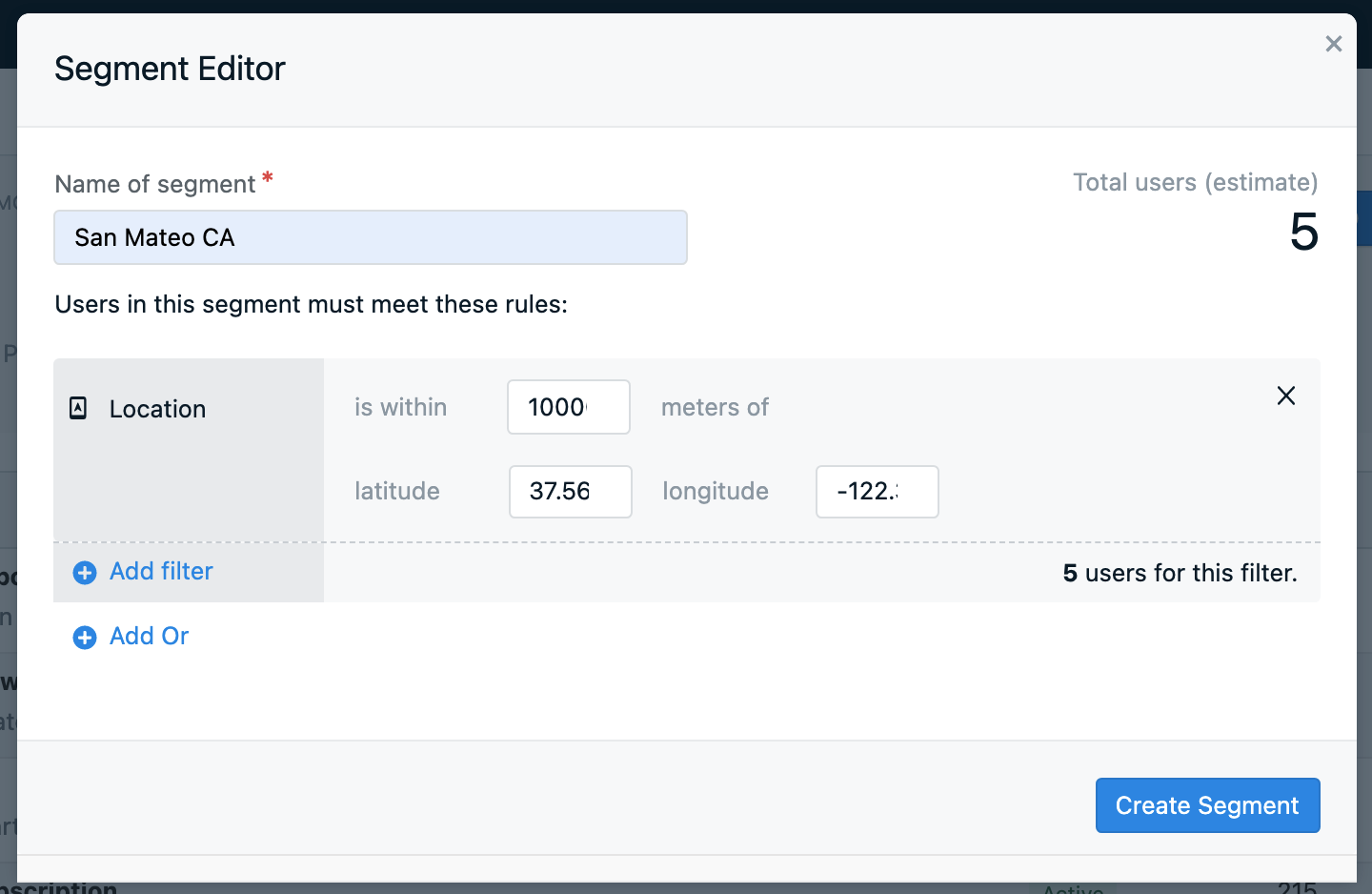
Once location tracking is enabled, you can create segments or send messages via our API using the `location` filter.
 ***
## Web push latitude and longitude tracking
OneSignal **does not collect** latitude/longitude for web. However, you can use tags to set the location from your web app or use the [Update User API](/reference/update-user) to set the location from your server.
**Tagging example:**
1. Request location access in your web app using the browser's [Geolocation API](https://developer.mozilla.org/en-US/docs/Web/API/Geolocation_API).
2. Use JavaScript to detect the user's coordinates.
3. Send those coordinates to OneSignal using [tags](./add-user-data-tags).
```javascript theme={null}
OneSignal.User.addTags({
lat: "37.160",
long: "-117.773"
});
```
Once the tags are set, create a geofenced segment by combining tag range filters. For example, to target users inside the bounding box `37° ≤ lat < 38°` and `-118° ≤ long < -117°`, add these four filters in the segment builder:
* Tag `lat` greater than `37`
* Tag `lat` less than `38`
* Tag `long` greater than `-118`
* Tag `long` less than `-117`
***
## Target by city or custom location
OneSignal does not natively detect city or area codes. To target by city or custom location:
* Let users input a city or region in a form.
* Or use JavaScript with reverse geocoding (e.g., Google Maps API) to infer city from coordinates.
* Send the city name as a [data tag](./add-user-data-tags).
```javascript theme={null}
OneSignal.User.addTag("city", "San Francisco");
```
***
## FAQ
### Does location tracking work on web?
Not natively. OneSignal's Web SDK does not collect GPS coordinates. To use location-based segments for web push, collect coordinates yourself from the browser's [Geolocation API](https://developer.mozilla.org/en-US/docs/Web/API/Geolocation_API) and send them to OneSignal as [tags](./add-user-data-tags), then build range-filter segments on those tags. See [Web push latitude and longitude tracking](#web-push-latitude-and-longitude-tracking).
### Why is my app not tracking location?
Verify all three setup conditions are met: your app has the correct location permissions and dependencies installed, `Location.isShared` is set to `true`, and the user has granted location permission at the system prompt. See the [Mobile SDK location reference](./mobile-sdk-reference#location) for platform-specific setup and common fixes, including the Android `play-services-location` dependency.
### How often does the SDK update location?
When location tracking is enabled, the SDK updates coordinates approximately every 5 minutes while the app is in use. If the app is force-stopped, location updates pause until the user opens the app again.
### Can I target users by city?
Not natively. OneSignal tracks country (via IP address) and GPS coordinates (via the SDK), but not city or area code. You can infer city from coordinates using a reverse geocoding service and store it as a tag. See [Target by city or custom location](#target-by-city-or-custom-location).
***
## Related pages
Use an in-app message as a soft pre-prompt before requesting native location permission.
Create audience segments using location filters, tags, and user properties.
***
## Web push latitude and longitude tracking
OneSignal **does not collect** latitude/longitude for web. However, you can use tags to set the location from your web app or use the [Update User API](/reference/update-user) to set the location from your server.
**Tagging example:**
1. Request location access in your web app using the browser's [Geolocation API](https://developer.mozilla.org/en-US/docs/Web/API/Geolocation_API).
2. Use JavaScript to detect the user's coordinates.
3. Send those coordinates to OneSignal using [tags](./add-user-data-tags).
```javascript theme={null}
OneSignal.User.addTags({
lat: "37.160",
long: "-117.773"
});
```
Once the tags are set, create a geofenced segment by combining tag range filters. For example, to target users inside the bounding box `37° ≤ lat < 38°` and `-118° ≤ long < -117°`, add these four filters in the segment builder:
* Tag `lat` greater than `37`
* Tag `lat` less than `38`
* Tag `long` greater than `-118`
* Tag `long` less than `-117`
***
## Target by city or custom location
OneSignal does not natively detect city or area codes. To target by city or custom location:
* Let users input a city or region in a form.
* Or use JavaScript with reverse geocoding (e.g., Google Maps API) to infer city from coordinates.
* Send the city name as a [data tag](./add-user-data-tags).
```javascript theme={null}
OneSignal.User.addTag("city", "San Francisco");
```
***
## FAQ
### Does location tracking work on web?
Not natively. OneSignal's Web SDK does not collect GPS coordinates. To use location-based segments for web push, collect coordinates yourself from the browser's [Geolocation API](https://developer.mozilla.org/en-US/docs/Web/API/Geolocation_API) and send them to OneSignal as [tags](./add-user-data-tags), then build range-filter segments on those tags. See [Web push latitude and longitude tracking](#web-push-latitude-and-longitude-tracking).
### Why is my app not tracking location?
Verify all three setup conditions are met: your app has the correct location permissions and dependencies installed, `Location.isShared` is set to `true`, and the user has granted location permission at the system prompt. See the [Mobile SDK location reference](./mobile-sdk-reference#location) for platform-specific setup and common fixes, including the Android `play-services-location` dependency.
### How often does the SDK update location?
When location tracking is enabled, the SDK updates coordinates approximately every 5 minutes while the app is in use. If the app is force-stopped, location updates pause until the user opens the app again.
### Can I target users by city?
Not natively. OneSignal tracks country (via IP address) and GPS coordinates (via the SDK), but not city or area code. You can infer city from coordinates using a reverse geocoding service and store it as a tag. See [Target by city or custom location](#target-by-city-or-custom-location).
***
## Related pages
Use an in-app message as a soft pre-prompt before requesting native location permission.
Create audience segments using location filters, tags, and user properties.