> ## Documentation Index
> Fetch the complete documentation index at: https://documentation.onesignal.com/llms.txt
> Use this file to discover all available pages before exploring further.
# Mixpanel
> Integrate OneSignal with Mixpanel to sync behavioral cohorts, track message events, and target Users across push, email, SMS, and in-app channels.
Integrate OneSignal with [Mixpanel](https://mixpanel.com) to enable real-time, behavior-based targeting across push, in-app, email, and SMS. This app-level integration supports two data flows:
* **Message events → Mixpanel**: Track delivery, clicks, failures, and more for all channels.
* **Cohorts → OneSignal**: Sync behavior-based Mixpanel cohorts as targeting filters in OneSignal.
The Mixpanel integration does not send Mixpanel events to OneSignal as [custom events](./custom-events). See [Can I send custom events from Mixpanel to OneSignal?](#can-i-send-custom-events-from-mixpanel-to-onesignal) for the recommended workaround.
***
## Requirements
* [Mixpanel Account](https://mixpanel.com/)
* [OneSignal Paid Plan](https://onesignal.com/pricing)
* OneSignal app with [Users](./users) and External ID set.
This integration does not create Users. It maps Users in Mixpanel to existing Users in OneSignal by matching identifiers.
***
## Setup
### Add Mixpanel to OneSignal (Outbound)
Sends OneSignal message events into your Mixpanel project.
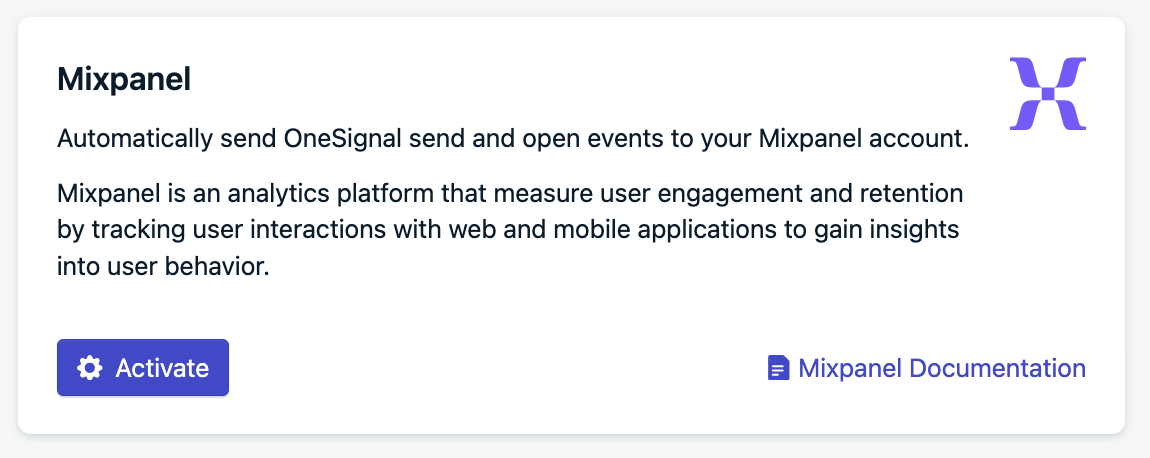
In OneSignal, navigate to **Data > Integrations > Mixpanel** and click **Activate**.
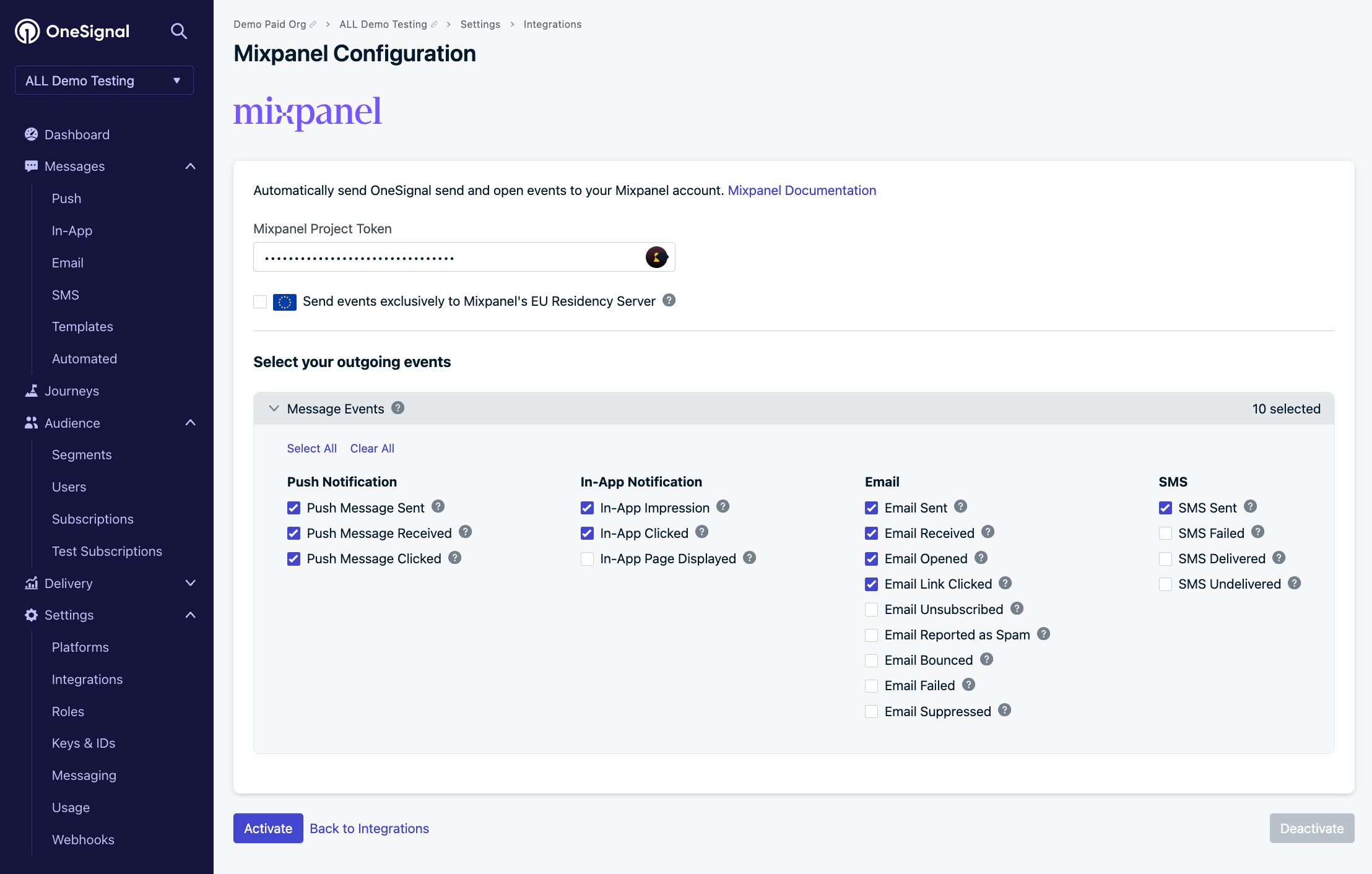
 In Mixpanel, find your [Project Token](https://docs.mixpanel.com/docs/orgs-and-projects/managing-projects#find-your-project-tokens) and paste it into OneSignal.
Check your [Data Residency](https://docs.mixpanel.com/docs/orgs-and-projects/managing-projects#project-details). If you use Mixpanel's EU servers, check the **Send events exclusively to Mixpanel's EU Residency Server** box.
Select which OneSignal message events to send to Mixpanel, then click **Activate**.
In Mixpanel, find your [Project Token](https://docs.mixpanel.com/docs/orgs-and-projects/managing-projects#find-your-project-tokens) and paste it into OneSignal.
Check your [Data Residency](https://docs.mixpanel.com/docs/orgs-and-projects/managing-projects#project-details). If you use Mixpanel's EU servers, check the **Send events exclusively to Mixpanel's EU Residency Server** box.
Select which OneSignal message events to send to Mixpanel, then click **Activate**.
 ### Add OneSignal to Mixpanel (Inbound)
Sends Mixpanel cohorts into OneSignal as Segment filters.
In your Mixpanel **Integrations**, add OneSignal.
### Add OneSignal to Mixpanel (Inbound)
Sends Mixpanel cohorts into OneSignal as Segment filters.
In your Mixpanel **Integrations**, add OneSignal.
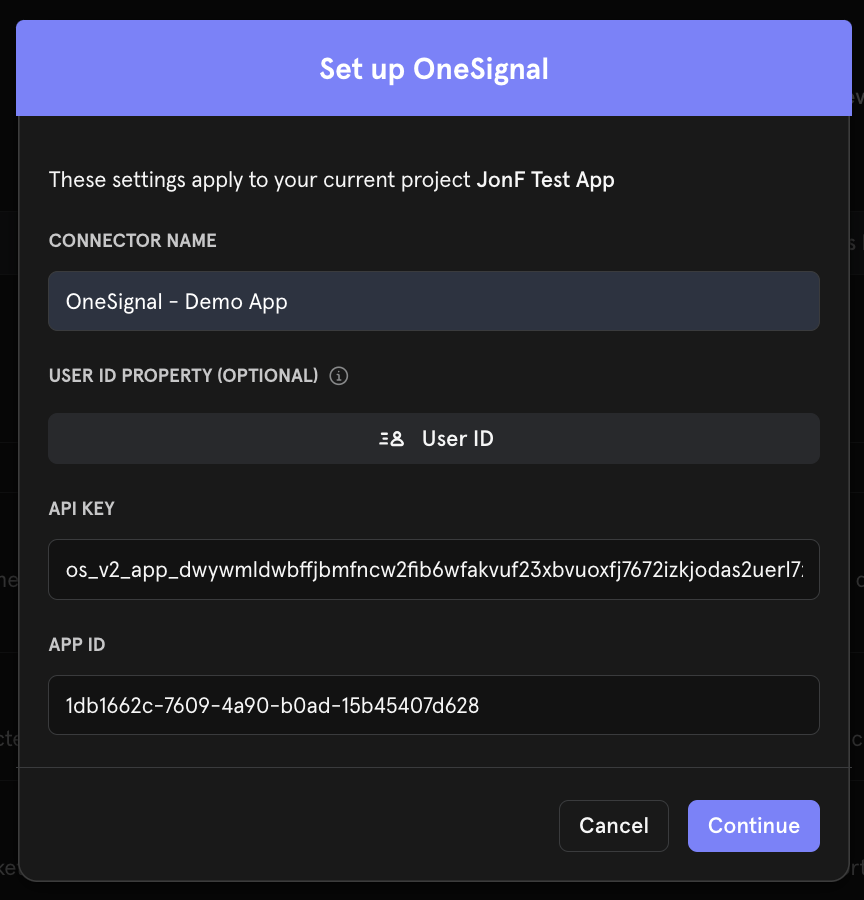
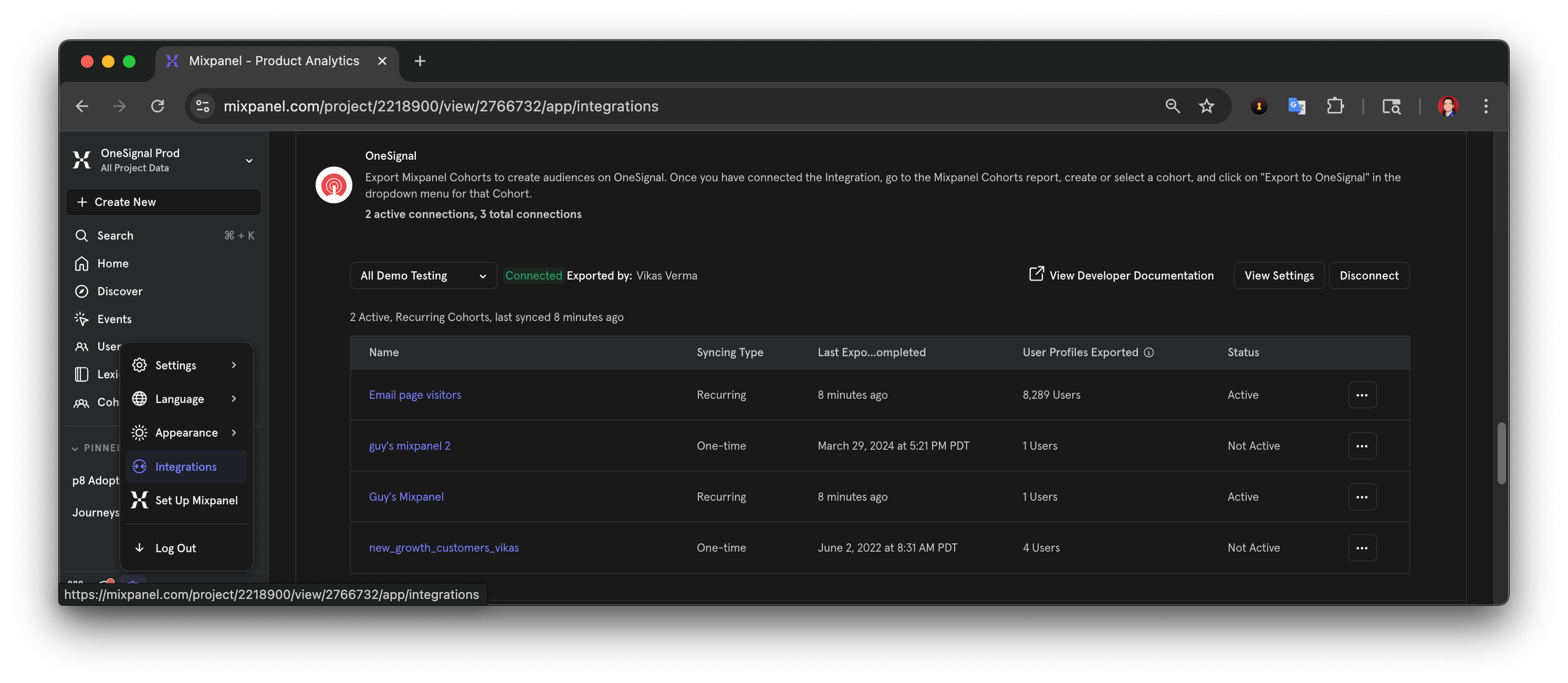 Set the **Connector Name** to something identifiable like `OneSignal - APP_NAME`, where `APP_NAME` is your OneSignal app name.
Enter the **App ID** and **API Key** from your OneSignal app's **Settings > [Keys & IDs](./keys-and-ids)** page.
### User ID mapping
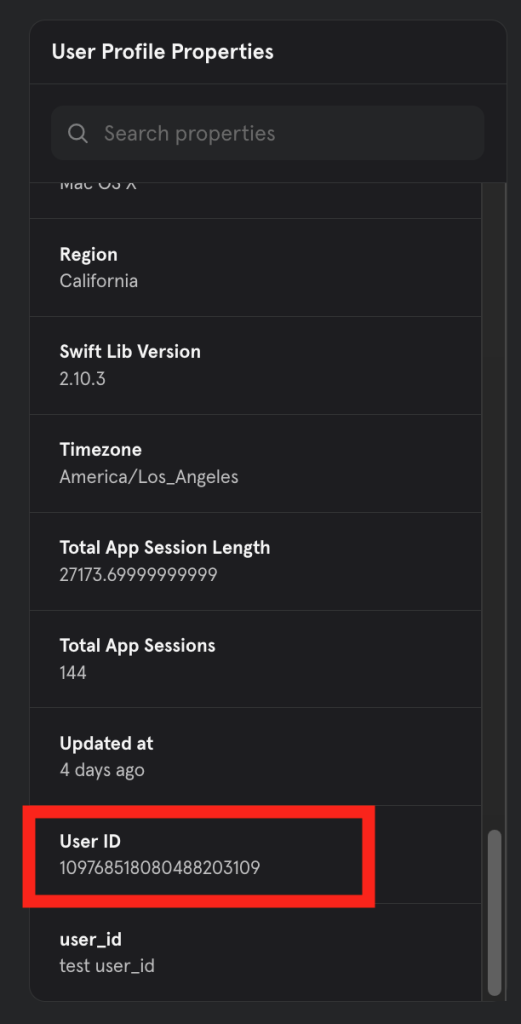
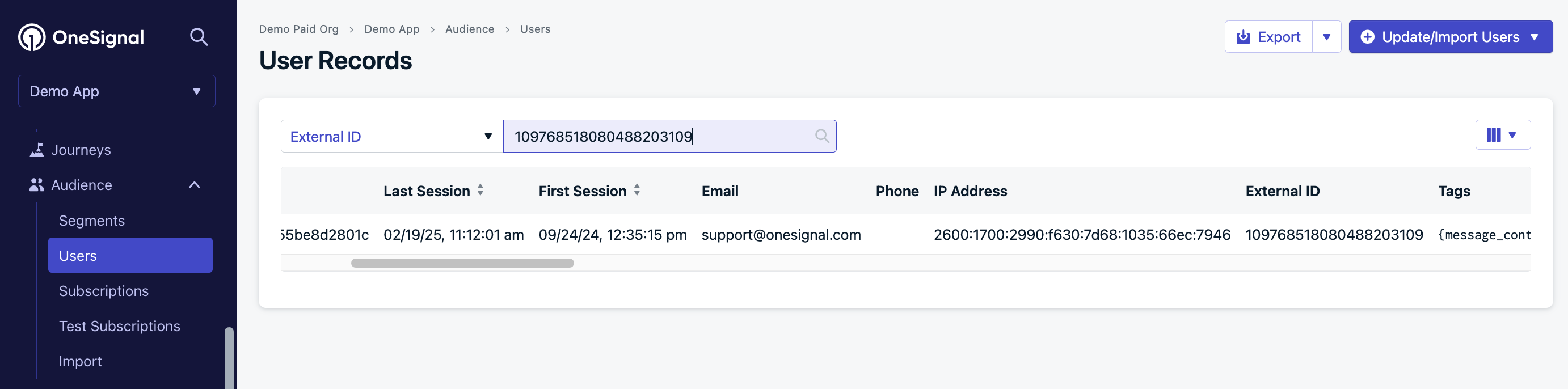
The OneSignal **[External ID](./users)** must match the Mixpanel **User ID Property** you select (for example, `user_id`). Cohort syncing and message event tracking only work when this mapping is exact.
In the Mixpanel OneSignal connector, choose the **User ID Property** that holds the same value as the OneSignal External ID.
Set the **Connector Name** to something identifiable like `OneSignal - APP_NAME`, where `APP_NAME` is your OneSignal app name.
Enter the **App ID** and **API Key** from your OneSignal app's **Settings > [Keys & IDs](./keys-and-ids)** page.
### User ID mapping
The OneSignal **[External ID](./users)** must match the Mixpanel **User ID Property** you select (for example, `user_id`). Cohort syncing and message event tracking only work when this mapping is exact.
In the Mixpanel OneSignal connector, choose the **User ID Property** that holds the same value as the OneSignal External ID.
 Open **Mixpanel > Users** and verify the **User ID Property** you selected appears in user profile properties.
 Open the User in **OneSignal > Audience > Users** and confirm the External ID matches the Mixpanel **User ID Property** value exactly.
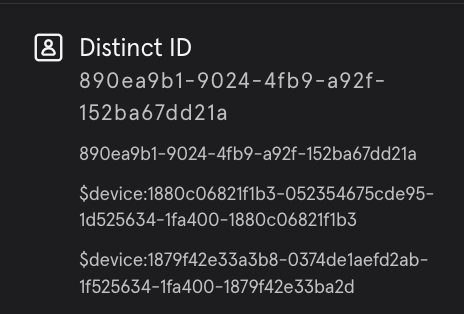
 If you map the Mixpanel `$distinct_id` to the OneSignal External ID, only the top value in the Distinct ID list matches.
In the example below, only `890ea9b1-9024-4fb9-a92f-152ba67dd21a` will match. The integration cannot match `109768518080488203109` or `$device:1880c06821f1b3-052354675cde95-1d525634-1fa400-1880c06821f1b3`.
If you map the Mixpanel `$distinct_id` to the OneSignal External ID, only the top value in the Distinct ID list matches.
In the example below, only `890ea9b1-9024-4fb9-a92f-152ba67dd21a` will match. The integration cannot match `109768518080488203109` or `$device:1880c06821f1b3-052354675cde95-1d525634-1fa400-1880c06821f1b3`.
 Click **Continue** when finished. You can now export cohorts from Mixpanel to OneSignal and collect message events from OneSignal in Mixpanel.
***
## Export Mixpanel cohorts to OneSignal
Sync Mixpanel cohorts to OneSignal using the matching External ID configured above. Exporting **does not create Users** — each User must already exist in OneSignal.
In Mixpanel, create a cohort containing the Users you want to target.
Click **Options > Export to... > *The OneSignal Connection name***.
Click **Continue** when finished. You can now export cohorts from Mixpanel to OneSignal and collect message events from OneSignal in Mixpanel.
***
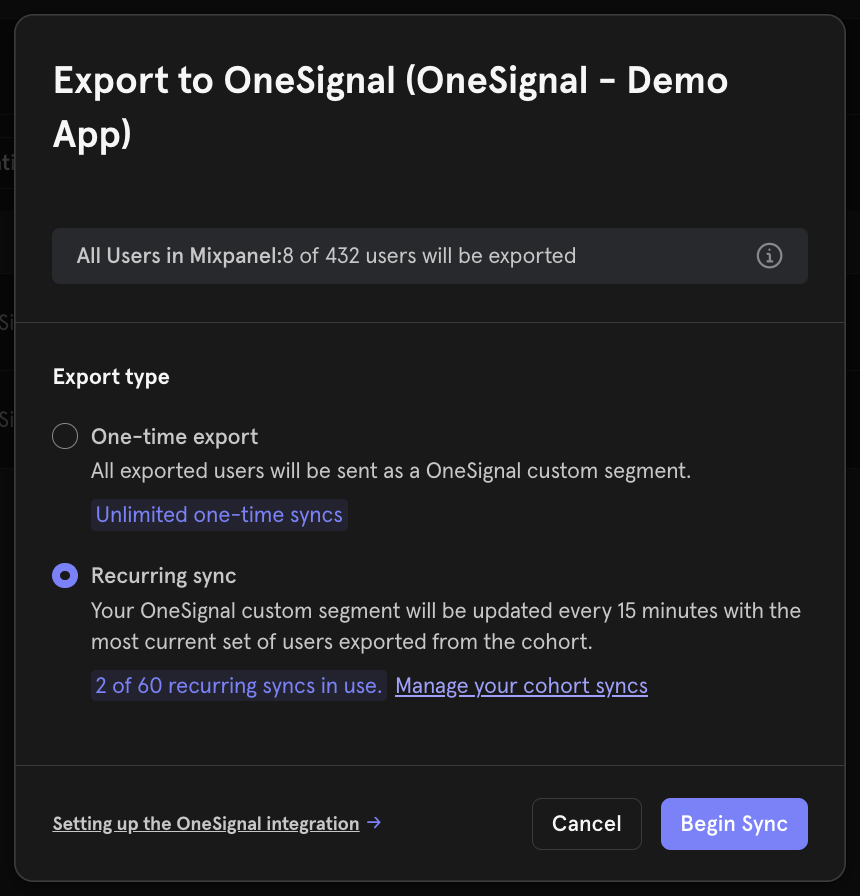
## Export Mixpanel cohorts to OneSignal
Sync Mixpanel cohorts to OneSignal using the matching External ID configured above. Exporting **does not create Users** — each User must already exist in OneSignal.
In Mixpanel, create a cohort containing the Users you want to target.
Click **Options > Export to... > *The OneSignal Connection name***.
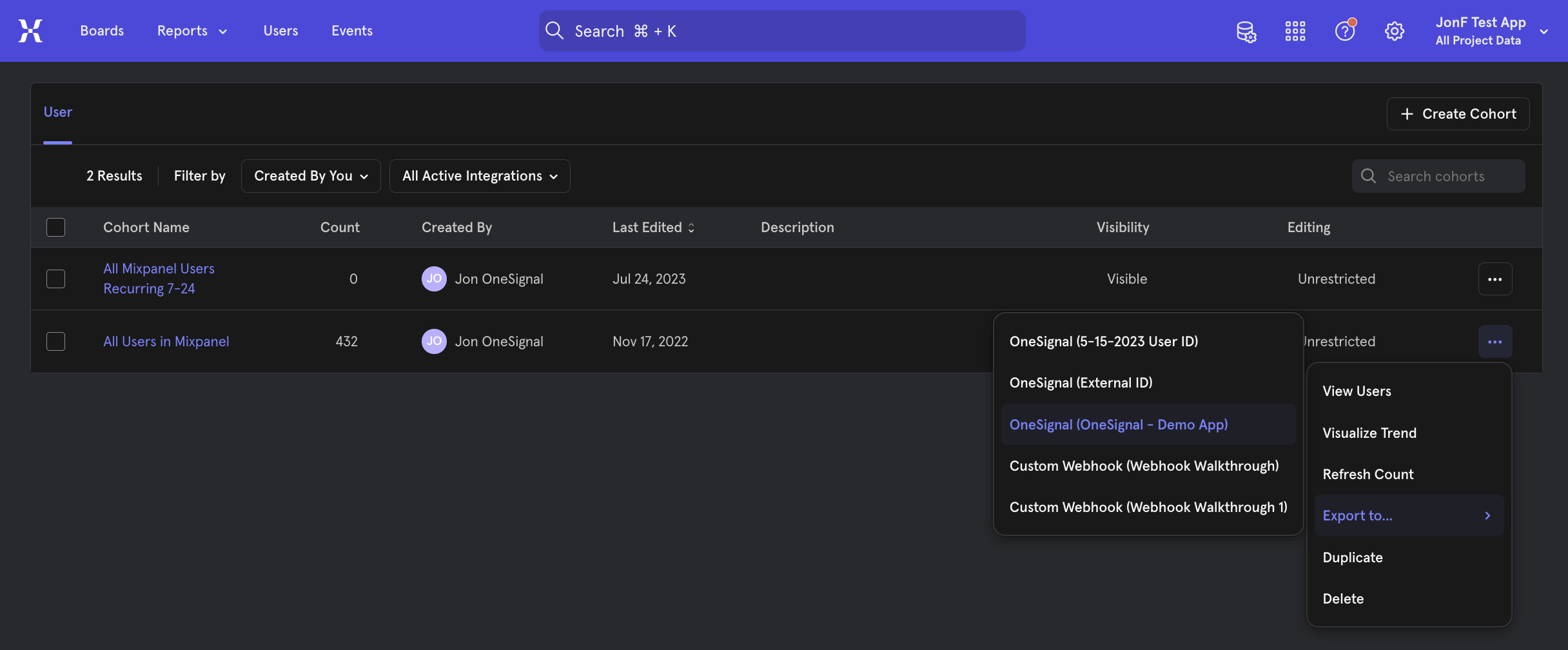 Select how often Mixpanel should sync the cohort, then click **Begin Sync**.
 ### OneSignal Segment creation
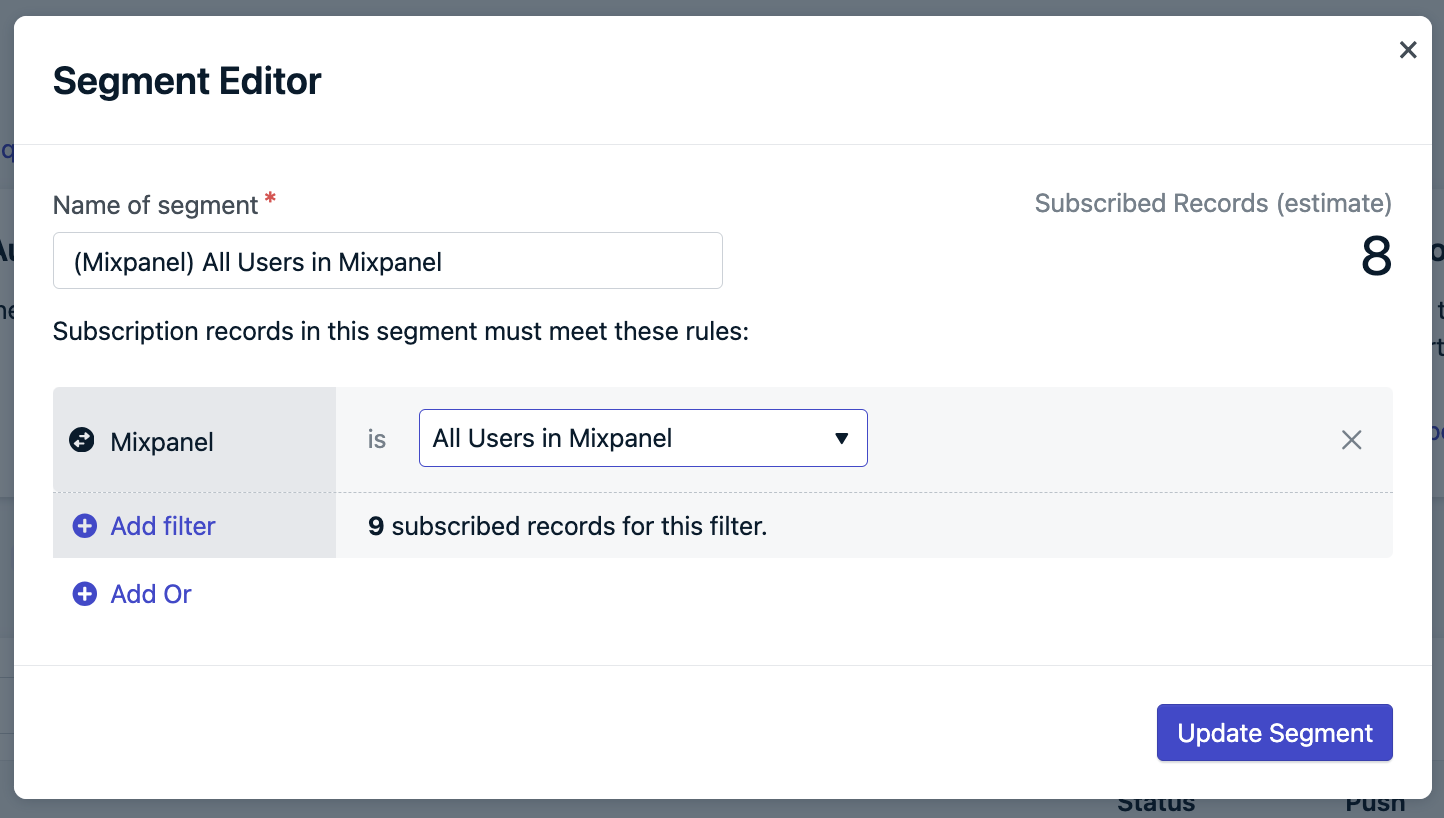
The synced cohort appears as a **Mixpanel Segment filter**. OneSignal automatically creates a Segment for the cohort if:
* The Users in the Mixpanel cohort also exist in OneSignal with a matching External ID.
* You have not exceeded your [Segment limit](./segmentation#segment-limit) in OneSignal.
OneSignal requires at least one matching User to create the Segment. After creation, the Segment remains in OneSignal even if the cohort later has no Users — it shows as empty until matching Users are added again.
### OneSignal Segment creation
The synced cohort appears as a **Mixpanel Segment filter**. OneSignal automatically creates a Segment for the cohort if:
* The Users in the Mixpanel cohort also exist in OneSignal with a matching External ID.
* You have not exceeded your [Segment limit](./segmentation#segment-limit) in OneSignal.
OneSignal requires at least one matching User to create the Segment. After creation, the Segment remains in OneSignal even if the cohort later has no Users — it shows as empty until matching Users are added again.
 ***
## Track message events in Mixpanel
OneSignal sends the following message events to Mixpanel in real time. Select which events to send in **Data > Integrations > Mixpanel**.
To test, send yourself a message from OneSignal, then navigate to your user profile page in Mixpanel. Within the Activity Feed, you should see the events populate.
***
## Track message events in Mixpanel
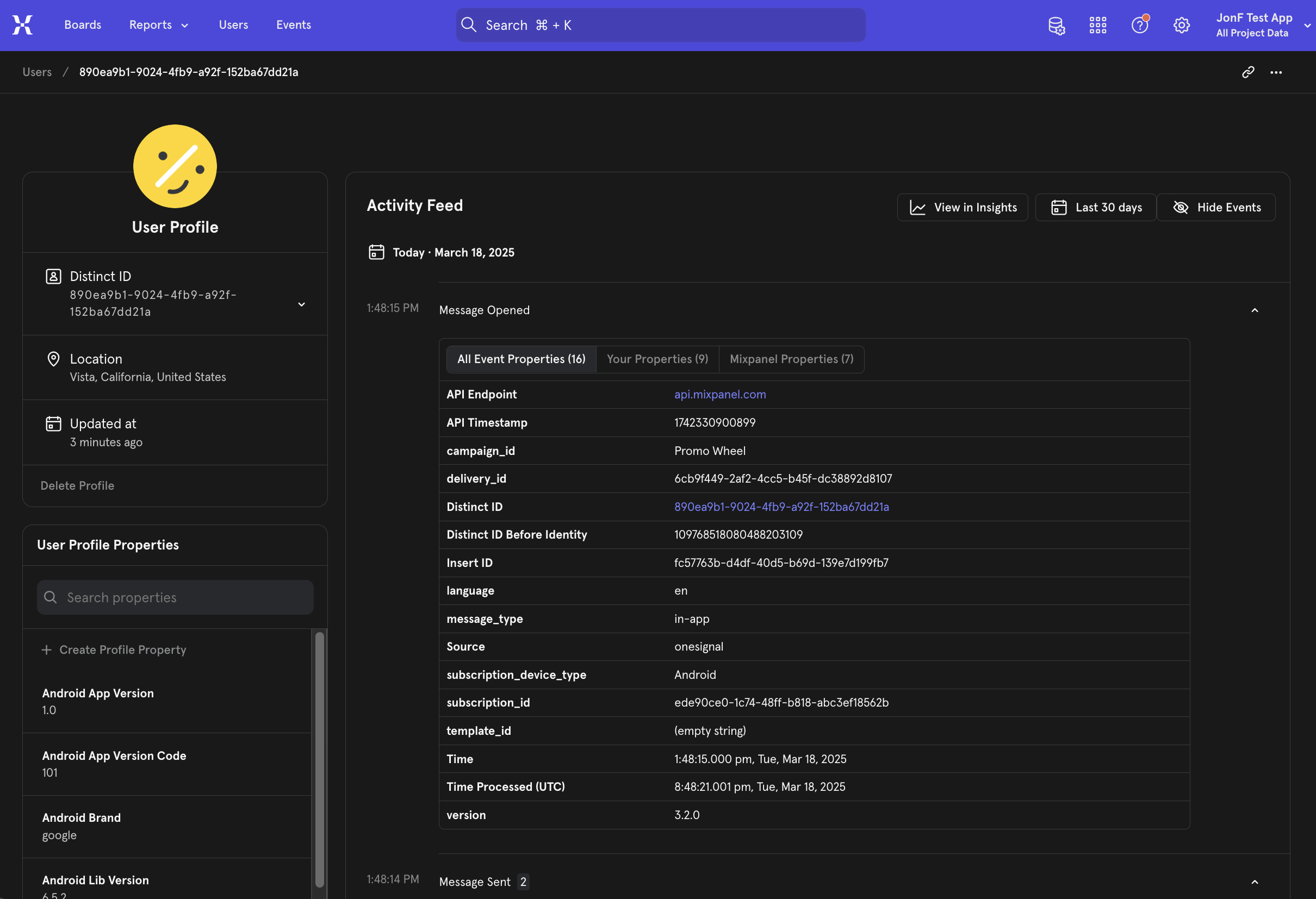
OneSignal sends the following message events to Mixpanel in real time. Select which events to send in **Data > Integrations > Mixpanel**.
To test, send yourself a message from OneSignal, then navigate to your user profile page in Mixpanel. Within the Activity Feed, you should see the events populate.
 ### Message events
#### Push
| Message Event Kind (OneSignal) | Message Event Name (Mixpanel) | Event Description |
| ------------------------------ | ----------------------------- | -------------------------------------------------------------------------- |
| Push Delivered | Message Sent | Push notification successfully delivered to the push services (FCM, APNs). |
| Push Received | Message Received | Push notification successfully received. |
| Push Clicked | App Opened from Push | Push notification tapped on device. |
| Push Failed | Push Failed | Push failed to send. Check the failed message report in OneSignal. |
| Push Unsubscribed | Push Unsubscribed | The [Subscription](./subscriptions) unsubscribed from push. |
#### In-app
| Message Event Kind (OneSignal) | Message Event Name (Mixpanel) | Event Description |
| ------------------------------ | ----------------------------- | ------------------------------------------------ |
| In-App Impression | Message Sent | In-app message successfully displayed on device. |
| In-App Clicked | Message Opened | In-app message clicked on device. |
| In-App Page Displayed | In-App Page Displayed | In-app message page displayed. |
#### Email
| Message Event Kind (OneSignal) | Message Event Name (Mixpanel) | Event Description |
| ------------------------------ | ----------------------------- | ----------------------------------------------------------------------------------------------- |
| Email Sent | Message Sent | Email successfully sent. |
| Email Received | Message Received | Email received by recipient. |
| Email Opened | Message Opened | Email opened by recipient. |
| Email Link Clicked | App Opened from Push | Email link clicked. |
| Email Unsubscribed | Email Unsubscribed | Email unsubscribed by recipient. |
| Email Reported As Spam | Email Reported as Spam | Email reported as spam by recipient. |
| Email Bounced | Email Bounced | Email returned to sender due to a permanent error. |
| Email Failed | Email Failed | Could not deliver the email to the recipient's inbox. |
| Email Suppressed | Email Suppressed | The email address is on your suppression list. Either it bounced or marked your emails as spam. |
#### SMS
| Message Event Kind (OneSignal) | Message Event Name (Mixpanel) | Event Description |
| ------------------------------ | ----------------------------- | --------------------------- |
| SMS Sent | Message Sent | SMS sent to recipient. |
| SMS Failed | SMS Failed | SMS failed to send. |
| SMS Delivered | Message Received | SMS successfully delivered. |
| SMS Undelivered | SMS Undelivered | The SMS could not be sent. |
### Event properties
Every event sent from OneSignal to Mixpanel includes these properties:
| PROPERTY NAME | DESCRIPTION |
| -------------------- | ------------------------------------------------------- |
| **Distinct ID** | The external\_id associated with the message |
| **Message ID** | The identifier of the discrete message |
| **Message Name** | The message name |
| **Message Title** | The message title |
| **Message Contents** | The message contents |
| **message\_type** | The type of message sent, push, in-app, email, SMS |
| **template\_id** | The message template used (API and Journey Messages) |
| **subscription\_id** | The OneSignal-assigned device, email, or SMS identifier |
| **device\_type** | The device type that received the message |
| **language** | The two-character language code of the device |
| **source** | `onesignal` (is indicated as the source for all events) |
Delivery counts may differ between Mixpanel and OneSignal. See [Why doesn't delivery data match?](#why-doesnt-delivery-data-match) for details.
***
## FAQ
### Why don't my cohort and segment counts match?
1. **Missing or mismatched External IDs**
Only Users with a matching OneSignal External ID and Mixpanel User ID are included. This integration does not create Users or Subscriptions.
2. **Unsubscribed Users**
OneSignal Segments only display the count for subscribed [Subscriptions](./subscriptions). Unsubscribed Subscriptions are available for Journeys or In-App Messages.
For example, if a Mixpanel cohort has 10 Users but the OneSignal Segment shows 8 Subscriptions, the 2 missing Users may:
* Not exist in OneSignal or have an incorrect External ID.
* Have unsubscribed Subscriptions.
To verify, check the **Audience > Users** tab in OneSignal to see if the Users exist and have active Subscriptions.
### Do unsubscribed Users sync from Mixpanel?
Yes, but they are excluded from the OneSignal Segment counts at this time. You can still message them via Journeys or In-App Messages if they have other [Subscriptions](./subscriptions) or their Subscription type supports it.
### Why doesn't delivery data match?
A single User may have multiple [Subscriptions](./subscriptions) (push devices, email addresses, phone numbers). Each Subscription generates its own delivery event. For example:
* 1 user = 2 Android + 1 iOS + 2 Web = 5 push Subscriptions
* 1 push message = up to 5 sent/received/clicked events
Use the `subscription_id` in event properties to trace the exact source.
To troubleshoot missing events:
* Ensure `OneSignal.login` is called whenever a user is identified to set the External ID.
* Verify that `OneSignal.logout` isn't removing the External ID.
* Check API requests or CSV uploads that may alter the External ID.
### Can I send custom events from Mixpanel to OneSignal?
Not natively. The Mixpanel integration supports message events (OneSignal → Mixpanel) and cohort syncing (Mixpanel → OneSignal), but does not include a built-in custom event destination. Unlike [Amplitude](./amplitude), Mixpanel has no native OneSignal events destination.
To route Mixpanel behavioral events into OneSignal as [custom events](./custom-events) that trigger Journeys or Segments, use a third-party connector like [Vendo](https://www.vendodata.com/use-cases/integrate-mixpanel-with-onesignal).
### How can I send user/subscription events?
User and subscription-level events (e.g., permission granted, user login/logout) are not automatically sent.
The OneSignal SDK has event listeners that can be used to track these events for you to send to Mixpanel:
* User State Observer: [Mobile SDK](./mobile-sdk-reference#addobserver-user-state), [Web SDK](./web-sdk-reference#addeventlistener-user-state)
* Permission Observer: [Mobile SDK](./mobile-sdk-reference#addpermissionobserver-push), [Web SDK](./web-sdk-reference#permissionchange)
***
## Related pages
Overview of OneSignal analytics, delivery metrics, and event tracking.
Track User actions to trigger Journeys or power analytics.
***
Need help?
Chat with our Support team or email `support@onesignal.com`
Please include:
* Details of the issue you're experiencing and steps to reproduce if available
* Your OneSignal App ID
* The External ID or Subscription ID if applicable
* The URL to the message you tested in the OneSignal Dashboard if applicable
* Any relevant [logs or error messages](/docs/en/capturing-a-debug-log)
We're happy to help!
### Message events
#### Push
| Message Event Kind (OneSignal) | Message Event Name (Mixpanel) | Event Description |
| ------------------------------ | ----------------------------- | -------------------------------------------------------------------------- |
| Push Delivered | Message Sent | Push notification successfully delivered to the push services (FCM, APNs). |
| Push Received | Message Received | Push notification successfully received. |
| Push Clicked | App Opened from Push | Push notification tapped on device. |
| Push Failed | Push Failed | Push failed to send. Check the failed message report in OneSignal. |
| Push Unsubscribed | Push Unsubscribed | The [Subscription](./subscriptions) unsubscribed from push. |
#### In-app
| Message Event Kind (OneSignal) | Message Event Name (Mixpanel) | Event Description |
| ------------------------------ | ----------------------------- | ------------------------------------------------ |
| In-App Impression | Message Sent | In-app message successfully displayed on device. |
| In-App Clicked | Message Opened | In-app message clicked on device. |
| In-App Page Displayed | In-App Page Displayed | In-app message page displayed. |
#### Email
| Message Event Kind (OneSignal) | Message Event Name (Mixpanel) | Event Description |
| ------------------------------ | ----------------------------- | ----------------------------------------------------------------------------------------------- |
| Email Sent | Message Sent | Email successfully sent. |
| Email Received | Message Received | Email received by recipient. |
| Email Opened | Message Opened | Email opened by recipient. |
| Email Link Clicked | App Opened from Push | Email link clicked. |
| Email Unsubscribed | Email Unsubscribed | Email unsubscribed by recipient. |
| Email Reported As Spam | Email Reported as Spam | Email reported as spam by recipient. |
| Email Bounced | Email Bounced | Email returned to sender due to a permanent error. |
| Email Failed | Email Failed | Could not deliver the email to the recipient's inbox. |
| Email Suppressed | Email Suppressed | The email address is on your suppression list. Either it bounced or marked your emails as spam. |
#### SMS
| Message Event Kind (OneSignal) | Message Event Name (Mixpanel) | Event Description |
| ------------------------------ | ----------------------------- | --------------------------- |
| SMS Sent | Message Sent | SMS sent to recipient. |
| SMS Failed | SMS Failed | SMS failed to send. |
| SMS Delivered | Message Received | SMS successfully delivered. |
| SMS Undelivered | SMS Undelivered | The SMS could not be sent. |
### Event properties
Every event sent from OneSignal to Mixpanel includes these properties:
| PROPERTY NAME | DESCRIPTION |
| -------------------- | ------------------------------------------------------- |
| **Distinct ID** | The external\_id associated with the message |
| **Message ID** | The identifier of the discrete message |
| **Message Name** | The message name |
| **Message Title** | The message title |
| **Message Contents** | The message contents |
| **message\_type** | The type of message sent, push, in-app, email, SMS |
| **template\_id** | The message template used (API and Journey Messages) |
| **subscription\_id** | The OneSignal-assigned device, email, or SMS identifier |
| **device\_type** | The device type that received the message |
| **language** | The two-character language code of the device |
| **source** | `onesignal` (is indicated as the source for all events) |
Delivery counts may differ between Mixpanel and OneSignal. See [Why doesn't delivery data match?](#why-doesnt-delivery-data-match) for details.
***
## FAQ
### Why don't my cohort and segment counts match?
1. **Missing or mismatched External IDs**
Only Users with a matching OneSignal External ID and Mixpanel User ID are included. This integration does not create Users or Subscriptions.
2. **Unsubscribed Users**
OneSignal Segments only display the count for subscribed [Subscriptions](./subscriptions). Unsubscribed Subscriptions are available for Journeys or In-App Messages.
For example, if a Mixpanel cohort has 10 Users but the OneSignal Segment shows 8 Subscriptions, the 2 missing Users may:
* Not exist in OneSignal or have an incorrect External ID.
* Have unsubscribed Subscriptions.
To verify, check the **Audience > Users** tab in OneSignal to see if the Users exist and have active Subscriptions.
### Do unsubscribed Users sync from Mixpanel?
Yes, but they are excluded from the OneSignal Segment counts at this time. You can still message them via Journeys or In-App Messages if they have other [Subscriptions](./subscriptions) or their Subscription type supports it.
### Why doesn't delivery data match?
A single User may have multiple [Subscriptions](./subscriptions) (push devices, email addresses, phone numbers). Each Subscription generates its own delivery event. For example:
* 1 user = 2 Android + 1 iOS + 2 Web = 5 push Subscriptions
* 1 push message = up to 5 sent/received/clicked events
Use the `subscription_id` in event properties to trace the exact source.
To troubleshoot missing events:
* Ensure `OneSignal.login` is called whenever a user is identified to set the External ID.
* Verify that `OneSignal.logout` isn't removing the External ID.
* Check API requests or CSV uploads that may alter the External ID.
### Can I send custom events from Mixpanel to OneSignal?
Not natively. The Mixpanel integration supports message events (OneSignal → Mixpanel) and cohort syncing (Mixpanel → OneSignal), but does not include a built-in custom event destination. Unlike [Amplitude](./amplitude), Mixpanel has no native OneSignal events destination.
To route Mixpanel behavioral events into OneSignal as [custom events](./custom-events) that trigger Journeys or Segments, use a third-party connector like [Vendo](https://www.vendodata.com/use-cases/integrate-mixpanel-with-onesignal).
### How can I send user/subscription events?
User and subscription-level events (e.g., permission granted, user login/logout) are not automatically sent.
The OneSignal SDK has event listeners that can be used to track these events for you to send to Mixpanel:
* User State Observer: [Mobile SDK](./mobile-sdk-reference#addobserver-user-state), [Web SDK](./web-sdk-reference#addeventlistener-user-state)
* Permission Observer: [Mobile SDK](./mobile-sdk-reference#addpermissionobserver-push), [Web SDK](./web-sdk-reference#permissionchange)
***
## Related pages
Overview of OneSignal analytics, delivery metrics, and event tracking.
Track User actions to trigger Journeys or power analytics.
***
Need help?
Chat with our Support team or email `support@onesignal.com`
Please include:
* Details of the issue you're experiencing and steps to reproduce if available
* Your OneSignal App ID
* The External ID or Subscription ID if applicable
* The URL to the message you tested in the OneSignal Dashboard if applicable
* Any relevant [logs or error messages](/docs/en/capturing-a-debug-log)
We're happy to help!