> ## Documentation Index
> Fetch the complete documentation index at: https://documentation.onesignal.com/llms.txt
> Use this file to discover all available pages before exploring further.
# Mobile-first strategies
> Implementation hub for mobile-first messaging: External IDs, Tags, Custom Events, segments, and lifecycle Journeys for subscription, freemium, and trial-driven apps.
Follow this guide if most of your app's user experience lives on a phone. The use cases here move your highest-leverage metrics: activation, trial-to-paid conversion, and Day 7/14/30 retention.
This guide picks up after you've installed the OneSignal [Mobile SDK](./mobile-sdk-setup) and confirmed users are flowing into your OneSignal dashboard [Users](./users) tab. If you haven't, complete SDK setup first.
## Implementation roadmap
To get the most out of your implementation, work through these steps in order.
The External ID binds push, email, SMS, and in-app behavior to one user across devices and reinstalls. It also merges anonymous pre-signup activity with the authenticated profile, so retention analytics count returning users correctly and trial-to-paid attribution stays accurate.
Set the External ID at signup, every login, and session resume. Common identifiers include your auth or billing ID (Auth0 `uid`, `user_id`, or Stripe `customer_id`).
Assign a unique identifier to each user so data follows them across devices and reinstalls.
For users to receive full-visibility push notifications (banner, sound, lock-screen alert), they must accept a system-level permission prompt. iOS supports [provisional authorization](./ios-provisional-push-notifications), which delivers notifications quietly to the Notification Center without a prompt.
A poorly timed prompt can cost you a subscriber permanently. iOS only shows the prompt once per install, and a denied user must re-enable notifications in system settings. Delay the prompt until after the first Aha moment, and precede it with an in-app message that explains what they'll receive and why.
Configure when and how the OS push permission prompt appears using in-app messages.
Tags capture longer-lived user properties so you can target each user precisely. Set `account_type` for lifecycle stage, `trial_end_date` for time-based Journeys, and `core_feature_used` for activation tracking. Update them whenever user state changes. See [recommended Tags](#tags) below.
Add key-value pairs to user profiles for segmentation and personalization.
Custom Events let you deliver messages at key moments in the customer lifecycle. Use `trial_started` to time trial-conversion Journeys, `payment_failed` to trigger dunning communication, and `core_feature_used` to mark activation. See [recommended Custom Events](#custom-events) below.
Capture user actions to trigger Journeys and Wait Until steps.
Segments are how you send the right message to the right group. Combine Tags and Custom Events into lifecycle audiences like Active Trial, Trial Expiring, and Core feature untouched. See [recommended segments](#segments) below.
Group users by shared characteristics to target Journeys and campaigns.
For high-priority moments like trial expiration, payment failures, and win-back, push alone reaches only opted-in users on the lock screen. Add the user's email address and phone number as Subscriptions on the user profile so your Journeys can also send email, SMS, RCS, and MMS. You can add them via:
* The SDK `addEmail` and `addSms` [methods](./mobile-sdk-reference)
* The REST API [Create Subscription](/reference/create-subscription) endpoint
* The dashboard [CSV Importer](./import)
Manage push, email, and SMS Subscriptions on a user profile.
Journeys turn data into outcomes: trial-to-paid conversions, retained subscribers, recovered failed payments. Each Journey reacts to user behavior in real time so you're not hand-sending campaigns. Build Welcome, conversion, retention, and win-back Journeys against your segments. Some use cases (like prompting for push permissions) don't require a Journey at all. See [Lifecycle Journeys](#lifecycle-journeys) below.
Build automated, multi-step messaging flows triggered by user behavior.
## Recommended data
Tags and Custom Events are case-sensitive. Keep names consistent across your app and backend.
### Tags
Tags are how you target the right user with the right message: segments filter on them, Journeys exit on them, and Liquid personalizes from them. Set Tags whenever user state changes. For boolean-style signals, set the Tag to `1` when true and **remove it** when false; segment with "tag exists" rather than storing `0`/`false` values.
If you only set up three Tags, start with `account_type`, `trial_end_date`, and `core_feature_used`. They power every starter segment below.
#### Lifecycle state
| Tag | Values | Use |
| :-------------------------- | :------------------------------------------ | :------------------------------------------------------------------------------------------------------------------------------------------------------------------ |
| `account_type` | `free` / `trial` / `paid` / `lapsed` | Lifecycle state that drives Journey entry, exit, and audience filters. |
| `plan_tier` | `basic` / `pro` / `enterprise` (your tiers) | Tailor upsell, renewal, and feature messaging by plan tier. |
| `trial_end_date` | Unix timestamp (seconds) | Trigger time-based conversion Journeys. Use OneSignal [time operators](./time-operators) to compare against the current time and send N days before the trial ends. |
| `subscription_start_date` | Unix timestamp (seconds) | Drive anniversary and tenure-based messaging for paid users. Pair with [time operators](./time-operators). |
| `subscription_renewal_date` | Unix timestamp (seconds) | Drive renewal-window messaging (e.g., "renews in 7 days") and post-expiration win-back. Pair with [time operators](./time-operators). |
| `subscription_auto_renew` | `1` (set when auto-renew is on) | Suppress renewal-prompt messaging for subscribers who will auto-renew. Removing the Tag flags the highest-priority retention moment. |
#### Engagement
| Tag | Values | Use |
| :------------------- | :---------------------------------------------- | :----------------------------------------------------------------------------------------------------------------------------------------------------------------------------------------------------------------------------------------------------------------- |
| `core_feature_used` | `1` (set when used) | Confirms the user has hit their Aha moment. Absence is your highest-leverage adoption segment; these users carry the highest churn risk. |
| `weekly_active_user` | `1` (set when WAU) | Identify Power Users for upsell or annual-plan offers. |
| `most_used_feature` | string (e.g., `dashboard`, `goals`, `tracking`) | The user's most-used feature over the last 30 days. Personalize re-engagement copy ("It's been a week since your last `{{ most_used_feature }}` session") with a Tag the user actually cares about. Set from your analytics pipeline on a daily or weekly cadence. |
#### Personalization and preferences
| Tag | Values | Use |
| :------------------------ | :----------------------------------------- | :------------------------------------------------------------------------------------------------------------------------------------------------------ |
| `first_name` | string | Personalize message content (e.g., `Hi {{ first_name \| default: 'there' }}`). |
| `acquisition_source` | `referral` / `social` / `organic` / `paid` | Tailor onboarding messaging to where the user came from. |
| `content_pref_` | `1` | Per-category content preferences (e.g., `content_pref_marketing`, `content_pref_entertainment`). Set when the user opts in; absence means not opted in. |
### Custom Events
Custom Events are how Journeys react in the moment a trigger happens. Send a Custom Event for each moment you want to react to. Events can carry properties, making them ideal for Journey entry triggers and conversion tracking. Use lowercase `snake_case` for event names.
| Event | Use case |
| ------------------------------------- | ----------------------------------------------------------------------------------------------------------------------------------------------------------------------------------------------------- |
| `signup_completed` | Welcome Journey entry. Carry `acquisition_source` as a property for source-aware copy. |
| `trial_started` | Trial onboarding Journey entry. |
| `onboarding_completed` | Exit onboarding Journeys; confirm setup is finished. |
| `core_feature_used` | Confirm activation; exit feature-education Journeys. Fired alongside the `core_feature_used` Tag; the event triggers Journey logic in the moment while the Tag persists state for later segmentation. |
| `aha_moment_reached` | Distinct activation milestone when "first use" and "real value realized" differ (e.g., first export, first invite sent, first habit logged). Use as a stronger Journey exit than `core_feature_used`. |
| `trial_converted` | Exit trial-to-paid conversion Journeys; thank-you message. |
| `plan_upgraded` | Exit upsell Journeys; expansion thank-you. |
| `plan_downgraded` | Retention check-in trigger; precedes churn for many users. |
| `subscription_renewed` | Renewal thank-you, retention checkpoint, and dunning Journey exit. |
| `payment_failed` | Dunning Journey entry. Carry `failure_reason` (e.g., `card_expired`, `insufficient_funds`) as a property for tailored copy. |
| `payment_succeeded` | Dunning Journey exit; renewal confirmation. |
| `subscription_cancelled` | Win-back Journey entry. Carry `cancel_reason` as a property when your billing platform captures it. |
| `support_contacted` | Proactive outreach trigger; suppress promotional messaging while the ticket is open. |
| `referral_sent` / `referral_redeemed` | Viral-loop Journeys: thank the sender on send, and onboard the redeemer with referral-aware copy. |
### Segments
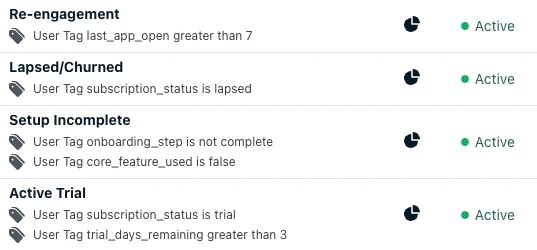
Segments turn Tags and Custom Events into messaging audiences. Combine them into the ten starter segments below.
| Segment | Definition |
| ---------------------- | ------------------------------------------------------------------------------------------------------------------------------------------ |
| New Trialists | `trial_started` event in the last 3 days. Onboarding-burst entry distinct from the broader Active Trial. |
| Active Trial | `account_type = "trial"` AND `trial_end_date` more than 3 days from now. |
| Trial Expiring | `account_type = "trial"` AND `trial_end_date` within the next 3 days. |
| Core feature untouched | `core_feature_used` does not exist. The user hasn't hit their Aha moment, making this the highest-leverage activation segment. |
| Paid Users | `account_type = "paid"`. |
| Power Users | Paid Users AND `weekly_active_user = "1"`. Annual-plan upsell and advocacy targets. |
| Failed Payment | `payment_failed` event in the last 7 days AND `account_type = "paid"`. Dunning entry. |
| At-Risk Subscribers | `account_type = "paid"` AND `Last Session > 14 days ago`. Distinct from generic re-engagement; the offer and tone differ for paying users. |
| Lapsed | `account_type = "lapsed"`. Keep active for 60 days post-cancellation, then exit users to a long-tail dormant list. |
| Re-engagement | OneSignal's built-in `Last Session` filter: more than 7 days for trial users, more than 14 days for free users. |
Mature mobile-first lifecycle setups run 15+ segments. Start with the ten above, then add depth (preferred channel, locale, session frequency) as your Journeys grow.
 ## Lifecycle Journeys
Most mobile-first revenue and churn happens at five lifecycle transitions, and a different Journey drives each one. With Tags, Custom Events, and segments in place, build messaging flows against them. Mobile-first apps mix channels by intent: push and in-app for real-time nudges, email for deeper conversion content, and SMS for high-intent moments like trial expiration and renewal. Most use cases below are Journeys, but some (like prompting for push permissions) use in-app messages alone.
Most mobile-first users move through five lifecycle stages, with a different Journey driving each transition:
```mermaid theme={null}
flowchart LR
A[New user] -->|Welcome| B[Active trial]
B -->|Trial-to-paid| C[Paid user]
C -. 14+ days inactive .-> D[At-risk]
D -. Cancellation .-> E[Lapsed]
E -. Win-back .-> C
```
The lifecycle above has four Journey flows driving its transitions, plus a fifth event-driven category for cross-cutting moments:
Engage new users immediately and drive them to their Aha moment before the trial expires.
Convert trialists with time-based sequences that ramp up urgency as the trial ends.
Catch at-risk users with `Last Session` thresholds before they fully disengage.
Re-engage churned subscribers with a value reminder rather than a discount.
React to user actions in real time, like purchase confirmation, milestones, and dunning.
### More use cases
Beyond the lifecycle Journeys, mobile-first apps commonly run these standalone use cases:
Reward consistent engagement with daily streak reminders that drive habit formation.
Prompt satisfied users for App Store and Google Play reviews at peak moments.
Target users on outdated app versions and nudge them to update via in-app messages.
Reach users via email or SMS when push delivery fails for high-priority moments.
## Best practices
* **Don't trigger the system-level push prompt at install.** Capture push opt-in via an in-app message *after* signup, the tutorial, or first Aha moment so the prompt arrives at a natural beat with context. Use a benefit-led message ("Get notified when your trial features unlock") rather than a generic prompt. See [Prompt for push permission with in-app messages](./prompt-for-push-permissions).
* **Time conversion pushes to the user's local time.** Trial-ending pushes scheduled in server time fire at 3 a.m. for half your audience. Use [Intelligent Delivery or Custom time per timezone](./push#delivery-schedule-and-optimization) so reminders land in waking hours.
* **Use `core_feature_used` as a Journey exit, not just an entry.** The single biggest welcome-Journey mistake is messaging users who already activated. Add the `core_feature_used` event (or Tag) as an exit on every onboarding Journey so converted users stop receiving feature-education pushes.
* **Cap trial-Journey frequency at one per day.** Trials are 7–14 days for most apps. Two pushes a day for that window will burn through your hard-won opt-in. Use a Journey-level frequency cap and let in-app messages carry the higher-frequency nudges.
* **Suppress promotional messaging during open support tickets.** Listen for `support_contacted` and add a suppression filter (e.g., "no `support_resolved` event in last 3 days") to upsell and renewal Journeys. A renewal nudge during an active complaint reads as tone-deaf.
* **Deep link every push to a specific screen.** A notification that opens the app home screen instead of the relevant content squanders most of the conversion value. Set a deep link on every Journey message so tapping the notification takes the user directly to the intended destination. See [Deep linking](./deep-linking).
### Measure success
Measure success by these metrics, not just opens or CTR:
* **Core action completion rate** of new users (`core_feature_used` Tag set)
* **Trial-to-paid conversion rate** (`trial_converted` over `trial_started`)
* **Weekly Active Users (WAU)** trend over time
* **Retention curve** at Day 7 / 14 / 30 from signup
## FAQ
### Should I use a Tag or a Custom Event for a given signal?
Use a **Custom Event** when you want to trigger a Journey or count an occurrence (e.g., `trial_started`, `core_feature_used`). Use a **Tag** when you want to segment on the user's current state or set a Journey exit condition (e.g., `account_type = "trial"`, `core_feature_used = "1"`). Many signals deserve both: fire the event in the moment, then update the Tag to reflect the new state.
### How often should I message trial users?
At most one push per day during the trial window, plus in-app messages. Trials are short (typically 7–14 days), and over-messaging during the trial is the fastest way to lose hard-won opt-in. Use a Journey-level frequency cap to enforce this, and watch your push opt-out rate by Journey step; a step with disproportionate opt-outs is the earliest signal you're being too aggressive.
### How do I keep converted users out of conversion Journeys?
Add an exit condition to every conversion Journey on either the `trial_converted` Custom Event or `account_type = "paid"`. Without an exit, converted users continue receiving "your trial ends in 2 days" pushes, the most common and most damaging onboarding mistake. The same pattern applies to onboarding Journeys: exit on `core_feature_used` or `onboarding_completed` so activated users stop seeing feature-education content.
### Do I need data integrations to use lifecycle Journeys?
No. You can build effective welcome and retention Journeys using dashboard-only segments like "First Session" and "Last Session." Custom Events and Tags give you more precise triggers and exit conditions, but they are not required to get started.
### Does this guide apply to apps with a web or desktop surface?
The patterns here apply to any subscription or freemium product, but the channel mix shifts. Apps with a meaningful web or desktop surface should layer in web push and additional segments for cross-platform users on top of this mobile-first foundation.
### What about apps with one-time purchases or downloadable content (DLC) instead of subscriptions?
The patterns apply, but the trial-specific Tags and Custom Events do not. Swap `trial_end_date` for `last_purchase_date`, `trial_started` and `trial_converted` for `first_purchase_completed`, and the **Trial Expiring** segment for an at-risk segment based on `Last Session`. For high-value users, replace `weekly_active_user` with a spend-based Tag like `total_spend_cents` or `purchase_count`. See [Welcome Journey: Mobile gaming](./welcome-journey-mobile-gaming) for an end-to-end Journey shaped around purchases instead of subscriptions.
## Lifecycle Journeys
Most mobile-first revenue and churn happens at five lifecycle transitions, and a different Journey drives each one. With Tags, Custom Events, and segments in place, build messaging flows against them. Mobile-first apps mix channels by intent: push and in-app for real-time nudges, email for deeper conversion content, and SMS for high-intent moments like trial expiration and renewal. Most use cases below are Journeys, but some (like prompting for push permissions) use in-app messages alone.
Most mobile-first users move through five lifecycle stages, with a different Journey driving each transition:
```mermaid theme={null}
flowchart LR
A[New user] -->|Welcome| B[Active trial]
B -->|Trial-to-paid| C[Paid user]
C -. 14+ days inactive .-> D[At-risk]
D -. Cancellation .-> E[Lapsed]
E -. Win-back .-> C
```
The lifecycle above has four Journey flows driving its transitions, plus a fifth event-driven category for cross-cutting moments:
Engage new users immediately and drive them to their Aha moment before the trial expires.
Convert trialists with time-based sequences that ramp up urgency as the trial ends.
Catch at-risk users with `Last Session` thresholds before they fully disengage.
Re-engage churned subscribers with a value reminder rather than a discount.
React to user actions in real time, like purchase confirmation, milestones, and dunning.
### More use cases
Beyond the lifecycle Journeys, mobile-first apps commonly run these standalone use cases:
Reward consistent engagement with daily streak reminders that drive habit formation.
Prompt satisfied users for App Store and Google Play reviews at peak moments.
Target users on outdated app versions and nudge them to update via in-app messages.
Reach users via email or SMS when push delivery fails for high-priority moments.
## Best practices
* **Don't trigger the system-level push prompt at install.** Capture push opt-in via an in-app message *after* signup, the tutorial, or first Aha moment so the prompt arrives at a natural beat with context. Use a benefit-led message ("Get notified when your trial features unlock") rather than a generic prompt. See [Prompt for push permission with in-app messages](./prompt-for-push-permissions).
* **Time conversion pushes to the user's local time.** Trial-ending pushes scheduled in server time fire at 3 a.m. for half your audience. Use [Intelligent Delivery or Custom time per timezone](./push#delivery-schedule-and-optimization) so reminders land in waking hours.
* **Use `core_feature_used` as a Journey exit, not just an entry.** The single biggest welcome-Journey mistake is messaging users who already activated. Add the `core_feature_used` event (or Tag) as an exit on every onboarding Journey so converted users stop receiving feature-education pushes.
* **Cap trial-Journey frequency at one per day.** Trials are 7–14 days for most apps. Two pushes a day for that window will burn through your hard-won opt-in. Use a Journey-level frequency cap and let in-app messages carry the higher-frequency nudges.
* **Suppress promotional messaging during open support tickets.** Listen for `support_contacted` and add a suppression filter (e.g., "no `support_resolved` event in last 3 days") to upsell and renewal Journeys. A renewal nudge during an active complaint reads as tone-deaf.
* **Deep link every push to a specific screen.** A notification that opens the app home screen instead of the relevant content squanders most of the conversion value. Set a deep link on every Journey message so tapping the notification takes the user directly to the intended destination. See [Deep linking](./deep-linking).
### Measure success
Measure success by these metrics, not just opens or CTR:
* **Core action completion rate** of new users (`core_feature_used` Tag set)
* **Trial-to-paid conversion rate** (`trial_converted` over `trial_started`)
* **Weekly Active Users (WAU)** trend over time
* **Retention curve** at Day 7 / 14 / 30 from signup
## FAQ
### Should I use a Tag or a Custom Event for a given signal?
Use a **Custom Event** when you want to trigger a Journey or count an occurrence (e.g., `trial_started`, `core_feature_used`). Use a **Tag** when you want to segment on the user's current state or set a Journey exit condition (e.g., `account_type = "trial"`, `core_feature_used = "1"`). Many signals deserve both: fire the event in the moment, then update the Tag to reflect the new state.
### How often should I message trial users?
At most one push per day during the trial window, plus in-app messages. Trials are short (typically 7–14 days), and over-messaging during the trial is the fastest way to lose hard-won opt-in. Use a Journey-level frequency cap to enforce this, and watch your push opt-out rate by Journey step; a step with disproportionate opt-outs is the earliest signal you're being too aggressive.
### How do I keep converted users out of conversion Journeys?
Add an exit condition to every conversion Journey on either the `trial_converted` Custom Event or `account_type = "paid"`. Without an exit, converted users continue receiving "your trial ends in 2 days" pushes, the most common and most damaging onboarding mistake. The same pattern applies to onboarding Journeys: exit on `core_feature_used` or `onboarding_completed` so activated users stop seeing feature-education content.
### Do I need data integrations to use lifecycle Journeys?
No. You can build effective welcome and retention Journeys using dashboard-only segments like "First Session" and "Last Session." Custom Events and Tags give you more precise triggers and exit conditions, but they are not required to get started.
### Does this guide apply to apps with a web or desktop surface?
The patterns here apply to any subscription or freemium product, but the channel mix shifts. Apps with a meaningful web or desktop surface should layer in web push and additional segments for cross-platform users on top of this mobile-first foundation.
### What about apps with one-time purchases or downloadable content (DLC) instead of subscriptions?
The patterns apply, but the trial-specific Tags and Custom Events do not. Swap `trial_end_date` for `last_purchase_date`, `trial_started` and `trial_converted` for `first_purchase_completed`, and the **Trial Expiring** segment for an at-risk segment based on `Last Session`. For high-value users, replace `weekly_active_user` with a spend-based Tag like `total_spend_cents` or `purchase_count`. See [Welcome Journey: Mobile gaming](./welcome-journey-mobile-gaming) for an end-to-end Journey shaped around purchases instead of subscriptions.