> ## Documentation Index
> Fetch the complete documentation index at: https://documentation.onesignal.com/llms.txt
> Use this file to discover all available pages before exploring further.
# Push message reports
> Push message reports show delivery outcomes, confirmed receipt, failure diagnostics, click-through rates, and per-subscription audience activity for each push send.
Push message reports help you track the performance of individual push message sends, including delivery outcomes, user engagement (CTR), device-level confirmations, and error diagnostics.
 ***
## Delivery metrics
OneSignal sends push notifications to **push services** (Google FCM, Apple APNs, Huawei HMS) which deliver them to your users' devices (Subscriptions). The Delivered, Unsubscribed, and Failed metrics come from these push services. The [Confirmed receipt](./confirmed-delivery) and Clicked metrics come from the OneSignal SDK on the device.
| Metric | Definition |
| --------------------- | ------------------------------------------------------------------------------------------------------------------------------------------------------------------------------------------------------------------------------------------------------------------------------------------------------ |
| **Sent** | The number of push notifications sent from OneSignal, including both those successfully delivered to the push services (FCM, APNs) and failures. This is a composite metric. |
| **Audience** | The number of Subscriptions in the targeted Segment(s). |
| **Remaining** | The number of Subscriptions in the target audience that haven't yet received the push notification (queued or in flight). Appears on the dashboard delivery report. |
| **Delivered** | The number of push notifications successfully delivered to the push services (FCM, APNs). |
| **Confirmed Receipt** | The number of push notifications confirmed as received by the device, verified by the OneSignal SDK. See [Confirmed receipt](/docs/en/confirmed-delivery) for platform-specific details and requirements. |
| **Unsubscribed** | The number of push Subscriptions that did not receive the push notification because they uninstalled the app, cleared browser data, or opted out of push and have not opened the app since. OneSignal will **not** attempt to send to these Subscriptions in future messages unless they re-subscribe. |
| **Failed** | The number of push Subscriptions that did not receive the push notification because of an error. OneSignal will attempt to send to these Subscriptions in future messages. |
| **Clicked** | The number of push Subscriptions that clicked the push notification. Push notifications can only be clicked once. |
| **Frequency Capped** | The number of push Subscriptions that did not receive the push notification due to frequency cap settings. |
The following metrics are specific to push message reports:
| Metric | Definition |
| ---------------------- | ---------------------------------------------------------------------------------------------------------------------------------------------------------------------- |
| **Confirmed Receipt** | The number of push Subscriptions that confirmed receiving the message. |
| **Remaining** | The number of notifications still queued on the OneSignal side for sending. |
| **Click-Through Rate** | Calculated as `(Clicks / Delivered) * 100%`. |
| **Confirmed CTR** | Calculated as `(Clicks / Confirmed Delivered) * 100%`. |
| **Influenced Opens** | The number of app opens that occurred after receiving the notification, without clicking. Based on time window set in **Settings > Push & In-App > Influenced Opens**. |
For detailed metric definitions across all channels, see the [Metrics Glossary](./analytics-metrics-glossary).
### Failure message troubleshooting
These errors prevented OneSignal from delivering the message to the push provider:
| Error | Type | Troubleshooting Steps |
| ---------------------------------------------------------------------------------------------------------------------------------------------------------------------- | ---- | --------------------------------------------------------------------------------------------------------------------------------------------------------------------------------- |
| **401 Unauthorized** | Web | Web push server gave an unclear 401 error. Retry cautiously — it may cause duplicate sends. |
| **404 Not Found** | Web | Invalid push subscription endpoint (bad token). |
| **Authentication Error** | FCM | Check your [FCM credentials](./android-firebase-credentials), re-upload the service account file, and try again. |
| **[DeviceTokenNotForTopic](https://developer.apple.com/library/archive/documentation/NetworkingInternet/Conceptual/RemoteNotificationsPG/CommunicatingwithAPNs.html)** | APNs | Token’s Bundle ID does not match your APNs key or certificate. Fix in [p8 token](./ios-p8-token-based-connection-to-apns) or [p12 setup](./ios-p12-generate-certificates). |
| **Expired Certificate** | APNs | Your p12 certificate has expired. See [certificate setup](./ios-p12-generate-certificates). |
| **FcmV1InvalidToken / Not Found** | FCM | Invalid push token. Check [Firebase credentials](./android-firebase-credentials). Devices must reopen app to refresh tokens. |
| **None / Missing** | FCM | Firebase Cloud Messaging API may not be enabled in your project. Activate in the Firebase Console and retry. |
| **Permission Denied** | FCM | Check the full error message for which permission is missing. [Update the permission for the Service Account file](./android-firebase-credentials) and re-upload it to OneSignal. |
| **SenderIdMismatch** | FCM | FCM v1 Sender ID mismatch. Verify [Firebase credentials](./android-firebase-credentials). Users must reopen the app for updated tokens. |
| **[TopicDisallowed](https://developer.apple.com/documentation/usernotifications/handling-notification-responses-from-apns)** | APNs | APNs token mismatch. Check your Team ID, Key ID, and Bundle ID in [p8 config](./ios-p8-token-based-connection-to-apns). |
***
## Delivery status
| Status | Description |
| ----------------- | ------------------------------------------------------------------------------------------------- |
| **Delivered** | Push notification successfully delivered to the push services (FCM, APNs). |
| **Scheduled** | Message is scheduled for future delivery. |
| **Sending** | Message is actively being sent. |
| **Queued** | Message is waiting to be sent. |
| **Canceled** | Message was manually canceled. See [Cancel push notifications](./push#cancel-push-notifications). |
| **No Recipients** | No valid audience at send time (e.g. unsubscribed or out of segment). |
| **Failed** | OneSignal could not send the message due to errors. |
***
## Conversions
**Coming soon** — [Conversion metrics](/docs/en/conversion-metrics) will be available on message reports. Once available, you will see attributed and influenced conversions for each message directly in its report. See [Conversion metrics](/docs/en/conversion-metrics) for details on the attribution model and setup instructions.
## Message statistics
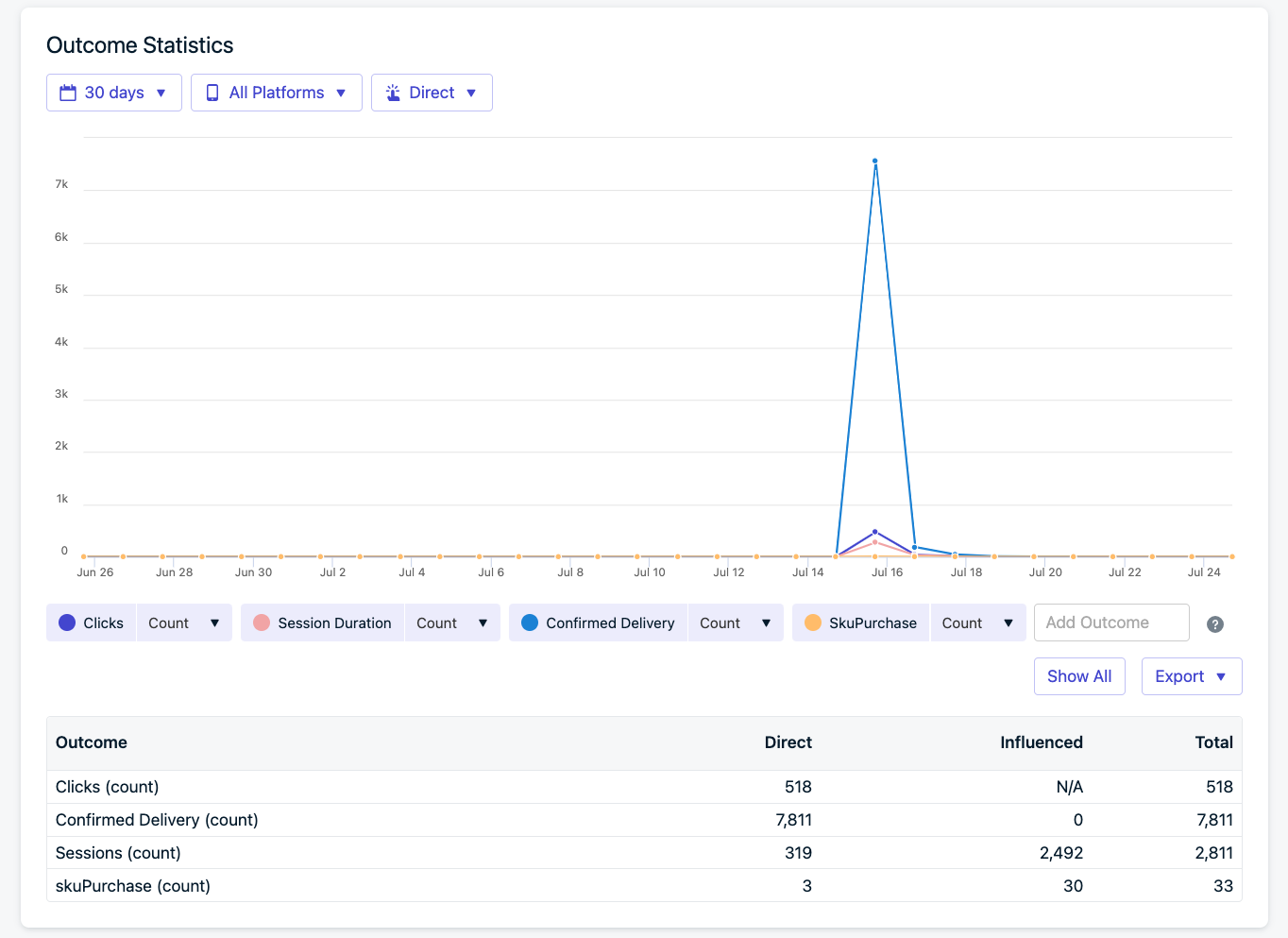
The message statistics graph tracks clicks, sessions, and [custom outcomes](./custom-outcomes) (legacy, being replaced by Conversion metrics) over the 30 days following a send. Use it to see whether engagement occurred immediately after delivery or continued over time.
***
## Delivery metrics
OneSignal sends push notifications to **push services** (Google FCM, Apple APNs, Huawei HMS) which deliver them to your users' devices (Subscriptions). The Delivered, Unsubscribed, and Failed metrics come from these push services. The [Confirmed receipt](./confirmed-delivery) and Clicked metrics come from the OneSignal SDK on the device.
| Metric | Definition |
| --------------------- | ------------------------------------------------------------------------------------------------------------------------------------------------------------------------------------------------------------------------------------------------------------------------------------------------------ |
| **Sent** | The number of push notifications sent from OneSignal, including both those successfully delivered to the push services (FCM, APNs) and failures. This is a composite metric. |
| **Audience** | The number of Subscriptions in the targeted Segment(s). |
| **Remaining** | The number of Subscriptions in the target audience that haven't yet received the push notification (queued or in flight). Appears on the dashboard delivery report. |
| **Delivered** | The number of push notifications successfully delivered to the push services (FCM, APNs). |
| **Confirmed Receipt** | The number of push notifications confirmed as received by the device, verified by the OneSignal SDK. See [Confirmed receipt](/docs/en/confirmed-delivery) for platform-specific details and requirements. |
| **Unsubscribed** | The number of push Subscriptions that did not receive the push notification because they uninstalled the app, cleared browser data, or opted out of push and have not opened the app since. OneSignal will **not** attempt to send to these Subscriptions in future messages unless they re-subscribe. |
| **Failed** | The number of push Subscriptions that did not receive the push notification because of an error. OneSignal will attempt to send to these Subscriptions in future messages. |
| **Clicked** | The number of push Subscriptions that clicked the push notification. Push notifications can only be clicked once. |
| **Frequency Capped** | The number of push Subscriptions that did not receive the push notification due to frequency cap settings. |
The following metrics are specific to push message reports:
| Metric | Definition |
| ---------------------- | ---------------------------------------------------------------------------------------------------------------------------------------------------------------------- |
| **Confirmed Receipt** | The number of push Subscriptions that confirmed receiving the message. |
| **Remaining** | The number of notifications still queued on the OneSignal side for sending. |
| **Click-Through Rate** | Calculated as `(Clicks / Delivered) * 100%`. |
| **Confirmed CTR** | Calculated as `(Clicks / Confirmed Delivered) * 100%`. |
| **Influenced Opens** | The number of app opens that occurred after receiving the notification, without clicking. Based on time window set in **Settings > Push & In-App > Influenced Opens**. |
For detailed metric definitions across all channels, see the [Metrics Glossary](./analytics-metrics-glossary).
### Failure message troubleshooting
These errors prevented OneSignal from delivering the message to the push provider:
| Error | Type | Troubleshooting Steps |
| ---------------------------------------------------------------------------------------------------------------------------------------------------------------------- | ---- | --------------------------------------------------------------------------------------------------------------------------------------------------------------------------------- |
| **401 Unauthorized** | Web | Web push server gave an unclear 401 error. Retry cautiously — it may cause duplicate sends. |
| **404 Not Found** | Web | Invalid push subscription endpoint (bad token). |
| **Authentication Error** | FCM | Check your [FCM credentials](./android-firebase-credentials), re-upload the service account file, and try again. |
| **[DeviceTokenNotForTopic](https://developer.apple.com/library/archive/documentation/NetworkingInternet/Conceptual/RemoteNotificationsPG/CommunicatingwithAPNs.html)** | APNs | Token’s Bundle ID does not match your APNs key or certificate. Fix in [p8 token](./ios-p8-token-based-connection-to-apns) or [p12 setup](./ios-p12-generate-certificates). |
| **Expired Certificate** | APNs | Your p12 certificate has expired. See [certificate setup](./ios-p12-generate-certificates). |
| **FcmV1InvalidToken / Not Found** | FCM | Invalid push token. Check [Firebase credentials](./android-firebase-credentials). Devices must reopen app to refresh tokens. |
| **None / Missing** | FCM | Firebase Cloud Messaging API may not be enabled in your project. Activate in the Firebase Console and retry. |
| **Permission Denied** | FCM | Check the full error message for which permission is missing. [Update the permission for the Service Account file](./android-firebase-credentials) and re-upload it to OneSignal. |
| **SenderIdMismatch** | FCM | FCM v1 Sender ID mismatch. Verify [Firebase credentials](./android-firebase-credentials). Users must reopen the app for updated tokens. |
| **[TopicDisallowed](https://developer.apple.com/documentation/usernotifications/handling-notification-responses-from-apns)** | APNs | APNs token mismatch. Check your Team ID, Key ID, and Bundle ID in [p8 config](./ios-p8-token-based-connection-to-apns). |
***
## Delivery status
| Status | Description |
| ----------------- | ------------------------------------------------------------------------------------------------- |
| **Delivered** | Push notification successfully delivered to the push services (FCM, APNs). |
| **Scheduled** | Message is scheduled for future delivery. |
| **Sending** | Message is actively being sent. |
| **Queued** | Message is waiting to be sent. |
| **Canceled** | Message was manually canceled. See [Cancel push notifications](./push#cancel-push-notifications). |
| **No Recipients** | No valid audience at send time (e.g. unsubscribed or out of segment). |
| **Failed** | OneSignal could not send the message due to errors. |
***
## Conversions
**Coming soon** — [Conversion metrics](/docs/en/conversion-metrics) will be available on message reports. Once available, you will see attributed and influenced conversions for each message directly in its report. See [Conversion metrics](/docs/en/conversion-metrics) for details on the attribution model and setup instructions.
## Message statistics
The message statistics graph tracks clicks, sessions, and [custom outcomes](./custom-outcomes) (legacy, being replaced by Conversion metrics) over the 30 days following a send. Use it to see whether engagement occurred immediately after delivery or continued over time.
 Messages sent via the OneSignal API are only retained for 30 days. Use [Template Analytics](./template-analytics) to track performance over time, or [export your data](./exporting-data) for offline analysis.
***
## Audience activity
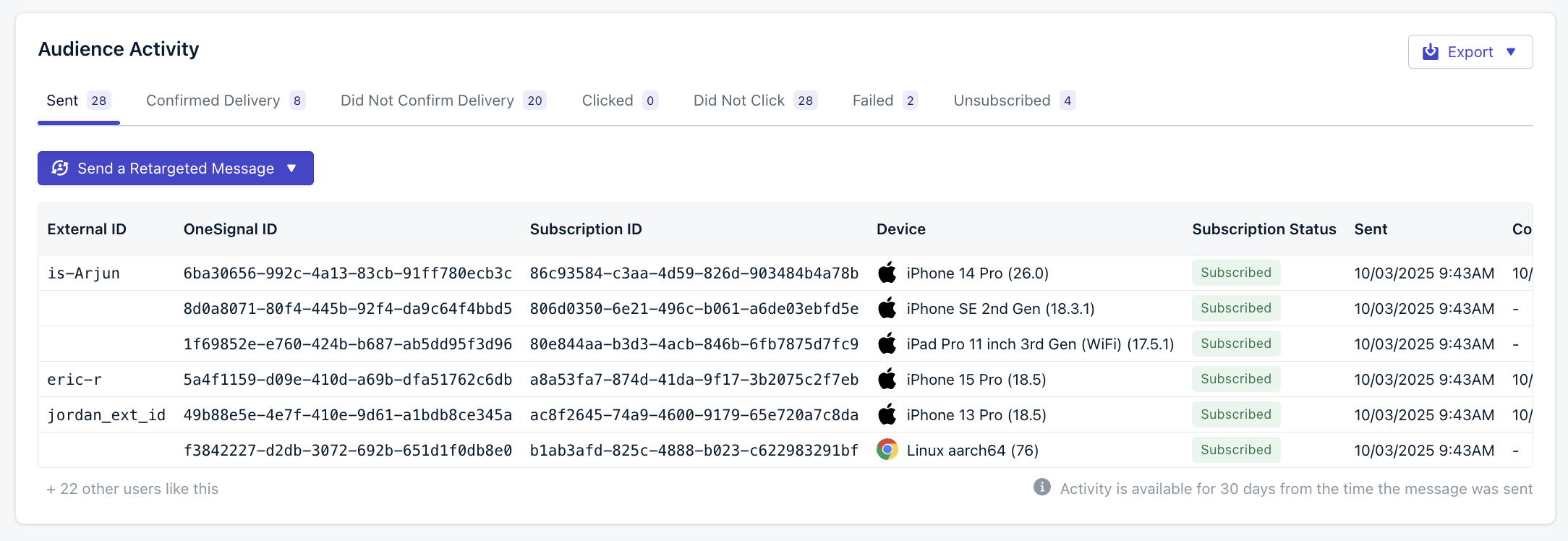
The **Audience activity** report shows how each Subscription interacted with a specific message. Results are grouped into categories so you can diagnose delivery issues, measure engagement, identify unsubscribes tied to a specific message, and segment audiences for retargeting or export.
Messages sent via the OneSignal API are only retained for 30 days. Use [Template Analytics](./template-analytics) to track performance over time, or [export your data](./exporting-data) for offline analysis.
***
## Audience activity
The **Audience activity** report shows how each Subscription interacted with a specific message. Results are grouped into categories so you can diagnose delivery issues, measure engagement, identify unsubscribes tied to a specific message, and segment audiences for retargeting or export.
 | Category | Description |
| --------------------------- | ------------------------------------------------------------------------------------------------------------------------------------------------------------------------------------------------------------------------------------------------------------------------------------------------------------------------------ |
| **Sent** | Message was sent to the device. |
| **Confirmed Receipt** | Delivery was confirmed by the device. |
| **Did Not Confirm Receipt** | Delivery confirmation was not received. |
| **Clicked** | User clicked the notification. |
| **Did Not Click** | User did not click the notification. |
| **Failed** | Delivery failed. |
| **Unsubscribed** | The number of push Subscriptions that did not receive the message because they uninstalled the app, cleared browser data, or opted out of push and have not opened the app since. We will not attempt to send to these Subscriptions in future messages unless the user resubscribes to push notifications on the same device. |
Each tab displays the number of recipients in that category and lets you drill into the individual subscription records.
| Column | Description |
| ----------------------- | ------------------------------------------------------------------------------------------------------------------------------------------------------------------------------ |
| **External ID** | Your system identifier (if set). |
| **OneSignal ID** | Unique OneSignal user ID. |
| **Subscription ID** | Unique subscription instance (device + app/browser). |
| **Device** | Browser or OS type. If you see `()`, the device has been deleted. |
| **Subscription Status** | Current status (for example, Subscribed, Unsubscribed). |
| **Sent** | Time the message was sent. |
| **Confirmed Receipt** | Time delivery was confirmed by the device, or `-` if not. |
| **Clicked** | Timestamp if the user clicked, or `-` if not. |
| **Failed** | Indicates if delivery failed. |
| **Unsubscribed** | Indicates the push Subscription did not receive the message because the user uninstalled the app, cleared browser data, or opted out of push and has not opened the app since. |
| **Failure message** | Error message if delivery failed (for example, "Invalid token"). |
Audience activity data is only available for **30 days** from the time the message is sent. Export results if you need to retain them longer.
### Retargeting audiences
From the **Audience activity** view, you can send a **Retargeted Message** directly to any category (for example, all users who did not click).
This makes it easy to follow up with users who didn't engage, re-engage those who churned, or reinforce success with users who confirmed receipt.
***
### Exporting results
You can download audience data with the **Export** menu:
* **Selected activity** – exports only the currently viewed tab (for example, all users who failed delivery).
* **All activities** – exports the full report across every category.
Exports let you analyze results offline, share with other teams, or merge with your CRM and analytics tools.
Export message and user data to CSV for offline analysis.
***
## Message settings
The message settings panel displays the configuration used for the send.
* **Audience** - Details of the audience including:
* Total number of recipients - How many Subscriptions were sent the message
* How the message was sent: Targeting filters or segments used
* **Schedule** - When the message started sending and per-user delivery options selected, if any.
* **Throttling** - Any throttling, frequency caps, or channel overrides
* **Message** - The message content.
* Platforms targeted (Android, iOS, specific browsers)
* **Advanced Settings** - Like Priority, Time to live, and Collapse ID.
* **Additional Data** - Any custom data added to the message.
***
## FAQ
### When do push subscription statuses update?
Push subscription statuses update through two mechanisms:
**1. When the user opens your app or site**
The OneSignal SDK checks whether the push token is valid and whether notification permissions are still granted, then updates the subscription status immediately.
For example, if a user disables push notifications in their device settings and then reopens your app, the SDK detects the change and marks the subscription as **Unsubscribed** right away.
You can capture these changes with the SDK's Subscription Observer ([mobile](./mobile-sdk-reference#addobserver-push-subscription-changes) | [web](./web-sdk-reference#addeventlistener-push-subscription-changes)) to sync status to your own database.
**2. When you send push notifications**
If a user uninstalls your app, clears browser data, or disables push **and never returns**, OneSignal cannot detect the change until you send a notification. The push service (FCM, APNs, HMS) reports the token as invalid, and OneSignal marks the subscription as **Unsubscribed**.
This detection typically takes 2 or more messages because the push service does not immediately reject an invalid token:
| Send | What happens |
| ---------- | ----------------------------------------------------------------------------------------------------------------------------------------------------------- |
| Message 1 | Delivered to device. User then unsubscribes in device settings or uninstalls the app. |
| Message 2 | Push service accepts the message but the device does not receive it. OneSignal reports "Delivered" because the push service has not rejected the token yet. |
| Message 3 | Push service rejects the token. OneSignal marks the subscription as **Unsubscribed**. |
| Message 4+ | OneSignal does not attempt delivery to this subscription. |
Use [Event Streams](./event-streams) to detect unsubscribes in real time when sending messages.
If you go long periods without sending to all users, unsubscribes accumulate silently and appear as a large spike when you resume sending. Send to all users at least once or twice a month to detect unsubscribes gradually. See [FCM expired token FAQ](./fcm-expired-token-faq) for more on unsubscribe spikes.
Apple delays unsubscribe reporting by 14+ days. To protect user privacy, Apple does not immediately report uninstalls or permission revocations. If a user opens your app after disabling push, OneSignal detects the change instantly via the SDK. If the user never opens the app again, it may take several weeks for Apple to report the invalid token. See [Apple Forum](https://developer.apple.com/forums/thread/670868) and [Technical Note](https://developer.apple.com/library/archive/technotes/tn2265/_index.html#//apple_ref/doc/uid/DTS40010376-CH1-TNTAG34) for details.
Use the dashboard or API to [delete old subscriptions](./delete-users) to keep your audience clean.
### Why don't my Delivered numbers match Confirmed Receipt?
Delivered reflects what the push service (FCM, APNs) reported — it accepted the message for delivery. Confirmed Receipt requires the OneSignal SDK on the device to report back, which only happens if the device is online and the app processes the notification. Devices that are offline, have the app force-closed, or lack the SDK will show as Delivered but not Confirmed.
### How long is audience activity data available?
Audience activity data is retained for 30 days from the time the message is sent. Export your results before this window closes if you need to keep them longer.
***
## Related pages
How device-level delivery confirmation works and what affects confirmation rates.
Definitions for all delivery, engagement, and conversion metrics across channels.
Track push notification performance across sends using templates.
Control delivery rate to manage server load during high-volume sends.
| Category | Description |
| --------------------------- | ------------------------------------------------------------------------------------------------------------------------------------------------------------------------------------------------------------------------------------------------------------------------------------------------------------------------------ |
| **Sent** | Message was sent to the device. |
| **Confirmed Receipt** | Delivery was confirmed by the device. |
| **Did Not Confirm Receipt** | Delivery confirmation was not received. |
| **Clicked** | User clicked the notification. |
| **Did Not Click** | User did not click the notification. |
| **Failed** | Delivery failed. |
| **Unsubscribed** | The number of push Subscriptions that did not receive the message because they uninstalled the app, cleared browser data, or opted out of push and have not opened the app since. We will not attempt to send to these Subscriptions in future messages unless the user resubscribes to push notifications on the same device. |
Each tab displays the number of recipients in that category and lets you drill into the individual subscription records.
| Column | Description |
| ----------------------- | ------------------------------------------------------------------------------------------------------------------------------------------------------------------------------ |
| **External ID** | Your system identifier (if set). |
| **OneSignal ID** | Unique OneSignal user ID. |
| **Subscription ID** | Unique subscription instance (device + app/browser). |
| **Device** | Browser or OS type. If you see `()`, the device has been deleted. |
| **Subscription Status** | Current status (for example, Subscribed, Unsubscribed). |
| **Sent** | Time the message was sent. |
| **Confirmed Receipt** | Time delivery was confirmed by the device, or `-` if not. |
| **Clicked** | Timestamp if the user clicked, or `-` if not. |
| **Failed** | Indicates if delivery failed. |
| **Unsubscribed** | Indicates the push Subscription did not receive the message because the user uninstalled the app, cleared browser data, or opted out of push and has not opened the app since. |
| **Failure message** | Error message if delivery failed (for example, "Invalid token"). |
Audience activity data is only available for **30 days** from the time the message is sent. Export results if you need to retain them longer.
### Retargeting audiences
From the **Audience activity** view, you can send a **Retargeted Message** directly to any category (for example, all users who did not click).
This makes it easy to follow up with users who didn't engage, re-engage those who churned, or reinforce success with users who confirmed receipt.
***
### Exporting results
You can download audience data with the **Export** menu:
* **Selected activity** – exports only the currently viewed tab (for example, all users who failed delivery).
* **All activities** – exports the full report across every category.
Exports let you analyze results offline, share with other teams, or merge with your CRM and analytics tools.
Export message and user data to CSV for offline analysis.
***
## Message settings
The message settings panel displays the configuration used for the send.
* **Audience** - Details of the audience including:
* Total number of recipients - How many Subscriptions were sent the message
* How the message was sent: Targeting filters or segments used
* **Schedule** - When the message started sending and per-user delivery options selected, if any.
* **Throttling** - Any throttling, frequency caps, or channel overrides
* **Message** - The message content.
* Platforms targeted (Android, iOS, specific browsers)
* **Advanced Settings** - Like Priority, Time to live, and Collapse ID.
* **Additional Data** - Any custom data added to the message.
***
## FAQ
### When do push subscription statuses update?
Push subscription statuses update through two mechanisms:
**1. When the user opens your app or site**
The OneSignal SDK checks whether the push token is valid and whether notification permissions are still granted, then updates the subscription status immediately.
For example, if a user disables push notifications in their device settings and then reopens your app, the SDK detects the change and marks the subscription as **Unsubscribed** right away.
You can capture these changes with the SDK's Subscription Observer ([mobile](./mobile-sdk-reference#addobserver-push-subscription-changes) | [web](./web-sdk-reference#addeventlistener-push-subscription-changes)) to sync status to your own database.
**2. When you send push notifications**
If a user uninstalls your app, clears browser data, or disables push **and never returns**, OneSignal cannot detect the change until you send a notification. The push service (FCM, APNs, HMS) reports the token as invalid, and OneSignal marks the subscription as **Unsubscribed**.
This detection typically takes 2 or more messages because the push service does not immediately reject an invalid token:
| Send | What happens |
| ---------- | ----------------------------------------------------------------------------------------------------------------------------------------------------------- |
| Message 1 | Delivered to device. User then unsubscribes in device settings or uninstalls the app. |
| Message 2 | Push service accepts the message but the device does not receive it. OneSignal reports "Delivered" because the push service has not rejected the token yet. |
| Message 3 | Push service rejects the token. OneSignal marks the subscription as **Unsubscribed**. |
| Message 4+ | OneSignal does not attempt delivery to this subscription. |
Use [Event Streams](./event-streams) to detect unsubscribes in real time when sending messages.
If you go long periods without sending to all users, unsubscribes accumulate silently and appear as a large spike when you resume sending. Send to all users at least once or twice a month to detect unsubscribes gradually. See [FCM expired token FAQ](./fcm-expired-token-faq) for more on unsubscribe spikes.
Apple delays unsubscribe reporting by 14+ days. To protect user privacy, Apple does not immediately report uninstalls or permission revocations. If a user opens your app after disabling push, OneSignal detects the change instantly via the SDK. If the user never opens the app again, it may take several weeks for Apple to report the invalid token. See [Apple Forum](https://developer.apple.com/forums/thread/670868) and [Technical Note](https://developer.apple.com/library/archive/technotes/tn2265/_index.html#//apple_ref/doc/uid/DTS40010376-CH1-TNTAG34) for details.
Use the dashboard or API to [delete old subscriptions](./delete-users) to keep your audience clean.
### Why don't my Delivered numbers match Confirmed Receipt?
Delivered reflects what the push service (FCM, APNs) reported — it accepted the message for delivery. Confirmed Receipt requires the OneSignal SDK on the device to report back, which only happens if the device is online and the app processes the notification. Devices that are offline, have the app force-closed, or lack the SDK will show as Delivered but not Confirmed.
### How long is audience activity data available?
Audience activity data is retained for 30 days from the time the message is sent. Export your results before this window closes if you need to keep them longer.
***
## Related pages
How device-level delivery confirmation works and what affects confirmation rates.
Definitions for all delivery, engagement, and conversion metrics across channels.
Track push notification performance across sends using templates.
Control delivery rate to manage server load during high-volume sends.