> ## Documentation Index
> Fetch the complete documentation index at: https://documentation.onesignal.com/llms.txt
> Use this file to discover all available pages before exploring further.
# Rich Communication Services (RCS)
> Send branded, app-like messages with RCS in OneSignal. Covers rich content types, sender setup, image requirements, SMS fallback, and country availability.
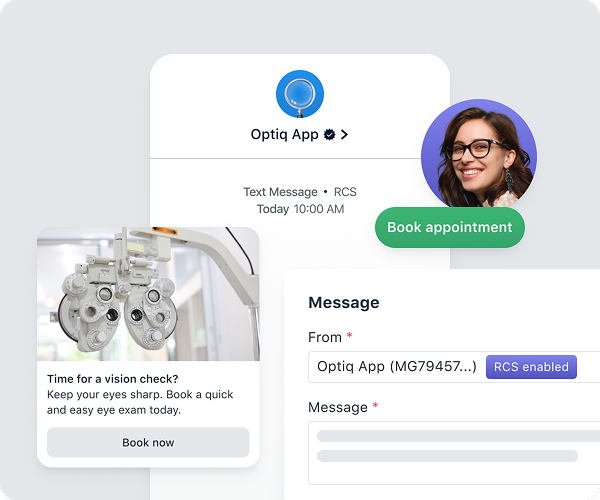
RCS (Rich Communication Services) is the next evolution of text messaging. It delivers branded, app-like experiences natively in the recipient's default messaging app — including your business name and logo as the sender identity, read receipts, carousels, action buttons, and keyword replies.
RCS requires a premium RCS sender resource and a separate approval process. SMS is used as an automatic fallback when the recipient's device or carrier does not support RCS.
 ***
## How RCS compares to SMS
| | SMS | RCS |
| ------------------- | ------------------------------------ | ----------------------------------------------------------- |
| **Sender identity** | Phone number | Your brand name, logo, and color |
| **Read receipts** | No | Yes |
| **Rich media** | MMS only (images, video) | Cards and carousels with embedded media |
| **Interactivity** | Keywords (inbound text) | Tappable action buttons (link, keyword reply, phone number) |
| **Fallback** | N/A | Automatically falls back to SMS |
| **Approval** | Standard sender resource application | Additional brand assets and carrier review |
| **Price** | Included / standard | Premium |
***
## Rich content types
If your sender includes an RCS sender resource, the message editor unlocks these capabilities:
* **Text only:** Plain branded RCS text with no media or actions. Links in the body remain tappable. Text-only messages always use their own RCS text as the fallback and do not use the SMS fallback field.
* **Cards:** Standalone rich messages with an image, title, description, and up to three actions.
* **Carousels:** Horizontally scrollable sets of rich cards. Useful for showcasing multiple products, locations, or options in a single message.
* **Actions:** Tappable buttons attached to cards. Three types are supported:
* **Link buttons:** Open any http or https URL. Supports iOS Universal Links and Android App Links, which deep link into your app when it's installed.
* **Keyword replies:** Send a keyword back as the subscriber's response without requiring them to type.
* **Phone number:** Initiates a phone call directly from the message.
Full RCS editor reference, including image aspect ratios, action configuration, and billing categories.
***
## SMS fallback
OneSignal automatically sends an SMS fallback when RCS fails to deliver — for example, when the recipient's device or carrier doesn't support RCS.
Configure the fallback message and review the rules for text-only RCS messages.
***
## Setup
RCS requires a premium RCS sender resource in addition to an SMS sender resource. The RCS sender resource must be approved separately. **Approval timelines are typically 8–16 weeks.**
During the application process, you will need to provide additional brand assets beyond the standard sender resource application:
* **Brand logo:** The image carriers display as your sender identity.
* **Brand color:** The accent color used alongside your brand in the messaging app.
* **Agent description:** A short paragraph carriers display alongside your brand identity, describing what subscribers should expect from your messages. "Agent" is the carrier term for the business identity that sends RCS messages.
* **Launch URL:** Your business homepage or marketing page for your messaging program.
For country-specific RCS availability, approval processes, and reviewer requirements, see [Sender resource applications](./sms-registration-requirements). Once you submit an application, you can track each sender resource's carrier approval status at **Settings > SMS > Senders**.
In the U.S., carriers currently prioritize notable brands (Fortune 1000), high-quality rich content experiences, and established SMS sending volume (100K+ SMS messages/month through OneSignal) for RCS approval.
To get started with RCS, [contact our team](https://onesignal.com/rcs#contact) or reach out to your account manager.
***
## Analytics
RCS messages include all standard SMS metrics plus:
* **Read:** The number of subscribers who read the RCS message (available because RCS supports read receipts).
Full metrics reference for delivery, click, and read events across SMS, MMS, and RCS.
***
## FAQ
### Does RCS work on all devices?
No. RCS requires the recipient's device and carrier to support it. OneSignal automatically falls back to SMS when RCS is not supported, so every recipient gets a message regardless of device capability.
### Can I send RCS messages internationally?
RCS availability varies by country. Not all countries where OneSignal supports SMS also support RCS. See [Sender resource applications](./sms-registration-requirements) for per-country RCS availability.
### Does an RCS sender resource replace my SMS sender resource?
No. You need both. The RCS sender resource is used when the recipient supports RCS; the SMS sender resource is used as the fallback. OneSignal handles the routing automatically within the same sender.
### Which editor do I get in Templates?
In Templates, you select a sender, and the editor adapts to it: you get the RCS editor when the selected sender has an RCS sender resource, and the SMS editor otherwise. When a sender has an approved RCS resource, OneSignal automatically prefers RCS for existing automations using that sender. See [Upgrading existing automations to RCS](./sms-composing-messages#upgrading-existing-automations-to-rcs) for how existing SMS content maps to RCS.
***
## How RCS compares to SMS
| | SMS | RCS |
| ------------------- | ------------------------------------ | ----------------------------------------------------------- |
| **Sender identity** | Phone number | Your brand name, logo, and color |
| **Read receipts** | No | Yes |
| **Rich media** | MMS only (images, video) | Cards and carousels with embedded media |
| **Interactivity** | Keywords (inbound text) | Tappable action buttons (link, keyword reply, phone number) |
| **Fallback** | N/A | Automatically falls back to SMS |
| **Approval** | Standard sender resource application | Additional brand assets and carrier review |
| **Price** | Included / standard | Premium |
***
## Rich content types
If your sender includes an RCS sender resource, the message editor unlocks these capabilities:
* **Text only:** Plain branded RCS text with no media or actions. Links in the body remain tappable. Text-only messages always use their own RCS text as the fallback and do not use the SMS fallback field.
* **Cards:** Standalone rich messages with an image, title, description, and up to three actions.
* **Carousels:** Horizontally scrollable sets of rich cards. Useful for showcasing multiple products, locations, or options in a single message.
* **Actions:** Tappable buttons attached to cards. Three types are supported:
* **Link buttons:** Open any http or https URL. Supports iOS Universal Links and Android App Links, which deep link into your app when it's installed.
* **Keyword replies:** Send a keyword back as the subscriber's response without requiring them to type.
* **Phone number:** Initiates a phone call directly from the message.
Full RCS editor reference, including image aspect ratios, action configuration, and billing categories.
***
## SMS fallback
OneSignal automatically sends an SMS fallback when RCS fails to deliver — for example, when the recipient's device or carrier doesn't support RCS.
Configure the fallback message and review the rules for text-only RCS messages.
***
## Setup
RCS requires a premium RCS sender resource in addition to an SMS sender resource. The RCS sender resource must be approved separately. **Approval timelines are typically 8–16 weeks.**
During the application process, you will need to provide additional brand assets beyond the standard sender resource application:
* **Brand logo:** The image carriers display as your sender identity.
* **Brand color:** The accent color used alongside your brand in the messaging app.
* **Agent description:** A short paragraph carriers display alongside your brand identity, describing what subscribers should expect from your messages. "Agent" is the carrier term for the business identity that sends RCS messages.
* **Launch URL:** Your business homepage or marketing page for your messaging program.
For country-specific RCS availability, approval processes, and reviewer requirements, see [Sender resource applications](./sms-registration-requirements). Once you submit an application, you can track each sender resource's carrier approval status at **Settings > SMS > Senders**.
In the U.S., carriers currently prioritize notable brands (Fortune 1000), high-quality rich content experiences, and established SMS sending volume (100K+ SMS messages/month through OneSignal) for RCS approval.
To get started with RCS, [contact our team](https://onesignal.com/rcs#contact) or reach out to your account manager.
***
## Analytics
RCS messages include all standard SMS metrics plus:
* **Read:** The number of subscribers who read the RCS message (available because RCS supports read receipts).
Full metrics reference for delivery, click, and read events across SMS, MMS, and RCS.
***
## FAQ
### Does RCS work on all devices?
No. RCS requires the recipient's device and carrier to support it. OneSignal automatically falls back to SMS when RCS is not supported, so every recipient gets a message regardless of device capability.
### Can I send RCS messages internationally?
RCS availability varies by country. Not all countries where OneSignal supports SMS also support RCS. See [Sender resource applications](./sms-registration-requirements) for per-country RCS availability.
### Does an RCS sender resource replace my SMS sender resource?
No. You need both. The RCS sender resource is used when the recipient supports RCS; the SMS sender resource is used as the fallback. OneSignal handles the routing automatically within the same sender.
### Which editor do I get in Templates?
In Templates, you select a sender, and the editor adapts to it: you get the RCS editor when the selected sender has an RCS sender resource, and the SMS editor otherwise. When a sender has an approved RCS resource, OneSignal automatically prefers RCS for existing automations using that sender. See [Upgrading existing automations to RCS](./sms-composing-messages#upgrading-existing-automations-to-rcs) for how existing SMS content maps to RCS.