> ## Documentation Index
> Fetch the complete documentation index at: https://documentation.onesignal.com/llms.txt
> Use this file to discover all available pages before exploring further.
# Transactional emails
> Send transactional emails like purchase confirmations, password resets, and welcome messages through OneSignal with delivery, click, and open tracking.
Transactional emails are messages triggered by a specific action — purchase confirmations, password resets, welcome emails, or other service-related notifications. Unlike marketing emails, transactional emails are considered necessary for delivering your service.
Sending transactional emails through OneSignal lets you:
* **Track delivery, clicks, and opens** from the OneSignal dashboard alongside push notifications and marketing emails
* **Manage all communications in one place** instead of maintaining a separate transactional email provider
* **Automate with Journeys** — combine transactional and marketing messages in visual workflows
***
## Transactional vs. marketing
**Transactional emails** are sent in response to an action the recipient has taken (e.g., making a purchase, requesting a password reset). An unsubscribe link is not required because the message is necessary for delivering your service.
**Marketing emails** are all other messages that are not required as part of your service. Marketing emails require recipient consent and must include an unsubscribe link. See [Email Regulatory Compliance](./email-compliance) for details.
***
## Sending transactional emails
Transactional emails can be sent to all recipients — including those who have unsubscribed from marketing emails — by enabling the **include unsubscribed** option.
### From the dashboard or a template
1. Open your email message or [template](./templates).
2. Toggle open **Advanced Settings**.
3. Check **Include sending to unsubscribed users**.
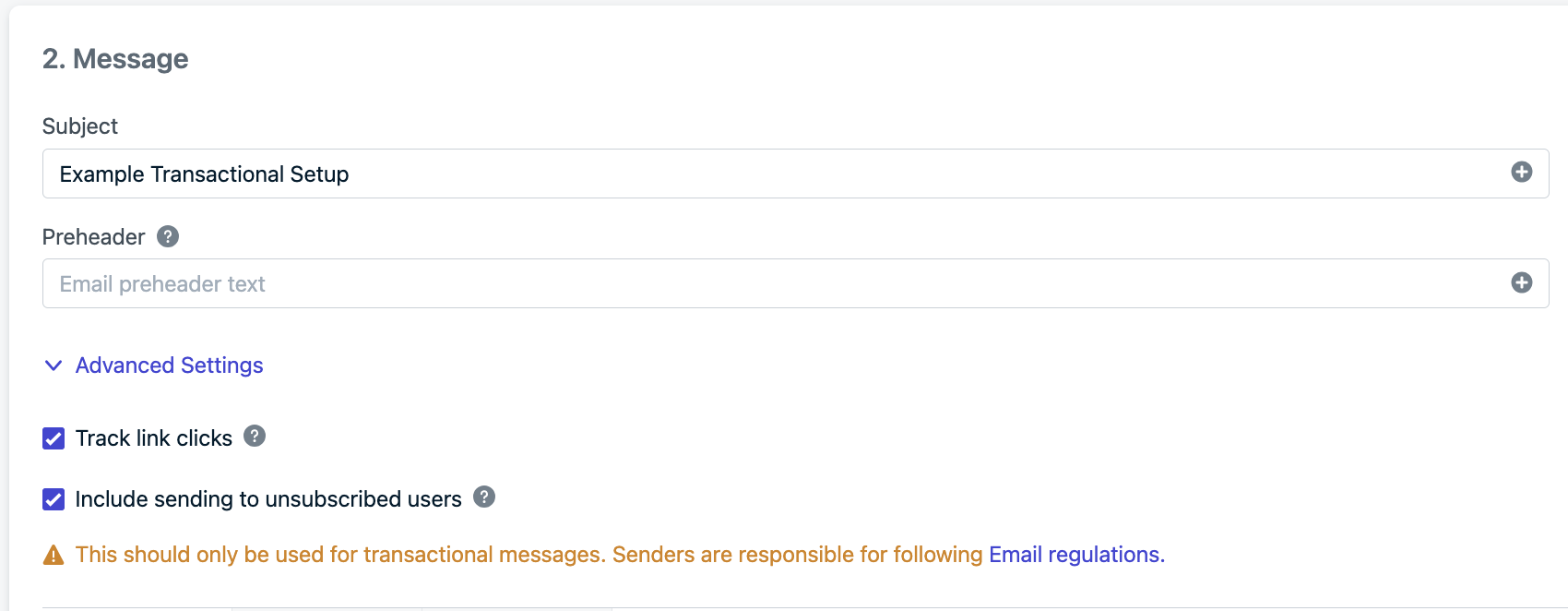 You can also remove the [unsubscribe link](./unsubscribe-links-email-subscriptions) since the email is sent to every recipient in the segment regardless of subscription status.
When sending from the dashboard, you can only target [Segments](./segmentation). To create a segment for specific recipients, set [Tags](./add-user-data-tags) using the [Import](./import) feature, then build a segment based on those tags.
If you send transactional emails via a third-party ESP like Mandrill, Mailgun, or SendGrid, you may need to clear unsubscribed addresses from your suppression list to enable delivery.
### From the API
Send transactional emails programmatically using the [Create message](/reference/email) API. Set `include_unsubscribed` to `true` to deliver to unsubscribed email Subscriptions.
```json theme={null}
{
"app_id": "YOUR_ONESIGNAL_APP_ID",
"include_email_tokens": ["email1@address.com", "email2@address.com"],
"email_subject": "Your Email Subject",
"template_id": "e59b3a5e-ccc4-44ff-b39e-aa4c668fe6c1",
"include_unsubscribed": true
}
```
This example uses a [template](./templates) that excludes the unsubscribe link. You can also omit the unsubscribe link directly in the `email_body` HTML.
See [Transactional Messages](./transactional-messages) for more details on transactional messaging across all channels.
***
## Migrate existing transactional emails
Import your existing email templates into OneSignal using:
1. [Email Template Forwarding](./email-template-forwarding) — forward an email to OneSignal to convert it into a template
2. [Create template API](/reference/create-template) — upload templates programmatically
3. The `email_body` parameter on the [Create message API](/reference/email) — inject HTML directly per message
***
## FAQ
### Do transactional emails require an unsubscribe link?
No. Transactional emails are service-related messages triggered by a recipient's action (e.g., a purchase or password reset). They are not subject to the same unsubscribe requirements as marketing emails. However, you should never use transactional emails to send marketing content.
### Can I send transactional emails to unsubscribed users?
Yes. Set `include_unsubscribed` to `true` in the API, or check **Include sending to unsubscribed users** in the dashboard's Advanced Settings. This delivers the email regardless of the recipient's subscription status.
### What is the difference between transactional and marketing emails?
Transactional emails are triggered by a specific user action and are necessary for delivering your service (e.g., order confirmations, password resets). Marketing emails promote your product or service and require recipient consent and an unsubscribe link. See [Email Regulatory Compliance](./email-compliance) for detailed guidelines.
## Related pages
Send transactional messages across all channels — email, push, SMS.
End-to-end guide to sending email with OneSignal.
Save and reuse email designs across campaigns.
Regulatory requirements for email messaging.
You can also remove the [unsubscribe link](./unsubscribe-links-email-subscriptions) since the email is sent to every recipient in the segment regardless of subscription status.
When sending from the dashboard, you can only target [Segments](./segmentation). To create a segment for specific recipients, set [Tags](./add-user-data-tags) using the [Import](./import) feature, then build a segment based on those tags.
If you send transactional emails via a third-party ESP like Mandrill, Mailgun, or SendGrid, you may need to clear unsubscribed addresses from your suppression list to enable delivery.
### From the API
Send transactional emails programmatically using the [Create message](/reference/email) API. Set `include_unsubscribed` to `true` to deliver to unsubscribed email Subscriptions.
```json theme={null}
{
"app_id": "YOUR_ONESIGNAL_APP_ID",
"include_email_tokens": ["email1@address.com", "email2@address.com"],
"email_subject": "Your Email Subject",
"template_id": "e59b3a5e-ccc4-44ff-b39e-aa4c668fe6c1",
"include_unsubscribed": true
}
```
This example uses a [template](./templates) that excludes the unsubscribe link. You can also omit the unsubscribe link directly in the `email_body` HTML.
See [Transactional Messages](./transactional-messages) for more details on transactional messaging across all channels.
***
## Migrate existing transactional emails
Import your existing email templates into OneSignal using:
1. [Email Template Forwarding](./email-template-forwarding) — forward an email to OneSignal to convert it into a template
2. [Create template API](/reference/create-template) — upload templates programmatically
3. The `email_body` parameter on the [Create message API](/reference/email) — inject HTML directly per message
***
## FAQ
### Do transactional emails require an unsubscribe link?
No. Transactional emails are service-related messages triggered by a recipient's action (e.g., a purchase or password reset). They are not subject to the same unsubscribe requirements as marketing emails. However, you should never use transactional emails to send marketing content.
### Can I send transactional emails to unsubscribed users?
Yes. Set `include_unsubscribed` to `true` in the API, or check **Include sending to unsubscribed users** in the dashboard's Advanced Settings. This delivers the email regardless of the recipient's subscription status.
### What is the difference between transactional and marketing emails?
Transactional emails are triggered by a specific user action and are necessary for delivering your service (e.g., order confirmations, password resets). Marketing emails promote your product or service and require recipient consent and an unsubscribe link. See [Email Regulatory Compliance](./email-compliance) for detailed guidelines.
## Related pages
Send transactional messages across all channels — email, push, SMS.
End-to-end guide to sending email with OneSignal.
Save and reuse email designs across campaigns.
Regulatory requirements for email messaging.