> ## Documentation Index
> Fetch the complete documentation index at: https://documentation.onesignal.com/llms.txt
> Use this file to discover all available pages before exploring further.
# Email unsubscribe links & headers
> Learn how to manage email unsubscribe behavior in OneSignal, including unsubscribe links, List-Unsubscribe headers, suppression rules, and resubscription workflows.
Managing how users unsubscribe from your emails is critical to complying with email standards (like CAN-SPAM), ensuring strong deliverability with providers like Gmail and Yahoo, and building trust with your audience.
OneSignal supports both visible unsubscribe links and List-Unsubscribe headers, ensuring your emails are fully compliant while giving you control over when and how users can opt out.
## Subscription states and suppression logic
Email [Subscriptions](./subscriptions) are either:
* **Subscribed** – eligible to receive email messages.
* **Unsubscribed** – excluded from most email sends unless explicitly overridden.
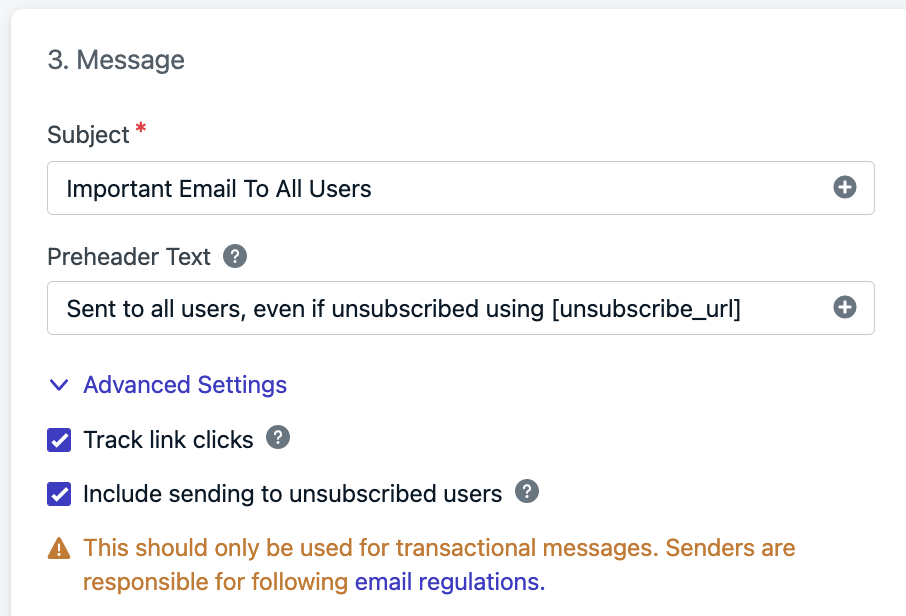
To include unsubscribed Subscriptions in your email (e.g., for transactional messages):
* In the dashboard: Enable **Advanced Settings > Include sending to unsubscribed users** when sending an email.
* In the API: Use the `include_unsubscribed` property in the [create email notification API](/reference/email).
 ***
## How users get unsubscribed
Email subscription status is updated via:
* The user clicking an unsubscribe link or List-Unsubscribe header
* You [importing a CSV of email addresses](./import) and setting `subscribed` to `no`.
* You setting `enabled : false` via the [Create user](/reference/create-user), [Update user](/reference/update-user), or [Update subscription](/reference/update-subscription) APIs.
* You manually unsubscribing from **Audience > Subscriptions > Options > Unsubscribe from Email**
***
## How unsubscribes are processed
What happens when a recipient unsubscribes depends on which method they use:
* **OneSignal unsubscribe link**: When a recipient clicks the `[unsubscribe_url]` link and confirms on the hosted page, OneSignal marks their subscription as **Unsubscribed** immediately. The email provider does not register this as an unsubscribe event on their end.
* **Email client unsubscribe button**: When a recipient uses the native "Unsubscribe" button in their email client (surfaced via the List-Unsubscribe header), the email provider captures the event and notifies OneSignal, which then updates the subscription status.
* **Custom unsubscribe or preference center page**: If you use your own unsubscribe URL, the email provider only sees a link click and does not trigger an unsubscribe event. You are responsible for calling the OneSignal API to update the subscription status based on what the recipient does on your page. See [Create a Custom Unsubscribe Page](./create-custom-unsubscribe-page).
***
## Unsubscribe header vs unsubscribe link
* **List-Unsubscribe header**: A hidden email header used by inbox providers to display native “Unsubscribe” buttons (e.g., Gmail, Yahoo).
* **Unsubscribe link**: A visible clickable URL placed in your email content using the `[unsubscribe_url]` token.
### List-Unsubscribe header behavior
OneSignal includes a `List-Unsubscribe` header in all emails **except when you enable “Include sending to unsubscribed users.”** This helps:
* Prevent your emails from being marked as spam
* Comply with [Gmail/Yahoo 2024 rules](https://onesignal.com/blog/guide-to-2024-gmail-and-yahoo-requirements-for-email-senders/).
The List-Unsubscribe header is **not included** if you enable "Include sending to unsubscribed users."
Some inbox providers may hide this header from display unless you meet certain sending volume thresholds. See [Gmail's](https://support.google.com/a/answer/81126?visit_id=638683263663552218-2680312485\&rd=1#requirements-5k\&zippy=%2Crequirements-for-sending-or-more-messages-per-day) and [Yahoo's](https://senders.yahooinc.com/best-practices/) requirements.
If a user clicks this, their email Subscription will be marked as unsubscribed in your OneSignal app.
### Adding unsubscribe links in emails
OneSignal provides the `[unsubscribe_url]` token, which inserts a visible unsubscribe link into your email content.
You can also create a branded experience with your own unsubscribe page. See [Create a custom unsubscribe page](./create-custom-unsubscribe-page).
#### HTML editor
If using our HTML editor, the default template includes an unsubscribe link automatically:
***
## How users get unsubscribed
Email subscription status is updated via:
* The user clicking an unsubscribe link or List-Unsubscribe header
* You [importing a CSV of email addresses](./import) and setting `subscribed` to `no`.
* You setting `enabled : false` via the [Create user](/reference/create-user), [Update user](/reference/update-user), or [Update subscription](/reference/update-subscription) APIs.
* You manually unsubscribing from **Audience > Subscriptions > Options > Unsubscribe from Email**
***
## How unsubscribes are processed
What happens when a recipient unsubscribes depends on which method they use:
* **OneSignal unsubscribe link**: When a recipient clicks the `[unsubscribe_url]` link and confirms on the hosted page, OneSignal marks their subscription as **Unsubscribed** immediately. The email provider does not register this as an unsubscribe event on their end.
* **Email client unsubscribe button**: When a recipient uses the native "Unsubscribe" button in their email client (surfaced via the List-Unsubscribe header), the email provider captures the event and notifies OneSignal, which then updates the subscription status.
* **Custom unsubscribe or preference center page**: If you use your own unsubscribe URL, the email provider only sees a link click and does not trigger an unsubscribe event. You are responsible for calling the OneSignal API to update the subscription status based on what the recipient does on your page. See [Create a Custom Unsubscribe Page](./create-custom-unsubscribe-page).
***
## Unsubscribe header vs unsubscribe link
* **List-Unsubscribe header**: A hidden email header used by inbox providers to display native “Unsubscribe” buttons (e.g., Gmail, Yahoo).
* **Unsubscribe link**: A visible clickable URL placed in your email content using the `[unsubscribe_url]` token.
### List-Unsubscribe header behavior
OneSignal includes a `List-Unsubscribe` header in all emails **except when you enable “Include sending to unsubscribed users.”** This helps:
* Prevent your emails from being marked as spam
* Comply with [Gmail/Yahoo 2024 rules](https://onesignal.com/blog/guide-to-2024-gmail-and-yahoo-requirements-for-email-senders/).
The List-Unsubscribe header is **not included** if you enable "Include sending to unsubscribed users."
Some inbox providers may hide this header from display unless you meet certain sending volume thresholds. See [Gmail's](https://support.google.com/a/answer/81126?visit_id=638683263663552218-2680312485\&rd=1#requirements-5k\&zippy=%2Crequirements-for-sending-or-more-messages-per-day) and [Yahoo's](https://senders.yahooinc.com/best-practices/) requirements.
If a user clicks this, their email Subscription will be marked as unsubscribed in your OneSignal app.
### Adding unsubscribe links in emails
OneSignal provides the `[unsubscribe_url]` token, which inserts a visible unsubscribe link into your email content.
You can also create a branded experience with your own unsubscribe page. See [Create a custom unsubscribe page](./create-custom-unsubscribe-page).
#### HTML editor
If using our HTML editor, the default template includes an unsubscribe link automatically:
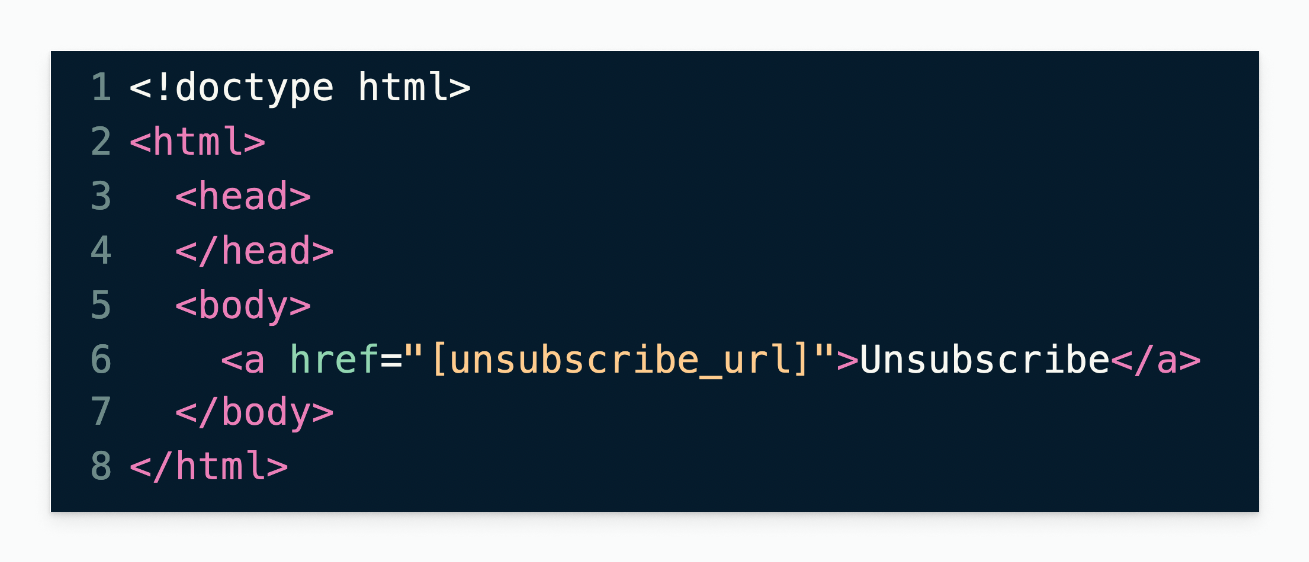 To add it manually (e.g. via API with `email_body`):
```html HTML theme={null}
Unsubscribe
```
#### Drag & drop editor
In a text block:
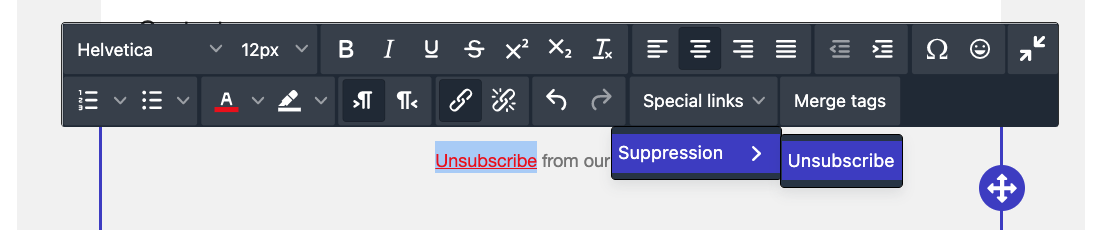
1. Click **Special Links > Suppression > Unsubscribe**
2. The `[unsubscribe_url]` placeholder is inserted
3. You can highlight text before inserting to turn it into a link
To add it manually (e.g. via API with `email_body`):
```html HTML theme={null}
Unsubscribe
```
#### Drag & drop editor
In a text block:
1. Click **Special Links > Suppression > Unsubscribe**
2. The `[unsubscribe_url]` placeholder is inserted
3. You can highlight text before inserting to turn it into a link
 Always make unsubscribe links **highly visible** with readable font sizes (at least 12px) and strong contrast. Hidden or hard-to-find links can lead users to mark your messages as spam, harming future deliverability.
***
## Custom unsubscribe link destinations
You may replace `[unsubscribe_url]` with your own unsubscribe landing page.
To do this:
* Follow the steps in [Create a Custom Unsubscribe Page](./create-custom-unsubscribe-page).
* Replace `[unsubscribe_url]` in your email with the URL of your custom unsubscribe page.
If using a custom link, OneSignal will not automatically mark the user as unsubscribed. You must handle that through the API or page behavior.
***
## FAQ
### Why isn’t the unsubscribe link working in my test email?
If your OneSignal email sending domain is not yet verified, unsubscribe links in test emails won’t be functional. You’ll see placeholder text, but no real link.
Once your domain is verified, unsubscribe links will render and function properly.
### How do I resubscribe an email address?
Users can be resubscribed in three ways:
1. Dashboard: Go to **Audience > Subscriptions > Options > Resubscribe to Email**
2. API: Set `enabled: true` in the [Create User](/reference/create-user) or [Update subscription](/reference/update-subscription) APIs
3. CSV Import: Set `subscribed = yes` when importing email addresses
If you use a third-party email provider, that provider maintains its own suppression list that OneSignal cannot access directly. An address marked **Subscribed** in OneSignal may still be suppressed on the provider's side. If a resubscribed address still is not receiving emails, check and remove it from the provider's suppression list as well.
### Why are there two unsubscribe links in my email?
If you're using ESPs like Mailgun or SendGrid, they may insert their own unsubscribe link. You can disable this in your ESP's settings to avoid duplication.
### Do unsubscribe clicks count toward analytics?
* Clicking the OneSignal custom `[unsubscribe_url]` does not count towards click analytics.
* Clicking a custom unsubscribe URL will be counted as a click. See [URLs, Links, and Deep Links](./links) for more details.
***
## Related articles
* [Create a Custom Unsubscribe Page](./create-custom-unsubscribe-page)
* [Email Messaging](./email-messaging)
* [Email API](/reference/email)
* [URLs, Links, and Deep Links](./links)
***
Always make unsubscribe links **highly visible** with readable font sizes (at least 12px) and strong contrast. Hidden or hard-to-find links can lead users to mark your messages as spam, harming future deliverability.
***
## Custom unsubscribe link destinations
You may replace `[unsubscribe_url]` with your own unsubscribe landing page.
To do this:
* Follow the steps in [Create a Custom Unsubscribe Page](./create-custom-unsubscribe-page).
* Replace `[unsubscribe_url]` in your email with the URL of your custom unsubscribe page.
If using a custom link, OneSignal will not automatically mark the user as unsubscribed. You must handle that through the API or page behavior.
***
## FAQ
### Why isn’t the unsubscribe link working in my test email?
If your OneSignal email sending domain is not yet verified, unsubscribe links in test emails won’t be functional. You’ll see placeholder text, but no real link.
Once your domain is verified, unsubscribe links will render and function properly.
### How do I resubscribe an email address?
Users can be resubscribed in three ways:
1. Dashboard: Go to **Audience > Subscriptions > Options > Resubscribe to Email**
2. API: Set `enabled: true` in the [Create User](/reference/create-user) or [Update subscription](/reference/update-subscription) APIs
3. CSV Import: Set `subscribed = yes` when importing email addresses
If you use a third-party email provider, that provider maintains its own suppression list that OneSignal cannot access directly. An address marked **Subscribed** in OneSignal may still be suppressed on the provider's side. If a resubscribed address still is not receiving emails, check and remove it from the provider's suppression list as well.
### Why are there two unsubscribe links in my email?
If you're using ESPs like Mailgun or SendGrid, they may insert their own unsubscribe link. You can disable this in your ESP's settings to avoid duplication.
### Do unsubscribe clicks count toward analytics?
* Clicking the OneSignal custom `[unsubscribe_url]` does not count towards click analytics.
* Clicking a custom unsubscribe URL will be counted as a click. See [URLs, Links, and Deep Links](./links) for more details.
***
## Related articles
* [Create a Custom Unsubscribe Page](./create-custom-unsubscribe-page)
* [Email Messaging](./email-messaging)
* [Email API](/reference/email)
* [URLs, Links, and Deep Links](./links)
***