> ## Documentation Index
> Fetch the complete documentation index at: https://documentation.onesignal.com/llms.txt
> Use this file to discover all available pages before exploring further.
# User-based segmentation
> User-based segments group Users with all of their Subscriptions, so one segment reaches every channel. Coming soon. Covers segment evaluation, optional Subscription filters for push and in-app messages, and user counts.
Use user-based segmentation to build segments of [Users](./users) instead of [Subscriptions](./subscriptions). When a user enters a segment, the user brings all of their Subscriptions, so the same segment works for push, email, SMS, and in-app messages.
User-based segmentation is **coming soon** and is not available yet. This page explains how it works so you can prepare before it's enabled for your app. Functionality may change before release. For how segments work today, see [Segments](./segmentation).
## Subscription-based vs user-based segments
Compare the two models by what a segment contains. OneSignal stores data in two layers:
* A **[User](./users)** is one person in your app. User-level data includes Tags, country, language, and sessions.
* A **[Subscription](./subscriptions)** is one place a user receives messages, such as an email address, a phone number, or an app on a device. Each Subscription has its own subscription status, device type, and app version.
| | Subscription-based segments | User-based segments |
| - | - | - |
| **What the segment contains** | Only the Subscriptions that match the filters | Users, each with all of their Subscriptions |
| **Channels the segment works on** | Only the channels of the matching Subscriptions. A segment built with an email filter can only reach users by email. | Every channel. The message's channel decides which Subscriptions receive it. |
| **Counts in the dashboard** | Subscriptions | Users, with a breakdown by channel |
When your app joins early access, OneSignal converts every existing segment to a user-based segment automatically. You do not need to recreate your segments.
## How OneSignal evaluates a user-based segment
OneSignal adds a user to a segment when at least one of the user's Subscriptions matches the segment's filters **and** the user has at least one subscribed Subscription. A user whose Subscriptions are all unsubscribed does not enter the segment.
OneSignal applies these rules:
1. **User-level filters check the user. Device-level filters check the Subscription.** Filters such as Tags, country, language, and sessions are checked against the user who owns the Subscription. **Device Type** and **App Version** are checked against the Subscription itself.
2. **Filters joined by AND must match the same Subscription.** Within one filter group, a single Subscription must satisfy every filter.
3. **Filter groups joined by OR are evaluated independently.** A user enters the segment if any group matches.
4. **App Version must be paired with Device Type.** You cannot use **App Version** on its own. In the segment editor, **App Version** is attached to a **Device Type** filter, and OneSignal checks both against the same Subscription. For example: Device Type is iOS AND App Version greater than 2.
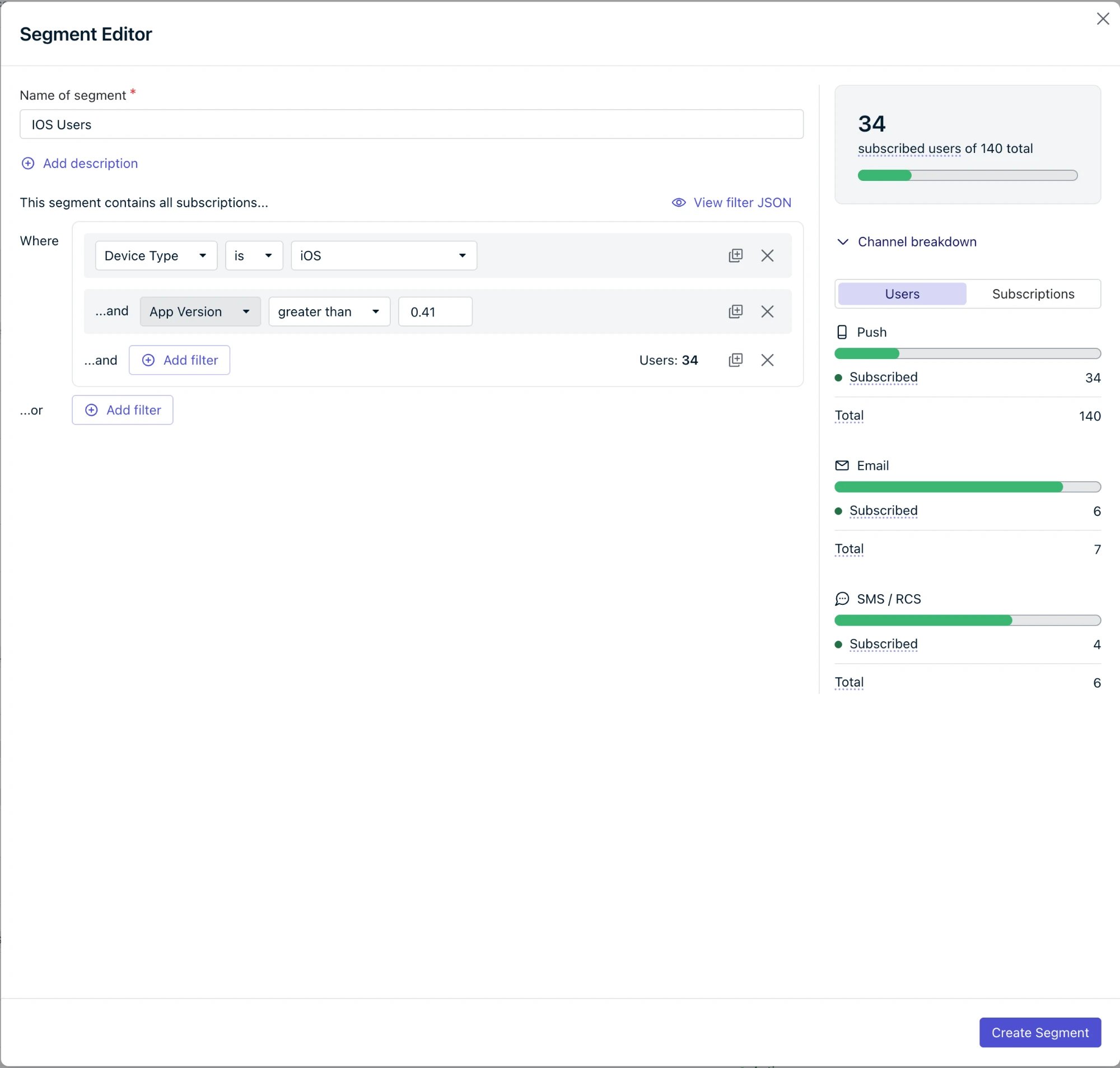 In the example above, the segment filters on iOS, yet the channel breakdown still shows subscribed email and SMS users. Those users have an iOS Subscription that matches, so they enter the segment with all of their Subscriptions.
## How messages are delivered
Think of delivery in two steps. The segment decides **which users** are in the audience. The message decides **which of those users' Subscriptions** receive it.
* **The channel always narrows delivery.** An email sent to a user-based segment goes only to email Subscriptions. An SMS goes only to SMS Subscriptions. A push notification goes only to push Subscriptions.
* **Optional Subscription filters narrow push and in-app messages further.** Subscription filters let you choose which platforms and app versions receive the message.
Without Subscription filters, a push notification goes to **every** push Subscription that each user in the segment has. A segment defined by Device Type is iOS still sends push to those users' Android and web push Subscriptions. To reach only matching devices, add the matching Subscription filters when you send.
### Subscription filters
Use Subscription filters to send a push or in-app message to specific platforms and app versions. Subscription filters are optional settings on the message screens. Leave them unchanged to send to every Subscription on the message's channel.
* **Platform:** Under **Send to these platforms**, select the platforms that should receive the message.
* **App version:** Expand **\ settings** (for example, **Apple iOS settings**). Under **Delivery settings**, use **Send to a specific app version** to choose an operator (such as **greater than** or **is**) and a version.
* **Platform:** In **Triggers & targeting**, expand **Platforms** and select **Show on Apple iOS**, **Show on Google Android**, or **Show on Huawei Android**.
* **App version:** Under each selected platform, use **Show on a specific app version** to choose an operator (such as **greater than** or **is**) and a version.
A platform in Subscription filters can cover more than one device type. For example, **Web (Chrome, Safari, Firefox)** covers web push Subscriptions in all three browsers. The push platforms are **Apple iOS**, **Google Android**, **Huawei Android**, **Windows**, **Apple macOS**, **Web (Chrome, Safari, Firefox)**, and **Google Chrome Apps & Extensions**.
Email and SMS messages do not need Subscription filters. The channel already selects the right Subscriptions.
Subscription filters will be available in the dashboard once user-based segmentation is enabled for your app. API support will follow.
## Examples
These examples use four users. All of their Subscriptions are subscribed.
| User | Subscriptions | Tags | Language | Country |
| - | - | - | - | - |
| Tom | Email, SMS, iOS (v1.4), Android (v1.2) | paid: yes, color: green | English | US |
| Bob | Email | paid: no, color: green | Spanish | US |
| Alice | SMS, iOS (v1.3) | paid: yes, color: red | English | CA |
| Riley | Android (v1.3) | paid: no, color: red | French | CA |
**Filters:** Device Type is Email
* **Subscription-based:** Tom's and Bob's email Subscriptions enter. The segment can only be used for email.
* **User-based:** Tom and Bob enter with all of their Subscriptions. The segment works on every channel: email reaches Tom and Bob, and SMS and push reach Tom.
**Filters:** Device Type is Email AND paid = yes
* **Subscription-based:** Only Tom's email Subscription enters.
* **User-based:** Tom enters with all four of his Subscriptions.
**Filters:** Device Type is iOS AND App Version greater than 1.3 AND paid = yes
* **Subscription-based:** Only Tom's iOS v1.4 Subscription enters.
* **User-based:** Tom enters with all four of his Subscriptions.
When you send a push notification to this segment:
* **Without Subscription filters:** The push goes to **both** of Tom's devices, iOS v1.4 and Android v1.2.
* **With Subscription filters** (platform Apple iOS, app version greater than 1.3): The push goes only to Tom's iOS v1.4 device.
**Filters:** Device Type is iOS AND App Version less than 1.4
* **Alice enters**, because her iOS Subscription is v1.3.
* **Tom does not enter.** His iOS Subscription is v1.4, and his v1.2 Subscription is Android. None of Tom's Subscriptions matches both filters.
**Filters:** Device Type is any of Email, SMS
* **Tom, Bob, and Alice enter**, because each has an email Subscription, an SMS Subscription, or both. Each enters with all of their Subscriptions.
## What changes when your app joins early access
### All existing segments become user-based
OneSignal converts every segment in your app to a user-based segment. Filters stay the same. Membership now follows the [evaluation rules](#how-onesignal-evaluates-a-user-based-segment) above.
### Segment counts show users
The **Segments** page shows counts of users instead of Subscriptions:
* **Users:** The number of users who match the segment criteria and are subscribed to at least one channel.
* **Push**, **Email**, and **SMS / RCS:** The number of users in the segment who are reachable on each channel.
A user with Subscriptions on several channels is counted in each of those channel columns. The channel columns can add up to more than the **Users** column.
In the example above, the segment filters on iOS, yet the channel breakdown still shows subscribed email and SMS users. Those users have an iOS Subscription that matches, so they enter the segment with all of their Subscriptions.
## How messages are delivered
Think of delivery in two steps. The segment decides **which users** are in the audience. The message decides **which of those users' Subscriptions** receive it.
* **The channel always narrows delivery.** An email sent to a user-based segment goes only to email Subscriptions. An SMS goes only to SMS Subscriptions. A push notification goes only to push Subscriptions.
* **Optional Subscription filters narrow push and in-app messages further.** Subscription filters let you choose which platforms and app versions receive the message.
Without Subscription filters, a push notification goes to **every** push Subscription that each user in the segment has. A segment defined by Device Type is iOS still sends push to those users' Android and web push Subscriptions. To reach only matching devices, add the matching Subscription filters when you send.
### Subscription filters
Use Subscription filters to send a push or in-app message to specific platforms and app versions. Subscription filters are optional settings on the message screens. Leave them unchanged to send to every Subscription on the message's channel.
* **Platform:** Under **Send to these platforms**, select the platforms that should receive the message.
* **App version:** Expand **\ settings** (for example, **Apple iOS settings**). Under **Delivery settings**, use **Send to a specific app version** to choose an operator (such as **greater than** or **is**) and a version.
* **Platform:** In **Triggers & targeting**, expand **Platforms** and select **Show on Apple iOS**, **Show on Google Android**, or **Show on Huawei Android**.
* **App version:** Under each selected platform, use **Show on a specific app version** to choose an operator (such as **greater than** or **is**) and a version.
A platform in Subscription filters can cover more than one device type. For example, **Web (Chrome, Safari, Firefox)** covers web push Subscriptions in all three browsers. The push platforms are **Apple iOS**, **Google Android**, **Huawei Android**, **Windows**, **Apple macOS**, **Web (Chrome, Safari, Firefox)**, and **Google Chrome Apps & Extensions**.
Email and SMS messages do not need Subscription filters. The channel already selects the right Subscriptions.
Subscription filters will be available in the dashboard once user-based segmentation is enabled for your app. API support will follow.
## Examples
These examples use four users. All of their Subscriptions are subscribed.
| User | Subscriptions | Tags | Language | Country |
| - | - | - | - | - |
| Tom | Email, SMS, iOS (v1.4), Android (v1.2) | paid: yes, color: green | English | US |
| Bob | Email | paid: no, color: green | Spanish | US |
| Alice | SMS, iOS (v1.3) | paid: yes, color: red | English | CA |
| Riley | Android (v1.3) | paid: no, color: red | French | CA |
**Filters:** Device Type is Email
* **Subscription-based:** Tom's and Bob's email Subscriptions enter. The segment can only be used for email.
* **User-based:** Tom and Bob enter with all of their Subscriptions. The segment works on every channel: email reaches Tom and Bob, and SMS and push reach Tom.
**Filters:** Device Type is Email AND paid = yes
* **Subscription-based:** Only Tom's email Subscription enters.
* **User-based:** Tom enters with all four of his Subscriptions.
**Filters:** Device Type is iOS AND App Version greater than 1.3 AND paid = yes
* **Subscription-based:** Only Tom's iOS v1.4 Subscription enters.
* **User-based:** Tom enters with all four of his Subscriptions.
When you send a push notification to this segment:
* **Without Subscription filters:** The push goes to **both** of Tom's devices, iOS v1.4 and Android v1.2.
* **With Subscription filters** (platform Apple iOS, app version greater than 1.3): The push goes only to Tom's iOS v1.4 device.
**Filters:** Device Type is iOS AND App Version less than 1.4
* **Alice enters**, because her iOS Subscription is v1.3.
* **Tom does not enter.** His iOS Subscription is v1.4, and his v1.2 Subscription is Android. None of Tom's Subscriptions matches both filters.
**Filters:** Device Type is any of Email, SMS
* **Tom, Bob, and Alice enter**, because each has an email Subscription, an SMS Subscription, or both. Each enters with all of their Subscriptions.
## What changes when your app joins early access
### All existing segments become user-based
OneSignal converts every segment in your app to a user-based segment. Filters stay the same. Membership now follows the [evaluation rules](#how-onesignal-evaluates-a-user-based-segment) above.
### Segment counts show users
The **Segments** page shows counts of users instead of Subscriptions:
* **Users:** The number of users who match the segment criteria and are subscribed to at least one channel.
* **Push**, **Email**, and **SMS / RCS:** The number of users in the segment who are reachable on each channel.
A user with Subscriptions on several channels is counted in each of those channel columns. The channel columns can add up to more than the **Users** column.
 In the segment editor, the audience count shows subscribed users out of the total users in the segment. The **Channel breakdown** switches between **Users** and **Subscriptions**, and each filter group shows its own user count.
### Filter the Users list by segment
On **Audience > Users & subscriptions**, the **Users** tab lets you filter the list by segment. Start typing a segment name in the segment filter and select the segment to see the users in it.
### Review push and in-app messages that target device filters
If a segment filters on **Device Type** or **App Version**, messages sent to it can reach more devices than before. See [Segment C](#examples). For each push or in-app message that should reach only those devices, add matching [Subscription filters](#subscription-filters) when you send.
### Segment combination rules stay the same
The rules for including and excluding segments with message event or custom event filters do not change. See [Can I combine custom event or message event segments with other segments?](./segmentation#can-i-combine-custom-event-or-message-event-segments-with-other-segments)
## FAQ
### Will my existing segments change?
Your segments keep the same names and filters. Membership changes from Subscriptions to users: each user who matches enters with all of their Subscriptions, and counts show users instead of Subscriptions.
### Does user-based segmentation change Journeys?
No. [Journeys](./journeys-overview) have always worked with users: when you use a segment in a Journey, OneSignal enters each user in the segment, not individual Subscriptions. User-based segmentation brings segments in line with Journeys, so a segment describes a group of users whether you send a message to it or start a Journey with it.
### Why did my push notification reach more devices than before?
In a user-based segment, each user brings all of their push Subscriptions. Without Subscription filters, a push notification goes to all of them. To reach only certain devices, select the platforms under **Send to these platforms** and set **Send to a specific app version** if needed.
### How do I send a push notification only to iOS devices?
Under **Send to these platforms**, select only **Apple iOS**. To target specific app versions, expand **Apple iOS settings** and set **Send to a specific app version** under **Delivery settings**.
### Can I use App Version without Device Type in a segment?
No. In a user-based segment, **App Version** must be attached to a **Device Type** filter, and both are checked against the same Subscription.
### Does a user with only unsubscribed Subscriptions enter a segment?
No. A user enters a user-based segment only when at least one of the user's Subscriptions matches the filters and the user has at least one subscribed Subscription.
### Is user-based segmentation available now?
No. User-based segmentation is coming soon. OneSignal is publishing this documentation early so you can learn how it works before it's enabled for your app. To register interest in early access, contact [support@onesignal.com](mailto:support@onesignal.com).
## Related pages
Create, filter, and manage segments.
How OneSignal identifies users across devices and channels.
The push, email, and SMS records that belong to each user.
Use App Version and Device Type filters to reach users on older builds.
Trigger automated workflows from segment membership.
This documentation is built and hosted on [Mintlify](https://mintlify.com), a developer documentation platform.
In the segment editor, the audience count shows subscribed users out of the total users in the segment. The **Channel breakdown** switches between **Users** and **Subscriptions**, and each filter group shows its own user count.
### Filter the Users list by segment
On **Audience > Users & subscriptions**, the **Users** tab lets you filter the list by segment. Start typing a segment name in the segment filter and select the segment to see the users in it.
### Review push and in-app messages that target device filters
If a segment filters on **Device Type** or **App Version**, messages sent to it can reach more devices than before. See [Segment C](#examples). For each push or in-app message that should reach only those devices, add matching [Subscription filters](#subscription-filters) when you send.
### Segment combination rules stay the same
The rules for including and excluding segments with message event or custom event filters do not change. See [Can I combine custom event or message event segments with other segments?](./segmentation#can-i-combine-custom-event-or-message-event-segments-with-other-segments)
## FAQ
### Will my existing segments change?
Your segments keep the same names and filters. Membership changes from Subscriptions to users: each user who matches enters with all of their Subscriptions, and counts show users instead of Subscriptions.
### Does user-based segmentation change Journeys?
No. [Journeys](./journeys-overview) have always worked with users: when you use a segment in a Journey, OneSignal enters each user in the segment, not individual Subscriptions. User-based segmentation brings segments in line with Journeys, so a segment describes a group of users whether you send a message to it or start a Journey with it.
### Why did my push notification reach more devices than before?
In a user-based segment, each user brings all of their push Subscriptions. Without Subscription filters, a push notification goes to all of them. To reach only certain devices, select the platforms under **Send to these platforms** and set **Send to a specific app version** if needed.
### How do I send a push notification only to iOS devices?
Under **Send to these platforms**, select only **Apple iOS**. To target specific app versions, expand **Apple iOS settings** and set **Send to a specific app version** under **Delivery settings**.
### Can I use App Version without Device Type in a segment?
No. In a user-based segment, **App Version** must be attached to a **Device Type** filter, and both are checked against the same Subscription.
### Does a user with only unsubscribed Subscriptions enter a segment?
No. A user enters a user-based segment only when at least one of the user's Subscriptions matches the filters and the user has at least one subscribed Subscription.
### Is user-based segmentation available now?
No. User-based segmentation is coming soon. OneSignal is publishing this documentation early so you can learn how it works before it's enabled for your app. To register interest in early access, contact [support@onesignal.com](mailto:support@onesignal.com).
## Related pages
Create, filter, and manage segments.
How OneSignal identifies users across devices and channels.
The push, email, and SMS records that belong to each user.
Use App Version and Device Type filters to reach users on older builds.
Trigger automated workflows from segment membership.
This documentation is built and hosted on [Mintlify](https://mintlify.com), a developer documentation platform.