> ## Documentation Index
> Fetch the complete documentation index at: https://documentation.onesignal.com/llms.txt
> Use this file to discover all available pages before exploring further.
# User model & migration guide
> Learn how to migrate from OneSignal’s device-centric model to the new user-centric APIs and SDKs for more personalized, multi-channel engagement.
OneSignal has migrated from a device-centric (Player ID) model to a user-centric model built around the concept of a unified user. This guide explains the new model, how it differs from the old approach, and how to migrate your app safely and successfully.
This guide is for customers who have been using OneSignal for a long time on versions 2, 3, or 4 of our Mobile SDKs or v15 of our Web SDK.
If you are a new customer or have already migrated to version 5 of our Mobile SDKs or v16 of our Web SDK, you can skip this guide and go to:
* [Users](./users)
* [Subscriptions](./subscriptions)
* [Mobile SDK reference](./mobile-sdk-reference)
* [Web SDK reference](./web-sdk-reference)
 ## What is the User Model?
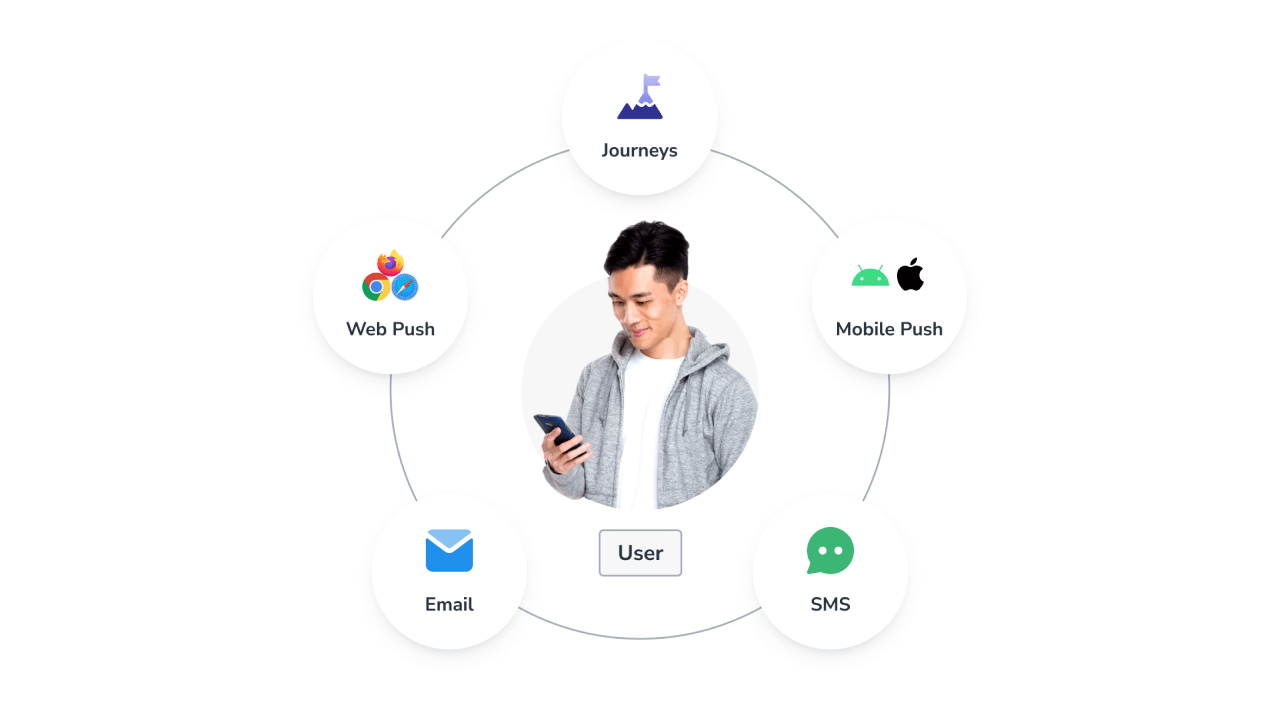
The User Model lets you target actual users across all the messaging channels they subscribe to (mobile push, web push, email, SMS, and in-app) rather than targeting individual devices.
Each User:
* Has one or more Identity Aliases (e.g. external\_id, custom alias)
* Can have multiple Subscriptions, one for each channel or device
* Includes metadata like tags, language, and activity history
This model simplifies audience targeting, supports personalized multi-channel messaging, and unlocks advanced features like Journeys, User-Level Analytics, and Real-Time Identity Resolution.
## What is the User Model?
The User Model lets you target actual users across all the messaging channels they subscribe to (mobile push, web push, email, SMS, and in-app) rather than targeting individual devices.
Each User:
* Has one or more Identity Aliases (e.g. external\_id, custom alias)
* Can have multiple Subscriptions, one for each channel or device
* Includes metadata like tags, language, and activity history
This model simplifies audience targeting, supports personalized multi-channel messaging, and unlocks advanced features like Journeys, User-Level Analytics, and Real-Time Identity Resolution.
 ***
## Key concepts
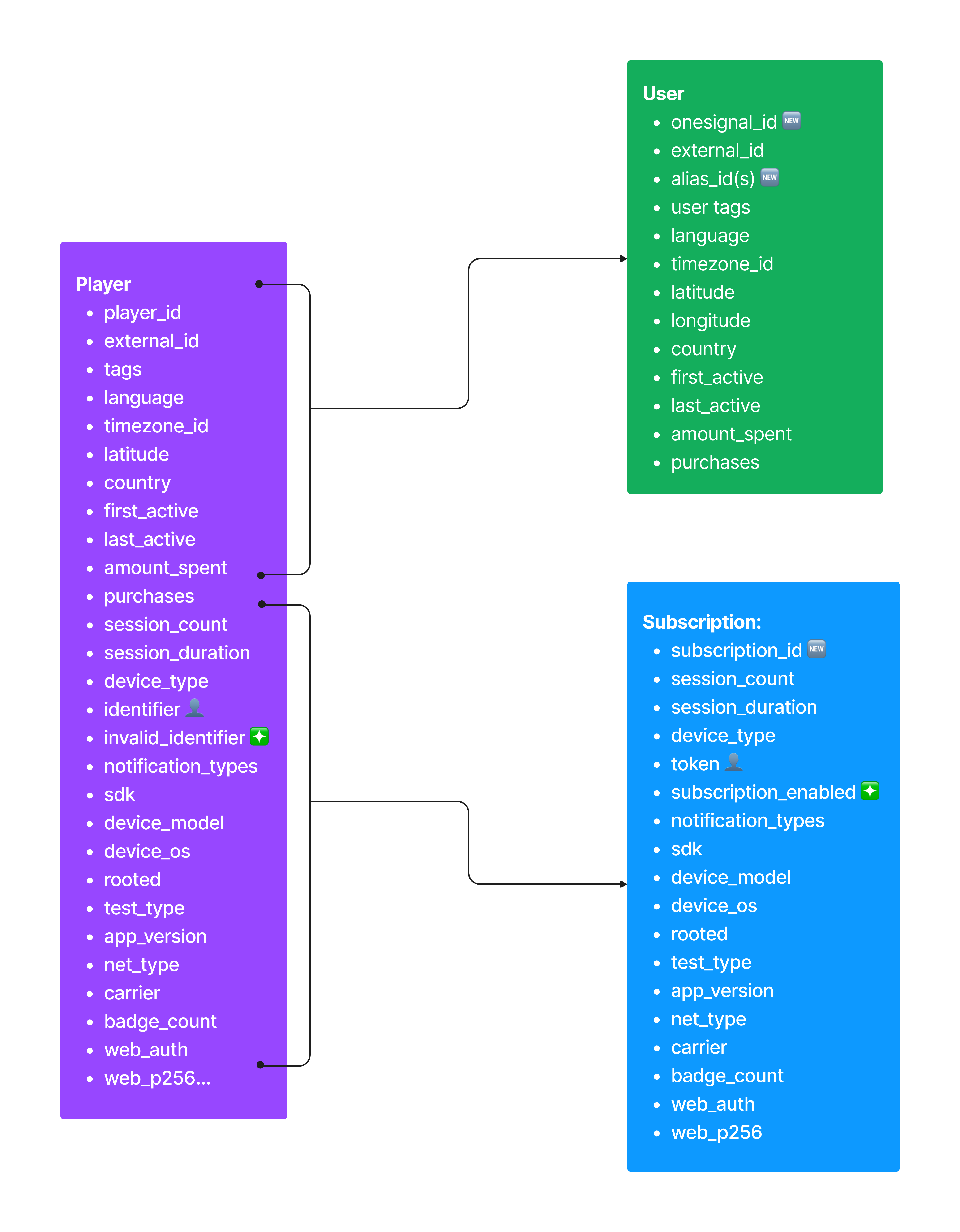
A **User** represents a real person. You can identify a user using system-generated or custom aliases.
* `onesignal_id`: Auto-generated by OneSignal
* `external_id`: Set via SDK `login()` or the API (reserved alias)
* Custom Aliases: e.g. `user_id`, `email`, `facebook`, etc.
Learn more: [Users](./users)
A **Subscription** represents a channel the user is subscribed to. This includes metadata like device info, tokens, session history, and opt-in status.
* Mobile & In-app
* Web Push
* Email
* SMS
Learn more: [Subscriptions](./subscriptions)
Aliases map external identifiers (e.g., user ID from your app, Mixpanel ID) to a OneSignal user. You can assign multiple aliases to unify fragmented identities across platforms.
* Special aliases:
* `onesignal_id`: Auto-managed, read-only
* `external_id`: Writable, legacy-compatible
Learn more: [Aliases & External ID](./users)
***
## Benefits of migrating
* **Unified Identity**: One user across all devices and channels
* **Advanced Messaging**: Power features like Journeys, in-app login tracking, and lifecycle campaigns
* **Clean Segmentation**: Group users by tags, subscription status, channel engagement, and more
* **Simplified API**: Fewer endpoints, more consistent data model
***
## Migration steps
The User Model is not backwards compatible. Migration is **one-way** from Player Model to User Model.
Before migrating:
* Thoroughly test with a staging environment
* Migrate only after all SDKs and backend services are updated
Use identity aliases to link existing player records into unified users.
**Options**:
* SDK `login(externalId)`
* API: [Create User](/reference/create-user), [Update User](/reference/update-user)
* CSV: [Import](./import)
OneSignal will auto-merge subscriptions under the same External ID.
All OneSignal mobile SDKs v5+ and web SDK v16+ support the User Model.
Roll out SDK updates using phased deployment strategies to minimize risk:
* [Apple Phased Rollout](https://developer.apple.com/help/app-store-connect/update-your-app/release-a-version-update-in-phases)
* [Google Play Staged Rollout](https://support.google.com/googleplay/android-developer/answer/6346149)
See [SDK support table below](#sdk-support).
Replace deprecated Player Model API calls with the new User Model equivalents.
Use our [API Reference](/reference/rest-api-overview) and tables below to map old endpoints to new ones.
## SDK support & migration guides
| Platform | SDK | Migration Guide |
| ------------ | ------------------------------------------------------------------- | ---------------------------------------------------------------------------------------------------------- |
| Android | [v5+](https://github.com/OneSignal/OneSignal-Android-SDK/releases) | [Guide](https://github.com/OneSignal/OneSignal-Android-SDK/blob/user-model/main/MIGRATION_GUIDE.md) |
| iOS | [v5+](https://github.com/OneSignal/OneSignal-iOS-SDK/releases) | [Guide](https://github.com/OneSignal/OneSignal-iOS-SDK/blob/major_release_5.0.0/MIGRATION_GUIDE.md) |
| Unity | [v5+](https://github.com/OneSignal/OneSignal-Unity-SDK/releases) | [Guide](https://github.com/OneSignal/OneSignal-Unity-SDK/blob/user-model/main/MIGRATION_GUIDE_v3_to_v5.md) |
| Flutter | [v5+](https://github.com/OneSignal/OneSignal-Flutter-SDK/releases) | [Guide](https://github.com/OneSignal/OneSignal-Flutter-SDK/blob/user_model/main/MIGRATION_GUIDE.md) |
| React Native | [v5+](https://github.com/OneSignal/react-native-onesignal/releases) | [Guide](https://github.com/OneSignal/react-native-onesignal/blob/major_release_5.0.0/MIGRATION_GUIDE.md) |
| .NET MAUI | [v5+](https://github.com/OneSignal/OneSignal-DotNet-SDK/releases) | [Guide](https://github.com/OneSignal/OneSignal-DotNet-SDK/blob/user-model/main/MIGRATION_GUIDE.md) |
For a map of old player model methods to new user model methods, see [Mobile SDK mapping](./device-user-model-mobile-sdk-mapping).
| Platform | SDK | Migration Guide |
| --------- | ------------------------------------------------------------------- | ------------------------------------------------------------------------------------------ |
| Web | [v16+](https://github.com/OneSignal/OneSignal-Website-SDK/releases) | [Guide](https://github.com/OneSignal/OneSignal-Website-SDK/blob/160000/MIGRATION_GUIDE.md) |
| React | [v3+](https://www.npmjs.com/package/react-onesignal) | [Guide](https://github.com/OneSignal/react-onesignal/blob/main/MigrationGuide.md) |
| Vue 2 & 3 | [v2+/v3+](https://www.npmjs.com/package/@onesignal/onesignal-vue3) | [Guide](https://github.com/OneSignal/onesignal-vue/blob/HEAD/MigrationGuide.md) |
| Angular | [v2+](https://www.npmjs.com/package/onesignal-ngx) | [Guide](https://github.com/OneSignal/onesignal-ngx/blob/HEAD/MigrationGuide.md) |
For a map of old player model methods to new user model methods, see [Web SDK mapping](./device-user-model-web-sdk-mapping).
| Language | SDK |
| -------- | ------------------------------------------------------------------------------------ |
| Node | [@onesignal/node-onesignal](https://www.npmjs.com/package/@onesignal/node-onesignal) |
| Python | [onesignal-python-api](https://pypi.org/project/onesignal-python-api/) |
| Go | [onesignal-go-api](https://pkg.go.dev/github.com/OneSignal/onesignal-go-api/v2) |
| .NET | [OneSignalApi](https://www.nuget.org/packages/OneSignalApi) |
| Rust | [onesignal-rust-api](https://crates.io/crates/onesignal-rust-api) |
| Ruby | [onesignal](https://rubygems.org/gems/onesignal) |
| PHP | [onesignal-php-api](https://packagist.org/packages/onesignal/onesignal-php-api) |
***
## API reference
| Old API | Replacement |
| ---------------------------------------------- | ---------------------------------------------------------------------------------------------- |
| [Add Device](/reference/add-a-device) | [Create User](/reference/create-user) or [Create Subscription](/reference/create-subscription) |
| [Edit Device](/reference/edit-device) | [Update User](/reference/update-user) or [Update Subscription](/reference/update-subscription) |
| [Delete Player](/reference/delete-user-record) | [Delete User](/reference/delete-user) or [Delete Subscription](/reference/delete-subscription) |
| Action | API |
| ------------ | --------------------------------------- |
| Create | [Create User](/reference/create-user) |
| View | [View User](/reference/view-user) |
| Update | [Update User](/reference/update-user) |
| Delete | [Delete User](/reference/delete-user) |
| Add Alias | [Create Alias](/reference/create-alias) |
| Remove Alias | [Delete Alias](/reference/delete-alias) |
### Subscription APIs
| Action | API |
| -------- | --------------------------------------------------------- |
| Create | [Create Subscription](/reference/create-subscription) |
| Update | [Update Subscription](/reference/update-subscription) |
| Delete | [Delete Subscription](/reference/delete-subscription) |
| Transfer | [Transfer Subscription](/reference/transfer-subscription) |
***
## Next steps
* 📘 See our [Users](./users) and [Subscriptions](./subscriptions) documentation
* 🛠️ Update SDKs and test in staging before going live
* 💬 Need help? Contact `support@onesignal.com`
You’re now ready to build personalized, multi-channel messaging experiences powered by the new User Model!
***
***
## Key concepts
A **User** represents a real person. You can identify a user using system-generated or custom aliases.
* `onesignal_id`: Auto-generated by OneSignal
* `external_id`: Set via SDK `login()` or the API (reserved alias)
* Custom Aliases: e.g. `user_id`, `email`, `facebook`, etc.
Learn more: [Users](./users)
A **Subscription** represents a channel the user is subscribed to. This includes metadata like device info, tokens, session history, and opt-in status.
* Mobile & In-app
* Web Push
* Email
* SMS
Learn more: [Subscriptions](./subscriptions)
Aliases map external identifiers (e.g., user ID from your app, Mixpanel ID) to a OneSignal user. You can assign multiple aliases to unify fragmented identities across platforms.
* Special aliases:
* `onesignal_id`: Auto-managed, read-only
* `external_id`: Writable, legacy-compatible
Learn more: [Aliases & External ID](./users)
***
## Benefits of migrating
* **Unified Identity**: One user across all devices and channels
* **Advanced Messaging**: Power features like Journeys, in-app login tracking, and lifecycle campaigns
* **Clean Segmentation**: Group users by tags, subscription status, channel engagement, and more
* **Simplified API**: Fewer endpoints, more consistent data model
***
## Migration steps
The User Model is not backwards compatible. Migration is **one-way** from Player Model to User Model.
Before migrating:
* Thoroughly test with a staging environment
* Migrate only after all SDKs and backend services are updated
Use identity aliases to link existing player records into unified users.
**Options**:
* SDK `login(externalId)`
* API: [Create User](/reference/create-user), [Update User](/reference/update-user)
* CSV: [Import](./import)
OneSignal will auto-merge subscriptions under the same External ID.
All OneSignal mobile SDKs v5+ and web SDK v16+ support the User Model.
Roll out SDK updates using phased deployment strategies to minimize risk:
* [Apple Phased Rollout](https://developer.apple.com/help/app-store-connect/update-your-app/release-a-version-update-in-phases)
* [Google Play Staged Rollout](https://support.google.com/googleplay/android-developer/answer/6346149)
See [SDK support table below](#sdk-support).
Replace deprecated Player Model API calls with the new User Model equivalents.
Use our [API Reference](/reference/rest-api-overview) and tables below to map old endpoints to new ones.
## SDK support & migration guides
| Platform | SDK | Migration Guide |
| ------------ | ------------------------------------------------------------------- | ---------------------------------------------------------------------------------------------------------- |
| Android | [v5+](https://github.com/OneSignal/OneSignal-Android-SDK/releases) | [Guide](https://github.com/OneSignal/OneSignal-Android-SDK/blob/user-model/main/MIGRATION_GUIDE.md) |
| iOS | [v5+](https://github.com/OneSignal/OneSignal-iOS-SDK/releases) | [Guide](https://github.com/OneSignal/OneSignal-iOS-SDK/blob/major_release_5.0.0/MIGRATION_GUIDE.md) |
| Unity | [v5+](https://github.com/OneSignal/OneSignal-Unity-SDK/releases) | [Guide](https://github.com/OneSignal/OneSignal-Unity-SDK/blob/user-model/main/MIGRATION_GUIDE_v3_to_v5.md) |
| Flutter | [v5+](https://github.com/OneSignal/OneSignal-Flutter-SDK/releases) | [Guide](https://github.com/OneSignal/OneSignal-Flutter-SDK/blob/user_model/main/MIGRATION_GUIDE.md) |
| React Native | [v5+](https://github.com/OneSignal/react-native-onesignal/releases) | [Guide](https://github.com/OneSignal/react-native-onesignal/blob/major_release_5.0.0/MIGRATION_GUIDE.md) |
| .NET MAUI | [v5+](https://github.com/OneSignal/OneSignal-DotNet-SDK/releases) | [Guide](https://github.com/OneSignal/OneSignal-DotNet-SDK/blob/user-model/main/MIGRATION_GUIDE.md) |
For a map of old player model methods to new user model methods, see [Mobile SDK mapping](./device-user-model-mobile-sdk-mapping).
| Platform | SDK | Migration Guide |
| --------- | ------------------------------------------------------------------- | ------------------------------------------------------------------------------------------ |
| Web | [v16+](https://github.com/OneSignal/OneSignal-Website-SDK/releases) | [Guide](https://github.com/OneSignal/OneSignal-Website-SDK/blob/160000/MIGRATION_GUIDE.md) |
| React | [v3+](https://www.npmjs.com/package/react-onesignal) | [Guide](https://github.com/OneSignal/react-onesignal/blob/main/MigrationGuide.md) |
| Vue 2 & 3 | [v2+/v3+](https://www.npmjs.com/package/@onesignal/onesignal-vue3) | [Guide](https://github.com/OneSignal/onesignal-vue/blob/HEAD/MigrationGuide.md) |
| Angular | [v2+](https://www.npmjs.com/package/onesignal-ngx) | [Guide](https://github.com/OneSignal/onesignal-ngx/blob/HEAD/MigrationGuide.md) |
For a map of old player model methods to new user model methods, see [Web SDK mapping](./device-user-model-web-sdk-mapping).
| Language | SDK |
| -------- | ------------------------------------------------------------------------------------ |
| Node | [@onesignal/node-onesignal](https://www.npmjs.com/package/@onesignal/node-onesignal) |
| Python | [onesignal-python-api](https://pypi.org/project/onesignal-python-api/) |
| Go | [onesignal-go-api](https://pkg.go.dev/github.com/OneSignal/onesignal-go-api/v2) |
| .NET | [OneSignalApi](https://www.nuget.org/packages/OneSignalApi) |
| Rust | [onesignal-rust-api](https://crates.io/crates/onesignal-rust-api) |
| Ruby | [onesignal](https://rubygems.org/gems/onesignal) |
| PHP | [onesignal-php-api](https://packagist.org/packages/onesignal/onesignal-php-api) |
***
## API reference
| Old API | Replacement |
| ---------------------------------------------- | ---------------------------------------------------------------------------------------------- |
| [Add Device](/reference/add-a-device) | [Create User](/reference/create-user) or [Create Subscription](/reference/create-subscription) |
| [Edit Device](/reference/edit-device) | [Update User](/reference/update-user) or [Update Subscription](/reference/update-subscription) |
| [Delete Player](/reference/delete-user-record) | [Delete User](/reference/delete-user) or [Delete Subscription](/reference/delete-subscription) |
| Action | API |
| ------------ | --------------------------------------- |
| Create | [Create User](/reference/create-user) |
| View | [View User](/reference/view-user) |
| Update | [Update User](/reference/update-user) |
| Delete | [Delete User](/reference/delete-user) |
| Add Alias | [Create Alias](/reference/create-alias) |
| Remove Alias | [Delete Alias](/reference/delete-alias) |
### Subscription APIs
| Action | API |
| -------- | --------------------------------------------------------- |
| Create | [Create Subscription](/reference/create-subscription) |
| Update | [Update Subscription](/reference/update-subscription) |
| Delete | [Delete Subscription](/reference/delete-subscription) |
| Transfer | [Transfer Subscription](/reference/transfer-subscription) |
***
## Next steps
* 📘 See our [Users](./users) and [Subscriptions](./subscriptions) documentation
* 🛠️ Update SDKs and test in staging before going live
* 💬 Need help? Contact `support@onesignal.com`
You’re now ready to build personalized, multi-channel messaging experiences powered by the new User Model!
***