> ## Documentation Index
> Fetch the complete documentation index at: https://documentation.onesignal.com/llms.txt
> Use this file to discover all available pages before exploring further.
# Users
> How OneSignal Users, OneSignal IDs, and External IDs connect Subscriptions across channels and devices.
Users tie every Subscription a person has across push, email, and SMS to a single identity. This page covers OneSignal IDs, External IDs, how anonymous Users become identified, what transfers when User context changes, and how Users factor into MAU billing.
## Overview
In OneSignal, a **User** represents an individual with one or more [Subscriptions](./subscriptions) across your messaging channels (mobile push, web push, email, and SMS).
* Each User can have up to **20 Subscriptions**.
* Every User is automatically assigned a **OneSignal ID** (UUID v4).
* Users start as **anonymous** until you assign them an **External ID**. Assigning an External ID links Subscriptions together and may replace the existing OneSignal ID if the user already exists in your app.
* **Users and Subscriptions have different properties.** For example, **Tags** are stored at the User level, while **subscription status** (opted-in/out) belongs to the Subscription.
* When the User context changes, for example logging in (anonymous → identified) or switching accounts (UserA → UserB), the **Subscription is reassigned** from the old User to the new one.
* The Subscription will now inherit the properties of the new User.
* Properties tied to the previous User (like Tags, language, or External ID) will no longer apply.
### What transfers when a User changes
Subscriptions move from the old User to the new one, but the properties they inherit are the new User's. For example:
* UserA has Tag `premium=true`
* UserB has Tag `premium=false`
* If a Subscription moves from UserA to UserB, it no longer reflects `premium=true` and instead reflects UserB's properties.
### Anonymous vs. identified users
* **Anonymous user:** Has no External ID → each Subscription is separate with its own OneSignal ID (treated as separate Users).
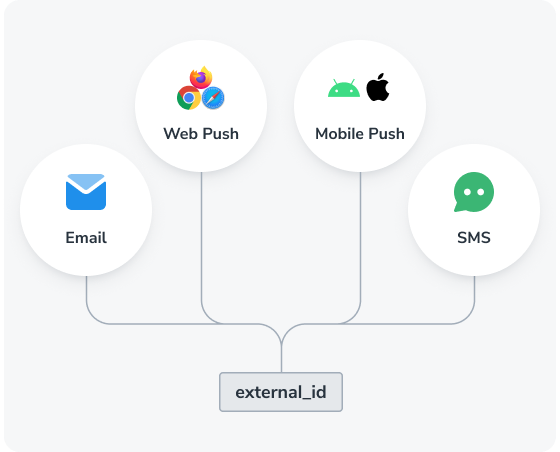
* **Identified user:** Has an External ID → OneSignal merges all Subscriptions under a single OneSignal ID.
**Example: Anonymous user**
* Web push Subscription → `OneSignal_ID_1`
* Mobile Subscription → `OneSignal_ID_2`
* Email Subscription → `OneSignal_ID_3`
* SMS Subscription → `OneSignal_ID_4`
* **Result:** Four Users (each Subscription is a separate User with unique properties)
**Example: Identified user**
* Web push Subscription with External ID `External_ID_A` → `OneSignal_ID_1`
* Mobile Subscription with same `External_ID_A` → merged into `OneSignal_ID_1`
* Email Subscription with same `External_ID_A` → merged into `OneSignal_ID_1`
* SMS Subscription with same `External_ID_A` → merged into `OneSignal_ID_1`
* **Result:** One User with four Subscriptions (all tied to the same User)
Always assign an External ID. This ensures Subscriptions across channels and devices unify under a single User profile and prevents duplication.
* Use stable, non-generic identifiers (e.g., your internal user ID or email address).
* Call `OneSignal.login` early in your app lifecycle.
***
## User properties
| Property | Description |
| ------------------ | ------------------------------------------------------------------------------------------------------------------------------------------------------- |
| **External ID** | A unique identifier you assign to unify the user with your system. |
| **OneSignal ID** | A UUID v4 auto-generated by OneSignal for each user. It may change upon assigning an External ID. |
| **Aliases** | Key-value pairs like `mixpanel_id : 1234`. See [Aliases](./aliases). |
| **Channel** | The [Subscriptions](./subscriptions) the user has, such as Push, Email, or SMS. |
| **Country** | Country code in [ISO 3166-1 Alpha-2](https://en.wikipedia.org/wiki/ISO_3166-1_alpha-2) format. |
| **Email** | Email from the most recent Email Subscription. |
| **First session** | When the user was initially created in OneSignal. |
| **IP Address** | From the latest updated Subscription. |
| **Language** | User's language in [ISO 639-1 format](https://en.wikipedia.org/wiki/List_of_ISO_639_language_codes). Can be updated via API or `setLanguage`. |
| **Last session** | The latest timestamp of app interaction. |
| **Location** | GPS coordinates of mobile subscriptions (if location tracking is enabled). See [Location-Triggered Notifications](./location-triggered-event). |
| **Phone** | Phone number from the most recent SMS Subscription. |
| **Tags** | Custom metadata (e.g. preferences, behavior). See [Tags](./add-user-data-tags). |
| **Test User name** | A label assigned when marking a User as a test user. Set via the dashboard or the `test_user_name` property in the API. See [Test users](./test-users). |
| **Timezone** | `timezone_id` in [IANA TZ format](https://en.wikipedia.org/wiki/List_of_tz_database_time_zones), set by the SDK. Can be updated via API. |
## OneSignal ID
The **OneSignal ID** is an internal UUID v4 generated to uniquely represent a user. It's automatically created in scenarios such as:
* First-time mobile app open (or after reinstall)
* New web push Subscription
* Creating Users/Subscriptions via [Create user](/reference/create-user) or [CSV Import](./import)
* Clearing browser cache and returning to the site
* Logging out with `OneSignal.logout`
Once an **External ID** is used via `OneSignal.login`, any existing OneSignal ID tied to the current Subscription is replaced by the one associated with that External ID. Subscriptions across platforms (Push, Email, SMS) will be merged under the same OneSignal ID if they share the same External ID.
### Reassignment and behavior
If a user reinstalls the app or clears cache, a new OneSignal ID and Subscription are created. However, calling `OneSignal.login` will link the new Subscription back to the original user profile.
Email and SMS Subscriptions added via `OneSignal.User.addEmail` or `addSms` inherit the current OneSignal ID. For full method details, see the [Mobile SDK reference](./mobile-sdk-reference) and [Web SDK reference](./web-sdk-reference).
If you call `addEmail` or `addSms` before `OneSignal.login`, those Subscriptions are associated with the anonymous User. After calling `login`, you must call `addEmail` or `addSms` again to associate the email and SMS Subscriptions with the newly identified User.
## External ID
The **External ID** is a unique string you assign to users to track them across devices and Subscriptions.
You can set or remove the External ID via:
* `OneSignal.login` (**recommended**). See [Mobile SDK](./mobile-sdk-reference#login-external-id) and [Web SDK](./web-sdk-reference#login-external-id).
* [Create user API](/reference/create-user).
* [Transfer subscription API](/reference/transfer-subscription).
* `OneSignal.logout`. Removes the External ID and returns the User to anonymous.
External IDs have a maximum length of **128 characters.**
### Restricted IDs
OneSignal rejects the values below as External IDs to prevent accidental User merges, since teams commonly use them as placeholders or fallbacks. Submitting one of these values fails the assignment and leaves the User in its previous state. Use stable identifiers from your auth or billing system instead.
* `NA`, `NULL`, `null`, `none`, `not set`, `unknown`, `undefined`
* `0`, `1`, `-1`, `NaN`
* `00000000-0000-0000-0000-000000000000`
* `-`, `ok`, `all`, `123ABC`
* `UNQUALIFIED`, `INVALID_USER`
***
## Multiple users on the same device
When multiple users share a device, each new login should trigger a call to `OneSignal.login` with a different External ID. This reassigns the OneSignal ID and Subscription to the new user. For the full list of what transfers when the User changes, see [What transfers when a User changes](#what-transfers-when-a-user-changes) in the Overview.
To handle logout, you can do the following to remove the user context:
* Call `OneSignal.logout` to clear the External ID, remove previous User properties (Tags, Aliases, etc.), and assign an anonymous OneSignal ID.
* Optionally disable notifications using `optOut`, and re-enable with `optIn` when logging back in.
***
## Monthly active users (MAU)
MAU is used for **billing** and is defined as a mobile [Subscription](./subscriptions) that has a last session within the 30-day billing period. This includes:
* Users that open your app for the first time, creating a mobile Subscription via our SDK
* Users that reinstall the app and open it again, creating another mobile Subscription via our SDK
* Users that get imported via our API
### MAU billing example
If a User has these Subscriptions:
* iOS mobile (active in the last 30 days)
* Android mobile (active in the last 30 days)
* Web push
* Email
* SMS
Only iOS and Android mobile Subscriptions count, resulting in **2 MAUs**.
The subscription status does not matter for MAU billing.
### Reducing MAUs (e.g., paywall use cases)
You can delay SDK initialization and Subscription creation using the mobile SDK [privacy methods](./mobile-sdk-reference#privacy).
1. Call `setConsentRequired()` before initializing the SDK. This prevents auto-creation of a Subscription.
2. Call `setConsentGiven()` when ready to create a Subscription for the user.
***
## FAQ
### What is the difference between a OneSignal ID and an External ID?
The **OneSignal ID** is a UUID v4 that OneSignal generates automatically for every User. The **External ID** is a value you assign from your own system (auth, billing, CRM) to identify the same User across devices and channels. The OneSignal ID is OneSignal's identifier for the User; the External ID is your identifier for the same User.
### When should I call `OneSignal.login`?
Call `OneSignal.login` as soon as you have a stable identifier for the user: at signup, on every login, and on session resume. Calling it late or sporadically breaks attribution between anonymous activity and the authenticated User, and may leave Subscriptions split across multiple OneSignal IDs.
### What happens when a user reinstalls the app?
A new OneSignal ID and Subscription are created. Calling `OneSignal.login` with the same External ID links the new Subscription back to the original User profile, preserving Tags, Aliases, and other User-level properties.
### What happens when a user logs out and another logs in on the same device?
Call `OneSignal.logout` first to clear the previous User context, then `OneSignal.login` with the new user's External ID. The Subscription transfers to the new User and inherits their Tags, language, and other properties. The previous User's properties no longer apply to that Subscription. See [Multiple users on the same device](#multiple-users-on-the-same-device).
### How many Subscriptions can a User have?
Each User can have up to 20 Subscriptions across all channels (mobile push, web push, email, and SMS).
### What is the difference between an anonymous and identified User?
An anonymous User has no External ID. Each Subscription is treated as a separate User with its own OneSignal ID. An identified User has an External ID, which causes OneSignal to merge all Subscriptions sharing that External ID under a single User profile.
### Does subscription status affect MAU billing?
No. Any mobile Subscription with a session in the 30-day billing period counts as an MAU, regardless of whether the Subscription is opted in or opted out of notifications.
***
## Related pages
Devices, email addresses, and phone numbers that receive your messages.
Map custom identifiers to Users for cross-platform tracking and integrations.
Add custom properties to users for personalization and segmentation.
Require server-generated JWTs to prevent User impersonation.
 You can set or remove the External ID via:
* `OneSignal.login` (**recommended**). See [Mobile SDK](./mobile-sdk-reference#login-external-id) and [Web SDK](./web-sdk-reference#login-external-id).
* [Create user API](/reference/create-user).
* [Transfer subscription API](/reference/transfer-subscription).
* `OneSignal.logout`. Removes the External ID and returns the User to anonymous.
External IDs have a maximum length of **128 characters.**
### Restricted IDs
You can set or remove the External ID via:
* `OneSignal.login` (**recommended**). See [Mobile SDK](./mobile-sdk-reference#login-external-id) and [Web SDK](./web-sdk-reference#login-external-id).
* [Create user API](/reference/create-user).
* [Transfer subscription API](/reference/transfer-subscription).
* `OneSignal.logout`. Removes the External ID and returns the User to anonymous.
External IDs have a maximum length of **128 characters.**
### Restricted IDs