> ## Documentation Index
> Fetch the complete documentation index at: https://documentation.onesignal.com/llms.txt
> Use this file to discover all available pages before exploring further.
# VoIP push notifications
> Send VoIP push notifications on iOS using OneSignal with PushKit token registration and a VoIP certificate, plus Android alternatives for call-style behavior.
VoIP push notifications let your app receive incoming call alerts even when the app is in the background or terminated. Apple handles VoIP pushes differently from standard push notifications — they use a separate certificate type, a separate token (via PushKit), and different delivery rules.
OneSignal supports **sending** VoIP pushes, but the OneSignal SDK does **not** handle VoIP token registration. You are responsible for:
* Registering VoIP tokens in your app using Apple PushKit
* Creating a dedicated OneSignal app with a VoIP Services Certificate
* Registering tokens and sending pushes through the OneSignal REST API
### Platform differences
| Platform | VoIP push supported? | How it works |
| ----------- | -------------------- | ----------------------------------------------------- |
| **iOS** | Yes | Uses Apple PushKit and a VoIP APNs certificate |
| **Android** | No | Uses data-only pushes to simulate call-style behavior |
If you are building a cross-platform calling app, you will use different approaches per platform.
***
## iOS: send VoIP push notifications
On iOS, VoIP notifications use Apple PushKit and follow special delivery rules that differ from standard push notifications. Because Apple treats VoIP pushes differently, OneSignal requires a separate app configuration for VoIP.
**Before you start** — these are the most common VoIP setup mistakes:
1. **Not creating a separate OneSignal app for VoIP.** Apple requires a different certificate type for VoIP, so OneSignal needs a dedicated app to send VoIP pushes. Your existing push app cannot be used for both.
2. **Uploading the wrong certificate.** You need a **VoIP Services Certificate (.p12)**, not your standard APNs push certificate. Using the wrong one causes silent delivery failures.
3. **Forgetting `test_type` in sandbox.** When testing with a development build, you must include `"test_type": 1` when registering the token. Without it, the API call succeeds but pushes never arrive.
Use Apple's PushKit framework to register for VoIP notifications and receive a VoIP token.
* Implement PushKit in your app
* Store and refresh the VoIP token as Apple rotates it
* Follow Apple's VoIP policies closely
```swift theme={null}
import PushKit
class AppDelegate: NSObject, PKPushRegistryDelegate {
func registerForVoIPPushes() {
let registry = PKPushRegistry(queue: .main)
registry.delegate = self
registry.desiredPushTypes = [.voIP]
}
func pushRegistry(_ registry: PKPushRegistry, didUpdatePushCredentials credentials: PKPushCredentials, for type: PKPushType) {
let token = credentials.token.map { String(format: "%02x", $0) }.joined()
// Pass this token to OneSignal — see Step 4
}
}
```
This is standard Apple PushKit code. OneSignal does not provide a PushKit SDK — you register the token yourself and pass it to OneSignal in Step 4.
Apple resources:
* [PushKit documentation](https://developer.apple.com/documentation/pushkit)
* [Responding to VoIP pushes](https://developer.apple.com/documentation/pushkit/responding_to_voip_notifications_from_pushkit)
* [Apple's VoIP best practices](https://developer.apple.com/library/content/documentation/Performance/Conceptual/EnergyGuide-iOS/OptimizeVoIP.html)
Apple VoIP pushes require a different certificate type than standard push notifications. A single OneSignal app can only use one certificate type, so you must create **two separate OneSignal apps**:
* **Main Push App**: Uses your APNs certificate for standard push notifications
* **VoIP Push App**: Uses a VoIP Services Certificate for VoIP-only notifications
Both apps must use the same iOS bundle ID and be associated with the same native iOS app. You do **not** need to initialize the OneSignal SDK twice — the VoIP app is only used server-side to send VoIP pushes via the API.
The bundle ID (e.g., `com.yourcompany.appname`) is found in Xcode under your target's **General** tab.
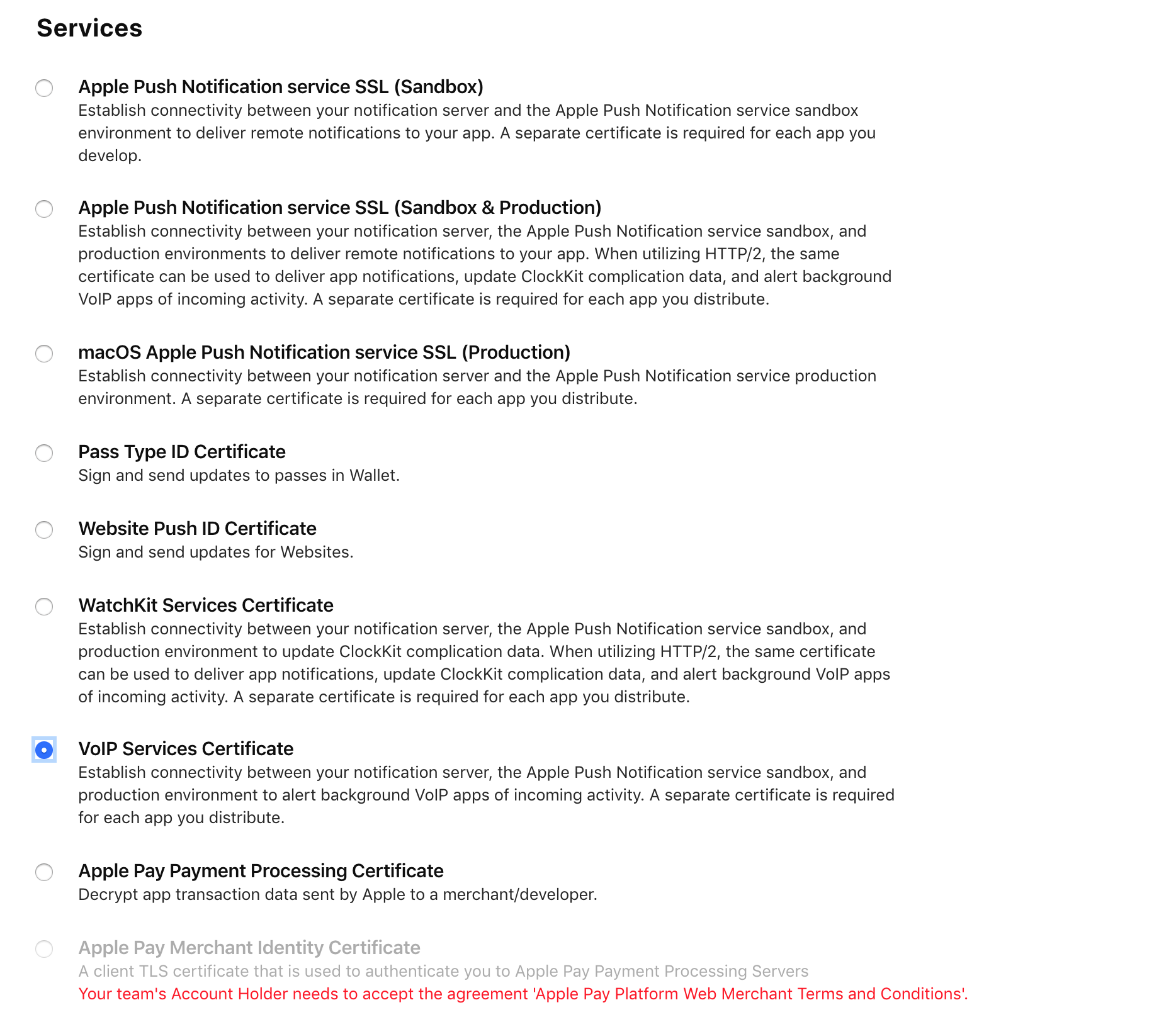
In your VoIP OneSignal app, upload a **VoIP Services Certificate (.p12)**. This is a different certificate type than the standard APNs push certificate you use for regular notifications.
To create one:
1. Go to the [Apple Developer Portal](https://developer.apple.com/account/resources/certificates/add)
2. Select **VoIP Services Certificate**
3. Follow the prompts to generate and download the certificate
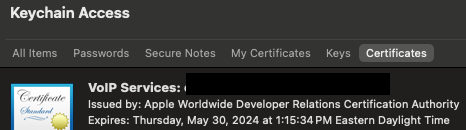
4. Open it in Keychain Access and export it as a `.p12` file
5. Upload the `.p12` file to your VoIP OneSignal app's iOS settings
Do **not** upload your standard APNs push certificate to the VoIP app. If you use the wrong certificate type, the API will accept your push request but Apple will reject it and the notification will never arrive.
 Use the [Create User](/reference/create-user) API to register the VoIP token with your VoIP OneSignal app.
**Sandbox/development builds require `"test_type": 1`.** If you omit this field, the API call succeeds and returns no error, but Apple treats the token as production and silently rejects every push sent to it.
```curl theme={null}
curl --request POST \
--url https://api.onesignal.com/apps/YOUR_VOIP_APP_ID/users \
--header 'accept: application/json' \
--header 'content-type: application/json' \
--data '
{
"subscriptions": [
{
"type": "iOSPush",
"token": "YOUR_VOIP_TOKEN",
"test_type": 1
}
]
}
'
```
A valid VoIP token is a 64-character lowercase hex string (e.g., `a1b2c3d4e5f6...`). PushKit does not work on the iOS Simulator — you must use a real device to obtain a valid token.
To update the token later, use the [Update Subscription](/reference/update-subscription) API.
Use the [Create Notification](/reference/create-message) API with the following parameters:
* `"apns_push_type_override": "voip"` — tells Apple this is a VoIP push
* `app_id` — your VoIP app ID
* `include_subscription_ids` — the VoIP subscription ID you registered
* Either `contents` or `content_available` is required
```curl theme={null}
curl --include \
--request POST \
--header "Content-Type: application/json; charset=utf-8" \
--header "Authorization: key YOUR_REST_API_KEY" \
--data-binary '{
"app_id": "YOUR_VOIP_APP_ID",
"content_available": true,
"data": {
"your_custom_data": "your_custom_value"
},
"apns_push_type_override": "voip",
"include_subscription_ids": ["YOUR_VOIP_SUBSCRIPTION_ID"]
}' \
https://api.onesignal.com/notifications
```
Your iOS VoIP integration is working correctly if:
1. The VoIP token appears as an iOS push subscription in your **VoIP app**
2. A VoIP push triggers [`pushRegistry(_:didReceiveIncomingPushWith:for:completion:)`](https://developer.apple.com/documentation/pushkit/responding_to_voip_notifications_from_pushkit) in your app
3. The app wakes even when it is terminated or backgrounded
***
## Android: simulate VoIP-style behavior
Android does not support VoIP push notifications. There is no equivalent to Apple PushKit.
Instead, Android calling apps simulate VoIP behavior using:
* Data-only push notifications
* Foreground services
* Custom call-style UI
You can use OneSignal's normal Android push support combined with native Android APIs to achieve this.
**Recommended approach:**
* Send data-only notifications
* Handle them in your app to:
* Start a foreground service
* Launch a call UI activity
* Display a custom incoming call notification
If you want to intercept and fully control notification rendering, use Android's [Notification Service Extension](./service-extensions#notification-service-extension).
**Helpful resources:**
* [Android calling app guide](https://developer.android.com/guide/topics/connectivity/telecom/selfManaged)
* [Incoming call UI example](https://medium.com/@dcostalloyd90/show-incoming-voip-call-notification-and-open-activity-for-android-os-10-5aada2d4c1e4)
Android setup is **not specific to OneSignal**. OneSignal only delivers the push payload; your app handles call behavior.
***
## FAQ
### Do confirmed deliveries work with VoIP?
No. [Confirmed Deliveries](./confirmed-delivery) are **not tracked** for VoIP pushes. Confirmed Deliveries rely on the Notification Service Extension, which does not trigger for VoIP notifications.
Instead, track receipt via the native iOS PushKit event:
```swift theme={null}
pushRegistry(_:didReceiveIncomingPushWith:for:completion:)
```
This event is part of your main app target and does not require a separate extension. See [Apple's VoIP documentation](https://developer.apple.com/documentation/pushkit/responding_to_voip_notifications_from_pushkit#3377587) for details.
### Can I send VoIP notifications from the OneSignal dashboard?
No. VoIP notifications must be sent via the [Create Notification](/reference/create-message) API with `"apns_push_type_override": "voip"`. The dashboard does not support this parameter.
### Why is my VoIP push silently failing?
VoIP pushes can fail without any error from the OneSignal API. Work through this checklist:
1. **Are you using a sandbox/development build?** You must include `"test_type": 1` when registering the token via the Create User API. Without it, the token registers as production, Apple rejects the push, and it silently fails.
2. **Did you upload the correct certificate?** The VoIP OneSignal app must use a **VoIP Services Certificate (.p12)**, not a standard APNs push certificate. Both look similar in Keychain Access — verify the certificate name starts with "VoIP Services".
3. **Are you sending to the right OneSignal app?** The `app_id` in your send request must be your **VoIP app**, not your main push app. The `REST API Key` must also come from the VoIP app.
4. **Is the VoIP token valid?** Tokens expire when the app is reinstalled or the device is restored. Check that the token is a 64-character lowercase hex string and was recently registered.
5. **Does your app call `reportNewIncomingVoIPPushPayload`?** Starting in iOS 13, Apple **terminates** apps that receive a VoIP push but do not report a call to CallKit. This is an Apple requirement, not a OneSignal limitation.
***
## Related pages
Send push notifications programmatically using the REST API.
Track push notification delivery confirmation on supported platforms.
Customize notification handling with Notification Service Extensions.
Register users and subscriptions with the OneSignal API.
Use the [Create User](/reference/create-user) API to register the VoIP token with your VoIP OneSignal app.
**Sandbox/development builds require `"test_type": 1`.** If you omit this field, the API call succeeds and returns no error, but Apple treats the token as production and silently rejects every push sent to it.
```curl theme={null}
curl --request POST \
--url https://api.onesignal.com/apps/YOUR_VOIP_APP_ID/users \
--header 'accept: application/json' \
--header 'content-type: application/json' \
--data '
{
"subscriptions": [
{
"type": "iOSPush",
"token": "YOUR_VOIP_TOKEN",
"test_type": 1
}
]
}
'
```
A valid VoIP token is a 64-character lowercase hex string (e.g., `a1b2c3d4e5f6...`). PushKit does not work on the iOS Simulator — you must use a real device to obtain a valid token.
To update the token later, use the [Update Subscription](/reference/update-subscription) API.
Use the [Create Notification](/reference/create-message) API with the following parameters:
* `"apns_push_type_override": "voip"` — tells Apple this is a VoIP push
* `app_id` — your VoIP app ID
* `include_subscription_ids` — the VoIP subscription ID you registered
* Either `contents` or `content_available` is required
```curl theme={null}
curl --include \
--request POST \
--header "Content-Type: application/json; charset=utf-8" \
--header "Authorization: key YOUR_REST_API_KEY" \
--data-binary '{
"app_id": "YOUR_VOIP_APP_ID",
"content_available": true,
"data": {
"your_custom_data": "your_custom_value"
},
"apns_push_type_override": "voip",
"include_subscription_ids": ["YOUR_VOIP_SUBSCRIPTION_ID"]
}' \
https://api.onesignal.com/notifications
```
Your iOS VoIP integration is working correctly if:
1. The VoIP token appears as an iOS push subscription in your **VoIP app**
2. A VoIP push triggers [`pushRegistry(_:didReceiveIncomingPushWith:for:completion:)`](https://developer.apple.com/documentation/pushkit/responding_to_voip_notifications_from_pushkit) in your app
3. The app wakes even when it is terminated or backgrounded
***
## Android: simulate VoIP-style behavior
Android does not support VoIP push notifications. There is no equivalent to Apple PushKit.
Instead, Android calling apps simulate VoIP behavior using:
* Data-only push notifications
* Foreground services
* Custom call-style UI
You can use OneSignal's normal Android push support combined with native Android APIs to achieve this.
**Recommended approach:**
* Send data-only notifications
* Handle them in your app to:
* Start a foreground service
* Launch a call UI activity
* Display a custom incoming call notification
If you want to intercept and fully control notification rendering, use Android's [Notification Service Extension](./service-extensions#notification-service-extension).
**Helpful resources:**
* [Android calling app guide](https://developer.android.com/guide/topics/connectivity/telecom/selfManaged)
* [Incoming call UI example](https://medium.com/@dcostalloyd90/show-incoming-voip-call-notification-and-open-activity-for-android-os-10-5aada2d4c1e4)
Android setup is **not specific to OneSignal**. OneSignal only delivers the push payload; your app handles call behavior.
***
## FAQ
### Do confirmed deliveries work with VoIP?
No. [Confirmed Deliveries](./confirmed-delivery) are **not tracked** for VoIP pushes. Confirmed Deliveries rely on the Notification Service Extension, which does not trigger for VoIP notifications.
Instead, track receipt via the native iOS PushKit event:
```swift theme={null}
pushRegistry(_:didReceiveIncomingPushWith:for:completion:)
```
This event is part of your main app target and does not require a separate extension. See [Apple's VoIP documentation](https://developer.apple.com/documentation/pushkit/responding_to_voip_notifications_from_pushkit#3377587) for details.
### Can I send VoIP notifications from the OneSignal dashboard?
No. VoIP notifications must be sent via the [Create Notification](/reference/create-message) API with `"apns_push_type_override": "voip"`. The dashboard does not support this parameter.
### Why is my VoIP push silently failing?
VoIP pushes can fail without any error from the OneSignal API. Work through this checklist:
1. **Are you using a sandbox/development build?** You must include `"test_type": 1` when registering the token via the Create User API. Without it, the token registers as production, Apple rejects the push, and it silently fails.
2. **Did you upload the correct certificate?** The VoIP OneSignal app must use a **VoIP Services Certificate (.p12)**, not a standard APNs push certificate. Both look similar in Keychain Access — verify the certificate name starts with "VoIP Services".
3. **Are you sending to the right OneSignal app?** The `app_id` in your send request must be your **VoIP app**, not your main push app. The `REST API Key` must also come from the VoIP app.
4. **Is the VoIP token valid?** Tokens expire when the app is reinstalled or the device is restored. Check that the token is a 64-character lowercase hex string and was recently registered.
5. **Does your app call `reportNewIncomingVoIPPushPayload`?** Starting in iOS 13, Apple **terminates** apps that receive a VoIP push but do not report a call to CallKit. This is an Apple requirement, not a OneSignal limitation.
***
## Related pages
Send push notifications programmatically using the REST API.
Track push notification delivery confirmation on supported platforms.
Customize notification handling with Notification Service Extensions.
Register users and subscriptions with the OneSignal API.