> ## Documentation Index
> Fetch the complete documentation index at: https://documentation.onesignal.com/llms.txt
> Use this file to discover all available pages before exploring further.
# Welcome Journey: Mobile gaming
> Build an automated onboarding flow that drives new players to their first meaningful in-game action — from minimal data setup to fully event-driven personalization.
This playbook implements the [Gaming strategies](./gaming-industry) hub as a 7-day onboarding Journey. Both cases share the same goal: get players to their first meaningful in-game action fast, build a play habit, and reduce early churn. The difference is how much player data you have available.
* **Case 1 – Basic:** You only have data collected automatically by the OneSignal SDK, such as `First Session` and `Last Session`. Messages are time-based, with no event tracking required.
* **Case 2 – Advanced:** You have Custom Events and Tags from gameplay. Messages are behavior-driven and personalized per player.
You can start with the Basic path and layer in Advanced data integrations as your implementation matures.
***
## At a glance
Setup is the same for both cases. The only difference is the daily decision step.
1. Define the [entry, exit, and recent-activity segments](#segments).
2. Build the [push, email, and in-app message templates](#templates).
3. Configure [Journey entry, exit, and re-entry rules](#journey-settings).
4. Wire up [Day 1](#day-1) — the same in both cases: email → IAM → Time Window → push.
5. Repeat the daily pattern for Days 2 through 7, then add the [Day 7 closing email](#day-7).
* **Case 1:** [Wait + Time Window + Yes/No + Push](#day-2).
* **Case 2:** [Wait Until + Time Window + Push (expiration branch)](#days-26).
***
## Onboarding goals
| Goal | Description |
| --------------------------------- | -------------------------------------------------------------------------------------------------- |
| Reach the first meaningful action | Tutorial completion, first win, first level completed, or any first meaningful in-game achievement |
| Drive account completion | Profile setup, avatar creation, linking accounts |
| Build a play habit | Establish regular sessions within the first 7 days |
| Encourage social connections | Friends, guilds, clans, co-op play |
| Reduce early churn (Day 1, 3, 7) | Re-engage players who haven't returned within their first week |
## Prerequisites
Work through the [Gaming strategies implementation roadmap](./gaming-industry#implementation-roadmap) before building this Journey. The strategy page defines the data foundation; this page implements one specific Journey on top of it.
**Required:**
* Familiarity with [Journeys](./journeys-overview) concepts (entry/exit rules, message and action steps, etc.).
* An active OneSignal app with the [mobile SDK](./mobile-sdk-setup) installed.
* Push permissions enabled by the player. This Journey relies on push notifications to re-engage players, so prompt for permission early — for example, after a tutorial or during an onboarding sequence.
* **Case 2 only:** a `daily_session` Custom Event — see [Custom Events](./gaming-industry#custom-events) on the strategy hub and [Required data](#required-data) below.
**Recommended:**
* A standalone push permission IAM. See [Prompt for push permission with in-app messages](./prompt-for-push-permissions) for how to configure an IAM with a **Push Permission Prompt** click action.
* **Case 2 only:** a `player_name` Tag for per-player personalization in the shared templates — see [Tags](./gaming-industry#tags) on the strategy hub.
### Segments
**Entry segment:**
* Name: "New Players First Day Inactivity"
* Filters: **First session** less than `1` day ago **AND** **Last session** greater than `4` hours ago.
A player matches this segment the moment they cross the 4-hour inactivity threshold within their first day of opening the app — exactly when the Day 1 re-engagement push should fire.
**Why 4 hours of inactivity?**
Four hours is long enough to avoid feeling needy — many players close the app between sessions and come back later the same day — but short enough that the game is still fresh in their mind. It's a strong default, not a magic number: casual puzzle games may prefer a shorter window (2 hours), while RPGs or strategy games may warrant longer (6–8 hours). To test alternatives, clone the Journey with a different segment threshold and compare Day 2 return rates.
**Exit segment:**
* Name: "Players who have not returned in 1 week"
* Filters: **Last session** greater than `1` week ago.
A player matches this segment the moment they have not returned to the game in over a week. At that point, they exit the welcome Journey and will be tagged for a separate winback Journey.
**Recent activity check:**
* Name: "Players active in the last 12 hours"
* Filters: **Last session** less than `12` hours ago.
Case 1's Yes/No branch on each daily step uses this segment to skip the push if the player has already played and likely claimed today's reward. Twelve hours is a deliberate compromise. Pushes fire between 6 PM and 10 PM, so the segment is evaluated somewhere in that window — a longer lookback (e.g., 18+ hours) would count *yesterday's* evening session as "recent activity" and skip the push for a player who hasn't actually returned today.
### Templates
These templates are starting points — clone, edit, and re-use them in your own Journey. They use [Liquid syntax](./using-liquid-syntax) for personalization.
| Day | Name | Title | Message |
| :-: | -------------- | --------------------------------- | ----------------------------------------------------------------------------------------------------------- |
| 1 | Day 1 — Reward | 🎁 Your Day 1 loot drop is ready | Jump in and claim it, `{{ player_name \| default: 'hero' }}`. Your adventure starts now! |
| 2 | Day 2 — Reward | ⚡ Day 2 rewards unlocked | Keep the momentum, `{{ player_name \| default: 'hero' }}` — grab your loot before it vanishes! |
| 3 | Day 3 — Reward | ⚔️ Day 3 loot is incoming | Sharpen your blades, `{{ player_name \| default: 'hero' }}` — your reward is waiting in-game! |
| 4 | Day 4 — Reward | 📜 New quests just dropped | Your Day 4 reward includes rare crafting materials. Tap now to collect! |
| 5 | Day 5 — Reward | 💎 A rare treasure chest awaits | Day 5 loot is inside, `{{ player_name \| default: 'hero' }}`. Open it before the timer runs out! |
| 6 | Day 6 — Reward | 🔥 One more day to Veteran status | You're almost there, `{{ player_name \| default: 'hero' }}`. Log in today to lock in tomorrow's reward! |
| 7 | Day 7 — Reward | 🏆 You've hit Veteran status | Claim your 7-day reward, `{{ player_name \| default: 'hero' }}` — you've made it through the toughest week. |
Create and manage reusable message templates.
Overview of all personalization options available in OneSignal.
Route users to the correct page.
Emails carry the long-form moments of the Journey. Two emails fire — one on Day 1 and one on Day 7 — and each plays a distinct role. See [Email messaging](./email-messaging) for setup.
**Day 1 — Welcome and push opt-in**
*Purpose:* Thank the player for downloading, reinforce what the game offers, and open paths to push opt-in and community.
*Suggested subject:* Welcome aboard, `{{ player_name | default: 'hero' }}`
*Content outline:*
* A short welcome and thank-you for downloading.
* 2–3 things the player can do next — claim their starter pack, customize their character, pick a class, or join a guild.
* A **turn-on-notifications** CTA that deep-links to an in-app **preference center** or notification settings screen. This lets the player enable push and manage email preferences in one place without a fresh OS prompt.
* Links to the game's social and community channels (Discord, X, Reddit, YouTube) so they can follow along outside the app.
**Day 7 — Leaderboard and community recap**
The milestone email at the end of the Journey. Where the Day 1 email welcomes the player into the game, this email welcomes them into the community.
*Purpose:* Shift the player's mindset from "a game I'm trying" to "a community I'm part of" — the transition that drives retention past Day 7.
*Suggested subject:* Where do you rank, `{{ player_name | default: 'hero' }}`?
*Content outline:*
* A first-week recap — high-level milestones or stats, personalized via Tags or Liquid if you've captured them.
* A **weekly leaderboard** snapshot (top 10 or the player's current rank) to seed competitive motivation.
* A guild-join CTA for players not yet in a guild.
* Social share buttons — one-tap share of a highlight or milestone to the player's social accounts.
* A teaser for what's next: the Day 14 reward, upcoming events, or a seasonal content drop.
Create and manage reusable message templates.
Overview of all personalization options available in OneSignal.
Route users to the correct page.
In-app messages fire when the player returns to the app. All are optional but high-leverage — setup completion, new-player conversion, and social bonds.
**Day 1 — Onboarding carousel**
Use a carousel to create a multi-card onboarding flow that funnels new players into two critical setup steps:
1. Profile completion
2. Push opt-in
Players who finish both are dramatically more likely to stick: profile investment creates sunk-cost attachment, and without push opt-in, the rest of this Journey can't reach the player.
Using in-app messages with a Push Permission Prompt will not show if the player has already granted push permission.
**Day 3 — New-player loot box**
Promote a one-time new-user bundle to convert first-week curiosity into commitment. Day 3 is the tipping point between "trying the game" and "playing the game" — a generous exclusive offer lands when players are most receptive:
1. A bundle with premium currency, rare gear, and a booster pack
2. A 24-hour countdown to create urgency
3. A deep link to the store's new-user offer for a one-tap claim
Gate redemption on the backend (one claim per player) so the IAM can safely retarget players who saw it but didn't convert. Target the IAM at *Tag `claimed_new_user_offer` is `false`* so redeemers don't see the offer again.
**Day 6 — Social connections**
Encourage social connections by prompting players to join a clan, invite friends, or unlock co-op play. Make sure to reward players who complete these actions!
Full reference for the in-app message editor, blocks, and Carousel.
Overview of all personalization options available in OneSignal.
Route users to the correct page.
## Journey configuration
Both cases share the same segments, message templates, and Journey settings. Define them once and reference them from either case.
### Journey settings
**Entry rules:**
* Audience Segment: "New Players First Day Inactivity"
* Future additions only: **Checked** — this must stay checked so existing users aren't bulk-enrolled the moment the Journey is saved.
**Exit rules:**
* Meet a certain condition: check **Exit when a user enters a segment**.
* Segment: "Players who have not returned in 1 week"
* Tag users when they exit early: `completed_welcome_journey:false`
* Identifies players who stopped returning before completing the Journey. Use it as the entry filter for a downstream winback Journey so stalled players get a dedicated "we miss you" flow rather than more onboarding messages.
**Re-entry rules:** No — the player can receive this Journey only once.
***
## Case 1: Basic onboarding journey
This Journey uses time-based delays and session filters — a "set it and forget it" onboarding flow that covers the critical first-week re-engagement window with minimal data requirements.
### Daily timing: Wait + Time Window
This Journey uses two Journey actions together to deliver a daily re-engagement push during the player's most likely play window:
1. **[Wait](./journeys-actions#wait):** A fixed delay between messages.
2. **[Time Window](./journeys-actions#time-window):** A delivery window every day between 6 PM and 10 PM in the player's local timezone. Every push is held until the window opens.
**Why a 6 PM – 10 PM window?**
Mobile gaming engagement peaks in the evening across genres. Morning pushes compete with email and social notifications during the "inbox sweep" most people do on their commute, and they get swiped away. A 6 PM – 10 PM window targets peak intent. Adjust this based on your audience — kids' games may skew earlier, competitive games may skew later — but evening is the right default for most games.
**Why not just use a 24-hour Wait?**
A plain 24-hour Wait would send pushes at essentially random times around the clock — whenever the player's Day 1 push happened to fire. Some players would get 3 AM pushes, others would get lunchtime pushes. Pairing a short Wait with a Time Window lets the Time Window control the actual delivery time, so every push lands between 6 PM and 10 PM regardless of when the Wait expires.
Set the Wait to the **Time Window duration + a 2-hour buffer**. For a 4-hour window (6 PM – 10 PM), the Wait is **6 hours**. The buffer guarantees the Wait always expires *after* the window closes, so the next push is held for the following day's window rather than sending again the same day:
| Day 1 push fires at | + 6h Wait expires at | Inside 6 PM – 10 PM? | Next push |
| ------------------- | -------------------- | ------------------------------ | --------- |
| 6 PM (earliest) | 12 AM | No → holds until 6 PM next day | Day 2 ✓ |
| 8 PM | 2 AM | No → holds until 6 PM next day | Day 2 ✓ |
| 10 PM (latest) | 4 AM | No → holds until 6 PM next day | Day 2 ✓ |
Without the buffer — say, a 4-hour Wait that exactly matches the window — a 6 PM push would expire at 10 PM the same day, still inside the window, and send the Day 2 push the same night.
The Time Window uses a randomization algorithm to distribute users through the allowed hours. If a lot of users are waiting to enter the window at the same time, they won't all receive a push at 6 PM sharp — OneSignal will spread them out to avoid a thundering herd of message sends.
### Basic Journey steps
#### Day 1
**Goal:** Open the Journey with an appreciative, welcoming, community-focused email that also drives push opt-in.
Because this is the first *message* step, the email lands 4 hours after the player's first session ends (per the entry segment) rather than immediately on install — less needy, less transactional. The email's push opt-in CTA also catches players who declined the install-time permission prompt, deep-linking them to the in-app preference center.
**Goal:** Get players to complete their profile and turn on push notifications.
Using in-app messages with a Push Permission Prompt will not show if the player has already granted push permission.
Make sure this in-app message doesn't overlap with other [push permission prompt strategies](./prompt-for-push-permissions) as discussed in [Prerequisites](#prerequisites).
It is better to remove the push permission prompt from this in-app message than to have both trigger at the same time.
**Goal:** Prevent the Day 1 push from firing outside the evening play window.
The entry segment triggers whenever the 4-hour inactivity threshold is crossed — including overnight or early morning. Without this step, a player who stopped playing at 2 AM would otherwise receive the Day 1 push at 6 AM. This Time Window holds the push until 6 PM in the player's timezone.
**Goal:** Drive a second session on Day 1 while the player is still engaged.
#### Day 2
**Goal:** Push the next Time Window evaluation past 10 PM so the window snaps to the next day rather than re-firing the same evening. See [Daily timing](#daily-timing-wait--time-window) for the math.
**Goal:** Hold the next push until the evening play window.
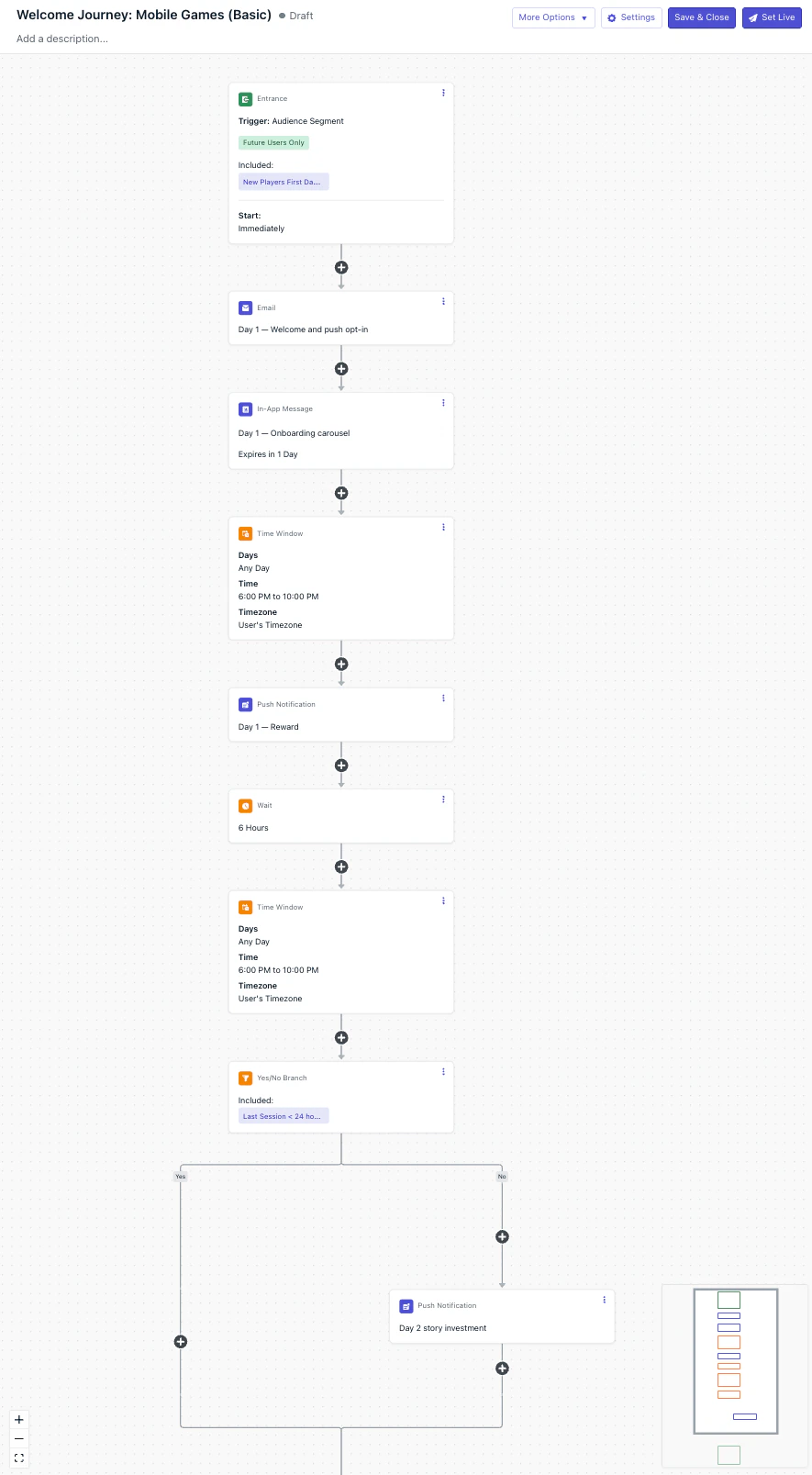
**Goal:** Skip the push if the player has already returned to claim their reward.
**Setup:** Segment membership: "Players active in the last 12 hours"
This creates 2 branches:
* **Yes:** Player has been active within the last 12 hours → skip the push and continue to the next day's Wait step.
* **No:** Player hasn't returned → send the Day 2 — Reward push.
**Goal:** Bring the player back to claim the next reward.
Add this to the **No** branch of the previous step.
Once you set this up, you should have a Journey that looks like this:
 #### Days 3–6
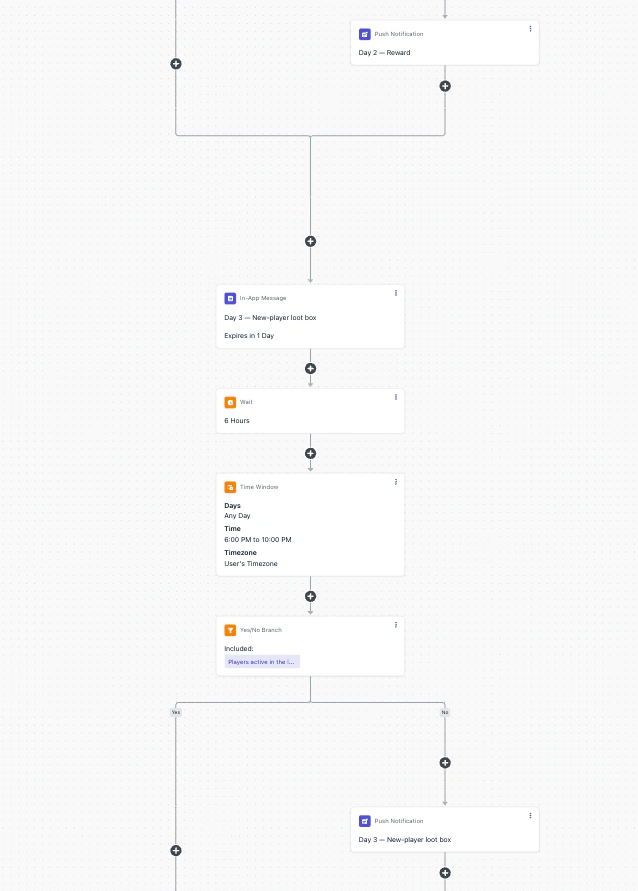
Each of these days repeats the Day 2 pattern:
* **Wait 6 hours**
* **Time Window 6 PM – 10 PM**
* **Yes/No branch:** Players active in the last 12 hours
* **Push notification** on the **No** branch.
Insert the **Day 3** and **Day 6** IAM steps *before* the corresponding day's 6-hour Wait (the first step of that day's pattern) so the IAM is queued and ready to display the next time the player opens the app.
#### Days 3–6
Each of these days repeats the Day 2 pattern:
* **Wait 6 hours**
* **Time Window 6 PM – 10 PM**
* **Yes/No branch:** Players active in the last 12 hours
* **Push notification** on the **No** branch.
Insert the **Day 3** and **Day 6** IAM steps *before* the corresponding day's 6-hour Wait (the first step of that day's pattern) so the IAM is queued and ready to display the next time the player opens the app.
 #### Day 7
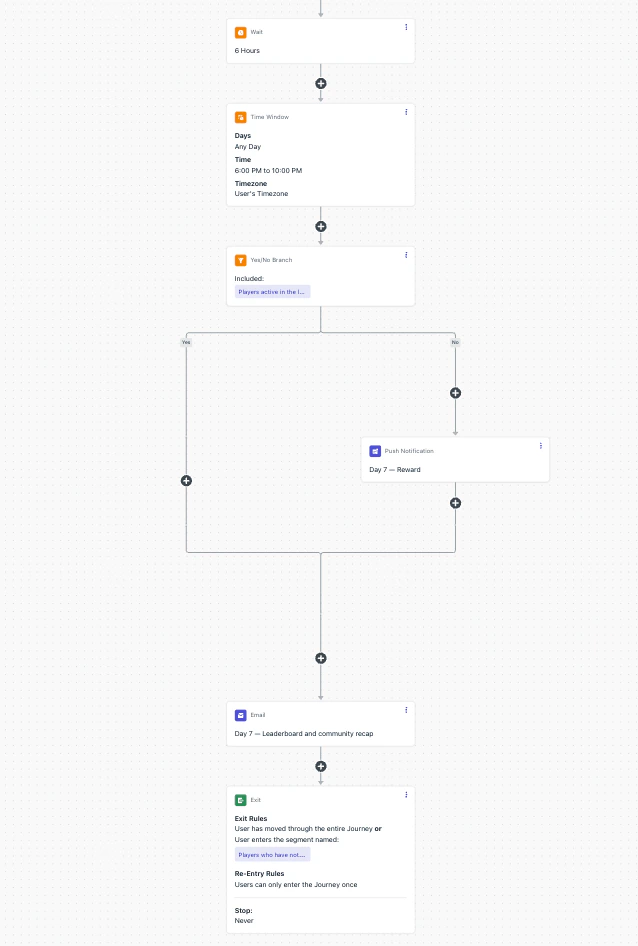
Day 7 follows the same four-step pattern as Days 3–6 and adds a closing email after the branches converge:
Same shape as Days 2–6: a 6-hour Wait, a 6 PM – 10 PM Time Window, the Yes/No branch on *Players active in the last 12 hours*, and the **Day 7 — Reward** push on the **No** branch.
Add this email step *after* the Yes/No branch's two paths converge — not on either branch. Placing it after convergence means active and inactive players both receive the milestone email, regardless of whether they took the Day 7 push.
#### Day 7
Day 7 follows the same four-step pattern as Days 3–6 and adds a closing email after the branches converge:
Same shape as Days 2–6: a 6-hour Wait, a 6 PM – 10 PM Time Window, the Yes/No branch on *Players active in the last 12 hours*, and the **Day 7 — Reward** push on the **No** branch.
Add this email step *after* the Yes/No branch's two paths converge — not on either branch. Placing it after convergence means active and inactive players both receive the milestone email, regardless of whether they took the Day 7 push.
 ### Best practices for Case 1
* **Run the push permission prompt outside the Journey.** Configure it as a standalone [push permission prompt IAM](./prompt-for-push-permissions) so first-session players see it before they ever enter the Journey.
* **Route long-silent players to winback via the exit rule.** The 1-week exit rule sets `completed_welcome_journey:false` so stalled players land in a dedicated winback Journey rather than cycling through more reward reminders. A shorter threshold (for example 48 hours) would exit players *before* Day 3 and Day 7 — the exact messages designed for silent players — and defeat the Journey's purpose.
* **Skip the push if the player was recently active.** The Yes/No branch on the *Players active in the last 12 hours* segment prevents sending a "claim your reward" push to a player who has already come back and likely claimed it. Without this gate, you risk layering a redundant reminder on top of an in-app notification they've already seen.
* **Bookend the Journey with email.** The Day 1 welcome email opens with a community-focused touchpoint that also catches players who declined the install-time push prompt; the Day 7 leaderboard email closes by transitioning the player from onboarding into the community. Both reach players regardless of push opt-in state.
* **Frame messages as reward reminders, not streak claims.** Case 1 has no way to verify whether the player actually returned, so claiming a "3-day streak" to someone who hasn't opened the app since Day 1 feels dishonest. Stick to "your Day N reward is ready" — it's honest and just as motivating. For real streak tracking, see Case 2.
* **Deep-link every push to the reward claim screen.** Tapping a push should land the player on the exact reward screen, not the app home. Deep linking removes friction and materially improves tap-through to claim rates. See [Deep linking](./deep-linking).
***
## Case 2: Advanced onboarding journey
Case 2 is structurally identical to Case 1 — same entry segment, exit rule, templates, Day 1 setup, and Day 3/6 IAMs. The only change is from Day 2 onward: replace Case 1's **Wait** and **Yes/No branch** with a single [Wait Until](./journeys-actions#wait-until) node that listens for a `daily_session` Custom Event. The Time Window stays.
This swaps a time-based heuristic ("did the player return in the last 12 hours?") for a behavioral fact ("did the player actually return?"). Players who return on their own take the event branch and continue silently — no push lands on top of an active session.
### Required data
| Type | Name | Description |
| ------------ | --------------- | ----------------------------------------------------------------------------------------------------------------------------------------------------------------------------------------------------------- |
| Custom Event | `daily_session` | Fire on app open, deduped to **once per calendar day** in the player's timezone. The dedupe is critical — without it, same-day return events would advance the Journey through subsequent days too quickly. |
| Tag (string) | `player_name` | *Recommended.* Player's display name. The shared templates already use `{{ player_name \| default: 'hero' }}`, so this Tag activates per-player personalization. Without it, every player sees `hero`. |
See [Custom Events](./gaming-industry#custom-events) and [Tags](./gaming-industry#tags) on the [Gaming strategies](./gaming-industry) hub for the full data foundation, or [Custom Events](./custom-events) and [Tags](./add-user-data-tags) for the canonical reference docs.
### Advanced Journey steps
#### Day 1
Identical to Case 1. See [Case 1's Day 1](#day-1) for the full step list.
#### Days 2–6
Days 2 through 6 share a single pattern. Each day uses a Wait Until node in place of Case 1's Wait + Yes/No combo. The Time Window and the day's push move onto the expiration branch; the event branch stays silent.
**Condition:** the `daily_session` Custom Event fires.
**Expiration:** **22 hours**.
* **Event branch** — player returned on their own. Continue silently; no push.
* **Expiration branch** — player didn't return in 22 hours. Continue to the next two steps.
**Optional: Scope each Wait Until to a specific day with an event property.** Fire `daily_session` with a property like `day` that increments per session day (`1`, `2`, `3`, ...). Each day's Wait Until then matches on the property's value — Day 2's Wait Until catches `daily_session` where `day = 2`, Day 3's catches `daily_session` where `day = 3`, and so on.
This guarantees a late-arriving or replayed event from an earlier day can't satisfy a later day's Wait Until, and gives you cleaner per-day funnel analytics. See [Event Matching](./journeys-actions#event-matching) for the property-matching configuration.
On the expiration branch, hold the player until the next 6 PM – 10 PM window in their timezone. This is the same Time Window pattern Case 1 uses, kept here so the push always lands in the evening regardless of when the Wait Until expired.
Send the day's reward push (`push_day_2` through `push_day_6`).
After this step, both branches converge and continue to the next day's Wait Until.
**Why 22 hours.** The expiration window has two jobs: give the returning player enough time to fire `daily_session`, and keep each day's push aligned with its intended calendar day. A much longer expiration (say, 30 hours) would push "Day 2's reward" into Day 3 territory; much shorter (say, 12 hours) would expire while many players are still asleep and miss return signals. 22 hours is tuned for Day 1 → Day 2: a Day 1 push at 8 PM expires at \~6 PM Day 2, right at the start of the next window.
For Day 3 onward, the timing self-stabilizes. Whether a day ends on the event branch (silent) or expiration branch (push at 6–10 PM), the next Wait Until starts in the evening, and 22 hours from there lands the next expiration in the late-afternoon-to-evening band — well-positioned for the next Time Window.
**Late-night edge case.** If `daily_session` fires very late (e.g., 11 PM Day 1), the next Wait Until starts at 11 PM and could expire as late as 9 PM Day 2, after the window has already opened. The player still gets the push that evening, but closer to the 10 PM cutoff. If most of your players are night owls, shorten the expiration to 18–20 hours.
**Quick timing scenario (Day 2).**
* Day 1 push fires at 8 PM. Wait Until starts.
* *Player returns:* opens the app at 9 AM Day 2 → `daily_session` fires → event branch → silent. Day 3's Wait Until starts immediately.
* *Player doesn't return:* Wait Until expires at 6 PM Day 2 → Time Window holds until 6 PM (no-op, already inside) → push fires at 6 PM Day 2 → Day 3's Wait Until starts.
**IAM placement.** Insert the **Day 3** and **Day 6** IAM steps *before* their corresponding day's Wait Until node, so the IAM is queued and ready to display the next time the player opens the app.
#### Day 7
Day 7 follows the same Wait Until pattern as Days 2–6 and adds a closing email after the branches converge:
Same shape as [Days 2–6](#days-26): a Wait Until on `daily_session` with a 22-hour expiration, then the Time Window and `push_day_7` on the expiration branch. The event branch stays silent.
Add this email step *after* both branches converge — not on either branch. Active and inactive players both receive the milestone email, regardless of whether the push fired.
### Best practices for Case 2
* **All Case 1 best practices still apply.** Push prompt outside the Journey, reward-focused copy, deep linking, bookend email on Day 1/7. Case 2 adds behavioral precision on top — it doesn't replace the fundamentals.
* **Dedupe `daily_session` on the client.** Fire it exactly once per calendar day in the player's timezone so the Wait Until evaluates predictably.
* **Keep the event branch silent.** Don't add a push or email on the event branch. The player is already in the app; the IAM steps that follow handle any in-app nudging.
* **Use `reward_claimed` for a stronger signal.** If your game has an explicit "Claim" action for daily rewards, fire a `reward_claimed` Custom Event and swap it in for `daily_session`. The event branch then triggers only when the player actually completed the intended action. See [`reward_claimed` in the Gaming strategies hub](./gaming-industry#custom-events).
* **Scope each Wait Until with an event property.** Fire `daily_session` (or `reward_claimed`) with a `day` property that increments per session day, then have each day's Wait Until match the corresponding value. Prevents late or replayed events from earlier days from satisfying a later day's Wait Until and produces cleaner per-day analytics. See [Event Matching](./journeys-actions#event-matching).
* **Sync to your backend (optional).** Add a [Webhook](./journeys-webhook) step on the event branch to notify your backend that the player returned, decoupling reward granting from the Journey's messaging role.
Behavioral foundation of Case 2 — track daily sessions, reward claims, and other key moments.
Reference for event/expiration branches and condition setup.
***
## Compare Case 1 and Case 2
Both cases share the same entry segment, 1-week exit rule, templates, IAMs, and Day 1 + Day 7 email — all defined once in [Journey segments](#segments), [Journey templates](#templates), and [Journey settings](#journey-settings). Case 2 only changes the daily decision step.
| | Case 1: Basic | Case 2: Advanced |
| ------------------------------- | --------------------------------------------------------------------------------------------------------------------------------------------------------------------------------------- | --------------------------------------------------------------------------------------------------------------------------------------- |
| **Data required** | Auto-tracked session data only | `daily_session` Custom Event (+ `player_name` Tag for personalization) |
| **Setup effort** | Low — no SDK instrumentation | Medium — one Custom Event + one Tag |
| **Daily decision** | [Wait](./journeys-actions#wait) + [Time Window](./journeys-actions#time-window) + [Yes/No branch](./journeys-actions#yesno-branch) on the *Players active in the last 12 hours* segment | [Wait Until](./journeys-actions#wait-until) on `daily_session` + [Time Window](./journeys-actions#time-window) on the expiration branch |
| **Push trigger** | Sends unless the player was active in the last 12 hours (heuristic) | Sends only if the player didn't fire `daily_session` in the expiration window (behavioral) |
| **Returning-player experience** | May receive a redundant push if the activity heuristic misses | Silent event branch — never piled on top of an in-app session |
| **Personalization** | Templates use `{{ player_name \| default: 'hero' }}` and fall back to `hero` | Same templates personalize per player once `player_name` is set |
| **Optional extensions** | Add SMS or email steps for non-push-opt-in players | `reward_claimed` swap for a stronger behavioral signal, backend [Webhook](./journeys-webhook) sync on the event branch |
| **Best for** | New apps, small teams, MVPs — ship in a week | Teams with Custom Event instrumentation already in place |
***
## Where to go from here
Start with Case 1 if you're setting up lifecycle messaging for the first time — it covers the onboarding window with minimal data requirements. As you add Custom Event and Tag instrumentation, upgrade to Case 2 by swapping each day's `Wait + Time Window + Yes/No` combo for a `Wait Until daily_session` node. Adding the `daily_session` event alone is enough to flip the Journey from time-based to behavior-based; setting `player_name` activates the personalization the templates already accommodate.
The first 7 days determine whether a player becomes a long-term user or a churn statistic. Invest in getting this right.
After this Journey is live, return to the [Gaming strategies](./gaming-industry) hub for the next layer of lifecycle messaging — re-engagement at Day 1/3/7/14, milestone celebrations on `level_completed` and `streak_reached`, and VIP / spend-based flows for high-value players.
## Related pages
Strategy hub: player IDs, Tags, Custom Events, segments, and Journey patterns for gaming apps.
Welcome, event-driven, and retention Journey patterns shared across mobile-first apps.
Trigger Journeys from gameplay events with Wait Until and Event Matching.
Reference for the `daily_session` and `reward_claimed` events used in Case 2.
Configure the standalone Push Permission Prompt IAM referenced in Prerequisites.
Required if you're sending the Day 1 and Day 7 emails at scale on a new domain.
### Best practices for Case 1
* **Run the push permission prompt outside the Journey.** Configure it as a standalone [push permission prompt IAM](./prompt-for-push-permissions) so first-session players see it before they ever enter the Journey.
* **Route long-silent players to winback via the exit rule.** The 1-week exit rule sets `completed_welcome_journey:false` so stalled players land in a dedicated winback Journey rather than cycling through more reward reminders. A shorter threshold (for example 48 hours) would exit players *before* Day 3 and Day 7 — the exact messages designed for silent players — and defeat the Journey's purpose.
* **Skip the push if the player was recently active.** The Yes/No branch on the *Players active in the last 12 hours* segment prevents sending a "claim your reward" push to a player who has already come back and likely claimed it. Without this gate, you risk layering a redundant reminder on top of an in-app notification they've already seen.
* **Bookend the Journey with email.** The Day 1 welcome email opens with a community-focused touchpoint that also catches players who declined the install-time push prompt; the Day 7 leaderboard email closes by transitioning the player from onboarding into the community. Both reach players regardless of push opt-in state.
* **Frame messages as reward reminders, not streak claims.** Case 1 has no way to verify whether the player actually returned, so claiming a "3-day streak" to someone who hasn't opened the app since Day 1 feels dishonest. Stick to "your Day N reward is ready" — it's honest and just as motivating. For real streak tracking, see Case 2.
* **Deep-link every push to the reward claim screen.** Tapping a push should land the player on the exact reward screen, not the app home. Deep linking removes friction and materially improves tap-through to claim rates. See [Deep linking](./deep-linking).
***
## Case 2: Advanced onboarding journey
Case 2 is structurally identical to Case 1 — same entry segment, exit rule, templates, Day 1 setup, and Day 3/6 IAMs. The only change is from Day 2 onward: replace Case 1's **Wait** and **Yes/No branch** with a single [Wait Until](./journeys-actions#wait-until) node that listens for a `daily_session` Custom Event. The Time Window stays.
This swaps a time-based heuristic ("did the player return in the last 12 hours?") for a behavioral fact ("did the player actually return?"). Players who return on their own take the event branch and continue silently — no push lands on top of an active session.
### Required data
| Type | Name | Description |
| ------------ | --------------- | ----------------------------------------------------------------------------------------------------------------------------------------------------------------------------------------------------------- |
| Custom Event | `daily_session` | Fire on app open, deduped to **once per calendar day** in the player's timezone. The dedupe is critical — without it, same-day return events would advance the Journey through subsequent days too quickly. |
| Tag (string) | `player_name` | *Recommended.* Player's display name. The shared templates already use `{{ player_name \| default: 'hero' }}`, so this Tag activates per-player personalization. Without it, every player sees `hero`. |
See [Custom Events](./gaming-industry#custom-events) and [Tags](./gaming-industry#tags) on the [Gaming strategies](./gaming-industry) hub for the full data foundation, or [Custom Events](./custom-events) and [Tags](./add-user-data-tags) for the canonical reference docs.
### Advanced Journey steps
#### Day 1
Identical to Case 1. See [Case 1's Day 1](#day-1) for the full step list.
#### Days 2–6
Days 2 through 6 share a single pattern. Each day uses a Wait Until node in place of Case 1's Wait + Yes/No combo. The Time Window and the day's push move onto the expiration branch; the event branch stays silent.
**Condition:** the `daily_session` Custom Event fires.
**Expiration:** **22 hours**.
* **Event branch** — player returned on their own. Continue silently; no push.
* **Expiration branch** — player didn't return in 22 hours. Continue to the next two steps.
**Optional: Scope each Wait Until to a specific day with an event property.** Fire `daily_session` with a property like `day` that increments per session day (`1`, `2`, `3`, ...). Each day's Wait Until then matches on the property's value — Day 2's Wait Until catches `daily_session` where `day = 2`, Day 3's catches `daily_session` where `day = 3`, and so on.
This guarantees a late-arriving or replayed event from an earlier day can't satisfy a later day's Wait Until, and gives you cleaner per-day funnel analytics. See [Event Matching](./journeys-actions#event-matching) for the property-matching configuration.
On the expiration branch, hold the player until the next 6 PM – 10 PM window in their timezone. This is the same Time Window pattern Case 1 uses, kept here so the push always lands in the evening regardless of when the Wait Until expired.
Send the day's reward push (`push_day_2` through `push_day_6`).
After this step, both branches converge and continue to the next day's Wait Until.
**Why 22 hours.** The expiration window has two jobs: give the returning player enough time to fire `daily_session`, and keep each day's push aligned with its intended calendar day. A much longer expiration (say, 30 hours) would push "Day 2's reward" into Day 3 territory; much shorter (say, 12 hours) would expire while many players are still asleep and miss return signals. 22 hours is tuned for Day 1 → Day 2: a Day 1 push at 8 PM expires at \~6 PM Day 2, right at the start of the next window.
For Day 3 onward, the timing self-stabilizes. Whether a day ends on the event branch (silent) or expiration branch (push at 6–10 PM), the next Wait Until starts in the evening, and 22 hours from there lands the next expiration in the late-afternoon-to-evening band — well-positioned for the next Time Window.
**Late-night edge case.** If `daily_session` fires very late (e.g., 11 PM Day 1), the next Wait Until starts at 11 PM and could expire as late as 9 PM Day 2, after the window has already opened. The player still gets the push that evening, but closer to the 10 PM cutoff. If most of your players are night owls, shorten the expiration to 18–20 hours.
**Quick timing scenario (Day 2).**
* Day 1 push fires at 8 PM. Wait Until starts.
* *Player returns:* opens the app at 9 AM Day 2 → `daily_session` fires → event branch → silent. Day 3's Wait Until starts immediately.
* *Player doesn't return:* Wait Until expires at 6 PM Day 2 → Time Window holds until 6 PM (no-op, already inside) → push fires at 6 PM Day 2 → Day 3's Wait Until starts.
**IAM placement.** Insert the **Day 3** and **Day 6** IAM steps *before* their corresponding day's Wait Until node, so the IAM is queued and ready to display the next time the player opens the app.
#### Day 7
Day 7 follows the same Wait Until pattern as Days 2–6 and adds a closing email after the branches converge:
Same shape as [Days 2–6](#days-26): a Wait Until on `daily_session` with a 22-hour expiration, then the Time Window and `push_day_7` on the expiration branch. The event branch stays silent.
Add this email step *after* both branches converge — not on either branch. Active and inactive players both receive the milestone email, regardless of whether the push fired.
### Best practices for Case 2
* **All Case 1 best practices still apply.** Push prompt outside the Journey, reward-focused copy, deep linking, bookend email on Day 1/7. Case 2 adds behavioral precision on top — it doesn't replace the fundamentals.
* **Dedupe `daily_session` on the client.** Fire it exactly once per calendar day in the player's timezone so the Wait Until evaluates predictably.
* **Keep the event branch silent.** Don't add a push or email on the event branch. The player is already in the app; the IAM steps that follow handle any in-app nudging.
* **Use `reward_claimed` for a stronger signal.** If your game has an explicit "Claim" action for daily rewards, fire a `reward_claimed` Custom Event and swap it in for `daily_session`. The event branch then triggers only when the player actually completed the intended action. See [`reward_claimed` in the Gaming strategies hub](./gaming-industry#custom-events).
* **Scope each Wait Until with an event property.** Fire `daily_session` (or `reward_claimed`) with a `day` property that increments per session day, then have each day's Wait Until match the corresponding value. Prevents late or replayed events from earlier days from satisfying a later day's Wait Until and produces cleaner per-day analytics. See [Event Matching](./journeys-actions#event-matching).
* **Sync to your backend (optional).** Add a [Webhook](./journeys-webhook) step on the event branch to notify your backend that the player returned, decoupling reward granting from the Journey's messaging role.
Behavioral foundation of Case 2 — track daily sessions, reward claims, and other key moments.
Reference for event/expiration branches and condition setup.
***
## Compare Case 1 and Case 2
Both cases share the same entry segment, 1-week exit rule, templates, IAMs, and Day 1 + Day 7 email — all defined once in [Journey segments](#segments), [Journey templates](#templates), and [Journey settings](#journey-settings). Case 2 only changes the daily decision step.
| | Case 1: Basic | Case 2: Advanced |
| ------------------------------- | --------------------------------------------------------------------------------------------------------------------------------------------------------------------------------------- | --------------------------------------------------------------------------------------------------------------------------------------- |
| **Data required** | Auto-tracked session data only | `daily_session` Custom Event (+ `player_name` Tag for personalization) |
| **Setup effort** | Low — no SDK instrumentation | Medium — one Custom Event + one Tag |
| **Daily decision** | [Wait](./journeys-actions#wait) + [Time Window](./journeys-actions#time-window) + [Yes/No branch](./journeys-actions#yesno-branch) on the *Players active in the last 12 hours* segment | [Wait Until](./journeys-actions#wait-until) on `daily_session` + [Time Window](./journeys-actions#time-window) on the expiration branch |
| **Push trigger** | Sends unless the player was active in the last 12 hours (heuristic) | Sends only if the player didn't fire `daily_session` in the expiration window (behavioral) |
| **Returning-player experience** | May receive a redundant push if the activity heuristic misses | Silent event branch — never piled on top of an in-app session |
| **Personalization** | Templates use `{{ player_name \| default: 'hero' }}` and fall back to `hero` | Same templates personalize per player once `player_name` is set |
| **Optional extensions** | Add SMS or email steps for non-push-opt-in players | `reward_claimed` swap for a stronger behavioral signal, backend [Webhook](./journeys-webhook) sync on the event branch |
| **Best for** | New apps, small teams, MVPs — ship in a week | Teams with Custom Event instrumentation already in place |
***
## Where to go from here
Start with Case 1 if you're setting up lifecycle messaging for the first time — it covers the onboarding window with minimal data requirements. As you add Custom Event and Tag instrumentation, upgrade to Case 2 by swapping each day's `Wait + Time Window + Yes/No` combo for a `Wait Until daily_session` node. Adding the `daily_session` event alone is enough to flip the Journey from time-based to behavior-based; setting `player_name` activates the personalization the templates already accommodate.
The first 7 days determine whether a player becomes a long-term user or a churn statistic. Invest in getting this right.
After this Journey is live, return to the [Gaming strategies](./gaming-industry) hub for the next layer of lifecycle messaging — re-engagement at Day 1/3/7/14, milestone celebrations on `level_completed` and `streak_reached`, and VIP / spend-based flows for high-value players.
## Related pages
Strategy hub: player IDs, Tags, Custom Events, segments, and Journey patterns for gaming apps.
Welcome, event-driven, and retention Journey patterns shared across mobile-first apps.
Trigger Journeys from gameplay events with Wait Until and Event Matching.
Reference for the `daily_session` and `reward_claimed` events used in Case 2.
Configure the standalone Push Permission Prompt IAM referenced in Prerequisites.
Required if you're sending the Day 1 and Day 7 emails at scale on a new domain.