> ## Documentation Index
> Fetch the complete documentation index at: https://documentation.onesignal.com/llms.txt
> Use this file to discover all available pages before exploring further.
# モバイルSDKリファレンス
> OneSignal Mobile SDKの包括的なAPIリファレンス。初期化、ユーザーID、サブスクリプション、タグ、権限、アプリ内メッセージ、Live Activitiesなどを含みます。Android、iOS、Unity、React Native、Flutter、Cordova/Ionicプラットフォームをサポートします。
## セットアップとデバッグ
これらのメソッドは、アプリにOneSignal SDKを統合するためのリファレンスです。プラットフォーム固有の完全なセットアップ手順については、[モバイルSDKセットアップ](./mobile-sdk-setup)を参照してください。
### `initialize()`
OneSignal SDKを初期化します。これはアプリケーションの起動時に呼び出す必要があります。`ONESIGNAL_APP_ID`は[キーとID](./keys-and-ids)で確認できます。
OneSignal SDKの初期化を遅延させたい場合は、[プライバシーメソッド](#privacy)の使用をお勧めします。
```kotlin Kotlin theme={null}
OneSignal.initWithContext(this, ONESIGNAL_APP_ID)
```
```java Java theme={null}
OneSignal.initWithContext(this, ONESIGNAL_APP_ID);
```
```swift Swift theme={null}
import OneSignalFramework
OneSignal.initialize("ONESIGNAL_APP_ID", withLaunchOptions: launchOptions)
```
```objectivec Objective-C theme={null}
#import
[OneSignal initialize:@"ONESIGNAL_APP_ID" withLaunchOptions:launchOptions];
```
```csharp C# theme={null}
OneSignal.Initialize("ONESIGNAL_APP_ID");
```
```javascript React Native theme={null}
OneSignal.initialize("ONESIGNAL_APP_ID");
```
```dart Flutter theme={null}
OneSignal.initialize("ONESIGNAL_APP_ID");
```
```javascript Cordova/Ionic theme={null}
// Ionic
OneSignal.initialize("ONESIGNAL_APP_ID");
// Cordova
window.plugins.OneSignal.initialize("ONESIGNAL_APP_ID");
```
### `setLogLevel()`
Android LogCatまたはXcodeログに追加のログを出力するようにログ記録を設定します。
OneSignalを初期化する*前に*これを呼び出します。詳細については、[デバッグログの取得](./capturing-a-debug-log)を参照してください。
```kotlin Kotlin theme={null}
// LogLevel: .None | .Fatal | .Error | .Warn | .Info | .Debug | .Verbose
OneSignal.Debug.logLevel = LogLevel.Verbose
```
```java Java theme={null}
// LogLevel: NONE | FATAL | ERROR | WARN | INFO | DEBUG | VERBOSE
OneSignal.getDebug().setLogLevel(OneSignal.LOG_LEVEL.VERBOSE);
```
```swift Swift theme={null}
// LogLevel: ONE_S_LL_NONE | ONE_S_LL_FATAL | ONE_S_LL_ERROR | ONE_S_LL_WARN | ONE_S_LL_INFO | ONE_S_LL_DEBUG | ONE_S_LL_VERBOSE
OneSignal.Debug.setLogLevel(.LL_VERBOSE)
```
```objc Objective-C theme={null}
// LogLevel: ONE_S_LL_NONE | ONE_S_LL_FATAL | ONE_S_LL_ERROR | ONE_S_LL_WARN | ONE_S_LL_INFO | ONE_S_LL_DEBUG | ONE_S_LL_VERBOSE
[OneSignal.Debug setLogLevel:ONE_S_LL_VERBOSE];
```
```csharp C# theme={null}
// LogLevel: None | Fatal | Error | Warn | Info | Debug | Verbose
OneSignal.Debug.LogLevel = LogLevel.Verbose;
```
```javascript React Native theme={null}
OneSignal.Debug.setLogLevel(LogLevel.Verbose);
```
```dart Flutter theme={null}
OneSignal.Debug.setLogLevel(OSLogLevel.verbose);
```
```javascript Cordova/Ionic theme={null}
// Ionic
// 0 = None, 1 = Fatal, 2 = Errors, 3 = Warnings, 4 = Info, 5 = Debug, 6 = Verbose
OneSignal.Debug.setLogLevel(6);
// Cordova
// 0 = None, 1 = Fatal, 2 = Errors, 3 = Warnings, 4 = Info, 5 = Debug, 6 = Verbose
window.plugins.OneSignal.Debug.setLogLevel(6);
```
### `setAlertLevel()`
アプリでアラートダイアログとして表示するログレベルを設定します。アプリストアに提出する前に、これを必ず削除してください。
```kotlin Kotlin theme={null}
OneSignal.Debug.alertLevel = LogLevel.Exception
```
```java Java theme={null}
OneSignal.getDebug.setAlertLevel(LogLevel.Exception);
```
```swift Swift theme={null}
OneSignal.Debug.setAlertLevel(.LL_NONE)
```
```objc Objective-C theme={null}
[OneSignal.Debug setAlertLevel:ONE_S_LL_NONE];
```
```csharp C# theme={null}
// LogLevel: None | Fatal | Error | Warn | Info | Debug | Verbose
OneSignal.Debug.AlertLevel = LogLevel.None;
```
```javascript React Native theme={null}
OneSignal.Debug.setAlertLevel(LogLevel.Verbose);
```
```dart Flutter theme={null}
OneSignal.Debug.setAlertLevel(OSLogLevel.none);
```
```javascript Cordova/Ionic theme={null}
// Ionic
// 0 = None, 1 = Fatal, 2 = Errors, 3 = Warnings, 4 = Info, 5 = Debug, 6 = Verbose
OneSignal.Debug.setAlertLevel(0);
// Cordova
// 0 = None, 1 = Fatal, 2 = Errors, 3 = Warnings, 4 = Info, 5 = Debug, 6 = Verbose
window.plugins.OneSignal.Debug.setAlertLevel(0);
```
## ユーザーIDとプロパティ
ユーザーがアプリを開くと、OneSignalは自動的にOneSignal ID(ユーザーレベル)とサブスクリプションID(デバイスレベル)を作成します。一意のユーザー識別子を使用して`login()`を呼び出すことで、複数のサブスクリプション(デバイス、メール、電話番号など)を単一のユーザーに関連付けることができます。
詳細については、[ユーザー](./users)と[エイリアス](./aliases)を参照してください。
### `login(external_id)`
提供された`external_id`にユーザーコンテキストを設定します。この`external_id`に関連付けられたすべてのサブスクリプションとプロパティが単一の`onesignal_id`の下に統合されることを保証します。詳細については、[ユーザー](./users)を参照してください。
**主な動作:**
* `external_id`が既に存在する場合、SDKはそのユーザーに切り替えます。ログイン前に収集された匿名データはマージされず、破棄されます。
* `external_id`が存在しない場合、ローカル状態は現在の`onesignal_id`の下に保存されます。ユーザーが匿名だった間に収集されたデータは保持されます。
* SDKはネットワーク障害またはサーバーエラーで自動的に再試行します。
ユーザーがアプリを開くたびにこのメソッドを呼び出して、外部IDが設定され、サブスクリプションがユーザーにリンクされていることを確認してください。
```kotlin Kotlin theme={null}
OneSignal.login("external_id")
```
```java Java theme={null}
OneSignal.login("external_id");
```
```swift Swift theme={null}
OneSignal.login("external_id")
```
```objc Objective-C theme={null}
[OneSignal login:@"external_id"];
```
```csharp C# theme={null}
OneSignal.Login("external_id");
```
```javascript React Native theme={null}
OneSignal.login("external_id");
```
```dart Flutter theme={null}
OneSignal.login("external_id");
```
```javascript Cordova/Ionic theme={null}
// Ionic
OneSignal.login("external_id");
// Cordova
window.plugins.OneSignal.login("external_id");
```
### `logout()`
現在のユーザーをサブスクリプションからリンク解除します。
* 現在のプッシュサブスクリプションから`external_id`を削除します。
* OneSignal IDを新しい匿名ユーザーにリセットします。
* 新しいデータ(タグ、サブスクリプション、セッションデータなど)は、`login`メソッドで識別されるまで、新しい匿名ユーザーに設定されます。
サブスクリプションを新しい匿名ユーザーに設定する場合、ユーザーがアプリからサインアウトするときにこれを使用します。
```kotlin Kotlin theme={null}
OneSignal.logout()
```
```java Java theme={null}
OneSignal.logout();
```
```swift Swift theme={null}
OneSignal.logout()
```
```objc Objective-C theme={null}
[OneSignal logout]
```
```csharp C# theme={null}
OneSignal.Logout();
```
```javascript React Native theme={null}
OneSignal.logout();
```
```dart Flutter theme={null}
OneSignal.logout();
```
```javascript Cordova/Ionic theme={null}
// Ionic
OneSignal.logout();
// Cordova
window.plugins.OneSignal.logout();
```
### `getOnesignalId()`
デバイスにローカルに保存されている現在のユーザーのOneSignal IDを取得します。ユーザー状態が初期化される前に呼び出された場合、`null`になる可能性があります。代わりに、[ユーザー状態`addObserver()`](#addobserver-user-state)を使用してユーザー状態の変更をリッスンしてください。
```kotlin Kotlin theme={null}
val id = OneSignal.User.onesignalId
```
```java Java theme={null}
String id = OneSignal.getUser().getOnesignalId();
```
```swift Swift theme={null}
let id = OneSignal.User.onesignalId
//Example
func getOneSignalId() async {
if let id = OneSignal.User.onesignalId {
print("OneSignal ID:", id)
} else {
print("OneSignal ID not available, try again.")
}
}
```
```objc Objective-C theme={null}
NSString* id = OneSignal.User.onesignalId
```
```csharp C# theme={null}
OneSignal.User.OneSignalId;
```
```javascript React Native theme={null}
await OneSignal.User.getOnesignalId();
//Example
const getOneSignalId = async () => {
try {
const id = await OneSignal.User.getOnesignalId();
console.log('OneSignal ID:', id);
Alert.alert('OneSignal ID', id || 'No ID available');
} catch (error) {
console.error('Error getting OneSignal ID:', error);
Alert.alert('Error', 'Failed to get OneSignal ID');
}
};
```
```dart Flutter theme={null}
await OneSignal.User.getOnesignalId();
```
```javascript Cordova/Ionic theme={null}
// Ionic
await OneSignal.User.getOnesignalId();
// Cordova
await window.plugins.OneSignal.User.getOnesignalId();
```
### `getExternalId()`
デバイスにローカルに保存されている現在のユーザーの外部IDを取得します。`login`メソッドで設定されていない場合、またはユーザー状態が初期化される前に呼び出された場合、`null`になる可能性があります。代わりに、[ユーザー状態`addObserver()`](#addobserver-user-state)を使用してユーザー状態の変更をリッスンしてください。
```kotlin Kotlin theme={null}
val id = OneSignal.User.externalId
```
```java Java theme={null}
String id = OneSignal.getUser().getExternalId();
```
```swift Swift theme={null}
let id: String? = OneSignal.User.externalId
```
```objc Objective-C theme={null}
NSString* id = OneSignal.User.externalId
```
```csharp C# theme={null}
OneSignal.User.ExternalId
```
```javascript React Native theme={null}
await OneSignal.User.getExternalId();
//Example
const getExternalId = async () => {
try {
const id = await OneSignal.User.getExternalId();
console.log('External ID:', id);
Alert.alert('External ID', id || 'No ID available');
} catch (error) {
console.error('Error getting External ID:', error);
Alert.alert('Error', 'Failed to get External ID');
}
};
```
```dart Flutter theme={null}
await OneSignal.User.getExternalId();
```
```javascript Cordova/Ionic theme={null}
// Ionic
await OneSignal.User.getExternalId();
// Cordova
await window.plugins.OneSignal.User.getExternalId();
```
### `addObserver()` *ユーザー状態*
ユーザーコンテキストの変更(ログイン、ログアウト、ID割り当てなど)をリッスンします。
```kotlin Kotlin theme={null}
OneSignal.User.addObserver(object : IUserStateObserver {
override fun onUserStateChange(state: UserChangedState) {
println("User State Changed: onesignalId=${state.current.onesignalId}, externalId=${state.current.externalId}")
}
})
```
```java Java theme={null}
OneSignal.getUser().addObserver(userChangedState -> {
Log.d("User State Changed", String.valueof(userChangedState.toJSONObject()));
});
```
```swift Swift theme={null}
// AppDelegate.swift
// Add OSUserStateObserver after UIApplicationDelegate
class AppDelegate: UIResponder, UIApplicationDelegate, OSUserStateObserver {
func application(_ application: UIApplication, didFinishLaunchingWithOptions launchOptions: [UIApplicationLaunchOptionsKey: Any]?) -> Bool {
// Add your AppDelegate as an observer
OneSignal.User.addObserver(self)
}
// Add this new method
func onUserStateDidChange(state: OSUserChangedState) {
// prints out all properties
print("OSUserChangedState: \n\(state.jsonRepresentation())")
print(state.current.externalId)
print(state.current.onesignalId)
}
}
// Remove the observer
OneSignal.User.removeObserver(self)
```
```objc Objective-C theme={null}
// AppDelegate.h
// Add OSUserStateObserver after UIApplicationDelegate
@interface AppDelegate : UIResponder
@end
// AppDelegate.m
@implementation AppDelegate
- (BOOL)application:(UIApplication*)application didFinishLaunchingWithOptions:(NSDictionary *)launchOptions {
// Add your AppDelegate as an observer
[OneSignal.User addObserver:self];
}
// Add this new method
- (void)onUserStateDidChangeWithState:(OSUserChangedState * _Nonnull)state {
// prints out all properties
NSLog(@"OSUserChangedState:\n%@", [state jsonRepresentation]);
NSLog(@"current externalId: %@", state.current.externalId);
NSLog(@"current onesignalId: %@", state.current.onesignalId);
}
@end
// Remove the observer
[OneSignal.User removeObserver:self];
```
```csharp C# theme={null}
OneSignal.User.Changed += _userStateChanged;
private void _userStateChanged(object sender, UserStateChangedEventArgs e) {
...
}
```
```javascript React Native theme={null}
const listener = (event: UserChangedState) => {
console.log("User changed: " + (event));
};
OneSignal.User.addEventListener("change", listener);
// Remove the listener
OneSignal.User.removeEventListener("change", listener);
```
```dart Flutter theme={null}
OneSignal.User.addObserver((state) {
var userState = state.jsonRepresentation();
print('OneSignal user changed: $userState');
});
/// Remove a user state observer that has been previously added.
OneSignal.User.removeObserver(observer);
```
```javascript Cordova/Ionic theme={null}
// Ionic
const listener = (event: UserChangedState) => {
console.log("User changed: " + (event));
};
OneSignal.User.addEventListener("change", listener);
// Remove the listener
OneSignal.User.removeEventListener("change", listener);
// Cordova
window.plugins.OneSignal.User.addEventListener("change", listener);
window.plugins.OneSignal.User.removeEventListener("change", listener);
```
### `addAlias()`, `addAliases()`, `removeAlias()`, `removeAliases()`
エイリアスは代替識別子(ユーザー名やCRM IDなど)です。
* エイリアスを追加する前に、`login()`で`external_id`を設定してください。`external_id`なしでサブスクリプションに追加されたエイリアスは、複数のサブスクリプション間で同期されません。
* 詳細については、[エイリアス](./aliases)を参照してください。
```kotlin Kotlin theme={null}
// Add a single alias
OneSignal.User.addAlias("ALIAS_LABEL", "ALIAS_ID")
// Add multiple aliases
var aliases = mapOf("ALIAS_LABEL_01" to "ALIAS_ID_01", "ALIAS_LABEL_02" to "ALIAS_ID_02")
OneSignal.User.addAliases(aliases)
// Remove a single alias
OneSignal.User.removeAlias("ALIAS_LABEL")
// Remove multiple aliases
OneSignal.User.removeAliases(["ALIAS_LABEL_01", "ALIAS_LABEL_02"])
```
```java Java theme={null}
// Add a single alias
OneSignal.getUser().addAlias("ALIAS_LABEL", "ALIAS_ID");
// Add multiple aliases
HashMap aliases = new HashMap();
aliases.put("ALIAS_LABEL_01", "ALIAS_ID_01");
aliases.put("ALIAS_LABEL_02", "ALIAS_ID_02");
OneSignal.getUser().addAliases(aliases);
// Remove a single alias
OneSignal.getUser().removeAlias("ALIAS_LABEL")
// Remove multiple aliases
HashSet labels = new HashSet();
labels.add("ALIAS_LABEL_01");
labels.add("ALIAS_LABEL_02");
OneSignal.getUser().removeAliases(labels);
```
```swift Swift theme={null}
// Add a single alias
OneSignal.User.addAlias(label: "ALIAS_LABEL", id: "ALIAS_ID")
// Add multiple aliases
OneSignal.User.addAliases(["ALIAS_LABEL_01": "ALIAS_ID_01", "ALIAS_LABEL_02": "ALIAS_ID_02"])
// Remove a single alias
OneSignal.User.removeAlias("ALIAS_LABEL")
// Remove multiple aliases
OneSignal.User.removeAliases(["ALIAS_LABEL_01", "ALIAS_LABEL_02"])
```
```objc Objective-C theme={null}
// Add a single alias
[OneSignal.User addAliasWithLabel:@"ALIAS_LABEL" id:@"ALIAS_ID"];
// Add multiple aliases
[OneSignal.User addAliases:@{@"ALIAS_LABEL_01": @"ALIAS_ID_01", @"ALIAS_LABEL_02": @"ALIAS_ID_02"}]
// Remove a single alias
[OneSignal.User removeAlias:@"ALIAS_LABEL"]
// Remove multiple aliases
[OneSignal.User removeAliases:@[@"ALIAS_LABEL_01", @"ALIAS_LABEL_02"]]
```
```csharp C# theme={null}
// Add a single alias
OneSignal.User.AddAlias("ALIAS_LABEL", "ALIAS_ID");
// Add multiple aliases
OneSignal.User.AddAliases(new Dictionary {
{ "ALIAS_LABEL_01", "ALIAS_ID_01" },
{ "ALIAS_LABEL_02", "ALIAS_ID_02" }
});
// Remove a single alias
OneSignal.User.RemoveAlias("ALIAS_LABEL");
// Remove multiple aliases
OneSignal.User.RemoveAliases(new[] {"ALIAS_LABEL_01", "ALIAS_LABEL_02"});
```
```javascript React Native theme={null}
// Add a single alias
OneSignal.User.addAlias("ALIAS_LABEL", "ALIAS_ID");
// Add multiple aliases
OneSignal.User.addAliases({ALIAS_LABEL_01: "ALIAS_ID_01", ALIAS_LABEL_02: "ALIAS_ID_02"});
// Remove a single alias
OneSignal.User.removeAlias("ALIAS_LABEL");
// Remove multiple aliases
OneSignal.User.removeAliases(["ALIAS_LABEL_01", "ALIAS_LABEL_02"]);
```
```dart Flutter theme={null}
// Add a single alias
OneSignal.User.addAlias("ALIAS_LABEL", "ALIAS_ID");
// Add multiple aliases
var aliases = {
"alias_key_1": "alias_id_1",
"alias_key_2": "alias_id_2"
};
OneSignal.User.addAliases(aliases);
// Remove a single alias
OneSignal.User.removeAlias("ALIAS_LABEL");
// Remove multiple aliases
var aliases = ["alias_key_1", "alias_key_2"];
OneSignal.User.removeAliases(aliases);
```
```javascript Cordova/Ionic theme={null}
// Add a single alias - Ionic
OneSignal.User.addAlias("ALIAS_LABEL", "ALIAS_ID");
// Add a single alias - Cordova
window.plugins.OneSignal.User.addAlias("ALIAS_LABEL", "ALIAS_ID");
// Add multiple aliases - Ionic
OneSignal.User.addAliases({ALIAS_LABEL_01: "ALIAS_ID_01", ALIAS_LABEL_02: "ALIAS_ID_02"});
// Add multiple aliases - Cordova
window.plugins.OneSignal.User.addAliases({ALIAS_LABEL_01: "ALIAS_ID_01", ALIAS_LABEL_02: "ALIAS_ID_02"});
// Remove a single alias - Ionic
OneSignal.User.removeAlias("ALIAS_LABEL");
// Remove a single alias - Cordova
window.plugins.OneSignal.User.removeAlias("ALIAS_LABEL");
// Remove multiple aliases - Ionic
OneSignal.User.removeAliases(["ALIAS_LABEL_01", "ALIAS_LABEL_02"]);
// Remove multiple aliases - Cordova
window.plugins.OneSignal.User.removeAliases(["ALIAS_LABEL_01", "ALIAS_LABEL_02"]);
```
### `setLanguage()`
ユーザーの自動検出された言語を上書きします。[ISO 639-1](https://en.wikipedia.org/wiki/List_of_ISO_639-1_codes?useskin=vector)言語コードを使用してください。
```kotlin Kotlin theme={null}
OneSignal.User.setLanguage("en")
```
```java Java theme={null}
OneSignal.getUser().setLanguage("en");
```
```swift Swift theme={null}
OneSignal.User.setLanguage("en")
```
```objc Objective-C theme={null}
[OneSignal.User setLanguage:@"en"]
```
```csharp C# theme={null}
OneSignal.User.Language = "en";
```
```javascript React Native theme={null}
OneSignal.User.setLanguage("en");
```
```dart Flutter theme={null}
OneSignal.User.setLanguage("en");
```
```javascript Cordova/Ionic theme={null}
window.plugins.OneSignal.User.setLanguage("en");
```
***
## カスタムイベント
関連するプロパティを使用してユーザーアクションを追跡します。詳細については、[カスタムイベント](./custom-events)を参照してください。
カスタムイベントには次の最小SDKバージョンが必要です:iOS `5.4.0`、Android `5.6.1`、React Native `5.3.0`、Flutter `5.4.0`、Unity `5.2.0`。
現在のユーザーが実行したカスタムイベントを追跡して送信します。
* `name` - **必須。** イベントの名前を文字列として指定します。
* `properties` - **オプション。** イベントに追加するキーと値のペア。propertiesディクショナリまたはマップは有効なJSONオブジェクトにシリアライズ可能である必要があります。ネストされた値をサポートします。
SDKは、予約キー`os_sdk`の下にアプリ固有のデータをpropertiesペイロードに自動的に含めます。これは利用可能になります。たとえば、デバイスタイプ別にイベントをターゲティングするには、`os_sdk.device_type`にアクセスします。
```json json theme={null}
{
"os_sdk": {
"sdk": "050213",
"device_os": "18.5",
"type": "iOSPush",
"device_model": "iPhone14,4",
"device_type": "ios",
"app_version": "5.4.0"
}
}
```
### `trackEvent()`
詳細については、[カスタムイベント](./custom-events)を参照してください。
```kotlin Kotlin theme={null}
// You can track an event by name without additional properties
OneSignal.User.trackEvent("my_event_name")
// You can track an event by name with additional properties
OneSignal.User.trackEvent(
name = "started_free_trial",
properties = mapOf(
"promo_code" to "NEW50",
"membership_details" to mapOf(
"vip" to true,
"products_viewed_count" to 15
)
)
)
```
```java Java theme={null}
// You can track an event by name without additional properties
OneSignal.getUser().trackEvent("my_event_name", null);
// You can track an event by name with additional properties
Map membershipDetails = new HashMap<>();
membershipDetails.put("vip", true);
membershipDetails.put("products_viewed_count", 15);
Map properties = new HashMap<>();
properties.put("promo_code", "NEW50");
properties.put("membership_details", membershipDetails);
OneSignal.getUser().trackEvent("started_free_trial", properties);
```
```swift Swift theme={null}
// You can track an event by name without additional properties
OneSignal.User.trackEvent(name: "my_event_name", properties: nil)
// The properties dictionary must be serializable into a valid JSON Object.
// You can track an event by name with additional properties
let myProperties = [
"promo_code": "NEW50",
"membership_details": [
"vip": true,
"products_viewed_count": 15
]
]
OneSignal.User.trackEvent(name: "started_free_trial", properties: myProperties)
```
```objc Objective-C theme={null}
// You can track an event by name without additional properties
[OneSignal.User trackEventWithName:@"my_event_name" properties:nil];
// The properties dictionary must be serializable into a valid JSON Object.
// You can track an event by name with additional properties
NSDictionary *myProperties = @{
@"promo_code" : @"NEW50",
@"membership_details" : @{
@"vip" : @true,
@"products_viewed_count" : @15
}
};
[OneSignal.User trackEventWithName:@"started_free_trial" properties:myProperties];
```
```csharp Unity C# theme={null}
COMING SOON
```
```javascript React Native theme={null}
// You can track an event by name without additional properties
OneSignal.User.trackEvent("my_event_name")
// You can track an event by name with additional properties
OneSignal.User.trackEvent("started_free_trial", {
"promo_code": "NEW50",
"membership_details": {
"vip": true,
"products_viewed_count": 15
}
})
```
```dart Flutter theme={null}
// You can track an event by name without additional properties
OneSignal.User.trackEvent("my_event_name")
// You can track an event by name with additional properties
OneSignal.User.trackEvent("started_free_trial", {
"promo_code": "NEW50",
"membership_details": {
"vip": true,
"products_viewed_count": 15
}
})
```
```javascript Cordova/Ionic theme={null}
COMING SOON
```
## データタグ
タグは、イベントまたはユーザープロパティに基づいてユーザーに設定するカスタム`key : value`ペアの文字列データです。詳細については、[データタグ](./add-user-data-tags)を参照してください。
### `addTag()`, `addTags()`
現在のユーザーに単一または複数のタグを設定します。
* キーが既に存在する場合、値は置き換えられます。
* プランのタグ制限を超えると、操作は静かに失敗します。
```kotlin Kotlin theme={null}
OneSignal.User.addTag("KEY", "VALUE")
OneSignal.User.addTags(mapOf("KEY_01" to "VALUE_01", "KEY_02" to "VALUE_02"))
```
```java Java theme={null}
OneSignal.getUser().addTag("KEY", "VALUE");
OneSignal.getUser().addTags(new HashMap() {{
put("KEY_01", "VALUE_01");
put("KEY_02", "VALUE_02");
}});
```
```swift Swift theme={null}
OneSignal.User.addTag(key: "KEY", value: "VALUE")
OneSignal.User.addTags(["KEY_01": "VALUE_01", "KEY_02": "VALUE_02"])
```
```objc Objective-C theme={null}
[OneSignal.User addTag:@"KEY" value:@"VALUE"];
[OneSignal.User addTags:@{@""KEY_01"": @""VALUE_01"", @""KEY_02"": @""VALUE_02""}];
```
```csharp C# theme={null}
OneSignal.User.AddTag("KEY", "VALUE");
OneSignal.User.AddTags(new Dictionary {
{ "KEY_01", "VALUE_01" },
{ "KEY_02", "VALUE_02" }
});
```
```javascript React Native theme={null}
OneSignal.User.addTag('KEY', 'VALUE');
OneSignal.User.addTags({my_tag1: 'my_value', my_tag2: 'my_value2'});
```
```dart Flutter theme={null}
OneSignal.User.addTagWithKey("KEY", "VALUE");
var tags = {'test': 'value', 'test2': 'value2'};
OneSignal.User.addTags(tags);
```
```javascript Cordova/Ionic theme={null}
// Ionic
OneSignal.User.addTag("KEY", "VALUE");
OneSignal.User.addTags({"KEY_01": "VALUE_01", "KEY_02": "VALUE_02"});
// Cordova
window.plugins.OneSignal.User.addTag("KEY", "VALUE");
window.plugins.OneSignal.User.addTags({"KEY_01": "VALUE_01", "KEY_02": "VALUE_02"});
```
### `removeTag()`, `removeTags()`
現在のユーザーから単一または複数のタグを削除します。
```kotlin Kotlin theme={null}
OneSignal.User.removeTag("KEY")
OneSignal.User.removeTags(listOf("KEY_01", "KEY_02"))
```
```java Java theme={null}
OneSignal.getUser().removeTag("KEY");
OneSignal.getUser().removeTags(Arrays.asList("KEY_01", "KEY_02"));
```
```swift Swift theme={null}
OneSignal.User.removeTag("KEY")
OneSignal.User.removeTags(["KEY_01", "KEY_02"])
```
```objc Objective-C theme={null}
[OneSignal.User removeTag:@"KEY"];
[OneSignal.User removeTags:@[@""KEY_01"", @""KEY_02""]]
```
```csharp C# theme={null}
OneSignal.User.RemoveTag("KEY");
OneSignal.User.RemoveTags(new string[] { "KEY_01", "KEY_02" });
```
```javascript React Native theme={null}
OneSignal.User.removeTag('my_tag1');
OneSignal.User.removeTags(['my_tag1', 'my_tag2']);
```
```dart Flutter theme={null}
OneSignal.User.removeTag("test");
OneSignal.User.removeTags(["test", "test2"]);
```
```javascript Cordova/Ionic theme={null}
// Ionic
OneSignal.User.removeTag("KEY");
OneSignal.User.removeTags(["KEY_01", "KEY_02"]);
// Cordova
window.plugins.OneSignal.User.removeTag("KEY");
window.plugins.OneSignal.User.removeTags(["KEY_01", "KEY_02"]);
```
### `getTags()`
ユーザーのタグのローカルコピーを返します。タグは、`login()`または新しいアプリセッション中にサーバーから更新されます。
```kotlin Kotlin theme={null}
val tags: Map = OneSignal.User.getTags()
```
```java Java theme={null}
Map tags = OneSignal.getUser().getTags();
```
```swift Swift theme={null}
let tags = OneSignal.User.getTags()
```
```objc Objective-C theme={null}
NSDictionary *tags = [OneSignal.User getTags]
```
```csharp C# theme={null}
Dictionary tags = OneSignal.User.GetTags();
```
```javascript React Native theme={null}
const getTags = async () => {
const tags = await OneSignal.User.getTags();
console.log('Tags:', tags);
};
```
```dart Flutter theme={null}
const getTags = async () async {
final tags = await OneSignal.User.getTags();
print('Tags: $tags');
};
```
```javascript Cordova/Ionic theme={null}
// Ionic
const getTags = async () => {
const tags = await OneSignal.User.getTags();
console.log('Tags:', tags);
};
// Cordova
const getTags = async () => {
const tags = await window.plugins.OneSignal.User.getTags();
console.log('Tags:', tags);
};
```
***
## プライバシー
### `setConsentRequired()`
データ収集を開始する前にユーザーの同意を強制します。**SDKを初期化する前に**呼び出す必要があります。
```kotlin Kotlin theme={null}
OneSignal.consentRequired = true
```
```java Java theme={null}
OneSignal.setConsentRequired(true);
```
```swift Swift theme={null}
OneSignal.setConsentRequired(true)
```
```objc Objective-C theme={null}
[OneSignal setConsentRequired:true];
```
```csharp C# theme={null}
OneSignal.ConsentRequired = true;
```
```javascript React Native theme={null}
OneSignal.setConsentRequired(true);
```
```dart Flutter theme={null}
OneSignal.consentRequired(true);
```
```javascript Cordova/Ionic theme={null}
// Ionic
OneSignal.setConsentRequired(true);
// Cordova
window.plugins.OneSignal.setConsentRequired(true);
```
### `setConsentGiven()`
データ収集のためのユーザーの同意を付与または取り消します。同意がない場合、データはOneSignalに送信されず、サブスクリプションは作成されません。
* [`setConsentRequired()`](#setconsentrequired)が`true`の場合、`setConsentGiven`が`true`で呼び出されるまで、SDKは完全に有効になりません。
* `setConsentGiven`が`true`に設定されてサブスクリプションが作成され、後で`false`に設定された場合、そのサブスクリプションは更新を受信しなくなります。そのサブスクリプションの現在のデータは、`setConsentGiven`が再度`true`に設定されるまで変更されません。
* ユーザーやサブスクリプションのデータを削除したい場合は、[ユーザーを削除](/reference/delete-user)または[サブスクリプションを削除](/reference/delete-subscription) APIを使用してください。
```kotlin Kotlin theme={null}
OneSignal.consentGiven = true
```
```java Java theme={null}
OneSignal.setConsentGiven(true);
```
```swift Swift theme={null}
OneSignal.setConsentGiven(true)
```
```objc Objective-C theme={null}
[OneSignal setConsentGiven:true];
```
```csharp C# theme={null}
OneSignal.ConsentGiven = true;
```
```javascript React Native theme={null}
OneSignal.setConsentGiven(true);
```
```dart Flutter theme={null}
OneSignal.consentGiven(true);
```
```javascript Cordova/Ionic theme={null}
// Ionic
OneSignal.setConsentGiven(true);
// Cordova
window.plugins.OneSignal.setConsentGiven(true);
```
***
## 位置情報
位置情報ポイントの追跡には3つのステップが必要です:
1. アプリに位置情報追跡の権限と依存関係を追加します。
* **iOS**: [Choosing the Location Services Authorization to Request 開発者ガイド](https://developer.apple.com/documentation/bundleresources/choosing-the-location-services-authorization-to-request)
* **Android**: [Request location permissions 開発者ガイド](https://developer.android.com/develop/sensors-and-location/location/permissions)
次のエラーが発生する場合があります:
> LocationManager.startGetLocation: not possible, no location dependency found
アプリの依存関係を確認してください。一般的な解決策は、`app/build.gradle`に次を追加することです:`implementation 'com.google.android.gms:play-services-location:21.0.1'`
2. `Location.setShared()`メソッドを使用して、アプリがOneSignalと位置情報を共有できるようにします。
3. `Location.requestPermission`メソッドで位置情報追跡の権限をユーザーにリクエストするか、[アプリ内メッセージを使用](./location-opt-in-prompt)します。
### `setShared()` *位置情報*
このメソッドを使用して、SDKがサブスクリプションの緯度と経度の追跡を開始できるようにします。最初にアプリで適切な[位置情報の権限](#location)を設定していることを確認してください。
```kotlin Kotlin theme={null}
// Enable your app to share location with OneSignal
OneSignal.Location.isShared = true
// Returns true if your app is sharing location with OneSignal
var isShared: Boolean = OneSignal.isShared
```
```java Java theme={null}
// Enable your app to share location with OneSignal
OneSignal.getLocation().setShared(true);
// Returns true if your app is sharing location with OneSignal
boolean isShared = OneSignal.Location.isShared();
```
```swift Swift theme={null}
// Enable your app to share location with OneSignal
OneSignal.Location.isShared = true
// Returns true if your app is sharing location with OneSignal
let locationShared = OneSignal.Location.isShared
```
```objc Objective-C theme={null}
// Enable your app to share location with OneSignal
[OneSignal.Location setShared:true]4
// Returns true if your app is sharing location with OneSignal
BOOL locationShared = [OneSignal isLocationShared];
```
```csharp C# theme={null}
// Enable your app to share location with OneSignal
OneSignal.Location.IsShared = true;
// Returns true if your app is sharing location with OneSignal
bool isShared = OneSignal.Location.IsShared;
```
```javascript React Native theme={null}
// Enable your app to share location with OneSignal
OneSignal.Location.setShared(true);
// Returns true if your app is sharing location with OneSignal
OneSignal.Location.isShared();
```
```dart Flutter theme={null}
// Enable your app to share location with OneSignal
OneSignal.Location.setShared(true);
// Returns true if your app is sharing location with OneSignal
OneSignal.Location.isShared();
```
```javascript Cordova/Ionic theme={null}
// Ionic
// Enable your app to share location with OneSignal
OneSignal.Location.setShared(true);
// Returns true if your app is sharing location with OneSignal
OneSignal.Location.isShared(isShared => {
console.log("Location shared: ", isShared);
});
// Cordova
// Enable your app to share location with OneSignal
window.plugins.OneSignal.Location.setShared(true);
// Returns true if your app is sharing location with OneSignal
window.plugins.OneSignal.Location.isShared(isShared => {
```
### `requestPermission()` *位置情報*
このメソッドを使用して、ユーザーにシステムレベルの位置情報権限プロンプトを表示するか、代わりに[アプリ内メッセージを使用](./location-opt-in-prompt)します。アプリで適切な[位置情報の権限](#location)を設定し、アプリがOneSignalと位置情報を共有できるようにしていることを確認してください。
```kotlin Kotlin theme={null}
// Request location tracking permissions
OneSignal.Location.requestPermission(true)
```
```java Java theme={null}
// Request location tracking permissions
OneSignal.getLocation().requestPermission(Continue.none());
```
```swift Swift theme={null}
// Request location tracking permissions
OneSignal.Location.requestPermission()
```
```objc Objective-C theme={null}
// Request location tracking permissions
[OneSignal.Location requestPermission];
```
```csharp C# theme={null}
// Request location tracking permissions
OneSignal.Location.RequestPermission();
```
```javascript React Native theme={null}
// Request location tracking permissions
OneSignal.Location.requestPermission();
```
```dart Flutter theme={null}
// Request location tracking permissions
OneSignal.Location.requestPermission();
```
```javascript Cordova/Ionic theme={null}
// Ionic
// Request location tracking permissions
OneSignal.Location.requestPermission();
// Cordova
// Request location tracking permissions
window.plugins.OneSignal.Location.requestPermission();
```
***
## サブスクリプション
詳細については、[サブスクリプション](./subscriptions)を参照してください。
### `User.pushSubscription.id`
デバイスにローカルに保存されている現在のユーザーのプッシュサブスクリプションIDを取得します。早期に呼び出された場合、`null`を返す可能性があります。変更に対応するために、[サブスクリプションオブザーバー](#addobserver-push-subscription-changes)内でこのデータを取得することをお勧めします。
```kotlin Kotlin theme={null}
val id = OneSignal.User.pushSubscription.id
```
```java Java theme={null}
String id = OneSignal.getUser().getPushSubscription().getId();
```
```swift Swift theme={null}
let id: String? = OneSignal.User.pushSubscription.id
```
```objc Objective-C theme={null}
NSString* id = OneSignal.User.pushSubscription.id
```
```csharp C# theme={null}
OneSignal.User.PushSubscription.Id;
```
```javascript React Native theme={null}
await OneSignal.User.pushSubscription.getIdAsync();
//Example
const getPushId = async () => {
try {
const id = await OneSignal.User.pushSubscription.getIdAsync();
console.log('Push Subscription ID:', id);
Alert.alert('Push Subscription ID', id || 'No ID available');
} catch (error) {
console.error('Error getting push ID:', error);
Alert.alert('Error', 'Failed to get push subscription ID');
}
};
```
```dart Flutter theme={null}
OneSignal.User.pushSubscription.id;
```
```javascript Cordova/Ionic theme={null}
// Ionic
await OneSignal.User.pushSubscription.getIdAsync();
// Cordova
await window.plugins.OneSignal.User.pushSubscription.getIdAsync();
```
### `User.pushSubscription.token`
現在のプッシュサブスクリプショントークンを返します。早期に呼び出された場合、`null`を返す可能性があります。変更に対応するために、[サブスクリプションオブザーバー](#addobserver-push-subscription-changes)内でこのデータを取得することをお勧めします。
```kotlin Kotlin theme={null}
val pushToken = OneSignal.User.pushSubscription.token
```
```java Java theme={null}
String pushToken = OneSignal.getUser().getPushSubscription().getToken();
```
```swift Swift theme={null}
let token: String? = OneSignal.User.pushSubscription.token
```
```objc Objective-C theme={null}
NSString* token = OneSignal.User.pushSubscription.token
```
```csharp C# theme={null}
OneSignal.User.PushSubscription.Token;
```
```javascript React Native theme={null}
await OneSignal.User.pushSubscription.getTokenAsync();
```
```dart Flutter theme={null}
OneSignal.User.pushSubscription.token;
```
```javascript Cordova/Ionic theme={null}
// Ionic
await OneSignal.User.pushSubscription.getTokenAsync();
// Cordova
await window.plugins.OneSignal.User.pushSubscription.getTokenAsync();
```
### `addObserver()` *プッシュサブスクリプションの変更*
このメソッドを使用して、次のようなプッシュサブスクリプションの変更に対応します:
* デバイスがGoogle(FCM)またはApple(APNs)から新しいプッシュトークンを受信
* OneSignalがサブスクリプションIDを割り当て
* `optedIn`値が変更(例:`optIn()`または`optOut()`が呼び出された)
* ユーザーがシステム設定でプッシュ権限を切り替えてからアプリを開く
これが発生すると、SDKは`onPushSubscriptionChange`イベントをトリガーします。リスナーは`previous`と`current`の値を持つ状態オブジェクトを受け取るため、何が変更されたかを正確に検出できます。
更新のリスニングを停止するには、関連する`removeObserver()`または`removeEventListener()`メソッドを呼び出します。
```kotlin Kotlin theme={null}
class MyObserver : IPushSubscriptionObserver {
init {
OneSignal.User.pushSubscription.addObserver(this)
}
override fun onPushSubscriptionChange(state: PushSubscriptionChangedState) {
if (state.current.optedIn) {
println("User is now opted-in with push token: ${state.current.token}")
}
}
}
// Remove the observer
OneSignal.User.pushSubscription.removeObserver(this)
```
```java Java theme={null}
//Add the IPushSubscriptionObserver
public class MainActivity extends Activity implements IPushSubscriptionObserver {
protected void onCreate(Bundle savedInstanceState) {
//Add the addObserver method
OneSignal.getUser().getPushSubscription().addObserver(this);
}
// This method will be fired when a subscription property changes
@Override
public void onPushSubscriptionChange(@NotNull PushSubscriptionChangedState pushSubscriptionChangedState) {
//Example getting the subscription ID
Log.i("OneSignal", "current subscription ID: " + pushSubscriptionChangedState.getCurrent().getId() );
}
}
// Remove the observer
OneSignal.getUser().getPushSubscription().removeObserver(this);
```
```swift Swift theme={null}
// AppDelegate.swift
// Add OSPushSubscriptionObserver after UIApplicationDelegate
class AppDelegate: UIResponder, UIApplicationDelegate, OSPushSubscriptionObserver {
func application(_ application: UIApplication, didFinishLaunchingWithOptions launchOptions: [UIApplicationLaunchOptionsKey: Any]?) -> Bool {
// Add your AppDelegate as an observer
OneSignal.User.pushSubscription.addObserver(self)
}
// Add this new method, which will be fired when a subscription property changes
func onPushSubscriptionDidChange(state: OSPushSubscriptionChangedState) {
// respond to state change
}
}
// Remove the observer
OneSignal.User.pushSubscription.removeObserver(self)
```
```objc Objective-C theme={null}
// AppDelegate.h
// Add OSPushSubscriptionObserver after UIApplicationDelegate
@interface AppDelegate : UIResponder
@end
// AppDelegate.m
@implementation AppDelegate
- (BOOL)application:(UIApplication*)application didFinishLaunchingWithOptions:(NSDictionary *)launchOptions {
// Add your AppDelegate as an obsserver
[OneSignal.User.pushSubscription addObserver:self];
}
// Add this new method, which will be fired when a subscription property changes
- (void)onPushSubscriptionDidChangeWithState:(OSPushSubscriptionChangedState *)state {
// respond to new state
}
@end
// Remove the observer
[OneSignal.User.pushSubscription removeObserver:self];
```
```csharp C# theme={null}
OneSignal.User.PushSubscription.Changed += (sender, e) =>
{
if (e.State.Current.Id != e.State.Previous.Id)
{
// OneSignal Subscription id changed.
}
};
```
```javascript React Native theme={null}
OneSignal.User.pushSubscription.addEventListener('change', (subscription) => {
console.log('OneSignal: subscription changed:', subscription);
});
// Removes the previously added listener
OneSignal.User.pushSubscription.removeEventListener('change', myListener);
```
```dart Flutter theme={null}
OneSignal.User.pushSubscription.addObserver((state) {
if (state.current.optedIn) {
/// respond to new state
}
});
// Removes the previously added observer
OneSignal.User.pushSubscription.removeObserver(myObserver);
```
```javascript Cordova/Ionic theme={null}
const listener = (event: PushSubscriptionChangedState) => {
console.log("Push subscription changed: " + (event));
};
// Add the listener - Ionic
OneSignal.User.pushSubscription.addEventListener("change", listener);
// Remove the listener - Ionic
OneSignal.User.pushSubscription.removeEventListener("change", listener);
// Add the listener - Cordova
window.plugins.OneSignal.User.pushSubscription.addEventListener("change", listener);
// Remove the listener - Cordova
window.plugins.OneSignal.User.pushSubscription.removeEventListener("change", listener);
```
### `optOut()`, `optIn()`, `optedIn`
現在のプッシュサブスクリプションのサブスクリプションステータス(`subscribed`または`unsubscribed`)を制御します。これらのメソッドを使用して、アプリ内のプッシュサブスクリプションステータスを制御します。一般的な使用例:1)ログアウトしたユーザーへのプッシュ送信を防ぐ。2)アプリ内に通知設定センターを実装する。
* `optOut()`:現在のプッシュサブスクリプションステータスをunsubscribedに設定します(ユーザーが有効なプッシュトークンを持っている場合でも)。
* `optIn()`:次の3つのアクションのいずれかを実行します:
1. サブスクリプションに有効なプッシュトークンがある場合、現在のプッシュサブスクリプションステータスを`subscribed`に設定します。
2. サブスクリプションに有効なプッシュトークンがない場合、プッシュ権限プロンプトを表示します。
3. プッシュ権限プロンプトがオペレーティングシステムの制限(iOS:1回、Android:2回)を超えて表示されている場合、フォールバックプロンプトを表示します。
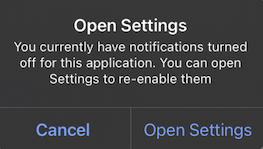 * `optedIn`:現在のプッシュサブスクリプションステータスがsubscribedの場合は`true`を返し、それ以外の場合は`false`を返します。プッシュトークンが有効でも`optOut()`が呼び出された場合、これは`false`を返します。
```kotlin Kotlin theme={null}
OneSignal.User.pushSubscription.optOut()
OneSignal.User.pushSubscription.optIn()
val optedIn = OneSignal.User.pushSubscription.optedIn
```
```java Java theme={null}
OneSignal.getUser().getPushSubscription().optOut();
OneSignal.getUser().getPushSubscription().optIn();
Boolean optedIn = OneSignal.getUser().getPushSubscription().getOptedIn();
```
```swift Swift theme={null}
OneSignal.User.pushSubscription.optOut()
OneSignal.User.pushSubscription.optIn()
let optedIn: Bool = OneSignal.User.pushSubscription.optedIn
```
```objc Objective-C theme={null}
[OneSignal.User.pushSubscription optOut];
[OneSignal.User.pushSubscription optIn];
Boolean optedIn = OneSignal.User.subscriptions.push.optedIn;
```
```csharp C# theme={null}
OneSignal.User.PushSubscription.OptOut();
OneSignal.User.PushSubscription.OptIn();
OneSignal.User.PushSubscription.OptedIn;
```
```javascript React Native theme={null}
OneSignal.User.pushSubscription.optOut();
OneSignal.User.pushSubscription.optIn();
await OneSignal.User.pushSubscription.getOptedInAsync();
```
```dart Flutter theme={null}
OneSignal.User.pushSubscription.optOut();
OneSignal.User.pushSubscription.optIn();
OneSignal.User.pushSubscription.optedIn;
```
```javascript Cordova/Ionic theme={null}
// Ionic
OneSignal.User.pushSubscription.optOut();
OneSignal.User.pushSubscription.optIn();
await OneSignal.User.pushSubscription.getOptedInAsync();
// Cordova
window.plugins.OneSignal.User.pushSubscription.optOut();
window.plugins.OneSignal.User.pushSubscription.optIn();
await window.plugins.OneSignal.User.pushSubscription.getOptedInAsync();
```
### `addEmail()`, `removeEmail()`
現在のユーザーにメールサブスクリプション(メールアドレス)を追加または削除します。正しいユーザーコンテキストを設定するために、`login()`の後に`addEmail`を呼び出してください。[ID検証](./identity-verification)と互換性があります。
```kotlin Kotlin theme={null}
OneSignal.User.addEmail("example@email.com")
OneSignal.User.removeEmail("example@email.com")
```
```java Java theme={null}
OneSignal.getUser().addEmail("example@email.com")
OneSignal.getUser().removeEmail("example@email.com")
```
```swift Swift theme={null}
OneSignal.User.addEmail("example@email.com")
OneSignal.User.removeEmail("example@email.com")
```
```objc Objective-C theme={null}
[OneSignal.User addEmail:@"example@email.com"];
[OneSignal.User removeEmail:@"example@email.com"];
```
```csharp C# theme={null}
OneSignal.User.AddEmail("example@email.com");
OneSignal.User.RemoveEmail("example@email.com");
```
```javascript React Native theme={null}
OneSignal.User.addEmail("example@email.com");
OneSignal.User.removeEmail("example@email.com");
```
```dart Flutter theme={null}
OneSignal.User.addEmail("example@email.com");
OneSignal.User.removeEmail("example@email.com");
```
```javascript Cordova/Ionic theme={null}
// Ionic
OneSignal.User.addEmail("example@email.com");
OneSignal.User.removeEmail("example@email.com");
// Cordova
window.plugins.OneSignal.User.addEmail("example@email.com");
window.plugins.OneSignal.User.removeEmail("example@email.com");
```
### `addSms()`, `removeSms()`
現在のユーザーにSMSサブスクリプション(電話番号)を追加または削除します。[E.164形式](https://www.twilio.com/docs/glossary/what-e164)が必要です。正しいユーザーコンテキストを設定するために、`login()`の後に`addSms`を呼び出してください。[ID検証](./identity-verification)と互換性があります。
```kotlin Kotlin theme={null}
OneSignal.User.addSms("+15558675309")
OneSignal.User.removeSms("+15558675309")
```
```java Java theme={null}
OneSignal.getUser().addSms("+15558675309")
OneSignal.getUser().removeSms("+15558675309")
```
```swift Swift theme={null}
OneSignal.User.addSms("+15558675309")
OneSignal.User.removeSms("+15558675309")
```
```objc Objective-C theme={null}
[OneSignal.User addSms:@"+15558675309"];
[OneSignal.User removeSms:@"+15558675309"];
```
```csharp C# theme={null}
OneSignal.User.AddSms("+15558675309");
OneSignal.User.RemoveSms("+15558675309");
```
```javascript React Native theme={null}
OneSignal.User.addSms("+15558675309");
OneSignal.User.removeSms("+15558675309");
```
```dart Flutter theme={null}
OneSignal.User.addSms("+15558675309");
OneSignal.User.removeSms("+15558675309");
```
```javascript Cordova/Ionic theme={null}
// Ionic
OneSignal.User.addSms("+15558675309");
OneSignal.User.removeSms("+15558675309");
// Cordova
window.plugins.OneSignal.User.addSms("+15558675309");
window.plugins.OneSignal.User.removeSms("+15558675309");
```
***
## プッシュ権限
### `requestPermission(fallbackToSettings)` *プッシュ*
ユーザーにプッシュ通知権限を求めるネイティブシステムプロンプトを表示します。オプションで、設定アプリにリンクするフォールバックプロンプトを有効にできます。
* `fallbackToSettings`:`true`の場合、ユーザーがオペレーティングシステムの制限(iOS:1回、Android:2回)を超えてプッシュ権限を拒否した場合、フォールバックプロンプトが表示されます。
詳細については、[プッシュ権限のプロンプト](./prompt-for-push-permissions)を参照してください。
```kotlin Kotlin theme={null}
// We recommend removing this method after testing and instead use In-App Messages to prompt for notification permission.
// Passing true will fallback to setting prompt if the user denies push permissions
OneSignal.Notifications.requestPermission(true)
```
```java Java theme={null}
// We recommend removing this method after testing and instead use In-App Messages to prompt for notification permission.
// Passing true will fallback to setting prompt if the user denies push permissions
OneSignal.getNotifications().requestPermission(Continue.with(r -> {
if (r.isSuccess()) {
if (r.getData()) {
// `requestPermission` completed successfully and the user has accepted permission
}
else {
// `requestPermission` completed successfully but the user has rejected permission
}
}
else {
// `requestPermission` completed unsuccessfully, check `r.getThrowable()` for more info on the failure reason
}
}));
```
```swift Swift theme={null}
// We recommend removing this method after testing and instead use In-App Messages to prompt for notification permission.
// Passing true will fallback to setting prompt if the user denies push permissions
OneSignal.Notifications.requestPermission({ accepted in
print("User accepted notifications: \(accepted)")
}, fallbackToSettings: true)
```
```objc Objective-C theme={null}
// We recommend removing this method after testing and instead use In-App Messages to prompt for notification permission.
// Passing true will fallback to setting prompt if the user denies push permissions
[OneSignal.Notifications requestPermission:^(BOOL accepted) {
NSLog(@"User accepted notifications: %d", accepted);
} fallbackToSettings:true];
```
```csharp C# theme={null}
// We recommend removing this method after testing and instead use In-App Messages to prompt for notification permission.
// Passing true will fallback to setting prompt if the user denies push permissions
var result = await OneSignal.Notifications.RequestPermissionAsync(true);
if (result)
{
// Notification permission was accepted.
}
else
{
// Notification permission was denied.
}
```
```javascript React Native theme={null}
// We recommend removing this method after testing and instead use In-App Messages to prompt for notification permission.
// Passing true will fallback to setting prompt if the user denies push permissions
OneSignal.Notifications.requestPermission(true);
```
```dart Flutter theme={null}
// We recommend removing this method after testing and instead use In-App Messages to prompt for notification permission.
// Passing true will fallback to setting prompt if the user denies push permissions
OneSignal.Notifications.requestPermission(true);
```
```javascript Cordova/Ionic theme={null}
// Ionic
// We recommend removing this method after testing and instead use In-App Messages to prompt for notification permission.
// Passing true will fallback to setting prompt if the user denies push permissions
OneSignal.Notifications.requestPermission(true).then((accepted) => {
console.log("User accepted notifications: " + accepted);
});
// Cordova
// We recommend removing this method after testing and instead use In-App Messages to prompt for notification permission.
// Passing true will fallback to setting prompt if the user denies push permissions
window.plugins.OneSignal.Notifications.requestPermission(true).then((accepted) => {
console.log("User accepted notifications: " + accepted);
});
```
### `addPermissionObserver()` *プッシュ*
このメソッドを使用して、次のようなプッシュ権限の変更を追跡します:
* ユーザーに通知権限プロンプトが表示されます。
* ユーザーが権限プロンプトを受け入れるまたは拒否します。
* ユーザーがデバイスのアプリ設定でアプリの通知を有効または無効にしてから、アプリに戻ります。
これが発生すると、SDKは`onOSPermissionChanged`イベントをトリガーします。リスナーは`from`と`to`の値を持つ状態オブジェクトを受け取るため、何が変更されたかを正確に検出できます。
更新のリスニングを停止するには、関連する`removePermissionObserver()`メソッドを呼び出します。
```kotlin Kotlin theme={null}
class MyObserver : IPermissionObserver {
init {
OneSignal.Notifications.addPermissionObserver(this)
}
override fun onNotificationPermissionChange(granted: Boolean) {
if (granted) {
// Notifications are now enabled
}
}
fun cleanup() {
OneSignal.Notifications.removePermissionObserver(this)
}
}
```
```java Java theme={null}
public class MainActivity extends Activity implements IPermissionObserver {
protected void onCreate(Bundle savedInstanceState) {
OneSignal.getNotifications().addPermissionObserver(this);
}
@Override
public void onNotificationPermissionChange(boolean granted) {
if (granted) {
// Notifications are now enabled
}
}
@Override
protected void onDestroy() {
OneSignal.getNotifications().removePermissionObserver(this);
super.onDestroy();
}
}
```
```swift Swift theme={null}
class AppDelegate: UIResponder, UIApplicationDelegate, OSNotificationPermissionObserver {
func application(_ application: UIApplication,
didFinishLaunchingWithOptions launchOptions: [UIApplication.LaunchOptionsKey: Any]?) -> Bool {
OneSignal.Notifications.addPermissionObserver(self)
return true
}
func onNotificationPermissionDidChange(_ granted: Bool) {
print("Notification permission changed: \(granted)")
}
func cleanup() {
OneSignal.Notifications.removePermissionObserver(self)
}
}
```
```objc Objective-C theme={null}
// AppDelegate.h
@interface AppDelegate : UIResponder
@end
// AppDelegate.m
@implementation AppDelegate
- (BOOL)application:(UIApplication *)application didFinishLaunchingWithOptions:(NSDictionary *)launchOptions {
[OneSignal.Notifications addPermissionObserver:self];
return YES;
}
- (void)onNotificationPermissionDidChange:(BOOL)granted {
NSLog(@"Permission changed: %d", granted);
}
- (void)cleanup {
[OneSignal.Notifications removePermissionObserver:self];
}
@end
```
```csharp C# theme={null}
OneSignal.Notifications.PermissionChanged += (sender, e) =>
{
// Respond to permission change
};
```
```javascript React Native theme={null}
const onPermissionChange = (granted) => {
console.log('Permission changed:', granted);
};
OneSignal.Notifications.addEventListener('permissionChange', onPermissionChange);
// Remove later if needed
OneSignal.Notifications.removeEventListener('permissionChange', onPermissionChange);
```
```dart Flutter theme={null}
final observer = (bool hasPermission) {
print("Notification permission: $hasPermission");
};
OneSignal.Notifications.addPermissionObserver(observer);
// Remove later if needed
OneSignal.Notifications.removePermissionObserver(observer);
```
```javascript Cordova/Ionic theme={null}
const listener = (granted) => {
console.log("Push permission changed:", granted);
};
// Ionic
OneSignal.Notifications.addEventListener("permissionChange", listener);
// Remove later if needed
OneSignal.Notifications.removeEventListener("permissionChange", listener);
// Cordova
window.plugins.OneSignal.Notifications.addEventListener("permissionChange", listener);
// Remove later if needed
window.plugins.OneSignal.Notifications.removeEventListener("permissionChange", listener);
```
### `getPermission()`, `getCanRequestPermission()`
`getPermission()`は、アプリレベルの現在のプッシュ権限ステータスを返します。`optOut()`またはUsers and Subscriptions APIの`enabled`パラメータで変更した場合、OneSignalレベルのサブスクリプションステータスは考慮されません。`getPermission()`を使用する代わりに、アプリの実行中にデバイスの通知権限ステータスの変更を追跡するには[プッシュ権限オブザーバー](#addpermissionobserver-push)を使用するか、プッシュサブスクリプションステータスの変更を追跡するには[プッシュサブスクリプションオブザーバー](#addobserver-push-subscription-changes)を使用することをお勧めします。
`getCanRequestPermission()`は、権限のリクエストを試みると、ユーザーにプロンプトが表示されるかどうかを返します。`false`の場合、ユーザーは既に権限を拒否しており、フォールバックプロンプトまたはプロンプトなしのいずれかを表示できます。詳細については、[プッシュ権限のプロンプト](./prompt-for-push-permissions)を参照してください。
```kotlin Kotlin theme={null}
// true if the app has permission to display notifications
OneSignal.Notifications.permission
// true if the device can display system notification permission prompt
val canRequest: Boolean = OneSignal.Notifications.canRequestPermission
```
```java Java theme={null}
// true if the app has permission to display notifications
OneSignal.getNotifications().getPermission();
// true if the device can display system notification permission prompt
OneSignal.getNotifications().getCanRequestPermission();
```
```swift Swift theme={null}
// true if the app has permission to display notifications
OneSignal.Notifications.permission
// true if the device can display system notification permission prompt
OneSignal.Notifications.canRequestPermission
```
```objc Objective-C theme={null}
// true if the app has permission to display notifications
[OneSignal.Notifications permission];
// true if the device can display system notification permission prompt
[OneSignal.Notifications canRequestPermission];
```
```csharp C# theme={null}
// true if the app has permission to display notifications
bool permission = OneSignal.Notifications.Permission;
// true if the device can display system notification permission prompt
bool canRequest = OneSignal.Notifications.CanRequestPermission;
```
```javascript React Native theme={null}
// true if the app has permission to display notifications
await OneSignal.Notifications.getPermissionAsync();
// true if the device can display system notification permission prompt
await OneSignal.Notifications.canRequestPermissionAsync();
```
```dart Flutter theme={null}
// true if the app has permission to display notifications
var permission = OneSignal.Notifications.permission;
// true if the device can display system notification permission prompt
var canRequest = OneSignal.Notifications.canRequestPermission;
```
```javascript Cordova/Ionic theme={null}
// Ionic
// true if the app has permission to display notifications
await OneSignal.Notifications.getPermissionAsync();
// true if the device can display system notification permission prompt
await OneSignal.Notifications.canRequestPermissionAsync();
// Cordova
// true if the app has permission to display notifications
await window.plugins.OneSignal.Notifications.getPermissionAsync();
// true if the device can display system notification permission prompt
await window.plugins.OneSignal.Notifications.canRequestPermissionAsync();
```
#### `permissionNative` *iOS*
iOSデバイスのネイティブ権限の列挙型を返します。次のいずれかになります:
* `0` = NotDetermined(未決定)
* `1` = Denied(拒否)
* `2` = Authorized(承認)
* `3` = Provisional(プロビジョナル、iOS 12+でのみ利用可能)
* `4` = Ephemeral(エフェメラル、iOS 14+でのみ利用可能)
```swift Swift theme={null}
let permissionNative: OSNotificationPermission = OneSignal.Notifications.permissionNative.rawValue
```
```objectivec Objective-C theme={null}
OSNotificationPermission permissionNative = [OneSignal.Notifications permissionNative]
```
```csharp C# theme={null}
NotificationPermission PermissionNative
```
```javascript React Native theme={null}
await OneSignal.Notifications.permissionNative()
```
```dart Flutter theme={null}
var permissionNative = await OneSignal.Notifications.permissionNative()
```
```javascript Cordova/Ionic theme={null}
// Ionic
await OneSignal.Notifications.permissionNative()
// Cordova
await window.plugins.OneSignal.Notifications.permissionNative()
```
## プッシュ通知イベント
### `addClickListener()` *プッシュ*
ユーザーがアプリを開くプッシュ通知をクリックしたときに実行されるコールバックを設定します。
このイベントが発生する時点で、アプリのアクティビティまたはシーンは既に起動しています。このハンドラーを使用してカスタムロジックを実行します。アプリのナビゲーションを手動で再起動または複製しないでください。
Flutterアプリの場合、アプリが強制終了されて通知をクリックすると、アプリは開かず、クリックリスナーは`Debug`モードで登録されません。これを修正するには、次のいずれかを実行できます:
* Flutterを介してリリースビルドを使用します。例:`flutter run --release`(物理デバイスが必要)
* Xcodeスキームを`Debug`ではなく`Release`に更新します
ハンドラーが不要になったらリスニングを停止するには、`removeClickListener()`または`removeEventListener()`を使用します。
```kotlin Kotlin theme={null}
val clickListener = object : INotificationClickListener {
override fun onClick(event: INotificationClickEvent) {
Log.d("OneSignal", "Notification clicked: ${event.notification.title}")
}
}
OneSignal.Notifications.addClickListener(clickListener)
```
```java Java theme={null}
OneSignal.getNotifications().addClickListener(event -> {
Log.v(Tag.LOG_TAG, "INotificationClickListener.onClick fired" +
" with event: " + event);
});
```
```swift Swift theme={null}
class AppDelegate: UIResponder, UIApplicationDelegate, OSNotificationClickListener {
func application(_ application: UIApplication,
didFinishLaunchingWithOptions launchOptions: [UIApplication.LaunchOptionsKey: Any]?) -> Bool {
OneSignal.Notifications.addClickListener(self)
return true
}
func onClick(event: OSNotificationClickEvent) {
print("Notification clicked: \(event.jsonRepresentation())")
}
}
```
```objc Objective-C theme={null}
// AppDelegate.h
@interface AppDelegate : UIResponder
@end
// AppDelegate.m
@implementation AppDelegate
- (BOOL)application:(UIApplication*)application didFinishLaunchingWithOptions:(NSDictionary *)launchOptions {
[OneSignal.Notifications addClickListener:self];
return YES;
}
- (void)onClickNotification:(OSNotificationClickEvent *)event {
NSLog(@"Notification clicked: %@", [event jsonRepresentation]);
}
@end
```
```csharp C# theme={null}
OneSignal.Notifications.Clicked += (sender, e) => {
var RawPayload = e.Notification.RawPayload;
Console.WriteLine("Notification clicked: " + RawPayload);
};
```
```javascript React Native theme={null}
OneSignal.Notifications.addEventListener('click', (event) => {
console.log('OneSignal: notification clicked:', event);
});
```
```dart Flutter theme={null}
OneSignal.Notifications.addClickListener((event) {
print('Notification clicked: ${event}');
});
```
```javascript Cordova/Ionic theme={null}
const myClickListener = (event) => {
console.log("Notification clicked:", JSON.stringify(event));
};
// Ionic
OneSignal.Notifications.addEventListener("click", myClickListener);
// Cordova
window.plugins.OneSignal.Notifications.addEventListener("click", myClickListener);
```
### `addForegroundLifecycleListener()` *プッシュ*
アプリがフォアグラウンドにあるときに通知がどのように動作するかをインターセプトして制御できます。
デフォルトでは、OneSignalは自動的に通知を表示します。`event.preventDefault()`を使用してこの動作を上書きできます:
* 通知を抑制
* カスタマイズ
* 非同期ロジックのために表示を遅延(例:ユーザー状態の取得、イベントのログ)
後で手動で表示するには、`event.notification.display()`を呼び出します。
これは、表示前にペイロードを変更する[通知サービス拡張機能](./service-extensions)の**後**に実行されます。
ハンドラーが不要になったらリスニングを停止するには、`removeForegroundLifecycleListener()`または`removeEventListener()`を使用します。
```kotlin Kotlin theme={null}
val lifecycleListener = object : INotificationLifecycleListener {
override fun onWillDisplay(event: INotificationWillDisplayEvent) {
Log.d("OneSignal", "Foreground notification: ${event.notification.title}")
// Uncomment to prevent the notification from being displayed while in the foreground
// event.preventDefault()
}
}
OneSignal.Notifications.addForegroundLifecycleListener(lifecycleListener)
```
```java Java theme={null}
OneSignal.getNotifications().addForegroundLifecycleListener(new INotificationLifecycleListener() {
@Override
public void onWillDisplay(@NonNull INotificationWillDisplayEvent event) {
Log.d("OneSignal", "Foreground notification received: " + event.getNotification().getTitle());
// Uncomment to prevent the notification from being displayed while in the foreground
// event.preventDefault();
}
});
```
```swift Swift theme={null}
class AppDelegate: UIResponder, UIApplicationDelegate, OSNotificationLifecycleListener {
func application(_ application: UIApplication,
didFinishLaunchingWithOptions launchOptions: [UIApplication.LaunchOptionsKey: Any]?) -> Bool {
OneSignal.Notifications.addForegroundLifecycleListener(self)
return true
}
func onWillDisplay(event: OSNotificationWillDisplayEvent) {
print("Foreground notification: \(event.notification.title ?? "No Title")")
// Uncomment to prevent the notification from being displayed while in the foreground
// event.preventDefault()
}
}
```
```objc Objective-C theme={null}
@implementation AppDelegate
- (BOOL)application:(UIApplication*)application didFinishLaunchingWithOptions:(NSDictionary *)launchOptions {
[OneSignal.Notifications addForegroundLifecycleListener:self];
return YES;
}
- (void)onWillDisplayNotification:(OSNotificationWillDisplayEvent *)event {
NSLog(@"Foreground notification: %@", event.notification.title);
// Uncomment to prevent the notification from being displayed while in the foreground
// [event preventDefault];
}
@end
```
```csharp C# theme={null}
OneSignal.Notifications.ForegroundWillDisplay += (sender, e) =>
{
Console.WriteLine("Foreground notification: " + e.Notification.RawPayload);
// Uncomment to prevent the notification from being displayed while in the foreground
// e.PreventDefault();
};
```
```javascript React Native theme={null}
OneSignal.Notifications.addEventListener('foregroundWillDisplay', (event) => {
console.log("Foreground notification:", event.getNotification().title);
// Uncomment to prevent the notification from being displayed while in the foreground
// event.preventDefault();
});
```
```dart Flutter theme={null}
OneSignal.Notifications.addForegroundWillDisplayListener((event) {
print("Foreground notification: ${event.notification.title}");
// Uncomment to prevent the notification from being displayed while in the foreground
// event.preventDefault();
});
```
```javascript Cordova/Ionic theme={null}
const myLifecyleListener = function(event) {
console.log("Foreground notification:", event.notification.title);
// Uncomment to prevent the notification from being displayed while in the foreground
// event.preventDefault();
};
// Ionic
OneSignal.Notifications.addEventListener("foregroundWillDisplay", myLifecyleListener);
// Cordova
window.plugins.OneSignal.Notifications.addEventListener("foregroundWillDisplay", myLifecyleListener);
```
### `clearAllNotifications()`
通知シェードからすべてのOneSignal通知を削除します。Androidの`android.app.NotificationManager.cancel`の代わりに使用してください。そうしないと、アプリを再起動したときに通知が復元されます。
```kotlin Kotlin theme={null}
OneSignal.Notifications.clearAllNotifications()
```
```java Java theme={null}
OneSignal.getNotifications.clearAllNotifications();
```
```swift Swift theme={null}
OneSignal.Notifications.clearAll()
```
```objc Objective-C theme={null}
[OneSignal.Notifications clearAll];
```
```csharp C# theme={null}
OneSignal.Notifications.ClearAllNotifications();
```
```javascript React Native theme={null}
OneSignal.Notifications.clearAll();
```
```dart Flutter theme={null}
OneSignal.Notifications.clearAll();
```
```javascript Cordova/Ionic theme={null}
// Ionic
OneSignal.Notifications.clearAll();
// Cordova
window.plugins.OneSignal.Notifications.clearAll();
```
#### `removeNotification()` *Android*
Android通知IDに基づいて単一の通知をキャンセルします。
Androidの`android.app.NotificationManager.cancel`の代わりに使用してください。そうしないと、アプリを再起動したときに通知が復元されます。
```kotlin Kotlin theme={null}
OneSignal.Notifications.removeNotification(id)
```
```java Java theme={null}
OneSignal.getNotifications().removeNotification(id);
```
```csharp C# theme={null}
OneSignal.Notifications.RemoveNotification(id);
```
```javascript React Native theme={null}
OneSignal.Notifications.removeNotification(id);
```
```dart Flutter theme={null}
OneSignal.Notifications.removeNotification(id);
```
```javascript Cordova/Ionic theme={null}
// Ionic
OneSignal.Notifications.removeNotification(id);
// Cordova
window.plugins.OneSignal.Notifications.removeNotification(id);
```
#### `removeGroupedNotifications()` *Android*
提供されたグループキーを持つOneSignal通知のグループをキャンセルします。通知のグループ化はOneSignalの概念です。`android.app.NotificationManager`に相当するものはありません。
```kotlin Kotlin theme={null}
OneSignal.Notifications.removeGroupedNotifications("GROUP_KEY")
```
```java Java theme={null}
OneSignal.getNotifications().removeGroupedNotifications("GROUP_KEY");
```
```csharp C# theme={null}
OneSignal.Notifications.RemoveGroupedNotifications("GROUP_KEY");
```
```javascript React Native theme={null}
OneSignal.Notifications.removeGroupedNotifications("GROUP_KEY");
```
```dart Flutter theme={null}
OneSignal.Notifications.removeGroupedNotifications("GROUP_KEY");
```
```javascript Cordova/Ionic theme={null}
// Ionic
OneSignal.Notifications.removeGroupedNotifications("GROUP_KEY");
// Cordova
window.plugins.OneSignal.Notifications.removeGroupedNotifications("GROUP_KEY");
```
***
## アプリ内メッセージ
アプリ内メッセージにはコードは必要ありませんが、SDKを使用すると、メッセージが表示されるタイミングをカスタマイズし、ライフサイクルイベントを処理できます。
### `addTrigger()`, `addTriggers()`
単一または複数のトリガーに基づいて、アプリ内メッセージをいつ表示するかを決定します。詳細については、[トリガー](./iam-triggers)を参照してください。
トリガーはバックエンドに保存されません。ローカルデバイスにのみ存在し、現在のユーザーに適用されます。
```kotlin Kotlin theme={null}
OneSignal.InAppMessages.addTrigger("KEY", "VALUE")
OneSignal.InAppMessages.addTriggers(mapOf("KEY_01" to "VALUE_01", "KEY_02" to "VALUE_02"))
```
```java Java theme={null}
OneSignal.getInAppMessages().addTrigger("KEY", "VALUE");
OneSignal.getInAppMessages().addTriggers(new HashMap() {{
put("KEY_01","VALUE_01");
put("KEY_02", "VALUE_02");
}});
```
```swift Swift theme={null}
OneSignal.InAppMessages.addTrigger("KEY", withValue: "VALUE")
OneSignal.InAppMessages.addTriggers(["KEY_01": "VALUE_01", "KEY_02": "VALUE_02"])
```
```objc Objective-C theme={null}
[OneSignal.InAppMessages addTrigger:@"KEY" withValue:@"VALUE"];
[OneSignal.InAppMessages addTriggers:@{@"KEY_01": @"VALUE_01", @"KEY_02": @"VALUE_02"}];
```
```csharp C# theme={null}
OneSignal.InAppMessages.AddTrigger("KEY", "VALUE");
OneSignal.InAppMessages.AddTriggers(new Dictionary {
{ "KEY_01", "VALUE_01" },
{ "KEY_02", "VALUE_02" }
});
```
```javascript React Native theme={null}
OneSignal.InAppMessages.addTrigger("KEY", "VALUE");
OneSignal.InAppMessages.addTriggers({
"KEY_01": "VALUE_01",
"KEY_02": "VALUE_02"
});
```
```dart Flutter theme={null}
OneSignal.InAppMessages.addTrigger("KEY", "VALUE");
OneSignal.InAppMessages.addTriggers({
"KEY_01": "VALUE_01",
"KEY_02": "VALUE_02"
});
```
```javascript Cordova/Ionic theme={null}
// Ionic
OneSignal.InAppMessages.addTrigger("KEY", "VALUE");
OneSignal.InAppMessages.addTriggers({"KEY_01":"VALUE_01", "KEY_02":"VALUE_02"});
// Cordova
window.plugins.OneSignal.InAppMessages.addTrigger("KEY", "VALUE");
window.plugins.OneSignal.InAppMessages.addTriggers({"KEY_01":"VALUE_01", "KEY_02":"VALUE_02"});
```
### `removeTrigger()`, `removeTriggers()`, `clearTriggers()`
現在のユーザーから、提供されたキーを持つ単一、複数、またはすべてのトリガーを削除します。
```kotlin Kotlin theme={null}
OneSignal.InAppMessages.removeTrigger("KEY")
OneSignal.InAppMessages.removeTriggers(setOf("KEY_01", "KEY_02"))
OneSignal.InAppMessages.clearTriggers()
```
```java Java theme={null}
OneSignal.getInAppMessages().removeTrigger("KEY");
OneSignal.getInAppMessages().removeTriggers(Arrays.asList("KEY_01", "KEY_02"));
OneSignal.getInAppMessages().clearTriggers();
```
```swift Swift theme={null}
OneSignal.InAppMessages.removeTrigger("KEY")
OneSignal.InAppMessages.removeTriggers(["KEY_01", "KEY_02"])
OneSignal.InAppMessages.clearTriggers()
```
```objc Objective-C theme={null}
[OneSignal.InAppMessages removeTrigger:@"KEY"];
[OneSignal.InAppMessages removeTriggers:@[@"KEY_01", @"KEY_02"]];
[OneSignal.InAppMessages clearTriggers];
```
```csharp C# theme={null}
OneSignal.InAppMessages.RemoveTrigger("KEY");
OneSignal.InAppMessages.RemoveTriggers(new List { "KEY_01", "KEY_02" });
OneSignal.InAppMessages.ClearTriggers();
```
```javascript React Native theme={null}
OneSignal.InAppMessages.removeTrigger("KEY");
OneSignal.InAppMessages.removeTriggers(["KEY_01", "KEY_02"]);
OneSignal.InAppMessages.clearTriggers();
```
```dart Flutter theme={null}
OneSignal.InAppMessages.removeTrigger("KEY");
OneSignal.InAppMessages.removeTriggers(["KEY_01", "KEY_02"]);
OneSignal.InAppMessages.clearTriggers();
```
```javascript Cordova/Ionic theme={null}
// Ionic
OneSignal.InAppMessages.removeTrigger("KEY");
OneSignal.InAppMessages.removeTriggers(["KEY_01", "KEY_02"]);
OneSignal.InAppMessages.clearTriggers();
// Cordova
window.plugins.OneSignal.InAppMessages.removeTrigger("KEY");
window.plugins.OneSignal.InAppMessages.removeTriggers(["KEY_01", "KEY_02"]);
window.plugins.OneSignal.InAppMessages.clearTriggers();
```
### `paused`
アプリ内メッセージがユーザーに表示されないようにします。`true`に設定すると、アプリ内メッセージは表示されません。`false`に設定すると、ユーザーが適格なすべてのメッセージが適切なタイミングで表示されます。
```kotlin Kotlin theme={null}
OneSignal.InAppMessages.paused = true
```
```java Java theme={null}
OneSignal.getInAppMessages().setPaused(true);
```
```swift Swift theme={null}
OneSignal.InAppMessages.paused = true
// Get `paused` state
let paused = OneSignal.InAppMessages.paused
```
```objc Objective-C theme={null}
[OneSignal.InAppMessages paused:true];
// Get `paused` state
BOOL paused = [OneSignal.InAppMessages paused];
```
```csharp C# theme={null}
OneSignal.InAppMessages.Paused = true;
```
```javascript React Native theme={null}
OneSignal.InAppMessages.setPaused(true);
```
```dart Flutter theme={null}
OneSignal.InAppMessages.paused(true);
```
```javascript Cordova/Ionic theme={null}
// Ionic
OneSignal.InAppMessages.setPaused(true);
// Cordova
window.plugins.OneSignal.InAppMessages.setPaused(true);
```
### `addLifecycleListener()`
アプリ内メッセージの表示と却下に応答または追跡します。
```kotlin Kotlin theme={null}
val lifecycleListener = object : IInAppMessageLifecycleListener {
override fun onWillDisplay(event: IInAppMessageWillDisplayEvent) {
print(event.message.messageId)
}
override fun onDidDisplay(event: IInAppMessageDidDisplayEvent) {
print(event.message.messageId)
}
override fun onWillDismiss(event: IInAppMessageWillDismissEvent) {
print(event.message.messageId)
}
override fun onDidDismiss(event: IInAppMessageDidDismissEvent) {
print(event.message.messageId)
}
}
OneSignal.InAppMessages.addLifecycleListener(lifecycleListener)
OneSignal.InAppMessages.removeLifecycleListener(lifecycleListener)
```
```java Java theme={null}
OneSignal.getInAppMessages().addLifecycleListener(new IInAppMessageLifecycleListener() {
@Override
public void onWillDisplay(@NonNull IInAppMessageWillDisplayEvent event) {
Log.v(Tag.LOG_TAG, "onWillDisplayInAppMessage");
}
@Override
public void onDidDisplay(@NonNull IInAppMessageDidDisplayEvent event) {
Log.v(Tag.LOG_TAG, "onDidDisplayInAppMessage");
}
@Override
public void onWillDismiss(@NonNull IInAppMessageWillDismissEvent event) {
Log.v(Tag.LOG_TAG, "onWillDismissInAppMessage");
}
@Override
public void onDidDismiss(@NonNull IInAppMessageDidDismissEvent event) {
Log.v(Tag.LOG_TAG, "onDidDismissInAppMessage");
}
});
```
```swift Swift theme={null}
// AppDelegate.swift
// Add OSInAppMessageLifecycleListener as an implemented protocol of the class that will handle the In-App Message lifecycle events.
class AppDelegate: UIResponder, UIApplicationDelegate, OSInAppMessageLifecycleListener {
func application(_ application: UIApplication, didFinishLaunchingWithOptions launchOptions: [UIApplicationLaunchOptionsKey: Any]?) -> Bool {
// Add your implementing class as the listener
OneSignal.InAppMessages.addLifecycleListener(self)
}
// Add one or more of the following optional lifecycle methods
func onWillDisplay(event: OSInAppMessageWillDisplayEvent) {
print("OSInAppMessageLifecycleListener: onWillDisplay Message: \(event.message.messageId)")
}
func onDidDisplay(event: OSInAppMessageDidDisplayEvent) {
print("OSInAppMessageLifecycleListener: onDidDisplay Message: \(event.message.messageId)")
}
func onWillDismiss(event: OSInAppMessageWillDismissEvent) {
print("OSInAppMessageLifecycleListener: onWillDismiss Message: \(event.message.messageId)")
}
func onDidDismiss(event: OSInAppMessageDidDisplayEvent) {
print("OSInAppMessageLifecycleListener: onDidDismiss Message: \(event.message.messageId)")
}
}
```
```objc Objective-C theme={null}
// AppDelegate.h
// Add OSInAppMessageLifecycleListener as an implemented protocol of the class that will handle the In-App Message lifecycle events.
@interface AppDelegate : UIResponder
@end
// AppDelegate.m
@implementation AppDelegate
- (BOOL)application:(UIApplication*)application didFinishLaunchingWithOptions:(NSDictionary *)launchOptions {
// Add your implementing class as the listener.
[OneSignal.InAppMessages addLifecycleListener:self];
}
// Add one or more of the following optional lifecycle methods
- (void)onWillDisplayInAppMessage:(OSInAppMessageWillDisplayEvent *)event {
NSLog(@"OSInAppMessageLifecycleListener: onWillDisplay Message: %@", event.message.messageId);
}
- (void)onDidDisplayInAppMessage:(OSInAppMessageDidDisplayEvent *)event {
NSLog(@"OSInAppMessageLifecycleListener: onDidDisplay Message: %@", event.message.messageId);
}
- (void)onWillDismissInAppMessage:(OSInAppMessageWillDismissEvent *)event {
NSLog(@"OSInAppMessageLifecycleListener: onWillDismiss Message: %@", event.message.messageId);
}
- (void)onDidDismissInAppMessage:(OSInAppMessageDidDismissEvent *)event {
NSLog(@"OSInAppMessageLifecycleListener: onDidDismiss Message: %@", event.message.messageId);
}
```
```csharp C# theme={null}
OneSignal.InAppMessages.WillDisplay += (sender, e) =>
{
// Access the in-app message with e.Message
};
OneSignal.InAppMessages.DidDisplay += (sender, e) =>
{
// Access the in-app message with e.Message
};
OneSignal.InAppMessages.WillDismiss += (sender, e) =>
{
// Access the in-app message with e.Message
};
OneSignal.InAppMessages.DidDismiss += (sender, e) =>
{
// Access the in-app message with e.Message
};
```
```javascript React Native theme={null}
OneSignal.InAppMessages.addEventListener('willDisplay', (event) => {
console.log('OneSignal: will display IAM: ', event);
});
OneSignal.InAppMessages.addEventListener('didDisplay', (event) => {
console.log('OneSignal: did display IAM: ', event);
});
OneSignal.InAppMessages.addEventListener('willDismiss', (event) => {
console.log('OneSignal: will dismiss IAM: ', event);
});
OneSignal.InAppMessages.addEventListener('didDismiss', (event) => {
console.log('OneSignal: did dismiss IAM: ', event);
});
```
```dart Flutter theme={null}
OneSignal.InAppMessages.addWillDisplayListener((event) {
print("ON WILL DISPLAY IN APP MESSAGE ${event.message.messageId}");
});
OneSignal.InAppMessages.addDidDisplayListener((event) {
print("ON DID DISPLAY IN APP MESSAGE ${event.message.messageId}");
});
OneSignal.InAppMessages.addWillDismissListener((event) {
print("ON WILL DISMISS IN APP MESSAGE ${event.message.messageId}");
});
OneSignal.InAppMessages.addDidDismissListener((event) {
print("ON DID DISMISS IN APP MESSAGE ${event.message.messageId}");
});
```
```javascript Cordova/Ionic theme={null}
// Define the lifecycle listener functions
let willDisplayListener = async function(event) {
console.log("OneSignal: will display IAM: "+ event.messageId);
};
let didDisplayListener = async function(event) {
console.log("OneSignal: did display IAM: "+ event.messageId);
};
let willDismissListener = async function(event) {
console.log("OneSignal: will dismiss IAM: "+ event.messageId);
};
let didDismissListener = async function(event) {
console.log("OneSignal: did dismiss IAM: "+ event.messageId);
};
// Listeners for each event added separately
// Ionic
OneSignal.InAppMessages.addEventListener("willDisplay", willDisplayListener);
OneSignal.InAppMessages.addEventListener("didDisplay", didDisplayListener);
OneSignal.InAppMessages.addEventListener("willDismiss", willDismissListener);
OneSignal.InAppMessages.addEventListener("didDismiss", didDismissListener);
// Cordova
window.plugins.OneSignal.InAppMessages.addEventListener("willDisplay", willDisplayListener);
window.plugins.OneSignal.InAppMessages.addEventListener("didDisplay", didDisplayListener);
window.plugins.OneSignal.InAppMessages.addEventListener("willDismiss", willDismissListener);
window.plugins.OneSignal.InAppMessages.addEventListener("didDismiss", didDismissListener);
```
### `addClickListener()` *アプリ内*
アプリ内メッセージのクリックイベントに応答します。イベントには、次の[クリックアクション](./iam-click-actions)メタデータが含まれています:
* `actionId`:要素に設定したカスタム識別子。
* `urlTarget`:メッセージの起動URLがどのように表示されるかを指定する列挙型。
* `url`:アクションの起動URL(ある場合)。
* `closingMessage`:アクションがメッセージのクローズにつながったかどうかを示すブール値。
```kotlin Kotlin theme={null}
val clickListener = object : IInAppMessageClickListener {
override fun onClick(event: IInAppMessageClickEvent) {
print(event.result.actionId)
}
}
OneSignal.InAppMessages.addClickListener(clickListener)
```
```java Java theme={null}
OneSignal.getInAppMessages().addClickListener(new IInAppMessageClickListener() {
@Override
public void onClick(@Nullable IInAppMessageClickEvent event) {
Log.v(Tag.LOG_TAG, "INotificationClickListener.inAppMessageClicked");
}
});
```
```swift Swift theme={null}
class MyInAppMessageClickListener : NSObject, OSInAppMessageClickListener {
func onClick(event: OSInAppMessageClickEvent) {
let messageId = event.message.messageId
print("Message ID: \(messageId)")
let result: OSInAppMessageClickResult = event.result
let actionId = result.actionId
print("Action ID: ",(actionId ?? "no actionId"))
let url = result.url
print("URL: ", (url ?? "No URL"))
let urlTarget: OSInAppMessageActionUrlType = result.urlTarget
print("URL Target: \(urlTarget)")
let closingMessage = result.closingMessage
print("Closing Message: \(closingMessage)")
}
}
// Add your object as a listener
let myListener = MyInAppMessageClickListener()
OneSignal.InAppMessages.addClickListener(myListener)
```
```objc Objective-C theme={null}
// Add this method to object implementing the OSInAppMessageClickListener protocol
- (void)onClickInAppMessage:(OSInAppMessageClickEvent * _Nonnull)event {
NSLog(@"onClickInAppMessage event: %@", [event jsonRepresentation]);
NSString *message = [NSString stringWithFormat:@"In App Message Click Occurred: messageId: %@ actionId: %@ url: %@ urlTarget: %@ closingMessage: %i",
event.message.messageId,
event.result.actionId,
event.result.url,
@(event.result.urlTarget),
event.result.closingMessage];
}
// Add your object as a listener
[OneSignal.InAppMessages addClickListener:self];
```
```csharp C# theme={null}
OneSignal.InAppMessages.Clicked += (sender, e) =>
{
// Access the in-app message with e.Message and the click result with e.Result
};
```
```javascript React Native theme={null}
OneSignal.InAppMessages.addEventListener('click', (event) => {
console.log('OneSignal IAM clicked:', event);
});
```
```dart Flutter theme={null}
OneSignal.InAppMessages.addClickListener((event) {
print("In App Message Clicked: \n${event.result.jsonRepresentation().replaceAll("\\n", "\n")}");
});
```
```javascript Cordova/Ionic theme={null}
let inAppClickListener = async function(event) {
let clickData = JSON.stringify(event);
console.log("In-App Message Clicked: "+ clickData);
};
// Ionic
OneSignal.InAppMessages.addEventListener("click", inAppClickListener);
// Cordova
window.plugins.OneSignal.InAppMessages.addEventListener("click", inAppClickListener);
```
***
## Live Activity
アプリケーションは、ユーザーがLive Activitiesにオプトインできるようにする必要があります。たとえば、アプリはボタンを使用するかIAMを表示することで、ユーザーにLive Activityを開始するオプションを提供します。通知権限または位置情報権限とは異なり、明示的なプロンプトなしで、任意の方法でLive Activityを開始および更新できます。Live ActivitiesはiOSプロビジョナル認証UIで表示されます。Live Activitiesは、アプリケーションがフォアグラウンドにあるときに開始する必要があります。Live Activitiesの詳細については、[Appleの開発者ガイドライン](https://developer.apple.com/design/human-interface-guidelines/live-activities)を読むことをお勧めします。
### `setup()`
OneSignalがアプリケーションに代わってLiveActivityのライフサイクルを管理できるようにします。これには、pushToStartトークンの更新とpushToUpdateトークンの更新の両方をリッスンすることが含まれます。
```swift Swift theme={null}
//... your app's code
OneSignal.LiveActivities.setup(MyWidgetAttributes.self);
```
### `setupDefault()`
クロスプラットフォームSDKがLiveActivityのライフサイクルを管理できるようにします。カスタマーアプリが独自のActivityAttributesを定義および管理する必要がなくなります。詳細については、[クロスプラットフォームセットアップ](./cross-platform-live-activity-setup)を参照してください。
```csharp C# theme={null}
using OneSignalSDK;
//Push To Start
OneSignal.LiveActivities.SetupDefault();
//Launching the Live Activity from within the app (not needed for push to start)
string activityId = "my_activity_id";
OneSignal.LiveActivities.StartDefault(
activityId,
new Dictionary() {
{ "title", "Welcome!" }
},
new Dictionary() {
{ "message", new Dictionary() {
{ "en", "Hello World!"}
}},
});
```
```javascript React Native theme={null}
import { OneSignal } from 'react-native-onesignal'
//Push To Start
OneSignal.LiveActivities.setupDefault()
//Launching the Live Activity from within the app (not needed for push to start)
const activityId = "my_activity_id"
const attributes = { title: "Sample Title" } ;
const content = { message: { en: "message" } };
OneSignal.LiveActivities.startDefault(activityId, attributes, content);
```
```dart Flutter theme={null}
import 'package:onesignal_flutter/onesignal_flutter.dart';
OneSignal.LiveActivities.setupDefault()
//Launching the Live Activity from within the app (not needed for push to start)
const String activityId = "my_activity_id";
OneSignal.LiveActivities.startDefault(activityId!, {
"title": "Welcome!"
}, {
"message": {"en": "Hello World!"},
});
```
```javascript Cordova/Ionic theme={null}
//Ionic
import OneSignal from "onesignal-cordova-plugin";
//Push To Start
OneSignal.LiveActivities.setupDefault();
//Launching the Live Activity from within the app (not needed for push to start)
const activityId = "my_activity_id";
const attributes = { title: "Sample Title" };
const content = { message: { en: "message" } };
OneSignal.LiveActivities.startDefault(activityId, attributes, content);
//Cordova
//Push To Start
window.plugins.OneSignal.LiveActivities.setupDefault();
//Launching the Live Activity from within the app (not needed for push to start)
const activityId = "my_activity_id";
const attributes = { title: "Sample Title" };
const content = { message: { en: "message" } };
window.plugins.OneSignal.LiveActivities.startDefault(
activityId,
attributes,
content
);
```
### `enter()`
Live Activityに入ると、`activityId`がサーバー上のLive Activity **一時プッシュトークン**に関連付けられます。[Update Live Activities](/reference/update-live-activity-api) REST APIを使用して1つまたは複数のLive Activitiesを同時に更新する場合に、この識別子を指定します。
```swift Swift theme={null}
// ... your app's code
let activity = try Activity.request(
attributes: attributes,
contentState: contentState,
pushType: .token)
Task {
for await data in activity.pushTokenUpdates {
let token = data.map {String(format: "%02x", $0)}.joined()
// ... required code for entering a live activity
// Activity ID cannot contain "/" characters
OneSignal.LiveActivities.enter("ACTIVITY_ID", withToken: token)
}
}
```
```csharp C# theme={null}
OneSignal.LiveActivities.EnterAsync("ACTIVITY_ID", token);
```
```csharp .Net theme={null}
var result = OneSignalSDK.DotNet.OneSignal.Default.EnterLiveActivity("ACTIVITY_ID", token);
if(result) {
Console.WriteLine("Success");
}
```
```javascript React Native theme={null}
OneSignal.LiveActivities.enter('ACTIVITY_ID', token, (result) => {
console.log('Results of entering live activity: ', result);
});
```
```dart Flutter theme={null}
OneSignal.LiveActivities.enterLiveActivity("ACTIVITY_ID", token).then((result) {
print("Successfully enter live activity");
}).catchError((error) {
print("Failed to enter live activity with error: $error");
});
```
```javascript Cordova/Ionic theme={null}
//Ionic
OneSignal.LiveActivities.enter("ACTIVITY_ID", token, (result) => {
console.log("Results of entering live activity: ", result);
});
//Cordova
window.plugins.OneSignal.LiveActivities.enter("ACTIVITY_ID", token, (result) => {
console.log("Results of entering live activity: ", result);
});
```
### `exit()`
Live Activityを終了すると、サーバー上のアクティビティ識別子とLive Activityプッシュトークン間の関連付けが削除されます。
```swift Swift theme={null}
OneSignal.LiveActivities.exit("ACTIVITY_ID")
```
```csharp C# theme={null}
OneSignal.LiveActivities.ExitAsync("ACTIVITY_ID");
```
```csharp .Net theme={null}
OneSignalSDK.DotNet.OneSignal.Default.ExitLiveActivity("ACTIVITY_ID");
```
```javascript React Native theme={null}
OneSignal.LiveActivities.exit('ACTIVITY_ID', (result) => {
console.log('Results of exiting live activity: ', result);
});
```
```dart Flutter theme={null}
OneSignal.LiveActivities.exit("ACTIVITY_ID").then((result) {
print("Successfully exit live activity");
}).catchError((error) {
print("Failed to exit live activity: $error");
});
```
```javascript Cordova/Ionic theme={null}
window.plugins.OneSignal.LiveActivities.exit("ACTIVITY_ID", (result) => {
console.log("Results of exiting live activity: ", result);
});
```
### `setPushToStartToken()`
Live Activitiesをプッシュして開始するためのオプションの「低レベル」アプローチ。`ActivityAttribute`構造を変更せずに、LiveActivityの開始および更新トークンをきめ細かく制御できます。[詳細はこちらで入手可能](https://github.com/OneSignal/OneSignal-iOS-SDK/pull/1377#:~:text=Alternative%20\(low%20level\)%20method%20to%20setup%20Live%20Activities%20with%20OneSignal)
```swift Swift theme={null}
if #available(iOS 17.2, *) {
// Setup an async task to monitor and send pushToStartToken updates to OneSignalSDK.
Task {
for try await data in Activity.pushToStartTokenUpdates {
let token = data.map {String(format: "%02x", $0)}.joined()
OneSignal.LiveActivities.setPushToStartToken(MyWidgetAttributes.self, withToken: token)
}
}
// Setup an async task to monitor for an activity to be started, for each started activity we
// can then set up an async task to monitor and send updateToken updates to OneSignalSDK.
Task {
for await activity in Activity.activityUpdates {
Task {
for await pushToken in activity.pushTokenUpdates {
let token = pushToken.map {String(format: "%02x", $0)}.joined()
OneSignal.LiveActivities.enter("my-activity-id", withToken: token)
}
}
}
}
}
```
### `removePushToStartToken()`
そのアクティビティタイプが現在のサブスクリプションに対して登録されなくなった場合に、アクティビティタイプごとに呼び出されます
```swift Swift theme={null}
OneSignal.LiveActivities.removePushToStartToken(MyWidgetAttributes.self)
```
***
## アウトカム
ユーザーが実行したアクションを追跡し、それらをメッセージに帰属させます。詳細については、[アウトカム](./custom-outcomes)を参照してください。
### `addOutcome()`
提供された名前でアウトカムを追加します。現在のセッションに対してキャプチャされます。
```kotlin Kotlin theme={null}
OneSignal.Session.addOutcome("OUTCOME_NAME")
```
```java Java theme={null}
OneSignal.getSession().addOutcome("OUTCOME_NAME");
```
```swift Swift theme={null}
OneSignal.Session.addOutcome("OUTCOME_NAME")
```
```objc Objective-C theme={null}
[OneSignal.Session addOutcome:@"OUTCOME_NAME"];
```
```csharp C# theme={null}
OneSignal.Session.AddOutcome("OUTCOME_NAME");
```
```javascript React Native theme={null}
OneSignal.Session.addOutcome("OUTCOME_NAME");
```
```dart Flutter theme={null}
OneSignal.Session.addOutcome("OUTCOME_NAME");
```
```javascript Cordova/Ionic theme={null}
//Ionic
OneSignal.Session.addOutcome("OUTCOME_NAME");
//Cordova
window.plugins.OneSignal.Session.addOutcome("OUTCOME_NAME");
```
### `addUniqueOutcome()`
提供された名前で一意のアウトカムを追加します。現在のセッションに対してキャプチャされます。
```kotlin Kotlin theme={null}
OneSignal.Session.addUniqueOutcome("OUTCOME_NAME")
```
```java Java theme={null}
OneSignal.getSession().addUniqueOutcome("OUTCOME_NAME");
```
```swift Swift theme={null}
OneSignal.Session.addUniqueOutcome("OUTCOME_NAME")
```
```objc Objective-C theme={null}
[OneSignal.Session addUniqueOutcome:@"OUTCOME_NAME"];
```
```csharp C# theme={null}
OneSignal.Session.AddUniqueOutcome("OUTCOME_NAME");
```
```javascript React Native theme={null}
OneSignal.Session.addUniqueOutcome("OUTCOME_NAME");
```
```dart Flutter theme={null}
OneSignal.Session.addUniqueOutcome("OUTCOME_NAME");
```
```javascript Cordova/Ionic theme={null}
//Ionic
OneSignal.Session.addUniqueOutcome("OUTCOME_NAME");
//Cordova
window.plugins.OneSignal.Session.addUniqueOutcome("OUTCOME_NAME");
```
### `addOutcomeWithValue()`
提供された名前と値でアウトカムを追加します。現在のセッションに対してキャプチャされます。
```kotlin Kotlin theme={null}
OneSignal.Session.addOutcomeWithValue("OUTCOME_NAME", 3.14)
```
```java Java theme={null}
OneSignal.getSession().addOutcomeWithValue("OUTCOME_NAME", 3.14);
```
```swift Swift theme={null}
OneSignal.Session.addOutcomeWithValue("OUTCOME_NAME", 3.14)
```
```objc Objective-C theme={null}
[OneSignal.Session addOutcomeWithValue:@"OUTCOME_NAME" value: 3.14];
```
```csharp C# theme={null}
OneSignal.Session.AddOutcomeWithValue("OUTCOME_NAME", 3.14);
```
```javascript React Native theme={null}
OneSignal.Session.addOutcomeWithValue("OUTCOME_NAME", 3.14);
```
```dart Flutter theme={null}
OneSignal.Session.addOutcomeWithValue("OUTCOME_NAME", 3.14);
```
```javascript Cordova/Ionic theme={null}
//Ionic
OneSignal.Session.addOutcomeWithValue("OUTCOME_NAME", 3.14);
//Cordova
window.plugins.OneSignal.Session.addOutcomeWithValue("OUTCOME_NAME", 3.14);
```
***
* `optedIn`:現在のプッシュサブスクリプションステータスがsubscribedの場合は`true`を返し、それ以外の場合は`false`を返します。プッシュトークンが有効でも`optOut()`が呼び出された場合、これは`false`を返します。
```kotlin Kotlin theme={null}
OneSignal.User.pushSubscription.optOut()
OneSignal.User.pushSubscription.optIn()
val optedIn = OneSignal.User.pushSubscription.optedIn
```
```java Java theme={null}
OneSignal.getUser().getPushSubscription().optOut();
OneSignal.getUser().getPushSubscription().optIn();
Boolean optedIn = OneSignal.getUser().getPushSubscription().getOptedIn();
```
```swift Swift theme={null}
OneSignal.User.pushSubscription.optOut()
OneSignal.User.pushSubscription.optIn()
let optedIn: Bool = OneSignal.User.pushSubscription.optedIn
```
```objc Objective-C theme={null}
[OneSignal.User.pushSubscription optOut];
[OneSignal.User.pushSubscription optIn];
Boolean optedIn = OneSignal.User.subscriptions.push.optedIn;
```
```csharp C# theme={null}
OneSignal.User.PushSubscription.OptOut();
OneSignal.User.PushSubscription.OptIn();
OneSignal.User.PushSubscription.OptedIn;
```
```javascript React Native theme={null}
OneSignal.User.pushSubscription.optOut();
OneSignal.User.pushSubscription.optIn();
await OneSignal.User.pushSubscription.getOptedInAsync();
```
```dart Flutter theme={null}
OneSignal.User.pushSubscription.optOut();
OneSignal.User.pushSubscription.optIn();
OneSignal.User.pushSubscription.optedIn;
```
```javascript Cordova/Ionic theme={null}
// Ionic
OneSignal.User.pushSubscription.optOut();
OneSignal.User.pushSubscription.optIn();
await OneSignal.User.pushSubscription.getOptedInAsync();
// Cordova
window.plugins.OneSignal.User.pushSubscription.optOut();
window.plugins.OneSignal.User.pushSubscription.optIn();
await window.plugins.OneSignal.User.pushSubscription.getOptedInAsync();
```
### `addEmail()`, `removeEmail()`
現在のユーザーにメールサブスクリプション(メールアドレス)を追加または削除します。正しいユーザーコンテキストを設定するために、`login()`の後に`addEmail`を呼び出してください。[ID検証](./identity-verification)と互換性があります。
```kotlin Kotlin theme={null}
OneSignal.User.addEmail("example@email.com")
OneSignal.User.removeEmail("example@email.com")
```
```java Java theme={null}
OneSignal.getUser().addEmail("example@email.com")
OneSignal.getUser().removeEmail("example@email.com")
```
```swift Swift theme={null}
OneSignal.User.addEmail("example@email.com")
OneSignal.User.removeEmail("example@email.com")
```
```objc Objective-C theme={null}
[OneSignal.User addEmail:@"example@email.com"];
[OneSignal.User removeEmail:@"example@email.com"];
```
```csharp C# theme={null}
OneSignal.User.AddEmail("example@email.com");
OneSignal.User.RemoveEmail("example@email.com");
```
```javascript React Native theme={null}
OneSignal.User.addEmail("example@email.com");
OneSignal.User.removeEmail("example@email.com");
```
```dart Flutter theme={null}
OneSignal.User.addEmail("example@email.com");
OneSignal.User.removeEmail("example@email.com");
```
```javascript Cordova/Ionic theme={null}
// Ionic
OneSignal.User.addEmail("example@email.com");
OneSignal.User.removeEmail("example@email.com");
// Cordova
window.plugins.OneSignal.User.addEmail("example@email.com");
window.plugins.OneSignal.User.removeEmail("example@email.com");
```
### `addSms()`, `removeSms()`
現在のユーザーにSMSサブスクリプション(電話番号)を追加または削除します。[E.164形式](https://www.twilio.com/docs/glossary/what-e164)が必要です。正しいユーザーコンテキストを設定するために、`login()`の後に`addSms`を呼び出してください。[ID検証](./identity-verification)と互換性があります。
```kotlin Kotlin theme={null}
OneSignal.User.addSms("+15558675309")
OneSignal.User.removeSms("+15558675309")
```
```java Java theme={null}
OneSignal.getUser().addSms("+15558675309")
OneSignal.getUser().removeSms("+15558675309")
```
```swift Swift theme={null}
OneSignal.User.addSms("+15558675309")
OneSignal.User.removeSms("+15558675309")
```
```objc Objective-C theme={null}
[OneSignal.User addSms:@"+15558675309"];
[OneSignal.User removeSms:@"+15558675309"];
```
```csharp C# theme={null}
OneSignal.User.AddSms("+15558675309");
OneSignal.User.RemoveSms("+15558675309");
```
```javascript React Native theme={null}
OneSignal.User.addSms("+15558675309");
OneSignal.User.removeSms("+15558675309");
```
```dart Flutter theme={null}
OneSignal.User.addSms("+15558675309");
OneSignal.User.removeSms("+15558675309");
```
```javascript Cordova/Ionic theme={null}
// Ionic
OneSignal.User.addSms("+15558675309");
OneSignal.User.removeSms("+15558675309");
// Cordova
window.plugins.OneSignal.User.addSms("+15558675309");
window.plugins.OneSignal.User.removeSms("+15558675309");
```
***
## プッシュ権限
### `requestPermission(fallbackToSettings)` *プッシュ*
ユーザーにプッシュ通知権限を求めるネイティブシステムプロンプトを表示します。オプションで、設定アプリにリンクするフォールバックプロンプトを有効にできます。
* `fallbackToSettings`:`true`の場合、ユーザーがオペレーティングシステムの制限(iOS:1回、Android:2回)を超えてプッシュ権限を拒否した場合、フォールバックプロンプトが表示されます。
詳細については、[プッシュ権限のプロンプト](./prompt-for-push-permissions)を参照してください。
```kotlin Kotlin theme={null}
// We recommend removing this method after testing and instead use In-App Messages to prompt for notification permission.
// Passing true will fallback to setting prompt if the user denies push permissions
OneSignal.Notifications.requestPermission(true)
```
```java Java theme={null}
// We recommend removing this method after testing and instead use In-App Messages to prompt for notification permission.
// Passing true will fallback to setting prompt if the user denies push permissions
OneSignal.getNotifications().requestPermission(Continue.with(r -> {
if (r.isSuccess()) {
if (r.getData()) {
// `requestPermission` completed successfully and the user has accepted permission
}
else {
// `requestPermission` completed successfully but the user has rejected permission
}
}
else {
// `requestPermission` completed unsuccessfully, check `r.getThrowable()` for more info on the failure reason
}
}));
```
```swift Swift theme={null}
// We recommend removing this method after testing and instead use In-App Messages to prompt for notification permission.
// Passing true will fallback to setting prompt if the user denies push permissions
OneSignal.Notifications.requestPermission({ accepted in
print("User accepted notifications: \(accepted)")
}, fallbackToSettings: true)
```
```objc Objective-C theme={null}
// We recommend removing this method after testing and instead use In-App Messages to prompt for notification permission.
// Passing true will fallback to setting prompt if the user denies push permissions
[OneSignal.Notifications requestPermission:^(BOOL accepted) {
NSLog(@"User accepted notifications: %d", accepted);
} fallbackToSettings:true];
```
```csharp C# theme={null}
// We recommend removing this method after testing and instead use In-App Messages to prompt for notification permission.
// Passing true will fallback to setting prompt if the user denies push permissions
var result = await OneSignal.Notifications.RequestPermissionAsync(true);
if (result)
{
// Notification permission was accepted.
}
else
{
// Notification permission was denied.
}
```
```javascript React Native theme={null}
// We recommend removing this method after testing and instead use In-App Messages to prompt for notification permission.
// Passing true will fallback to setting prompt if the user denies push permissions
OneSignal.Notifications.requestPermission(true);
```
```dart Flutter theme={null}
// We recommend removing this method after testing and instead use In-App Messages to prompt for notification permission.
// Passing true will fallback to setting prompt if the user denies push permissions
OneSignal.Notifications.requestPermission(true);
```
```javascript Cordova/Ionic theme={null}
// Ionic
// We recommend removing this method after testing and instead use In-App Messages to prompt for notification permission.
// Passing true will fallback to setting prompt if the user denies push permissions
OneSignal.Notifications.requestPermission(true).then((accepted) => {
console.log("User accepted notifications: " + accepted);
});
// Cordova
// We recommend removing this method after testing and instead use In-App Messages to prompt for notification permission.
// Passing true will fallback to setting prompt if the user denies push permissions
window.plugins.OneSignal.Notifications.requestPermission(true).then((accepted) => {
console.log("User accepted notifications: " + accepted);
});
```
### `addPermissionObserver()` *プッシュ*
このメソッドを使用して、次のようなプッシュ権限の変更を追跡します:
* ユーザーに通知権限プロンプトが表示されます。
* ユーザーが権限プロンプトを受け入れるまたは拒否します。
* ユーザーがデバイスのアプリ設定でアプリの通知を有効または無効にしてから、アプリに戻ります。
これが発生すると、SDKは`onOSPermissionChanged`イベントをトリガーします。リスナーは`from`と`to`の値を持つ状態オブジェクトを受け取るため、何が変更されたかを正確に検出できます。
更新のリスニングを停止するには、関連する`removePermissionObserver()`メソッドを呼び出します。
```kotlin Kotlin theme={null}
class MyObserver : IPermissionObserver {
init {
OneSignal.Notifications.addPermissionObserver(this)
}
override fun onNotificationPermissionChange(granted: Boolean) {
if (granted) {
// Notifications are now enabled
}
}
fun cleanup() {
OneSignal.Notifications.removePermissionObserver(this)
}
}
```
```java Java theme={null}
public class MainActivity extends Activity implements IPermissionObserver {
protected void onCreate(Bundle savedInstanceState) {
OneSignal.getNotifications().addPermissionObserver(this);
}
@Override
public void onNotificationPermissionChange(boolean granted) {
if (granted) {
// Notifications are now enabled
}
}
@Override
protected void onDestroy() {
OneSignal.getNotifications().removePermissionObserver(this);
super.onDestroy();
}
}
```
```swift Swift theme={null}
class AppDelegate: UIResponder, UIApplicationDelegate, OSNotificationPermissionObserver {
func application(_ application: UIApplication,
didFinishLaunchingWithOptions launchOptions: [UIApplication.LaunchOptionsKey: Any]?) -> Bool {
OneSignal.Notifications.addPermissionObserver(self)
return true
}
func onNotificationPermissionDidChange(_ granted: Bool) {
print("Notification permission changed: \(granted)")
}
func cleanup() {
OneSignal.Notifications.removePermissionObserver(self)
}
}
```
```objc Objective-C theme={null}
// AppDelegate.h
@interface AppDelegate : UIResponder
@end
// AppDelegate.m
@implementation AppDelegate
- (BOOL)application:(UIApplication *)application didFinishLaunchingWithOptions:(NSDictionary *)launchOptions {
[OneSignal.Notifications addPermissionObserver:self];
return YES;
}
- (void)onNotificationPermissionDidChange:(BOOL)granted {
NSLog(@"Permission changed: %d", granted);
}
- (void)cleanup {
[OneSignal.Notifications removePermissionObserver:self];
}
@end
```
```csharp C# theme={null}
OneSignal.Notifications.PermissionChanged += (sender, e) =>
{
// Respond to permission change
};
```
```javascript React Native theme={null}
const onPermissionChange = (granted) => {
console.log('Permission changed:', granted);
};
OneSignal.Notifications.addEventListener('permissionChange', onPermissionChange);
// Remove later if needed
OneSignal.Notifications.removeEventListener('permissionChange', onPermissionChange);
```
```dart Flutter theme={null}
final observer = (bool hasPermission) {
print("Notification permission: $hasPermission");
};
OneSignal.Notifications.addPermissionObserver(observer);
// Remove later if needed
OneSignal.Notifications.removePermissionObserver(observer);
```
```javascript Cordova/Ionic theme={null}
const listener = (granted) => {
console.log("Push permission changed:", granted);
};
// Ionic
OneSignal.Notifications.addEventListener("permissionChange", listener);
// Remove later if needed
OneSignal.Notifications.removeEventListener("permissionChange", listener);
// Cordova
window.plugins.OneSignal.Notifications.addEventListener("permissionChange", listener);
// Remove later if needed
window.plugins.OneSignal.Notifications.removeEventListener("permissionChange", listener);
```
### `getPermission()`, `getCanRequestPermission()`
`getPermission()`は、アプリレベルの現在のプッシュ権限ステータスを返します。`optOut()`またはUsers and Subscriptions APIの`enabled`パラメータで変更した場合、OneSignalレベルのサブスクリプションステータスは考慮されません。`getPermission()`を使用する代わりに、アプリの実行中にデバイスの通知権限ステータスの変更を追跡するには[プッシュ権限オブザーバー](#addpermissionobserver-push)を使用するか、プッシュサブスクリプションステータスの変更を追跡するには[プッシュサブスクリプションオブザーバー](#addobserver-push-subscription-changes)を使用することをお勧めします。
`getCanRequestPermission()`は、権限のリクエストを試みると、ユーザーにプロンプトが表示されるかどうかを返します。`false`の場合、ユーザーは既に権限を拒否しており、フォールバックプロンプトまたはプロンプトなしのいずれかを表示できます。詳細については、[プッシュ権限のプロンプト](./prompt-for-push-permissions)を参照してください。
```kotlin Kotlin theme={null}
// true if the app has permission to display notifications
OneSignal.Notifications.permission
// true if the device can display system notification permission prompt
val canRequest: Boolean = OneSignal.Notifications.canRequestPermission
```
```java Java theme={null}
// true if the app has permission to display notifications
OneSignal.getNotifications().getPermission();
// true if the device can display system notification permission prompt
OneSignal.getNotifications().getCanRequestPermission();
```
```swift Swift theme={null}
// true if the app has permission to display notifications
OneSignal.Notifications.permission
// true if the device can display system notification permission prompt
OneSignal.Notifications.canRequestPermission
```
```objc Objective-C theme={null}
// true if the app has permission to display notifications
[OneSignal.Notifications permission];
// true if the device can display system notification permission prompt
[OneSignal.Notifications canRequestPermission];
```
```csharp C# theme={null}
// true if the app has permission to display notifications
bool permission = OneSignal.Notifications.Permission;
// true if the device can display system notification permission prompt
bool canRequest = OneSignal.Notifications.CanRequestPermission;
```
```javascript React Native theme={null}
// true if the app has permission to display notifications
await OneSignal.Notifications.getPermissionAsync();
// true if the device can display system notification permission prompt
await OneSignal.Notifications.canRequestPermissionAsync();
```
```dart Flutter theme={null}
// true if the app has permission to display notifications
var permission = OneSignal.Notifications.permission;
// true if the device can display system notification permission prompt
var canRequest = OneSignal.Notifications.canRequestPermission;
```
```javascript Cordova/Ionic theme={null}
// Ionic
// true if the app has permission to display notifications
await OneSignal.Notifications.getPermissionAsync();
// true if the device can display system notification permission prompt
await OneSignal.Notifications.canRequestPermissionAsync();
// Cordova
// true if the app has permission to display notifications
await window.plugins.OneSignal.Notifications.getPermissionAsync();
// true if the device can display system notification permission prompt
await window.plugins.OneSignal.Notifications.canRequestPermissionAsync();
```
#### `permissionNative` *iOS*
iOSデバイスのネイティブ権限の列挙型を返します。次のいずれかになります:
* `0` = NotDetermined(未決定)
* `1` = Denied(拒否)
* `2` = Authorized(承認)
* `3` = Provisional(プロビジョナル、iOS 12+でのみ利用可能)
* `4` = Ephemeral(エフェメラル、iOS 14+でのみ利用可能)
```swift Swift theme={null}
let permissionNative: OSNotificationPermission = OneSignal.Notifications.permissionNative.rawValue
```
```objectivec Objective-C theme={null}
OSNotificationPermission permissionNative = [OneSignal.Notifications permissionNative]
```
```csharp C# theme={null}
NotificationPermission PermissionNative
```
```javascript React Native theme={null}
await OneSignal.Notifications.permissionNative()
```
```dart Flutter theme={null}
var permissionNative = await OneSignal.Notifications.permissionNative()
```
```javascript Cordova/Ionic theme={null}
// Ionic
await OneSignal.Notifications.permissionNative()
// Cordova
await window.plugins.OneSignal.Notifications.permissionNative()
```
## プッシュ通知イベント
### `addClickListener()` *プッシュ*
ユーザーがアプリを開くプッシュ通知をクリックしたときに実行されるコールバックを設定します。
このイベントが発生する時点で、アプリのアクティビティまたはシーンは既に起動しています。このハンドラーを使用してカスタムロジックを実行します。アプリのナビゲーションを手動で再起動または複製しないでください。
Flutterアプリの場合、アプリが強制終了されて通知をクリックすると、アプリは開かず、クリックリスナーは`Debug`モードで登録されません。これを修正するには、次のいずれかを実行できます:
* Flutterを介してリリースビルドを使用します。例:`flutter run --release`(物理デバイスが必要)
* Xcodeスキームを`Debug`ではなく`Release`に更新します
ハンドラーが不要になったらリスニングを停止するには、`removeClickListener()`または`removeEventListener()`を使用します。
```kotlin Kotlin theme={null}
val clickListener = object : INotificationClickListener {
override fun onClick(event: INotificationClickEvent) {
Log.d("OneSignal", "Notification clicked: ${event.notification.title}")
}
}
OneSignal.Notifications.addClickListener(clickListener)
```
```java Java theme={null}
OneSignal.getNotifications().addClickListener(event -> {
Log.v(Tag.LOG_TAG, "INotificationClickListener.onClick fired" +
" with event: " + event);
});
```
```swift Swift theme={null}
class AppDelegate: UIResponder, UIApplicationDelegate, OSNotificationClickListener {
func application(_ application: UIApplication,
didFinishLaunchingWithOptions launchOptions: [UIApplication.LaunchOptionsKey: Any]?) -> Bool {
OneSignal.Notifications.addClickListener(self)
return true
}
func onClick(event: OSNotificationClickEvent) {
print("Notification clicked: \(event.jsonRepresentation())")
}
}
```
```objc Objective-C theme={null}
// AppDelegate.h
@interface AppDelegate : UIResponder
@end
// AppDelegate.m
@implementation AppDelegate
- (BOOL)application:(UIApplication*)application didFinishLaunchingWithOptions:(NSDictionary *)launchOptions {
[OneSignal.Notifications addClickListener:self];
return YES;
}
- (void)onClickNotification:(OSNotificationClickEvent *)event {
NSLog(@"Notification clicked: %@", [event jsonRepresentation]);
}
@end
```
```csharp C# theme={null}
OneSignal.Notifications.Clicked += (sender, e) => {
var RawPayload = e.Notification.RawPayload;
Console.WriteLine("Notification clicked: " + RawPayload);
};
```
```javascript React Native theme={null}
OneSignal.Notifications.addEventListener('click', (event) => {
console.log('OneSignal: notification clicked:', event);
});
```
```dart Flutter theme={null}
OneSignal.Notifications.addClickListener((event) {
print('Notification clicked: ${event}');
});
```
```javascript Cordova/Ionic theme={null}
const myClickListener = (event) => {
console.log("Notification clicked:", JSON.stringify(event));
};
// Ionic
OneSignal.Notifications.addEventListener("click", myClickListener);
// Cordova
window.plugins.OneSignal.Notifications.addEventListener("click", myClickListener);
```
### `addForegroundLifecycleListener()` *プッシュ*
アプリがフォアグラウンドにあるときに通知がどのように動作するかをインターセプトして制御できます。
デフォルトでは、OneSignalは自動的に通知を表示します。`event.preventDefault()`を使用してこの動作を上書きできます:
* 通知を抑制
* カスタマイズ
* 非同期ロジックのために表示を遅延(例:ユーザー状態の取得、イベントのログ)
後で手動で表示するには、`event.notification.display()`を呼び出します。
これは、表示前にペイロードを変更する[通知サービス拡張機能](./service-extensions)の**後**に実行されます。
ハンドラーが不要になったらリスニングを停止するには、`removeForegroundLifecycleListener()`または`removeEventListener()`を使用します。
```kotlin Kotlin theme={null}
val lifecycleListener = object : INotificationLifecycleListener {
override fun onWillDisplay(event: INotificationWillDisplayEvent) {
Log.d("OneSignal", "Foreground notification: ${event.notification.title}")
// Uncomment to prevent the notification from being displayed while in the foreground
// event.preventDefault()
}
}
OneSignal.Notifications.addForegroundLifecycleListener(lifecycleListener)
```
```java Java theme={null}
OneSignal.getNotifications().addForegroundLifecycleListener(new INotificationLifecycleListener() {
@Override
public void onWillDisplay(@NonNull INotificationWillDisplayEvent event) {
Log.d("OneSignal", "Foreground notification received: " + event.getNotification().getTitle());
// Uncomment to prevent the notification from being displayed while in the foreground
// event.preventDefault();
}
});
```
```swift Swift theme={null}
class AppDelegate: UIResponder, UIApplicationDelegate, OSNotificationLifecycleListener {
func application(_ application: UIApplication,
didFinishLaunchingWithOptions launchOptions: [UIApplication.LaunchOptionsKey: Any]?) -> Bool {
OneSignal.Notifications.addForegroundLifecycleListener(self)
return true
}
func onWillDisplay(event: OSNotificationWillDisplayEvent) {
print("Foreground notification: \(event.notification.title ?? "No Title")")
// Uncomment to prevent the notification from being displayed while in the foreground
// event.preventDefault()
}
}
```
```objc Objective-C theme={null}
@implementation AppDelegate
- (BOOL)application:(UIApplication*)application didFinishLaunchingWithOptions:(NSDictionary *)launchOptions {
[OneSignal.Notifications addForegroundLifecycleListener:self];
return YES;
}
- (void)onWillDisplayNotification:(OSNotificationWillDisplayEvent *)event {
NSLog(@"Foreground notification: %@", event.notification.title);
// Uncomment to prevent the notification from being displayed while in the foreground
// [event preventDefault];
}
@end
```
```csharp C# theme={null}
OneSignal.Notifications.ForegroundWillDisplay += (sender, e) =>
{
Console.WriteLine("Foreground notification: " + e.Notification.RawPayload);
// Uncomment to prevent the notification from being displayed while in the foreground
// e.PreventDefault();
};
```
```javascript React Native theme={null}
OneSignal.Notifications.addEventListener('foregroundWillDisplay', (event) => {
console.log("Foreground notification:", event.getNotification().title);
// Uncomment to prevent the notification from being displayed while in the foreground
// event.preventDefault();
});
```
```dart Flutter theme={null}
OneSignal.Notifications.addForegroundWillDisplayListener((event) {
print("Foreground notification: ${event.notification.title}");
// Uncomment to prevent the notification from being displayed while in the foreground
// event.preventDefault();
});
```
```javascript Cordova/Ionic theme={null}
const myLifecyleListener = function(event) {
console.log("Foreground notification:", event.notification.title);
// Uncomment to prevent the notification from being displayed while in the foreground
// event.preventDefault();
};
// Ionic
OneSignal.Notifications.addEventListener("foregroundWillDisplay", myLifecyleListener);
// Cordova
window.plugins.OneSignal.Notifications.addEventListener("foregroundWillDisplay", myLifecyleListener);
```
### `clearAllNotifications()`
通知シェードからすべてのOneSignal通知を削除します。Androidの`android.app.NotificationManager.cancel`の代わりに使用してください。そうしないと、アプリを再起動したときに通知が復元されます。
```kotlin Kotlin theme={null}
OneSignal.Notifications.clearAllNotifications()
```
```java Java theme={null}
OneSignal.getNotifications.clearAllNotifications();
```
```swift Swift theme={null}
OneSignal.Notifications.clearAll()
```
```objc Objective-C theme={null}
[OneSignal.Notifications clearAll];
```
```csharp C# theme={null}
OneSignal.Notifications.ClearAllNotifications();
```
```javascript React Native theme={null}
OneSignal.Notifications.clearAll();
```
```dart Flutter theme={null}
OneSignal.Notifications.clearAll();
```
```javascript Cordova/Ionic theme={null}
// Ionic
OneSignal.Notifications.clearAll();
// Cordova
window.plugins.OneSignal.Notifications.clearAll();
```
#### `removeNotification()` *Android*
Android通知IDに基づいて単一の通知をキャンセルします。
Androidの`android.app.NotificationManager.cancel`の代わりに使用してください。そうしないと、アプリを再起動したときに通知が復元されます。
```kotlin Kotlin theme={null}
OneSignal.Notifications.removeNotification(id)
```
```java Java theme={null}
OneSignal.getNotifications().removeNotification(id);
```
```csharp C# theme={null}
OneSignal.Notifications.RemoveNotification(id);
```
```javascript React Native theme={null}
OneSignal.Notifications.removeNotification(id);
```
```dart Flutter theme={null}
OneSignal.Notifications.removeNotification(id);
```
```javascript Cordova/Ionic theme={null}
// Ionic
OneSignal.Notifications.removeNotification(id);
// Cordova
window.plugins.OneSignal.Notifications.removeNotification(id);
```
#### `removeGroupedNotifications()` *Android*
提供されたグループキーを持つOneSignal通知のグループをキャンセルします。通知のグループ化はOneSignalの概念です。`android.app.NotificationManager`に相当するものはありません。
```kotlin Kotlin theme={null}
OneSignal.Notifications.removeGroupedNotifications("GROUP_KEY")
```
```java Java theme={null}
OneSignal.getNotifications().removeGroupedNotifications("GROUP_KEY");
```
```csharp C# theme={null}
OneSignal.Notifications.RemoveGroupedNotifications("GROUP_KEY");
```
```javascript React Native theme={null}
OneSignal.Notifications.removeGroupedNotifications("GROUP_KEY");
```
```dart Flutter theme={null}
OneSignal.Notifications.removeGroupedNotifications("GROUP_KEY");
```
```javascript Cordova/Ionic theme={null}
// Ionic
OneSignal.Notifications.removeGroupedNotifications("GROUP_KEY");
// Cordova
window.plugins.OneSignal.Notifications.removeGroupedNotifications("GROUP_KEY");
```
***
## アプリ内メッセージ
アプリ内メッセージにはコードは必要ありませんが、SDKを使用すると、メッセージが表示されるタイミングをカスタマイズし、ライフサイクルイベントを処理できます。
### `addTrigger()`, `addTriggers()`
単一または複数のトリガーに基づいて、アプリ内メッセージをいつ表示するかを決定します。詳細については、[トリガー](./iam-triggers)を参照してください。
トリガーはバックエンドに保存されません。ローカルデバイスにのみ存在し、現在のユーザーに適用されます。
```kotlin Kotlin theme={null}
OneSignal.InAppMessages.addTrigger("KEY", "VALUE")
OneSignal.InAppMessages.addTriggers(mapOf("KEY_01" to "VALUE_01", "KEY_02" to "VALUE_02"))
```
```java Java theme={null}
OneSignal.getInAppMessages().addTrigger("KEY", "VALUE");
OneSignal.getInAppMessages().addTriggers(new HashMap() {{
put("KEY_01","VALUE_01");
put("KEY_02", "VALUE_02");
}});
```
```swift Swift theme={null}
OneSignal.InAppMessages.addTrigger("KEY", withValue: "VALUE")
OneSignal.InAppMessages.addTriggers(["KEY_01": "VALUE_01", "KEY_02": "VALUE_02"])
```
```objc Objective-C theme={null}
[OneSignal.InAppMessages addTrigger:@"KEY" withValue:@"VALUE"];
[OneSignal.InAppMessages addTriggers:@{@"KEY_01": @"VALUE_01", @"KEY_02": @"VALUE_02"}];
```
```csharp C# theme={null}
OneSignal.InAppMessages.AddTrigger("KEY", "VALUE");
OneSignal.InAppMessages.AddTriggers(new Dictionary {
{ "KEY_01", "VALUE_01" },
{ "KEY_02", "VALUE_02" }
});
```
```javascript React Native theme={null}
OneSignal.InAppMessages.addTrigger("KEY", "VALUE");
OneSignal.InAppMessages.addTriggers({
"KEY_01": "VALUE_01",
"KEY_02": "VALUE_02"
});
```
```dart Flutter theme={null}
OneSignal.InAppMessages.addTrigger("KEY", "VALUE");
OneSignal.InAppMessages.addTriggers({
"KEY_01": "VALUE_01",
"KEY_02": "VALUE_02"
});
```
```javascript Cordova/Ionic theme={null}
// Ionic
OneSignal.InAppMessages.addTrigger("KEY", "VALUE");
OneSignal.InAppMessages.addTriggers({"KEY_01":"VALUE_01", "KEY_02":"VALUE_02"});
// Cordova
window.plugins.OneSignal.InAppMessages.addTrigger("KEY", "VALUE");
window.plugins.OneSignal.InAppMessages.addTriggers({"KEY_01":"VALUE_01", "KEY_02":"VALUE_02"});
```
### `removeTrigger()`, `removeTriggers()`, `clearTriggers()`
現在のユーザーから、提供されたキーを持つ単一、複数、またはすべてのトリガーを削除します。
```kotlin Kotlin theme={null}
OneSignal.InAppMessages.removeTrigger("KEY")
OneSignal.InAppMessages.removeTriggers(setOf("KEY_01", "KEY_02"))
OneSignal.InAppMessages.clearTriggers()
```
```java Java theme={null}
OneSignal.getInAppMessages().removeTrigger("KEY");
OneSignal.getInAppMessages().removeTriggers(Arrays.asList("KEY_01", "KEY_02"));
OneSignal.getInAppMessages().clearTriggers();
```
```swift Swift theme={null}
OneSignal.InAppMessages.removeTrigger("KEY")
OneSignal.InAppMessages.removeTriggers(["KEY_01", "KEY_02"])
OneSignal.InAppMessages.clearTriggers()
```
```objc Objective-C theme={null}
[OneSignal.InAppMessages removeTrigger:@"KEY"];
[OneSignal.InAppMessages removeTriggers:@[@"KEY_01", @"KEY_02"]];
[OneSignal.InAppMessages clearTriggers];
```
```csharp C# theme={null}
OneSignal.InAppMessages.RemoveTrigger("KEY");
OneSignal.InAppMessages.RemoveTriggers(new List { "KEY_01", "KEY_02" });
OneSignal.InAppMessages.ClearTriggers();
```
```javascript React Native theme={null}
OneSignal.InAppMessages.removeTrigger("KEY");
OneSignal.InAppMessages.removeTriggers(["KEY_01", "KEY_02"]);
OneSignal.InAppMessages.clearTriggers();
```
```dart Flutter theme={null}
OneSignal.InAppMessages.removeTrigger("KEY");
OneSignal.InAppMessages.removeTriggers(["KEY_01", "KEY_02"]);
OneSignal.InAppMessages.clearTriggers();
```
```javascript Cordova/Ionic theme={null}
// Ionic
OneSignal.InAppMessages.removeTrigger("KEY");
OneSignal.InAppMessages.removeTriggers(["KEY_01", "KEY_02"]);
OneSignal.InAppMessages.clearTriggers();
// Cordova
window.plugins.OneSignal.InAppMessages.removeTrigger("KEY");
window.plugins.OneSignal.InAppMessages.removeTriggers(["KEY_01", "KEY_02"]);
window.plugins.OneSignal.InAppMessages.clearTriggers();
```
### `paused`
アプリ内メッセージがユーザーに表示されないようにします。`true`に設定すると、アプリ内メッセージは表示されません。`false`に設定すると、ユーザーが適格なすべてのメッセージが適切なタイミングで表示されます。
```kotlin Kotlin theme={null}
OneSignal.InAppMessages.paused = true
```
```java Java theme={null}
OneSignal.getInAppMessages().setPaused(true);
```
```swift Swift theme={null}
OneSignal.InAppMessages.paused = true
// Get `paused` state
let paused = OneSignal.InAppMessages.paused
```
```objc Objective-C theme={null}
[OneSignal.InAppMessages paused:true];
// Get `paused` state
BOOL paused = [OneSignal.InAppMessages paused];
```
```csharp C# theme={null}
OneSignal.InAppMessages.Paused = true;
```
```javascript React Native theme={null}
OneSignal.InAppMessages.setPaused(true);
```
```dart Flutter theme={null}
OneSignal.InAppMessages.paused(true);
```
```javascript Cordova/Ionic theme={null}
// Ionic
OneSignal.InAppMessages.setPaused(true);
// Cordova
window.plugins.OneSignal.InAppMessages.setPaused(true);
```
### `addLifecycleListener()`
アプリ内メッセージの表示と却下に応答または追跡します。
```kotlin Kotlin theme={null}
val lifecycleListener = object : IInAppMessageLifecycleListener {
override fun onWillDisplay(event: IInAppMessageWillDisplayEvent) {
print(event.message.messageId)
}
override fun onDidDisplay(event: IInAppMessageDidDisplayEvent) {
print(event.message.messageId)
}
override fun onWillDismiss(event: IInAppMessageWillDismissEvent) {
print(event.message.messageId)
}
override fun onDidDismiss(event: IInAppMessageDidDismissEvent) {
print(event.message.messageId)
}
}
OneSignal.InAppMessages.addLifecycleListener(lifecycleListener)
OneSignal.InAppMessages.removeLifecycleListener(lifecycleListener)
```
```java Java theme={null}
OneSignal.getInAppMessages().addLifecycleListener(new IInAppMessageLifecycleListener() {
@Override
public void onWillDisplay(@NonNull IInAppMessageWillDisplayEvent event) {
Log.v(Tag.LOG_TAG, "onWillDisplayInAppMessage");
}
@Override
public void onDidDisplay(@NonNull IInAppMessageDidDisplayEvent event) {
Log.v(Tag.LOG_TAG, "onDidDisplayInAppMessage");
}
@Override
public void onWillDismiss(@NonNull IInAppMessageWillDismissEvent event) {
Log.v(Tag.LOG_TAG, "onWillDismissInAppMessage");
}
@Override
public void onDidDismiss(@NonNull IInAppMessageDidDismissEvent event) {
Log.v(Tag.LOG_TAG, "onDidDismissInAppMessage");
}
});
```
```swift Swift theme={null}
// AppDelegate.swift
// Add OSInAppMessageLifecycleListener as an implemented protocol of the class that will handle the In-App Message lifecycle events.
class AppDelegate: UIResponder, UIApplicationDelegate, OSInAppMessageLifecycleListener {
func application(_ application: UIApplication, didFinishLaunchingWithOptions launchOptions: [UIApplicationLaunchOptionsKey: Any]?) -> Bool {
// Add your implementing class as the listener
OneSignal.InAppMessages.addLifecycleListener(self)
}
// Add one or more of the following optional lifecycle methods
func onWillDisplay(event: OSInAppMessageWillDisplayEvent) {
print("OSInAppMessageLifecycleListener: onWillDisplay Message: \(event.message.messageId)")
}
func onDidDisplay(event: OSInAppMessageDidDisplayEvent) {
print("OSInAppMessageLifecycleListener: onDidDisplay Message: \(event.message.messageId)")
}
func onWillDismiss(event: OSInAppMessageWillDismissEvent) {
print("OSInAppMessageLifecycleListener: onWillDismiss Message: \(event.message.messageId)")
}
func onDidDismiss(event: OSInAppMessageDidDisplayEvent) {
print("OSInAppMessageLifecycleListener: onDidDismiss Message: \(event.message.messageId)")
}
}
```
```objc Objective-C theme={null}
// AppDelegate.h
// Add OSInAppMessageLifecycleListener as an implemented protocol of the class that will handle the In-App Message lifecycle events.
@interface AppDelegate : UIResponder
@end
// AppDelegate.m
@implementation AppDelegate
- (BOOL)application:(UIApplication*)application didFinishLaunchingWithOptions:(NSDictionary *)launchOptions {
// Add your implementing class as the listener.
[OneSignal.InAppMessages addLifecycleListener:self];
}
// Add one or more of the following optional lifecycle methods
- (void)onWillDisplayInAppMessage:(OSInAppMessageWillDisplayEvent *)event {
NSLog(@"OSInAppMessageLifecycleListener: onWillDisplay Message: %@", event.message.messageId);
}
- (void)onDidDisplayInAppMessage:(OSInAppMessageDidDisplayEvent *)event {
NSLog(@"OSInAppMessageLifecycleListener: onDidDisplay Message: %@", event.message.messageId);
}
- (void)onWillDismissInAppMessage:(OSInAppMessageWillDismissEvent *)event {
NSLog(@"OSInAppMessageLifecycleListener: onWillDismiss Message: %@", event.message.messageId);
}
- (void)onDidDismissInAppMessage:(OSInAppMessageDidDismissEvent *)event {
NSLog(@"OSInAppMessageLifecycleListener: onDidDismiss Message: %@", event.message.messageId);
}
```
```csharp C# theme={null}
OneSignal.InAppMessages.WillDisplay += (sender, e) =>
{
// Access the in-app message with e.Message
};
OneSignal.InAppMessages.DidDisplay += (sender, e) =>
{
// Access the in-app message with e.Message
};
OneSignal.InAppMessages.WillDismiss += (sender, e) =>
{
// Access the in-app message with e.Message
};
OneSignal.InAppMessages.DidDismiss += (sender, e) =>
{
// Access the in-app message with e.Message
};
```
```javascript React Native theme={null}
OneSignal.InAppMessages.addEventListener('willDisplay', (event) => {
console.log('OneSignal: will display IAM: ', event);
});
OneSignal.InAppMessages.addEventListener('didDisplay', (event) => {
console.log('OneSignal: did display IAM: ', event);
});
OneSignal.InAppMessages.addEventListener('willDismiss', (event) => {
console.log('OneSignal: will dismiss IAM: ', event);
});
OneSignal.InAppMessages.addEventListener('didDismiss', (event) => {
console.log('OneSignal: did dismiss IAM: ', event);
});
```
```dart Flutter theme={null}
OneSignal.InAppMessages.addWillDisplayListener((event) {
print("ON WILL DISPLAY IN APP MESSAGE ${event.message.messageId}");
});
OneSignal.InAppMessages.addDidDisplayListener((event) {
print("ON DID DISPLAY IN APP MESSAGE ${event.message.messageId}");
});
OneSignal.InAppMessages.addWillDismissListener((event) {
print("ON WILL DISMISS IN APP MESSAGE ${event.message.messageId}");
});
OneSignal.InAppMessages.addDidDismissListener((event) {
print("ON DID DISMISS IN APP MESSAGE ${event.message.messageId}");
});
```
```javascript Cordova/Ionic theme={null}
// Define the lifecycle listener functions
let willDisplayListener = async function(event) {
console.log("OneSignal: will display IAM: "+ event.messageId);
};
let didDisplayListener = async function(event) {
console.log("OneSignal: did display IAM: "+ event.messageId);
};
let willDismissListener = async function(event) {
console.log("OneSignal: will dismiss IAM: "+ event.messageId);
};
let didDismissListener = async function(event) {
console.log("OneSignal: did dismiss IAM: "+ event.messageId);
};
// Listeners for each event added separately
// Ionic
OneSignal.InAppMessages.addEventListener("willDisplay", willDisplayListener);
OneSignal.InAppMessages.addEventListener("didDisplay", didDisplayListener);
OneSignal.InAppMessages.addEventListener("willDismiss", willDismissListener);
OneSignal.InAppMessages.addEventListener("didDismiss", didDismissListener);
// Cordova
window.plugins.OneSignal.InAppMessages.addEventListener("willDisplay", willDisplayListener);
window.plugins.OneSignal.InAppMessages.addEventListener("didDisplay", didDisplayListener);
window.plugins.OneSignal.InAppMessages.addEventListener("willDismiss", willDismissListener);
window.plugins.OneSignal.InAppMessages.addEventListener("didDismiss", didDismissListener);
```
### `addClickListener()` *アプリ内*
アプリ内メッセージのクリックイベントに応答します。イベントには、次の[クリックアクション](./iam-click-actions)メタデータが含まれています:
* `actionId`:要素に設定したカスタム識別子。
* `urlTarget`:メッセージの起動URLがどのように表示されるかを指定する列挙型。
* `url`:アクションの起動URL(ある場合)。
* `closingMessage`:アクションがメッセージのクローズにつながったかどうかを示すブール値。
```kotlin Kotlin theme={null}
val clickListener = object : IInAppMessageClickListener {
override fun onClick(event: IInAppMessageClickEvent) {
print(event.result.actionId)
}
}
OneSignal.InAppMessages.addClickListener(clickListener)
```
```java Java theme={null}
OneSignal.getInAppMessages().addClickListener(new IInAppMessageClickListener() {
@Override
public void onClick(@Nullable IInAppMessageClickEvent event) {
Log.v(Tag.LOG_TAG, "INotificationClickListener.inAppMessageClicked");
}
});
```
```swift Swift theme={null}
class MyInAppMessageClickListener : NSObject, OSInAppMessageClickListener {
func onClick(event: OSInAppMessageClickEvent) {
let messageId = event.message.messageId
print("Message ID: \(messageId)")
let result: OSInAppMessageClickResult = event.result
let actionId = result.actionId
print("Action ID: ",(actionId ?? "no actionId"))
let url = result.url
print("URL: ", (url ?? "No URL"))
let urlTarget: OSInAppMessageActionUrlType = result.urlTarget
print("URL Target: \(urlTarget)")
let closingMessage = result.closingMessage
print("Closing Message: \(closingMessage)")
}
}
// Add your object as a listener
let myListener = MyInAppMessageClickListener()
OneSignal.InAppMessages.addClickListener(myListener)
```
```objc Objective-C theme={null}
// Add this method to object implementing the OSInAppMessageClickListener protocol
- (void)onClickInAppMessage:(OSInAppMessageClickEvent * _Nonnull)event {
NSLog(@"onClickInAppMessage event: %@", [event jsonRepresentation]);
NSString *message = [NSString stringWithFormat:@"In App Message Click Occurred: messageId: %@ actionId: %@ url: %@ urlTarget: %@ closingMessage: %i",
event.message.messageId,
event.result.actionId,
event.result.url,
@(event.result.urlTarget),
event.result.closingMessage];
}
// Add your object as a listener
[OneSignal.InAppMessages addClickListener:self];
```
```csharp C# theme={null}
OneSignal.InAppMessages.Clicked += (sender, e) =>
{
// Access the in-app message with e.Message and the click result with e.Result
};
```
```javascript React Native theme={null}
OneSignal.InAppMessages.addEventListener('click', (event) => {
console.log('OneSignal IAM clicked:', event);
});
```
```dart Flutter theme={null}
OneSignal.InAppMessages.addClickListener((event) {
print("In App Message Clicked: \n${event.result.jsonRepresentation().replaceAll("\\n", "\n")}");
});
```
```javascript Cordova/Ionic theme={null}
let inAppClickListener = async function(event) {
let clickData = JSON.stringify(event);
console.log("In-App Message Clicked: "+ clickData);
};
// Ionic
OneSignal.InAppMessages.addEventListener("click", inAppClickListener);
// Cordova
window.plugins.OneSignal.InAppMessages.addEventListener("click", inAppClickListener);
```
***
## Live Activity
アプリケーションは、ユーザーがLive Activitiesにオプトインできるようにする必要があります。たとえば、アプリはボタンを使用するかIAMを表示することで、ユーザーにLive Activityを開始するオプションを提供します。通知権限または位置情報権限とは異なり、明示的なプロンプトなしで、任意の方法でLive Activityを開始および更新できます。Live ActivitiesはiOSプロビジョナル認証UIで表示されます。Live Activitiesは、アプリケーションがフォアグラウンドにあるときに開始する必要があります。Live Activitiesの詳細については、[Appleの開発者ガイドライン](https://developer.apple.com/design/human-interface-guidelines/live-activities)を読むことをお勧めします。
### `setup()`
OneSignalがアプリケーションに代わってLiveActivityのライフサイクルを管理できるようにします。これには、pushToStartトークンの更新とpushToUpdateトークンの更新の両方をリッスンすることが含まれます。
```swift Swift theme={null}
//... your app's code
OneSignal.LiveActivities.setup(MyWidgetAttributes.self);
```
### `setupDefault()`
クロスプラットフォームSDKがLiveActivityのライフサイクルを管理できるようにします。カスタマーアプリが独自のActivityAttributesを定義および管理する必要がなくなります。詳細については、[クロスプラットフォームセットアップ](./cross-platform-live-activity-setup)を参照してください。
```csharp C# theme={null}
using OneSignalSDK;
//Push To Start
OneSignal.LiveActivities.SetupDefault();
//Launching the Live Activity from within the app (not needed for push to start)
string activityId = "my_activity_id";
OneSignal.LiveActivities.StartDefault(
activityId,
new Dictionary() {
{ "title", "Welcome!" }
},
new Dictionary() {
{ "message", new Dictionary() {
{ "en", "Hello World!"}
}},
});
```
```javascript React Native theme={null}
import { OneSignal } from 'react-native-onesignal'
//Push To Start
OneSignal.LiveActivities.setupDefault()
//Launching the Live Activity from within the app (not needed for push to start)
const activityId = "my_activity_id"
const attributes = { title: "Sample Title" } ;
const content = { message: { en: "message" } };
OneSignal.LiveActivities.startDefault(activityId, attributes, content);
```
```dart Flutter theme={null}
import 'package:onesignal_flutter/onesignal_flutter.dart';
OneSignal.LiveActivities.setupDefault()
//Launching the Live Activity from within the app (not needed for push to start)
const String activityId = "my_activity_id";
OneSignal.LiveActivities.startDefault(activityId!, {
"title": "Welcome!"
}, {
"message": {"en": "Hello World!"},
});
```
```javascript Cordova/Ionic theme={null}
//Ionic
import OneSignal from "onesignal-cordova-plugin";
//Push To Start
OneSignal.LiveActivities.setupDefault();
//Launching the Live Activity from within the app (not needed for push to start)
const activityId = "my_activity_id";
const attributes = { title: "Sample Title" };
const content = { message: { en: "message" } };
OneSignal.LiveActivities.startDefault(activityId, attributes, content);
//Cordova
//Push To Start
window.plugins.OneSignal.LiveActivities.setupDefault();
//Launching the Live Activity from within the app (not needed for push to start)
const activityId = "my_activity_id";
const attributes = { title: "Sample Title" };
const content = { message: { en: "message" } };
window.plugins.OneSignal.LiveActivities.startDefault(
activityId,
attributes,
content
);
```
### `enter()`
Live Activityに入ると、`activityId`がサーバー上のLive Activity **一時プッシュトークン**に関連付けられます。[Update Live Activities](/reference/update-live-activity-api) REST APIを使用して1つまたは複数のLive Activitiesを同時に更新する場合に、この識別子を指定します。
```swift Swift theme={null}
// ... your app's code
let activity = try Activity.request(
attributes: attributes,
contentState: contentState,
pushType: .token)
Task {
for await data in activity.pushTokenUpdates {
let token = data.map {String(format: "%02x", $0)}.joined()
// ... required code for entering a live activity
// Activity ID cannot contain "/" characters
OneSignal.LiveActivities.enter("ACTIVITY_ID", withToken: token)
}
}
```
```csharp C# theme={null}
OneSignal.LiveActivities.EnterAsync("ACTIVITY_ID", token);
```
```csharp .Net theme={null}
var result = OneSignalSDK.DotNet.OneSignal.Default.EnterLiveActivity("ACTIVITY_ID", token);
if(result) {
Console.WriteLine("Success");
}
```
```javascript React Native theme={null}
OneSignal.LiveActivities.enter('ACTIVITY_ID', token, (result) => {
console.log('Results of entering live activity: ', result);
});
```
```dart Flutter theme={null}
OneSignal.LiveActivities.enterLiveActivity("ACTIVITY_ID", token).then((result) {
print("Successfully enter live activity");
}).catchError((error) {
print("Failed to enter live activity with error: $error");
});
```
```javascript Cordova/Ionic theme={null}
//Ionic
OneSignal.LiveActivities.enter("ACTIVITY_ID", token, (result) => {
console.log("Results of entering live activity: ", result);
});
//Cordova
window.plugins.OneSignal.LiveActivities.enter("ACTIVITY_ID", token, (result) => {
console.log("Results of entering live activity: ", result);
});
```
### `exit()`
Live Activityを終了すると、サーバー上のアクティビティ識別子とLive Activityプッシュトークン間の関連付けが削除されます。
```swift Swift theme={null}
OneSignal.LiveActivities.exit("ACTIVITY_ID")
```
```csharp C# theme={null}
OneSignal.LiveActivities.ExitAsync("ACTIVITY_ID");
```
```csharp .Net theme={null}
OneSignalSDK.DotNet.OneSignal.Default.ExitLiveActivity("ACTIVITY_ID");
```
```javascript React Native theme={null}
OneSignal.LiveActivities.exit('ACTIVITY_ID', (result) => {
console.log('Results of exiting live activity: ', result);
});
```
```dart Flutter theme={null}
OneSignal.LiveActivities.exit("ACTIVITY_ID").then((result) {
print("Successfully exit live activity");
}).catchError((error) {
print("Failed to exit live activity: $error");
});
```
```javascript Cordova/Ionic theme={null}
window.plugins.OneSignal.LiveActivities.exit("ACTIVITY_ID", (result) => {
console.log("Results of exiting live activity: ", result);
});
```
### `setPushToStartToken()`
Live Activitiesをプッシュして開始するためのオプションの「低レベル」アプローチ。`ActivityAttribute`構造を変更せずに、LiveActivityの開始および更新トークンをきめ細かく制御できます。[詳細はこちらで入手可能](https://github.com/OneSignal/OneSignal-iOS-SDK/pull/1377#:~:text=Alternative%20\(low%20level\)%20method%20to%20setup%20Live%20Activities%20with%20OneSignal)
```swift Swift theme={null}
if #available(iOS 17.2, *) {
// Setup an async task to monitor and send pushToStartToken updates to OneSignalSDK.
Task {
for try await data in Activity.pushToStartTokenUpdates {
let token = data.map {String(format: "%02x", $0)}.joined()
OneSignal.LiveActivities.setPushToStartToken(MyWidgetAttributes.self, withToken: token)
}
}
// Setup an async task to monitor for an activity to be started, for each started activity we
// can then set up an async task to monitor and send updateToken updates to OneSignalSDK.
Task {
for await activity in Activity.activityUpdates {
Task {
for await pushToken in activity.pushTokenUpdates {
let token = pushToken.map {String(format: "%02x", $0)}.joined()
OneSignal.LiveActivities.enter("my-activity-id", withToken: token)
}
}
}
}
}
```
### `removePushToStartToken()`
そのアクティビティタイプが現在のサブスクリプションに対して登録されなくなった場合に、アクティビティタイプごとに呼び出されます
```swift Swift theme={null}
OneSignal.LiveActivities.removePushToStartToken(MyWidgetAttributes.self)
```
***
## アウトカム
ユーザーが実行したアクションを追跡し、それらをメッセージに帰属させます。詳細については、[アウトカム](./custom-outcomes)を参照してください。
### `addOutcome()`
提供された名前でアウトカムを追加します。現在のセッションに対してキャプチャされます。
```kotlin Kotlin theme={null}
OneSignal.Session.addOutcome("OUTCOME_NAME")
```
```java Java theme={null}
OneSignal.getSession().addOutcome("OUTCOME_NAME");
```
```swift Swift theme={null}
OneSignal.Session.addOutcome("OUTCOME_NAME")
```
```objc Objective-C theme={null}
[OneSignal.Session addOutcome:@"OUTCOME_NAME"];
```
```csharp C# theme={null}
OneSignal.Session.AddOutcome("OUTCOME_NAME");
```
```javascript React Native theme={null}
OneSignal.Session.addOutcome("OUTCOME_NAME");
```
```dart Flutter theme={null}
OneSignal.Session.addOutcome("OUTCOME_NAME");
```
```javascript Cordova/Ionic theme={null}
//Ionic
OneSignal.Session.addOutcome("OUTCOME_NAME");
//Cordova
window.plugins.OneSignal.Session.addOutcome("OUTCOME_NAME");
```
### `addUniqueOutcome()`
提供された名前で一意のアウトカムを追加します。現在のセッションに対してキャプチャされます。
```kotlin Kotlin theme={null}
OneSignal.Session.addUniqueOutcome("OUTCOME_NAME")
```
```java Java theme={null}
OneSignal.getSession().addUniqueOutcome("OUTCOME_NAME");
```
```swift Swift theme={null}
OneSignal.Session.addUniqueOutcome("OUTCOME_NAME")
```
```objc Objective-C theme={null}
[OneSignal.Session addUniqueOutcome:@"OUTCOME_NAME"];
```
```csharp C# theme={null}
OneSignal.Session.AddUniqueOutcome("OUTCOME_NAME");
```
```javascript React Native theme={null}
OneSignal.Session.addUniqueOutcome("OUTCOME_NAME");
```
```dart Flutter theme={null}
OneSignal.Session.addUniqueOutcome("OUTCOME_NAME");
```
```javascript Cordova/Ionic theme={null}
//Ionic
OneSignal.Session.addUniqueOutcome("OUTCOME_NAME");
//Cordova
window.plugins.OneSignal.Session.addUniqueOutcome("OUTCOME_NAME");
```
### `addOutcomeWithValue()`
提供された名前と値でアウトカムを追加します。現在のセッションに対してキャプチャされます。
```kotlin Kotlin theme={null}
OneSignal.Session.addOutcomeWithValue("OUTCOME_NAME", 3.14)
```
```java Java theme={null}
OneSignal.getSession().addOutcomeWithValue("OUTCOME_NAME", 3.14);
```
```swift Swift theme={null}
OneSignal.Session.addOutcomeWithValue("OUTCOME_NAME", 3.14)
```
```objc Objective-C theme={null}
[OneSignal.Session addOutcomeWithValue:@"OUTCOME_NAME" value: 3.14];
```
```csharp C# theme={null}
OneSignal.Session.AddOutcomeWithValue("OUTCOME_NAME", 3.14);
```
```javascript React Native theme={null}
OneSignal.Session.addOutcomeWithValue("OUTCOME_NAME", 3.14);
```
```dart Flutter theme={null}
OneSignal.Session.addOutcomeWithValue("OUTCOME_NAME", 3.14);
```
```javascript Cordova/Ionic theme={null}
//Ionic
OneSignal.Session.addOutcomeWithValue("OUTCOME_NAME", 3.14);
//Cordova
window.plugins.OneSignal.Session.addOutcomeWithValue("OUTCOME_NAME", 3.14);
```
***