> ## Documentation Index
> Fetch the complete documentation index at: https://documentation.onesignal.com/llms.txt
> Use this file to discover all available pages before exploring further.
# ユーザー
> OneSignalでのユーザーの動作、ユーザー識別、OneSignal ID、External ID、チャネル全体でのサブスクリプションとユーザープロパティの管理方法を理解します。
## 概要
OneSignalでは、**ユーザー**はメッセージングチャネル(モバイルプッシュ、Webプッシュ、メール、SMS)全体で1つ以上の[サブスクリプション](./subscriptions)を持つ個人を表します。
* 各ユーザーは最大**20のサブスクリプション**を持つことができます。
* すべてのユーザーには自動的に**OneSignal ID**(UUID v4)が割り当てられます。
* ユーザーは、**External ID**を割り当てるまで**匿名**として開始されます。External IDを割り当てると、サブスクリプションがリンクされ、ユーザーがアプリにすでに存在する場合は既存のOneSignal IDが置き換えられる可能性があります。
* **ユーザーとサブスクリプションには異なるプロパティがあります。** たとえば、**タグ**はユーザーレベルで保存されますが、**サブスクリプションステータス**(オプトイン/アウト)はサブスクリプションに属します。
* ユーザーコンテキストが変更される場合(たとえば、ログイン(匿名→識別済み)またはアカウントの切り替え(UserA→UserB))、**サブスクリプションは古いユーザーから新しいユーザーに再割り当て**されます。
* サブスクリプションは、新しいユーザーのプロパティを継承します。
* 以前のユーザーに関連付けられたプロパティ(タグ、言語、External IDなど)は適用されなくなります。
**例:**
* UserAにはタグ`premium=true`があります
* UserBにはタグ`premium=false`があります
* サブスクリプションがUserAからUserBに移動すると、`premium=true`に関連付けられなくなり、代わりにUserBのプロパティが反映されます。
### 匿名ユーザーと識別済みユーザー
* **匿名ユーザー:** External IDがない→各サブスクリプションは独自のOneSignal IDで分離されます(別々のユーザーとして扱われます)。
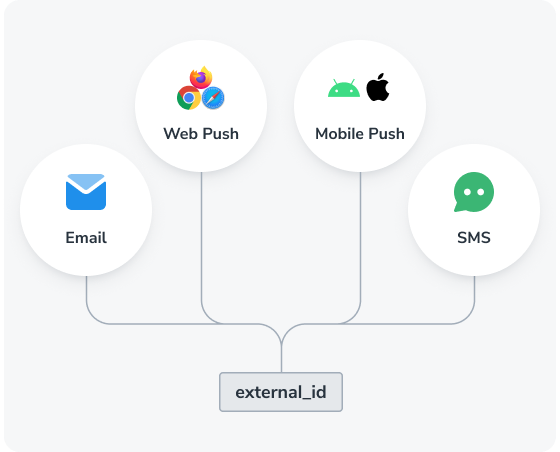
* **識別済みユーザー:** External IDがある→OneSignalはすべてのサブスクリプションを単一のOneSignal IDの下にマージします。
**例:匿名ユーザー**
* Webプッシュサブスクリプション → `OneSignal_ID_1`
* モバイルサブスクリプション → `OneSignal_ID_2`
* メールサブスクリプション → `OneSignal_ID_3`
* SMSサブスクリプション → `OneSignal_ID_4`
* **結果:** 4人のユーザー(各サブスクリプションは独自のプロパティを持つ別々のユーザー)
**例:識別済みユーザー**
* External ID `External_ID_A`を持つWebプッシュサブスクリプション → `OneSignal_ID_1`
* 同じ`External_ID_A`を持つモバイルサブスクリプション → `OneSignal_ID_1`にマージ
* 同じ`External_ID_A`を持つメールサブスクリプション → `OneSignal_ID_1`にマージ
* 同じ`External_ID_A`を持つSMSサブスクリプション → `OneSignal_ID_1`にマージ
* **結果:** 4つのサブスクリプションを持つ1人のユーザー(すべて同じユーザーに関連付けられています)
常にExternal IDを割り当ててください。これにより、チャネルとデバイス全体のサブスクリプションが単一のユーザープロファイルの下で統合され、重複が防止されます。
* 安定した非汎用識別子(例:内部ユーザーIDまたはメールアドレス)を使用します。
* アプリのライフサイクルの早い段階で`OneSignal.login`を呼び出します。
***
## User properties
| Property | Description |
| ------------------ | ------------------------------------------------------------------------------------------------------------------------------------------------------------------------------------------- |
| **External ID** | A unique identifier you assign to unify the user with your system. |
| **OneSignal ID** | A UUID v4 auto-generated by OneSignal for each user. It may change upon assigning an External ID. |
| **Aliases** | Key-value pairs like `mixpanel_id : 1234`. See [Aliases](./aliases). |
| **Channel** | The [Subscriptions](./subscriptions) the user has, such as Push, Email, or SMS. |
| **Country** | Country code in [ISO 3166-1 Alpha-2](https://en.wikipedia.org/wiki/ISO_3166-1_alpha-2) format. |
| **Email** | Email from the most recent Email Subscription. |
| **First session** | When the user was initially created in OneSignal. |
| **IP Address** | From the latest updated Subscription. |
| **Language** | User's language in [ISO 639-1 format](https://en.wikipedia.org/wiki/List_of_ISO_639_language_codes). Can be updated via API or `setLanguage`. |
| **Last session** | The latest timestamp of app interaction. |
| **Location** | GPS coordinates of mobile subscriptions (if location tracking is enabled). See [Location-Triggered Notifications](./location-triggered-event). |
| **Phone** | Phone number from the most recent SMS Subscription. |
| **Tags** | Custom metadata (e.g. preferences, behavior). See [Tags](./add-user-data-tags). |
| **Test User name** | A label assigned when marking a User as a test user. Set via the dashboard or the `test_user_name` property in the API. See [Test Users](./find-set-test-subscriptions#test-subscriptions). |
| **Timezone** | `timezone_id` in [IANA TZ format](https://en.wikipedia.org/wiki/List_of_tz_database_time_zones), set by the SDK. Can be updated via API. |
## OneSignal ID
The **OneSignal ID** is an internal UUID v4 generated to uniquely represent a user. It's automatically created in scenarios such as:
* First-time mobile app open (or after reinstall)
* New web push Subscription
* Creating Users/Subscriptions via [Create user](/reference/create-user) or [CSV Import](./import)
* Clearing browser cache and returning to the site
* Logging out with `OneSignal.logout`
Once an **External ID** is used via `OneSignal.login`, any existing OneSignal ID tied to the current Subscription is replaced by the one associated with that External ID. Subscriptions across platforms (Push, Email, SMS) will be merged under the same OneSignal ID if they share the same External ID.
### Reassignment and behavior
If a user reinstalls the app or clears cache, a new OneSignal ID and Subscription are created. However, calling `OneSignal.login` will link the new Subscription back to the original user profile.
Subscriptions added via `OneSignal.User.addEmail` or `addSms` will inherit the current OneSignal ID.
SDK references:
* [Mobile SDK Reference](./mobile-sdk-reference)
* [Web SDK Reference](./web-sdk-reference)
## External ID
The **External ID** is a unique string you assign to users to track them across devices and subscriptions.
You can set or remove the External ID via:
* `OneSignal.login` - **Recommended** see [Mobile SDK](./mobile-sdk-reference#login-external-id) and [Web SDK](./web-sdk-reference#login-external-id)
* [Create user API](/reference/create-user)
* [Transfer subscription API](/reference/transfer-subscription)
* `OneSignal.logout` (to remove)
### Restricted IDs
Do not use placeholder values or temporary values for External IDs.
The following values cannot be used for External IDs:
* `NA`
* `NULL`
* `0`
* `1`
* `-1`
* `null`
* `UNQUALIFIED`
* `all`
* `NaN`
* `00000000-0000-0000-0000-000000000000`
* `-`
* `none`
* `ok`
* `123ABC`
* `unknown`
* `INVALID_USER`
* `undefined`
* `not set`
***
## Multiple users on the same device
When multiple users share a device, each new login should trigger a call to `OneSignal.login` with a different External ID. This reassigns the OneSignal ID and Subscription to the new user.
To handle logout, you can do the following to remove the user context:
* Call `OneSignal.logout()` → clears External ID, removes previous user properties (Tags, Aliases, etc.), and assigns anonymous OneSignal ID.
* Optionally disable notifications using `optOut`, and re-enable with `optIn` when logging back in.
***
## Monthly active users (MAU)
MAU is used for **billing** and is defined as a mobile [Subscription](./subscriptions) that has a last session within the 30 day billing period. This includes:
* Users that open your app for the first time, creating a mobile Subscription via our SDK
* Users that reinstall the app and open it again, creating another mobile Subscription via our SDK
* Users that get imported via our API
### MAU billing example
If a User has these Subscriptions:
* iOS mobile (active in the last 30 days)
* Android mobile (active in the last 30 days)
* Web push
* Email
* SMS
Only iOS and Android mobile Subscriptions count, resulting in **2 MAUs**.
The subscription status does not matter for MAU billing.
### Reducing MAUs (e.g., paywall use cases)
You can delay SDK initialization and Subscription creation using the mobile SDK [privacy methods](./mobile-sdk-reference#privacy).
1. Call `setConsentRequired()` before initializing the SDK – this prevents auto-creation of a Subscription
2. Call `setConsentGiven()` when ready to create a Subscription for the user
***
 You can set or remove the External ID via:
* `OneSignal.login` - **Recommended** see [Mobile SDK](./mobile-sdk-reference#login-external-id) and [Web SDK](./web-sdk-reference#login-external-id)
* [Create user API](/reference/create-user)
* [Transfer subscription API](/reference/transfer-subscription)
* `OneSignal.logout` (to remove)
### Restricted IDs
Do not use placeholder values or temporary values for External IDs.
The following values cannot be used for External IDs:
* `NA`
* `NULL`
* `0`
* `1`
* `-1`
* `null`
* `UNQUALIFIED`
* `all`
* `NaN`
* `00000000-0000-0000-0000-000000000000`
* `-`
* `none`
* `ok`
* `123ABC`
* `unknown`
* `INVALID_USER`
* `undefined`
* `not set`
***
## Multiple users on the same device
When multiple users share a device, each new login should trigger a call to `OneSignal.login` with a different External ID. This reassigns the OneSignal ID and Subscription to the new user.
To handle logout, you can do the following to remove the user context:
* Call `OneSignal.logout()` → clears External ID, removes previous user properties (Tags, Aliases, etc.), and assigns anonymous OneSignal ID.
* Optionally disable notifications using `optOut`, and re-enable with `optIn` when logging back in.
***
## Monthly active users (MAU)
MAU is used for **billing** and is defined as a mobile [Subscription](./subscriptions) that has a last session within the 30 day billing period. This includes:
* Users that open your app for the first time, creating a mobile Subscription via our SDK
* Users that reinstall the app and open it again, creating another mobile Subscription via our SDK
* Users that get imported via our API
### MAU billing example
If a User has these Subscriptions:
* iOS mobile (active in the last 30 days)
* Android mobile (active in the last 30 days)
* Web push
* Email
* SMS
Only iOS and Android mobile Subscriptions count, resulting in **2 MAUs**.
The subscription status does not matter for MAU billing.
### Reducing MAUs (e.g., paywall use cases)
You can delay SDK initialization and Subscription creation using the mobile SDK [privacy methods](./mobile-sdk-reference#privacy).
1. Call `setConsentRequired()` before initializing the SDK – this prevents auto-creation of a Subscription
2. Call `setConsentGiven()` when ready to create a Subscription for the user
***
You can set or remove the External ID via:
* `OneSignal.login` - **Recommended** see [Mobile SDK](./mobile-sdk-reference#login-external-id) and [Web SDK](./web-sdk-reference#login-external-id)
* [Create user API](/reference/create-user)
* [Transfer subscription API](/reference/transfer-subscription)
* `OneSignal.logout` (to remove)
### Restricted IDs
Do not use placeholder values or temporary values for External IDs.
The following values cannot be used for External IDs:
* `NA`
* `NULL`
* `0`
* `1`
* `-1`
* `null`
* `UNQUALIFIED`
* `all`
* `NaN`
* `00000000-0000-0000-0000-000000000000`
* `-`
* `none`
* `ok`
* `123ABC`
* `unknown`
* `INVALID_USER`
* `undefined`
* `not set`
***
## Multiple users on the same device
When multiple users share a device, each new login should trigger a call to `OneSignal.login` with a different External ID. This reassigns the OneSignal ID and Subscription to the new user.
To handle logout, you can do the following to remove the user context:
* Call `OneSignal.logout()` → clears External ID, removes previous user properties (Tags, Aliases, etc.), and assigns anonymous OneSignal ID.
* Optionally disable notifications using `optOut`, and re-enable with `optIn` when logging back in.
***
## Monthly active users (MAU)
MAU is used for **billing** and is defined as a mobile [Subscription](./subscriptions) that has a last session within the 30 day billing period. This includes:
* Users that open your app for the first time, creating a mobile Subscription via our SDK
* Users that reinstall the app and open it again, creating another mobile Subscription via our SDK
* Users that get imported via our API
### MAU billing example
If a User has these Subscriptions:
* iOS mobile (active in the last 30 days)
* Android mobile (active in the last 30 days)
* Web push
* Email
* SMS
Only iOS and Android mobile Subscriptions count, resulting in **2 MAUs**.
The subscription status does not matter for MAU billing.
### Reducing MAUs (e.g., paywall use cases)
You can delay SDK initialization and Subscription creation using the mobile SDK [privacy methods](./mobile-sdk-reference#privacy).
1. Call `setConsentRequired()` before initializing the SDK – this prevents auto-creation of a Subscription
2. Call `setConsentGiven()` when ready to create a Subscription for the user
***