> ## Documentation Index
> Fetch the complete documentation index at: https://documentation.onesignal.com/llms.txt
> Use this file to discover all available pages before exploring further.
# Mobile SDK reference
> Comprehensive API reference for the OneSignal Mobile SDK, including initialization, user identity, subscriptions, tags, permissions, in-app messages, live activities, and more. Supports Android, iOS, Unity, React Native, Flutter, and Cordova/Ionic platforms.
## Setup & debugging
These methods are a reference for integrating the OneSignal SDK into your app. For full platform-specific setup instructions, see [Mobile SDK setup](./mobile-sdk-setup).
### `initialize()`
Initializes the OneSignal SDK. This should be called during application startup. The `ONESIGNAL_APP_ID` can be found in [Keys & IDs](./keys-and-ids).
If you want to delay initialization of the OneSignal SDK, we recommend using our [Privacy methods](#privacy).
```kotlin Kotlin theme={null}
OneSignal.initWithContext(this, ONESIGNAL_APP_ID)
```
```java Java theme={null}
OneSignal.initWithContext(this, ONESIGNAL_APP_ID);
```
```swift Swift theme={null}
import OneSignalFramework
OneSignal.initialize("ONESIGNAL_APP_ID", withLaunchOptions: launchOptions)
```
```objectivec Objective-C theme={null}
#import
[OneSignal initialize:@"ONESIGNAL_APP_ID" withLaunchOptions:launchOptions];
```
```csharp C# theme={null}
OneSignal.Initialize("ONESIGNAL_APP_ID");
```
```javascript React Native theme={null}
OneSignal.initialize("ONESIGNAL_APP_ID");
```
```dart Flutter theme={null}
OneSignal.initialize("ONESIGNAL_APP_ID");
```
```javascript Cordova/Ionic theme={null}
// Ionic
OneSignal.initialize("ONESIGNAL_APP_ID");
// Cordova
window.plugins.OneSignal.initialize("ONESIGNAL_APP_ID");
```
### `setLogLevel()`
Set the logging to print additional logs to Android LogCat or Xcode logs.
Call this *before* initializing OneSignal. See [Getting a Debug Log](./capturing-a-debug-log) for more details.
```kotlin Kotlin theme={null}
// LogLevel: .None | .Fatal | .Error | .Warn | .Info | .Debug | .Verbose
OneSignal.Debug.logLevel = LogLevel.Verbose
```
```java Java theme={null}
// LogLevel: NONE | FATAL | ERROR | WARN | INFO | DEBUG | VERBOSE
OneSignal.getDebug().setLogLevel(OneSignal.LOG_LEVEL.VERBOSE);
```
```swift Swift theme={null}
// LogLevel: ONE_S_LL_NONE | ONE_S_LL_FATAL | ONE_S_LL_ERROR | ONE_S_LL_WARN | ONE_S_LL_INFO | ONE_S_LL_DEBUG | ONE_S_LL_VERBOSE
OneSignal.Debug.setLogLevel(.LL_VERBOSE)
```
```objc Objective-C theme={null}
// LogLevel: ONE_S_LL_NONE | ONE_S_LL_FATAL | ONE_S_LL_ERROR | ONE_S_LL_WARN | ONE_S_LL_INFO | ONE_S_LL_DEBUG | ONE_S_LL_VERBOSE
[OneSignal.Debug setLogLevel:ONE_S_LL_VERBOSE];
```
```csharp C# theme={null}
// LogLevel: None | Fatal | Error | Warn | Info | Debug | Verbose
OneSignal.Debug.LogLevel = LogLevel.Verbose;
```
```javascript React Native theme={null}
OneSignal.Debug.setLogLevel(LogLevel.Verbose);
```
```dart Flutter theme={null}
OneSignal.Debug.setLogLevel(OSLogLevel.verbose);
```
```javascript Cordova/Ionic theme={null}
// Ionic
// 0 = None, 1 = Fatal, 2 = Errors, 3 = Warnings, 4 = Info, 5 = Debug, 6 = Verbose
OneSignal.Debug.setLogLevel(6);
// Cordova
// 0 = None, 1 = Fatal, 2 = Errors, 3 = Warnings, 4 = Info, 5 = Debug, 6 = Verbose
window.plugins.OneSignal.Debug.setLogLevel(6);
```
### `setAlertLevel()`
Sets the logging level to show as alert dialogs in your app. Make sure to remove this before submitting to the app store.
```kotlin Kotlin theme={null}
OneSignal.Debug.alertLevel = LogLevel.Exception
```
```java Java theme={null}
OneSignal.getDebug.setAlertLevel(LogLevel.Exception);
```
```swift Swift theme={null}
OneSignal.Debug.setAlertLevel(.LL_NONE)
```
```objc Objective-C theme={null}
[OneSignal.Debug setAlertLevel:ONE_S_LL_NONE];
```
```csharp C# theme={null}
// LogLevel: None | Fatal | Error | Warn | Info | Debug | Verbose
OneSignal.Debug.AlertLevel = LogLevel.None;
```
```javascript React Native theme={null}
OneSignal.Debug.setAlertLevel(LogLevel.Verbose);
```
```dart Flutter theme={null}
OneSignal.Debug.setAlertLevel(OSLogLevel.none);
```
```javascript Cordova/Ionic theme={null}
// Ionic
// 0 = None, 1 = Fatal, 2 = Errors, 3 = Warnings, 4 = Info, 5 = Debug, 6 = Verbose
OneSignal.Debug.setAlertLevel(0);
// Cordova
// 0 = None, 1 = Fatal, 2 = Errors, 3 = Warnings, 4 = Info, 5 = Debug, 6 = Verbose
window.plugins.OneSignal.Debug.setAlertLevel(0);
```
## User identity & properties
When users open your app, OneSignal automatically creates a OneSignal ID (user-level) and a Subscription ID (device-level). You can associate multiple subscriptions (e.g., devices, emails, phone numbers) with a single user by calling `login()` with your unique user identifier.
See [Users](./users) and [Aliases](./aliases) for more details.
### `login(external_id)`
Sets the user context to the provided `external_id`. Ensures that all subscriptions and properties associated with this `external_id` are unified under a single `onesignal_id`. See [Users](./users) for more details.
**Key behaviors:**
* If the `external_id` already exists, the SDK switches to that user. Anonymous data collected before login is not merged and will be discarded.
* If the `external_id` does not exist, the local state will be saved under the current `onesignal_id`. Any data collected while the user was anonymous will be kept.
* SDK retries automatically on network failure or server error.
Call this method every time the user opens the app to make sure the External ID is set and the subscription is linked to the user.
```kotlin Kotlin theme={null}
OneSignal.login("external_id")
```
```java Java theme={null}
OneSignal.login("external_id");
```
```swift Swift theme={null}
OneSignal.login("external_id")
```
```objc Objective-C theme={null}
[OneSignal login:@"external_id"];
```
```csharp C# theme={null}
OneSignal.Login("external_id");
```
```javascript React Native theme={null}
OneSignal.login("external_id");
```
```dart Flutter theme={null}
OneSignal.login("external_id");
```
```javascript Cordova/Ionic theme={null}
// Ionic
OneSignal.login("external_id");
// Cordova
window.plugins.OneSignal.login("external_id");
```
### `logout()`
Unlinks the current user from the subscription.
* Removes the `external_id` from the current push subscription.
* Resets the OneSignal ID to a new anonymous user.
* Any new data (e.g tags, Subscriptions, session data, etc.) will now be set on the new anonymous user until they are identified with the `login` method.
Use this when a user signs out of your app if you want to set the subscription to a new anonymous user.
```kotlin Kotlin theme={null}
OneSignal.logout()
```
```java Java theme={null}
OneSignal.logout();
```
```swift Swift theme={null}
OneSignal.logout()
```
```objc Objective-C theme={null}
[OneSignal logout]
```
```csharp C# theme={null}
OneSignal.Logout();
```
```javascript React Native theme={null}
OneSignal.logout();
```
```dart Flutter theme={null}
OneSignal.logout();
```
```javascript Cordova/Ionic theme={null}
// Ionic
OneSignal.logout();
// Cordova
window.plugins.OneSignal.logout();
```
### `getOnesignalId()`
Retrieve the current user's OneSignal ID saved locally on the device. May be `null` if called before user state is initialized. Instead, use [User State `addObserver()`](#addobserver-user-state) to listen for user state changes.
```kotlin Kotlin theme={null}
val id = OneSignal.User.onesignalId
```
```java Java theme={null}
String id = OneSignal.getUser().getOnesignalId();
```
```swift Swift theme={null}
let id = OneSignal.User.onesignalId
//Example
func getOneSignalId() async {
if let id = OneSignal.User.onesignalId {
print("OneSignal ID:", id)
} else {
print("OneSignal ID not available, try again.")
}
}
```
```objc Objective-C theme={null}
NSString* id = OneSignal.User.onesignalId
```
```csharp C# theme={null}
OneSignal.User.OneSignalId;
```
```javascript React Native theme={null}
await OneSignal.User.getOnesignalId();
//Example
const getOneSignalId = async () => {
try {
const id = await OneSignal.User.getOnesignalId();
console.log('OneSignal ID:', id);
Alert.alert('OneSignal ID', id || 'No ID available');
} catch (error) {
console.error('Error getting OneSignal ID:', error);
Alert.alert('Error', 'Failed to get OneSignal ID');
}
};
```
```dart Flutter theme={null}
await OneSignal.User.getOnesignalId();
```
```javascript Cordova/Ionic theme={null}
// Ionic
await OneSignal.User.getOnesignalId();
// Cordova
await window.plugins.OneSignal.User.getOnesignalId();
```
### `getExternalId()`
Retrieve the current user's External ID saved locally on the device. May be `null` if not set via the `login` method or called before user state is initialized. Instead, use [User State `addObserver()`](#addobserver-user-state) to listen for user state changes.
```kotlin Kotlin theme={null}
val id = OneSignal.User.externalId
```
```java Java theme={null}
String id = OneSignal.getUser().getExternalId();
```
```swift Swift theme={null}
let id: String? = OneSignal.User.externalId
```
```objc Objective-C theme={null}
NSString* id = OneSignal.User.externalId
```
```csharp C# theme={null}
OneSignal.User.ExternalId
```
```javascript React Native theme={null}
await OneSignal.User.getExternalId();
//Example
const getExternalId = async () => {
try {
const id = await OneSignal.User.getExternalId();
console.log('External ID:', id);
Alert.alert('External ID', id || 'No ID available');
} catch (error) {
console.error('Error getting External ID:', error);
Alert.alert('Error', 'Failed to get External ID');
}
};
```
```dart Flutter theme={null}
await OneSignal.User.getExternalId();
```
```javascript Cordova/Ionic theme={null}
// Ionic
await OneSignal.User.getExternalId();
// Cordova
await window.plugins.OneSignal.User.getExternalId();
```
### `addObserver()` *user state*
Listen for changes in the user context (e.g., login, logout, ID assignment).
```kotlin Kotlin theme={null}
OneSignal.User.addObserver(object : IUserStateObserver {
override fun onUserStateChange(state: UserChangedState) {
println("User State Changed: onesignalId=${state.current.onesignalId}, externalId=${state.current.externalId}")
}
})
```
```java Java theme={null}
OneSignal.getUser().addObserver(userChangedState -> {
Log.d("User State Changed", String.valueof(userChangedState.toJSONObject()));
});
```
```swift Swift theme={null}
// AppDelegate.swift
// Add OSUserStateObserver after UIApplicationDelegate
class AppDelegate: UIResponder, UIApplicationDelegate, OSUserStateObserver {
func application(_ application: UIApplication, didFinishLaunchingWithOptions launchOptions: [UIApplicationLaunchOptionsKey: Any]?) -> Bool {
// Add your AppDelegate as an observer
OneSignal.User.addObserver(self)
}
// Add this new method
func onUserStateDidChange(state: OSUserChangedState) {
// prints out all properties
print("OSUserChangedState: \n\(state.jsonRepresentation())")
print(state.current.externalId)
print(state.current.onesignalId)
}
}
// Remove the observer
OneSignal.User.removeObserver(self)
```
```objc Objective-C theme={null}
// AppDelegate.h
// Add OSUserStateObserver after UIApplicationDelegate
@interface AppDelegate : UIResponder
@end
// AppDelegate.m
@implementation AppDelegate
- (BOOL)application:(UIApplication*)application didFinishLaunchingWithOptions:(NSDictionary *)launchOptions {
// Add your AppDelegate as an observer
[OneSignal.User addObserver:self];
}
// Add this new method
- (void)onUserStateDidChangeWithState:(OSUserChangedState * _Nonnull)state {
// prints out all properties
NSLog(@"OSUserChangedState:\n%@", [state jsonRepresentation]);
NSLog(@"current externalId: %@", state.current.externalId);
NSLog(@"current onesignalId: %@", state.current.onesignalId);
}
@end
// Remove the observer
[OneSignal.User removeObserver:self];
```
```csharp C# theme={null}
OneSignal.User.Changed += _userStateChanged;
private void _userStateChanged(object sender, UserStateChangedEventArgs e) {
...
}
```
```javascript React Native theme={null}
const listener = (event: UserChangedState) => {
console.log("User changed: " + (event));
};
OneSignal.User.addEventListener("change", listener);
// Remove the listener
OneSignal.User.removeEventListener("change", listener);
```
```dart Flutter theme={null}
OneSignal.User.addObserver((state) {
var userState = state.jsonRepresentation();
print('OneSignal user changed: $userState');
});
/// Remove a user state observer that has been previously added.
OneSignal.User.removeObserver(observer);
```
```javascript Cordova/Ionic theme={null}
// Ionic
const listener = (event: UserChangedState) => {
console.log("User changed: " + (event));
};
OneSignal.User.addEventListener("change", listener);
// Remove the listener
OneSignal.User.removeEventListener("change", listener);
// Cordova
window.plugins.OneSignal.User.addEventListener("change", listener);
window.plugins.OneSignal.User.removeEventListener("change", listener);
```
### `addAlias()`, `addAliases()`, `removeAlias()`, `removeAliases()`
Aliases are alternative identifiers (like usernames or CRM IDs).
* Set `external_id` with `login()` before adding aliases. Aliases added to subscriptions without `external_id` will not sync across multiple subscriptions.
* See [Aliases](./aliases) for details.
```kotlin Kotlin theme={null}
// Add a single alias
OneSignal.User.addAlias("ALIAS_LABEL", "ALIAS_ID")
// Add multiple aliases
var aliases = mapOf("ALIAS_LABEL_01" to "ALIAS_ID_01", "ALIAS_LABEL_02" to "ALIAS_ID_02")
OneSignal.User.addAliases(aliases)
// Remove a single alias
OneSignal.User.removeAlias("ALIAS_LABEL")
// Remove multiple aliases
OneSignal.User.removeAliases(["ALIAS_LABEL_01", "ALIAS_LABEL_02"])
```
```java Java theme={null}
// Add a single alias
OneSignal.getUser().addAlias("ALIAS_LABEL", "ALIAS_ID");
// Add multiple aliases
HashMap aliases = new HashMap();
aliases.put("ALIAS_LABEL_01", "ALIAS_ID_01");
aliases.put("ALIAS_LABEL_02", "ALIAS_ID_02");
OneSignal.getUser().addAliases(aliases);
// Remove a single alias
OneSignal.getUser().removeAlias("ALIAS_LABEL")
// Remove multiple aliases
HashSet labels = new HashSet();
labels.add("ALIAS_LABEL_01");
labels.add("ALIAS_LABEL_02");
OneSignal.getUser().removeAliases(labels);
```
```swift Swift theme={null}
// Add a single alias
OneSignal.User.addAlias(label: "ALIAS_LABEL", id: "ALIAS_ID")
// Add multiple aliases
OneSignal.User.addAliases(["ALIAS_LABEL_01": "ALIAS_ID_01", "ALIAS_LABEL_02": "ALIAS_ID_02"])
// Remove a single alias
OneSignal.User.removeAlias("ALIAS_LABEL")
// Remove multiple aliases
OneSignal.User.removeAliases(["ALIAS_LABEL_01", "ALIAS_LABEL_02"])
```
```objc Objective-C theme={null}
// Add a single alias
[OneSignal.User addAliasWithLabel:@"ALIAS_LABEL" id:@"ALIAS_ID"];
// Add multiple aliases
[OneSignal.User addAliases:@{@"ALIAS_LABEL_01": @"ALIAS_ID_01", @"ALIAS_LABEL_02": @"ALIAS_ID_02"}]
// Remove a single alias
[OneSignal.User removeAlias:@"ALIAS_LABEL"]
// Remove multiple aliases
[OneSignal.User removeAliases:@[@"ALIAS_LABEL_01", @"ALIAS_LABEL_02"]]
```
```csharp C# theme={null}
// Add a single alias
OneSignal.User.AddAlias("ALIAS_LABEL", "ALIAS_ID");
// Add multiple aliases
OneSignal.User.AddAliases(new Dictionary {
{ "ALIAS_LABEL_01", "ALIAS_ID_01" },
{ "ALIAS_LABEL_02", "ALIAS_ID_02" }
});
// Remove a single alias
OneSignal.User.RemoveAlias("ALIAS_LABEL");
// Remove multiple aliases
OneSignal.User.RemoveAliases(new[] {"ALIAS_LABEL_01", "ALIAS_LABEL_02"});
```
```javascript React Native theme={null}
// Add a single alias
OneSignal.User.addAlias("ALIAS_LABEL", "ALIAS_ID");
// Add multiple aliases
OneSignal.User.addAliases({ALIAS_LABEL_01: "ALIAS_ID_01", ALIAS_LABEL_02: "ALIAS_ID_02"});
// Remove a single alias
OneSignal.User.removeAlias("ALIAS_LABEL");
// Remove multiple aliases
OneSignal.User.removeAliases(["ALIAS_LABEL_01", "ALIAS_LABEL_02"]);
```
```dart Flutter theme={null}
// Add a single alias
OneSignal.User.addAlias("ALIAS_LABEL", "ALIAS_ID");
// Add multiple aliases
var aliases = {
"alias_key_1": "alias_id_1",
"alias_key_2": "alias_id_2"
};
OneSignal.User.addAliases(aliases);
// Remove a single alias
OneSignal.User.removeAlias("ALIAS_LABEL");
// Remove multiple aliases
var aliases = ["alias_key_1", "alias_key_2"];
OneSignal.User.removeAliases(aliases);
```
```javascript Cordova/Ionic theme={null}
// Add a single alias - Ionic
OneSignal.User.addAlias("ALIAS_LABEL", "ALIAS_ID");
// Add a single alias - Cordova
window.plugins.OneSignal.User.addAlias("ALIAS_LABEL", "ALIAS_ID");
// Add multiple aliases - Ionic
OneSignal.User.addAliases({ALIAS_LABEL_01: "ALIAS_ID_01", ALIAS_LABEL_02: "ALIAS_ID_02"});
// Add multiple aliases - Cordova
window.plugins.OneSignal.User.addAliases({ALIAS_LABEL_01: "ALIAS_ID_01", ALIAS_LABEL_02: "ALIAS_ID_02"});
// Remove a single alias - Ionic
OneSignal.User.removeAlias("ALIAS_LABEL");
// Remove a single alias - Cordova
window.plugins.OneSignal.User.removeAlias("ALIAS_LABEL");
// Remove multiple aliases - Ionic
OneSignal.User.removeAliases(["ALIAS_LABEL_01", "ALIAS_LABEL_02"]);
// Remove multiple aliases - Cordova
window.plugins.OneSignal.User.removeAliases(["ALIAS_LABEL_01", "ALIAS_LABEL_02"]);
```
### `setLanguage()`
Overrides the auto-detected language of the user. Use [ISO 639-1](https://en.wikipedia.org/wiki/List_of_ISO_639-1_codes?useskin=vector) language code.
```kotlin Kotlin theme={null}
OneSignal.User.setLanguage("en")
```
```java Java theme={null}
OneSignal.getUser().setLanguage("en");
```
```swift Swift theme={null}
OneSignal.User.setLanguage("en")
```
```objc Objective-C theme={null}
[OneSignal.User setLanguage:@"en"]
```
```csharp C# theme={null}
OneSignal.User.Language = "en";
```
```javascript React Native theme={null}
OneSignal.User.setLanguage("en");
```
```dart Flutter theme={null}
OneSignal.User.setLanguage("en");
```
```javascript Cordova/Ionic theme={null}
window.plugins.OneSignal.User.setLanguage("en");
```
***
## Custom events
Rastreie ações do usuário com propriedades associadas. Veja [Custom Events](./custom-events) para mais detalhes.
Custom events requerem as seguintes versões mínimas do SDK: iOS `5.4.0`, Android `5.6.1`, React Native `5.3.0`, Flutter `5.4.0`, Unity `5.2.0`.
Track and send a custom event performed by the current user.
* `name` - **Required.** The name of the event as a string.
* `properties` - **Optional.** Key-value pairs to add to the event. The properties dictionary or map must be serializable into a valid JSON Object. Supports nested values.
The SDK automatically includes app-specific data into the properties payload under the reserved key `os_sdk` that will be available to consume. For example, to target events by device type, you would access `os_sdk.device_type`.
```json json theme={null}
{
"os_sdk": {
"sdk": "050213",
"device_os": "18.5",
"type": "iOSPush",
"device_model": "iPhone14,4",
"device_type": "ios",
"app_version": "5.4.0"
}
}
```
### `trackEvent()`
See [Custom Events](./custom-events) for more details.
```kotlin Kotlin theme={null}
// Track an event, by name, without additional properties
OneSignal.User.trackEvent("my_event_name")
// Track an event, by name, with additional properties
OneSignal.User.trackEvent(
name = "started_free_trial",
properties = mapOf(
"promo_code" to "NEW50",
"membership_details" to mapOf(
"vip" to true,
"products_viewed_count" to 15
)
)
)
```
```java Java theme={null}
// Track an event, by name, without additional properties
OneSignal.getUser().trackEvent("my_event_name", null);
// Track an event, by name, with additional properties
Map membershipDetails = new HashMap<>();
membershipDetails.put("vip", true);
membershipDetails.put("products_viewed_count", 15);
Map properties = new HashMap<>();
properties.put("promo_code", "NEW50");
properties.put("membership_details", membershipDetails);
OneSignal.getUser().trackEvent("started_free_trial", properties);
```
```swift Swift theme={null}
// Track an event, by name, without additional properties
OneSignal.User.trackEvent(name: "my_event_name", properties: nil)
// Track an event, by name, with additional properties
// The properties dictionary must be serializable into a valid JSON Object.
let myProperties = [
"promo_code": "NEW50",
"membership_details": [
"vip": true,
"products_viewed_count": 15
]
]
OneSignal.User.trackEvent(name: "started_free_trial", properties: myProperties)
```
```objc Objective-C theme={null}
// Track an event, by name, without additional properties
[OneSignal.User trackEventWithName:@"my_event_name" properties:nil];
// Track an event by name, with additional properties
// The properties dictionary must be serializable into a valid JSON Object.
NSDictionary *myProperties = @{
@"promo_code" : @"NEW50",
@"membership_details" : @{
@"vip" : @true,
@"products_viewed_count" : @15
}
};
[OneSignal.User trackEventWithName:@"started_free_trial" properties:myProperties];
```
```csharp Unity C# theme={null}
// Track an event, by name, without additional properties
OneSignal.User.TrackEvent("my_event_name")
// Track an event, by name, with additional properties
OneSignal.User.TrackEvent("started_free_trial", new Dictionary {
{ "promo_code", "NEW50" },
{ "membership_details", new Dictionary {
{ "vip", true },
{ "products_viewed_count", 15 }
}}
});
```
```javascript React Native theme={null}
// Track an event, by name, without additional properties
OneSignal.User.trackEvent("my_event_name")
// Track an event, by name, with additional properties
OneSignal.User.trackEvent("started_free_trial", {
"promo_code": "NEW50",
"membership_details": {
"vip": true,
"products_viewed_count": 15
}
})
```
```dart Flutter theme={null}
// Track an event, by name, without additional properties
OneSignal.User.trackEvent("my_event_name")
// Track an event, by name, with additional properties
OneSignal.User.trackEvent("started_free_trial", {
"promo_code": "NEW50",
"membership_details": {
"vip": true,
"products_viewed_count": 15
}
})
```
```javascript Cordova/Ionic theme={null}
// Track an event, by name, without additional properties
OneSignal.User.trackEvent("my_event_name")
// Track an event, by name, with additional properties
OneSignal.User.trackEvent("started_free_trial", {
"promo_code": "NEW50",
"membership_details": {
"vip": true,
"products_viewed_count": 15
}
})
```
## Tags
Tags are custom `key : value` pairs of string data you set on users based on events or user properties. See [Tags](./add-user-data-tags) for more details.
### `addTag()`, `addTags()`
Set a single or multiple tags on the current user.
* Values will be replaced if the key already exists.
* Exceeding your plan's tag limit will cause the operations to fail silently.
```kotlin Kotlin theme={null}
OneSignal.User.addTag("KEY", "VALUE")
OneSignal.User.addTags(mapOf("KEY_01" to "VALUE_01", "KEY_02" to "VALUE_02"))
```
```java Java theme={null}
OneSignal.getUser().addTag("KEY", "VALUE");
OneSignal.getUser().addTags(new HashMap() {{
put("KEY_01", "VALUE_01");
put("KEY_02", "VALUE_02");
}});
```
```swift Swift theme={null}
OneSignal.User.addTag(key: "KEY", value: "VALUE")
OneSignal.User.addTags(["KEY_01": "VALUE_01", "KEY_02": "VALUE_02"])
```
```objc Objective-C theme={null}
[OneSignal.User addTag:@"KEY" value:@"VALUE"];
[OneSignal.User addTags:@{@""KEY_01"": @""VALUE_01"", @""KEY_02"": @""VALUE_02""}];
```
```csharp C# theme={null}
OneSignal.User.AddTag("KEY", "VALUE");
OneSignal.User.AddTags(new Dictionary {
{ "KEY_01", "VALUE_01" },
{ "KEY_02", "VALUE_02" }
});
```
```javascript React Native theme={null}
OneSignal.User.addTag('KEY', 'VALUE');
OneSignal.User.addTags({my_tag1: 'my_value', my_tag2: 'my_value2'});
```
```dart Flutter theme={null}
OneSignal.User.addTagWithKey("KEY", "VALUE");
var tags = {'test': 'value', 'test2': 'value2'};
OneSignal.User.addTags(tags);
```
```javascript Cordova/Ionic theme={null}
// Ionic
OneSignal.User.addTag("KEY", "VALUE");
OneSignal.User.addTags({"KEY_01": "VALUE_01", "KEY_02": "VALUE_02"});
// Cordova
window.plugins.OneSignal.User.addTag("KEY", "VALUE");
window.plugins.OneSignal.User.addTags({"KEY_01": "VALUE_01", "KEY_02": "VALUE_02"});
```
### `removeTag()`, `removeTags()`
Delete a single or multiple tags from the current user.
```kotlin Kotlin theme={null}
OneSignal.User.removeTag("KEY")
OneSignal.User.removeTags(listOf("KEY_01", "KEY_02"))
```
```java Java theme={null}
OneSignal.getUser().removeTag("KEY");
OneSignal.getUser().removeTags(Arrays.asList("KEY_01", "KEY_02"));
```
```swift Swift theme={null}
OneSignal.User.removeTag("KEY")
OneSignal.User.removeTags(["KEY_01", "KEY_02"])
```
```objc Objective-C theme={null}
[OneSignal.User removeTag:@"KEY"];
[OneSignal.User removeTags:@[@""KEY_01"", @""KEY_02""]]
```
```csharp C# theme={null}
OneSignal.User.RemoveTag("KEY");
OneSignal.User.RemoveTags(new string[] { "KEY_01", "KEY_02" });
```
```javascript React Native theme={null}
OneSignal.User.removeTag('my_tag1');
OneSignal.User.removeTags(['my_tag1', 'my_tag2']);
```
```dart Flutter theme={null}
OneSignal.User.removeTag("test");
OneSignal.User.removeTags(["test", "test2"]);
```
```javascript Cordova/Ionic theme={null}
// Ionic
OneSignal.User.removeTag("KEY");
OneSignal.User.removeTags(["KEY_01", "KEY_02"]);
// Cordova
window.plugins.OneSignal.User.removeTag("KEY");
window.plugins.OneSignal.User.removeTags(["KEY_01", "KEY_02"]);
```
### `getTags()`
Returns the local copy of the user's tags. Tags are updated from the server during `login()` or new app sessions.
```kotlin Kotlin theme={null}
val tags: Map = OneSignal.User.getTags()
```
```java Java theme={null}
Map tags = OneSignal.getUser().getTags();
```
```swift Swift theme={null}
let tags = OneSignal.User.getTags()
```
```objc Objective-C theme={null}
NSDictionary *tags = [OneSignal.User getTags]
```
```csharp C# theme={null}
Dictionary tags = OneSignal.User.GetTags();
```
```javascript React Native theme={null}
const getTags = async () => {
const tags = await OneSignal.User.getTags();
console.log('Tags:', tags);
};
```
```dart Flutter theme={null}
const getTags = async () async {
final tags = await OneSignal.User.getTags();
print('Tags: $tags');
};
```
```javascript Cordova/Ionic theme={null}
// Ionic
const getTags = async () => {
const tags = await OneSignal.User.getTags();
console.log('Tags:', tags);
};
// Cordova
const getTags = async () => {
const tags = await window.plugins.OneSignal.User.getTags();
console.log('Tags:', tags);
};
```
***
## Privacy
### `setConsentRequired()`
Enforces user consent before data collection begins. Must be called **before initializing the SDK**.
```kotlin Kotlin theme={null}
OneSignal.consentRequired = true
```
```java Java theme={null}
OneSignal.setConsentRequired(true);
```
```swift Swift theme={null}
OneSignal.setConsentRequired(true)
```
```objc Objective-C theme={null}
[OneSignal setConsentRequired:true];
```
```csharp C# theme={null}
OneSignal.ConsentRequired = true;
```
```javascript React Native theme={null}
OneSignal.setConsentRequired(true);
```
```dart Flutter theme={null}
OneSignal.consentRequired(true);
```
```javascript Cordova/Ionic theme={null}
// Ionic
OneSignal.setConsentRequired(true);
// Cordova
window.plugins.OneSignal.setConsentRequired(true);
```
### `setConsentGiven()`
Grants or revokes user consent for data collection. Without consent, no data is sent to OneSignal and no subscription is created.
* If [`setConsentRequired()`](#setconsentrequired) is `true`, our SDK will not be fully enabled until `setConsentGiven` is called with `true`.
* If `setConsentGiven` is set to `true` and a Subscription is created, then later it is set to `false`, that Subscription will no longer receive updates. The current data for that Subscription remains unchanged until `setConsentGiven` is set to `true` again.
* If you want to delete the User and/or Subscription data, use our [Delete user](/reference/delete-user) or [Delete subscription](/reference/delete-subscription) APIs.
```kotlin Kotlin theme={null}
OneSignal.consentGiven = true
```
```java Java theme={null}
OneSignal.setConsentGiven(true);
```
```swift Swift theme={null}
OneSignal.setConsentGiven(true)
```
```objc Objective-C theme={null}
[OneSignal setConsentGiven:true];
```
```csharp C# theme={null}
OneSignal.ConsentGiven = true;
```
```javascript React Native theme={null}
OneSignal.setConsentGiven(true);
```
```dart Flutter theme={null}
OneSignal.consentGiven(true);
```
```javascript Cordova/Ionic theme={null}
// Ionic
OneSignal.setConsentGiven(true);
// Cordova
window.plugins.OneSignal.setConsentGiven(true);
```
***
## Location
Tracking location points requires 3 steps:
1. Add location tracking permissions and dependencies to your app.
* **iOS**: [Choosing the Location Services Authorization to Request developer guide](https://developer.apple.com/documentation/bundleresources/choosing-the-location-services-authorization-to-request)
* **Android**: [Request location permissions developer guide](https://developer.android.com/develop/sensors-and-location/location/permissions)
You may get the following errors:
> LocationManager.startGetLocation: not possible, no location dependency found
Check your App's dependencies. A common solutions is in you `app/build.gradle` add: `implementation 'com.google.android.gms:play-services-location:21.0.1'`
2. Enable your app to share location with OneSignal using the `Location.setShared()` method.
3. Request permission from the user for location tracking with the `Location.requestPermission` method or [use in-app messages](./location-opt-in-prompt).
### `setShared()` *location*
Use this method to allow our SDK to start tracking the Subscription's latitude and longitude. Make sure you set the proper [location permissions](#location) in your app first.
```kotlin Kotlin theme={null}
// Enable your app to share location with OneSignal
OneSignal.Location.isShared = true
// Returns true if your app is sharing location with OneSignal
var isShared: Boolean = OneSignal.isShared
```
```java Java theme={null}
// Enable your app to share location with OneSignal
OneSignal.getLocation().setShared(true);
// Returns true if your app is sharing location with OneSignal
boolean isShared = OneSignal.Location.isShared();
```
```swift Swift theme={null}
// Enable your app to share location with OneSignal
OneSignal.Location.isShared = true
// Returns true if your app is sharing location with OneSignal
let locationShared = OneSignal.Location.isShared
```
```objc Objective-C theme={null}
// Enable your app to share location with OneSignal
[OneSignal.Location setShared:true]4
// Returns true if your app is sharing location with OneSignal
BOOL locationShared = [OneSignal isLocationShared];
```
```csharp C# theme={null}
// Enable your app to share location with OneSignal
OneSignal.Location.IsShared = true;
// Returns true if your app is sharing location with OneSignal
bool isShared = OneSignal.Location.IsShared;
```
```javascript React Native theme={null}
// Enable your app to share location with OneSignal
OneSignal.Location.setShared(true);
// Returns true if your app is sharing location with OneSignal
OneSignal.Location.isShared();
```
```dart Flutter theme={null}
// Enable your app to share location with OneSignal
OneSignal.Location.setShared(true);
// Returns true if your app is sharing location with OneSignal
OneSignal.Location.isShared();
```
```javascript Cordova/Ionic theme={null}
// Ionic
// Enable your app to share location with OneSignal
OneSignal.Location.setShared(true);
// Returns true if your app is sharing location with OneSignal
OneSignal.Location.isShared(isShared => {
console.log("Location shared: ", isShared);
});
// Cordova
// Enable your app to share location with OneSignal
window.plugins.OneSignal.Location.setShared(true);
// Returns true if your app is sharing location with OneSignal
window.plugins.OneSignal.Location.isShared(isShared => {
```
### `requestPermission()` *location*
Use this method to display the system-level location permission prompt to your users or instead [use in-app messages](./location-opt-in-prompt). Make sure you set the proper [location permissions](#location) in your app and enabled your app to share location with OneSignal.
```kotlin Kotlin theme={null}
// Request location tracking permissions
OneSignal.Location.requestPermission(true)
```
```java Java theme={null}
// Request location tracking permissions
OneSignal.getLocation().requestPermission(Continue.none());
```
```swift Swift theme={null}
// Request location tracking permissions
OneSignal.Location.requestPermission()
```
```objc Objective-C theme={null}
// Request location tracking permissions
[OneSignal.Location requestPermission];
```
```csharp C# theme={null}
// Request location tracking permissions
OneSignal.Location.RequestPermission();
```
```javascript React Native theme={null}
// Request location tracking permissions
OneSignal.Location.requestPermission();
```
```dart Flutter theme={null}
// Request location tracking permissions
OneSignal.Location.requestPermission();
```
```javascript Cordova/Ionic theme={null}
// Ionic
// Request location tracking permissions
OneSignal.Location.requestPermission();
// Cordova
// Request location tracking permissions
window.plugins.OneSignal.Location.requestPermission();
```
***
## Subscriptions
See [Subscriptions](./subscriptions) for more details.
### `User.pushSubscription.id`
Retrieve the current user's push Subscription ID saved locally on the device. May return `null` if called too early. Its recommended to get this data within the [subscription observer](#addobserver-push-subscription-changes) to react to changes.
```kotlin Kotlin theme={null}
val id = OneSignal.User.pushSubscription.id
```
```java Java theme={null}
String id = OneSignal.getUser().getPushSubscription().getId();
```
```swift Swift theme={null}
let id: String? = OneSignal.User.pushSubscription.id
```
```objc Objective-C theme={null}
NSString* id = OneSignal.User.pushSubscription.id
```
```csharp C# theme={null}
OneSignal.User.PushSubscription.Id;
```
```javascript React Native theme={null}
await OneSignal.User.pushSubscription.getIdAsync();
//Example
const getPushId = async () => {
try {
const id = await OneSignal.User.pushSubscription.getIdAsync();
console.log('Push Subscription ID:', id);
Alert.alert('Push Subscription ID', id || 'No ID available');
} catch (error) {
console.error('Error getting push ID:', error);
Alert.alert('Error', 'Failed to get push subscription ID');
}
};
```
```dart Flutter theme={null}
OneSignal.User.pushSubscription.id;
```
```javascript Cordova/Ionic theme={null}
// Ionic
await OneSignal.User.pushSubscription.getIdAsync();
// Cordova
await window.plugins.OneSignal.User.pushSubscription.getIdAsync();
```
### `User.pushSubscription.token`
Returns the current push subscription token. May return `null` if called too early. Its recommended to get this data within the [subscription observer](#addobserver-push-subscription-changes) to react to changes.
```kotlin Kotlin theme={null}
val pushToken = OneSignal.User.pushSubscription.token
```
```java Java theme={null}
String pushToken = OneSignal.getUser().getPushSubscription().getToken();
```
```swift Swift theme={null}
let token: String? = OneSignal.User.pushSubscription.token
```
```objc Objective-C theme={null}
NSString* token = OneSignal.User.pushSubscription.token
```
```csharp C# theme={null}
OneSignal.User.PushSubscription.Token;
```
```javascript React Native theme={null}
await OneSignal.User.pushSubscription.getTokenAsync();
```
```dart Flutter theme={null}
OneSignal.User.pushSubscription.token;
```
```javascript Cordova/Ionic theme={null}
// Ionic
await OneSignal.User.pushSubscription.getTokenAsync();
// Cordova
await window.plugins.OneSignal.User.pushSubscription.getTokenAsync();
```
### `addObserver()` *push subscription changes*
Use this method to respond to push subscription changes like:
* The device receives a new push token from Google (FCM) or Apple (APNs)
* OneSignal assigns a subscription ID
* The `optedIn` value changes (e.g. called `optIn()` or `optOut()`)
* The user toggles push permission in system settings, then opens the app
When this happens, the SDK triggers the `onPushSubscriptionChange` event. Your listener receives a state object with the `previous` and `current` values so you can detect exactly what changed.
To stop listening for updates, call the associated `removeObserver()` or `removeEventListener()` method.
```kotlin Kotlin theme={null}
class MyObserver : IPushSubscriptionObserver {
init {
OneSignal.User.pushSubscription.addObserver(this)
}
override fun onPushSubscriptionChange(state: PushSubscriptionChangedState) {
if (state.current.optedIn) {
println("User is now opted-in with push token: ${state.current.token}")
}
}
}
// Remove the observer
OneSignal.User.pushSubscription.removeObserver(this)
```
```java Java theme={null}
//Add the IPushSubscriptionObserver
public class MainActivity extends Activity implements IPushSubscriptionObserver {
protected void onCreate(Bundle savedInstanceState) {
//Add the addObserver method
OneSignal.getUser().getPushSubscription().addObserver(this);
}
// This method will be fired when a subscription property changes
@Override
public void onPushSubscriptionChange(@NotNull PushSubscriptionChangedState pushSubscriptionChangedState) {
//Example getting the subscription ID
Log.i("OneSignal", "current subscription ID: " + pushSubscriptionChangedState.getCurrent().getId() );
}
}
// Remove the observer
OneSignal.getUser().getPushSubscription().removeObserver(this);
```
```swift Swift theme={null}
// AppDelegate.swift
// Add OSPushSubscriptionObserver after UIApplicationDelegate
class AppDelegate: UIResponder, UIApplicationDelegate, OSPushSubscriptionObserver {
func application(_ application: UIApplication, didFinishLaunchingWithOptions launchOptions: [UIApplicationLaunchOptionsKey: Any]?) -> Bool {
// Add your AppDelegate as an observer
OneSignal.User.pushSubscription.addObserver(self)
}
// Add this new method, which will be fired when a subscription property changes
func onPushSubscriptionDidChange(state: OSPushSubscriptionChangedState) {
// respond to state change
}
}
// Remove the observer
OneSignal.User.pushSubscription.removeObserver(self)
```
```objc Objective-C theme={null}
// AppDelegate.h
// Add OSPushSubscriptionObserver after UIApplicationDelegate
@interface AppDelegate : UIResponder
@end
// AppDelegate.m
@implementation AppDelegate
- (BOOL)application:(UIApplication*)application didFinishLaunchingWithOptions:(NSDictionary *)launchOptions {
// Add your AppDelegate as an obsserver
[OneSignal.User.pushSubscription addObserver:self];
}
// Add this new method, which will be fired when a subscription property changes
- (void)onPushSubscriptionDidChangeWithState:(OSPushSubscriptionChangedState *)state {
// respond to new state
}
@end
// Remove the observer
[OneSignal.User.pushSubscription removeObserver:self];
```
```csharp C# theme={null}
OneSignal.User.PushSubscription.Changed += (sender, e) =>
{
if (e.State.Current.Id != e.State.Previous.Id)
{
// OneSignal Subscription id changed.
}
};
```
```javascript React Native theme={null}
OneSignal.User.pushSubscription.addEventListener('change', (subscription) => {
console.log('OneSignal: subscription changed:', subscription);
});
// Removes the previously added listener
OneSignal.User.pushSubscription.removeEventListener('change', myListener);
```
```dart Flutter theme={null}
OneSignal.User.pushSubscription.addObserver((state) {
if (state.current.optedIn) {
/// respond to new state
}
});
// Removes the previously added observer
OneSignal.User.pushSubscription.removeObserver(myObserver);
```
```javascript Cordova/Ionic theme={null}
const listener = (event: PushSubscriptionChangedState) => {
console.log("Push subscription changed: " + (event));
};
// Add the listener - Ionic
OneSignal.User.pushSubscription.addEventListener("change", listener);
// Remove the listener - Ionic
OneSignal.User.pushSubscription.removeEventListener("change", listener);
// Add the listener - Cordova
window.plugins.OneSignal.User.pushSubscription.addEventListener("change", listener);
// Remove the listener - Cordova
window.plugins.OneSignal.User.pushSubscription.removeEventListener("change", listener);
```
### `optOut()`, `optIn()`, `optedIn`
Control the subscription status (`subscribed` or `unsubscribed`) of the current push Subscription. Use these methods to control the push subscription status within your app. Common use cases: 1) Prevent push from being sent to users that log out. 2) Implement a notification preference center within your app.
* `optOut()`: Sets the current push subscription status to unsubscribed (even if the user has a valid push token).
* `optIn()`: Does one of three actions:
1. If the Subscription has a valid push token, it sets the current push subscription status to `subscribed`.
2. If the Subscription does not have a valid push token, it displays the push permission prompt.
3. If the push permission prompt has been displayed more than the operating system's limit (once iOS, twice Android), it displays the fallback prompt.
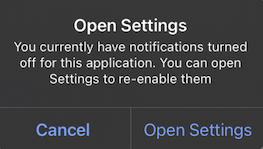 * `optedIn`: Returns `true` if the current push subscription status is subscribed, otherwise `false`. If the push token is valid but `optOut()` was called, this will return `false`.
```kotlin Kotlin theme={null}
OneSignal.User.pushSubscription.optOut()
OneSignal.User.pushSubscription.optIn()
val optedIn = OneSignal.User.pushSubscription.optedIn
```
```java Java theme={null}
OneSignal.getUser().getPushSubscription().optOut();
OneSignal.getUser().getPushSubscription().optIn();
Boolean optedIn = OneSignal.getUser().getPushSubscription().getOptedIn();
```
```swift Swift theme={null}
OneSignal.User.pushSubscription.optOut()
OneSignal.User.pushSubscription.optIn()
let optedIn: Bool = OneSignal.User.pushSubscription.optedIn
```
```objc Objective-C theme={null}
[OneSignal.User.pushSubscription optOut];
[OneSignal.User.pushSubscription optIn];
Boolean optedIn = OneSignal.User.subscriptions.push.optedIn;
```
```csharp C# theme={null}
OneSignal.User.PushSubscription.OptOut();
OneSignal.User.PushSubscription.OptIn();
OneSignal.User.PushSubscription.OptedIn;
```
```javascript React Native theme={null}
OneSignal.User.pushSubscription.optOut();
OneSignal.User.pushSubscription.optIn();
await OneSignal.User.pushSubscription.getOptedInAsync();
```
```dart Flutter theme={null}
OneSignal.User.pushSubscription.optOut();
OneSignal.User.pushSubscription.optIn();
OneSignal.User.pushSubscription.optedIn;
```
```javascript Cordova/Ionic theme={null}
// Ionic
OneSignal.User.pushSubscription.optOut();
OneSignal.User.pushSubscription.optIn();
await OneSignal.User.pushSubscription.getOptedInAsync();
// Cordova
window.plugins.OneSignal.User.pushSubscription.optOut();
window.plugins.OneSignal.User.pushSubscription.optIn();
await window.plugins.OneSignal.User.pushSubscription.getOptedInAsync();
```
### `addEmail()`, `removeEmail()`
Adds or removes an email Subscription (email address) to/from the current user. Call `addEmail` after `login()` to set the correct user context. Compatible with [Identity Verification](./identity-verification).
```kotlin Kotlin theme={null}
OneSignal.User.addEmail("example@email.com")
OneSignal.User.removeEmail("example@email.com")
```
```java Java theme={null}
OneSignal.getUser().addEmail("example@email.com")
OneSignal.getUser().removeEmail("example@email.com")
```
```swift Swift theme={null}
OneSignal.User.addEmail("example@email.com")
OneSignal.User.removeEmail("example@email.com")
```
```objc Objective-C theme={null}
[OneSignal.User addEmail:@"example@email.com"];
[OneSignal.User removeEmail:@"example@email.com"];
```
```csharp C# theme={null}
OneSignal.User.AddEmail("example@email.com");
OneSignal.User.RemoveEmail("example@email.com");
```
```javascript React Native theme={null}
OneSignal.User.addEmail("example@email.com");
OneSignal.User.removeEmail("example@email.com");
```
```dart Flutter theme={null}
OneSignal.User.addEmail("example@email.com");
OneSignal.User.removeEmail("example@email.com");
```
```javascript Cordova/Ionic theme={null}
// Ionic
OneSignal.User.addEmail("example@email.com");
OneSignal.User.removeEmail("example@email.com");
// Cordova
window.plugins.OneSignal.User.addEmail("example@email.com");
window.plugins.OneSignal.User.removeEmail("example@email.com");
```
### `addSms()`, `removeSms()`
Adds or removes an SMS Subscription (phone number) to/from the current user. Requires [E.164 format](https://www.twilio.com/docs/glossary/what-e164). Call `addSms` after `login()` to set the correct user context. Compatible with [Identity Verification](./identity-verification).
```kotlin Kotlin theme={null}
OneSignal.User.addSms("+15558675309")
OneSignal.User.removeSms("+15558675309")
```
```java Java theme={null}
OneSignal.getUser().addSms("+15558675309")
OneSignal.getUser().removeSms("+15558675309")
```
```swift Swift theme={null}
OneSignal.User.addSms("+15558675309")
OneSignal.User.removeSms("+15558675309")
```
```objc Objective-C theme={null}
[OneSignal.User addSms:@"+15558675309"];
[OneSignal.User removeSms:@"+15558675309"];
```
```csharp C# theme={null}
OneSignal.User.AddSms("+15558675309");
OneSignal.User.RemoveSms("+15558675309");
```
```javascript React Native theme={null}
OneSignal.User.addSms("+15558675309");
OneSignal.User.removeSms("+15558675309");
```
```dart Flutter theme={null}
OneSignal.User.addSms("+15558675309");
OneSignal.User.removeSms("+15558675309");
```
```javascript Cordova/Ionic theme={null}
// Ionic
OneSignal.User.addSms("+15558675309");
OneSignal.User.removeSms("+15558675309");
// Cordova
window.plugins.OneSignal.User.addSms("+15558675309");
window.plugins.OneSignal.User.removeSms("+15558675309");
```
***
## Push permissions
### `requestPermission(fallbackToSettings)` *push*
Shows the native system prompt asking the user for push notification permission. Optionally enable a fallback prompt that links to the settings app.
* `fallbackToSettings`: If `true`, the fallback prompt will be displayed if the user denied push permissions more than the operating system's limit (once iOS, twice Android).
See [Prompt for Push Permissions](./prompt-for-push-permissions) for more information.
```kotlin Kotlin theme={null}
// We recommend removing this method after testing and instead use In-App Messages to prompt for notification permission.
// Passing true will fallback to setting prompt if the user denies push permissions
OneSignal.Notifications.requestPermission(true)
```
```java Java theme={null}
// We recommend removing this method after testing and instead use In-App Messages to prompt for notification permission.
// Passing true will fallback to setting prompt if the user denies push permissions
OneSignal.getNotifications().requestPermission(Continue.with(r -> {
if (r.isSuccess()) {
if (r.getData()) {
// `requestPermission` completed successfully and the user has accepted permission
}
else {
// `requestPermission` completed successfully but the user has rejected permission
}
}
else {
// `requestPermission` completed unsuccessfully, check `r.getThrowable()` for more info on the failure reason
}
}));
```
```swift Swift theme={null}
// We recommend removing this method after testing and instead use In-App Messages to prompt for notification permission.
// Passing true will fallback to setting prompt if the user denies push permissions
OneSignal.Notifications.requestPermission({ accepted in
print("User accepted notifications: \(accepted)")
}, fallbackToSettings: true)
```
```objc Objective-C theme={null}
// We recommend removing this method after testing and instead use In-App Messages to prompt for notification permission.
// Passing true will fallback to setting prompt if the user denies push permissions
[OneSignal.Notifications requestPermission:^(BOOL accepted) {
NSLog(@"User accepted notifications: %d", accepted);
} fallbackToSettings:true];
```
```csharp C# theme={null}
// We recommend removing this method after testing and instead use In-App Messages to prompt for notification permission.
// Passing true will fallback to setting prompt if the user denies push permissions
var result = await OneSignal.Notifications.RequestPermissionAsync(true);
if (result)
{
// Notification permission was accepted.
}
else
{
// Notification permission was denied.
}
```
```javascript React Native theme={null}
// We recommend removing this method after testing and instead use In-App Messages to prompt for notification permission.
// Passing true will fallback to setting prompt if the user denies push permissions
OneSignal.Notifications.requestPermission(true);
```
```dart Flutter theme={null}
// We recommend removing this method after testing and instead use In-App Messages to prompt for notification permission.
// Passing true will fallback to setting prompt if the user denies push permissions
OneSignal.Notifications.requestPermission(true);
```
```javascript Cordova/Ionic theme={null}
// Ionic
// We recommend removing this method after testing and instead use In-App Messages to prompt for notification permission.
// Passing true will fallback to setting prompt if the user denies push permissions
OneSignal.Notifications.requestPermission(true).then((accepted) => {
console.log("User accepted notifications: " + accepted);
});
// Cordova
// We recommend removing this method after testing and instead use In-App Messages to prompt for notification permission.
// Passing true will fallback to setting prompt if the user denies push permissions
window.plugins.OneSignal.Notifications.requestPermission(true).then((accepted) => {
console.log("User accepted notifications: " + accepted);
});
```
### `addPermissionObserver()` *push*
Use this method to track push permission changes like:
* The notification permission prompt is displayed to the user.
* The user accepts or declines the permission prompt.
* The user enables or disables notifications for your app in the device's app settings and then returns to your app.
When this happens, the SDK triggers the `onOSPermissionChanged` event. Your listener receives a state object with the `from` and `to` values so you can detect exactly what changed.
To stop listening for updates, call the associated `removePermissionObserver()` method.
```kotlin Kotlin theme={null}
class MyObserver : IPermissionObserver {
init {
OneSignal.Notifications.addPermissionObserver(this)
}
override fun onNotificationPermissionChange(granted: Boolean) {
if (granted) {
// Notifications are now enabled
}
}
fun cleanup() {
OneSignal.Notifications.removePermissionObserver(this)
}
}
```
```java Java theme={null}
public class MainActivity extends Activity implements IPermissionObserver {
protected void onCreate(Bundle savedInstanceState) {
OneSignal.getNotifications().addPermissionObserver(this);
}
@Override
public void onNotificationPermissionChange(boolean granted) {
if (granted) {
// Notifications are now enabled
}
}
@Override
protected void onDestroy() {
OneSignal.getNotifications().removePermissionObserver(this);
super.onDestroy();
}
}
```
```swift Swift theme={null}
class AppDelegate: UIResponder, UIApplicationDelegate, OSNotificationPermissionObserver {
func application(_ application: UIApplication,
didFinishLaunchingWithOptions launchOptions: [UIApplication.LaunchOptionsKey: Any]?) -> Bool {
OneSignal.Notifications.addPermissionObserver(self)
return true
}
func onNotificationPermissionDidChange(_ granted: Bool) {
print("Notification permission changed: \(granted)")
}
func cleanup() {
OneSignal.Notifications.removePermissionObserver(self)
}
}
```
```objc Objective-C theme={null}
// AppDelegate.h
@interface AppDelegate : UIResponder
@end
// AppDelegate.m
@implementation AppDelegate
- (BOOL)application:(UIApplication *)application didFinishLaunchingWithOptions:(NSDictionary *)launchOptions {
[OneSignal.Notifications addPermissionObserver:self];
return YES;
}
- (void)onNotificationPermissionDidChange:(BOOL)granted {
NSLog(@"Permission changed: %d", granted);
}
- (void)cleanup {
[OneSignal.Notifications removePermissionObserver:self];
}
@end
```
```csharp C# theme={null}
OneSignal.Notifications.PermissionChanged += (sender, e) =>
{
// Respond to permission change
};
```
```javascript React Native theme={null}
const onPermissionChange = (granted) => {
console.log('Permission changed:', granted);
};
OneSignal.Notifications.addEventListener('permissionChange', onPermissionChange);
// Remove later if needed
OneSignal.Notifications.removeEventListener('permissionChange', onPermissionChange);
```
```dart Flutter theme={null}
final observer = (bool hasPermission) {
print("Notification permission: $hasPermission");
};
OneSignal.Notifications.addPermissionObserver(observer);
// Remove later if needed
OneSignal.Notifications.removePermissionObserver(observer);
```
```javascript Cordova/Ionic theme={null}
const listener = (granted) => {
console.log("Push permission changed:", granted);
};
// Ionic
OneSignal.Notifications.addEventListener("permissionChange", listener);
// Remove later if needed
OneSignal.Notifications.removeEventListener("permissionChange", listener);
// Cordova
window.plugins.OneSignal.Notifications.addEventListener("permissionChange", listener);
// Remove later if needed
window.plugins.OneSignal.Notifications.removeEventListener("permissionChange", listener);
```
### `getPermission()`, `getCanRequestPermission()`
`getPermission()` returns the current push permission status at the app-level. It does not consider the OneSignal-level subscription status if you changed it via `optOut()` or the `enabled` parameter in the Users and Subscriptions APIs. Instead of using `getPermission()`, we recommend using the [Push Permission Observer](#addpermissionobserver-push) to track changes in the device's notification permission status while the app is running or the [Push Subscription Observer](#addobserver-push-subscription-changes) to track changes in the push subscription status.
`getCanRequestPermission()` returns whether attempting to request permission will result in a prompt being displayed to the user. If `false`, the user has already denied permission and can either be shown the fallback prompt or no prompt at all. See [Prompt for push permissions](./prompt-for-push-permissions) for more information.
```kotlin Kotlin theme={null}
// true if the app has permission to display notifications
OneSignal.Notifications.permission
// true if the device can display system notification permission prompt
val canRequest: Boolean = OneSignal.Notifications.canRequestPermission
```
```java Java theme={null}
// true if the app has permission to display notifications
OneSignal.getNotifications().getPermission();
// true if the device can display system notification permission prompt
OneSignal.getNotifications().getCanRequestPermission();
```
```swift Swift theme={null}
// true if the app has permission to display notifications
OneSignal.Notifications.permission
// true if the device can display system notification permission prompt
OneSignal.Notifications.canRequestPermission
```
```objc Objective-C theme={null}
// true if the app has permission to display notifications
[OneSignal.Notifications permission];
// true if the device can display system notification permission prompt
[OneSignal.Notifications canRequestPermission];
```
```csharp C# theme={null}
// true if the app has permission to display notifications
bool permission = OneSignal.Notifications.Permission;
// true if the device can display system notification permission prompt
bool canRequest = OneSignal.Notifications.CanRequestPermission;
```
```javascript React Native theme={null}
// true if the app has permission to display notifications
await OneSignal.Notifications.getPermissionAsync();
// true if the device can display system notification permission prompt
await OneSignal.Notifications.canRequestPermissionAsync();
```
```dart Flutter theme={null}
// true if the app has permission to display notifications
var permission = OneSignal.Notifications.permission;
// true if the device can display system notification permission prompt
var canRequest = OneSignal.Notifications.canRequestPermission;
```
```javascript Cordova/Ionic theme={null}
// Ionic
// true if the app has permission to display notifications
await OneSignal.Notifications.getPermissionAsync();
// true if the device can display system notification permission prompt
await OneSignal.Notifications.canRequestPermissionAsync();
// Cordova
// true if the app has permission to display notifications
await window.plugins.OneSignal.Notifications.getPermissionAsync();
// true if the device can display system notification permission prompt
await window.plugins.OneSignal.Notifications.canRequestPermissionAsync();
```
#### `permissionNative` *iOS*
Returns an enum for the native permission of the iOS device. It will be one of:
* `0` = NotDetermined
* `1` = Denied
* `2` = Authorized
* `3` = Provisional (only available in iOS 12+)
* `4` = Ephemeral (only available in iOS 14+)
```swift Swift theme={null}
let permissionNative: OSNotificationPermission = OneSignal.Notifications.permissionNative.rawValue
```
```objectivec Objective-C theme={null}
OSNotificationPermission permissionNative = [OneSignal.Notifications permissionNative]
```
```csharp C# theme={null}
NotificationPermission PermissionNative
```
```javascript React Native theme={null}
await OneSignal.Notifications.permissionNative()
```
```dart Flutter theme={null}
var permissionNative = await OneSignal.Notifications.permissionNative()
```
```javascript Cordova/Ionic theme={null}
// Ionic
await OneSignal.Notifications.permissionNative()
// Cordova
await window.plugins.OneSignal.Notifications.permissionNative()
```
## Push notification events
### `addClickListener()` *push*
Set a callback that runs when a user clicks a push notification that opens the app.
The app's activity or scene is already launched by the time this event fires. Use this handler to perform any custom logic — do not relaunch or duplicate app navigation manually.
For Flutter Apps, if the app is force-closed and you click a notification, the app will not open and the Click Listener will not register in `Debug` mode. To fix this, you can either:
* Use a release build via Flutter e.g. `flutter run --release` (requires a physical device)
* Update the Xcode scheme to be `Release` not `Debug`
Use `removeClickListener()` or `removeEventListener()` to stop listening when the handler is no longer needed.
```kotlin Kotlin theme={null}
val clickListener = object : INotificationClickListener {
override fun onClick(event: INotificationClickEvent) {
Log.d("OneSignal", "Notification clicked: ${event.notification.title}")
}
}
OneSignal.Notifications.addClickListener(clickListener)
```
```java Java theme={null}
OneSignal.getNotifications().addClickListener(event -> {
Log.v(Tag.LOG_TAG, "INotificationClickListener.onClick fired" +
" with event: " + event);
});
```
```swift Swift theme={null}
class AppDelegate: UIResponder, UIApplicationDelegate, OSNotificationClickListener {
func application(_ application: UIApplication,
didFinishLaunchingWithOptions launchOptions: [UIApplication.LaunchOptionsKey: Any]?) -> Bool {
OneSignal.Notifications.addClickListener(self)
return true
}
func onClick(event: OSNotificationClickEvent) {
print("Notification clicked: \(event.jsonRepresentation())")
}
}
```
```objc Objective-C theme={null}
// AppDelegate.h
@interface AppDelegate : UIResponder
@end
// AppDelegate.m
@implementation AppDelegate
- (BOOL)application:(UIApplication*)application didFinishLaunchingWithOptions:(NSDictionary *)launchOptions {
[OneSignal.Notifications addClickListener:self];
return YES;
}
- (void)onClickNotification:(OSNotificationClickEvent *)event {
NSLog(@"Notification clicked: %@", [event jsonRepresentation]);
}
@end
```
```csharp C# theme={null}
OneSignal.Notifications.Clicked += (sender, e) => {
var RawPayload = e.Notification.RawPayload;
Console.WriteLine("Notification clicked: " + RawPayload);
};
```
```javascript React Native theme={null}
OneSignal.Notifications.addEventListener('click', (event) => {
console.log('OneSignal: notification clicked:', event);
});
```
```dart Flutter theme={null}
OneSignal.Notifications.addClickListener((event) {
print('Notification clicked: ${event}');
});
```
```javascript Cordova/Ionic theme={null}
const myClickListener = (event) => {
console.log("Notification clicked:", JSON.stringify(event));
};
// Ionic
OneSignal.Notifications.addEventListener("click", myClickListener);
// Cordova
window.plugins.OneSignal.Notifications.addEventListener("click", myClickListener);
```
### `addForegroundLifecycleListener()` *push*
Allows you to intercept and control how notifications behave when the app is in the foreground.
By default, OneSignal automatically displays the notification. You can override this behavior using `event.preventDefault()` to:
* Suppress the notification
* Customize it
* Delay display for async logic (e.g., fetch user state, log events)
Call `event.notification.display()` to manually show it later.
This runs **after** [Notification Service Extensions](./service-extensions), which modify the payload before display.
Use `removeForegroundLifecycleListener()` or `removeEventListener()` to stop listening when the handler is no longer needed.
```kotlin Kotlin theme={null}
val lifecycleListener = object : INotificationLifecycleListener {
override fun onWillDisplay(event: INotificationWillDisplayEvent) {
Log.d("OneSignal", "Foreground notification: ${event.notification.title}")
// Uncomment to prevent the notification from being displayed while in the foreground
// event.preventDefault()
}
}
OneSignal.Notifications.addForegroundLifecycleListener(lifecycleListener)
```
```java Java theme={null}
OneSignal.getNotifications().addForegroundLifecycleListener(new INotificationLifecycleListener() {
@Override
public void onWillDisplay(@NonNull INotificationWillDisplayEvent event) {
Log.d("OneSignal", "Foreground notification received: " + event.getNotification().getTitle());
// Uncomment to prevent the notification from being displayed while in the foreground
// event.preventDefault();
}
});
```
```swift Swift theme={null}
class AppDelegate: UIResponder, UIApplicationDelegate, OSNotificationLifecycleListener {
func application(_ application: UIApplication,
didFinishLaunchingWithOptions launchOptions: [UIApplication.LaunchOptionsKey: Any]?) -> Bool {
OneSignal.Notifications.addForegroundLifecycleListener(self)
return true
}
func onWillDisplay(event: OSNotificationWillDisplayEvent) {
print("Foreground notification: \(event.notification.title ?? "No Title")")
// Uncomment to prevent the notification from being displayed while in the foreground
// event.preventDefault()
}
}
```
```objc Objective-C theme={null}
@implementation AppDelegate
- (BOOL)application:(UIApplication*)application didFinishLaunchingWithOptions:(NSDictionary *)launchOptions {
[OneSignal.Notifications addForegroundLifecycleListener:self];
return YES;
}
- (void)onWillDisplayNotification:(OSNotificationWillDisplayEvent *)event {
NSLog(@"Foreground notification: %@", event.notification.title);
// Uncomment to prevent the notification from being displayed while in the foreground
// [event preventDefault];
}
@end
```
```csharp C# theme={null}
OneSignal.Notifications.ForegroundWillDisplay += (sender, e) =>
{
Console.WriteLine("Foreground notification: " + e.Notification.RawPayload);
// Uncomment to prevent the notification from being displayed while in the foreground
// e.PreventDefault();
};
```
```javascript React Native theme={null}
OneSignal.Notifications.addEventListener('foregroundWillDisplay', (event) => {
console.log("Foreground notification:", event.getNotification().title);
// Uncomment to prevent the notification from being displayed while in the foreground
// event.preventDefault();
});
```
```dart Flutter theme={null}
OneSignal.Notifications.addForegroundWillDisplayListener((event) {
print("Foreground notification: ${event.notification.title}");
// Uncomment to prevent the notification from being displayed while in the foreground
// event.preventDefault();
});
```
```javascript Cordova/Ionic theme={null}
const myLifecyleListener = function(event) {
console.log("Foreground notification:", event.notification.title);
// Uncomment to prevent the notification from being displayed while in the foreground
// event.preventDefault();
};
// Ionic
OneSignal.Notifications.addEventListener("foregroundWillDisplay", myLifecyleListener);
// Cordova
window.plugins.OneSignal.Notifications.addEventListener("foregroundWillDisplay", myLifecyleListener);
```
### `clearAllNotifications()`
Removes all OneSignal notifications from the Notification Shade. Use instead of Android's `android.app.NotificationManager.cancel`. Otherwise, the notifications will be restored when your app is restarted.
```kotlin Kotlin theme={null}
OneSignal.Notifications.clearAllNotifications()
```
```java Java theme={null}
OneSignal.getNotifications.clearAllNotifications();
```
```swift Swift theme={null}
OneSignal.Notifications.clearAll()
```
```objc Objective-C theme={null}
[OneSignal.Notifications clearAll];
```
```csharp C# theme={null}
OneSignal.Notifications.ClearAllNotifications();
```
```javascript React Native theme={null}
OneSignal.Notifications.clearAll();
```
```dart Flutter theme={null}
OneSignal.Notifications.clearAll();
```
```javascript Cordova/Ionic theme={null}
// Ionic
OneSignal.Notifications.clearAll();
// Cordova
window.plugins.OneSignal.Notifications.clearAll();
```
#### `removeNotification()` *Android*
Cancel a single notification based on its Android notification ID.
Use instead of Android's `android.app.NotificationManager.cancel`. Otherwise, the notification will be restored when your app is restarted.
```kotlin Kotlin theme={null}
OneSignal.Notifications.removeNotification(id)
```
```java Java theme={null}
OneSignal.getNotifications().removeNotification(id);
```
```csharp C# theme={null}
OneSignal.Notifications.RemoveNotification(id);
```
```javascript React Native theme={null}
OneSignal.Notifications.removeNotification(id);
```
```dart Flutter theme={null}
OneSignal.Notifications.removeNotification(id);
```
```javascript Cordova/Ionic theme={null}
// Ionic
OneSignal.Notifications.removeNotification(id);
// Cordova
window.plugins.OneSignal.Notifications.removeNotification(id);
```
#### `removeGroupedNotifications()` *Android*
Cancel a group of OneSignal notifications with the provided group key. Grouping notifications is a OneSignal concept. There is no `android.app.NotificationManager` equivalent.
```kotlin Kotlin theme={null}
OneSignal.Notifications.removeGroupedNotifications("GROUP_KEY")
```
```java Java theme={null}
OneSignal.getNotifications().removeGroupedNotifications("GROUP_KEY");
```
```csharp C# theme={null}
OneSignal.Notifications.RemoveGroupedNotifications("GROUP_KEY");
```
```javascript React Native theme={null}
OneSignal.Notifications.removeGroupedNotifications("GROUP_KEY");
```
```dart Flutter theme={null}
OneSignal.Notifications.removeGroupedNotifications("GROUP_KEY");
```
```javascript Cordova/Ionic theme={null}
// Ionic
OneSignal.Notifications.removeGroupedNotifications("GROUP_KEY");
// Cordova
window.plugins.OneSignal.Notifications.removeGroupedNotifications("GROUP_KEY");
```
***
## In-App Messages
In-app messages do not require any code; however, the SDK enables you to customize when messages are presented and handle lifecycle events.
### `addTrigger()`, `addTriggers()`
Decide when to display an In-App Message based on a single or multiple triggers. See [Triggers](./iam-triggers) for more information.
Triggers are not persisted to the backend. They only exist on the local device and apply to the current user.
```kotlin Kotlin theme={null}
OneSignal.InAppMessages.addTrigger("KEY", "VALUE")
OneSignal.InAppMessages.addTriggers(mapOf("KEY_01" to "VALUE_01", "KEY_02" to "VALUE_02"))
```
```java Java theme={null}
OneSignal.getInAppMessages().addTrigger("KEY", "VALUE");
OneSignal.getInAppMessages().addTriggers(new HashMap() {{
put("KEY_01","VALUE_01");
put("KEY_02", "VALUE_02");
}});
```
```swift Swift theme={null}
OneSignal.InAppMessages.addTrigger("KEY", withValue: "VALUE")
OneSignal.InAppMessages.addTriggers(["KEY_01": "VALUE_01", "KEY_02": "VALUE_02"])
```
```objc Objective-C theme={null}
[OneSignal.InAppMessages addTrigger:@"KEY" withValue:@"VALUE"];
[OneSignal.InAppMessages addTriggers:@{@"KEY_01": @"VALUE_01", @"KEY_02": @"VALUE_02"}];
```
```csharp C# theme={null}
OneSignal.InAppMessages.AddTrigger("KEY", "VALUE");
OneSignal.InAppMessages.AddTriggers(new Dictionary {
{ "KEY_01", "VALUE_01" },
{ "KEY_02", "VALUE_02" }
});
```
```javascript React Native theme={null}
OneSignal.InAppMessages.addTrigger("KEY", "VALUE");
OneSignal.InAppMessages.addTriggers({
"KEY_01": "VALUE_01",
"KEY_02": "VALUE_02"
});
```
```dart Flutter theme={null}
OneSignal.InAppMessages.addTrigger("KEY", "VALUE");
OneSignal.InAppMessages.addTriggers({
"KEY_01": "VALUE_01",
"KEY_02": "VALUE_02"
});
```
```javascript Cordova/Ionic theme={null}
// Ionic
OneSignal.InAppMessages.addTrigger("KEY", "VALUE");
OneSignal.InAppMessages.addTriggers({"KEY_01":"VALUE_01", "KEY_02":"VALUE_02"});
// Cordova
window.plugins.OneSignal.InAppMessages.addTrigger("KEY", "VALUE");
window.plugins.OneSignal.InAppMessages.addTriggers({"KEY_01":"VALUE_01", "KEY_02":"VALUE_02"});
```
### `removeTrigger()`, `removeTriggers()`, `clearTriggers()`
Remove a single, multiple, or all triggers with the provided key from the current user.
```kotlin Kotlin theme={null}
OneSignal.InAppMessages.removeTrigger("KEY")
OneSignal.InAppMessages.removeTriggers(setOf("KEY_01", "KEY_02"))
OneSignal.InAppMessages.clearTriggers()
```
```java Java theme={null}
OneSignal.getInAppMessages().removeTrigger("KEY");
OneSignal.getInAppMessages().removeTriggers(Arrays.asList("KEY_01", "KEY_02"));
OneSignal.getInAppMessages().clearTriggers();
```
```swift Swift theme={null}
OneSignal.InAppMessages.removeTrigger("KEY")
OneSignal.InAppMessages.removeTriggers(["KEY_01", "KEY_02"])
OneSignal.InAppMessages.clearTriggers()
```
```objc Objective-C theme={null}
[OneSignal.InAppMessages removeTrigger:@"KEY"];
[OneSignal.InAppMessages removeTriggers:@[@"KEY_01", @"KEY_02"]];
[OneSignal.InAppMessages clearTriggers];
```
```csharp C# theme={null}
OneSignal.InAppMessages.RemoveTrigger("KEY");
OneSignal.InAppMessages.RemoveTriggers(new List { "KEY_01", "KEY_02" });
OneSignal.InAppMessages.ClearTriggers();
```
```javascript React Native theme={null}
OneSignal.InAppMessages.removeTrigger("KEY");
OneSignal.InAppMessages.removeTriggers(["KEY_01", "KEY_02"]);
OneSignal.InAppMessages.clearTriggers();
```
```dart Flutter theme={null}
OneSignal.InAppMessages.removeTrigger("KEY");
OneSignal.InAppMessages.removeTriggers(["KEY_01", "KEY_02"]);
OneSignal.InAppMessages.clearTriggers();
```
```javascript Cordova/Ionic theme={null}
// Ionic
OneSignal.InAppMessages.removeTrigger("KEY");
OneSignal.InAppMessages.removeTriggers(["KEY_01", "KEY_02"]);
OneSignal.InAppMessages.clearTriggers();
// Cordova
window.plugins.OneSignal.InAppMessages.removeTrigger("KEY");
window.plugins.OneSignal.InAppMessages.removeTriggers(["KEY_01", "KEY_02"]);
window.plugins.OneSignal.InAppMessages.clearTriggers();
```
### `paused`
Prevent In-app messages from being displayed to the user. When set to `true`, no in-app messages will be presented. When set to `false`, any messages the user qualifies for will be presented to them at the appropriate time.
```kotlin Kotlin theme={null}
OneSignal.InAppMessages.paused = true
```
```java Java theme={null}
OneSignal.getInAppMessages().setPaused(true);
```
```swift Swift theme={null}
OneSignal.InAppMessages.paused = true
// Get `paused` state
let paused = OneSignal.InAppMessages.paused
```
```objc Objective-C theme={null}
[OneSignal.InAppMessages paused:true];
// Get `paused` state
BOOL paused = [OneSignal.InAppMessages paused];
```
```csharp C# theme={null}
OneSignal.InAppMessages.Paused = true;
```
```javascript React Native theme={null}
OneSignal.InAppMessages.setPaused(true);
```
```dart Flutter theme={null}
OneSignal.InAppMessages.paused(true);
```
```javascript Cordova/Ionic theme={null}
// Ionic
OneSignal.InAppMessages.setPaused(true);
// Cordova
window.plugins.OneSignal.InAppMessages.setPaused(true);
```
### `addLifecycleListener()`
Respond to or track In-App Messages being displayed and dismissed.
```kotlin Kotlin theme={null}
val lifecycleListener = object : IInAppMessageLifecycleListener {
override fun onWillDisplay(event: IInAppMessageWillDisplayEvent) {
print(event.message.messageId)
}
override fun onDidDisplay(event: IInAppMessageDidDisplayEvent) {
print(event.message.messageId)
}
override fun onWillDismiss(event: IInAppMessageWillDismissEvent) {
print(event.message.messageId)
}
override fun onDidDismiss(event: IInAppMessageDidDismissEvent) {
print(event.message.messageId)
}
}
OneSignal.InAppMessages.addLifecycleListener(lifecycleListener)
OneSignal.InAppMessages.removeLifecycleListener(lifecycleListener)
```
```java Java theme={null}
OneSignal.getInAppMessages().addLifecycleListener(new IInAppMessageLifecycleListener() {
@Override
public void onWillDisplay(@NonNull IInAppMessageWillDisplayEvent event) {
Log.v(Tag.LOG_TAG, "onWillDisplayInAppMessage");
}
@Override
public void onDidDisplay(@NonNull IInAppMessageDidDisplayEvent event) {
Log.v(Tag.LOG_TAG, "onDidDisplayInAppMessage");
}
@Override
public void onWillDismiss(@NonNull IInAppMessageWillDismissEvent event) {
Log.v(Tag.LOG_TAG, "onWillDismissInAppMessage");
}
@Override
public void onDidDismiss(@NonNull IInAppMessageDidDismissEvent event) {
Log.v(Tag.LOG_TAG, "onDidDismissInAppMessage");
}
});
```
```swift Swift theme={null}
// AppDelegate.swift
// Add OSInAppMessageLifecycleListener as an implemented protocol of the class that will handle the In-App Message lifecycle events.
class AppDelegate: UIResponder, UIApplicationDelegate, OSInAppMessageLifecycleListener {
func application(_ application: UIApplication, didFinishLaunchingWithOptions launchOptions: [UIApplicationLaunchOptionsKey: Any]?) -> Bool {
// Add your implementing class as the listener
OneSignal.InAppMessages.addLifecycleListener(self)
}
// Add one or more of the following optional lifecycle methods
func onWillDisplay(event: OSInAppMessageWillDisplayEvent) {
print("OSInAppMessageLifecycleListener: onWillDisplay Message: \(event.message.messageId)")
}
func onDidDisplay(event: OSInAppMessageDidDisplayEvent) {
print("OSInAppMessageLifecycleListener: onDidDisplay Message: \(event.message.messageId)")
}
func onWillDismiss(event: OSInAppMessageWillDismissEvent) {
print("OSInAppMessageLifecycleListener: onWillDismiss Message: \(event.message.messageId)")
}
func onDidDismiss(event: OSInAppMessageDidDisplayEvent) {
print("OSInAppMessageLifecycleListener: onDidDismiss Message: \(event.message.messageId)")
}
}
```
```objc Objective-C theme={null}
// AppDelegate.h
// Add OSInAppMessageLifecycleListener as an implemented protocol of the class that will handle the In-App Message lifecycle events.
@interface AppDelegate : UIResponder
@end
// AppDelegate.m
@implementation AppDelegate
- (BOOL)application:(UIApplication*)application didFinishLaunchingWithOptions:(NSDictionary *)launchOptions {
// Add your implementing class as the listener.
[OneSignal.InAppMessages addLifecycleListener:self];
}
// Add one or more of the following optional lifecycle methods
- (void)onWillDisplayInAppMessage:(OSInAppMessageWillDisplayEvent *)event {
NSLog(@"OSInAppMessageLifecycleListener: onWillDisplay Message: %@", event.message.messageId);
}
- (void)onDidDisplayInAppMessage:(OSInAppMessageDidDisplayEvent *)event {
NSLog(@"OSInAppMessageLifecycleListener: onDidDisplay Message: %@", event.message.messageId);
}
- (void)onWillDismissInAppMessage:(OSInAppMessageWillDismissEvent *)event {
NSLog(@"OSInAppMessageLifecycleListener: onWillDismiss Message: %@", event.message.messageId);
}
- (void)onDidDismissInAppMessage:(OSInAppMessageDidDismissEvent *)event {
NSLog(@"OSInAppMessageLifecycleListener: onDidDismiss Message: %@", event.message.messageId);
}
```
```csharp C# theme={null}
OneSignal.InAppMessages.WillDisplay += (sender, e) =>
{
// Access the in-app message with e.Message
};
OneSignal.InAppMessages.DidDisplay += (sender, e) =>
{
// Access the in-app message with e.Message
};
OneSignal.InAppMessages.WillDismiss += (sender, e) =>
{
// Access the in-app message with e.Message
};
OneSignal.InAppMessages.DidDismiss += (sender, e) =>
{
// Access the in-app message with e.Message
};
```
```javascript React Native theme={null}
OneSignal.InAppMessages.addEventListener('willDisplay', (event) => {
console.log('OneSignal: will display IAM: ', event);
});
OneSignal.InAppMessages.addEventListener('didDisplay', (event) => {
console.log('OneSignal: did display IAM: ', event);
});
OneSignal.InAppMessages.addEventListener('willDismiss', (event) => {
console.log('OneSignal: will dismiss IAM: ', event);
});
OneSignal.InAppMessages.addEventListener('didDismiss', (event) => {
console.log('OneSignal: did dismiss IAM: ', event);
});
```
```dart Flutter theme={null}
OneSignal.InAppMessages.addWillDisplayListener((event) {
print("ON WILL DISPLAY IN APP MESSAGE ${event.message.messageId}");
});
OneSignal.InAppMessages.addDidDisplayListener((event) {
print("ON DID DISPLAY IN APP MESSAGE ${event.message.messageId}");
});
OneSignal.InAppMessages.addWillDismissListener((event) {
print("ON WILL DISMISS IN APP MESSAGE ${event.message.messageId}");
});
OneSignal.InAppMessages.addDidDismissListener((event) {
print("ON DID DISMISS IN APP MESSAGE ${event.message.messageId}");
});
```
```javascript Cordova/Ionic theme={null}
// Define the lifecycle listener functions
let willDisplayListener = async function(event) {
console.log("OneSignal: will display IAM: "+ event.messageId);
};
let didDisplayListener = async function(event) {
console.log("OneSignal: did display IAM: "+ event.messageId);
};
let willDismissListener = async function(event) {
console.log("OneSignal: will dismiss IAM: "+ event.messageId);
};
let didDismissListener = async function(event) {
console.log("OneSignal: did dismiss IAM: "+ event.messageId);
};
// Listeners for each event added separately
// Ionic
OneSignal.InAppMessages.addEventListener("willDisplay", willDisplayListener);
OneSignal.InAppMessages.addEventListener("didDisplay", didDisplayListener);
OneSignal.InAppMessages.addEventListener("willDismiss", willDismissListener);
OneSignal.InAppMessages.addEventListener("didDismiss", didDismissListener);
// Cordova
window.plugins.OneSignal.InAppMessages.addEventListener("willDisplay", willDisplayListener);
window.plugins.OneSignal.InAppMessages.addEventListener("didDisplay", didDisplayListener);
window.plugins.OneSignal.InAppMessages.addEventListener("willDismiss", willDismissListener);
window.plugins.OneSignal.InAppMessages.addEventListener("didDismiss", didDismissListener);
```
### `addClickListener()` *in-app*
Respond to in-app message click events. The event contains the following [click action](./iam-click-actions) metadata:
* `actionId`: A custom identifier you set on the element.
* `urlTarget`: An enum specifying how the launch URL for the message will be presented.
* `url`: The launch URL for the action, if any.
* `closingMessage`: A boolean value indicating if the action resulted in the message being closed.
```kotlin Kotlin theme={null}
val clickListener = object : IInAppMessageClickListener {
override fun onClick(event: IInAppMessageClickEvent) {
print(event.result.actionId)
}
}
OneSignal.InAppMessages.addClickListener(clickListener)
```
```java Java theme={null}
OneSignal.getInAppMessages().addClickListener(new IInAppMessageClickListener() {
@Override
public void onClick(@Nullable IInAppMessageClickEvent event) {
Log.v(Tag.LOG_TAG, "INotificationClickListener.inAppMessageClicked");
}
});
```
```swift Swift theme={null}
class MyInAppMessageClickListener : NSObject, OSInAppMessageClickListener {
func onClick(event: OSInAppMessageClickEvent) {
let messageId = event.message.messageId
print("Message ID: \(messageId)")
let result: OSInAppMessageClickResult = event.result
let actionId = result.actionId
print("Action ID: ",(actionId ?? "no actionId"))
let url = result.url
print("URL: ", (url ?? "No URL"))
let urlTarget: OSInAppMessageActionUrlType = result.urlTarget
print("URL Target: \(urlTarget)")
let closingMessage = result.closingMessage
print("Closing Message: \(closingMessage)")
}
}
// Add your object as a listener
let myListener = MyInAppMessageClickListener()
OneSignal.InAppMessages.addClickListener(myListener)
```
```objc Objective-C theme={null}
// Add this method to object implementing the OSInAppMessageClickListener protocol
- (void)onClickInAppMessage:(OSInAppMessageClickEvent * _Nonnull)event {
NSLog(@"onClickInAppMessage event: %@", [event jsonRepresentation]);
NSString *message = [NSString stringWithFormat:@"In App Message Click Occurred: messageId: %@ actionId: %@ url: %@ urlTarget: %@ closingMessage: %i",
event.message.messageId,
event.result.actionId,
event.result.url,
@(event.result.urlTarget),
event.result.closingMessage];
}
// Add your object as a listener
[OneSignal.InAppMessages addClickListener:self];
```
```csharp C# theme={null}
OneSignal.InAppMessages.Clicked += (sender, e) =>
{
// Access the in-app message with e.Message and the click result with e.Result
};
```
```javascript React Native theme={null}
OneSignal.InAppMessages.addEventListener('click', (event) => {
console.log('OneSignal IAM clicked:', event);
});
```
```dart Flutter theme={null}
OneSignal.InAppMessages.addClickListener((event) {
print("In App Message Clicked: \n${event.result.jsonRepresentation().replaceAll("\\n", "\n")}");
});
```
```javascript Cordova/Ionic theme={null}
let inAppClickListener = async function(event) {
let clickData = JSON.stringify(event);
console.log("In-App Message Clicked: "+ clickData);
};
// Ionic
OneSignal.InAppMessages.addEventListener("click", inAppClickListener);
// Cordova
window.plugins.OneSignal.InAppMessages.addEventListener("click", inAppClickListener);
```
***
## Live Activity
Applications should allow users to opt-in to Live Activities. For example, your app gives the user the option to start the Live Activity within your US using a button or presenting an IAM. You may start and update a Live Activity via any method without an explicit prompt, unlike Notification Permission or Location Permission. Live Activities appear with the iOS Provisional Authorization UI. Live Activities must be started when your application is in the foreground. We recommend reading [Apple’s developer guidelines](https://developer.apple.com/design/human-interface-guidelines/live-activities) to learn more about Live Activities.
### `setup()`
Allows OneSignal to manage the lifecycle of a LiveActivity on behalf of the application. This includes listening for both pushToStart token updates and pushToUpdate token updates.
```swift Swift theme={null}
//... your app's code
OneSignal.LiveActivities.setup(MyWidgetAttributes.self);
```
### `setupDefault()`
Allows cross platform SDK's to manage the lifecycle of a LiveActivity by eliminating the need for a customer app to define and manage their own ActivityAttributes. See [Cross-platform setup](./cross-platform-live-activity-setup) for further details.
```csharp C# theme={null}
using OneSignalSDK;
//Push To Start
OneSignal.LiveActivities.SetupDefault();
//Launching the Live Activity from within the app (not needed for push to start)
string activityId = "my_activity_id";
OneSignal.LiveActivities.StartDefault(
activityId,
new Dictionary() {
{ "title", "Welcome!" }
},
new Dictionary() {
{ "message", new Dictionary() {
{ "en", "Hello World!"}
}},
});
```
```javascript React Native theme={null}
import { OneSignal } from 'react-native-onesignal'
//Push To Start
OneSignal.LiveActivities.setupDefault()
//Launching the Live Activity from within the app (not needed for push to start)
const activityId = "my_activity_id"
const attributes = { title: "Sample Title" } ;
const content = { message: { en: "message" } };
OneSignal.LiveActivities.startDefault(activityId, attributes, content);
```
```dart Flutter theme={null}
import 'package:onesignal_flutter/onesignal_flutter.dart';
OneSignal.LiveActivities.setupDefault()
//Launching the Live Activity from within the app (not needed for push to start)
const String activityId = "my_activity_id";
OneSignal.LiveActivities.startDefault(activityId!, {
"title": "Welcome!"
}, {
"message": {"en": "Hello World!"},
});
```
```javascript Cordova/Ionic theme={null}
//Ionic
import OneSignal from "onesignal-cordova-plugin";
//Push To Start
OneSignal.LiveActivities.setupDefault();
//Launching the Live Activity from within the app (not needed for push to start)
const activityId = "my_activity_id";
const attributes = { title: "Sample Title" };
const content = { message: { en: "message" } };
OneSignal.LiveActivities.startDefault(activityId, attributes, content);
//Cordova
//Push To Start
window.plugins.OneSignal.LiveActivities.setupDefault();
//Launching the Live Activity from within the app (not needed for push to start)
const activityId = "my_activity_id";
const attributes = { title: "Sample Title" };
const content = { message: { en: "message" } };
window.plugins.OneSignal.LiveActivities.startDefault(
activityId,
attributes,
content
);
```
### `enter()`
Entering a Live Activity associates an `activityId` with a Live Activity **Temporary Push Token** on our server. Specify this identifier when using the [Update Live Activities](/reference/update-live-activity-api) REST API to update one or multiple Live Activities simultaneously.
```swift Swift theme={null}
// ... your app's code
let activity = try Activity.request(
attributes: attributes,
contentState: contentState,
pushType: .token)
Task {
for await data in activity.pushTokenUpdates {
let token = data.map {String(format: "%02x", $0)}.joined()
// ... required code for entering a live activity
// Activity ID cannot contain "/" characters
OneSignal.LiveActivities.enter("ACTIVITY_ID", withToken: token)
}
}
```
```csharp C# theme={null}
OneSignal.LiveActivities.EnterAsync("ACTIVITY_ID", token);
```
```csharp .Net theme={null}
var result = OneSignalSDK.DotNet.OneSignal.Default.EnterLiveActivity("ACTIVITY_ID", token);
if(result) {
Console.WriteLine("Success");
}
```
```javascript React Native theme={null}
OneSignal.LiveActivities.enter('ACTIVITY_ID', token, (result) => {
console.log('Results of entering live activity: ', result);
});
```
```dart Flutter theme={null}
OneSignal.LiveActivities.enterLiveActivity("ACTIVITY_ID", token).then((result) {
print("Successfully enter live activity");
}).catchError((error) {
print("Failed to enter live activity with error: $error");
});
```
```javascript Cordova/Ionic theme={null}
//Ionic
OneSignal.LiveActivities.enter("ACTIVITY_ID", token, (result) => {
console.log("Results of entering live activity: ", result);
});
//Cordova
window.plugins.OneSignal.LiveActivities.enter("ACTIVITY_ID", token, (result) => {
console.log("Results of entering live activity: ", result);
});
```
### `exit()`
Exiting a Live activity deletes the association between an Activity Identifier with the Live Activity push token on our server.
```swift Swift theme={null}
OneSignal.LiveActivities.exit("ACTIVITY_ID")
```
```csharp C# theme={null}
OneSignal.LiveActivities.ExitAsync("ACTIVITY_ID");
```
```csharp .Net theme={null}
OneSignalSDK.DotNet.OneSignal.Default.ExitLiveActivity("ACTIVITY_ID");
```
```javascript React Native theme={null}
OneSignal.LiveActivities.exit('ACTIVITY_ID', (result) => {
console.log('Results of exiting live activity: ', result);
});
```
```dart Flutter theme={null}
OneSignal.LiveActivities.exit("ACTIVITY_ID").then((result) {
print("Successfully exit live activity");
}).catchError((error) {
print("Failed to exit live activity: $error");
});
```
```javascript Cordova/Ionic theme={null}
window.plugins.OneSignal.LiveActivities.exit("ACTIVITY_ID", (result) => {
console.log("Results of exiting live activity: ", result);
});
```
### `setPushToStartToken()`
Optional "low-level" approach to push to start live activities. Offers fine-grained control over the LiveActivity start and update tokens without altering the `ActivityAttribute` structure. [Additional details available here](https://github.com/OneSignal/OneSignal-iOS-SDK/pull/1377#:~:text=Alternative%20\(low%20level\)%20method%20to%20setup%20Live%20Activities%20with%20OneSignal)
```swift Swift theme={null}
if #available(iOS 17.2, *) {
// Setup an async task to monitor and send pushToStartToken updates to OneSignalSDK.
Task {
for try await data in Activity.pushToStartTokenUpdates {
let token = data.map {String(format: "%02x", $0)}.joined()
OneSignal.LiveActivities.setPushToStartToken(MyWidgetAttributes.self, withToken: token)
}
}
// Setup an async task to monitor for an activity to be started, for each started activity we
// can then set up an async task to monitor and send updateToken updates to OneSignalSDK.
Task {
for await activity in Activity.activityUpdates {
Task {
for await pushToken in activity.pushTokenUpdates {
let token = pushToken.map {String(format: "%02x", $0)}.joined()
OneSignal.LiveActivities.enter("my-activity-id", withToken: token)
}
}
}
}
}
```
### `removePushToStartToken()`
Called per-activity-type whenever that activity type should no longer be registered against the current subscription
```swift Swift theme={null}
OneSignal.LiveActivities.removePushToStartToken(MyWidgetAttributes.self)
```
***
## Outcomes
Track actions taken by users and attribute them to messages. See [Outcomes](./custom-outcomes) for more details.
### `addOutcome()`
Add an outcome with the provided name, captured against the current session.
```kotlin Kotlin theme={null}
OneSignal.Session.addOutcome("OUTCOME_NAME")
```
```java Java theme={null}
OneSignal.getSession().addOutcome("OUTCOME_NAME");
```
```swift Swift theme={null}
OneSignal.Session.addOutcome("OUTCOME_NAME")
```
```objc Objective-C theme={null}
[OneSignal.Session addOutcome:@"OUTCOME_NAME"];
```
```csharp C# theme={null}
OneSignal.Session.AddOutcome("OUTCOME_NAME");
```
```javascript React Native theme={null}
OneSignal.Session.addOutcome("OUTCOME_NAME");
```
```dart Flutter theme={null}
OneSignal.Session.addOutcome("OUTCOME_NAME");
```
```javascript Cordova/Ionic theme={null}
//Ionic
OneSignal.Session.addOutcome("OUTCOME_NAME");
//Cordova
window.plugins.OneSignal.Session.addOutcome("OUTCOME_NAME");
```
### `addUniqueOutcome()`
Add a unique outcome with the provided name, captured against the current session.
```kotlin Kotlin theme={null}
OneSignal.Session.addUniqueOutcome("OUTCOME_NAME")
```
```java Java theme={null}
OneSignal.getSession().addUniqueOutcome("OUTCOME_NAME");
```
```swift Swift theme={null}
OneSignal.Session.addUniqueOutcome("OUTCOME_NAME")
```
```objc Objective-C theme={null}
[OneSignal.Session addUniqueOutcome:@"OUTCOME_NAME"];
```
```csharp C# theme={null}
OneSignal.Session.AddUniqueOutcome("OUTCOME_NAME");
```
```javascript React Native theme={null}
OneSignal.Session.addUniqueOutcome("OUTCOME_NAME");
```
```dart Flutter theme={null}
OneSignal.Session.addUniqueOutcome("OUTCOME_NAME");
```
```javascript Cordova/Ionic theme={null}
//Ionic
OneSignal.Session.addUniqueOutcome("OUTCOME_NAME");
//Cordova
window.plugins.OneSignal.Session.addUniqueOutcome("OUTCOME_NAME");
```
### `addOutcomeWithValue()`
Add an outcome with the provided name and value captured against the current session.
```kotlin Kotlin theme={null}
OneSignal.Session.addOutcomeWithValue("OUTCOME_NAME", 3.14)
```
```java Java theme={null}
OneSignal.getSession().addOutcomeWithValue("OUTCOME_NAME", 3.14);
```
```swift Swift theme={null}
OneSignal.Session.addOutcomeWithValue("OUTCOME_NAME", 3.14)
```
```objc Objective-C theme={null}
[OneSignal.Session addOutcomeWithValue:@"OUTCOME_NAME" value: 3.14];
```
```csharp C# theme={null}
OneSignal.Session.AddOutcomeWithValue("OUTCOME_NAME", 3.14);
```
```javascript React Native theme={null}
OneSignal.Session.addOutcomeWithValue("OUTCOME_NAME", 3.14);
```
```dart Flutter theme={null}
OneSignal.Session.addOutcomeWithValue("OUTCOME_NAME", 3.14);
```
```javascript Cordova/Ionic theme={null}
//Ionic
OneSignal.Session.addOutcomeWithValue("OUTCOME_NAME", 3.14);
//Cordova
window.plugins.OneSignal.Session.addOutcomeWithValue("OUTCOME_NAME", 3.14);
```
***
* `optedIn`: Returns `true` if the current push subscription status is subscribed, otherwise `false`. If the push token is valid but `optOut()` was called, this will return `false`.
```kotlin Kotlin theme={null}
OneSignal.User.pushSubscription.optOut()
OneSignal.User.pushSubscription.optIn()
val optedIn = OneSignal.User.pushSubscription.optedIn
```
```java Java theme={null}
OneSignal.getUser().getPushSubscription().optOut();
OneSignal.getUser().getPushSubscription().optIn();
Boolean optedIn = OneSignal.getUser().getPushSubscription().getOptedIn();
```
```swift Swift theme={null}
OneSignal.User.pushSubscription.optOut()
OneSignal.User.pushSubscription.optIn()
let optedIn: Bool = OneSignal.User.pushSubscription.optedIn
```
```objc Objective-C theme={null}
[OneSignal.User.pushSubscription optOut];
[OneSignal.User.pushSubscription optIn];
Boolean optedIn = OneSignal.User.subscriptions.push.optedIn;
```
```csharp C# theme={null}
OneSignal.User.PushSubscription.OptOut();
OneSignal.User.PushSubscription.OptIn();
OneSignal.User.PushSubscription.OptedIn;
```
```javascript React Native theme={null}
OneSignal.User.pushSubscription.optOut();
OneSignal.User.pushSubscription.optIn();
await OneSignal.User.pushSubscription.getOptedInAsync();
```
```dart Flutter theme={null}
OneSignal.User.pushSubscription.optOut();
OneSignal.User.pushSubscription.optIn();
OneSignal.User.pushSubscription.optedIn;
```
```javascript Cordova/Ionic theme={null}
// Ionic
OneSignal.User.pushSubscription.optOut();
OneSignal.User.pushSubscription.optIn();
await OneSignal.User.pushSubscription.getOptedInAsync();
// Cordova
window.plugins.OneSignal.User.pushSubscription.optOut();
window.plugins.OneSignal.User.pushSubscription.optIn();
await window.plugins.OneSignal.User.pushSubscription.getOptedInAsync();
```
### `addEmail()`, `removeEmail()`
Adds or removes an email Subscription (email address) to/from the current user. Call `addEmail` after `login()` to set the correct user context. Compatible with [Identity Verification](./identity-verification).
```kotlin Kotlin theme={null}
OneSignal.User.addEmail("example@email.com")
OneSignal.User.removeEmail("example@email.com")
```
```java Java theme={null}
OneSignal.getUser().addEmail("example@email.com")
OneSignal.getUser().removeEmail("example@email.com")
```
```swift Swift theme={null}
OneSignal.User.addEmail("example@email.com")
OneSignal.User.removeEmail("example@email.com")
```
```objc Objective-C theme={null}
[OneSignal.User addEmail:@"example@email.com"];
[OneSignal.User removeEmail:@"example@email.com"];
```
```csharp C# theme={null}
OneSignal.User.AddEmail("example@email.com");
OneSignal.User.RemoveEmail("example@email.com");
```
```javascript React Native theme={null}
OneSignal.User.addEmail("example@email.com");
OneSignal.User.removeEmail("example@email.com");
```
```dart Flutter theme={null}
OneSignal.User.addEmail("example@email.com");
OneSignal.User.removeEmail("example@email.com");
```
```javascript Cordova/Ionic theme={null}
// Ionic
OneSignal.User.addEmail("example@email.com");
OneSignal.User.removeEmail("example@email.com");
// Cordova
window.plugins.OneSignal.User.addEmail("example@email.com");
window.plugins.OneSignal.User.removeEmail("example@email.com");
```
### `addSms()`, `removeSms()`
Adds or removes an SMS Subscription (phone number) to/from the current user. Requires [E.164 format](https://www.twilio.com/docs/glossary/what-e164). Call `addSms` after `login()` to set the correct user context. Compatible with [Identity Verification](./identity-verification).
```kotlin Kotlin theme={null}
OneSignal.User.addSms("+15558675309")
OneSignal.User.removeSms("+15558675309")
```
```java Java theme={null}
OneSignal.getUser().addSms("+15558675309")
OneSignal.getUser().removeSms("+15558675309")
```
```swift Swift theme={null}
OneSignal.User.addSms("+15558675309")
OneSignal.User.removeSms("+15558675309")
```
```objc Objective-C theme={null}
[OneSignal.User addSms:@"+15558675309"];
[OneSignal.User removeSms:@"+15558675309"];
```
```csharp C# theme={null}
OneSignal.User.AddSms("+15558675309");
OneSignal.User.RemoveSms("+15558675309");
```
```javascript React Native theme={null}
OneSignal.User.addSms("+15558675309");
OneSignal.User.removeSms("+15558675309");
```
```dart Flutter theme={null}
OneSignal.User.addSms("+15558675309");
OneSignal.User.removeSms("+15558675309");
```
```javascript Cordova/Ionic theme={null}
// Ionic
OneSignal.User.addSms("+15558675309");
OneSignal.User.removeSms("+15558675309");
// Cordova
window.plugins.OneSignal.User.addSms("+15558675309");
window.plugins.OneSignal.User.removeSms("+15558675309");
```
***
## Push permissions
### `requestPermission(fallbackToSettings)` *push*
Shows the native system prompt asking the user for push notification permission. Optionally enable a fallback prompt that links to the settings app.
* `fallbackToSettings`: If `true`, the fallback prompt will be displayed if the user denied push permissions more than the operating system's limit (once iOS, twice Android).
See [Prompt for Push Permissions](./prompt-for-push-permissions) for more information.
```kotlin Kotlin theme={null}
// We recommend removing this method after testing and instead use In-App Messages to prompt for notification permission.
// Passing true will fallback to setting prompt if the user denies push permissions
OneSignal.Notifications.requestPermission(true)
```
```java Java theme={null}
// We recommend removing this method after testing and instead use In-App Messages to prompt for notification permission.
// Passing true will fallback to setting prompt if the user denies push permissions
OneSignal.getNotifications().requestPermission(Continue.with(r -> {
if (r.isSuccess()) {
if (r.getData()) {
// `requestPermission` completed successfully and the user has accepted permission
}
else {
// `requestPermission` completed successfully but the user has rejected permission
}
}
else {
// `requestPermission` completed unsuccessfully, check `r.getThrowable()` for more info on the failure reason
}
}));
```
```swift Swift theme={null}
// We recommend removing this method after testing and instead use In-App Messages to prompt for notification permission.
// Passing true will fallback to setting prompt if the user denies push permissions
OneSignal.Notifications.requestPermission({ accepted in
print("User accepted notifications: \(accepted)")
}, fallbackToSettings: true)
```
```objc Objective-C theme={null}
// We recommend removing this method after testing and instead use In-App Messages to prompt for notification permission.
// Passing true will fallback to setting prompt if the user denies push permissions
[OneSignal.Notifications requestPermission:^(BOOL accepted) {
NSLog(@"User accepted notifications: %d", accepted);
} fallbackToSettings:true];
```
```csharp C# theme={null}
// We recommend removing this method after testing and instead use In-App Messages to prompt for notification permission.
// Passing true will fallback to setting prompt if the user denies push permissions
var result = await OneSignal.Notifications.RequestPermissionAsync(true);
if (result)
{
// Notification permission was accepted.
}
else
{
// Notification permission was denied.
}
```
```javascript React Native theme={null}
// We recommend removing this method after testing and instead use In-App Messages to prompt for notification permission.
// Passing true will fallback to setting prompt if the user denies push permissions
OneSignal.Notifications.requestPermission(true);
```
```dart Flutter theme={null}
// We recommend removing this method after testing and instead use In-App Messages to prompt for notification permission.
// Passing true will fallback to setting prompt if the user denies push permissions
OneSignal.Notifications.requestPermission(true);
```
```javascript Cordova/Ionic theme={null}
// Ionic
// We recommend removing this method after testing and instead use In-App Messages to prompt for notification permission.
// Passing true will fallback to setting prompt if the user denies push permissions
OneSignal.Notifications.requestPermission(true).then((accepted) => {
console.log("User accepted notifications: " + accepted);
});
// Cordova
// We recommend removing this method after testing and instead use In-App Messages to prompt for notification permission.
// Passing true will fallback to setting prompt if the user denies push permissions
window.plugins.OneSignal.Notifications.requestPermission(true).then((accepted) => {
console.log("User accepted notifications: " + accepted);
});
```
### `addPermissionObserver()` *push*
Use this method to track push permission changes like:
* The notification permission prompt is displayed to the user.
* The user accepts or declines the permission prompt.
* The user enables or disables notifications for your app in the device's app settings and then returns to your app.
When this happens, the SDK triggers the `onOSPermissionChanged` event. Your listener receives a state object with the `from` and `to` values so you can detect exactly what changed.
To stop listening for updates, call the associated `removePermissionObserver()` method.
```kotlin Kotlin theme={null}
class MyObserver : IPermissionObserver {
init {
OneSignal.Notifications.addPermissionObserver(this)
}
override fun onNotificationPermissionChange(granted: Boolean) {
if (granted) {
// Notifications are now enabled
}
}
fun cleanup() {
OneSignal.Notifications.removePermissionObserver(this)
}
}
```
```java Java theme={null}
public class MainActivity extends Activity implements IPermissionObserver {
protected void onCreate(Bundle savedInstanceState) {
OneSignal.getNotifications().addPermissionObserver(this);
}
@Override
public void onNotificationPermissionChange(boolean granted) {
if (granted) {
// Notifications are now enabled
}
}
@Override
protected void onDestroy() {
OneSignal.getNotifications().removePermissionObserver(this);
super.onDestroy();
}
}
```
```swift Swift theme={null}
class AppDelegate: UIResponder, UIApplicationDelegate, OSNotificationPermissionObserver {
func application(_ application: UIApplication,
didFinishLaunchingWithOptions launchOptions: [UIApplication.LaunchOptionsKey: Any]?) -> Bool {
OneSignal.Notifications.addPermissionObserver(self)
return true
}
func onNotificationPermissionDidChange(_ granted: Bool) {
print("Notification permission changed: \(granted)")
}
func cleanup() {
OneSignal.Notifications.removePermissionObserver(self)
}
}
```
```objc Objective-C theme={null}
// AppDelegate.h
@interface AppDelegate : UIResponder
@end
// AppDelegate.m
@implementation AppDelegate
- (BOOL)application:(UIApplication *)application didFinishLaunchingWithOptions:(NSDictionary *)launchOptions {
[OneSignal.Notifications addPermissionObserver:self];
return YES;
}
- (void)onNotificationPermissionDidChange:(BOOL)granted {
NSLog(@"Permission changed: %d", granted);
}
- (void)cleanup {
[OneSignal.Notifications removePermissionObserver:self];
}
@end
```
```csharp C# theme={null}
OneSignal.Notifications.PermissionChanged += (sender, e) =>
{
// Respond to permission change
};
```
```javascript React Native theme={null}
const onPermissionChange = (granted) => {
console.log('Permission changed:', granted);
};
OneSignal.Notifications.addEventListener('permissionChange', onPermissionChange);
// Remove later if needed
OneSignal.Notifications.removeEventListener('permissionChange', onPermissionChange);
```
```dart Flutter theme={null}
final observer = (bool hasPermission) {
print("Notification permission: $hasPermission");
};
OneSignal.Notifications.addPermissionObserver(observer);
// Remove later if needed
OneSignal.Notifications.removePermissionObserver(observer);
```
```javascript Cordova/Ionic theme={null}
const listener = (granted) => {
console.log("Push permission changed:", granted);
};
// Ionic
OneSignal.Notifications.addEventListener("permissionChange", listener);
// Remove later if needed
OneSignal.Notifications.removeEventListener("permissionChange", listener);
// Cordova
window.plugins.OneSignal.Notifications.addEventListener("permissionChange", listener);
// Remove later if needed
window.plugins.OneSignal.Notifications.removeEventListener("permissionChange", listener);
```
### `getPermission()`, `getCanRequestPermission()`
`getPermission()` returns the current push permission status at the app-level. It does not consider the OneSignal-level subscription status if you changed it via `optOut()` or the `enabled` parameter in the Users and Subscriptions APIs. Instead of using `getPermission()`, we recommend using the [Push Permission Observer](#addpermissionobserver-push) to track changes in the device's notification permission status while the app is running or the [Push Subscription Observer](#addobserver-push-subscription-changes) to track changes in the push subscription status.
`getCanRequestPermission()` returns whether attempting to request permission will result in a prompt being displayed to the user. If `false`, the user has already denied permission and can either be shown the fallback prompt or no prompt at all. See [Prompt for push permissions](./prompt-for-push-permissions) for more information.
```kotlin Kotlin theme={null}
// true if the app has permission to display notifications
OneSignal.Notifications.permission
// true if the device can display system notification permission prompt
val canRequest: Boolean = OneSignal.Notifications.canRequestPermission
```
```java Java theme={null}
// true if the app has permission to display notifications
OneSignal.getNotifications().getPermission();
// true if the device can display system notification permission prompt
OneSignal.getNotifications().getCanRequestPermission();
```
```swift Swift theme={null}
// true if the app has permission to display notifications
OneSignal.Notifications.permission
// true if the device can display system notification permission prompt
OneSignal.Notifications.canRequestPermission
```
```objc Objective-C theme={null}
// true if the app has permission to display notifications
[OneSignal.Notifications permission];
// true if the device can display system notification permission prompt
[OneSignal.Notifications canRequestPermission];
```
```csharp C# theme={null}
// true if the app has permission to display notifications
bool permission = OneSignal.Notifications.Permission;
// true if the device can display system notification permission prompt
bool canRequest = OneSignal.Notifications.CanRequestPermission;
```
```javascript React Native theme={null}
// true if the app has permission to display notifications
await OneSignal.Notifications.getPermissionAsync();
// true if the device can display system notification permission prompt
await OneSignal.Notifications.canRequestPermissionAsync();
```
```dart Flutter theme={null}
// true if the app has permission to display notifications
var permission = OneSignal.Notifications.permission;
// true if the device can display system notification permission prompt
var canRequest = OneSignal.Notifications.canRequestPermission;
```
```javascript Cordova/Ionic theme={null}
// Ionic
// true if the app has permission to display notifications
await OneSignal.Notifications.getPermissionAsync();
// true if the device can display system notification permission prompt
await OneSignal.Notifications.canRequestPermissionAsync();
// Cordova
// true if the app has permission to display notifications
await window.plugins.OneSignal.Notifications.getPermissionAsync();
// true if the device can display system notification permission prompt
await window.plugins.OneSignal.Notifications.canRequestPermissionAsync();
```
#### `permissionNative` *iOS*
Returns an enum for the native permission of the iOS device. It will be one of:
* `0` = NotDetermined
* `1` = Denied
* `2` = Authorized
* `3` = Provisional (only available in iOS 12+)
* `4` = Ephemeral (only available in iOS 14+)
```swift Swift theme={null}
let permissionNative: OSNotificationPermission = OneSignal.Notifications.permissionNative.rawValue
```
```objectivec Objective-C theme={null}
OSNotificationPermission permissionNative = [OneSignal.Notifications permissionNative]
```
```csharp C# theme={null}
NotificationPermission PermissionNative
```
```javascript React Native theme={null}
await OneSignal.Notifications.permissionNative()
```
```dart Flutter theme={null}
var permissionNative = await OneSignal.Notifications.permissionNative()
```
```javascript Cordova/Ionic theme={null}
// Ionic
await OneSignal.Notifications.permissionNative()
// Cordova
await window.plugins.OneSignal.Notifications.permissionNative()
```
## Push notification events
### `addClickListener()` *push*
Set a callback that runs when a user clicks a push notification that opens the app.
The app's activity or scene is already launched by the time this event fires. Use this handler to perform any custom logic — do not relaunch or duplicate app navigation manually.
For Flutter Apps, if the app is force-closed and you click a notification, the app will not open and the Click Listener will not register in `Debug` mode. To fix this, you can either:
* Use a release build via Flutter e.g. `flutter run --release` (requires a physical device)
* Update the Xcode scheme to be `Release` not `Debug`
Use `removeClickListener()` or `removeEventListener()` to stop listening when the handler is no longer needed.
```kotlin Kotlin theme={null}
val clickListener = object : INotificationClickListener {
override fun onClick(event: INotificationClickEvent) {
Log.d("OneSignal", "Notification clicked: ${event.notification.title}")
}
}
OneSignal.Notifications.addClickListener(clickListener)
```
```java Java theme={null}
OneSignal.getNotifications().addClickListener(event -> {
Log.v(Tag.LOG_TAG, "INotificationClickListener.onClick fired" +
" with event: " + event);
});
```
```swift Swift theme={null}
class AppDelegate: UIResponder, UIApplicationDelegate, OSNotificationClickListener {
func application(_ application: UIApplication,
didFinishLaunchingWithOptions launchOptions: [UIApplication.LaunchOptionsKey: Any]?) -> Bool {
OneSignal.Notifications.addClickListener(self)
return true
}
func onClick(event: OSNotificationClickEvent) {
print("Notification clicked: \(event.jsonRepresentation())")
}
}
```
```objc Objective-C theme={null}
// AppDelegate.h
@interface AppDelegate : UIResponder
@end
// AppDelegate.m
@implementation AppDelegate
- (BOOL)application:(UIApplication*)application didFinishLaunchingWithOptions:(NSDictionary *)launchOptions {
[OneSignal.Notifications addClickListener:self];
return YES;
}
- (void)onClickNotification:(OSNotificationClickEvent *)event {
NSLog(@"Notification clicked: %@", [event jsonRepresentation]);
}
@end
```
```csharp C# theme={null}
OneSignal.Notifications.Clicked += (sender, e) => {
var RawPayload = e.Notification.RawPayload;
Console.WriteLine("Notification clicked: " + RawPayload);
};
```
```javascript React Native theme={null}
OneSignal.Notifications.addEventListener('click', (event) => {
console.log('OneSignal: notification clicked:', event);
});
```
```dart Flutter theme={null}
OneSignal.Notifications.addClickListener((event) {
print('Notification clicked: ${event}');
});
```
```javascript Cordova/Ionic theme={null}
const myClickListener = (event) => {
console.log("Notification clicked:", JSON.stringify(event));
};
// Ionic
OneSignal.Notifications.addEventListener("click", myClickListener);
// Cordova
window.plugins.OneSignal.Notifications.addEventListener("click", myClickListener);
```
### `addForegroundLifecycleListener()` *push*
Allows you to intercept and control how notifications behave when the app is in the foreground.
By default, OneSignal automatically displays the notification. You can override this behavior using `event.preventDefault()` to:
* Suppress the notification
* Customize it
* Delay display for async logic (e.g., fetch user state, log events)
Call `event.notification.display()` to manually show it later.
This runs **after** [Notification Service Extensions](./service-extensions), which modify the payload before display.
Use `removeForegroundLifecycleListener()` or `removeEventListener()` to stop listening when the handler is no longer needed.
```kotlin Kotlin theme={null}
val lifecycleListener = object : INotificationLifecycleListener {
override fun onWillDisplay(event: INotificationWillDisplayEvent) {
Log.d("OneSignal", "Foreground notification: ${event.notification.title}")
// Uncomment to prevent the notification from being displayed while in the foreground
// event.preventDefault()
}
}
OneSignal.Notifications.addForegroundLifecycleListener(lifecycleListener)
```
```java Java theme={null}
OneSignal.getNotifications().addForegroundLifecycleListener(new INotificationLifecycleListener() {
@Override
public void onWillDisplay(@NonNull INotificationWillDisplayEvent event) {
Log.d("OneSignal", "Foreground notification received: " + event.getNotification().getTitle());
// Uncomment to prevent the notification from being displayed while in the foreground
// event.preventDefault();
}
});
```
```swift Swift theme={null}
class AppDelegate: UIResponder, UIApplicationDelegate, OSNotificationLifecycleListener {
func application(_ application: UIApplication,
didFinishLaunchingWithOptions launchOptions: [UIApplication.LaunchOptionsKey: Any]?) -> Bool {
OneSignal.Notifications.addForegroundLifecycleListener(self)
return true
}
func onWillDisplay(event: OSNotificationWillDisplayEvent) {
print("Foreground notification: \(event.notification.title ?? "No Title")")
// Uncomment to prevent the notification from being displayed while in the foreground
// event.preventDefault()
}
}
```
```objc Objective-C theme={null}
@implementation AppDelegate
- (BOOL)application:(UIApplication*)application didFinishLaunchingWithOptions:(NSDictionary *)launchOptions {
[OneSignal.Notifications addForegroundLifecycleListener:self];
return YES;
}
- (void)onWillDisplayNotification:(OSNotificationWillDisplayEvent *)event {
NSLog(@"Foreground notification: %@", event.notification.title);
// Uncomment to prevent the notification from being displayed while in the foreground
// [event preventDefault];
}
@end
```
```csharp C# theme={null}
OneSignal.Notifications.ForegroundWillDisplay += (sender, e) =>
{
Console.WriteLine("Foreground notification: " + e.Notification.RawPayload);
// Uncomment to prevent the notification from being displayed while in the foreground
// e.PreventDefault();
};
```
```javascript React Native theme={null}
OneSignal.Notifications.addEventListener('foregroundWillDisplay', (event) => {
console.log("Foreground notification:", event.getNotification().title);
// Uncomment to prevent the notification from being displayed while in the foreground
// event.preventDefault();
});
```
```dart Flutter theme={null}
OneSignal.Notifications.addForegroundWillDisplayListener((event) {
print("Foreground notification: ${event.notification.title}");
// Uncomment to prevent the notification from being displayed while in the foreground
// event.preventDefault();
});
```
```javascript Cordova/Ionic theme={null}
const myLifecyleListener = function(event) {
console.log("Foreground notification:", event.notification.title);
// Uncomment to prevent the notification from being displayed while in the foreground
// event.preventDefault();
};
// Ionic
OneSignal.Notifications.addEventListener("foregroundWillDisplay", myLifecyleListener);
// Cordova
window.plugins.OneSignal.Notifications.addEventListener("foregroundWillDisplay", myLifecyleListener);
```
### `clearAllNotifications()`
Removes all OneSignal notifications from the Notification Shade. Use instead of Android's `android.app.NotificationManager.cancel`. Otherwise, the notifications will be restored when your app is restarted.
```kotlin Kotlin theme={null}
OneSignal.Notifications.clearAllNotifications()
```
```java Java theme={null}
OneSignal.getNotifications.clearAllNotifications();
```
```swift Swift theme={null}
OneSignal.Notifications.clearAll()
```
```objc Objective-C theme={null}
[OneSignal.Notifications clearAll];
```
```csharp C# theme={null}
OneSignal.Notifications.ClearAllNotifications();
```
```javascript React Native theme={null}
OneSignal.Notifications.clearAll();
```
```dart Flutter theme={null}
OneSignal.Notifications.clearAll();
```
```javascript Cordova/Ionic theme={null}
// Ionic
OneSignal.Notifications.clearAll();
// Cordova
window.plugins.OneSignal.Notifications.clearAll();
```
#### `removeNotification()` *Android*
Cancel a single notification based on its Android notification ID.
Use instead of Android's `android.app.NotificationManager.cancel`. Otherwise, the notification will be restored when your app is restarted.
```kotlin Kotlin theme={null}
OneSignal.Notifications.removeNotification(id)
```
```java Java theme={null}
OneSignal.getNotifications().removeNotification(id);
```
```csharp C# theme={null}
OneSignal.Notifications.RemoveNotification(id);
```
```javascript React Native theme={null}
OneSignal.Notifications.removeNotification(id);
```
```dart Flutter theme={null}
OneSignal.Notifications.removeNotification(id);
```
```javascript Cordova/Ionic theme={null}
// Ionic
OneSignal.Notifications.removeNotification(id);
// Cordova
window.plugins.OneSignal.Notifications.removeNotification(id);
```
#### `removeGroupedNotifications()` *Android*
Cancel a group of OneSignal notifications with the provided group key. Grouping notifications is a OneSignal concept. There is no `android.app.NotificationManager` equivalent.
```kotlin Kotlin theme={null}
OneSignal.Notifications.removeGroupedNotifications("GROUP_KEY")
```
```java Java theme={null}
OneSignal.getNotifications().removeGroupedNotifications("GROUP_KEY");
```
```csharp C# theme={null}
OneSignal.Notifications.RemoveGroupedNotifications("GROUP_KEY");
```
```javascript React Native theme={null}
OneSignal.Notifications.removeGroupedNotifications("GROUP_KEY");
```
```dart Flutter theme={null}
OneSignal.Notifications.removeGroupedNotifications("GROUP_KEY");
```
```javascript Cordova/Ionic theme={null}
// Ionic
OneSignal.Notifications.removeGroupedNotifications("GROUP_KEY");
// Cordova
window.plugins.OneSignal.Notifications.removeGroupedNotifications("GROUP_KEY");
```
***
## In-App Messages
In-app messages do not require any code; however, the SDK enables you to customize when messages are presented and handle lifecycle events.
### `addTrigger()`, `addTriggers()`
Decide when to display an In-App Message based on a single or multiple triggers. See [Triggers](./iam-triggers) for more information.
Triggers are not persisted to the backend. They only exist on the local device and apply to the current user.
```kotlin Kotlin theme={null}
OneSignal.InAppMessages.addTrigger("KEY", "VALUE")
OneSignal.InAppMessages.addTriggers(mapOf("KEY_01" to "VALUE_01", "KEY_02" to "VALUE_02"))
```
```java Java theme={null}
OneSignal.getInAppMessages().addTrigger("KEY", "VALUE");
OneSignal.getInAppMessages().addTriggers(new HashMap() {{
put("KEY_01","VALUE_01");
put("KEY_02", "VALUE_02");
}});
```
```swift Swift theme={null}
OneSignal.InAppMessages.addTrigger("KEY", withValue: "VALUE")
OneSignal.InAppMessages.addTriggers(["KEY_01": "VALUE_01", "KEY_02": "VALUE_02"])
```
```objc Objective-C theme={null}
[OneSignal.InAppMessages addTrigger:@"KEY" withValue:@"VALUE"];
[OneSignal.InAppMessages addTriggers:@{@"KEY_01": @"VALUE_01", @"KEY_02": @"VALUE_02"}];
```
```csharp C# theme={null}
OneSignal.InAppMessages.AddTrigger("KEY", "VALUE");
OneSignal.InAppMessages.AddTriggers(new Dictionary {
{ "KEY_01", "VALUE_01" },
{ "KEY_02", "VALUE_02" }
});
```
```javascript React Native theme={null}
OneSignal.InAppMessages.addTrigger("KEY", "VALUE");
OneSignal.InAppMessages.addTriggers({
"KEY_01": "VALUE_01",
"KEY_02": "VALUE_02"
});
```
```dart Flutter theme={null}
OneSignal.InAppMessages.addTrigger("KEY", "VALUE");
OneSignal.InAppMessages.addTriggers({
"KEY_01": "VALUE_01",
"KEY_02": "VALUE_02"
});
```
```javascript Cordova/Ionic theme={null}
// Ionic
OneSignal.InAppMessages.addTrigger("KEY", "VALUE");
OneSignal.InAppMessages.addTriggers({"KEY_01":"VALUE_01", "KEY_02":"VALUE_02"});
// Cordova
window.plugins.OneSignal.InAppMessages.addTrigger("KEY", "VALUE");
window.plugins.OneSignal.InAppMessages.addTriggers({"KEY_01":"VALUE_01", "KEY_02":"VALUE_02"});
```
### `removeTrigger()`, `removeTriggers()`, `clearTriggers()`
Remove a single, multiple, or all triggers with the provided key from the current user.
```kotlin Kotlin theme={null}
OneSignal.InAppMessages.removeTrigger("KEY")
OneSignal.InAppMessages.removeTriggers(setOf("KEY_01", "KEY_02"))
OneSignal.InAppMessages.clearTriggers()
```
```java Java theme={null}
OneSignal.getInAppMessages().removeTrigger("KEY");
OneSignal.getInAppMessages().removeTriggers(Arrays.asList("KEY_01", "KEY_02"));
OneSignal.getInAppMessages().clearTriggers();
```
```swift Swift theme={null}
OneSignal.InAppMessages.removeTrigger("KEY")
OneSignal.InAppMessages.removeTriggers(["KEY_01", "KEY_02"])
OneSignal.InAppMessages.clearTriggers()
```
```objc Objective-C theme={null}
[OneSignal.InAppMessages removeTrigger:@"KEY"];
[OneSignal.InAppMessages removeTriggers:@[@"KEY_01", @"KEY_02"]];
[OneSignal.InAppMessages clearTriggers];
```
```csharp C# theme={null}
OneSignal.InAppMessages.RemoveTrigger("KEY");
OneSignal.InAppMessages.RemoveTriggers(new List { "KEY_01", "KEY_02" });
OneSignal.InAppMessages.ClearTriggers();
```
```javascript React Native theme={null}
OneSignal.InAppMessages.removeTrigger("KEY");
OneSignal.InAppMessages.removeTriggers(["KEY_01", "KEY_02"]);
OneSignal.InAppMessages.clearTriggers();
```
```dart Flutter theme={null}
OneSignal.InAppMessages.removeTrigger("KEY");
OneSignal.InAppMessages.removeTriggers(["KEY_01", "KEY_02"]);
OneSignal.InAppMessages.clearTriggers();
```
```javascript Cordova/Ionic theme={null}
// Ionic
OneSignal.InAppMessages.removeTrigger("KEY");
OneSignal.InAppMessages.removeTriggers(["KEY_01", "KEY_02"]);
OneSignal.InAppMessages.clearTriggers();
// Cordova
window.plugins.OneSignal.InAppMessages.removeTrigger("KEY");
window.plugins.OneSignal.InAppMessages.removeTriggers(["KEY_01", "KEY_02"]);
window.plugins.OneSignal.InAppMessages.clearTriggers();
```
### `paused`
Prevent In-app messages from being displayed to the user. When set to `true`, no in-app messages will be presented. When set to `false`, any messages the user qualifies for will be presented to them at the appropriate time.
```kotlin Kotlin theme={null}
OneSignal.InAppMessages.paused = true
```
```java Java theme={null}
OneSignal.getInAppMessages().setPaused(true);
```
```swift Swift theme={null}
OneSignal.InAppMessages.paused = true
// Get `paused` state
let paused = OneSignal.InAppMessages.paused
```
```objc Objective-C theme={null}
[OneSignal.InAppMessages paused:true];
// Get `paused` state
BOOL paused = [OneSignal.InAppMessages paused];
```
```csharp C# theme={null}
OneSignal.InAppMessages.Paused = true;
```
```javascript React Native theme={null}
OneSignal.InAppMessages.setPaused(true);
```
```dart Flutter theme={null}
OneSignal.InAppMessages.paused(true);
```
```javascript Cordova/Ionic theme={null}
// Ionic
OneSignal.InAppMessages.setPaused(true);
// Cordova
window.plugins.OneSignal.InAppMessages.setPaused(true);
```
### `addLifecycleListener()`
Respond to or track In-App Messages being displayed and dismissed.
```kotlin Kotlin theme={null}
val lifecycleListener = object : IInAppMessageLifecycleListener {
override fun onWillDisplay(event: IInAppMessageWillDisplayEvent) {
print(event.message.messageId)
}
override fun onDidDisplay(event: IInAppMessageDidDisplayEvent) {
print(event.message.messageId)
}
override fun onWillDismiss(event: IInAppMessageWillDismissEvent) {
print(event.message.messageId)
}
override fun onDidDismiss(event: IInAppMessageDidDismissEvent) {
print(event.message.messageId)
}
}
OneSignal.InAppMessages.addLifecycleListener(lifecycleListener)
OneSignal.InAppMessages.removeLifecycleListener(lifecycleListener)
```
```java Java theme={null}
OneSignal.getInAppMessages().addLifecycleListener(new IInAppMessageLifecycleListener() {
@Override
public void onWillDisplay(@NonNull IInAppMessageWillDisplayEvent event) {
Log.v(Tag.LOG_TAG, "onWillDisplayInAppMessage");
}
@Override
public void onDidDisplay(@NonNull IInAppMessageDidDisplayEvent event) {
Log.v(Tag.LOG_TAG, "onDidDisplayInAppMessage");
}
@Override
public void onWillDismiss(@NonNull IInAppMessageWillDismissEvent event) {
Log.v(Tag.LOG_TAG, "onWillDismissInAppMessage");
}
@Override
public void onDidDismiss(@NonNull IInAppMessageDidDismissEvent event) {
Log.v(Tag.LOG_TAG, "onDidDismissInAppMessage");
}
});
```
```swift Swift theme={null}
// AppDelegate.swift
// Add OSInAppMessageLifecycleListener as an implemented protocol of the class that will handle the In-App Message lifecycle events.
class AppDelegate: UIResponder, UIApplicationDelegate, OSInAppMessageLifecycleListener {
func application(_ application: UIApplication, didFinishLaunchingWithOptions launchOptions: [UIApplicationLaunchOptionsKey: Any]?) -> Bool {
// Add your implementing class as the listener
OneSignal.InAppMessages.addLifecycleListener(self)
}
// Add one or more of the following optional lifecycle methods
func onWillDisplay(event: OSInAppMessageWillDisplayEvent) {
print("OSInAppMessageLifecycleListener: onWillDisplay Message: \(event.message.messageId)")
}
func onDidDisplay(event: OSInAppMessageDidDisplayEvent) {
print("OSInAppMessageLifecycleListener: onDidDisplay Message: \(event.message.messageId)")
}
func onWillDismiss(event: OSInAppMessageWillDismissEvent) {
print("OSInAppMessageLifecycleListener: onWillDismiss Message: \(event.message.messageId)")
}
func onDidDismiss(event: OSInAppMessageDidDisplayEvent) {
print("OSInAppMessageLifecycleListener: onDidDismiss Message: \(event.message.messageId)")
}
}
```
```objc Objective-C theme={null}
// AppDelegate.h
// Add OSInAppMessageLifecycleListener as an implemented protocol of the class that will handle the In-App Message lifecycle events.
@interface AppDelegate : UIResponder
@end
// AppDelegate.m
@implementation AppDelegate
- (BOOL)application:(UIApplication*)application didFinishLaunchingWithOptions:(NSDictionary *)launchOptions {
// Add your implementing class as the listener.
[OneSignal.InAppMessages addLifecycleListener:self];
}
// Add one or more of the following optional lifecycle methods
- (void)onWillDisplayInAppMessage:(OSInAppMessageWillDisplayEvent *)event {
NSLog(@"OSInAppMessageLifecycleListener: onWillDisplay Message: %@", event.message.messageId);
}
- (void)onDidDisplayInAppMessage:(OSInAppMessageDidDisplayEvent *)event {
NSLog(@"OSInAppMessageLifecycleListener: onDidDisplay Message: %@", event.message.messageId);
}
- (void)onWillDismissInAppMessage:(OSInAppMessageWillDismissEvent *)event {
NSLog(@"OSInAppMessageLifecycleListener: onWillDismiss Message: %@", event.message.messageId);
}
- (void)onDidDismissInAppMessage:(OSInAppMessageDidDismissEvent *)event {
NSLog(@"OSInAppMessageLifecycleListener: onDidDismiss Message: %@", event.message.messageId);
}
```
```csharp C# theme={null}
OneSignal.InAppMessages.WillDisplay += (sender, e) =>
{
// Access the in-app message with e.Message
};
OneSignal.InAppMessages.DidDisplay += (sender, e) =>
{
// Access the in-app message with e.Message
};
OneSignal.InAppMessages.WillDismiss += (sender, e) =>
{
// Access the in-app message with e.Message
};
OneSignal.InAppMessages.DidDismiss += (sender, e) =>
{
// Access the in-app message with e.Message
};
```
```javascript React Native theme={null}
OneSignal.InAppMessages.addEventListener('willDisplay', (event) => {
console.log('OneSignal: will display IAM: ', event);
});
OneSignal.InAppMessages.addEventListener('didDisplay', (event) => {
console.log('OneSignal: did display IAM: ', event);
});
OneSignal.InAppMessages.addEventListener('willDismiss', (event) => {
console.log('OneSignal: will dismiss IAM: ', event);
});
OneSignal.InAppMessages.addEventListener('didDismiss', (event) => {
console.log('OneSignal: did dismiss IAM: ', event);
});
```
```dart Flutter theme={null}
OneSignal.InAppMessages.addWillDisplayListener((event) {
print("ON WILL DISPLAY IN APP MESSAGE ${event.message.messageId}");
});
OneSignal.InAppMessages.addDidDisplayListener((event) {
print("ON DID DISPLAY IN APP MESSAGE ${event.message.messageId}");
});
OneSignal.InAppMessages.addWillDismissListener((event) {
print("ON WILL DISMISS IN APP MESSAGE ${event.message.messageId}");
});
OneSignal.InAppMessages.addDidDismissListener((event) {
print("ON DID DISMISS IN APP MESSAGE ${event.message.messageId}");
});
```
```javascript Cordova/Ionic theme={null}
// Define the lifecycle listener functions
let willDisplayListener = async function(event) {
console.log("OneSignal: will display IAM: "+ event.messageId);
};
let didDisplayListener = async function(event) {
console.log("OneSignal: did display IAM: "+ event.messageId);
};
let willDismissListener = async function(event) {
console.log("OneSignal: will dismiss IAM: "+ event.messageId);
};
let didDismissListener = async function(event) {
console.log("OneSignal: did dismiss IAM: "+ event.messageId);
};
// Listeners for each event added separately
// Ionic
OneSignal.InAppMessages.addEventListener("willDisplay", willDisplayListener);
OneSignal.InAppMessages.addEventListener("didDisplay", didDisplayListener);
OneSignal.InAppMessages.addEventListener("willDismiss", willDismissListener);
OneSignal.InAppMessages.addEventListener("didDismiss", didDismissListener);
// Cordova
window.plugins.OneSignal.InAppMessages.addEventListener("willDisplay", willDisplayListener);
window.plugins.OneSignal.InAppMessages.addEventListener("didDisplay", didDisplayListener);
window.plugins.OneSignal.InAppMessages.addEventListener("willDismiss", willDismissListener);
window.plugins.OneSignal.InAppMessages.addEventListener("didDismiss", didDismissListener);
```
### `addClickListener()` *in-app*
Respond to in-app message click events. The event contains the following [click action](./iam-click-actions) metadata:
* `actionId`: A custom identifier you set on the element.
* `urlTarget`: An enum specifying how the launch URL for the message will be presented.
* `url`: The launch URL for the action, if any.
* `closingMessage`: A boolean value indicating if the action resulted in the message being closed.
```kotlin Kotlin theme={null}
val clickListener = object : IInAppMessageClickListener {
override fun onClick(event: IInAppMessageClickEvent) {
print(event.result.actionId)
}
}
OneSignal.InAppMessages.addClickListener(clickListener)
```
```java Java theme={null}
OneSignal.getInAppMessages().addClickListener(new IInAppMessageClickListener() {
@Override
public void onClick(@Nullable IInAppMessageClickEvent event) {
Log.v(Tag.LOG_TAG, "INotificationClickListener.inAppMessageClicked");
}
});
```
```swift Swift theme={null}
class MyInAppMessageClickListener : NSObject, OSInAppMessageClickListener {
func onClick(event: OSInAppMessageClickEvent) {
let messageId = event.message.messageId
print("Message ID: \(messageId)")
let result: OSInAppMessageClickResult = event.result
let actionId = result.actionId
print("Action ID: ",(actionId ?? "no actionId"))
let url = result.url
print("URL: ", (url ?? "No URL"))
let urlTarget: OSInAppMessageActionUrlType = result.urlTarget
print("URL Target: \(urlTarget)")
let closingMessage = result.closingMessage
print("Closing Message: \(closingMessage)")
}
}
// Add your object as a listener
let myListener = MyInAppMessageClickListener()
OneSignal.InAppMessages.addClickListener(myListener)
```
```objc Objective-C theme={null}
// Add this method to object implementing the OSInAppMessageClickListener protocol
- (void)onClickInAppMessage:(OSInAppMessageClickEvent * _Nonnull)event {
NSLog(@"onClickInAppMessage event: %@", [event jsonRepresentation]);
NSString *message = [NSString stringWithFormat:@"In App Message Click Occurred: messageId: %@ actionId: %@ url: %@ urlTarget: %@ closingMessage: %i",
event.message.messageId,
event.result.actionId,
event.result.url,
@(event.result.urlTarget),
event.result.closingMessage];
}
// Add your object as a listener
[OneSignal.InAppMessages addClickListener:self];
```
```csharp C# theme={null}
OneSignal.InAppMessages.Clicked += (sender, e) =>
{
// Access the in-app message with e.Message and the click result with e.Result
};
```
```javascript React Native theme={null}
OneSignal.InAppMessages.addEventListener('click', (event) => {
console.log('OneSignal IAM clicked:', event);
});
```
```dart Flutter theme={null}
OneSignal.InAppMessages.addClickListener((event) {
print("In App Message Clicked: \n${event.result.jsonRepresentation().replaceAll("\\n", "\n")}");
});
```
```javascript Cordova/Ionic theme={null}
let inAppClickListener = async function(event) {
let clickData = JSON.stringify(event);
console.log("In-App Message Clicked: "+ clickData);
};
// Ionic
OneSignal.InAppMessages.addEventListener("click", inAppClickListener);
// Cordova
window.plugins.OneSignal.InAppMessages.addEventListener("click", inAppClickListener);
```
***
## Live Activity
Applications should allow users to opt-in to Live Activities. For example, your app gives the user the option to start the Live Activity within your US using a button or presenting an IAM. You may start and update a Live Activity via any method without an explicit prompt, unlike Notification Permission or Location Permission. Live Activities appear with the iOS Provisional Authorization UI. Live Activities must be started when your application is in the foreground. We recommend reading [Apple’s developer guidelines](https://developer.apple.com/design/human-interface-guidelines/live-activities) to learn more about Live Activities.
### `setup()`
Allows OneSignal to manage the lifecycle of a LiveActivity on behalf of the application. This includes listening for both pushToStart token updates and pushToUpdate token updates.
```swift Swift theme={null}
//... your app's code
OneSignal.LiveActivities.setup(MyWidgetAttributes.self);
```
### `setupDefault()`
Allows cross platform SDK's to manage the lifecycle of a LiveActivity by eliminating the need for a customer app to define and manage their own ActivityAttributes. See [Cross-platform setup](./cross-platform-live-activity-setup) for further details.
```csharp C# theme={null}
using OneSignalSDK;
//Push To Start
OneSignal.LiveActivities.SetupDefault();
//Launching the Live Activity from within the app (not needed for push to start)
string activityId = "my_activity_id";
OneSignal.LiveActivities.StartDefault(
activityId,
new Dictionary() {
{ "title", "Welcome!" }
},
new Dictionary() {
{ "message", new Dictionary() {
{ "en", "Hello World!"}
}},
});
```
```javascript React Native theme={null}
import { OneSignal } from 'react-native-onesignal'
//Push To Start
OneSignal.LiveActivities.setupDefault()
//Launching the Live Activity from within the app (not needed for push to start)
const activityId = "my_activity_id"
const attributes = { title: "Sample Title" } ;
const content = { message: { en: "message" } };
OneSignal.LiveActivities.startDefault(activityId, attributes, content);
```
```dart Flutter theme={null}
import 'package:onesignal_flutter/onesignal_flutter.dart';
OneSignal.LiveActivities.setupDefault()
//Launching the Live Activity from within the app (not needed for push to start)
const String activityId = "my_activity_id";
OneSignal.LiveActivities.startDefault(activityId!, {
"title": "Welcome!"
}, {
"message": {"en": "Hello World!"},
});
```
```javascript Cordova/Ionic theme={null}
//Ionic
import OneSignal from "onesignal-cordova-plugin";
//Push To Start
OneSignal.LiveActivities.setupDefault();
//Launching the Live Activity from within the app (not needed for push to start)
const activityId = "my_activity_id";
const attributes = { title: "Sample Title" };
const content = { message: { en: "message" } };
OneSignal.LiveActivities.startDefault(activityId, attributes, content);
//Cordova
//Push To Start
window.plugins.OneSignal.LiveActivities.setupDefault();
//Launching the Live Activity from within the app (not needed for push to start)
const activityId = "my_activity_id";
const attributes = { title: "Sample Title" };
const content = { message: { en: "message" } };
window.plugins.OneSignal.LiveActivities.startDefault(
activityId,
attributes,
content
);
```
### `enter()`
Entering a Live Activity associates an `activityId` with a Live Activity **Temporary Push Token** on our server. Specify this identifier when using the [Update Live Activities](/reference/update-live-activity-api) REST API to update one or multiple Live Activities simultaneously.
```swift Swift theme={null}
// ... your app's code
let activity = try Activity.request(
attributes: attributes,
contentState: contentState,
pushType: .token)
Task {
for await data in activity.pushTokenUpdates {
let token = data.map {String(format: "%02x", $0)}.joined()
// ... required code for entering a live activity
// Activity ID cannot contain "/" characters
OneSignal.LiveActivities.enter("ACTIVITY_ID", withToken: token)
}
}
```
```csharp C# theme={null}
OneSignal.LiveActivities.EnterAsync("ACTIVITY_ID", token);
```
```csharp .Net theme={null}
var result = OneSignalSDK.DotNet.OneSignal.Default.EnterLiveActivity("ACTIVITY_ID", token);
if(result) {
Console.WriteLine("Success");
}
```
```javascript React Native theme={null}
OneSignal.LiveActivities.enter('ACTIVITY_ID', token, (result) => {
console.log('Results of entering live activity: ', result);
});
```
```dart Flutter theme={null}
OneSignal.LiveActivities.enterLiveActivity("ACTIVITY_ID", token).then((result) {
print("Successfully enter live activity");
}).catchError((error) {
print("Failed to enter live activity with error: $error");
});
```
```javascript Cordova/Ionic theme={null}
//Ionic
OneSignal.LiveActivities.enter("ACTIVITY_ID", token, (result) => {
console.log("Results of entering live activity: ", result);
});
//Cordova
window.plugins.OneSignal.LiveActivities.enter("ACTIVITY_ID", token, (result) => {
console.log("Results of entering live activity: ", result);
});
```
### `exit()`
Exiting a Live activity deletes the association between an Activity Identifier with the Live Activity push token on our server.
```swift Swift theme={null}
OneSignal.LiveActivities.exit("ACTIVITY_ID")
```
```csharp C# theme={null}
OneSignal.LiveActivities.ExitAsync("ACTIVITY_ID");
```
```csharp .Net theme={null}
OneSignalSDK.DotNet.OneSignal.Default.ExitLiveActivity("ACTIVITY_ID");
```
```javascript React Native theme={null}
OneSignal.LiveActivities.exit('ACTIVITY_ID', (result) => {
console.log('Results of exiting live activity: ', result);
});
```
```dart Flutter theme={null}
OneSignal.LiveActivities.exit("ACTIVITY_ID").then((result) {
print("Successfully exit live activity");
}).catchError((error) {
print("Failed to exit live activity: $error");
});
```
```javascript Cordova/Ionic theme={null}
window.plugins.OneSignal.LiveActivities.exit("ACTIVITY_ID", (result) => {
console.log("Results of exiting live activity: ", result);
});
```
### `setPushToStartToken()`
Optional "low-level" approach to push to start live activities. Offers fine-grained control over the LiveActivity start and update tokens without altering the `ActivityAttribute` structure. [Additional details available here](https://github.com/OneSignal/OneSignal-iOS-SDK/pull/1377#:~:text=Alternative%20\(low%20level\)%20method%20to%20setup%20Live%20Activities%20with%20OneSignal)
```swift Swift theme={null}
if #available(iOS 17.2, *) {
// Setup an async task to monitor and send pushToStartToken updates to OneSignalSDK.
Task {
for try await data in Activity.pushToStartTokenUpdates {
let token = data.map {String(format: "%02x", $0)}.joined()
OneSignal.LiveActivities.setPushToStartToken(MyWidgetAttributes.self, withToken: token)
}
}
// Setup an async task to monitor for an activity to be started, for each started activity we
// can then set up an async task to monitor and send updateToken updates to OneSignalSDK.
Task {
for await activity in Activity.activityUpdates {
Task {
for await pushToken in activity.pushTokenUpdates {
let token = pushToken.map {String(format: "%02x", $0)}.joined()
OneSignal.LiveActivities.enter("my-activity-id", withToken: token)
}
}
}
}
}
```
### `removePushToStartToken()`
Called per-activity-type whenever that activity type should no longer be registered against the current subscription
```swift Swift theme={null}
OneSignal.LiveActivities.removePushToStartToken(MyWidgetAttributes.self)
```
***
## Outcomes
Track actions taken by users and attribute them to messages. See [Outcomes](./custom-outcomes) for more details.
### `addOutcome()`
Add an outcome with the provided name, captured against the current session.
```kotlin Kotlin theme={null}
OneSignal.Session.addOutcome("OUTCOME_NAME")
```
```java Java theme={null}
OneSignal.getSession().addOutcome("OUTCOME_NAME");
```
```swift Swift theme={null}
OneSignal.Session.addOutcome("OUTCOME_NAME")
```
```objc Objective-C theme={null}
[OneSignal.Session addOutcome:@"OUTCOME_NAME"];
```
```csharp C# theme={null}
OneSignal.Session.AddOutcome("OUTCOME_NAME");
```
```javascript React Native theme={null}
OneSignal.Session.addOutcome("OUTCOME_NAME");
```
```dart Flutter theme={null}
OneSignal.Session.addOutcome("OUTCOME_NAME");
```
```javascript Cordova/Ionic theme={null}
//Ionic
OneSignal.Session.addOutcome("OUTCOME_NAME");
//Cordova
window.plugins.OneSignal.Session.addOutcome("OUTCOME_NAME");
```
### `addUniqueOutcome()`
Add a unique outcome with the provided name, captured against the current session.
```kotlin Kotlin theme={null}
OneSignal.Session.addUniqueOutcome("OUTCOME_NAME")
```
```java Java theme={null}
OneSignal.getSession().addUniqueOutcome("OUTCOME_NAME");
```
```swift Swift theme={null}
OneSignal.Session.addUniqueOutcome("OUTCOME_NAME")
```
```objc Objective-C theme={null}
[OneSignal.Session addUniqueOutcome:@"OUTCOME_NAME"];
```
```csharp C# theme={null}
OneSignal.Session.AddUniqueOutcome("OUTCOME_NAME");
```
```javascript React Native theme={null}
OneSignal.Session.addUniqueOutcome("OUTCOME_NAME");
```
```dart Flutter theme={null}
OneSignal.Session.addUniqueOutcome("OUTCOME_NAME");
```
```javascript Cordova/Ionic theme={null}
//Ionic
OneSignal.Session.addUniqueOutcome("OUTCOME_NAME");
//Cordova
window.plugins.OneSignal.Session.addUniqueOutcome("OUTCOME_NAME");
```
### `addOutcomeWithValue()`
Add an outcome with the provided name and value captured against the current session.
```kotlin Kotlin theme={null}
OneSignal.Session.addOutcomeWithValue("OUTCOME_NAME", 3.14)
```
```java Java theme={null}
OneSignal.getSession().addOutcomeWithValue("OUTCOME_NAME", 3.14);
```
```swift Swift theme={null}
OneSignal.Session.addOutcomeWithValue("OUTCOME_NAME", 3.14)
```
```objc Objective-C theme={null}
[OneSignal.Session addOutcomeWithValue:@"OUTCOME_NAME" value: 3.14];
```
```csharp C# theme={null}
OneSignal.Session.AddOutcomeWithValue("OUTCOME_NAME", 3.14);
```
```javascript React Native theme={null}
OneSignal.Session.addOutcomeWithValue("OUTCOME_NAME", 3.14);
```
```dart Flutter theme={null}
OneSignal.Session.addOutcomeWithValue("OUTCOME_NAME", 3.14);
```
```javascript Cordova/Ionic theme={null}
//Ionic
OneSignal.Session.addOutcomeWithValue("OUTCOME_NAME", 3.14);
//Cordova
window.plugins.OneSignal.Session.addOutcomeWithValue("OUTCOME_NAME", 3.14);
```
***