> ## Documentation Index
> Fetch the complete documentation index at: https://documentation.onesignal.com/llms.txt
> Use this file to discover all available pages before exploring further.
# Mobil SDK referansı
> OneSignal Mobil SDK için başlatma, kullanıcı kimliği, abonelikler, etiketler, izinler, uygulama içi mesajlar, canlı aktiviteler ve daha fazlasını içeren kapsamlı API referansı. Android, iOS, Unity, React Native, Flutter ve Cordova/Ionic platformlarını destekler.
## Kurulum ve hata ayıklama
Bu metodlar, OneSignal SDK'sını uygulamanıza entegre etmek için bir referanstır. Platforma özel tam kurulum talimatları için [Mobil SDK kurulumu](./mobile-sdk-setup) sayfasına bakın.
### `initialize()`
OneSignal SDK'sını başlatır. Bu, uygulama başlangıcında çağrılmalıdır. `ONESIGNAL_APP_ID`, [Anahtarlar ve Kimlikler](./keys-and-ids) bölümünde bulunabilir.
OneSignal SDK'sının başlatılmasını geciktirmek istiyorsanız, [Gizlilik metodlarımızı](#privacy) kullanmanızı öneririz.
```kotlin Kotlin theme={null}
OneSignal.initWithContext(this, ONESIGNAL_APP_ID)
```
```java Java theme={null}
OneSignal.initWithContext(this, ONESIGNAL_APP_ID);
```
```swift Swift theme={null}
import OneSignalFramework
OneSignal.initialize("ONESIGNAL_APP_ID", withLaunchOptions: launchOptions)
```
```objectivec Objective-C theme={null}
#import
[OneSignal initialize:@"ONESIGNAL_APP_ID" withLaunchOptions:launchOptions];
```
```csharp C# theme={null}
OneSignal.Initialize("ONESIGNAL_APP_ID");
```
```javascript React Native theme={null}
OneSignal.initialize("ONESIGNAL_APP_ID");
```
```dart Flutter theme={null}
OneSignal.initialize("ONESIGNAL_APP_ID");
```
```javascript Cordova/Ionic theme={null}
// Ionic
OneSignal.initialize("ONESIGNAL_APP_ID");
// Cordova
window.plugins.OneSignal.initialize("ONESIGNAL_APP_ID");
```
### `setLogLevel()`
Android LogCat veya Xcode günlüklerine ek günlükler yazdırmak için günlük kaydını ayarlar.
Bunu OneSignal'i başlatmadan *önce* çağırın. Daha fazla ayrıntı için [Hata Ayıklama Günlüğü Alma](./capturing-a-debug-log) sayfasına bakın.
```kotlin Kotlin theme={null}
// LogLevel: .None | .Fatal | .Error | .Warn | .Info | .Debug | .Verbose
OneSignal.Debug.logLevel = LogLevel.Verbose
```
```java Java theme={null}
// LogLevel: NONE | FATAL | ERROR | WARN | INFO | DEBUG | VERBOSE
OneSignal.getDebug().setLogLevel(OneSignal.LOG_LEVEL.VERBOSE);
```
```swift Swift theme={null}
// LogLevel: ONE_S_LL_NONE | ONE_S_LL_FATAL | ONE_S_LL_ERROR | ONE_S_LL_WARN | ONE_S_LL_INFO | ONE_S_LL_DEBUG | ONE_S_LL_VERBOSE
OneSignal.Debug.setLogLevel(.LL_VERBOSE)
```
```objc Objective-C theme={null}
// LogLevel: ONE_S_LL_NONE | ONE_S_LL_FATAL | ONE_S_LL_ERROR | ONE_S_LL_WARN | ONE_S_LL_INFO | ONE_S_LL_DEBUG | ONE_S_LL_VERBOSE
[OneSignal.Debug setLogLevel:ONE_S_LL_VERBOSE];
```
```csharp C# theme={null}
// LogLevel: None | Fatal | Error | Warn | Info | Debug | Verbose
OneSignal.Debug.LogLevel = LogLevel.Verbose;
```
```javascript React Native theme={null}
OneSignal.Debug.setLogLevel(LogLevel.Verbose);
```
```dart Flutter theme={null}
OneSignal.Debug.setLogLevel(OSLogLevel.verbose);
```
```javascript Cordova/Ionic theme={null}
// Ionic
// 0 = None, 1 = Fatal, 2 = Errors, 3 = Warnings, 4 = Info, 5 = Debug, 6 = Verbose
OneSignal.Debug.setLogLevel(6);
// Cordova
// 0 = None, 1 = Fatal, 2 = Errors, 3 = Warnings, 4 = Info, 5 = Debug, 6 = Verbose
window.plugins.OneSignal.Debug.setLogLevel(6);
```
### `setAlertLevel()`
Uygulamanızda uyarı diyalogları olarak gösterilecek günlük kaydı seviyesini ayarlar. Bunu uygulama mağazasına göndermeden önce kaldırdığınızdan emin olun.
```kotlin Kotlin theme={null}
OneSignal.Debug.alertLevel = LogLevel.Exception
```
```java Java theme={null}
OneSignal.getDebug.setAlertLevel(LogLevel.Exception);
```
```swift Swift theme={null}
OneSignal.Debug.setAlertLevel(.LL_NONE)
```
```objc Objective-C theme={null}
[OneSignal.Debug setAlertLevel:ONE_S_LL_NONE];
```
```csharp C# theme={null}
// LogLevel: None | Fatal | Error | Warn | Info | Debug | Verbose
OneSignal.Debug.AlertLevel = LogLevel.None;
```
```javascript React Native theme={null}
OneSignal.Debug.setAlertLevel(LogLevel.Verbose);
```
```dart Flutter theme={null}
OneSignal.Debug.setAlertLevel(OSLogLevel.none);
```
```javascript Cordova/Ionic theme={null}
// Ionic
// 0 = None, 1 = Fatal, 2 = Errors, 3 = Warnings, 4 = Info, 5 = Debug, 6 = Verbose
OneSignal.Debug.setAlertLevel(0);
// Cordova
// 0 = None, 1 = Fatal, 2 = Errors, 3 = Warnings, 4 = Info, 5 = Debug, 6 = Verbose
window.plugins.OneSignal.Debug.setAlertLevel(0);
```
## Kullanıcı kimliği ve özellikleri
Kullanıcılar uygulamanızı açtığında, OneSignal otomatik olarak bir OneSignal ID (kullanıcı seviyesi) ve bir Abonelik ID'si (cihaz seviyesi) oluşturur. Benzersiz kullanıcı tanımlayıcınızla `login()` metodunu çağırarak birden fazla aboneliği (örneğin, cihazlar, e-postalar, telefon numaraları) tek bir kullanıcıyla ilişkilendirebilirsiniz.
Daha fazla ayrıntı için [Kullanıcılar](./users) ve [Takma Adlar](./aliases) sayfalarına bakın.
### `login(external_id)`
Kullanıcı bağlamını sağlanan `external_id`'ye ayarlar. Bu `external_id` ile ilişkili tüm aboneliklerin ve özelliklerin tek bir `onesignal_id` altında birleştirilmesini sağlar. Daha fazla ayrıntı için [Kullanıcılar](./users) sayfasına bakın.
**Ana davranışlar:**
* `external_id` zaten mevcutsa, SDK o kullanıcıya geçer. Oturum açmadan önce toplanan anonim veriler birleştirilmez ve atılır.
* `external_id` mevcut değilse, yerel durum mevcut `onesignal_id` altında kaydedilir. Kullanıcı anonim durumdayken toplanan tüm veriler saklanır.
* SDK, ağ hatası veya sunucu hatası durumunda otomatik olarak yeniden dener.
Harici Kimliğin ayarlandığından ve aboneliğin kullanıcıya bağlı olduğundan emin olmak için kullanıcı uygulamayı her açtığında bu metodu çağırın.
```kotlin Kotlin theme={null}
OneSignal.login("external_id")
```
```java Java theme={null}
OneSignal.login("external_id");
```
```swift Swift theme={null}
OneSignal.login("external_id")
```
```objc Objective-C theme={null}
[OneSignal login:@"external_id"];
```
```csharp C# theme={null}
OneSignal.Login("external_id");
```
```javascript React Native theme={null}
OneSignal.login("external_id");
```
```dart Flutter theme={null}
OneSignal.login("external_id");
```
```javascript Cordova/Ionic theme={null}
// Ionic
OneSignal.login("external_id");
// Cordova
window.plugins.OneSignal.login("external_id");
```
### `logout()`
Mevcut kullanıcıyı abonelikten ayırır.
* Mevcut push aboneliğinden `external_id`'yi kaldırır.
* OneSignal ID'sini yeni bir anonim kullanıcıya sıfırlar.
* Artık tüm yeni veriler (örneğin etiketler, Abonelikler, oturum verileri vb.) `login` metoduyla tanımlanana kadar yeni anonim kullanıcı üzerinde ayarlanacaktır.
Aboneliği yeni bir anonim kullanıcıya ayarlamak istiyorsanız, kullanıcı uygulamanızdan çıkış yaptığında bunu kullanın.
```kotlin Kotlin theme={null}
OneSignal.logout()
```
```java Java theme={null}
OneSignal.logout();
```
```swift Swift theme={null}
OneSignal.logout()
```
```objc Objective-C theme={null}
[OneSignal logout]
```
```csharp C# theme={null}
OneSignal.Logout();
```
```javascript React Native theme={null}
OneSignal.logout();
```
```dart Flutter theme={null}
OneSignal.logout();
```
```javascript Cordova/Ionic theme={null}
// Ionic
OneSignal.logout();
// Cordova
window.plugins.OneSignal.logout();
```
### `getOnesignalId()`
Cihazda yerel olarak kaydedilmiş mevcut kullanıcının OneSignal ID'sini alır. Kullanıcı durumu başlatılmadan önce çağrılırsa `null` olabilir. Bunun yerine, kullanıcı durumu değişikliklerini dinlemek için [Kullanıcı Durumu `addObserver()`](#addobserver-user-state) kullanın.
```kotlin Kotlin theme={null}
val id = OneSignal.User.onesignalId
```
```java Java theme={null}
String id = OneSignal.getUser().getOnesignalId();
```
```swift Swift theme={null}
let id = OneSignal.User.onesignalId
//Example
func getOneSignalId() async {
if let id = OneSignal.User.onesignalId {
print("OneSignal ID:", id)
} else {
print("OneSignal ID not available, try again.")
}
}
```
```objc Objective-C theme={null}
NSString* id = OneSignal.User.onesignalId
```
```csharp C# theme={null}
OneSignal.User.OneSignalId;
```
```javascript React Native theme={null}
await OneSignal.User.getOnesignalId();
//Example
const getOneSignalId = async () => {
try {
const id = await OneSignal.User.getOnesignalId();
console.log('OneSignal ID:', id);
Alert.alert('OneSignal ID', id || 'No ID available');
} catch (error) {
console.error('Error getting OneSignal ID:', error);
Alert.alert('Error', 'Failed to get OneSignal ID');
}
};
```
```dart Flutter theme={null}
await OneSignal.User.getOnesignalId();
```
```javascript Cordova/Ionic theme={null}
// Ionic
await OneSignal.User.getOnesignalId();
// Cordova
await window.plugins.OneSignal.User.getOnesignalId();
```
### `getExternalId()`
Cihazda yerel olarak kaydedilmiş mevcut kullanıcının Harici Kimliğini alır. `login` metodu aracılığıyla ayarlanmadıysa veya kullanıcı durumu başlatılmadan önce çağrılırsa `null` olabilir. Bunun yerine, kullanıcı durumu değişikliklerini dinlemek için [Kullanıcı Durumu `addObserver()`](#addobserver-user-state) kullanın.
```kotlin Kotlin theme={null}
val id = OneSignal.User.externalId
```
```java Java theme={null}
String id = OneSignal.getUser().getExternalId();
```
```swift Swift theme={null}
let id: String? = OneSignal.User.externalId
```
```objc Objective-C theme={null}
NSString* id = OneSignal.User.externalId
```
```csharp C# theme={null}
OneSignal.User.ExternalId
```
```javascript React Native theme={null}
await OneSignal.User.getExternalId();
//Example
const getExternalId = async () => {
try {
const id = await OneSignal.User.getExternalId();
console.log('External ID:', id);
Alert.alert('External ID', id || 'No ID available');
} catch (error) {
console.error('Error getting External ID:', error);
Alert.alert('Error', 'Failed to get External ID');
}
};
```
```dart Flutter theme={null}
await OneSignal.User.getExternalId();
```
```javascript Cordova/Ionic theme={null}
// Ionic
await OneSignal.User.getExternalId();
// Cordova
await window.plugins.OneSignal.User.getExternalId();
```
### `addObserver()` *kullanıcı durumu*
Kullanıcı bağlamındaki değişiklikleri dinler (örneğin, oturum açma, oturum kapatma, kimlik ataması).
```kotlin Kotlin theme={null}
OneSignal.User.addObserver(object : IUserStateObserver {
override fun onUserStateChange(state: UserChangedState) {
println("User State Changed: onesignalId=${state.current.onesignalId}, externalId=${state.current.externalId}")
}
})
```
```java Java theme={null}
OneSignal.getUser().addObserver(userChangedState -> {
Log.d("User State Changed", String.valueof(userChangedState.toJSONObject()));
});
```
```swift Swift theme={null}
// AppDelegate.swift
// Add OSUserStateObserver after UIApplicationDelegate
class AppDelegate: UIResponder, UIApplicationDelegate, OSUserStateObserver {
func application(_ application: UIApplication, didFinishLaunchingWithOptions launchOptions: [UIApplicationLaunchOptionsKey: Any]?) -> Bool {
// Add your AppDelegate as an observer
OneSignal.User.addObserver(self)
}
// Add this new method
func onUserStateDidChange(state: OSUserChangedState) {
// prints out all properties
print("OSUserChangedState: \n\(state.jsonRepresentation())")
print(state.current.externalId)
print(state.current.onesignalId)
}
}
// Remove the observer
OneSignal.User.removeObserver(self)
```
```objc Objective-C theme={null}
// AppDelegate.h
// Add OSUserStateObserver after UIApplicationDelegate
@interface AppDelegate : UIResponder
@end
// AppDelegate.m
@implementation AppDelegate
- (BOOL)application:(UIApplication*)application didFinishLaunchingWithOptions:(NSDictionary *)launchOptions {
// Add your AppDelegate as an observer
[OneSignal.User addObserver:self];
}
// Add this new method
- (void)onUserStateDidChangeWithState:(OSUserChangedState * _Nonnull)state {
// prints out all properties
NSLog(@"OSUserChangedState:\n%@", [state jsonRepresentation]);
NSLog(@"current externalId: %@", state.current.externalId);
NSLog(@"current onesignalId: %@", state.current.onesignalId);
}
@end
// Remove the observer
[OneSignal.User removeObserver:self];
```
```csharp C# theme={null}
OneSignal.User.Changed += _userStateChanged;
private void _userStateChanged(object sender, UserStateChangedEventArgs e) {
...
}
```
```javascript React Native theme={null}
const listener = (event: UserChangedState) => {
console.log("User changed: " + (event));
};
OneSignal.User.addEventListener("change", listener);
// Remove the listener
OneSignal.User.removeEventListener("change", listener);
```
```dart Flutter theme={null}
OneSignal.User.addObserver((state) {
var userState = state.jsonRepresentation();
print('OneSignal user changed: $userState');
});
/// Remove a user state observer that has been previously added.
OneSignal.User.removeObserver(observer);
```
```javascript Cordova/Ionic theme={null}
// Ionic
const listener = (event: UserChangedState) => {
console.log("User changed: " + (event));
};
OneSignal.User.addEventListener("change", listener);
// Remove the listener
OneSignal.User.removeEventListener("change", listener);
// Cordova
window.plugins.OneSignal.User.addEventListener("change", listener);
window.plugins.OneSignal.User.removeEventListener("change", listener);
```
### `addAlias()`, `addAliases()`, `removeAlias()`, `removeAliases()`
Takma adlar alternatif tanımlayıcılardır (kullanıcı adları veya CRM kimlikleri gibi).
* Takma ad eklemeden önce `login()` ile `external_id`'yi ayarlayın. `external_id` olmayan aboneliklere eklenen takma adlar birden fazla abonelik arasında senkronize olmaz.
* Ayrıntılar için [Takma Adlar](./aliases) sayfasına bakın.
```kotlin Kotlin theme={null}
// Add a single alias
OneSignal.User.addAlias("ALIAS_LABEL", "ALIAS_ID")
// Add multiple aliases
var aliases = mapOf("ALIAS_LABEL_01" to "ALIAS_ID_01", "ALIAS_LABEL_02" to "ALIAS_ID_02")
OneSignal.User.addAliases(aliases)
// Remove a single alias
OneSignal.User.removeAlias("ALIAS_LABEL")
// Remove multiple aliases
OneSignal.User.removeAliases(["ALIAS_LABEL_01", "ALIAS_LABEL_02"])
```
```java Java theme={null}
// Add a single alias
OneSignal.getUser().addAlias("ALIAS_LABEL", "ALIAS_ID");
// Add multiple aliases
HashMap aliases = new HashMap();
aliases.put("ALIAS_LABEL_01", "ALIAS_ID_01");
aliases.put("ALIAS_LABEL_02", "ALIAS_ID_02");
OneSignal.getUser().addAliases(aliases);
// Remove a single alias
OneSignal.getUser().removeAlias("ALIAS_LABEL")
// Remove multiple aliases
HashSet labels = new HashSet();
labels.add("ALIAS_LABEL_01");
labels.add("ALIAS_LABEL_02");
OneSignal.getUser().removeAliases(labels);
```
```swift Swift theme={null}
// Add a single alias
OneSignal.User.addAlias(label: "ALIAS_LABEL", id: "ALIAS_ID")
// Add multiple aliases
OneSignal.User.addAliases(["ALIAS_LABEL_01": "ALIAS_ID_01", "ALIAS_LABEL_02": "ALIAS_ID_02"])
// Remove a single alias
OneSignal.User.removeAlias("ALIAS_LABEL")
// Remove multiple aliases
OneSignal.User.removeAliases(["ALIAS_LABEL_01", "ALIAS_LABEL_02"])
```
```objc Objective-C theme={null}
// Add a single alias
[OneSignal.User addAliasWithLabel:@"ALIAS_LABEL" id:@"ALIAS_ID"];
// Add multiple aliases
[OneSignal.User addAliases:@{@"ALIAS_LABEL_01": @"ALIAS_ID_01", @"ALIAS_LABEL_02": @"ALIAS_ID_02"}]
// Remove a single alias
[OneSignal.User removeAlias:@"ALIAS_LABEL"]
// Remove multiple aliases
[OneSignal.User removeAliases:@[@"ALIAS_LABEL_01", @"ALIAS_LABEL_02"]]
```
```csharp C# theme={null}
// Add a single alias
OneSignal.User.AddAlias("ALIAS_LABEL", "ALIAS_ID");
// Add multiple aliases
OneSignal.User.AddAliases(new Dictionary {
{ "ALIAS_LABEL_01", "ALIAS_ID_01" },
{ "ALIAS_LABEL_02", "ALIAS_ID_02" }
});
// Remove a single alias
OneSignal.User.RemoveAlias("ALIAS_LABEL");
// Remove multiple aliases
OneSignal.User.RemoveAliases(new[] {"ALIAS_LABEL_01", "ALIAS_LABEL_02"});
```
```javascript React Native theme={null}
// Add a single alias
OneSignal.User.addAlias("ALIAS_LABEL", "ALIAS_ID");
// Add multiple aliases
OneSignal.User.addAliases({ALIAS_LABEL_01: "ALIAS_ID_01", ALIAS_LABEL_02: "ALIAS_ID_02"});
// Remove a single alias
OneSignal.User.removeAlias("ALIAS_LABEL");
// Remove multiple aliases
OneSignal.User.removeAliases(["ALIAS_LABEL_01", "ALIAS_LABEL_02"]);
```
```dart Flutter theme={null}
// Add a single alias
OneSignal.User.addAlias("ALIAS_LABEL", "ALIAS_ID");
// Add multiple aliases
var aliases = {
"alias_key_1": "alias_id_1",
"alias_key_2": "alias_id_2"
};
OneSignal.User.addAliases(aliases);
// Remove a single alias
OneSignal.User.removeAlias("ALIAS_LABEL");
// Remove multiple aliases
var aliases = ["alias_key_1", "alias_key_2"];
OneSignal.User.removeAliases(aliases);
```
```javascript Cordova/Ionic theme={null}
// Add a single alias - Ionic
OneSignal.User.addAlias("ALIAS_LABEL", "ALIAS_ID");
// Add a single alias - Cordova
window.plugins.OneSignal.User.addAlias("ALIAS_LABEL", "ALIAS_ID");
// Add multiple aliases - Ionic
OneSignal.User.addAliases({ALIAS_LABEL_01: "ALIAS_ID_01", ALIAS_LABEL_02: "ALIAS_ID_02"});
// Add multiple aliases - Cordova
window.plugins.OneSignal.User.addAliases({ALIAS_LABEL_01: "ALIAS_ID_01", ALIAS_LABEL_02: "ALIAS_ID_02"});
// Remove a single alias - Ionic
OneSignal.User.removeAlias("ALIAS_LABEL");
// Remove a single alias - Cordova
window.plugins.OneSignal.User.removeAlias("ALIAS_LABEL");
// Remove multiple aliases - Ionic
OneSignal.User.removeAliases(["ALIAS_LABEL_01", "ALIAS_LABEL_02"]);
// Remove multiple aliases - Cordova
window.plugins.OneSignal.User.removeAliases(["ALIAS_LABEL_01", "ALIAS_LABEL_02"]);
```
### `setLanguage()`
Kullanıcının otomatik olarak algılanan dilini geçersiz kılar. [ISO 639-1](https://en.wikipedia.org/wiki/List_of_ISO_639-1_codes?useskin=vector) dil kodunu kullanın.
```kotlin Kotlin theme={null}
OneSignal.User.setLanguage("en")
```
```java Java theme={null}
OneSignal.getUser().setLanguage("en");
```
```swift Swift theme={null}
OneSignal.User.setLanguage("en")
```
```objc Objective-C theme={null}
[OneSignal.User setLanguage:@"en"]
```
```csharp C# theme={null}
OneSignal.User.Language = "en";
```
```javascript React Native theme={null}
OneSignal.User.setLanguage("en");
```
```dart Flutter theme={null}
OneSignal.User.setLanguage("en");
```
```javascript Cordova/Ionic theme={null}
window.plugins.OneSignal.User.setLanguage("en");
```
***
## Özel etkinlikler
İlişkili özelliklerle kullanıcı eylemlerini izleyin. Daha fazla ayrıntı için [Özel Etkinlikler](./custom-events) sayfasına bakın.
Özel etkinlikler aşağıdaki minimum SDK sürümlerini gerektirir: iOS `5.4.0`, Android `5.6.1`, React Native `5.3.0`, Flutter `5.4.0`, Unity `5.2.0`.
Mevcut kullanıcı tarafından gerçekleştirilen özel bir etkinliği izleyin ve gönderin.
* `name` - **Gerekli.** Etkinliğin adı string olarak.
* `properties` - **İsteğe bağlı.** Etkinliğe eklenecek anahtar-değer çiftleri. Özellikler sözlüğü veya haritası geçerli bir JSON Nesnesine serileştirilebilir olmalıdır. İç içe değerleri destekler.
SDK, tüketilebilir olacak ayrılmış `os_sdk` anahtarı altında uygulamaya özel verileri özelliklere otomatik olarak dahil eder. Örneğin, etkinlikleri cihaz türüne göre hedeflemek için `os_sdk.device_type` değerine erişirsiniz.
```json json theme={null}
{
"os_sdk": {
"sdk": "050213",
"device_os": "18.5",
"type": "iOSPush",
"device_model": "iPhone14,4",
"device_type": "ios",
"app_version": "5.4.0"
}
}
```
### `trackEvent()`
Daha fazla ayrıntı için [Özel Etkinlikler](./custom-events) sayfasına bakın.
```kotlin Kotlin theme={null}
// Track an event, by name, without additional properties
OneSignal.User.trackEvent("my_event_name")
// Track an event, by name, with additional properties
OneSignal.User.trackEvent(
name = "started_free_trial",
properties = mapOf(
"promo_code" to "NEW50",
"membership_details" to mapOf(
"vip" to true,
"products_viewed_count" to 15
)
)
)
```
```java Java theme={null}
// Track an event, by name, without additional properties
OneSignal.getUser().trackEvent("my_event_name", null);
// Track an event, by name, with additional properties
Map membershipDetails = new HashMap<>();
membershipDetails.put("vip", true);
membershipDetails.put("products_viewed_count", 15);
Map properties = new HashMap<>();
properties.put("promo_code", "NEW50");
properties.put("membership_details", membershipDetails);
OneSignal.getUser().trackEvent("started_free_trial", properties);
```
```swift Swift theme={null}
// Track an event, by name, without additional properties
OneSignal.User.trackEvent(name: "my_event_name", properties: nil)
// Track an event, by name, with additional properties
// The properties dictionary must be serializable into a valid JSON Object.
let myProperties = [
"promo_code": "NEW50",
"membership_details": [
"vip": true,
"products_viewed_count": 15
]
]
OneSignal.User.trackEvent(name: "started_free_trial", properties: myProperties)
```
```objc Objective-C theme={null}
// Track an event, by name, without additional properties
[OneSignal.User trackEventWithName:@"my_event_name" properties:nil];
// Track an event by name, with additional properties
// The properties dictionary must be serializable into a valid JSON Object.
NSDictionary *myProperties = @{
@"promo_code" : @"NEW50",
@"membership_details" : @{
@"vip" : @true,
@"products_viewed_count" : @15
}
};
[OneSignal.User trackEventWithName:@"started_free_trial" properties:myProperties];
```
```csharp Unity C# theme={null}
// Track an event, by name, without additional properties
OneSignal.User.TrackEvent("my_event_name")
// Track an event, by name, with additional properties
OneSignal.User.TrackEvent("started_free_trial", new Dictionary {
{ "promo_code", "NEW50" },
{ "membership_details", new Dictionary {
{ "vip", true },
{ "products_viewed_count", 15 }
}}
});
```
```javascript React Native theme={null}
// Track an event, by name, without additional properties
OneSignal.User.trackEvent("my_event_name")
// Track an event, by name, with additional properties
OneSignal.User.trackEvent("started_free_trial", {
"promo_code": "NEW50",
"membership_details": {
"vip": true,
"products_viewed_count": 15
}
})
```
```dart Flutter theme={null}
// Track an event, by name, without additional properties
OneSignal.User.trackEvent("my_event_name")
// Track an event, by name, with additional properties
OneSignal.User.trackEvent("started_free_trial", {
"promo_code": "NEW50",
"membership_details": {
"vip": true,
"products_viewed_count": 15
}
})
```
```javascript Cordova/Ionic theme={null}
// Track an event, by name, without additional properties
OneSignal.User.trackEvent("my_event_name")
// Track an event, by name, with additional properties
OneSignal.User.trackEvent("started_free_trial", {
"promo_code": "NEW50",
"membership_details": {
"vip": true,
"products_viewed_count": 15
}
})
```
## Veri etiketleri
Etiketler, olaylara veya kullanıcı özelliklerine göre kullanıcılar üzerinde ayarladığınız özel `anahtar : değer` çiftleri string verileridir. Daha fazla ayrıntı için [Veri Etiketleri](./add-user-data-tags) sayfasına bakın.
### `addTag()`, `addTags()`
Mevcut kullanıcıya tek veya birden fazla etiket ayarlar.
* Anahtar zaten mevcutsa değerler değiştirilir.
* Planınızın etiket sınırını aşmak işlemlerin sessizce başarısız olmasına neden olur.
```kotlin Kotlin theme={null}
OneSignal.User.addTag("KEY", "VALUE")
OneSignal.User.addTags(mapOf("KEY_01" to "VALUE_01", "KEY_02" to "VALUE_02"))
```
```java Java theme={null}
OneSignal.getUser().addTag("KEY", "VALUE");
OneSignal.getUser().addTags(new HashMap() {{
put("KEY_01", "VALUE_01");
put("KEY_02", "VALUE_02");
}});
```
```swift Swift theme={null}
OneSignal.User.addTag(key: "KEY", value: "VALUE")
OneSignal.User.addTags(["KEY_01": "VALUE_01", "KEY_02": "VALUE_02"])
```
```objc Objective-C theme={null}
[OneSignal.User addTag:@"KEY" value:@"VALUE"];
[OneSignal.User addTags:@{@""KEY_01"": @""VALUE_01"", @""KEY_02"": @""VALUE_02""}];
```
```csharp C# theme={null}
OneSignal.User.AddTag("KEY", "VALUE");
OneSignal.User.AddTags(new Dictionary {
{ "KEY_01", "VALUE_01" },
{ "KEY_02", "VALUE_02" }
});
```
```javascript React Native theme={null}
OneSignal.User.addTag('KEY', 'VALUE');
OneSignal.User.addTags({my_tag1: 'my_value', my_tag2: 'my_value2'});
```
```dart Flutter theme={null}
OneSignal.User.addTagWithKey("KEY", "VALUE");
var tags = {'test': 'value', 'test2': 'value2'};
OneSignal.User.addTags(tags);
```
```javascript Cordova/Ionic theme={null}
// Ionic
OneSignal.User.addTag("KEY", "VALUE");
OneSignal.User.addTags({"KEY_01": "VALUE_01", "KEY_02": "VALUE_02"});
// Cordova
window.plugins.OneSignal.User.addTag("KEY", "VALUE");
window.plugins.OneSignal.User.addTags({"KEY_01": "VALUE_01", "KEY_02": "VALUE_02"});
```
### `removeTag()`, `removeTags()`
Mevcut kullanıcıdan tek veya birden fazla etiketi siler.
```kotlin Kotlin theme={null}
OneSignal.User.removeTag("KEY")
OneSignal.User.removeTags(listOf("KEY_01", "KEY_02"))
```
```java Java theme={null}
OneSignal.getUser().removeTag("KEY");
OneSignal.getUser().removeTags(Arrays.asList("KEY_01", "KEY_02"));
```
```swift Swift theme={null}
OneSignal.User.removeTag("KEY")
OneSignal.User.removeTags(["KEY_01", "KEY_02"])
```
```objc Objective-C theme={null}
[OneSignal.User removeTag:@"KEY"];
[OneSignal.User removeTags:@[@""KEY_01"", @""KEY_02""]]
```
```csharp C# theme={null}
OneSignal.User.RemoveTag("KEY");
OneSignal.User.RemoveTags(new string[] { "KEY_01", "KEY_02" });
```
```javascript React Native theme={null}
OneSignal.User.removeTag('my_tag1');
OneSignal.User.removeTags(['my_tag1', 'my_tag2']);
```
```dart Flutter theme={null}
OneSignal.User.removeTag("test");
OneSignal.User.removeTags(["test", "test2"]);
```
```javascript Cordova/Ionic theme={null}
// Ionic
OneSignal.User.removeTag("KEY");
OneSignal.User.removeTags(["KEY_01", "KEY_02"]);
// Cordova
window.plugins.OneSignal.User.removeTag("KEY");
window.plugins.OneSignal.User.removeTags(["KEY_01", "KEY_02"]);
```
### `getTags()`
Kullanıcının etiketlerinin yerel kopyasını döndürür. Etiketler `login()` veya yeni uygulama oturumları sırasında sunucudan güncellenir.
```kotlin Kotlin theme={null}
val tags: Map = OneSignal.User.getTags()
```
```java Java theme={null}
Map tags = OneSignal.getUser().getTags();
```
```swift Swift theme={null}
let tags = OneSignal.User.getTags()
```
```objc Objective-C theme={null}
NSDictionary *tags = [OneSignal.User getTags]
```
```csharp C# theme={null}
Dictionary tags = OneSignal.User.GetTags();
```
```javascript React Native theme={null}
const getTags = async () => {
const tags = await OneSignal.User.getTags();
console.log('Tags:', tags);
};
```
```dart Flutter theme={null}
const getTags = async () async {
final tags = await OneSignal.User.getTags();
print('Tags: $tags');
};
```
```javascript Cordova/Ionic theme={null}
// Ionic
const getTags = async () => {
const tags = await OneSignal.User.getTags();
console.log('Tags:', tags);
};
// Cordova
const getTags = async () => {
const tags = await window.plugins.OneSignal.User.getTags();
console.log('Tags:', tags);
};
```
***
## Gizlilik
### `setConsentRequired()`
Veri toplama başlamadan önce kullanıcı onayını zorunlu kılar. **SDK'yı başlatmadan önce** çağrılmalıdır.
```kotlin Kotlin theme={null}
OneSignal.consentRequired = true
```
```java Java theme={null}
OneSignal.setConsentRequired(true);
```
```swift Swift theme={null}
OneSignal.setConsentRequired(true)
```
```objc Objective-C theme={null}
[OneSignal setConsentRequired:true];
```
```csharp C# theme={null}
OneSignal.ConsentRequired = true;
```
```javascript React Native theme={null}
OneSignal.setConsentRequired(true);
```
```dart Flutter theme={null}
OneSignal.consentRequired(true);
```
```javascript Cordova/Ionic theme={null}
// Ionic
OneSignal.setConsentRequired(true);
// Cordova
window.plugins.OneSignal.setConsentRequired(true);
```
### `setConsentGiven()`
Veri toplama için kullanıcı onayını verir veya iptal eder. Onay olmadan OneSignal'e hiçbir veri gönderilmez ve hiçbir abonelik oluşturulmaz.
* [`setConsentRequired()`](#setconsentrequired) `true` ise, SDK'mız `setConsentGiven` `true` ile çağrılana kadar tam olarak etkinleştirilmez.
* `setConsentGiven` `true` olarak ayarlanmışsa ve bir Abonelik oluşturulmuşsa, daha sonra `false` olarak ayarlanırsa, bu Abonelik artık güncellemeler almaz. Bu Abonelik için mevcut veriler, `setConsentGiven` tekrar `true` olarak ayarlanana kadar değişmeden kalır.
* Kullanıcı ve/veya Abonelik verilerini silmek istiyorsanız, [Kullanıcıyı sil](/reference/delete-user) veya [Aboneliği sil](/reference/delete-subscription) API'lerimizi kullanın.
```kotlin Kotlin theme={null}
OneSignal.consentGiven = true
```
```java Java theme={null}
OneSignal.setConsentGiven(true);
```
```swift Swift theme={null}
OneSignal.setConsentGiven(true)
```
```objc Objective-C theme={null}
[OneSignal setConsentGiven:true];
```
```csharp C# theme={null}
OneSignal.ConsentGiven = true;
```
```javascript React Native theme={null}
OneSignal.setConsentGiven(true);
```
```dart Flutter theme={null}
OneSignal.consentGiven(true);
```
```javascript Cordova/Ionic theme={null}
// Ionic
OneSignal.setConsentGiven(true);
// Cordova
window.plugins.OneSignal.setConsentGiven(true);
```
***
## Konum
Konum noktalarını izlemek 3 adım gerektirir:
1. Uygulamanıza konum izleme izinleri ve bağımlılıkları ekleyin.
* **iOS**: [İstenecek Konum Hizmetleri Yetkilendirmesini Seçme geliştirici kılavuzu](https://developer.apple.com/documentation/bundleresources/choosing-the-location-services-authorization-to-request)
* **Android**: [Konum izinleri isteme geliştirici kılavuzu](https://developer.android.com/develop/sensors-and-location/location/permissions)
Aşağıdaki hataları alabilirsiniz:
> LocationManager.startGetLocation: mümkün değil, konum bağımlılığı bulunamadı
Uygulamanızın bağımlılıklarını kontrol edin. Yaygın bir çözüm `app/build.gradle` dosyanıza şunu eklemektir: `implementation 'com.google.android.gms:play-services-location:21.0.1'`
2. `Location.setShared()` metodunu kullanarak uygulamanızın OneSignal ile konum paylaşmasını etkinleştirin.
3. `Location.requestPermission` metoduyla veya [uygulama içi mesajları kullanarak](./location-opt-in-prompt) kullanıcıdan konum izleme izni isteyin.
### `setShared()` *konum*
SDK'mızın Aboneliğin enlem ve boylamını izlemeye başlamasına izin vermek için bu metodu kullanın. Önce uygulamanızda uygun [konum izinlerini](#location) ayarladığınızdan emin olun.
```kotlin Kotlin theme={null}
// Enable your app to share location with OneSignal
OneSignal.Location.isShared = true
// Returns true if your app is sharing location with OneSignal
var isShared: Boolean = OneSignal.isShared
```
```java Java theme={null}
// Enable your app to share location with OneSignal
OneSignal.getLocation().setShared(true);
// Returns true if your app is sharing location with OneSignal
boolean isShared = OneSignal.Location.isShared();
```
```swift Swift theme={null}
// Enable your app to share location with OneSignal
OneSignal.Location.isShared = true
// Returns true if your app is sharing location with OneSignal
let locationShared = OneSignal.Location.isShared
```
```objc Objective-C theme={null}
// Enable your app to share location with OneSignal
[OneSignal.Location setShared:true]4
// Returns true if your app is sharing location with OneSignal
BOOL locationShared = [OneSignal isLocationShared];
```
```csharp C# theme={null}
// Enable your app to share location with OneSignal
OneSignal.Location.IsShared = true;
// Returns true if your app is sharing location with OneSignal
bool isShared = OneSignal.Location.IsShared;
```
```javascript React Native theme={null}
// Enable your app to share location with OneSignal
OneSignal.Location.setShared(true);
// Returns true if your app is sharing location with OneSignal
OneSignal.Location.isShared();
```
```dart Flutter theme={null}
// Enable your app to share location with OneSignal
OneSignal.Location.setShared(true);
// Returns true if your app is sharing location with OneSignal
OneSignal.Location.isShared();
```
```javascript Cordova/Ionic theme={null}
// Ionic
// Enable your app to share location with OneSignal
OneSignal.Location.setShared(true);
// Returns true if your app is sharing location with OneSignal
OneSignal.Location.isShared(isShared => {
console.log("Location shared: ", isShared);
});
// Cordova
// Enable your app to share location with OneSignal
window.plugins.OneSignal.Location.setShared(true);
// Returns true if your app is sharing location with OneSignal
window.plugins.OneSignal.Location.isShared(isShared => {
```
### `requestPermission()` *konum*
Kullanıcılarınıza sistem düzeyinde konum izni istemini göstermek için bu metodu kullanın veya bunun yerine [uygulama içi mesajları kullanın](./location-opt-in-prompt). Uygulamanızda uygun [konum izinlerini](#location) ayarladığınızdan ve uygulamanızın OneSignal ile konum paylaşmasını etkinleştirdiğinizden emin olun.
```kotlin Kotlin theme={null}
// Request location tracking permissions
OneSignal.Location.requestPermission(true)
```
```java Java theme={null}
// Request location tracking permissions
OneSignal.getLocation().requestPermission(Continue.none());
```
```swift Swift theme={null}
// Request location tracking permissions
OneSignal.Location.requestPermission()
```
```objc Objective-C theme={null}
// Request location tracking permissions
[OneSignal.Location requestPermission];
```
```csharp C# theme={null}
// Request location tracking permissions
OneSignal.Location.RequestPermission();
```
```javascript React Native theme={null}
// Request location tracking permissions
OneSignal.Location.requestPermission();
```
```dart Flutter theme={null}
// Request location tracking permissions
OneSignal.Location.requestPermission();
```
```javascript Cordova/Ionic theme={null}
// Ionic
// Request location tracking permissions
OneSignal.Location.requestPermission();
// Cordova
// Request location tracking permissions
window.plugins.OneSignal.Location.requestPermission();
```
***
## Abonelikler
Daha fazla ayrıntı için [Abonelikler](./subscriptions) sayfasına bakın.
### `User.pushSubscription.id`
Cihazda yerel olarak kaydedilmiş mevcut kullanıcının push Abonelik Kimliğini alır. Çok erken çağrılırsa `null` döndürebilir. Değişikliklere tepki vermek için bu veriyi [abonelik gözlemcisi](#addobserver-push-subscription-changes) içinde almanız önerilir.
```kotlin Kotlin theme={null}
val id = OneSignal.User.pushSubscription.id
```
```java Java theme={null}
String id = OneSignal.getUser().getPushSubscription().getId();
```
```swift Swift theme={null}
let id: String? = OneSignal.User.pushSubscription.id
```
```objc Objective-C theme={null}
NSString* id = OneSignal.User.pushSubscription.id
```
```csharp C# theme={null}
OneSignal.User.PushSubscription.Id;
```
```javascript React Native theme={null}
await OneSignal.User.pushSubscription.getIdAsync();
//Example
const getPushId = async () => {
try {
const id = await OneSignal.User.pushSubscription.getIdAsync();
console.log('Push Subscription ID:', id);
Alert.alert('Push Subscription ID', id || 'No ID available');
} catch (error) {
console.error('Error getting push ID:', error);
Alert.alert('Error', 'Failed to get push subscription ID');
}
};
```
```dart Flutter theme={null}
OneSignal.User.pushSubscription.id;
```
```javascript Cordova/Ionic theme={null}
// Ionic
await OneSignal.User.pushSubscription.getIdAsync();
// Cordova
await window.plugins.OneSignal.User.pushSubscription.getIdAsync();
```
### `User.pushSubscription.token`
Mevcut push abonelik belirtecini döndürür. Çok erken çağrılırsa `null` döndürebilir. Değişikliklere tepki vermek için bu veriyi [abonelik gözlemcisi](#addobserver-push-subscription-changes) içinde almanız önerilir.
```kotlin Kotlin theme={null}
val pushToken = OneSignal.User.pushSubscription.token
```
```java Java theme={null}
String pushToken = OneSignal.getUser().getPushSubscription().getToken();
```
```swift Swift theme={null}
let token: String? = OneSignal.User.pushSubscription.token
```
```objc Objective-C theme={null}
NSString* token = OneSignal.User.pushSubscription.token
```
```csharp C# theme={null}
OneSignal.User.PushSubscription.Token;
```
```javascript React Native theme={null}
await OneSignal.User.pushSubscription.getTokenAsync();
```
```dart Flutter theme={null}
OneSignal.User.pushSubscription.token;
```
```javascript Cordova/Ionic theme={null}
// Ionic
await OneSignal.User.pushSubscription.getTokenAsync();
// Cordova
await window.plugins.OneSignal.User.pushSubscription.getTokenAsync();
```
### `addObserver()` *push abonelik değişiklikleri*
Şu gibi push abonelik değişikliklerine yanıt vermek için bu metodu kullanın:
* Cihaz Google (FCM) veya Apple (APNs)'den yeni bir push belirteci alır
* OneSignal bir abonelik kimliği atar
* `optedIn` değeri değişir (örneğin `optIn()` veya `optOut()` çağrıldı)
* Kullanıcı sistem ayarlarında push iznini değiştirir, ardından uygulamayı açar
Bu olduğunda, SDK `onPushSubscriptionChange` olayını tetikler. Dinleyiciniz, neyin tam olarak değiştiğini tespit edebilmeniz için `previous` ve `current` değerlerini içeren bir durum nesnesi alır.
Güncellemeleri dinlemeyi durdurmak için ilişkili `removeObserver()` veya `removeEventListener()` metodunu çağırın.
```kotlin Kotlin theme={null}
class MyObserver : IPushSubscriptionObserver {
init {
OneSignal.User.pushSubscription.addObserver(this)
}
override fun onPushSubscriptionChange(state: PushSubscriptionChangedState) {
if (state.current.optedIn) {
println("User is now opted-in with push token: ${state.current.token}")
}
}
}
// Remove the observer
OneSignal.User.pushSubscription.removeObserver(this)
```
```java Java theme={null}
//Add the IPushSubscriptionObserver
public class MainActivity extends Activity implements IPushSubscriptionObserver {
protected void onCreate(Bundle savedInstanceState) {
//Add the addObserver method
OneSignal.getUser().getPushSubscription().addObserver(this);
}
// This method will be fired when a subscription property changes
@Override
public void onPushSubscriptionChange(@NotNull PushSubscriptionChangedState pushSubscriptionChangedState) {
//Example getting the subscription ID
Log.i("OneSignal", "current subscription ID: " + pushSubscriptionChangedState.getCurrent().getId() );
}
}
// Remove the observer
OneSignal.getUser().getPushSubscription().removeObserver(this);
```
```swift Swift theme={null}
// AppDelegate.swift
// Add OSPushSubscriptionObserver after UIApplicationDelegate
class AppDelegate: UIResponder, UIApplicationDelegate, OSPushSubscriptionObserver {
func application(_ application: UIApplication, didFinishLaunchingWithOptions launchOptions: [UIApplicationLaunchOptionsKey: Any]?) -> Bool {
// Add your AppDelegate as an observer
OneSignal.User.pushSubscription.addObserver(self)
}
// Add this new method, which will be fired when a subscription property changes
func onPushSubscriptionDidChange(state: OSPushSubscriptionChangedState) {
// respond to state change
}
}
// Remove the observer
OneSignal.User.pushSubscription.removeObserver(self)
```
```objc Objective-C theme={null}
// AppDelegate.h
// Add OSPushSubscriptionObserver after UIApplicationDelegate
@interface AppDelegate : UIResponder
@end
// AppDelegate.m
@implementation AppDelegate
- (BOOL)application:(UIApplication*)application didFinishLaunchingWithOptions:(NSDictionary *)launchOptions {
// Add your AppDelegate as an obsserver
[OneSignal.User.pushSubscription addObserver:self];
}
// Add this new method, which will be fired when a subscription property changes
- (void)onPushSubscriptionDidChangeWithState:(OSPushSubscriptionChangedState *)state {
// respond to new state
}
@end
// Remove the observer
[OneSignal.User.pushSubscription removeObserver:self];
```
```csharp C# theme={null}
OneSignal.User.PushSubscription.Changed += (sender, e) =>
{
if (e.State.Current.Id != e.State.Previous.Id)
{
// OneSignal Subscription id changed.
}
};
```
```javascript React Native theme={null}
OneSignal.User.pushSubscription.addEventListener('change', (subscription) => {
console.log('OneSignal: subscription changed:', subscription);
});
// Removes the previously added listener
OneSignal.User.pushSubscription.removeEventListener('change', myListener);
```
```dart Flutter theme={null}
OneSignal.User.pushSubscription.addObserver((state) {
if (state.current.optedIn) {
/// respond to new state
}
});
// Removes the previously added observer
OneSignal.User.pushSubscription.removeObserver(myObserver);
```
```javascript Cordova/Ionic theme={null}
const listener = (event: PushSubscriptionChangedState) => {
console.log("Push subscription changed: " + (event));
};
// Add the listener - Ionic
OneSignal.User.pushSubscription.addEventListener("change", listener);
// Remove the listener - Ionic
OneSignal.User.pushSubscription.removeEventListener("change", listener);
// Add the listener - Cordova
window.plugins.OneSignal.User.pushSubscription.addEventListener("change", listener);
// Remove the listener - Cordova
window.plugins.OneSignal.User.pushSubscription.removeEventListener("change", listener);
```
### `optOut()`, `optIn()`, `optedIn`
Mevcut push Aboneliğinin abonelik durumunu (`abone olundu` veya `abonelikten çıkıldı`) kontrol eder. Uygulamanızda push abonelik durumunu kontrol etmek için bu metodları kullanın. Yaygın kullanım durumları: 1) Oturumu kapatan kullanıcılara push gönderilmesini önleyin. 2) Uygulamanızda bir bildirim tercih merkezi uygulayın.
* `optOut()`: Mevcut push abonelik durumunu abonelikten çıkıldı olarak ayarlar (kullanıcının geçerli bir push belirteci olsa bile).
* `optIn()`: Üç eylemden birini yapar:
1. Aboneliğin geçerli bir push belirteci varsa, mevcut push abonelik durumunu `abone olundu` olarak ayarlar.
2. Aboneliğin geçerli bir push belirteci yoksa, push izin istemini görüntüler.
3. Push izin istemi işletim sisteminin sınırından fazla görüntülendiyse (iOS'ta bir kez, Android'de iki kez), yedek istemi görüntüler.
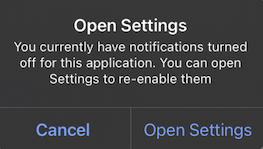 * `optedIn`: Mevcut push abonelik durumu abone olundu ise `true` döndürür, aksi takdirde `false`. Push belirteci geçerliyse ancak `optOut()` çağrıldıysa, bu `false` döndürür.
```kotlin Kotlin theme={null}
OneSignal.User.pushSubscription.optOut()
OneSignal.User.pushSubscription.optIn()
val optedIn = OneSignal.User.pushSubscription.optedIn
```
```java Java theme={null}
OneSignal.getUser().getPushSubscription().optOut();
OneSignal.getUser().getPushSubscription().optIn();
Boolean optedIn = OneSignal.getUser().getPushSubscription().getOptedIn();
```
```swift Swift theme={null}
OneSignal.User.pushSubscription.optOut()
OneSignal.User.pushSubscription.optIn()
let optedIn: Bool = OneSignal.User.pushSubscription.optedIn
```
```objc Objective-C theme={null}
[OneSignal.User.pushSubscription optOut];
[OneSignal.User.pushSubscription optIn];
Boolean optedIn = OneSignal.User.subscriptions.push.optedIn;
```
```csharp C# theme={null}
OneSignal.User.PushSubscription.OptOut();
OneSignal.User.PushSubscription.OptIn();
OneSignal.User.PushSubscription.OptedIn;
```
```javascript React Native theme={null}
OneSignal.User.pushSubscription.optOut();
OneSignal.User.pushSubscription.optIn();
await OneSignal.User.pushSubscription.getOptedInAsync();
```
```dart Flutter theme={null}
OneSignal.User.pushSubscription.optOut();
OneSignal.User.pushSubscription.optIn();
OneSignal.User.pushSubscription.optedIn;
```
```javascript Cordova/Ionic theme={null}
// Ionic
OneSignal.User.pushSubscription.optOut();
OneSignal.User.pushSubscription.optIn();
await OneSignal.User.pushSubscription.getOptedInAsync();
// Cordova
window.plugins.OneSignal.User.pushSubscription.optOut();
window.plugins.OneSignal.User.pushSubscription.optIn();
await window.plugins.OneSignal.User.pushSubscription.getOptedInAsync();
```
### `addEmail()`, `removeEmail()`
Mevcut kullanıcıya/kullanıcıdan bir e-posta Aboneliği (e-posta adresi) ekler veya kaldırır. Doğru kullanıcı bağlamını ayarlamak için `login()` sonrasında `addEmail` çağırın. [Kimlik Doğrulama](./identity-verification) ile uyumludur.
```kotlin Kotlin theme={null}
OneSignal.User.addEmail("example@email.com")
OneSignal.User.removeEmail("example@email.com")
```
```java Java theme={null}
OneSignal.getUser().addEmail("example@email.com")
OneSignal.getUser().removeEmail("example@email.com")
```
```swift Swift theme={null}
OneSignal.User.addEmail("example@email.com")
OneSignal.User.removeEmail("example@email.com")
```
```objc Objective-C theme={null}
[OneSignal.User addEmail:@"example@email.com"];
[OneSignal.User removeEmail:@"example@email.com"];
```
```csharp C# theme={null}
OneSignal.User.AddEmail("example@email.com");
OneSignal.User.RemoveEmail("example@email.com");
```
```javascript React Native theme={null}
OneSignal.User.addEmail("example@email.com");
OneSignal.User.removeEmail("example@email.com");
```
```dart Flutter theme={null}
OneSignal.User.addEmail("example@email.com");
OneSignal.User.removeEmail("example@email.com");
```
```javascript Cordova/Ionic theme={null}
// Ionic
OneSignal.User.addEmail("example@email.com");
OneSignal.User.removeEmail("example@email.com");
// Cordova
window.plugins.OneSignal.User.addEmail("example@email.com");
window.plugins.OneSignal.User.removeEmail("example@email.com");
```
### `addSms()`, `removeSms()`
Mevcut kullanıcıya/kullanıcıdan bir SMS Aboneliği (telefon numarası) ekler veya kaldırır. [E.164 formatı](https://www.twilio.com/docs/glossary/what-e164) gerektirir. Doğru kullanıcı bağlamını ayarlamak için `login()` sonrasında `addSms` çağırın. [Kimlik Doğrulama](./identity-verification) ile uyumludur.
```kotlin Kotlin theme={null}
OneSignal.User.addSms("+15558675309")
OneSignal.User.removeSms("+15558675309")
```
```java Java theme={null}
OneSignal.getUser().addSms("+15558675309")
OneSignal.getUser().removeSms("+15558675309")
```
```swift Swift theme={null}
OneSignal.User.addSms("+15558675309")
OneSignal.User.removeSms("+15558675309")
```
```objc Objective-C theme={null}
[OneSignal.User addSms:@"+15558675309"];
[OneSignal.User removeSms:@"+15558675309"];
```
```csharp C# theme={null}
OneSignal.User.AddSms("+15558675309");
OneSignal.User.RemoveSms("+15558675309");
```
```javascript React Native theme={null}
OneSignal.User.addSms("+15558675309");
OneSignal.User.removeSms("+15558675309");
```
```dart Flutter theme={null}
OneSignal.User.addSms("+15558675309");
OneSignal.User.removeSms("+15558675309");
```
```javascript Cordova/Ionic theme={null}
// Ionic
OneSignal.User.addSms("+15558675309");
OneSignal.User.removeSms("+15558675309");
// Cordova
window.plugins.OneSignal.User.addSms("+15558675309");
window.plugins.OneSignal.User.removeSms("+15558675309");
```
***
## Push izinleri
### `requestPermission(fallbackToSettings)` *push*
Kullanıcıdan push bildirim izni isteyen yerel sistem istemini gösterir. İsteğe bağlı olarak ayarlar uygulamasına bağlantı veren bir yedek istem etkinleştirin.
* `fallbackToSettings`: `true` ise, kullanıcı işletim sisteminin sınırından fazla push izinlerini reddettiyse (iOS'ta bir kez, Android'de iki kez) yedek istem görüntülenir.
Daha fazla bilgi için [Push İzinleri için İstem](./prompt-for-push-permissions) sayfasına bakın.
```kotlin Kotlin theme={null}
// We recommend removing this method after testing and instead use In-App Messages to prompt for notification permission.
// Passing true will fallback to setting prompt if the user denies push permissions
OneSignal.Notifications.requestPermission(true)
```
```java Java theme={null}
// We recommend removing this method after testing and instead use In-App Messages to prompt for notification permission.
// Passing true will fallback to setting prompt if the user denies push permissions
OneSignal.getNotifications().requestPermission(Continue.with(r -> {
if (r.isSuccess()) {
if (r.getData()) {
// `requestPermission` completed successfully and the user has accepted permission
}
else {
// `requestPermission` completed successfully but the user has rejected permission
}
}
else {
// `requestPermission` completed unsuccessfully, check `r.getThrowable()` for more info on the failure reason
}
}));
```
```swift Swift theme={null}
// We recommend removing this method after testing and instead use In-App Messages to prompt for notification permission.
// Passing true will fallback to setting prompt if the user denies push permissions
OneSignal.Notifications.requestPermission({ accepted in
print("User accepted notifications: \(accepted)")
}, fallbackToSettings: true)
```
```objc Objective-C theme={null}
// We recommend removing this method after testing and instead use In-App Messages to prompt for notification permission.
// Passing true will fallback to setting prompt if the user denies push permissions
[OneSignal.Notifications requestPermission:^(BOOL accepted) {
NSLog(@"User accepted notifications: %d", accepted);
} fallbackToSettings:true];
```
```csharp C# theme={null}
// We recommend removing this method after testing and instead use In-App Messages to prompt for notification permission.
// Passing true will fallback to setting prompt if the user denies push permissions
var result = await OneSignal.Notifications.RequestPermissionAsync(true);
if (result)
{
// Notification permission was accepted.
}
else
{
// Notification permission was denied.
}
```
```javascript React Native theme={null}
// We recommend removing this method after testing and instead use In-App Messages to prompt for notification permission.
// Passing true will fallback to setting prompt if the user denies push permissions
OneSignal.Notifications.requestPermission(true);
```
```dart Flutter theme={null}
// We recommend removing this method after testing and instead use In-App Messages to prompt for notification permission.
// Passing true will fallback to setting prompt if the user denies push permissions
OneSignal.Notifications.requestPermission(true);
```
```javascript Cordova/Ionic theme={null}
// Ionic
// We recommend removing this method after testing and instead use In-App Messages to prompt for notification permission.
// Passing true will fallback to setting prompt if the user denies push permissions
OneSignal.Notifications.requestPermission(true).then((accepted) => {
console.log("User accepted notifications: " + accepted);
});
// Cordova
// We recommend removing this method after testing and instead use In-App Messages to prompt for notification permission.
// Passing true will fallback to setting prompt if the user denies push permissions
window.plugins.OneSignal.Notifications.requestPermission(true).then((accepted) => {
console.log("User accepted notifications: " + accepted);
});
```
### `addPermissionObserver()` *push*
Şu gibi push izin değişikliklerini izlemek için bu metodu kullanın:
* Bildirim izin istemi kullanıcıya görüntülenir.
* Kullanıcı izin istemini kabul eder veya reddeder.
* Kullanıcı cihazın uygulama ayarlarında uygulamanız için bildirimleri etkinleştirir veya devre dışı bırakır ve ardından uygulamanıza geri döner.
Bu olduğunda, SDK `onOSPermissionChanged` olayını tetikler. Dinleyiciniz, neyin tam olarak değiştiğini tespit edebilmeniz için `from` ve `to` değerlerini içeren bir durum nesnesi alır.
Güncellemeleri dinlemeyi durdurmak için ilişkili `removePermissionObserver()` metodunu çağırın.
```kotlin Kotlin theme={null}
class MyObserver : IPermissionObserver {
init {
OneSignal.Notifications.addPermissionObserver(this)
}
override fun onNotificationPermissionChange(granted: Boolean) {
if (granted) {
// Notifications are now enabled
}
}
fun cleanup() {
OneSignal.Notifications.removePermissionObserver(this)
}
}
```
```java Java theme={null}
public class MainActivity extends Activity implements IPermissionObserver {
protected void onCreate(Bundle savedInstanceState) {
OneSignal.getNotifications().addPermissionObserver(this);
}
@Override
public void onNotificationPermissionChange(boolean granted) {
if (granted) {
// Notifications are now enabled
}
}
@Override
protected void onDestroy() {
OneSignal.getNotifications().removePermissionObserver(this);
super.onDestroy();
}
}
```
```swift Swift theme={null}
class AppDelegate: UIResponder, UIApplicationDelegate, OSNotificationPermissionObserver {
func application(_ application: UIApplication,
didFinishLaunchingWithOptions launchOptions: [UIApplication.LaunchOptionsKey: Any]?) -> Bool {
OneSignal.Notifications.addPermissionObserver(self)
return true
}
func onNotificationPermissionDidChange(_ granted: Bool) {
print("Notification permission changed: \(granted)")
}
func cleanup() {
OneSignal.Notifications.removePermissionObserver(self)
}
}
```
```objc Objective-C theme={null}
// AppDelegate.h
@interface AppDelegate : UIResponder
@end
// AppDelegate.m
@implementation AppDelegate
- (BOOL)application:(UIApplication *)application didFinishLaunchingWithOptions:(NSDictionary *)launchOptions {
[OneSignal.Notifications addPermissionObserver:self];
return YES;
}
- (void)onNotificationPermissionDidChange:(BOOL)granted {
NSLog(@"Permission changed: %d", granted);
}
- (void)cleanup {
[OneSignal.Notifications removePermissionObserver:self];
}
@end
```
```csharp C# theme={null}
OneSignal.Notifications.PermissionChanged += (sender, e) =>
{
// Respond to permission change
};
```
```javascript React Native theme={null}
const onPermissionChange = (granted) => {
console.log('Permission changed:', granted);
};
OneSignal.Notifications.addEventListener('permissionChange', onPermissionChange);
// Remove later if needed
OneSignal.Notifications.removeEventListener('permissionChange', onPermissionChange);
```
```dart Flutter theme={null}
final observer = (bool hasPermission) {
print("Notification permission: $hasPermission");
};
OneSignal.Notifications.addPermissionObserver(observer);
// Remove later if needed
OneSignal.Notifications.removePermissionObserver(observer);
```
```javascript Cordova/Ionic theme={null}
const listener = (granted) => {
console.log("Push permission changed:", granted);
};
// Ionic
OneSignal.Notifications.addEventListener("permissionChange", listener);
// Remove later if needed
OneSignal.Notifications.removeEventListener("permissionChange", listener);
// Cordova
window.plugins.OneSignal.Notifications.addEventListener("permissionChange", listener);
// Remove later if needed
window.plugins.OneSignal.Notifications.removeEventListener("permissionChange", listener);
```
### `getPermission()`, `getCanRequestPermission()`
`getPermission()`, uygulama düzeyinde mevcut push izin durumunu döndürür. Kullanıcılar ve Abonelikler API'lerinde `optOut()` veya `enabled` parametresi aracılığıyla değiştirdiyseniz OneSignal düzeyinde abonelik durumunu dikkate almaz. `getPermission()` kullanmak yerine, uygulama çalışırken cihazın bildirim izin durumundaki değişiklikleri izlemek için [Push İzin Gözlemcisini](#addpermissionobserver-push) veya push abonelik durumundaki değişiklikleri izlemek için [Push Abonelik Gözlemcisini](#addobserver-push-subscription-changes) kullanmanızı öneririz.
`getCanRequestPermission()`, izin isteme girişiminin kullanıcıya bir istemin gösterilmesiyle sonuçlanıp sonuçlanmayacağını döndürür. `false` ise, kullanıcı zaten izni reddetmiştir ve ya yedek istem gösterilebilir ya da hiç istem gösterilmez. Daha fazla bilgi için [Push izinleri için istem](./prompt-for-push-permissions) sayfasına bakın.
```kotlin Kotlin theme={null}
// true if the app has permission to display notifications
OneSignal.Notifications.permission
// true if the device can display system notification permission prompt
val canRequest: Boolean = OneSignal.Notifications.canRequestPermission
```
```java Java theme={null}
// true if the app has permission to display notifications
OneSignal.getNotifications().getPermission();
// true if the device can display system notification permission prompt
OneSignal.getNotifications().getCanRequestPermission();
```
```swift Swift theme={null}
// true if the app has permission to display notifications
OneSignal.Notifications.permission
// true if the device can display system notification permission prompt
OneSignal.Notifications.canRequestPermission
```
```objc Objective-C theme={null}
// true if the app has permission to display notifications
[OneSignal.Notifications permission];
// true if the device can display system notification permission prompt
[OneSignal.Notifications canRequestPermission];
```
```csharp C# theme={null}
// true if the app has permission to display notifications
bool permission = OneSignal.Notifications.Permission;
// true if the device can display system notification permission prompt
bool canRequest = OneSignal.Notifications.CanRequestPermission;
```
```javascript React Native theme={null}
// true if the app has permission to display notifications
await OneSignal.Notifications.getPermissionAsync();
// true if the device can display system notification permission prompt
await OneSignal.Notifications.canRequestPermissionAsync();
```
```dart Flutter theme={null}
// true if the app has permission to display notifications
var permission = OneSignal.Notifications.permission;
// true if the device can display system notification permission prompt
var canRequest = OneSignal.Notifications.canRequestPermission;
```
```javascript Cordova/Ionic theme={null}
// Ionic
// true if the app has permission to display notifications
await OneSignal.Notifications.getPermissionAsync();
// true if the device can display system notification permission prompt
await OneSignal.Notifications.canRequestPermissionAsync();
// Cordova
// true if the app has permission to display notifications
await window.plugins.OneSignal.Notifications.getPermissionAsync();
// true if the device can display system notification permission prompt
await window.plugins.OneSignal.Notifications.canRequestPermissionAsync();
```
#### `permissionNative` *iOS*
iOS cihazının yerel izni için bir enum döndürür. Şunlardan biri olacaktır:
* `0` = NotDetermined (Belirlenmedi)
* `1` = Denied (Reddedildi)
* `2` = Authorized (Yetkilendirildi)
* `3` = Provisional (yalnızca iOS 12+ sürümlerinde kullanılabilir)
* `4` = Ephemeral (yalnızca iOS 14+ sürümlerinde kullanılabilir)
```swift Swift theme={null}
let permissionNative: OSNotificationPermission = OneSignal.Notifications.permissionNative.rawValue
```
```objectivec Objective-C theme={null}
OSNotificationPermission permissionNative = [OneSignal.Notifications permissionNative]
```
```csharp C# theme={null}
NotificationPermission PermissionNative
```
```javascript React Native theme={null}
await OneSignal.Notifications.permissionNative()
```
```dart Flutter theme={null}
var permissionNative = await OneSignal.Notifications.permissionNative()
```
```javascript Cordova/Ionic theme={null}
// Ionic
await OneSignal.Notifications.permissionNative()
// Cordova
await window.plugins.OneSignal.Notifications.permissionNative()
```
## Push bildirim olayları
### `addClickListener()` *push*
Kullanıcı uygulamayı açan bir push bildirimine tıkladığında çalışan bir geri çağırma ayarlar.
Bu olay tetiklendiğinde uygulamanın etkinliği veya sahnesi zaten başlatılmıştır. Herhangi bir özel mantık gerçekleştirmek için bu işleyiciyi kullanın — uygulama navigasyonunu manuel olarak yeniden başlatmayın veya çoğaltmayın.
Flutter Uygulamaları için, uygulama zorla kapatılırsa ve bir bildirime tıklarsanız, uygulama açılmaz ve Click Listener `Debug` modunda kaydedilmez. Bunu düzeltmek için şunlardan birini yapabilirsiniz:
* Flutter aracılığıyla release derlemesi kullanın, örneğin `flutter run --release` (fiziksel cihaz gerektirir)
* Xcode şemasını `Debug` yerine `Release` olarak güncelleyin
İşleyici artık gerekmediğinde dinlemeyi durdurmak için `removeClickListener()` veya `removeEventListener()` kullanın.
```kotlin Kotlin theme={null}
val clickListener = object : INotificationClickListener {
override fun onClick(event: INotificationClickEvent) {
Log.d("OneSignal", "Notification clicked: ${event.notification.title}")
}
}
OneSignal.Notifications.addClickListener(clickListener)
```
```java Java theme={null}
OneSignal.getNotifications().addClickListener(event -> {
Log.v(Tag.LOG_TAG, "INotificationClickListener.onClick fired" +
" with event: " + event);
});
```
```swift Swift theme={null}
class AppDelegate: UIResponder, UIApplicationDelegate, OSNotificationClickListener {
func application(_ application: UIApplication,
didFinishLaunchingWithOptions launchOptions: [UIApplication.LaunchOptionsKey: Any]?) -> Bool {
OneSignal.Notifications.addClickListener(self)
return true
}
func onClick(event: OSNotificationClickEvent) {
print("Notification clicked: \(event.jsonRepresentation())")
}
}
```
```objc Objective-C theme={null}
// AppDelegate.h
@interface AppDelegate : UIResponder
@end
// AppDelegate.m
@implementation AppDelegate
- (BOOL)application:(UIApplication*)application didFinishLaunchingWithOptions:(NSDictionary *)launchOptions {
[OneSignal.Notifications addClickListener:self];
return YES;
}
- (void)onClickNotification:(OSNotificationClickEvent *)event {
NSLog(@"Notification clicked: %@", [event jsonRepresentation]);
}
@end
```
```csharp C# theme={null}
OneSignal.Notifications.Clicked += (sender, e) => {
var RawPayload = e.Notification.RawPayload;
Console.WriteLine("Notification clicked: " + RawPayload);
};
```
```javascript React Native theme={null}
OneSignal.Notifications.addEventListener('click', (event) => {
console.log('OneSignal: notification clicked:', event);
});
```
```dart Flutter theme={null}
OneSignal.Notifications.addClickListener((event) {
print('Notification clicked: ${event}');
});
```
```javascript Cordova/Ionic theme={null}
const myClickListener = (event) => {
console.log("Notification clicked:", JSON.stringify(event));
};
// Ionic
OneSignal.Notifications.addEventListener("click", myClickListener);
// Cordova
window.plugins.OneSignal.Notifications.addEventListener("click", myClickListener);
```
### `addForegroundLifecycleListener()` *push*
Uygulama ön planda olduğunda bildirimlerin nasıl davrandığını kesmenize ve kontrol etmenize olanak tanır.
Varsayılan olarak, OneSignal bildirimi otomatik olarak görüntüler. Bu davranışı `event.preventDefault()` kullanarak geçersiz kılabilir ve şunları yapabilirsiniz:
* Bildirimi bastırma
* Özelleştirme
* Eşzamansız mantık için görüntülemeyi geciktirme (örneğin, kullanıcı durumunu alma, olayları kaydetme)
Daha sonra manuel olarak göstermek için `event.notification.display()` çağırın.
Bu, görüntülemeden önce yükü değiştiren [Bildirim Hizmeti Uzantılarından](./service-extensions) **sonra** çalışır.
İşleyici artık gerekmediğinde dinlemeyi durdurmak için `removeForegroundLifecycleListener()` veya `removeEventListener()` kullanın.
```kotlin Kotlin theme={null}
val lifecycleListener = object : INotificationLifecycleListener {
override fun onWillDisplay(event: INotificationWillDisplayEvent) {
Log.d("OneSignal", "Foreground notification: ${event.notification.title}")
// Uncomment to prevent the notification from being displayed while in the foreground
// event.preventDefault()
}
}
OneSignal.Notifications.addForegroundLifecycleListener(lifecycleListener)
```
```java Java theme={null}
OneSignal.getNotifications().addForegroundLifecycleListener(new INotificationLifecycleListener() {
@Override
public void onWillDisplay(@NonNull INotificationWillDisplayEvent event) {
Log.d("OneSignal", "Foreground notification received: " + event.getNotification().getTitle());
// Uncomment to prevent the notification from being displayed while in the foreground
// event.preventDefault();
}
});
```
```swift Swift theme={null}
class AppDelegate: UIResponder, UIApplicationDelegate, OSNotificationLifecycleListener {
func application(_ application: UIApplication,
didFinishLaunchingWithOptions launchOptions: [UIApplication.LaunchOptionsKey: Any]?) -> Bool {
OneSignal.Notifications.addForegroundLifecycleListener(self)
return true
}
func onWillDisplay(event: OSNotificationWillDisplayEvent) {
print("Foreground notification: \(event.notification.title ?? "No Title")")
// Uncomment to prevent the notification from being displayed while in the foreground
// event.preventDefault()
}
}
```
```objc Objective-C theme={null}
@implementation AppDelegate
- (BOOL)application:(UIApplication*)application didFinishLaunchingWithOptions:(NSDictionary *)launchOptions {
[OneSignal.Notifications addForegroundLifecycleListener:self];
return YES;
}
- (void)onWillDisplayNotification:(OSNotificationWillDisplayEvent *)event {
NSLog(@"Foreground notification: %@", event.notification.title);
// Uncomment to prevent the notification from being displayed while in the foreground
// [event preventDefault];
}
@end
```
```csharp C# theme={null}
OneSignal.Notifications.ForegroundWillDisplay += (sender, e) =>
{
Console.WriteLine("Foreground notification: " + e.Notification.RawPayload);
// Uncomment to prevent the notification from being displayed while in the foreground
// e.PreventDefault();
};
```
```javascript React Native theme={null}
OneSignal.Notifications.addEventListener('foregroundWillDisplay', (event) => {
console.log("Foreground notification:", event.getNotification().title);
// Uncomment to prevent the notification from being displayed while in the foreground
// event.preventDefault();
});
```
```dart Flutter theme={null}
OneSignal.Notifications.addForegroundWillDisplayListener((event) {
print("Foreground notification: ${event.notification.title}");
// Uncomment to prevent the notification from being displayed while in the foreground
// event.preventDefault();
});
```
```javascript Cordova/Ionic theme={null}
const myLifecyleListener = function(event) {
console.log("Foreground notification:", event.notification.title);
// Uncomment to prevent the notification from being displayed while in the foreground
// event.preventDefault();
};
// Ionic
OneSignal.Notifications.addEventListener("foregroundWillDisplay", myLifecyleListener);
// Cordova
window.plugins.OneSignal.Notifications.addEventListener("foregroundWillDisplay", myLifecyleListener);
```
### `clearAllNotifications()`
Removes all OneSignal notifications from the Notification Shade. Use instead of Android's `android.app.NotificationManager.cancel`. Otherwise, the notifications will be restored when your app is restarted.
```kotlin Kotlin theme={null}
OneSignal.Notifications.clearAllNotifications()
```
```java Java theme={null}
OneSignal.getNotifications.clearAllNotifications();
```
```swift Swift theme={null}
OneSignal.Notifications.clearAll()
```
```objc Objective-C theme={null}
[OneSignal.Notifications clearAll];
```
```csharp C# theme={null}
OneSignal.Notifications.ClearAllNotifications();
```
```javascript React Native theme={null}
OneSignal.Notifications.clearAll();
```
```dart Flutter theme={null}
OneSignal.Notifications.clearAll();
```
```javascript Cordova/Ionic theme={null}
// Ionic
OneSignal.Notifications.clearAll();
// Cordova
window.plugins.OneSignal.Notifications.clearAll();
```
#### `removeNotification()` *Android*
Android bildirim kimliğine dayalı olarak tek bir bildirimi iptal eder.
Android'in `android.app.NotificationManager.cancel` yerine kullanın. Aksi takdirde, uygulamanız yeniden başlatıldığında bildirim geri yüklenecektir.
```kotlin Kotlin theme={null}
OneSignal.Notifications.removeNotification(id)
```
```java Java theme={null}
OneSignal.getNotifications().removeNotification(id);
```
```csharp C# theme={null}
OneSignal.Notifications.RemoveNotification(id);
```
```javascript React Native theme={null}
OneSignal.Notifications.removeNotification(id);
```
```dart Flutter theme={null}
OneSignal.Notifications.removeNotification(id);
```
```javascript Cordova/Ionic theme={null}
// Ionic
OneSignal.Notifications.removeNotification(id);
// Cordova
window.plugins.OneSignal.Notifications.removeNotification(id);
```
#### `removeGroupedNotifications()` *Android*
Cancel a group of OneSignal notifications with the provided group key. Grouping notifications is a OneSignal concept. There is no `android.app.NotificationManager` equivalent.
```kotlin Kotlin theme={null}
OneSignal.Notifications.removeGroupedNotifications("GROUP_KEY")
```
```java Java theme={null}
OneSignal.getNotifications().removeGroupedNotifications("GROUP_KEY");
```
```csharp C# theme={null}
OneSignal.Notifications.RemoveGroupedNotifications("GROUP_KEY");
```
```javascript React Native theme={null}
OneSignal.Notifications.removeGroupedNotifications("GROUP_KEY");
```
```dart Flutter theme={null}
OneSignal.Notifications.removeGroupedNotifications("GROUP_KEY");
```
```javascript Cordova/Ionic theme={null}
// Ionic
OneSignal.Notifications.removeGroupedNotifications("GROUP_KEY");
// Cordova
window.plugins.OneSignal.Notifications.removeGroupedNotifications("GROUP_KEY");
```
***
## Uygulama İçi Mesajlar
Uygulama içi mesajlar herhangi bir kod gerektirmez; ancak SDK, mesajların ne zaman sunulacağını özelleştirmenize ve yaşam döngüsü olaylarını yönetmenize olanak tanır.
### `addTrigger()`, `addTriggers()`
Tek veya birden fazla tetikleyiciye dayalı olarak bir Uygulama İçi Mesajın ne zaman görüntüleneceğine karar verin. Daha fazla bilgi için [Tetikleyiciler](./iam-triggers) sayfasına bakın.
Tetikleyiciler arka uca kalıcı olarak kaydedilmez. Yalnızca yerel cihazda bulunurlar ve mevcut kullanıcı için geçerlidir.
```kotlin Kotlin theme={null}
OneSignal.InAppMessages.addTrigger("KEY", "VALUE")
OneSignal.InAppMessages.addTriggers(mapOf("KEY_01" to "VALUE_01", "KEY_02" to "VALUE_02"))
```
```java Java theme={null}
OneSignal.getInAppMessages().addTrigger("KEY", "VALUE");
OneSignal.getInAppMessages().addTriggers(new HashMap() {{
put("KEY_01","VALUE_01");
put("KEY_02", "VALUE_02");
}});
```
```swift Swift theme={null}
OneSignal.InAppMessages.addTrigger("KEY", withValue: "VALUE")
OneSignal.InAppMessages.addTriggers(["KEY_01": "VALUE_01", "KEY_02": "VALUE_02"])
```
```objc Objective-C theme={null}
[OneSignal.InAppMessages addTrigger:@"KEY" withValue:@"VALUE"];
[OneSignal.InAppMessages addTriggers:@{@"KEY_01": @"VALUE_01", @"KEY_02": @"VALUE_02"}];
```
```csharp C# theme={null}
OneSignal.InAppMessages.AddTrigger("KEY", "VALUE");
OneSignal.InAppMessages.AddTriggers(new Dictionary {
{ "KEY_01", "VALUE_01" },
{ "KEY_02", "VALUE_02" }
});
```
```javascript React Native theme={null}
OneSignal.InAppMessages.addTrigger("KEY", "VALUE");
OneSignal.InAppMessages.addTriggers({
"KEY_01": "VALUE_01",
"KEY_02": "VALUE_02"
});
```
```dart Flutter theme={null}
OneSignal.InAppMessages.addTrigger("KEY", "VALUE");
OneSignal.InAppMessages.addTriggers({
"KEY_01": "VALUE_01",
"KEY_02": "VALUE_02"
});
```
```javascript Cordova/Ionic theme={null}
// Ionic
OneSignal.InAppMessages.addTrigger("KEY", "VALUE");
OneSignal.InAppMessages.addTriggers({"KEY_01":"VALUE_01", "KEY_02":"VALUE_02"});
// Cordova
window.plugins.OneSignal.InAppMessages.addTrigger("KEY", "VALUE");
window.plugins.OneSignal.InAppMessages.addTriggers({"KEY_01":"VALUE_01", "KEY_02":"VALUE_02"});
```
### `removeTrigger()`, `removeTriggers()`, `clearTriggers()`
Sağlanan anahtarla mevcut kullanıcıdan tek, birden fazla veya tüm tetikleyicileri kaldırır.
```kotlin Kotlin theme={null}
OneSignal.InAppMessages.removeTrigger("KEY")
OneSignal.InAppMessages.removeTriggers(setOf("KEY_01", "KEY_02"))
OneSignal.InAppMessages.clearTriggers()
```
```java Java theme={null}
OneSignal.getInAppMessages().removeTrigger("KEY");
OneSignal.getInAppMessages().removeTriggers(Arrays.asList("KEY_01", "KEY_02"));
OneSignal.getInAppMessages().clearTriggers();
```
```swift Swift theme={null}
OneSignal.InAppMessages.removeTrigger("KEY")
OneSignal.InAppMessages.removeTriggers(["KEY_01", "KEY_02"])
OneSignal.InAppMessages.clearTriggers()
```
```objc Objective-C theme={null}
[OneSignal.InAppMessages removeTrigger:@"KEY"];
[OneSignal.InAppMessages removeTriggers:@[@"KEY_01", @"KEY_02"]];
[OneSignal.InAppMessages clearTriggers];
```
```csharp C# theme={null}
OneSignal.InAppMessages.RemoveTrigger("KEY");
OneSignal.InAppMessages.RemoveTriggers(new List { "KEY_01", "KEY_02" });
OneSignal.InAppMessages.ClearTriggers();
```
```javascript React Native theme={null}
OneSignal.InAppMessages.removeTrigger("KEY");
OneSignal.InAppMessages.removeTriggers(["KEY_01", "KEY_02"]);
OneSignal.InAppMessages.clearTriggers();
```
```dart Flutter theme={null}
OneSignal.InAppMessages.removeTrigger("KEY");
OneSignal.InAppMessages.removeTriggers(["KEY_01", "KEY_02"]);
OneSignal.InAppMessages.clearTriggers();
```
```javascript Cordova/Ionic theme={null}
// Ionic
OneSignal.InAppMessages.removeTrigger("KEY");
OneSignal.InAppMessages.removeTriggers(["KEY_01", "KEY_02"]);
OneSignal.InAppMessages.clearTriggers();
// Cordova
window.plugins.OneSignal.InAppMessages.removeTrigger("KEY");
window.plugins.OneSignal.InAppMessages.removeTriggers(["KEY_01", "KEY_02"]);
window.plugins.OneSignal.InAppMessages.clearTriggers();
```
### `paused`
Uygulama içi mesajların kullanıcıya görüntülenmesini engeller. `true` olarak ayarlandığında, hiçbir uygulama içi mesaj sunulmaz. `false` olarak ayarlandığında, kullanıcının uygun olduğu herhangi bir mesaj uygun zamanda kendilerine sunulur.
```kotlin Kotlin theme={null}
OneSignal.InAppMessages.paused = true
```
```java Java theme={null}
OneSignal.getInAppMessages().setPaused(true);
```
```swift Swift theme={null}
OneSignal.InAppMessages.paused = true
// Get `paused` state
let paused = OneSignal.InAppMessages.paused
```
```objc Objective-C theme={null}
[OneSignal.InAppMessages paused:true];
// Get `paused` state
BOOL paused = [OneSignal.InAppMessages paused];
```
```csharp C# theme={null}
OneSignal.InAppMessages.Paused = true;
```
```javascript React Native theme={null}
OneSignal.InAppMessages.setPaused(true);
```
```dart Flutter theme={null}
OneSignal.InAppMessages.paused(true);
```
```javascript Cordova/Ionic theme={null}
// Ionic
OneSignal.InAppMessages.setPaused(true);
// Cordova
window.plugins.OneSignal.InAppMessages.setPaused(true);
```
### `addLifecycleListener()`
Görüntülenen ve kapatılan Uygulama İçi Mesajlara yanıt verir veya bunları izler.
```kotlin Kotlin theme={null}
val lifecycleListener = object : IInAppMessageLifecycleListener {
override fun onWillDisplay(event: IInAppMessageWillDisplayEvent) {
print(event.message.messageId)
}
override fun onDidDisplay(event: IInAppMessageDidDisplayEvent) {
print(event.message.messageId)
}
override fun onWillDismiss(event: IInAppMessageWillDismissEvent) {
print(event.message.messageId)
}
override fun onDidDismiss(event: IInAppMessageDidDismissEvent) {
print(event.message.messageId)
}
}
OneSignal.InAppMessages.addLifecycleListener(lifecycleListener)
OneSignal.InAppMessages.removeLifecycleListener(lifecycleListener)
```
```java Java theme={null}
OneSignal.getInAppMessages().addLifecycleListener(new IInAppMessageLifecycleListener() {
@Override
public void onWillDisplay(@NonNull IInAppMessageWillDisplayEvent event) {
Log.v(Tag.LOG_TAG, "onWillDisplayInAppMessage");
}
@Override
public void onDidDisplay(@NonNull IInAppMessageDidDisplayEvent event) {
Log.v(Tag.LOG_TAG, "onDidDisplayInAppMessage");
}
@Override
public void onWillDismiss(@NonNull IInAppMessageWillDismissEvent event) {
Log.v(Tag.LOG_TAG, "onWillDismissInAppMessage");
}
@Override
public void onDidDismiss(@NonNull IInAppMessageDidDismissEvent event) {
Log.v(Tag.LOG_TAG, "onDidDismissInAppMessage");
}
});
```
```swift Swift theme={null}
// AppDelegate.swift
// Add OSInAppMessageLifecycleListener as an implemented protocol of the class that will handle the In-App Message lifecycle events.
class AppDelegate: UIResponder, UIApplicationDelegate, OSInAppMessageLifecycleListener {
func application(_ application: UIApplication, didFinishLaunchingWithOptions launchOptions: [UIApplicationLaunchOptionsKey: Any]?) -> Bool {
// Add your implementing class as the listener
OneSignal.InAppMessages.addLifecycleListener(self)
}
// Add one or more of the following optional lifecycle methods
func onWillDisplay(event: OSInAppMessageWillDisplayEvent) {
print("OSInAppMessageLifecycleListener: onWillDisplay Message: \(event.message.messageId)")
}
func onDidDisplay(event: OSInAppMessageDidDisplayEvent) {
print("OSInAppMessageLifecycleListener: onDidDisplay Message: \(event.message.messageId)")
}
func onWillDismiss(event: OSInAppMessageWillDismissEvent) {
print("OSInAppMessageLifecycleListener: onWillDismiss Message: \(event.message.messageId)")
}
func onDidDismiss(event: OSInAppMessageDidDisplayEvent) {
print("OSInAppMessageLifecycleListener: onDidDismiss Message: \(event.message.messageId)")
}
}
```
```objc Objective-C theme={null}
// AppDelegate.h
// Add OSInAppMessageLifecycleListener as an implemented protocol of the class that will handle the In-App Message lifecycle events.
@interface AppDelegate : UIResponder
@end
// AppDelegate.m
@implementation AppDelegate
- (BOOL)application:(UIApplication*)application didFinishLaunchingWithOptions:(NSDictionary *)launchOptions {
// Add your implementing class as the listener.
[OneSignal.InAppMessages addLifecycleListener:self];
}
// Add one or more of the following optional lifecycle methods
- (void)onWillDisplayInAppMessage:(OSInAppMessageWillDisplayEvent *)event {
NSLog(@"OSInAppMessageLifecycleListener: onWillDisplay Message: %@", event.message.messageId);
}
- (void)onDidDisplayInAppMessage:(OSInAppMessageDidDisplayEvent *)event {
NSLog(@"OSInAppMessageLifecycleListener: onDidDisplay Message: %@", event.message.messageId);
}
- (void)onWillDismissInAppMessage:(OSInAppMessageWillDismissEvent *)event {
NSLog(@"OSInAppMessageLifecycleListener: onWillDismiss Message: %@", event.message.messageId);
}
- (void)onDidDismissInAppMessage:(OSInAppMessageDidDismissEvent *)event {
NSLog(@"OSInAppMessageLifecycleListener: onDidDismiss Message: %@", event.message.messageId);
}
```
```csharp C# theme={null}
OneSignal.InAppMessages.WillDisplay += (sender, e) =>
{
// Access the in-app message with e.Message
};
OneSignal.InAppMessages.DidDisplay += (sender, e) =>
{
// Access the in-app message with e.Message
};
OneSignal.InAppMessages.WillDismiss += (sender, e) =>
{
// Access the in-app message with e.Message
};
OneSignal.InAppMessages.DidDismiss += (sender, e) =>
{
// Access the in-app message with e.Message
};
```
```javascript React Native theme={null}
OneSignal.InAppMessages.addEventListener('willDisplay', (event) => {
console.log('OneSignal: will display IAM: ', event);
});
OneSignal.InAppMessages.addEventListener('didDisplay', (event) => {
console.log('OneSignal: did display IAM: ', event);
});
OneSignal.InAppMessages.addEventListener('willDismiss', (event) => {
console.log('OneSignal: will dismiss IAM: ', event);
});
OneSignal.InAppMessages.addEventListener('didDismiss', (event) => {
console.log('OneSignal: did dismiss IAM: ', event);
});
```
```dart Flutter theme={null}
OneSignal.InAppMessages.addWillDisplayListener((event) {
print("ON WILL DISPLAY IN APP MESSAGE ${event.message.messageId}");
});
OneSignal.InAppMessages.addDidDisplayListener((event) {
print("ON DID DISPLAY IN APP MESSAGE ${event.message.messageId}");
});
OneSignal.InAppMessages.addWillDismissListener((event) {
print("ON WILL DISMISS IN APP MESSAGE ${event.message.messageId}");
});
OneSignal.InAppMessages.addDidDismissListener((event) {
print("ON DID DISMISS IN APP MESSAGE ${event.message.messageId}");
});
```
```javascript Cordova/Ionic theme={null}
// Define the lifecycle listener functions
let willDisplayListener = async function(event) {
console.log("OneSignal: will display IAM: "+ event.messageId);
};
let didDisplayListener = async function(event) {
console.log("OneSignal: did display IAM: "+ event.messageId);
};
let willDismissListener = async function(event) {
console.log("OneSignal: will dismiss IAM: "+ event.messageId);
};
let didDismissListener = async function(event) {
console.log("OneSignal: did dismiss IAM: "+ event.messageId);
};
// Listeners for each event added separately
// Ionic
OneSignal.InAppMessages.addEventListener("willDisplay", willDisplayListener);
OneSignal.InAppMessages.addEventListener("didDisplay", didDisplayListener);
OneSignal.InAppMessages.addEventListener("willDismiss", willDismissListener);
OneSignal.InAppMessages.addEventListener("didDismiss", didDismissListener);
// Cordova
window.plugins.OneSignal.InAppMessages.addEventListener("willDisplay", willDisplayListener);
window.plugins.OneSignal.InAppMessages.addEventListener("didDisplay", didDisplayListener);
window.plugins.OneSignal.InAppMessages.addEventListener("willDismiss", willDismissListener);
window.plugins.OneSignal.InAppMessages.addEventListener("didDismiss", didDismissListener);
```
### `addClickListener()` *uygulama-içi*
Uygulama içi mesaj tıklama olaylarına yanıt verir. Olay aşağıdaki [tıklama eylemi](./iam-click-actions) meta verilerini içerir:
* `actionId`: Öğe üzerinde ayarladığınız özel bir tanımlayıcı.
* `urlTarget`: Mesaj için başlatma URL'sinin nasıl sunulacağını belirten bir enum.
* `url`: Eylem için başlatma URL'si, varsa.
* `closingMessage`: Eylemin mesajın kapatılmasına neden olup olmadığını gösteren bir boolean değeri.
```kotlin Kotlin theme={null}
val clickListener = object : IInAppMessageClickListener {
override fun onClick(event: IInAppMessageClickEvent) {
print(event.result.actionId)
}
}
OneSignal.InAppMessages.addClickListener(clickListener)
```
```java Java theme={null}
OneSignal.getInAppMessages().addClickListener(new IInAppMessageClickListener() {
@Override
public void onClick(@Nullable IInAppMessageClickEvent event) {
Log.v(Tag.LOG_TAG, "INotificationClickListener.inAppMessageClicked");
}
});
```
```swift Swift theme={null}
class MyInAppMessageClickListener : NSObject, OSInAppMessageClickListener {
func onClick(event: OSInAppMessageClickEvent) {
let messageId = event.message.messageId
print("Message ID: \(messageId)")
let result: OSInAppMessageClickResult = event.result
let actionId = result.actionId
print("Action ID: ",(actionId ?? "no actionId"))
let url = result.url
print("URL: ", (url ?? "No URL"))
let urlTarget: OSInAppMessageActionUrlType = result.urlTarget
print("URL Target: \(urlTarget)")
let closingMessage = result.closingMessage
print("Closing Message: \(closingMessage)")
}
}
// Add your object as a listener
let myListener = MyInAppMessageClickListener()
OneSignal.InAppMessages.addClickListener(myListener)
```
```objc Objective-C theme={null}
// Add this method to object implementing the OSInAppMessageClickListener protocol
- (void)onClickInAppMessage:(OSInAppMessageClickEvent * _Nonnull)event {
NSLog(@"onClickInAppMessage event: %@", [event jsonRepresentation]);
NSString *message = [NSString stringWithFormat:@"In App Message Click Occurred: messageId: %@ actionId: %@ url: %@ urlTarget: %@ closingMessage: %i",
event.message.messageId,
event.result.actionId,
event.result.url,
@(event.result.urlTarget),
event.result.closingMessage];
}
// Add your object as a listener
[OneSignal.InAppMessages addClickListener:self];
```
```csharp C# theme={null}
OneSignal.InAppMessages.Clicked += (sender, e) =>
{
// Access the in-app message with e.Message and the click result with e.Result
};
```
```javascript React Native theme={null}
OneSignal.InAppMessages.addEventListener('click', (event) => {
console.log('OneSignal IAM clicked:', event);
});
```
```dart Flutter theme={null}
OneSignal.InAppMessages.addClickListener((event) {
print("In App Message Clicked: \n${event.result.jsonRepresentation().replaceAll("\\n", "\n")}");
});
```
```javascript Cordova/Ionic theme={null}
let inAppClickListener = async function(event) {
let clickData = JSON.stringify(event);
console.log("In-App Message Clicked: "+ clickData);
};
// Ionic
OneSignal.InAppMessages.addEventListener("click", inAppClickListener);
// Cordova
window.plugins.OneSignal.InAppMessages.addEventListener("click", inAppClickListener);
```
***
## Canlı Aktivite
Uygulamalar, kullanıcıların Canlı Aktivitelere katılmalarına izin vermelidir. Örneğin, uygulamanız kullanıcıya bir düğme kullanarak veya bir IAM sunarak ABD içinde Canlı Aktiviteyi başlatma seçeneği sunar. Bildirim İzni veya Konum İzninin aksine, açık bir istem olmadan herhangi bir yöntemle bir Canlı Aktivite başlatabilir ve güncelleyebilirsiniz. Canlı Aktiviteler iOS Geçici Yetkilendirme kullanıcı arayüzü ile görünür. Canlı Aktiviteler, uygulamanız ön plandayken başlatılmalıdır. Canlı Aktiviteler hakkında daha fazla bilgi edinmek için [Apple'ın geliştirici yönergelerini](https://developer.apple.com/design/human-interface-guidelines/live-activities) okumanızı öneririz.
### `setup()`
OneSignal'in uygulama adına bir LiveActivity yaşam döngüsünü yönetmesine izin verir. Bu, hem pushToStart belirteç güncellemelerini hem de pushToUpdate belirteç güncellemelerini dinlemeyi içerir.
```swift Swift theme={null}
//... your app's code
OneSignal.LiveActivities.setup(MyWidgetAttributes.self);
```
### `setupDefault()`
Müşteri uygulamasının kendi ActivityAttributes'ını tanımlama ve yönetme ihtiyacını ortadan kaldırarak platformlar arası SDK'ların bir LiveActivity yaşam döngüsünü yönetmesine izin verir. Daha fazla ayrıntı için [Platformlar arası kurulum](./cross-platform-live-activity-setup) sayfasına bakın.
```csharp C# theme={null}
using OneSignalSDK;
//Push To Start
OneSignal.LiveActivities.SetupDefault();
//Launching the Live Activity from within the app (not needed for push to start)
string activityId = "my_activity_id";
OneSignal.LiveActivities.StartDefault(
activityId,
new Dictionary() {
{ "title", "Welcome!" }
},
new Dictionary() {
{ "message", new Dictionary() {
{ "en", "Hello World!"}
}},
});
```
```javascript React Native theme={null}
import { OneSignal } from 'react-native-onesignal'
//Push To Start
OneSignal.LiveActivities.setupDefault()
//Launching the Live Activity from within the app (not needed for push to start)
const activityId = "my_activity_id"
const attributes = { title: "Sample Title" } ;
const content = { message: { en: "message" } };
OneSignal.LiveActivities.startDefault(activityId, attributes, content);
```
```dart Flutter theme={null}
import 'package:onesignal_flutter/onesignal_flutter.dart';
OneSignal.LiveActivities.setupDefault()
//Launching the Live Activity from within the app (not needed for push to start)
const String activityId = "my_activity_id";
OneSignal.LiveActivities.startDefault(activityId!, {
"title": "Welcome!"
}, {
"message": {"en": "Hello World!"},
});
```
```javascript Cordova/Ionic theme={null}
//Ionic
import OneSignal from "onesignal-cordova-plugin";
//Push To Start
OneSignal.LiveActivities.setupDefault();
//Launching the Live Activity from within the app (not needed for push to start)
const activityId = "my_activity_id";
const attributes = { title: "Sample Title" };
const content = { message: { en: "message" } };
OneSignal.LiveActivities.startDefault(activityId, attributes, content);
//Cordova
//Push To Start
window.plugins.OneSignal.LiveActivities.setupDefault();
//Launching the Live Activity from within the app (not needed for push to start)
const activityId = "my_activity_id";
const attributes = { title: "Sample Title" };
const content = { message: { en: "message" } };
window.plugins.OneSignal.LiveActivities.startDefault(
activityId,
attributes,
content
);
```
### `enter()`
Bir Canlı Aktiviteye girme, sunucumuzda bir `activityId`'yi bir Canlı Aktivite **Geçici Push Belirteci** ile ilişkilendirir. Bir veya birden fazla Canlı Aktiviteyi aynı anda güncellemek için [Canlı Aktiviteleri Güncelle](/reference/update-live-activity-api) REST API'sini kullanırken bu tanımlayıcıyı belirtin.
```swift Swift theme={null}
// ... your app's code
let activity = try Activity.request(
attributes: attributes,
contentState: contentState,
pushType: .token)
Task {
for await data in activity.pushTokenUpdates {
let token = data.map {String(format: "%02x", $0)}.joined()
// ... required code for entering a live activity
// Activity ID cannot contain "/" characters
OneSignal.LiveActivities.enter("ACTIVITY_ID", withToken: token)
}
}
```
```csharp C# theme={null}
OneSignal.LiveActivities.EnterAsync("ACTIVITY_ID", token);
```
```csharp .Net theme={null}
var result = OneSignalSDK.DotNet.OneSignal.Default.EnterLiveActivity("ACTIVITY_ID", token);
if(result) {
Console.WriteLine("Success");
}
```
```javascript React Native theme={null}
OneSignal.LiveActivities.enter('ACTIVITY_ID', token, (result) => {
console.log('Results of entering live activity: ', result);
});
```
```dart Flutter theme={null}
OneSignal.LiveActivities.enterLiveActivity("ACTIVITY_ID", token).then((result) {
print("Successfully enter live activity");
}).catchError((error) {
print("Failed to enter live activity with error: $error");
});
```
```javascript Cordova/Ionic theme={null}
//Ionic
OneSignal.LiveActivities.enter("ACTIVITY_ID", token, (result) => {
console.log("Results of entering live activity: ", result);
});
//Cordova
window.plugins.OneSignal.LiveActivities.enter("ACTIVITY_ID", token, (result) => {
console.log("Results of entering live activity: ", result);
});
```
### `exit()`
Bir Canlı aktiviteden çıkma, sunucumuzda bir Aktivite Tanımlayıcısı ile Canlı Aktivite push belirteci arasındaki ilişkiyi siler.
```swift Swift theme={null}
OneSignal.LiveActivities.exit("ACTIVITY_ID")
```
```csharp C# theme={null}
OneSignal.LiveActivities.ExitAsync("ACTIVITY_ID");
```
```csharp .Net theme={null}
OneSignalSDK.DotNet.OneSignal.Default.ExitLiveActivity("ACTIVITY_ID");
```
```javascript React Native theme={null}
OneSignal.LiveActivities.exit('ACTIVITY_ID', (result) => {
console.log('Results of exiting live activity: ', result);
});
```
```dart Flutter theme={null}
OneSignal.LiveActivities.exit("ACTIVITY_ID").then((result) {
print("Successfully exit live activity");
}).catchError((error) {
print("Failed to exit live activity: $error");
});
```
```javascript Cordova/Ionic theme={null}
window.plugins.OneSignal.LiveActivities.exit("ACTIVITY_ID", (result) => {
console.log("Results of exiting live activity: ", result);
});
```
### `setPushToStartToken()`
Canlı aktiviteleri başlatmak için push için isteğe bağlı "düşük seviyeli" yaklaşım. `ActivityAttribute` yapısını değiştirmeden LiveActivity başlatma ve güncelleme belirteçleri üzerinde hassas kontrol sunar. [Ek ayrıntılar burada mevcuttur](https://github.com/OneSignal/OneSignal-iOS-SDK/pull/1377#:~:text=Alternative%20\(low%20level\)%20method%20to%20setup%20Live%20Activities%20with%20OneSignal)
```swift Swift theme={null}
if #available(iOS 17.2, *) {
// Setup an async task to monitor and send pushToStartToken updates to OneSignalSDK.
Task {
for try await data in Activity.pushToStartTokenUpdates {
let token = data.map {String(format: "%02x", $0)}.joined()
OneSignal.LiveActivities.setPushToStartToken(MyWidgetAttributes.self, withToken: token)
}
}
// Setup an async task to monitor for an activity to be started, for each started activity we
// can then set up an async task to monitor and send updateToken updates to OneSignalSDK.
Task {
for await activity in Activity.activityUpdates {
Task {
for await pushToken in activity.pushTokenUpdates {
let token = pushToken.map {String(format: "%02x", $0)}.joined()
OneSignal.LiveActivities.enter("my-activity-id", withToken: token)
}
}
}
}
}
```
### `removePushToStartToken()`
Bu aktivite türü artık mevcut aboneliğe karşı kaydedilmemesi gerektiğinde aktivite türü başına çağrılır
```swift Swift theme={null}
OneSignal.LiveActivities.removePushToStartToken(MyWidgetAttributes.self)
```
***
## Sonuçlar
Kullanıcılar tarafından gerçekleştirilen eylemleri izleyin ve bunları mesajlara atfedin. Daha fazla ayrıntı için [Sonuçlar](./custom-outcomes) sayfasına bakın.
### `addOutcome()`
Sağlanan adla mevcut oturuma karşı yakalanan bir sonuç ekler.
```kotlin Kotlin theme={null}
OneSignal.Session.addOutcome("OUTCOME_NAME")
```
```java Java theme={null}
OneSignal.getSession().addOutcome("OUTCOME_NAME");
```
```swift Swift theme={null}
OneSignal.Session.addOutcome("OUTCOME_NAME")
```
```objc Objective-C theme={null}
[OneSignal.Session addOutcome:@"OUTCOME_NAME"];
```
```csharp C# theme={null}
OneSignal.Session.AddOutcome("OUTCOME_NAME");
```
```javascript React Native theme={null}
OneSignal.Session.addOutcome("OUTCOME_NAME");
```
```dart Flutter theme={null}
OneSignal.Session.addOutcome("OUTCOME_NAME");
```
```javascript Cordova/Ionic theme={null}
//Ionic
OneSignal.Session.addOutcome("OUTCOME_NAME");
//Cordova
window.plugins.OneSignal.Session.addOutcome("OUTCOME_NAME");
```
### `addUniqueOutcome()`
Sağlanan adla mevcut oturuma karşı yakalanan benzersiz bir sonuç ekler.
```kotlin Kotlin theme={null}
OneSignal.Session.addUniqueOutcome("OUTCOME_NAME")
```
```java Java theme={null}
OneSignal.getSession().addUniqueOutcome("OUTCOME_NAME");
```
```swift Swift theme={null}
OneSignal.Session.addUniqueOutcome("OUTCOME_NAME")
```
```objc Objective-C theme={null}
[OneSignal.Session addUniqueOutcome:@"OUTCOME_NAME"];
```
```csharp C# theme={null}
OneSignal.Session.AddUniqueOutcome("OUTCOME_NAME");
```
```javascript React Native theme={null}
OneSignal.Session.addUniqueOutcome("OUTCOME_NAME");
```
```dart Flutter theme={null}
OneSignal.Session.addUniqueOutcome("OUTCOME_NAME");
```
```javascript Cordova/Ionic theme={null}
//Ionic
OneSignal.Session.addUniqueOutcome("OUTCOME_NAME");
//Cordova
window.plugins.OneSignal.Session.addUniqueOutcome("OUTCOME_NAME");
```
### `addOutcomeWithValue()`
Sağlanan ad ve değerle mevcut oturuma karşı yakalanan bir sonuç ekler.
```kotlin Kotlin theme={null}
OneSignal.Session.addOutcomeWithValue("OUTCOME_NAME", 3.14)
```
```java Java theme={null}
OneSignal.getSession().addOutcomeWithValue("OUTCOME_NAME", 3.14);
```
```swift Swift theme={null}
OneSignal.Session.addOutcomeWithValue("OUTCOME_NAME", 3.14)
```
```objc Objective-C theme={null}
[OneSignal.Session addOutcomeWithValue:@"OUTCOME_NAME" value: 3.14];
```
```csharp C# theme={null}
OneSignal.Session.AddOutcomeWithValue("OUTCOME_NAME", 3.14);
```
```javascript React Native theme={null}
OneSignal.Session.addOutcomeWithValue("OUTCOME_NAME", 3.14);
```
```dart Flutter theme={null}
OneSignal.Session.addOutcomeWithValue("OUTCOME_NAME", 3.14);
```
```javascript Cordova/Ionic theme={null}
//Ionic
OneSignal.Session.addOutcomeWithValue("OUTCOME_NAME", 3.14);
//Cordova
window.plugins.OneSignal.Session.addOutcomeWithValue("OUTCOME_NAME", 3.14);
```
***
* `optedIn`: Mevcut push abonelik durumu abone olundu ise `true` döndürür, aksi takdirde `false`. Push belirteci geçerliyse ancak `optOut()` çağrıldıysa, bu `false` döndürür.
```kotlin Kotlin theme={null}
OneSignal.User.pushSubscription.optOut()
OneSignal.User.pushSubscription.optIn()
val optedIn = OneSignal.User.pushSubscription.optedIn
```
```java Java theme={null}
OneSignal.getUser().getPushSubscription().optOut();
OneSignal.getUser().getPushSubscription().optIn();
Boolean optedIn = OneSignal.getUser().getPushSubscription().getOptedIn();
```
```swift Swift theme={null}
OneSignal.User.pushSubscription.optOut()
OneSignal.User.pushSubscription.optIn()
let optedIn: Bool = OneSignal.User.pushSubscription.optedIn
```
```objc Objective-C theme={null}
[OneSignal.User.pushSubscription optOut];
[OneSignal.User.pushSubscription optIn];
Boolean optedIn = OneSignal.User.subscriptions.push.optedIn;
```
```csharp C# theme={null}
OneSignal.User.PushSubscription.OptOut();
OneSignal.User.PushSubscription.OptIn();
OneSignal.User.PushSubscription.OptedIn;
```
```javascript React Native theme={null}
OneSignal.User.pushSubscription.optOut();
OneSignal.User.pushSubscription.optIn();
await OneSignal.User.pushSubscription.getOptedInAsync();
```
```dart Flutter theme={null}
OneSignal.User.pushSubscription.optOut();
OneSignal.User.pushSubscription.optIn();
OneSignal.User.pushSubscription.optedIn;
```
```javascript Cordova/Ionic theme={null}
// Ionic
OneSignal.User.pushSubscription.optOut();
OneSignal.User.pushSubscription.optIn();
await OneSignal.User.pushSubscription.getOptedInAsync();
// Cordova
window.plugins.OneSignal.User.pushSubscription.optOut();
window.plugins.OneSignal.User.pushSubscription.optIn();
await window.plugins.OneSignal.User.pushSubscription.getOptedInAsync();
```
### `addEmail()`, `removeEmail()`
Mevcut kullanıcıya/kullanıcıdan bir e-posta Aboneliği (e-posta adresi) ekler veya kaldırır. Doğru kullanıcı bağlamını ayarlamak için `login()` sonrasında `addEmail` çağırın. [Kimlik Doğrulama](./identity-verification) ile uyumludur.
```kotlin Kotlin theme={null}
OneSignal.User.addEmail("example@email.com")
OneSignal.User.removeEmail("example@email.com")
```
```java Java theme={null}
OneSignal.getUser().addEmail("example@email.com")
OneSignal.getUser().removeEmail("example@email.com")
```
```swift Swift theme={null}
OneSignal.User.addEmail("example@email.com")
OneSignal.User.removeEmail("example@email.com")
```
```objc Objective-C theme={null}
[OneSignal.User addEmail:@"example@email.com"];
[OneSignal.User removeEmail:@"example@email.com"];
```
```csharp C# theme={null}
OneSignal.User.AddEmail("example@email.com");
OneSignal.User.RemoveEmail("example@email.com");
```
```javascript React Native theme={null}
OneSignal.User.addEmail("example@email.com");
OneSignal.User.removeEmail("example@email.com");
```
```dart Flutter theme={null}
OneSignal.User.addEmail("example@email.com");
OneSignal.User.removeEmail("example@email.com");
```
```javascript Cordova/Ionic theme={null}
// Ionic
OneSignal.User.addEmail("example@email.com");
OneSignal.User.removeEmail("example@email.com");
// Cordova
window.plugins.OneSignal.User.addEmail("example@email.com");
window.plugins.OneSignal.User.removeEmail("example@email.com");
```
### `addSms()`, `removeSms()`
Mevcut kullanıcıya/kullanıcıdan bir SMS Aboneliği (telefon numarası) ekler veya kaldırır. [E.164 formatı](https://www.twilio.com/docs/glossary/what-e164) gerektirir. Doğru kullanıcı bağlamını ayarlamak için `login()` sonrasında `addSms` çağırın. [Kimlik Doğrulama](./identity-verification) ile uyumludur.
```kotlin Kotlin theme={null}
OneSignal.User.addSms("+15558675309")
OneSignal.User.removeSms("+15558675309")
```
```java Java theme={null}
OneSignal.getUser().addSms("+15558675309")
OneSignal.getUser().removeSms("+15558675309")
```
```swift Swift theme={null}
OneSignal.User.addSms("+15558675309")
OneSignal.User.removeSms("+15558675309")
```
```objc Objective-C theme={null}
[OneSignal.User addSms:@"+15558675309"];
[OneSignal.User removeSms:@"+15558675309"];
```
```csharp C# theme={null}
OneSignal.User.AddSms("+15558675309");
OneSignal.User.RemoveSms("+15558675309");
```
```javascript React Native theme={null}
OneSignal.User.addSms("+15558675309");
OneSignal.User.removeSms("+15558675309");
```
```dart Flutter theme={null}
OneSignal.User.addSms("+15558675309");
OneSignal.User.removeSms("+15558675309");
```
```javascript Cordova/Ionic theme={null}
// Ionic
OneSignal.User.addSms("+15558675309");
OneSignal.User.removeSms("+15558675309");
// Cordova
window.plugins.OneSignal.User.addSms("+15558675309");
window.plugins.OneSignal.User.removeSms("+15558675309");
```
***
## Push izinleri
### `requestPermission(fallbackToSettings)` *push*
Kullanıcıdan push bildirim izni isteyen yerel sistem istemini gösterir. İsteğe bağlı olarak ayarlar uygulamasına bağlantı veren bir yedek istem etkinleştirin.
* `fallbackToSettings`: `true` ise, kullanıcı işletim sisteminin sınırından fazla push izinlerini reddettiyse (iOS'ta bir kez, Android'de iki kez) yedek istem görüntülenir.
Daha fazla bilgi için [Push İzinleri için İstem](./prompt-for-push-permissions) sayfasına bakın.
```kotlin Kotlin theme={null}
// We recommend removing this method after testing and instead use In-App Messages to prompt for notification permission.
// Passing true will fallback to setting prompt if the user denies push permissions
OneSignal.Notifications.requestPermission(true)
```
```java Java theme={null}
// We recommend removing this method after testing and instead use In-App Messages to prompt for notification permission.
// Passing true will fallback to setting prompt if the user denies push permissions
OneSignal.getNotifications().requestPermission(Continue.with(r -> {
if (r.isSuccess()) {
if (r.getData()) {
// `requestPermission` completed successfully and the user has accepted permission
}
else {
// `requestPermission` completed successfully but the user has rejected permission
}
}
else {
// `requestPermission` completed unsuccessfully, check `r.getThrowable()` for more info on the failure reason
}
}));
```
```swift Swift theme={null}
// We recommend removing this method after testing and instead use In-App Messages to prompt for notification permission.
// Passing true will fallback to setting prompt if the user denies push permissions
OneSignal.Notifications.requestPermission({ accepted in
print("User accepted notifications: \(accepted)")
}, fallbackToSettings: true)
```
```objc Objective-C theme={null}
// We recommend removing this method after testing and instead use In-App Messages to prompt for notification permission.
// Passing true will fallback to setting prompt if the user denies push permissions
[OneSignal.Notifications requestPermission:^(BOOL accepted) {
NSLog(@"User accepted notifications: %d", accepted);
} fallbackToSettings:true];
```
```csharp C# theme={null}
// We recommend removing this method after testing and instead use In-App Messages to prompt for notification permission.
// Passing true will fallback to setting prompt if the user denies push permissions
var result = await OneSignal.Notifications.RequestPermissionAsync(true);
if (result)
{
// Notification permission was accepted.
}
else
{
// Notification permission was denied.
}
```
```javascript React Native theme={null}
// We recommend removing this method after testing and instead use In-App Messages to prompt for notification permission.
// Passing true will fallback to setting prompt if the user denies push permissions
OneSignal.Notifications.requestPermission(true);
```
```dart Flutter theme={null}
// We recommend removing this method after testing and instead use In-App Messages to prompt for notification permission.
// Passing true will fallback to setting prompt if the user denies push permissions
OneSignal.Notifications.requestPermission(true);
```
```javascript Cordova/Ionic theme={null}
// Ionic
// We recommend removing this method after testing and instead use In-App Messages to prompt for notification permission.
// Passing true will fallback to setting prompt if the user denies push permissions
OneSignal.Notifications.requestPermission(true).then((accepted) => {
console.log("User accepted notifications: " + accepted);
});
// Cordova
// We recommend removing this method after testing and instead use In-App Messages to prompt for notification permission.
// Passing true will fallback to setting prompt if the user denies push permissions
window.plugins.OneSignal.Notifications.requestPermission(true).then((accepted) => {
console.log("User accepted notifications: " + accepted);
});
```
### `addPermissionObserver()` *push*
Şu gibi push izin değişikliklerini izlemek için bu metodu kullanın:
* Bildirim izin istemi kullanıcıya görüntülenir.
* Kullanıcı izin istemini kabul eder veya reddeder.
* Kullanıcı cihazın uygulama ayarlarında uygulamanız için bildirimleri etkinleştirir veya devre dışı bırakır ve ardından uygulamanıza geri döner.
Bu olduğunda, SDK `onOSPermissionChanged` olayını tetikler. Dinleyiciniz, neyin tam olarak değiştiğini tespit edebilmeniz için `from` ve `to` değerlerini içeren bir durum nesnesi alır.
Güncellemeleri dinlemeyi durdurmak için ilişkili `removePermissionObserver()` metodunu çağırın.
```kotlin Kotlin theme={null}
class MyObserver : IPermissionObserver {
init {
OneSignal.Notifications.addPermissionObserver(this)
}
override fun onNotificationPermissionChange(granted: Boolean) {
if (granted) {
// Notifications are now enabled
}
}
fun cleanup() {
OneSignal.Notifications.removePermissionObserver(this)
}
}
```
```java Java theme={null}
public class MainActivity extends Activity implements IPermissionObserver {
protected void onCreate(Bundle savedInstanceState) {
OneSignal.getNotifications().addPermissionObserver(this);
}
@Override
public void onNotificationPermissionChange(boolean granted) {
if (granted) {
// Notifications are now enabled
}
}
@Override
protected void onDestroy() {
OneSignal.getNotifications().removePermissionObserver(this);
super.onDestroy();
}
}
```
```swift Swift theme={null}
class AppDelegate: UIResponder, UIApplicationDelegate, OSNotificationPermissionObserver {
func application(_ application: UIApplication,
didFinishLaunchingWithOptions launchOptions: [UIApplication.LaunchOptionsKey: Any]?) -> Bool {
OneSignal.Notifications.addPermissionObserver(self)
return true
}
func onNotificationPermissionDidChange(_ granted: Bool) {
print("Notification permission changed: \(granted)")
}
func cleanup() {
OneSignal.Notifications.removePermissionObserver(self)
}
}
```
```objc Objective-C theme={null}
// AppDelegate.h
@interface AppDelegate : UIResponder
@end
// AppDelegate.m
@implementation AppDelegate
- (BOOL)application:(UIApplication *)application didFinishLaunchingWithOptions:(NSDictionary *)launchOptions {
[OneSignal.Notifications addPermissionObserver:self];
return YES;
}
- (void)onNotificationPermissionDidChange:(BOOL)granted {
NSLog(@"Permission changed: %d", granted);
}
- (void)cleanup {
[OneSignal.Notifications removePermissionObserver:self];
}
@end
```
```csharp C# theme={null}
OneSignal.Notifications.PermissionChanged += (sender, e) =>
{
// Respond to permission change
};
```
```javascript React Native theme={null}
const onPermissionChange = (granted) => {
console.log('Permission changed:', granted);
};
OneSignal.Notifications.addEventListener('permissionChange', onPermissionChange);
// Remove later if needed
OneSignal.Notifications.removeEventListener('permissionChange', onPermissionChange);
```
```dart Flutter theme={null}
final observer = (bool hasPermission) {
print("Notification permission: $hasPermission");
};
OneSignal.Notifications.addPermissionObserver(observer);
// Remove later if needed
OneSignal.Notifications.removePermissionObserver(observer);
```
```javascript Cordova/Ionic theme={null}
const listener = (granted) => {
console.log("Push permission changed:", granted);
};
// Ionic
OneSignal.Notifications.addEventListener("permissionChange", listener);
// Remove later if needed
OneSignal.Notifications.removeEventListener("permissionChange", listener);
// Cordova
window.plugins.OneSignal.Notifications.addEventListener("permissionChange", listener);
// Remove later if needed
window.plugins.OneSignal.Notifications.removeEventListener("permissionChange", listener);
```
### `getPermission()`, `getCanRequestPermission()`
`getPermission()`, uygulama düzeyinde mevcut push izin durumunu döndürür. Kullanıcılar ve Abonelikler API'lerinde `optOut()` veya `enabled` parametresi aracılığıyla değiştirdiyseniz OneSignal düzeyinde abonelik durumunu dikkate almaz. `getPermission()` kullanmak yerine, uygulama çalışırken cihazın bildirim izin durumundaki değişiklikleri izlemek için [Push İzin Gözlemcisini](#addpermissionobserver-push) veya push abonelik durumundaki değişiklikleri izlemek için [Push Abonelik Gözlemcisini](#addobserver-push-subscription-changes) kullanmanızı öneririz.
`getCanRequestPermission()`, izin isteme girişiminin kullanıcıya bir istemin gösterilmesiyle sonuçlanıp sonuçlanmayacağını döndürür. `false` ise, kullanıcı zaten izni reddetmiştir ve ya yedek istem gösterilebilir ya da hiç istem gösterilmez. Daha fazla bilgi için [Push izinleri için istem](./prompt-for-push-permissions) sayfasına bakın.
```kotlin Kotlin theme={null}
// true if the app has permission to display notifications
OneSignal.Notifications.permission
// true if the device can display system notification permission prompt
val canRequest: Boolean = OneSignal.Notifications.canRequestPermission
```
```java Java theme={null}
// true if the app has permission to display notifications
OneSignal.getNotifications().getPermission();
// true if the device can display system notification permission prompt
OneSignal.getNotifications().getCanRequestPermission();
```
```swift Swift theme={null}
// true if the app has permission to display notifications
OneSignal.Notifications.permission
// true if the device can display system notification permission prompt
OneSignal.Notifications.canRequestPermission
```
```objc Objective-C theme={null}
// true if the app has permission to display notifications
[OneSignal.Notifications permission];
// true if the device can display system notification permission prompt
[OneSignal.Notifications canRequestPermission];
```
```csharp C# theme={null}
// true if the app has permission to display notifications
bool permission = OneSignal.Notifications.Permission;
// true if the device can display system notification permission prompt
bool canRequest = OneSignal.Notifications.CanRequestPermission;
```
```javascript React Native theme={null}
// true if the app has permission to display notifications
await OneSignal.Notifications.getPermissionAsync();
// true if the device can display system notification permission prompt
await OneSignal.Notifications.canRequestPermissionAsync();
```
```dart Flutter theme={null}
// true if the app has permission to display notifications
var permission = OneSignal.Notifications.permission;
// true if the device can display system notification permission prompt
var canRequest = OneSignal.Notifications.canRequestPermission;
```
```javascript Cordova/Ionic theme={null}
// Ionic
// true if the app has permission to display notifications
await OneSignal.Notifications.getPermissionAsync();
// true if the device can display system notification permission prompt
await OneSignal.Notifications.canRequestPermissionAsync();
// Cordova
// true if the app has permission to display notifications
await window.plugins.OneSignal.Notifications.getPermissionAsync();
// true if the device can display system notification permission prompt
await window.plugins.OneSignal.Notifications.canRequestPermissionAsync();
```
#### `permissionNative` *iOS*
iOS cihazının yerel izni için bir enum döndürür. Şunlardan biri olacaktır:
* `0` = NotDetermined (Belirlenmedi)
* `1` = Denied (Reddedildi)
* `2` = Authorized (Yetkilendirildi)
* `3` = Provisional (yalnızca iOS 12+ sürümlerinde kullanılabilir)
* `4` = Ephemeral (yalnızca iOS 14+ sürümlerinde kullanılabilir)
```swift Swift theme={null}
let permissionNative: OSNotificationPermission = OneSignal.Notifications.permissionNative.rawValue
```
```objectivec Objective-C theme={null}
OSNotificationPermission permissionNative = [OneSignal.Notifications permissionNative]
```
```csharp C# theme={null}
NotificationPermission PermissionNative
```
```javascript React Native theme={null}
await OneSignal.Notifications.permissionNative()
```
```dart Flutter theme={null}
var permissionNative = await OneSignal.Notifications.permissionNative()
```
```javascript Cordova/Ionic theme={null}
// Ionic
await OneSignal.Notifications.permissionNative()
// Cordova
await window.plugins.OneSignal.Notifications.permissionNative()
```
## Push bildirim olayları
### `addClickListener()` *push*
Kullanıcı uygulamayı açan bir push bildirimine tıkladığında çalışan bir geri çağırma ayarlar.
Bu olay tetiklendiğinde uygulamanın etkinliği veya sahnesi zaten başlatılmıştır. Herhangi bir özel mantık gerçekleştirmek için bu işleyiciyi kullanın — uygulama navigasyonunu manuel olarak yeniden başlatmayın veya çoğaltmayın.
Flutter Uygulamaları için, uygulama zorla kapatılırsa ve bir bildirime tıklarsanız, uygulama açılmaz ve Click Listener `Debug` modunda kaydedilmez. Bunu düzeltmek için şunlardan birini yapabilirsiniz:
* Flutter aracılığıyla release derlemesi kullanın, örneğin `flutter run --release` (fiziksel cihaz gerektirir)
* Xcode şemasını `Debug` yerine `Release` olarak güncelleyin
İşleyici artık gerekmediğinde dinlemeyi durdurmak için `removeClickListener()` veya `removeEventListener()` kullanın.
```kotlin Kotlin theme={null}
val clickListener = object : INotificationClickListener {
override fun onClick(event: INotificationClickEvent) {
Log.d("OneSignal", "Notification clicked: ${event.notification.title}")
}
}
OneSignal.Notifications.addClickListener(clickListener)
```
```java Java theme={null}
OneSignal.getNotifications().addClickListener(event -> {
Log.v(Tag.LOG_TAG, "INotificationClickListener.onClick fired" +
" with event: " + event);
});
```
```swift Swift theme={null}
class AppDelegate: UIResponder, UIApplicationDelegate, OSNotificationClickListener {
func application(_ application: UIApplication,
didFinishLaunchingWithOptions launchOptions: [UIApplication.LaunchOptionsKey: Any]?) -> Bool {
OneSignal.Notifications.addClickListener(self)
return true
}
func onClick(event: OSNotificationClickEvent) {
print("Notification clicked: \(event.jsonRepresentation())")
}
}
```
```objc Objective-C theme={null}
// AppDelegate.h
@interface AppDelegate : UIResponder
@end
// AppDelegate.m
@implementation AppDelegate
- (BOOL)application:(UIApplication*)application didFinishLaunchingWithOptions:(NSDictionary *)launchOptions {
[OneSignal.Notifications addClickListener:self];
return YES;
}
- (void)onClickNotification:(OSNotificationClickEvent *)event {
NSLog(@"Notification clicked: %@", [event jsonRepresentation]);
}
@end
```
```csharp C# theme={null}
OneSignal.Notifications.Clicked += (sender, e) => {
var RawPayload = e.Notification.RawPayload;
Console.WriteLine("Notification clicked: " + RawPayload);
};
```
```javascript React Native theme={null}
OneSignal.Notifications.addEventListener('click', (event) => {
console.log('OneSignal: notification clicked:', event);
});
```
```dart Flutter theme={null}
OneSignal.Notifications.addClickListener((event) {
print('Notification clicked: ${event}');
});
```
```javascript Cordova/Ionic theme={null}
const myClickListener = (event) => {
console.log("Notification clicked:", JSON.stringify(event));
};
// Ionic
OneSignal.Notifications.addEventListener("click", myClickListener);
// Cordova
window.plugins.OneSignal.Notifications.addEventListener("click", myClickListener);
```
### `addForegroundLifecycleListener()` *push*
Uygulama ön planda olduğunda bildirimlerin nasıl davrandığını kesmenize ve kontrol etmenize olanak tanır.
Varsayılan olarak, OneSignal bildirimi otomatik olarak görüntüler. Bu davranışı `event.preventDefault()` kullanarak geçersiz kılabilir ve şunları yapabilirsiniz:
* Bildirimi bastırma
* Özelleştirme
* Eşzamansız mantık için görüntülemeyi geciktirme (örneğin, kullanıcı durumunu alma, olayları kaydetme)
Daha sonra manuel olarak göstermek için `event.notification.display()` çağırın.
Bu, görüntülemeden önce yükü değiştiren [Bildirim Hizmeti Uzantılarından](./service-extensions) **sonra** çalışır.
İşleyici artık gerekmediğinde dinlemeyi durdurmak için `removeForegroundLifecycleListener()` veya `removeEventListener()` kullanın.
```kotlin Kotlin theme={null}
val lifecycleListener = object : INotificationLifecycleListener {
override fun onWillDisplay(event: INotificationWillDisplayEvent) {
Log.d("OneSignal", "Foreground notification: ${event.notification.title}")
// Uncomment to prevent the notification from being displayed while in the foreground
// event.preventDefault()
}
}
OneSignal.Notifications.addForegroundLifecycleListener(lifecycleListener)
```
```java Java theme={null}
OneSignal.getNotifications().addForegroundLifecycleListener(new INotificationLifecycleListener() {
@Override
public void onWillDisplay(@NonNull INotificationWillDisplayEvent event) {
Log.d("OneSignal", "Foreground notification received: " + event.getNotification().getTitle());
// Uncomment to prevent the notification from being displayed while in the foreground
// event.preventDefault();
}
});
```
```swift Swift theme={null}
class AppDelegate: UIResponder, UIApplicationDelegate, OSNotificationLifecycleListener {
func application(_ application: UIApplication,
didFinishLaunchingWithOptions launchOptions: [UIApplication.LaunchOptionsKey: Any]?) -> Bool {
OneSignal.Notifications.addForegroundLifecycleListener(self)
return true
}
func onWillDisplay(event: OSNotificationWillDisplayEvent) {
print("Foreground notification: \(event.notification.title ?? "No Title")")
// Uncomment to prevent the notification from being displayed while in the foreground
// event.preventDefault()
}
}
```
```objc Objective-C theme={null}
@implementation AppDelegate
- (BOOL)application:(UIApplication*)application didFinishLaunchingWithOptions:(NSDictionary *)launchOptions {
[OneSignal.Notifications addForegroundLifecycleListener:self];
return YES;
}
- (void)onWillDisplayNotification:(OSNotificationWillDisplayEvent *)event {
NSLog(@"Foreground notification: %@", event.notification.title);
// Uncomment to prevent the notification from being displayed while in the foreground
// [event preventDefault];
}
@end
```
```csharp C# theme={null}
OneSignal.Notifications.ForegroundWillDisplay += (sender, e) =>
{
Console.WriteLine("Foreground notification: " + e.Notification.RawPayload);
// Uncomment to prevent the notification from being displayed while in the foreground
// e.PreventDefault();
};
```
```javascript React Native theme={null}
OneSignal.Notifications.addEventListener('foregroundWillDisplay', (event) => {
console.log("Foreground notification:", event.getNotification().title);
// Uncomment to prevent the notification from being displayed while in the foreground
// event.preventDefault();
});
```
```dart Flutter theme={null}
OneSignal.Notifications.addForegroundWillDisplayListener((event) {
print("Foreground notification: ${event.notification.title}");
// Uncomment to prevent the notification from being displayed while in the foreground
// event.preventDefault();
});
```
```javascript Cordova/Ionic theme={null}
const myLifecyleListener = function(event) {
console.log("Foreground notification:", event.notification.title);
// Uncomment to prevent the notification from being displayed while in the foreground
// event.preventDefault();
};
// Ionic
OneSignal.Notifications.addEventListener("foregroundWillDisplay", myLifecyleListener);
// Cordova
window.plugins.OneSignal.Notifications.addEventListener("foregroundWillDisplay", myLifecyleListener);
```
### `clearAllNotifications()`
Removes all OneSignal notifications from the Notification Shade. Use instead of Android's `android.app.NotificationManager.cancel`. Otherwise, the notifications will be restored when your app is restarted.
```kotlin Kotlin theme={null}
OneSignal.Notifications.clearAllNotifications()
```
```java Java theme={null}
OneSignal.getNotifications.clearAllNotifications();
```
```swift Swift theme={null}
OneSignal.Notifications.clearAll()
```
```objc Objective-C theme={null}
[OneSignal.Notifications clearAll];
```
```csharp C# theme={null}
OneSignal.Notifications.ClearAllNotifications();
```
```javascript React Native theme={null}
OneSignal.Notifications.clearAll();
```
```dart Flutter theme={null}
OneSignal.Notifications.clearAll();
```
```javascript Cordova/Ionic theme={null}
// Ionic
OneSignal.Notifications.clearAll();
// Cordova
window.plugins.OneSignal.Notifications.clearAll();
```
#### `removeNotification()` *Android*
Android bildirim kimliğine dayalı olarak tek bir bildirimi iptal eder.
Android'in `android.app.NotificationManager.cancel` yerine kullanın. Aksi takdirde, uygulamanız yeniden başlatıldığında bildirim geri yüklenecektir.
```kotlin Kotlin theme={null}
OneSignal.Notifications.removeNotification(id)
```
```java Java theme={null}
OneSignal.getNotifications().removeNotification(id);
```
```csharp C# theme={null}
OneSignal.Notifications.RemoveNotification(id);
```
```javascript React Native theme={null}
OneSignal.Notifications.removeNotification(id);
```
```dart Flutter theme={null}
OneSignal.Notifications.removeNotification(id);
```
```javascript Cordova/Ionic theme={null}
// Ionic
OneSignal.Notifications.removeNotification(id);
// Cordova
window.plugins.OneSignal.Notifications.removeNotification(id);
```
#### `removeGroupedNotifications()` *Android*
Cancel a group of OneSignal notifications with the provided group key. Grouping notifications is a OneSignal concept. There is no `android.app.NotificationManager` equivalent.
```kotlin Kotlin theme={null}
OneSignal.Notifications.removeGroupedNotifications("GROUP_KEY")
```
```java Java theme={null}
OneSignal.getNotifications().removeGroupedNotifications("GROUP_KEY");
```
```csharp C# theme={null}
OneSignal.Notifications.RemoveGroupedNotifications("GROUP_KEY");
```
```javascript React Native theme={null}
OneSignal.Notifications.removeGroupedNotifications("GROUP_KEY");
```
```dart Flutter theme={null}
OneSignal.Notifications.removeGroupedNotifications("GROUP_KEY");
```
```javascript Cordova/Ionic theme={null}
// Ionic
OneSignal.Notifications.removeGroupedNotifications("GROUP_KEY");
// Cordova
window.plugins.OneSignal.Notifications.removeGroupedNotifications("GROUP_KEY");
```
***
## Uygulama İçi Mesajlar
Uygulama içi mesajlar herhangi bir kod gerektirmez; ancak SDK, mesajların ne zaman sunulacağını özelleştirmenize ve yaşam döngüsü olaylarını yönetmenize olanak tanır.
### `addTrigger()`, `addTriggers()`
Tek veya birden fazla tetikleyiciye dayalı olarak bir Uygulama İçi Mesajın ne zaman görüntüleneceğine karar verin. Daha fazla bilgi için [Tetikleyiciler](./iam-triggers) sayfasına bakın.
Tetikleyiciler arka uca kalıcı olarak kaydedilmez. Yalnızca yerel cihazda bulunurlar ve mevcut kullanıcı için geçerlidir.
```kotlin Kotlin theme={null}
OneSignal.InAppMessages.addTrigger("KEY", "VALUE")
OneSignal.InAppMessages.addTriggers(mapOf("KEY_01" to "VALUE_01", "KEY_02" to "VALUE_02"))
```
```java Java theme={null}
OneSignal.getInAppMessages().addTrigger("KEY", "VALUE");
OneSignal.getInAppMessages().addTriggers(new HashMap() {{
put("KEY_01","VALUE_01");
put("KEY_02", "VALUE_02");
}});
```
```swift Swift theme={null}
OneSignal.InAppMessages.addTrigger("KEY", withValue: "VALUE")
OneSignal.InAppMessages.addTriggers(["KEY_01": "VALUE_01", "KEY_02": "VALUE_02"])
```
```objc Objective-C theme={null}
[OneSignal.InAppMessages addTrigger:@"KEY" withValue:@"VALUE"];
[OneSignal.InAppMessages addTriggers:@{@"KEY_01": @"VALUE_01", @"KEY_02": @"VALUE_02"}];
```
```csharp C# theme={null}
OneSignal.InAppMessages.AddTrigger("KEY", "VALUE");
OneSignal.InAppMessages.AddTriggers(new Dictionary {
{ "KEY_01", "VALUE_01" },
{ "KEY_02", "VALUE_02" }
});
```
```javascript React Native theme={null}
OneSignal.InAppMessages.addTrigger("KEY", "VALUE");
OneSignal.InAppMessages.addTriggers({
"KEY_01": "VALUE_01",
"KEY_02": "VALUE_02"
});
```
```dart Flutter theme={null}
OneSignal.InAppMessages.addTrigger("KEY", "VALUE");
OneSignal.InAppMessages.addTriggers({
"KEY_01": "VALUE_01",
"KEY_02": "VALUE_02"
});
```
```javascript Cordova/Ionic theme={null}
// Ionic
OneSignal.InAppMessages.addTrigger("KEY", "VALUE");
OneSignal.InAppMessages.addTriggers({"KEY_01":"VALUE_01", "KEY_02":"VALUE_02"});
// Cordova
window.plugins.OneSignal.InAppMessages.addTrigger("KEY", "VALUE");
window.plugins.OneSignal.InAppMessages.addTriggers({"KEY_01":"VALUE_01", "KEY_02":"VALUE_02"});
```
### `removeTrigger()`, `removeTriggers()`, `clearTriggers()`
Sağlanan anahtarla mevcut kullanıcıdan tek, birden fazla veya tüm tetikleyicileri kaldırır.
```kotlin Kotlin theme={null}
OneSignal.InAppMessages.removeTrigger("KEY")
OneSignal.InAppMessages.removeTriggers(setOf("KEY_01", "KEY_02"))
OneSignal.InAppMessages.clearTriggers()
```
```java Java theme={null}
OneSignal.getInAppMessages().removeTrigger("KEY");
OneSignal.getInAppMessages().removeTriggers(Arrays.asList("KEY_01", "KEY_02"));
OneSignal.getInAppMessages().clearTriggers();
```
```swift Swift theme={null}
OneSignal.InAppMessages.removeTrigger("KEY")
OneSignal.InAppMessages.removeTriggers(["KEY_01", "KEY_02"])
OneSignal.InAppMessages.clearTriggers()
```
```objc Objective-C theme={null}
[OneSignal.InAppMessages removeTrigger:@"KEY"];
[OneSignal.InAppMessages removeTriggers:@[@"KEY_01", @"KEY_02"]];
[OneSignal.InAppMessages clearTriggers];
```
```csharp C# theme={null}
OneSignal.InAppMessages.RemoveTrigger("KEY");
OneSignal.InAppMessages.RemoveTriggers(new List { "KEY_01", "KEY_02" });
OneSignal.InAppMessages.ClearTriggers();
```
```javascript React Native theme={null}
OneSignal.InAppMessages.removeTrigger("KEY");
OneSignal.InAppMessages.removeTriggers(["KEY_01", "KEY_02"]);
OneSignal.InAppMessages.clearTriggers();
```
```dart Flutter theme={null}
OneSignal.InAppMessages.removeTrigger("KEY");
OneSignal.InAppMessages.removeTriggers(["KEY_01", "KEY_02"]);
OneSignal.InAppMessages.clearTriggers();
```
```javascript Cordova/Ionic theme={null}
// Ionic
OneSignal.InAppMessages.removeTrigger("KEY");
OneSignal.InAppMessages.removeTriggers(["KEY_01", "KEY_02"]);
OneSignal.InAppMessages.clearTriggers();
// Cordova
window.plugins.OneSignal.InAppMessages.removeTrigger("KEY");
window.plugins.OneSignal.InAppMessages.removeTriggers(["KEY_01", "KEY_02"]);
window.plugins.OneSignal.InAppMessages.clearTriggers();
```
### `paused`
Uygulama içi mesajların kullanıcıya görüntülenmesini engeller. `true` olarak ayarlandığında, hiçbir uygulama içi mesaj sunulmaz. `false` olarak ayarlandığında, kullanıcının uygun olduğu herhangi bir mesaj uygun zamanda kendilerine sunulur.
```kotlin Kotlin theme={null}
OneSignal.InAppMessages.paused = true
```
```java Java theme={null}
OneSignal.getInAppMessages().setPaused(true);
```
```swift Swift theme={null}
OneSignal.InAppMessages.paused = true
// Get `paused` state
let paused = OneSignal.InAppMessages.paused
```
```objc Objective-C theme={null}
[OneSignal.InAppMessages paused:true];
// Get `paused` state
BOOL paused = [OneSignal.InAppMessages paused];
```
```csharp C# theme={null}
OneSignal.InAppMessages.Paused = true;
```
```javascript React Native theme={null}
OneSignal.InAppMessages.setPaused(true);
```
```dart Flutter theme={null}
OneSignal.InAppMessages.paused(true);
```
```javascript Cordova/Ionic theme={null}
// Ionic
OneSignal.InAppMessages.setPaused(true);
// Cordova
window.plugins.OneSignal.InAppMessages.setPaused(true);
```
### `addLifecycleListener()`
Görüntülenen ve kapatılan Uygulama İçi Mesajlara yanıt verir veya bunları izler.
```kotlin Kotlin theme={null}
val lifecycleListener = object : IInAppMessageLifecycleListener {
override fun onWillDisplay(event: IInAppMessageWillDisplayEvent) {
print(event.message.messageId)
}
override fun onDidDisplay(event: IInAppMessageDidDisplayEvent) {
print(event.message.messageId)
}
override fun onWillDismiss(event: IInAppMessageWillDismissEvent) {
print(event.message.messageId)
}
override fun onDidDismiss(event: IInAppMessageDidDismissEvent) {
print(event.message.messageId)
}
}
OneSignal.InAppMessages.addLifecycleListener(lifecycleListener)
OneSignal.InAppMessages.removeLifecycleListener(lifecycleListener)
```
```java Java theme={null}
OneSignal.getInAppMessages().addLifecycleListener(new IInAppMessageLifecycleListener() {
@Override
public void onWillDisplay(@NonNull IInAppMessageWillDisplayEvent event) {
Log.v(Tag.LOG_TAG, "onWillDisplayInAppMessage");
}
@Override
public void onDidDisplay(@NonNull IInAppMessageDidDisplayEvent event) {
Log.v(Tag.LOG_TAG, "onDidDisplayInAppMessage");
}
@Override
public void onWillDismiss(@NonNull IInAppMessageWillDismissEvent event) {
Log.v(Tag.LOG_TAG, "onWillDismissInAppMessage");
}
@Override
public void onDidDismiss(@NonNull IInAppMessageDidDismissEvent event) {
Log.v(Tag.LOG_TAG, "onDidDismissInAppMessage");
}
});
```
```swift Swift theme={null}
// AppDelegate.swift
// Add OSInAppMessageLifecycleListener as an implemented protocol of the class that will handle the In-App Message lifecycle events.
class AppDelegate: UIResponder, UIApplicationDelegate, OSInAppMessageLifecycleListener {
func application(_ application: UIApplication, didFinishLaunchingWithOptions launchOptions: [UIApplicationLaunchOptionsKey: Any]?) -> Bool {
// Add your implementing class as the listener
OneSignal.InAppMessages.addLifecycleListener(self)
}
// Add one or more of the following optional lifecycle methods
func onWillDisplay(event: OSInAppMessageWillDisplayEvent) {
print("OSInAppMessageLifecycleListener: onWillDisplay Message: \(event.message.messageId)")
}
func onDidDisplay(event: OSInAppMessageDidDisplayEvent) {
print("OSInAppMessageLifecycleListener: onDidDisplay Message: \(event.message.messageId)")
}
func onWillDismiss(event: OSInAppMessageWillDismissEvent) {
print("OSInAppMessageLifecycleListener: onWillDismiss Message: \(event.message.messageId)")
}
func onDidDismiss(event: OSInAppMessageDidDisplayEvent) {
print("OSInAppMessageLifecycleListener: onDidDismiss Message: \(event.message.messageId)")
}
}
```
```objc Objective-C theme={null}
// AppDelegate.h
// Add OSInAppMessageLifecycleListener as an implemented protocol of the class that will handle the In-App Message lifecycle events.
@interface AppDelegate : UIResponder
@end
// AppDelegate.m
@implementation AppDelegate
- (BOOL)application:(UIApplication*)application didFinishLaunchingWithOptions:(NSDictionary *)launchOptions {
// Add your implementing class as the listener.
[OneSignal.InAppMessages addLifecycleListener:self];
}
// Add one or more of the following optional lifecycle methods
- (void)onWillDisplayInAppMessage:(OSInAppMessageWillDisplayEvent *)event {
NSLog(@"OSInAppMessageLifecycleListener: onWillDisplay Message: %@", event.message.messageId);
}
- (void)onDidDisplayInAppMessage:(OSInAppMessageDidDisplayEvent *)event {
NSLog(@"OSInAppMessageLifecycleListener: onDidDisplay Message: %@", event.message.messageId);
}
- (void)onWillDismissInAppMessage:(OSInAppMessageWillDismissEvent *)event {
NSLog(@"OSInAppMessageLifecycleListener: onWillDismiss Message: %@", event.message.messageId);
}
- (void)onDidDismissInAppMessage:(OSInAppMessageDidDismissEvent *)event {
NSLog(@"OSInAppMessageLifecycleListener: onDidDismiss Message: %@", event.message.messageId);
}
```
```csharp C# theme={null}
OneSignal.InAppMessages.WillDisplay += (sender, e) =>
{
// Access the in-app message with e.Message
};
OneSignal.InAppMessages.DidDisplay += (sender, e) =>
{
// Access the in-app message with e.Message
};
OneSignal.InAppMessages.WillDismiss += (sender, e) =>
{
// Access the in-app message with e.Message
};
OneSignal.InAppMessages.DidDismiss += (sender, e) =>
{
// Access the in-app message with e.Message
};
```
```javascript React Native theme={null}
OneSignal.InAppMessages.addEventListener('willDisplay', (event) => {
console.log('OneSignal: will display IAM: ', event);
});
OneSignal.InAppMessages.addEventListener('didDisplay', (event) => {
console.log('OneSignal: did display IAM: ', event);
});
OneSignal.InAppMessages.addEventListener('willDismiss', (event) => {
console.log('OneSignal: will dismiss IAM: ', event);
});
OneSignal.InAppMessages.addEventListener('didDismiss', (event) => {
console.log('OneSignal: did dismiss IAM: ', event);
});
```
```dart Flutter theme={null}
OneSignal.InAppMessages.addWillDisplayListener((event) {
print("ON WILL DISPLAY IN APP MESSAGE ${event.message.messageId}");
});
OneSignal.InAppMessages.addDidDisplayListener((event) {
print("ON DID DISPLAY IN APP MESSAGE ${event.message.messageId}");
});
OneSignal.InAppMessages.addWillDismissListener((event) {
print("ON WILL DISMISS IN APP MESSAGE ${event.message.messageId}");
});
OneSignal.InAppMessages.addDidDismissListener((event) {
print("ON DID DISMISS IN APP MESSAGE ${event.message.messageId}");
});
```
```javascript Cordova/Ionic theme={null}
// Define the lifecycle listener functions
let willDisplayListener = async function(event) {
console.log("OneSignal: will display IAM: "+ event.messageId);
};
let didDisplayListener = async function(event) {
console.log("OneSignal: did display IAM: "+ event.messageId);
};
let willDismissListener = async function(event) {
console.log("OneSignal: will dismiss IAM: "+ event.messageId);
};
let didDismissListener = async function(event) {
console.log("OneSignal: did dismiss IAM: "+ event.messageId);
};
// Listeners for each event added separately
// Ionic
OneSignal.InAppMessages.addEventListener("willDisplay", willDisplayListener);
OneSignal.InAppMessages.addEventListener("didDisplay", didDisplayListener);
OneSignal.InAppMessages.addEventListener("willDismiss", willDismissListener);
OneSignal.InAppMessages.addEventListener("didDismiss", didDismissListener);
// Cordova
window.plugins.OneSignal.InAppMessages.addEventListener("willDisplay", willDisplayListener);
window.plugins.OneSignal.InAppMessages.addEventListener("didDisplay", didDisplayListener);
window.plugins.OneSignal.InAppMessages.addEventListener("willDismiss", willDismissListener);
window.plugins.OneSignal.InAppMessages.addEventListener("didDismiss", didDismissListener);
```
### `addClickListener()` *uygulama-içi*
Uygulama içi mesaj tıklama olaylarına yanıt verir. Olay aşağıdaki [tıklama eylemi](./iam-click-actions) meta verilerini içerir:
* `actionId`: Öğe üzerinde ayarladığınız özel bir tanımlayıcı.
* `urlTarget`: Mesaj için başlatma URL'sinin nasıl sunulacağını belirten bir enum.
* `url`: Eylem için başlatma URL'si, varsa.
* `closingMessage`: Eylemin mesajın kapatılmasına neden olup olmadığını gösteren bir boolean değeri.
```kotlin Kotlin theme={null}
val clickListener = object : IInAppMessageClickListener {
override fun onClick(event: IInAppMessageClickEvent) {
print(event.result.actionId)
}
}
OneSignal.InAppMessages.addClickListener(clickListener)
```
```java Java theme={null}
OneSignal.getInAppMessages().addClickListener(new IInAppMessageClickListener() {
@Override
public void onClick(@Nullable IInAppMessageClickEvent event) {
Log.v(Tag.LOG_TAG, "INotificationClickListener.inAppMessageClicked");
}
});
```
```swift Swift theme={null}
class MyInAppMessageClickListener : NSObject, OSInAppMessageClickListener {
func onClick(event: OSInAppMessageClickEvent) {
let messageId = event.message.messageId
print("Message ID: \(messageId)")
let result: OSInAppMessageClickResult = event.result
let actionId = result.actionId
print("Action ID: ",(actionId ?? "no actionId"))
let url = result.url
print("URL: ", (url ?? "No URL"))
let urlTarget: OSInAppMessageActionUrlType = result.urlTarget
print("URL Target: \(urlTarget)")
let closingMessage = result.closingMessage
print("Closing Message: \(closingMessage)")
}
}
// Add your object as a listener
let myListener = MyInAppMessageClickListener()
OneSignal.InAppMessages.addClickListener(myListener)
```
```objc Objective-C theme={null}
// Add this method to object implementing the OSInAppMessageClickListener protocol
- (void)onClickInAppMessage:(OSInAppMessageClickEvent * _Nonnull)event {
NSLog(@"onClickInAppMessage event: %@", [event jsonRepresentation]);
NSString *message = [NSString stringWithFormat:@"In App Message Click Occurred: messageId: %@ actionId: %@ url: %@ urlTarget: %@ closingMessage: %i",
event.message.messageId,
event.result.actionId,
event.result.url,
@(event.result.urlTarget),
event.result.closingMessage];
}
// Add your object as a listener
[OneSignal.InAppMessages addClickListener:self];
```
```csharp C# theme={null}
OneSignal.InAppMessages.Clicked += (sender, e) =>
{
// Access the in-app message with e.Message and the click result with e.Result
};
```
```javascript React Native theme={null}
OneSignal.InAppMessages.addEventListener('click', (event) => {
console.log('OneSignal IAM clicked:', event);
});
```
```dart Flutter theme={null}
OneSignal.InAppMessages.addClickListener((event) {
print("In App Message Clicked: \n${event.result.jsonRepresentation().replaceAll("\\n", "\n")}");
});
```
```javascript Cordova/Ionic theme={null}
let inAppClickListener = async function(event) {
let clickData = JSON.stringify(event);
console.log("In-App Message Clicked: "+ clickData);
};
// Ionic
OneSignal.InAppMessages.addEventListener("click", inAppClickListener);
// Cordova
window.plugins.OneSignal.InAppMessages.addEventListener("click", inAppClickListener);
```
***
## Canlı Aktivite
Uygulamalar, kullanıcıların Canlı Aktivitelere katılmalarına izin vermelidir. Örneğin, uygulamanız kullanıcıya bir düğme kullanarak veya bir IAM sunarak ABD içinde Canlı Aktiviteyi başlatma seçeneği sunar. Bildirim İzni veya Konum İzninin aksine, açık bir istem olmadan herhangi bir yöntemle bir Canlı Aktivite başlatabilir ve güncelleyebilirsiniz. Canlı Aktiviteler iOS Geçici Yetkilendirme kullanıcı arayüzü ile görünür. Canlı Aktiviteler, uygulamanız ön plandayken başlatılmalıdır. Canlı Aktiviteler hakkında daha fazla bilgi edinmek için [Apple'ın geliştirici yönergelerini](https://developer.apple.com/design/human-interface-guidelines/live-activities) okumanızı öneririz.
### `setup()`
OneSignal'in uygulama adına bir LiveActivity yaşam döngüsünü yönetmesine izin verir. Bu, hem pushToStart belirteç güncellemelerini hem de pushToUpdate belirteç güncellemelerini dinlemeyi içerir.
```swift Swift theme={null}
//... your app's code
OneSignal.LiveActivities.setup(MyWidgetAttributes.self);
```
### `setupDefault()`
Müşteri uygulamasının kendi ActivityAttributes'ını tanımlama ve yönetme ihtiyacını ortadan kaldırarak platformlar arası SDK'ların bir LiveActivity yaşam döngüsünü yönetmesine izin verir. Daha fazla ayrıntı için [Platformlar arası kurulum](./cross-platform-live-activity-setup) sayfasına bakın.
```csharp C# theme={null}
using OneSignalSDK;
//Push To Start
OneSignal.LiveActivities.SetupDefault();
//Launching the Live Activity from within the app (not needed for push to start)
string activityId = "my_activity_id";
OneSignal.LiveActivities.StartDefault(
activityId,
new Dictionary() {
{ "title", "Welcome!" }
},
new Dictionary() {
{ "message", new Dictionary() {
{ "en", "Hello World!"}
}},
});
```
```javascript React Native theme={null}
import { OneSignal } from 'react-native-onesignal'
//Push To Start
OneSignal.LiveActivities.setupDefault()
//Launching the Live Activity from within the app (not needed for push to start)
const activityId = "my_activity_id"
const attributes = { title: "Sample Title" } ;
const content = { message: { en: "message" } };
OneSignal.LiveActivities.startDefault(activityId, attributes, content);
```
```dart Flutter theme={null}
import 'package:onesignal_flutter/onesignal_flutter.dart';
OneSignal.LiveActivities.setupDefault()
//Launching the Live Activity from within the app (not needed for push to start)
const String activityId = "my_activity_id";
OneSignal.LiveActivities.startDefault(activityId!, {
"title": "Welcome!"
}, {
"message": {"en": "Hello World!"},
});
```
```javascript Cordova/Ionic theme={null}
//Ionic
import OneSignal from "onesignal-cordova-plugin";
//Push To Start
OneSignal.LiveActivities.setupDefault();
//Launching the Live Activity from within the app (not needed for push to start)
const activityId = "my_activity_id";
const attributes = { title: "Sample Title" };
const content = { message: { en: "message" } };
OneSignal.LiveActivities.startDefault(activityId, attributes, content);
//Cordova
//Push To Start
window.plugins.OneSignal.LiveActivities.setupDefault();
//Launching the Live Activity from within the app (not needed for push to start)
const activityId = "my_activity_id";
const attributes = { title: "Sample Title" };
const content = { message: { en: "message" } };
window.plugins.OneSignal.LiveActivities.startDefault(
activityId,
attributes,
content
);
```
### `enter()`
Bir Canlı Aktiviteye girme, sunucumuzda bir `activityId`'yi bir Canlı Aktivite **Geçici Push Belirteci** ile ilişkilendirir. Bir veya birden fazla Canlı Aktiviteyi aynı anda güncellemek için [Canlı Aktiviteleri Güncelle](/reference/update-live-activity-api) REST API'sini kullanırken bu tanımlayıcıyı belirtin.
```swift Swift theme={null}
// ... your app's code
let activity = try Activity.request(
attributes: attributes,
contentState: contentState,
pushType: .token)
Task {
for await data in activity.pushTokenUpdates {
let token = data.map {String(format: "%02x", $0)}.joined()
// ... required code for entering a live activity
// Activity ID cannot contain "/" characters
OneSignal.LiveActivities.enter("ACTIVITY_ID", withToken: token)
}
}
```
```csharp C# theme={null}
OneSignal.LiveActivities.EnterAsync("ACTIVITY_ID", token);
```
```csharp .Net theme={null}
var result = OneSignalSDK.DotNet.OneSignal.Default.EnterLiveActivity("ACTIVITY_ID", token);
if(result) {
Console.WriteLine("Success");
}
```
```javascript React Native theme={null}
OneSignal.LiveActivities.enter('ACTIVITY_ID', token, (result) => {
console.log('Results of entering live activity: ', result);
});
```
```dart Flutter theme={null}
OneSignal.LiveActivities.enterLiveActivity("ACTIVITY_ID", token).then((result) {
print("Successfully enter live activity");
}).catchError((error) {
print("Failed to enter live activity with error: $error");
});
```
```javascript Cordova/Ionic theme={null}
//Ionic
OneSignal.LiveActivities.enter("ACTIVITY_ID", token, (result) => {
console.log("Results of entering live activity: ", result);
});
//Cordova
window.plugins.OneSignal.LiveActivities.enter("ACTIVITY_ID", token, (result) => {
console.log("Results of entering live activity: ", result);
});
```
### `exit()`
Bir Canlı aktiviteden çıkma, sunucumuzda bir Aktivite Tanımlayıcısı ile Canlı Aktivite push belirteci arasındaki ilişkiyi siler.
```swift Swift theme={null}
OneSignal.LiveActivities.exit("ACTIVITY_ID")
```
```csharp C# theme={null}
OneSignal.LiveActivities.ExitAsync("ACTIVITY_ID");
```
```csharp .Net theme={null}
OneSignalSDK.DotNet.OneSignal.Default.ExitLiveActivity("ACTIVITY_ID");
```
```javascript React Native theme={null}
OneSignal.LiveActivities.exit('ACTIVITY_ID', (result) => {
console.log('Results of exiting live activity: ', result);
});
```
```dart Flutter theme={null}
OneSignal.LiveActivities.exit("ACTIVITY_ID").then((result) {
print("Successfully exit live activity");
}).catchError((error) {
print("Failed to exit live activity: $error");
});
```
```javascript Cordova/Ionic theme={null}
window.plugins.OneSignal.LiveActivities.exit("ACTIVITY_ID", (result) => {
console.log("Results of exiting live activity: ", result);
});
```
### `setPushToStartToken()`
Canlı aktiviteleri başlatmak için push için isteğe bağlı "düşük seviyeli" yaklaşım. `ActivityAttribute` yapısını değiştirmeden LiveActivity başlatma ve güncelleme belirteçleri üzerinde hassas kontrol sunar. [Ek ayrıntılar burada mevcuttur](https://github.com/OneSignal/OneSignal-iOS-SDK/pull/1377#:~:text=Alternative%20\(low%20level\)%20method%20to%20setup%20Live%20Activities%20with%20OneSignal)
```swift Swift theme={null}
if #available(iOS 17.2, *) {
// Setup an async task to monitor and send pushToStartToken updates to OneSignalSDK.
Task {
for try await data in Activity.pushToStartTokenUpdates {
let token = data.map {String(format: "%02x", $0)}.joined()
OneSignal.LiveActivities.setPushToStartToken(MyWidgetAttributes.self, withToken: token)
}
}
// Setup an async task to monitor for an activity to be started, for each started activity we
// can then set up an async task to monitor and send updateToken updates to OneSignalSDK.
Task {
for await activity in Activity.activityUpdates {
Task {
for await pushToken in activity.pushTokenUpdates {
let token = pushToken.map {String(format: "%02x", $0)}.joined()
OneSignal.LiveActivities.enter("my-activity-id", withToken: token)
}
}
}
}
}
```
### `removePushToStartToken()`
Bu aktivite türü artık mevcut aboneliğe karşı kaydedilmemesi gerektiğinde aktivite türü başına çağrılır
```swift Swift theme={null}
OneSignal.LiveActivities.removePushToStartToken(MyWidgetAttributes.self)
```
***
## Sonuçlar
Kullanıcılar tarafından gerçekleştirilen eylemleri izleyin ve bunları mesajlara atfedin. Daha fazla ayrıntı için [Sonuçlar](./custom-outcomes) sayfasına bakın.
### `addOutcome()`
Sağlanan adla mevcut oturuma karşı yakalanan bir sonuç ekler.
```kotlin Kotlin theme={null}
OneSignal.Session.addOutcome("OUTCOME_NAME")
```
```java Java theme={null}
OneSignal.getSession().addOutcome("OUTCOME_NAME");
```
```swift Swift theme={null}
OneSignal.Session.addOutcome("OUTCOME_NAME")
```
```objc Objective-C theme={null}
[OneSignal.Session addOutcome:@"OUTCOME_NAME"];
```
```csharp C# theme={null}
OneSignal.Session.AddOutcome("OUTCOME_NAME");
```
```javascript React Native theme={null}
OneSignal.Session.addOutcome("OUTCOME_NAME");
```
```dart Flutter theme={null}
OneSignal.Session.addOutcome("OUTCOME_NAME");
```
```javascript Cordova/Ionic theme={null}
//Ionic
OneSignal.Session.addOutcome("OUTCOME_NAME");
//Cordova
window.plugins.OneSignal.Session.addOutcome("OUTCOME_NAME");
```
### `addUniqueOutcome()`
Sağlanan adla mevcut oturuma karşı yakalanan benzersiz bir sonuç ekler.
```kotlin Kotlin theme={null}
OneSignal.Session.addUniqueOutcome("OUTCOME_NAME")
```
```java Java theme={null}
OneSignal.getSession().addUniqueOutcome("OUTCOME_NAME");
```
```swift Swift theme={null}
OneSignal.Session.addUniqueOutcome("OUTCOME_NAME")
```
```objc Objective-C theme={null}
[OneSignal.Session addUniqueOutcome:@"OUTCOME_NAME"];
```
```csharp C# theme={null}
OneSignal.Session.AddUniqueOutcome("OUTCOME_NAME");
```
```javascript React Native theme={null}
OneSignal.Session.addUniqueOutcome("OUTCOME_NAME");
```
```dart Flutter theme={null}
OneSignal.Session.addUniqueOutcome("OUTCOME_NAME");
```
```javascript Cordova/Ionic theme={null}
//Ionic
OneSignal.Session.addUniqueOutcome("OUTCOME_NAME");
//Cordova
window.plugins.OneSignal.Session.addUniqueOutcome("OUTCOME_NAME");
```
### `addOutcomeWithValue()`
Sağlanan ad ve değerle mevcut oturuma karşı yakalanan bir sonuç ekler.
```kotlin Kotlin theme={null}
OneSignal.Session.addOutcomeWithValue("OUTCOME_NAME", 3.14)
```
```java Java theme={null}
OneSignal.getSession().addOutcomeWithValue("OUTCOME_NAME", 3.14);
```
```swift Swift theme={null}
OneSignal.Session.addOutcomeWithValue("OUTCOME_NAME", 3.14)
```
```objc Objective-C theme={null}
[OneSignal.Session addOutcomeWithValue:@"OUTCOME_NAME" value: 3.14];
```
```csharp C# theme={null}
OneSignal.Session.AddOutcomeWithValue("OUTCOME_NAME", 3.14);
```
```javascript React Native theme={null}
OneSignal.Session.addOutcomeWithValue("OUTCOME_NAME", 3.14);
```
```dart Flutter theme={null}
OneSignal.Session.addOutcomeWithValue("OUTCOME_NAME", 3.14);
```
```javascript Cordova/Ionic theme={null}
//Ionic
OneSignal.Session.addOutcomeWithValue("OUTCOME_NAME", 3.14);
//Cordova
window.plugins.OneSignal.Session.addOutcomeWithValue("OUTCOME_NAME", 3.14);
```
***