> ## Documentation Index
> Fetch the complete documentation index at: https://documentation.onesignal.com/llms.txt
> Use this file to discover all available pages before exploring further.
# v3-4 SDK Identity Verification
> Security feature to authenticate your external user ids and emails sent to OneSignal.
The methods below require the OneSignal SDK versions 3 & 4.
It is recommended to upgrade to our latest version 5 SDKs for User Model APIs.
See [Update to User Model](/docs/en/user-model-migration-guide) for migration steps.
OneSignal supports a higher security method known as *Identity Verification*. This helps prevent users from impersonating one another by generating a user-specific token on your server, if you have one.
Enabling Identity Verification applies to:
* Adding Email and SMS records into OneSignal AND associated tags.
* Setting `external_user_id` for any record across all channels (Push, Email, SMS)
It can be enabled in the Dashboard > Settings > Keys & IDs
Once enabled or disabled, this will take up to 10 minutes to process.
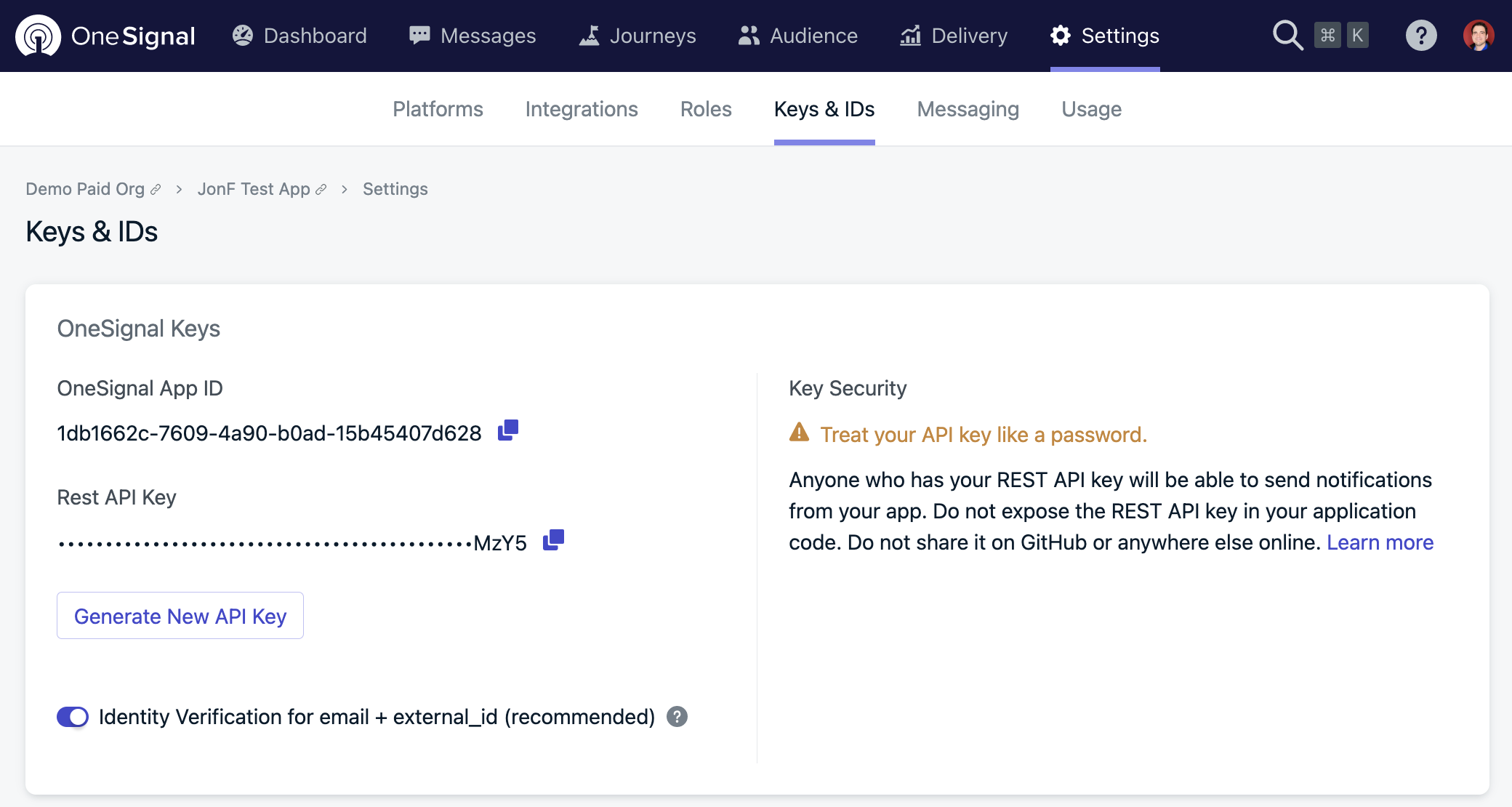 We **highly recommend** enabling identity verification for apps and websites that use setting `external_user_ids` and/or [Email Messaging](/docs/en/email-setup). For apps and websites that are 'backendless' and do not run their own servers, we suggest either creating a minimal server that just verifies users, saving the OneSignal User ID records to your database, or avoid sending sensitive information in Tags and notifications.
# Auth Hash Generation
Auth hashes are expected to be a HMAC on a SHA-256 of the [OneSignal REST API Key](/docs/en/keys-and-ids) and the ``.
## Example Auth Hash Generation Code
When identity verification is enabled, OneSignal will look for a SHA-256 hash of a user's email address or external user identifier from your server. See the following code examples for how to generate these hashes on your server:
```ruby ruby theme={null}
OpenSSL::HMAC.hexdigest('sha256', ONESIGNAL_API_KEY, identifier)
OpenSSL::HMAC.hexdigest('sha256', ONESIGNAL_API_KEY, email_address)
```
```php php theme={null}
```
```javascript Node.js theme={null}
const crypto = require('crypto');
const hmac = crypto.createHmac('sha256', ONESIGNAL_REST_API_KEY);
hmac.update(email_address);
// or hmac.update(identifier);
console.log(hmac.digest('hex'));
```
# SDK `setEmail` Method
Your backend can generate an ***email authentication token*** and send it to your app to include in the `setEmail` method.
```javascript Web (js) theme={null}
var emailAddress = "[email protected]";
var emailAuthHash = "..."; // Email auth hash generated from your server
OneSignal.push(function() {
OneSignal.setEmail(emailAddress, {
emailAuthHash: emailAuthHash
});
});
```
```java java theme={null}
String emailAddress = "[email protected]";
String emailAuthHash = "..."; // Email auth hash generated from your server
OneSignal.setEmail(emailAddress, emailAuthHash, new OneSignal.EmailUpdateHandler() {
@Override
public void onSuccess() {
// Email successfully synced with OneSignal
}
@Override
public void onFailure(OneSignal.EmailUpdateError error) {
// Error syncing email, check error.getType() and error.getMessage() for details
}
});
```
```swift Swift theme={null}
let emailAuthHash = //generated on your backend server
let emailAddress = "[email protected]";
OneSignal.setEmail(emailAddress, withEmailAuthHashToken: emailAuthHash, withSuccess: {
//The email has successfully been set.
}) { (error) in
//Encountered an error while setting the email.
};
```
```objectivec objectivec theme={null}
NSString *hashToken = //hash token from your server
NSString *emailAddress = @"[email protected]";
[OneSignal setEmail:emailAddress withEmailAuthHashToken:hashToken onSuccess: ^() {
//The email has successfully been set.
} onFailure: ^(NSError *error) {
//Encountered an error while setting the email.
}];
```
```csharp Unity (C#) theme={null}
string emailAuthToken = ""; //from your backend server
OneSignal.SetEmail("[email protected]", emailAuthToken, () => {
//Successfully set email
}, (error) => {
//Encountered error setting email
});
```
```javascript React Native theme={null}
var emailAddress = "[email protected]";//email you pull from app
var sha_token = null;//pull from your server or keep as null
OneSignal.setEmail(emailAddress, sha_token, (error) => {
//handle error if it occurred
});
```
```javascript Cordova theme={null}
let emailAuthToken = ""; //from your backend server
window.plugins.OneSignal.setEmail("[email protected]", emailAuthToken, function() {
//Successfully set email
}, function(error) {
//encountered an error setting email
});
```
```javascript Flutter theme={null}
String tokenFromServer = "";
OneSignal.shared.setEmail(email: "[email protected]", emailAuthHashToken: tokenFromServer).then((result) {
//request succeeded
}).catchError((error) {
//encountered an error
});
```
```csharp Xamarin theme={null}
string email = "[email protected]";
string emailAuthCode = ; //generated on your backend server
OneSignal.SetEmail(email, emailAuthCode);
// Optionally, you can also use callbacks
OneSignal.Current.SetEmail(email, emailAuthCode, () => {
//handle success
}, (error) => {
//handle failure
});
```
# SDK `setSMSNumber` Method
Your backend can generate an ***SMS authentication token*** and send it to your app to include in the `setSMSNumber` method.
```java java theme={null}
String smsNumber = "+123456789";
String smsAuthHash = "..."; // SMS auth hash generated from your server
OneSignal.setSMSNumber(smsNumber, smsAuthHash, new OneSignal.OSSMSUpdateHandler() {
@Override
public void onSuccess(JSONObject result) {
// SMS successfully synced with OneSignal
}
@Override
public void onFailure(OneSignal.OSSMSUpdateError error) {
// Error syncing SMS, check error.getType() and error.getMessage() for details
}
});
```
```swift Swift theme={null}
let smsHashToken = "..." //generated on your backend server
let smsNumber = "+123456789"
OneSignal.setSMSNumber(smsNumber, withSMSAuthHashToken: smsHashToken, withSuccess: {
//The SMS number has successfully been set.
}) { (error) in
//Encountered an error while setting the SMS number.
}
```
```objectivec objectivec theme={null}
NSString *smsHashToken = @"..."; //generated on your backend server
NSString *smsNumber = @"+123456789";
[OneSignal setSMSNumber:smsNumber withSMSAuthHashToken:smsHashToken withSuccess:^(NSDictionary *results) {
// SMS successfully synced with OneSignal
} withFailure:^(NSError *error) {
// Error syncing SMS, check error.getType() and error.getMessage() for details
}];
```
# SDK `setExternalUserId` Method
Your backend can generate an ***email authentication token*** and send it to your app to include in the `setExternalUserId` method.
```javascript Web (js) theme={null}
let externalUserId = "123456789" // You will supply the external user id to the OneSignal SDK
let externalUserIdAuthHash = "..."; // Identifier auth hash generated from your server
OneSignal.push(function() {
OneSignal.setExternalUserId(externalUserId, externalUserIdAuthHash);
});
```
```java java theme={null}
String externalUserId = "123456789"; // You will supply the external user id to the OneSignal SDK
String externalUserIdAuthHash = "..."; // Identifier auth hash generated from your server
// Setting External User Id with Callback Available in SDK Version 3.15.6+
OneSignal.setExternalUserId(externalUserId, externalUserIdAuthHash, new OneSignal.OSExternalUserIdUpdateCompletionHandler() {
@Override
public void onComplete(JSONObject results) {
// The results will contain push and email success statuses
OneSignal.onesignalLog(OneSignal.LOG_LEVEL.VERBOSE, "Set external user id done with results: " + results.toString());
// Push can be expected in almost every situation with a success status, but
// as a pre-caution its good to verify it exists
if (results.has("push") && results.getJSONObject("push").has("success")) {
boolean isPushSuccess = results.getJSONObject("push").getBoolean("success");
OneSignal.onesignalLog(OneSignal.LOG_LEVEL.VERBOSE, "Set external user id for push status: " + isPushSuccess);
}
// Verify the email is set or check that the results have an email success status
if (results.has("email") && results.getJSONObject("email").has("success")) {
boolean isEmailSuccess = results.getJSONObject("email").getBoolean("success");
OneSignal.onesignalLog(OneSignal.LOG_LEVEL.VERBOSE, "Sets external user id for email status: " + isEmailSuccess);
}
}
});
```
```swift Swift theme={null}
let externalUserId = "123456789" // You will supply the external user id to the OneSignal SDK
let externalUserIdAuthHash = "..."; // Identifier auth hash generated from your server
// Setting External User Id with Callback Available in SDK Version 2.16.0+
OneSignal.setExternalUserId(externalUserId, externalUserIdAuthHash, withCompletion: { results in
// The results will contain push and email success statuses
print("External user id update complete with results: ", results!.description)
// Push can be expected in almost every situation with a success status, but
// as a pre-caution its good to verify it exists
if let pushResults = results!["push"] {
print("Set external user id push status: ", pushResults)
}
if let emailResults = results!["email"] {
print("Set external user id email status: ", emailResults)
}
})
```
```objectivec objectivec theme={null}
NSString* externalUserId = @"123456789"; // You will supply the external user id to the OneSignal SDK
NSString* externalUserIdAuthHash = @"..."; // Identifier auth hash generated from your server
// Setting External User Id with Callback Available in SDK Version 2.16.0+
[OneSignal setExternalUserId:externalUserId, externalUserIdAuthHash withCompletion:^(NSDictionary *results) {
// The results will contain push and email success statuses
NSLog(@"External user id update complete with results: %@", results.description);
// Push can be expected in almost every situation with a success status, but
// as a pre-caution its good to verify it exists
if (results["push"] && results["push"]["success"])
NSLog(@"Set external user id push status: %@", results["push"]["success"]);
// Verify the email is set or check that the results have an email success status
if (results["email"] && results["email"]["success"])
NSLog(@"Set external user id email status: %@", results["email"]["success"]);
}];
```
```csharp Unity (C#) theme={null}
// Setting External User Id with Callback
string externalUserId = "123456789"; // You will supply the external user id to the OneSignal SDK
String externalUserIdAuthHash = "..."; // Identifier auth hash generated from your server
// Setting External User Id with Callback Available in SDK Version 2.13.2+
OneSignal.Current.SetExternalUserId(externalUserId, externalUserIdAuthHash, OneSignalSetExternalUserId);
// Removing External User Id with Callback Available in SDK Version 2.12.0+
//OneSignal.Current.RemoveExternalUserId(OneSignalSetExternalUSerId);
//Callback available in SDK Version 2.12.0+
private static void OneSignalSetExternalUserId(Dictionary results)
{
// The results will contain push and email success statuses
Debug.WriteLine("External user id updated with results: " + Json.Serialize(results));
// Push can be expected in almost every situation with a success status, but
// as a pre-caution its good to verify it exists
if (results.ContainsKey("push"))
{
Dictionary pushStatusDict = results["push"] as Dictionary;
if (pushStatusDict.ContainsKey("success"))
{
Debug.WriteLine("External user id updated for push with results: " + pushStatusDict["success"] as string);
}
}
// Verify the email is set or check that the results have an email success status
if (results.ContainsKey("email"))
{
Dictionary emailStatusDict = results["email"] as Dictionary;
if (emailStatusDict.ContainsKey("success"))
{
Debug.WriteLine("External user id updated for email with results: " + emailStatusDict["success"] as string);
}
}
}
```
```javascript React Native theme={null}
let externalUserId = '123456789'; // You will supply the external user id to the OneSignal SDK
let externalUserIdAuthHash = "..."; // Identifier auth hash generated from your server
// Setting External User Id with Callback Available in SDK Version 3.9.3+
OneSignal.setExternalUserId(externalUserId, externalUserIdAuthHash, (results) => {
// The results will contain push and email success statuses
console.log('Results of setting external user id');
console.log(results);
// Push can be expected in almost every situation with a success status, but
// as a pre-caution its good to verify it exists
if (results.push && results.push.success) {
console.log('Results of setting external user id push status:');
console.log(results.push.success);
}
// Verify the email is set or check that the results have an email success status
if (results.email && results.email.success) {
console.log('Results of setting external user id email status:');
console.log(results.email.success);
}
});
```
```javascript Cordova theme={null}
let externalUserId = '123456789'; // You will supply the external user id to the OneSignal SDK
let externalUserIdAuthHash = "..."; // Identifier auth hash generated from your server
// Setting External User Id with Callback Available in SDK Version 2.11.2+
OneSignal.setExternalUserId(externalUserId, externalUserIdAuthHash, (results) => {
// The results will contain push and email success statuses
console.log('Results of setting external user id');
console.log(results);
// Push can be expected in almost every situation with a success status, but
// as a pre-caution its good to verify it exists
if (results.push && results.push.success) {
console.log('Results of setting external user id push status:');
console.log(results.push.success);
}
// Verify the email is set or check that the results have an email success status
if (results.email && results.email.success) {
console.log('Results of setting external user id email status:');
console.log(results.email.success);
}
});
```
```javascript Flutter theme={null}
let externalUserId = "123456789" // You will supply the external user id to the OneSignal SDK
let externalUserIdAuthHash = "..."; // Identifier auth hash generated from your server
// Setting External User Id with Callback Available in SDK Version 2.6.2+
OneSignal.shared.setExternalUserId(externalUserId, externalUserIdAuthHash);
```
```csharp Xamarin theme={null}
// Setting External User Id with Callback
string externalUserId = "123456789"; // You will supply the external user id to the OneSignal SDK
String externalUserIdAuthHash = "..."; // Identifier auth hash generated from your server
// Setting External User Id with Callback Available in SDK Version 3.8.0+
OneSignal.Current.SetExternalUserId(externalUserId, externalUserIdAuthHash, OneSignalSetExternalUserId);
// Removing External User Id with Callback Available in SDK Version 3.8.0+
//OneSignal.Current.RemoveExternalUserId(OneSignalSetExternalUSerId);
//Callback available in SDK Version 3.10.3+
private static void OneSignalSetExternalUserId(Dictionary results)
{
// The results will contain push and email success statuses
Debug.WriteLine("External user id updated with results: " + Json.Serialize(results));
// Push can be expected in almost every situation with a success status, but
// as a pre-caution its good to verify it exists
if (results.ContainsKey("push"))
{
Dictionary pushStatusDict = results["push"] as Dictionary;
if (pushStatusDict.ContainsKey("success"))
{
Debug.WriteLine("External user id updated for push with results: " + pushStatusDict["success"] as string);
}
}
// Verify the email is set or check that the results have an email success status
if (results.ContainsKey("email"))
{
Dictionary emailStatusDict = results["email"] as Dictionary;
if (emailStatusDict.ContainsKey("success"))
{
Debug.WriteLine("External user id updated for email with results: " + emailStatusDict["success"] as string);
}
}
}
```
# Updating Devices with REST API
If you **enabled** Identity Verification and call the [Add a device](/reference/add-a-device) or [Edit device](/reference/edit-device) endpoint (`api/v1/players`), the request must contain the `external_user_id_auth_hash` or `identifier_auth_hash` parameters.
If you are adding or updating the `external_user_id` on a non-email device (`device_type` != `11`), you must use the `external_user_id_auth_hash` parameter.
If you are adding or updating the email (`identifier` parameter && `device_type` = `11`), then any field being updated will need the `identifier_auth_hash` (or `email_auth_hash` for backwards compatibility) value.
# Removing External User ID
To remove an `external_user_id` from a device record with Identity Verification enabled, you can set it to an empty string with the auth hash based on the existing `external_user_id` value before removal.
***
We **highly recommend** enabling identity verification for apps and websites that use setting `external_user_ids` and/or [Email Messaging](/docs/en/email-setup). For apps and websites that are 'backendless' and do not run their own servers, we suggest either creating a minimal server that just verifies users, saving the OneSignal User ID records to your database, or avoid sending sensitive information in Tags and notifications.
# Auth Hash Generation
Auth hashes are expected to be a HMAC on a SHA-256 of the [OneSignal REST API Key](/docs/en/keys-and-ids) and the ``.
## Example Auth Hash Generation Code
When identity verification is enabled, OneSignal will look for a SHA-256 hash of a user's email address or external user identifier from your server. See the following code examples for how to generate these hashes on your server:
```ruby ruby theme={null}
OpenSSL::HMAC.hexdigest('sha256', ONESIGNAL_API_KEY, identifier)
OpenSSL::HMAC.hexdigest('sha256', ONESIGNAL_API_KEY, email_address)
```
```php php theme={null}
```
```javascript Node.js theme={null}
const crypto = require('crypto');
const hmac = crypto.createHmac('sha256', ONESIGNAL_REST_API_KEY);
hmac.update(email_address);
// or hmac.update(identifier);
console.log(hmac.digest('hex'));
```
# SDK `setEmail` Method
Your backend can generate an ***email authentication token*** and send it to your app to include in the `setEmail` method.
```javascript Web (js) theme={null}
var emailAddress = "[email protected]";
var emailAuthHash = "..."; // Email auth hash generated from your server
OneSignal.push(function() {
OneSignal.setEmail(emailAddress, {
emailAuthHash: emailAuthHash
});
});
```
```java java theme={null}
String emailAddress = "[email protected]";
String emailAuthHash = "..."; // Email auth hash generated from your server
OneSignal.setEmail(emailAddress, emailAuthHash, new OneSignal.EmailUpdateHandler() {
@Override
public void onSuccess() {
// Email successfully synced with OneSignal
}
@Override
public void onFailure(OneSignal.EmailUpdateError error) {
// Error syncing email, check error.getType() and error.getMessage() for details
}
});
```
```swift Swift theme={null}
let emailAuthHash = //generated on your backend server
let emailAddress = "[email protected]";
OneSignal.setEmail(emailAddress, withEmailAuthHashToken: emailAuthHash, withSuccess: {
//The email has successfully been set.
}) { (error) in
//Encountered an error while setting the email.
};
```
```objectivec objectivec theme={null}
NSString *hashToken = //hash token from your server
NSString *emailAddress = @"[email protected]";
[OneSignal setEmail:emailAddress withEmailAuthHashToken:hashToken onSuccess: ^() {
//The email has successfully been set.
} onFailure: ^(NSError *error) {
//Encountered an error while setting the email.
}];
```
```csharp Unity (C#) theme={null}
string emailAuthToken = ""; //from your backend server
OneSignal.SetEmail("[email protected]", emailAuthToken, () => {
//Successfully set email
}, (error) => {
//Encountered error setting email
});
```
```javascript React Native theme={null}
var emailAddress = "[email protected]";//email you pull from app
var sha_token = null;//pull from your server or keep as null
OneSignal.setEmail(emailAddress, sha_token, (error) => {
//handle error if it occurred
});
```
```javascript Cordova theme={null}
let emailAuthToken = ""; //from your backend server
window.plugins.OneSignal.setEmail("[email protected]", emailAuthToken, function() {
//Successfully set email
}, function(error) {
//encountered an error setting email
});
```
```javascript Flutter theme={null}
String tokenFromServer = "";
OneSignal.shared.setEmail(email: "[email protected]", emailAuthHashToken: tokenFromServer).then((result) {
//request succeeded
}).catchError((error) {
//encountered an error
});
```
```csharp Xamarin theme={null}
string email = "[email protected]";
string emailAuthCode = ; //generated on your backend server
OneSignal.SetEmail(email, emailAuthCode);
// Optionally, you can also use callbacks
OneSignal.Current.SetEmail(email, emailAuthCode, () => {
//handle success
}, (error) => {
//handle failure
});
```
# SDK `setSMSNumber` Method
Your backend can generate an ***SMS authentication token*** and send it to your app to include in the `setSMSNumber` method.
```java java theme={null}
String smsNumber = "+123456789";
String smsAuthHash = "..."; // SMS auth hash generated from your server
OneSignal.setSMSNumber(smsNumber, smsAuthHash, new OneSignal.OSSMSUpdateHandler() {
@Override
public void onSuccess(JSONObject result) {
// SMS successfully synced with OneSignal
}
@Override
public void onFailure(OneSignal.OSSMSUpdateError error) {
// Error syncing SMS, check error.getType() and error.getMessage() for details
}
});
```
```swift Swift theme={null}
let smsHashToken = "..." //generated on your backend server
let smsNumber = "+123456789"
OneSignal.setSMSNumber(smsNumber, withSMSAuthHashToken: smsHashToken, withSuccess: {
//The SMS number has successfully been set.
}) { (error) in
//Encountered an error while setting the SMS number.
}
```
```objectivec objectivec theme={null}
NSString *smsHashToken = @"..."; //generated on your backend server
NSString *smsNumber = @"+123456789";
[OneSignal setSMSNumber:smsNumber withSMSAuthHashToken:smsHashToken withSuccess:^(NSDictionary *results) {
// SMS successfully synced with OneSignal
} withFailure:^(NSError *error) {
// Error syncing SMS, check error.getType() and error.getMessage() for details
}];
```
# SDK `setExternalUserId` Method
Your backend can generate an ***email authentication token*** and send it to your app to include in the `setExternalUserId` method.
```javascript Web (js) theme={null}
let externalUserId = "123456789" // You will supply the external user id to the OneSignal SDK
let externalUserIdAuthHash = "..."; // Identifier auth hash generated from your server
OneSignal.push(function() {
OneSignal.setExternalUserId(externalUserId, externalUserIdAuthHash);
});
```
```java java theme={null}
String externalUserId = "123456789"; // You will supply the external user id to the OneSignal SDK
String externalUserIdAuthHash = "..."; // Identifier auth hash generated from your server
// Setting External User Id with Callback Available in SDK Version 3.15.6+
OneSignal.setExternalUserId(externalUserId, externalUserIdAuthHash, new OneSignal.OSExternalUserIdUpdateCompletionHandler() {
@Override
public void onComplete(JSONObject results) {
// The results will contain push and email success statuses
OneSignal.onesignalLog(OneSignal.LOG_LEVEL.VERBOSE, "Set external user id done with results: " + results.toString());
// Push can be expected in almost every situation with a success status, but
// as a pre-caution its good to verify it exists
if (results.has("push") && results.getJSONObject("push").has("success")) {
boolean isPushSuccess = results.getJSONObject("push").getBoolean("success");
OneSignal.onesignalLog(OneSignal.LOG_LEVEL.VERBOSE, "Set external user id for push status: " + isPushSuccess);
}
// Verify the email is set or check that the results have an email success status
if (results.has("email") && results.getJSONObject("email").has("success")) {
boolean isEmailSuccess = results.getJSONObject("email").getBoolean("success");
OneSignal.onesignalLog(OneSignal.LOG_LEVEL.VERBOSE, "Sets external user id for email status: " + isEmailSuccess);
}
}
});
```
```swift Swift theme={null}
let externalUserId = "123456789" // You will supply the external user id to the OneSignal SDK
let externalUserIdAuthHash = "..."; // Identifier auth hash generated from your server
// Setting External User Id with Callback Available in SDK Version 2.16.0+
OneSignal.setExternalUserId(externalUserId, externalUserIdAuthHash, withCompletion: { results in
// The results will contain push and email success statuses
print("External user id update complete with results: ", results!.description)
// Push can be expected in almost every situation with a success status, but
// as a pre-caution its good to verify it exists
if let pushResults = results!["push"] {
print("Set external user id push status: ", pushResults)
}
if let emailResults = results!["email"] {
print("Set external user id email status: ", emailResults)
}
})
```
```objectivec objectivec theme={null}
NSString* externalUserId = @"123456789"; // You will supply the external user id to the OneSignal SDK
NSString* externalUserIdAuthHash = @"..."; // Identifier auth hash generated from your server
// Setting External User Id with Callback Available in SDK Version 2.16.0+
[OneSignal setExternalUserId:externalUserId, externalUserIdAuthHash withCompletion:^(NSDictionary *results) {
// The results will contain push and email success statuses
NSLog(@"External user id update complete with results: %@", results.description);
// Push can be expected in almost every situation with a success status, but
// as a pre-caution its good to verify it exists
if (results["push"] && results["push"]["success"])
NSLog(@"Set external user id push status: %@", results["push"]["success"]);
// Verify the email is set or check that the results have an email success status
if (results["email"] && results["email"]["success"])
NSLog(@"Set external user id email status: %@", results["email"]["success"]);
}];
```
```csharp Unity (C#) theme={null}
// Setting External User Id with Callback
string externalUserId = "123456789"; // You will supply the external user id to the OneSignal SDK
String externalUserIdAuthHash = "..."; // Identifier auth hash generated from your server
// Setting External User Id with Callback Available in SDK Version 2.13.2+
OneSignal.Current.SetExternalUserId(externalUserId, externalUserIdAuthHash, OneSignalSetExternalUserId);
// Removing External User Id with Callback Available in SDK Version 2.12.0+
//OneSignal.Current.RemoveExternalUserId(OneSignalSetExternalUSerId);
//Callback available in SDK Version 2.12.0+
private static void OneSignalSetExternalUserId(Dictionary results)
{
// The results will contain push and email success statuses
Debug.WriteLine("External user id updated with results: " + Json.Serialize(results));
// Push can be expected in almost every situation with a success status, but
// as a pre-caution its good to verify it exists
if (results.ContainsKey("push"))
{
Dictionary pushStatusDict = results["push"] as Dictionary;
if (pushStatusDict.ContainsKey("success"))
{
Debug.WriteLine("External user id updated for push with results: " + pushStatusDict["success"] as string);
}
}
// Verify the email is set or check that the results have an email success status
if (results.ContainsKey("email"))
{
Dictionary emailStatusDict = results["email"] as Dictionary;
if (emailStatusDict.ContainsKey("success"))
{
Debug.WriteLine("External user id updated for email with results: " + emailStatusDict["success"] as string);
}
}
}
```
```javascript React Native theme={null}
let externalUserId = '123456789'; // You will supply the external user id to the OneSignal SDK
let externalUserIdAuthHash = "..."; // Identifier auth hash generated from your server
// Setting External User Id with Callback Available in SDK Version 3.9.3+
OneSignal.setExternalUserId(externalUserId, externalUserIdAuthHash, (results) => {
// The results will contain push and email success statuses
console.log('Results of setting external user id');
console.log(results);
// Push can be expected in almost every situation with a success status, but
// as a pre-caution its good to verify it exists
if (results.push && results.push.success) {
console.log('Results of setting external user id push status:');
console.log(results.push.success);
}
// Verify the email is set or check that the results have an email success status
if (results.email && results.email.success) {
console.log('Results of setting external user id email status:');
console.log(results.email.success);
}
});
```
```javascript Cordova theme={null}
let externalUserId = '123456789'; // You will supply the external user id to the OneSignal SDK
let externalUserIdAuthHash = "..."; // Identifier auth hash generated from your server
// Setting External User Id with Callback Available in SDK Version 2.11.2+
OneSignal.setExternalUserId(externalUserId, externalUserIdAuthHash, (results) => {
// The results will contain push and email success statuses
console.log('Results of setting external user id');
console.log(results);
// Push can be expected in almost every situation with a success status, but
// as a pre-caution its good to verify it exists
if (results.push && results.push.success) {
console.log('Results of setting external user id push status:');
console.log(results.push.success);
}
// Verify the email is set or check that the results have an email success status
if (results.email && results.email.success) {
console.log('Results of setting external user id email status:');
console.log(results.email.success);
}
});
```
```javascript Flutter theme={null}
let externalUserId = "123456789" // You will supply the external user id to the OneSignal SDK
let externalUserIdAuthHash = "..."; // Identifier auth hash generated from your server
// Setting External User Id with Callback Available in SDK Version 2.6.2+
OneSignal.shared.setExternalUserId(externalUserId, externalUserIdAuthHash);
```
```csharp Xamarin theme={null}
// Setting External User Id with Callback
string externalUserId = "123456789"; // You will supply the external user id to the OneSignal SDK
String externalUserIdAuthHash = "..."; // Identifier auth hash generated from your server
// Setting External User Id with Callback Available in SDK Version 3.8.0+
OneSignal.Current.SetExternalUserId(externalUserId, externalUserIdAuthHash, OneSignalSetExternalUserId);
// Removing External User Id with Callback Available in SDK Version 3.8.0+
//OneSignal.Current.RemoveExternalUserId(OneSignalSetExternalUSerId);
//Callback available in SDK Version 3.10.3+
private static void OneSignalSetExternalUserId(Dictionary results)
{
// The results will contain push and email success statuses
Debug.WriteLine("External user id updated with results: " + Json.Serialize(results));
// Push can be expected in almost every situation with a success status, but
// as a pre-caution its good to verify it exists
if (results.ContainsKey("push"))
{
Dictionary pushStatusDict = results["push"] as Dictionary;
if (pushStatusDict.ContainsKey("success"))
{
Debug.WriteLine("External user id updated for push with results: " + pushStatusDict["success"] as string);
}
}
// Verify the email is set or check that the results have an email success status
if (results.ContainsKey("email"))
{
Dictionary emailStatusDict = results["email"] as Dictionary;
if (emailStatusDict.ContainsKey("success"))
{
Debug.WriteLine("External user id updated for email with results: " + emailStatusDict["success"] as string);
}
}
}
```
# Updating Devices with REST API
If you **enabled** Identity Verification and call the [Add a device](/reference/add-a-device) or [Edit device](/reference/edit-device) endpoint (`api/v1/players`), the request must contain the `external_user_id_auth_hash` or `identifier_auth_hash` parameters.
If you are adding or updating the `external_user_id` on a non-email device (`device_type` != `11`), you must use the `external_user_id_auth_hash` parameter.
If you are adding or updating the email (`identifier` parameter && `device_type` = `11`), then any field being updated will need the `identifier_auth_hash` (or `email_auth_hash` for backwards compatibility) value.
# Removing External User ID
To remove an `external_user_id` from a device record with Identity Verification enabled, you can set it to an empty string with the auth hash based on the existing `external_user_id` value before removal.
***