Add custom notification sounds to iOS, Android, Huawei, and Amazon apps — including file formats, SDK setup, and API parameters.
Custom sounds let you provide a more unique, branded experience in your app. You can add a custom sound to every notification or only to certain types. For example, a social app might play a distinct sound only for direct messages to differentiate them from system notifications.
For mobile apps only. Custom sounds are not supported on web push.
Create sound files following the platform requirements below. If the device cannot find the specified file or the file format is unsupported, it falls back to the default system notification sound.
Keep sound filenames lowercase since some platforms ignore uppercase letters for sound files. Instead of AwesomeSound.wav use awesomesound.wav or awesome_sound.wav.
Platform
Extensions
Notes
iOS
.wav.aiff.caf
Sounds must be encoded as Linear PCM, MA4 (IMA/ADPCM), µLaw, or aLaw. Must be less than 30 seconds.
Android
.wav.mp3.ogg
Recommended length less than 30 seconds. Keep file size small, large files may not play on some devices.
Huawei
.wav.mp3.wma
Recommended length less than 30 seconds. Keep file size small, large files may not play on some devices.
Amazon
.wav.mp3.ogg
Recommended length less than 30 seconds. Keep file size small, large files may not play on some devices.
Sound files must be included as resources within your app. External URLs are not supported.
iOS
Android, Huawei, and Amazon
Add sound files to the appropriate location in your Xcode project depending on your SDK.
SDK
Folder
iOS Native
Add files to the Xcode project root. Make sure Add to targets is selected when adding files so they are automatically added to the bundle resources.
Cordova, Ionic
Add files to Resources directory within the Xcode project in <project-root>/platforms/ios/project-name.xcodeproj.
Unity
Add sounds anywhere in your Unity project, build your project, and then move those sounds to the Xcode project root.
Add sound files to the appropriate folder in your project depending on your SDK. If the folder does not exist, create it.
SDK
Folder
Android, Huawei, Amazon Native
res/raw
React Native
<project-root>/android/app/src/main/res/raw
Cordova
<project-root>/platforms/android/res/raw/
Ionic
/android/app/src/main/res/raw/
Unity
Assets/Plugins/Android/OneSignalConfig/res/rawNOTE: Your sound and icon file names must be lowercase and can’t contain anything else except underscores and numbers.
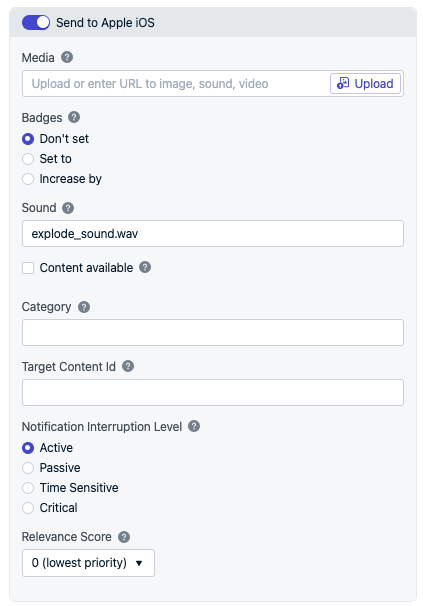
Include the file extension when referencing the sound resource (e.g., explode_sound.wav). Set the sound in the dashboard when sending push messages or use the Create Notification API ios_sound property.For no sound, pass nil to the Sound field.
Setting a custom sound for iOS in the OneSignal dashboard.
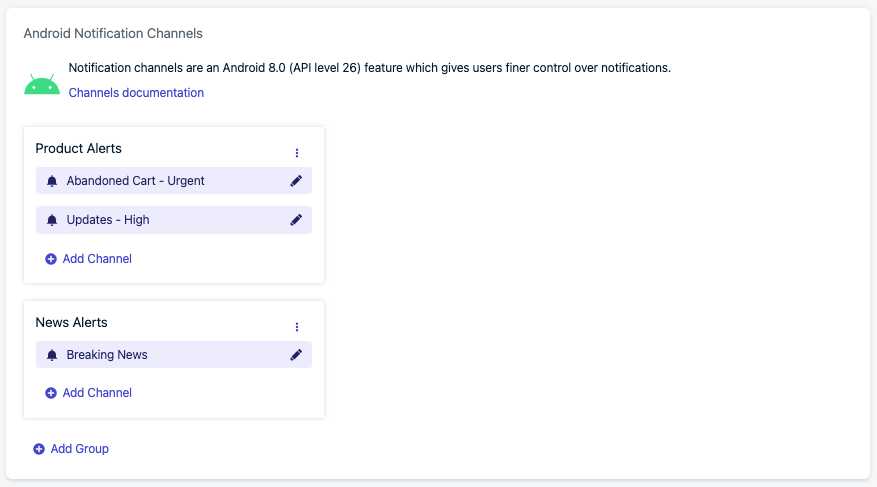
Android 8+ introduced Notification Categories which must be set up to customize notification sounds. OneSignal uses the sound configured in the Notification Channel for all versions of Android.In Settings > Push & In-App > Android Notification Channels, create the group and channel.
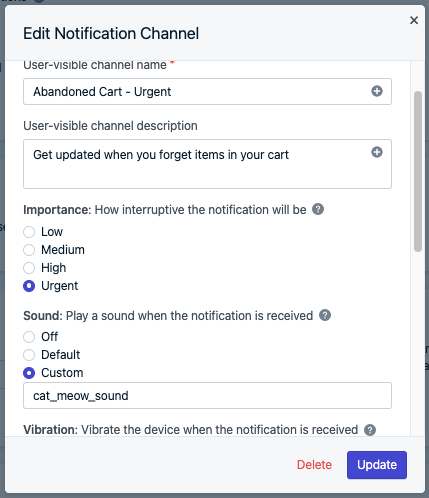
Create a notification channel.
Set Importance to “Urgent” or “High” to play sound.
Set Sound to “Default” or “Custom” based on your needs. Do not add the file extension when referencing the sound resource (e.g., cat_meow_sound).
For no sound, set Importance to “Urgent” or “High” and Sound to “Off”. Or set Importance to “Medium” or “Low” for no sound.
Setting the sound for a notification channel.
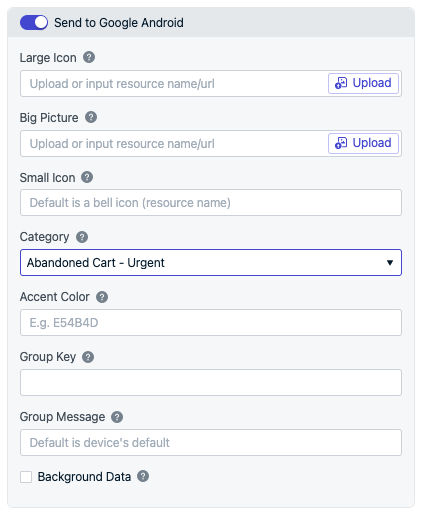
You can then set the category name in the dashboard when sending push messages or use the Create Notification API android_channel_id and huawei_channel_id properties. The sound set in the category works for all Android versions.
Selecting the notification category in the push composer.
You can send notifications with sounds via the REST API using the appropriate parameter for each platform. See the Create Notification API reference for full details.
Platform
API Parameter
Details
iOS
ios_sound
Include file extension. Example: "ios_sound": "explode_sound.wav". For no sound, pass nil.
Android
android_channel_id — Use if you created the channel in the OneSignal dashboard via Notification Categories. existing_android_channel_id — Use if you created the channel elsewhere.
huawei_channel_id — Use if you created the channel in the OneSignal dashboard via Notification Categories. huawei_existing_channel_id — Use if you created the channel elsewhere.
Do not include file extension. Example: "adm_sound": "explode_sound".
If you recently added a sound resource to your app, consider waiting a few days before sending notifications that use it. It can take days or weeks for most users to update to the latest app version containing the new sound file.If a user has an older version without the sound resource and receives a notification referencing it, they hear only the default system notification sound.
Use a Template that references the sound and/or Android Notification Channel. Every notification sent with that template uses the configured sound automatically.
Can I send different notification sounds to different users?
The ios_sound and android_channel_id parameters are request-level — they apply to all recipients of that API call. You cannot specify different sounds for different users in a single request.To deliver different sounds to different users, use a fan-out pattern: make separate API calls for each sound variant, targeting users by tag or segment. For example, store each user’s preferred sound in a tag like preferred_sound, then send one request per sound value.
{ "app_id": "YOUR_APP_ID", "contents": {"en": "You have a new message!"}, "ios_sound": "chime.wav", "android_channel_id": "CHIME_CHANNEL_ID", "include_filters": [ {"field": "tag", "key": "preferred_sound", "relation": "=", "value": "chime"} ]}
{ "app_id": "YOUR_APP_ID", "contents": {"en": "You have a new message!"}, "ios_sound": "bell.wav", "android_channel_id": "BELL_CHANNEL_ID", "include_filters": [ {"field": "tag", "key": "preferred_sound", "relation": "=", "value": "bell"} ]}
Each request targets only the users whose preferred_sound tag matches, so each group hears its own sound. Add as many variants as you need — one API call per sound.
Why is my notification not playing the custom sound file?
There are a few common causes:
Sound file has an incorrect file extension
Sound file is not encoded in a supported format
Sound file is in the wrong location in the project
Sound file is longer than 30 seconds
iOS — Read more in Apple’s documentation for encoding and testing guidance.Android — Verify the sound file is included in your APK by extracting it and confirming it exists in res/raw/.If resource shrinking is enabled, protect sound files from being removed by creating keep.xml in res/raw/:
Why is my notification playing the default sound file?
Make sure you followed the setup instructions and the sound file is in the correct location for your SDK. Double-check the filename casing — some platforms ignore uppercase letters.
On Android, notifications are grouped together after a certain number are received without being opened. Grouped notifications play a default sound. You can set the sound with the group key for all your notifications.