Import or update users in OneSignal using CSV uploads, REST API, or manual entry. Supports email, SMS, tags, and more for seamless user onboarding or migration.
Import or update users in bulk through the OneSignal dashboard using a CSV file or manual entry. Common use cases include migrating users from another platform, updating user details, and organizing users with Tags and Segments.
You can also update or create users via the REST API.
email — Required for creating new email subscriptions. See Email address validation for more info.
phone_number — Required for creating new SMS subscriptions.
subscription_id — Only recommended for cases where you track Subscription IDs on your backend and want to set an external_id.
Only one identifier of each type is allowed per row. To associate multiple emails or phone numbers with the same user, use separate rows sharing the same external_id.
Include external_id to deduplicate Users. Make sure it matches the ID used in your SDK login method — otherwise it resets when the user opens the app.
To change subscription status, the row must include email, phone_number, or subscription_id. An external_id alone is not enough.
subscription_id does not link or merge Subscriptions. Use external_id to add new emails or phone numbers to an existing user.
Include up to 1,000 Tags per import. Use tag keys in the column headers and tag values in the rows. You can also use a single tags column with JSON formatting — see Bulk tag updates for details.
Tag plan limits apply per user, not per app. For example, if your plan allows 20 tags per user and a user already has 19, you can only add 1 more — even though the app itself can have unlimited tag keys.
Use the Bulk tag updates workflow to export users, clear unwanted tag values, and re-import with the delete option enabled.
Avoid spaces in tag keys — use underscores instead.
Reserved and restricted tag keysThe following tag keys are reserved and should not be used:
“user”
“subscription”
“message”
“template”
“app”
“org”
“custom_data”
“dynamic_content”
If you accidentally set one of these as a tag key, remove it via the Update User API.Tag overwrites and deletionsDuring a CSV import:
Tags included in your CSV are overwritten with the value provided.
Tags not included in your CSV remain unchanged on the user record.
If a tag is still present after import, verify that:
The header column contains the tag key.
The row contains no value.
You selected the “Delete tags with blank values” option in the Review screen.
Other sources of tags being addedIf deleted tags reappear after import, an integration may be automatically writing them back. Common sources include:
Segment
HubSpot
Journeys
SDK Tagging methods
Custom APIs or ETL pipelines
Review integration mappings and event triggers to ensure they are not overwriting your CSV changes.
Email address validation detects common problems in email addresses before they reach your audience. It flags typos, invalid domains, role-based addresses, and disposable email services that could increase your bounce rate or hurt your sender reputation.
Email address validation
Validate email addresses during CSV import and in bulk to reduce bounces and protect your sender reputation.
If you have errors or questions about your CSV formatting, you can describe your CSV problem to an AI tool (like Claude, ChatGPT, or similar) to automatically clean or rebuild your file before importing again.
Always test with a small sample (5-10 rows) before importing thousands of records.
Example AI prompts for common CSV issues
Deleting tags
Tag formatting
Identify invalid formats
Fix phone numbers
Migrate from another platform
AI prompt example for deleting unwanted tags
I want to remove all tags except "user_name" from this CSV.Please:1. Keep only the "user_name" tag column.2. Remove all other tag columns.3. Format the CSV so it matches the OneSignal import requirements in this doc: https://documentation.onesignal.com/docs/en/importHere is my CSV:[PASTE CSV]
AI prompt example for fixing multiple tag columns format
I have multiple tag columns such as tag_first_name, tag_last_name, and tag_city.According to the OneSignal import documentation, each tag must:- Use the tag_ prefix- Contain only alphanumeric characters and underscores- Follow supported data typesCould you review my CSV, identify what is incorrectly formatted, and return a corrected version that meets these requirements?Documentation link:https://documentation.onesignal.com/docs/en/import
AI prompt example for identifying missing or invalid formatting
OneSignal rejected my CSV during import.Please:1. Validate my CSV structure.2. Identify any formatting issues (headers, ID columns, tag formats, quoting).3. Return a corrected version that follows the requirements in this doc: https://documentation.onesignal.com/docs/en/import#csv-requirementsHere is the file:[PASTE CSV]
AI prompt example for fixing invalid phone number formats (E.164)
My import is failing because phone numbers are not in E.164 format.Please:1. Convert all phone numbers to E.164 format.2. Keep all other fields unchanged.3. Ensure the CSV matches OneSignal's required structure: https://documentation.onesignal.com/docs/en/importExample of current format: (555) 555-1234Here is my CSV:[PASTE CSV]
AI prompt example for data from another platform
I'm migrating from [Platform Name] to OneSignal.Could you transform this CSV to match OneSignal's import format?Include:- `external_id`- Any tags converted with the `tag_` prefix (if desired)- Phone numbers in E.164 format (if applicable)Reference doc:https://documentation.onesignal.com/docs/en/importHere is my CSV:[PASTE CSV]
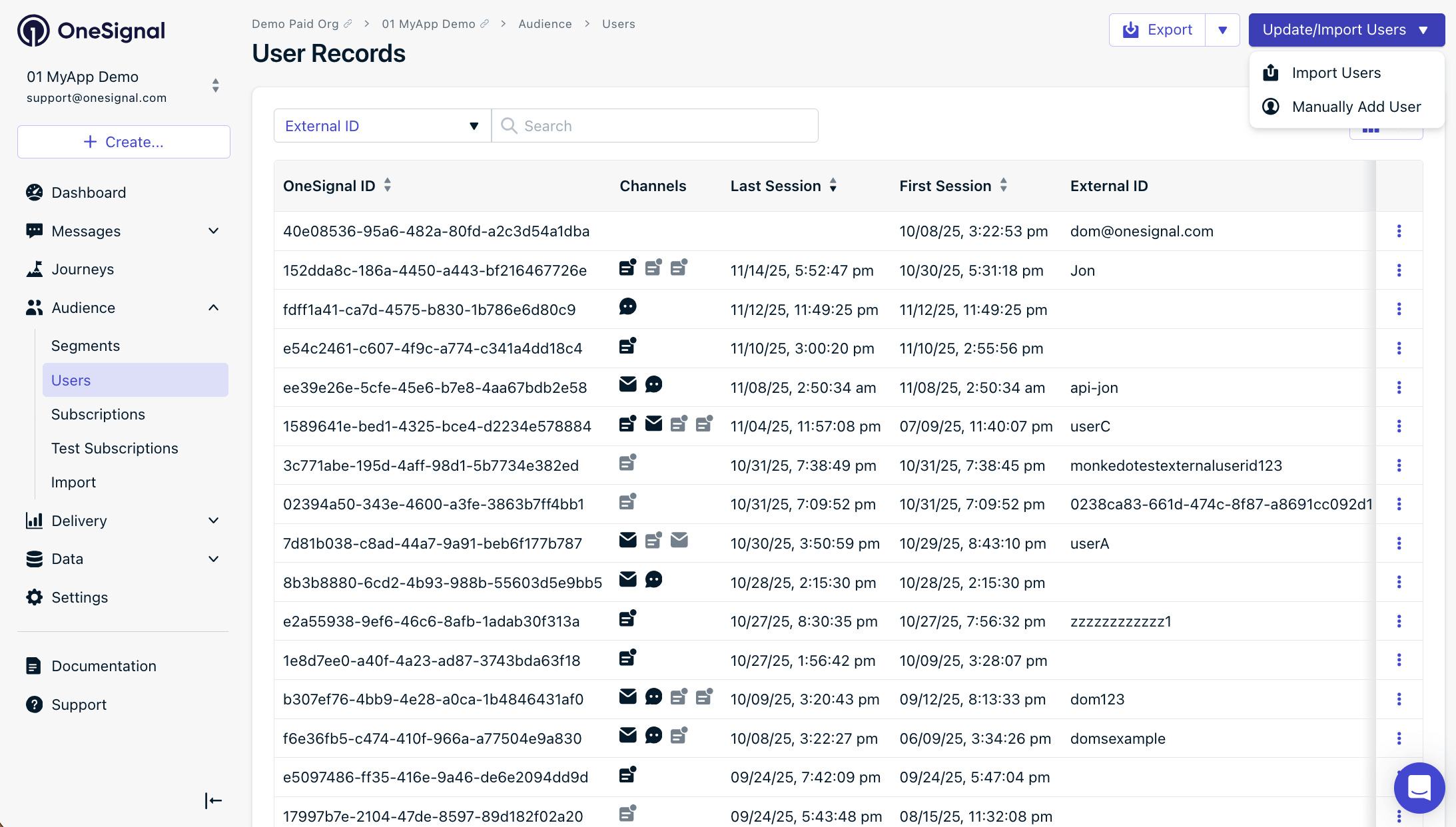
Navigate to Audience > Users & subscriptions > Update/Import Users > Import users and click Launch CSV Importer.
1
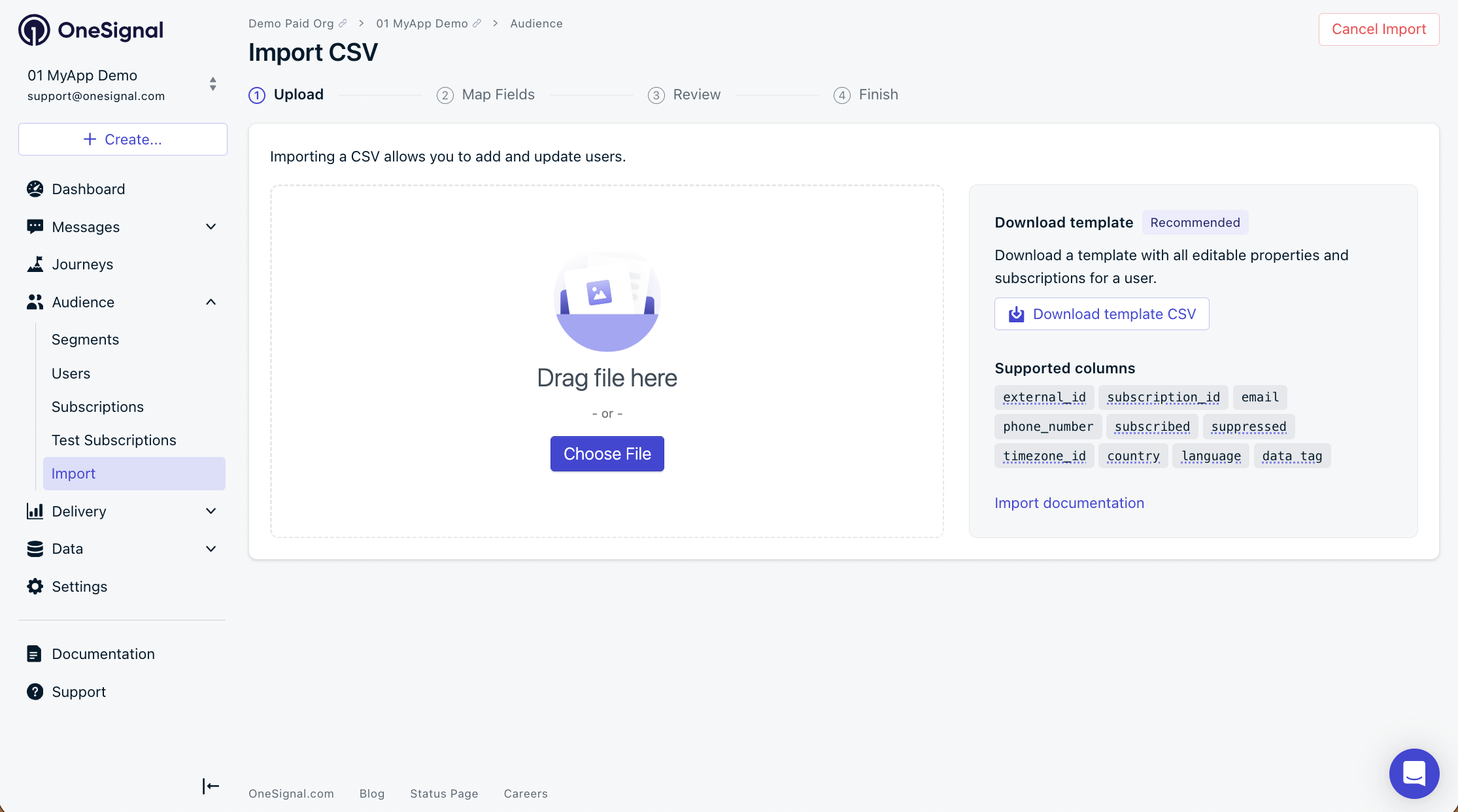
Upload your CSV
Select your prepared CSV file.
Import CSV screen
2
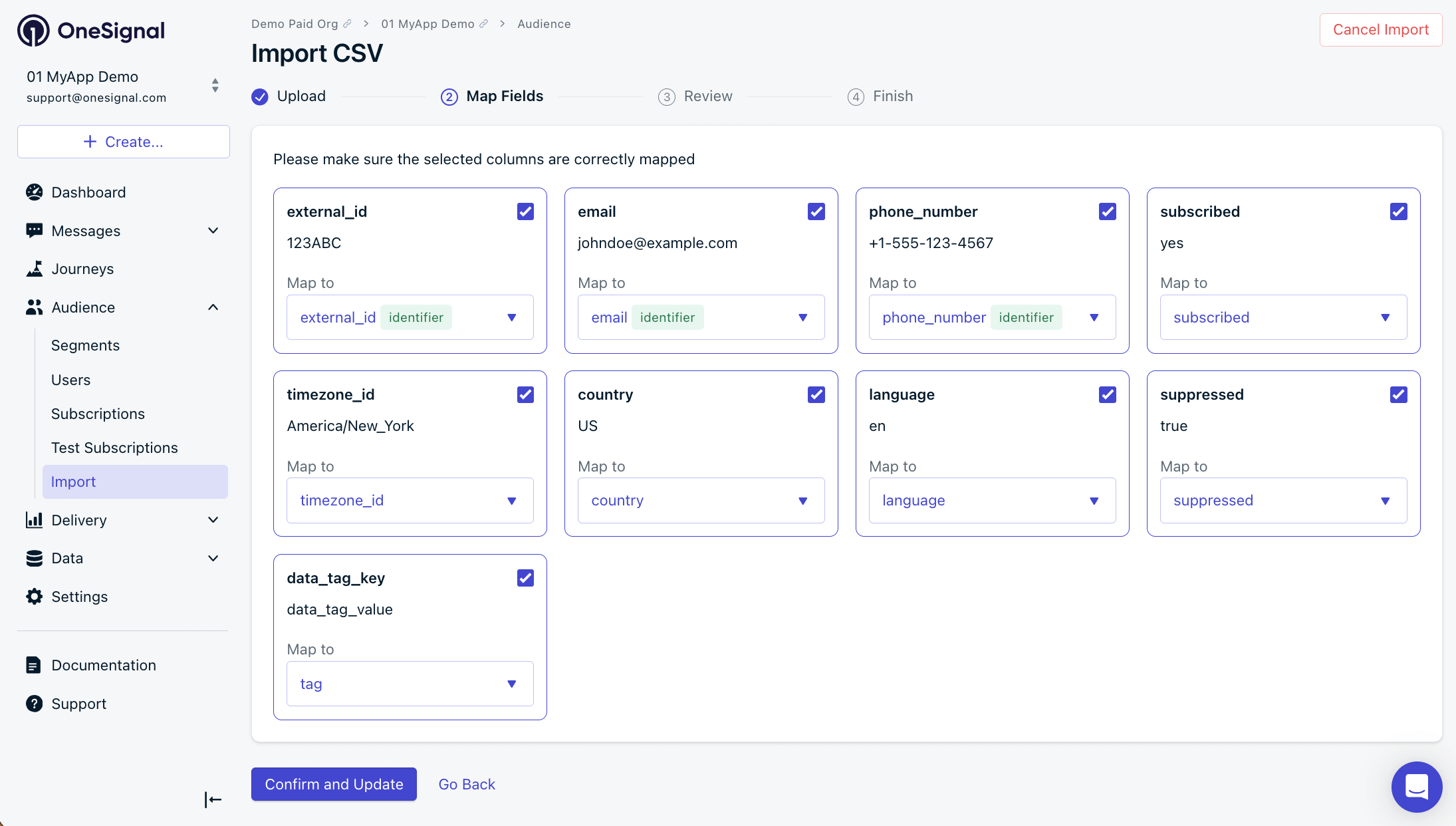
Map fields
OneSignal auto-maps your CSV headers to known properties. Review the mappings before confirming — use external_id, email, phone_number, and/or subscription_id as identifiers, not tags.
To add a new email or phone number to an existing user, you must useexternal_id. Do not use subscription_id — it will not link or merge Subscriptions.
Import CSV Map Fields screen
If OneSignal detects format issues, fix the CSV and re-upload (recommended) or uncheck the affected column to skip it.
3
Review and confirm
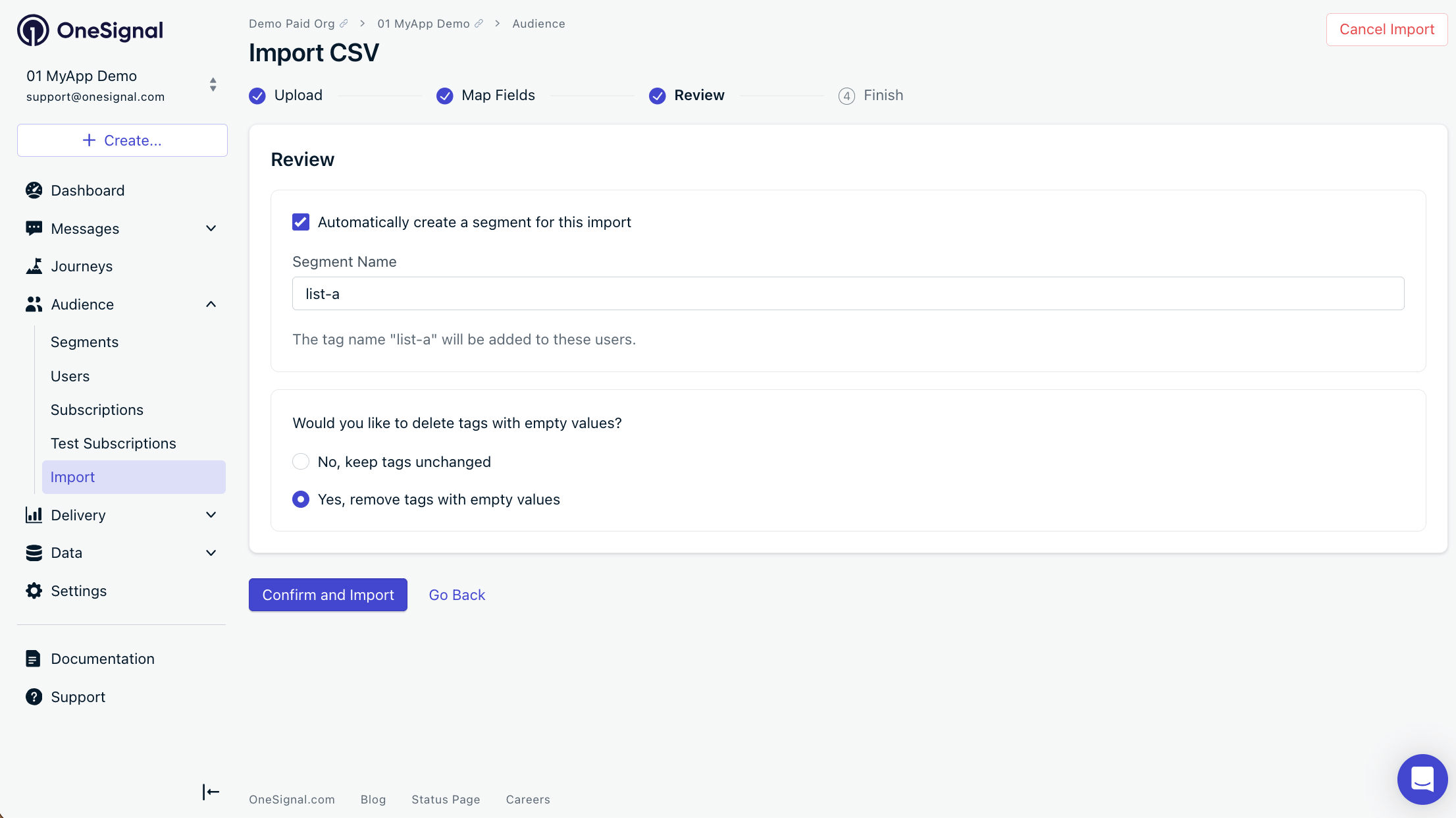
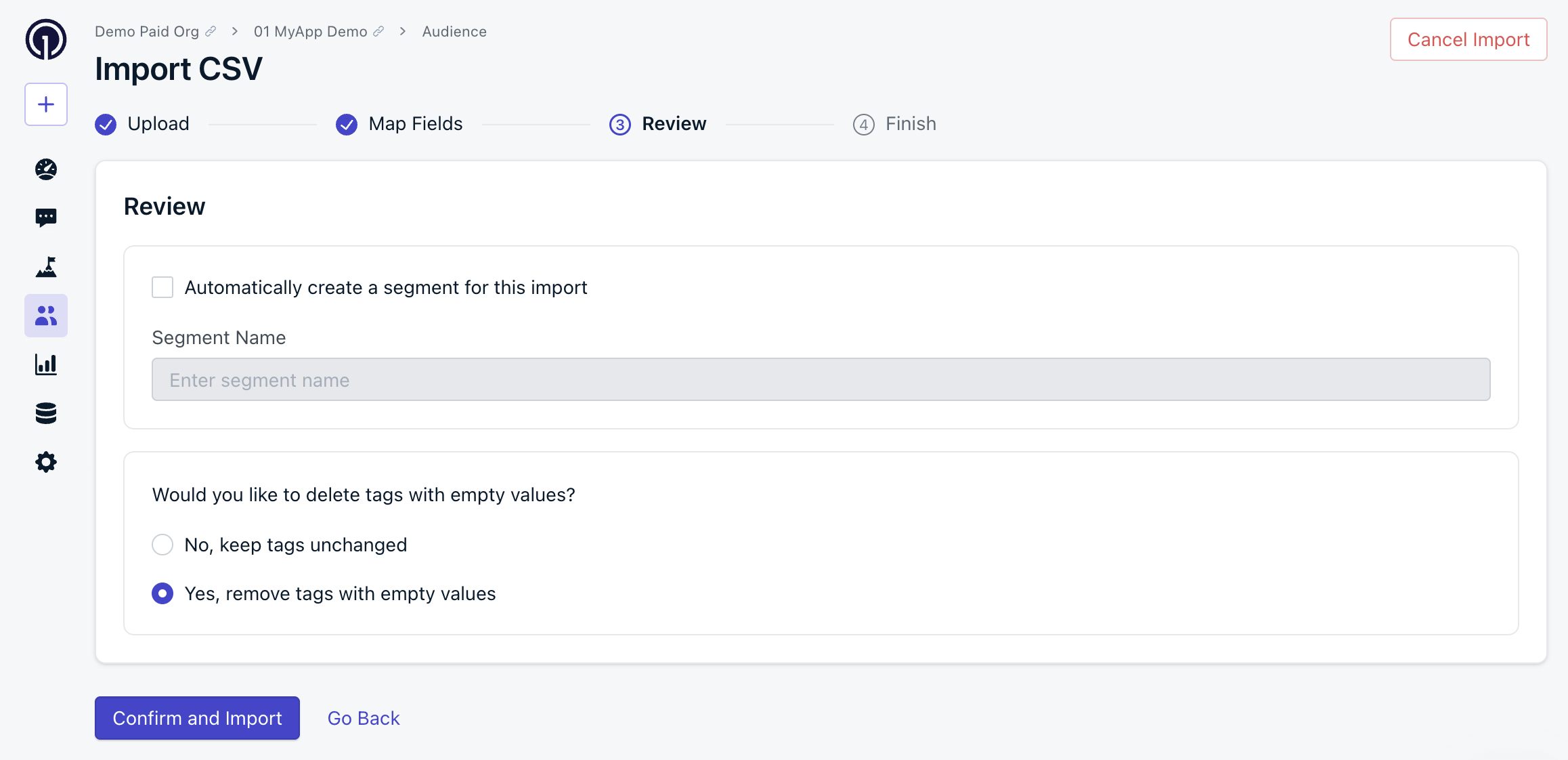
The Review screen allows you to:
Automatically create a Segment — Adds a tag to each imported user and creates a matching Segment. Be mindful of your plan limits.
Delete tags with blank values — Removes any tag where the value is blank in the CSV. This is useful for cleaning up unwanted tags and staying under plan limits.
Configure email address validation — Configure email address validation settings to reduce bounces and protect your sender reputation.
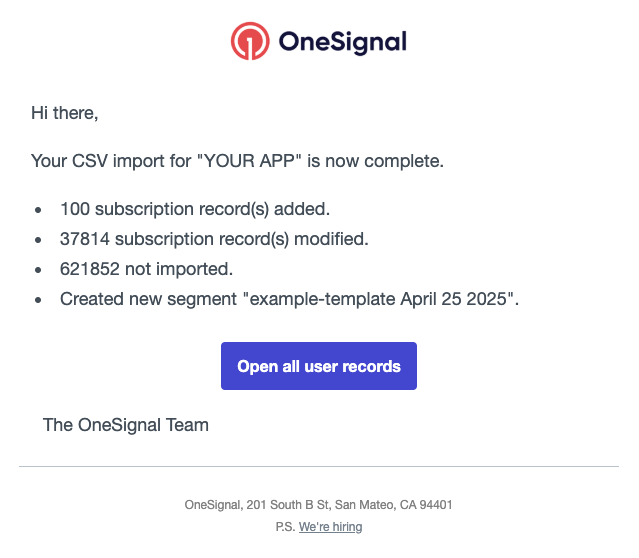
Once the import finishes, you receive a confirmation email from contact@onesignal.com with the following data. Note that a single User can have multiple Subscriptions (e.g., email + push), so subscription counts may be higher than your row count.Subscription record(s) added — New email or SMS Subscriptions created. 0 means no unique email or phone_number identifiers were found.Subscription record(s) modified — Subscriptions where data changed (tags, properties, etc.). For example, 10 External IDs each linked to 20 subscriptions = 200 records modified.Subscription updates skipped — Subscriptions skipped for the stated reason. If the reason is “over your app’s tag limit,” remove tags and re-import or upgrade your plan.Not imported — Rows that were not updated or imported. Common causes: the external_id does not match any existing subscription, or the email/phone_number already exists with no new data to set.Created new segment — The segment name, if you selected that option.
Example email confirmation.
In the example above:
100 subscriptions were created from unique email addresses or phone numbers not already in the app.
37,814 subscriptions were updated (not the count of Users — each user can have multiple subscriptions).
621,852 rows were not imported because their External IDs did not match existing users, or their emails/phone numbers already existed with no new data.
Segments only count subscribedSubscriptions. Unsubscribed subscriptions are updated by the import but not reflected in segment counts. Improvements to segmentation are in progress.
You can add, update, or delete Tags in bulk using the CSV import. This section covers how to format tags for import and how to remove unwanted tags.Import tags from a single columnInstead of using separate column headers for each tag key, you can set a single tags header with each row containing a JSON map of all key-value pairs within quotes. This is especially useful if you previously exported a CSV with tags and want to re-import it without reformatting.
CSV header
external_id,email,tags
Tags must be formatted as a JSON object enclosed in 2 sets of double quotes around each key-value pair.
When imported, OneSignal automatically converts each key-value pair into distinct tags. For example, the above row would be converted to 2 tags: level:30 and color:teal.Bulk delete tagsTo remove tags in bulk, export your current data, blank out the tag values, and re-import the CSV with the delete option enabled.
1
Export your data
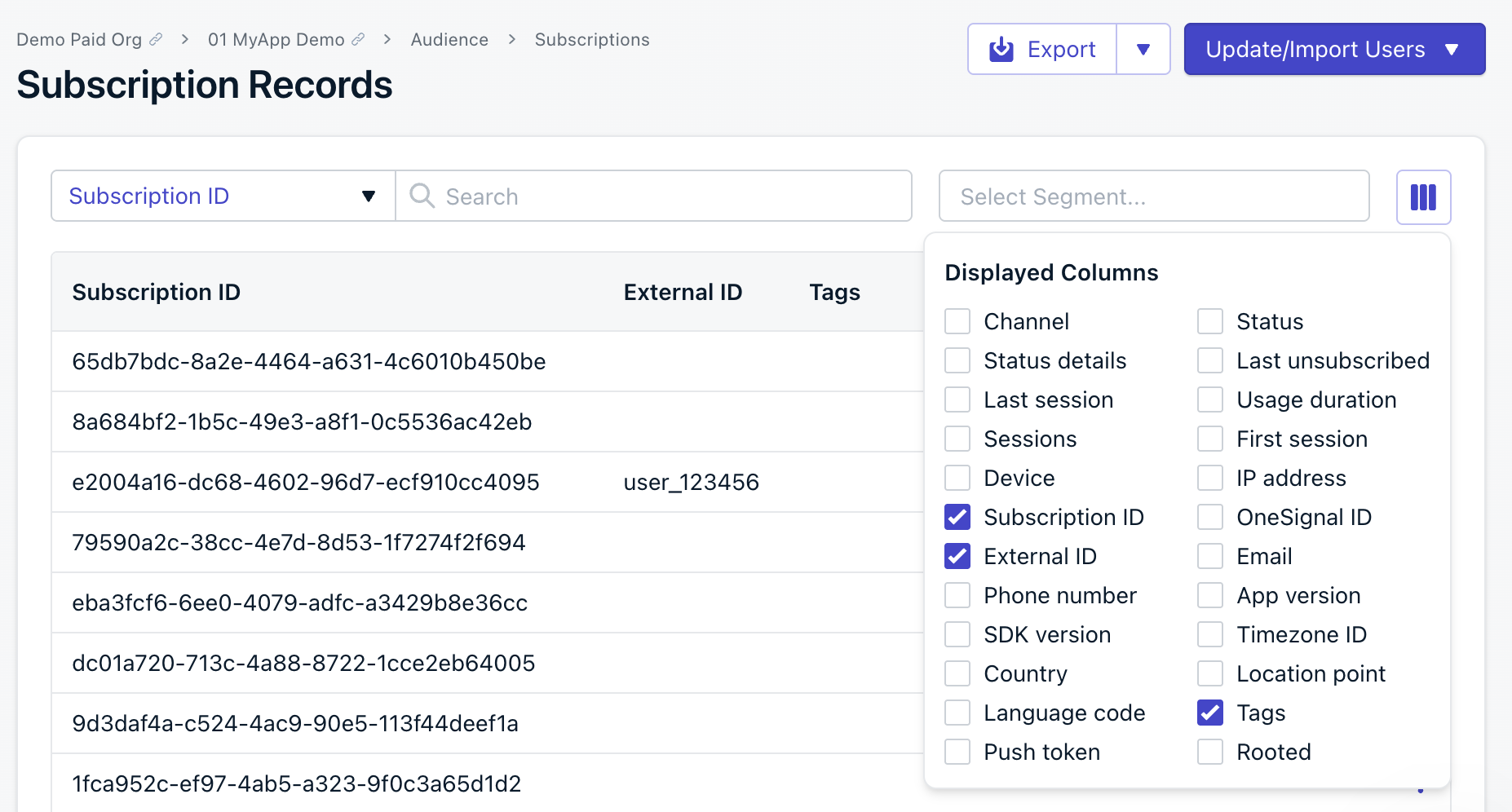
Navigate to Audience > Users & subscriptions > Subscriptions in the OneSignal dashboard. Enable only the External ID, Subscription ID, and Tags columns (and optionally Email or Phone Number).
Click Export to export the CSV.
Select the displayable columns for export
2
Clear the tag values you want to delete
Open the exported CSV in a text editor and set the values of each tag you want to delete as an empty string.For example, a row with tag values before editing:
This will result in deleting the tags level and color from the user.
3
Re-import the CSV with the delete option
Take the edited CSV and import.
On the Review screen, select Yes for Delete tags with blank values. OneSignal deletes the tags with blank values during import.
Review screen with remove tags with empty values option
To remove only specific tags, clear the values for those tags and leave the others unchanged. Only blank values are deleted when the delete option is enabled.
You can manually add users’ email and phone number Subscriptions through the OneSignal dashboard by navigating to Audience > Users & subscriptions > Update/Import Users > Manually add user.
Manually add users screen
On the New User screen, include the data you want and select Create User.
Most imports complete within a few minutes depending on file size. You receive a confirmation email from contact@onesignal.com when the import finishes.
The subscribed column controls subscription status. It requires email, phone_number, or subscription_id in the same row.
New email or phone number, no subscribed column: OneSignal creates the Subscription with a Subscribed status. See Subscriptions.
Existing email or phone number, no subscribed column: The current subscription status is unchanged. The import only updates the fields you provide.
subscribed set to yes or no: The import overwrites the existing status with the value you provide, including re-subscribing a currently unsubscribed Subscription or unsubscribing a currently subscribed one.
To keep existing statuses intact, omit the subscribed column from your CSV.
Why don’t my segment counts match the rows in my CSV?
Segments only count subscribedSubscriptions. Unsubscribed subscriptions are updated but not reflected in segment counts. See the Email confirmation section for details.
Why did my import show “not imported” for some rows?
Rows are skipped when the external_id does not match any existing subscription, or when the email/phone_number already exists with no new data to set. See Email confirmation for details on each status.
{"docsConfig":{"theme":"mint","$schema":"https://mintlify.com/docs.json","name":"OneSignal Documentation","description":"OneSignal is a platform for sending push notifications, emails, in-app messages, and SMS campaigns via a single API, Journey Builder, and a dashboard.","colors":{"primary":"#3A3DB3","light":"#E54B4D","dark":"#3A3DB3"},"logo":{"light":"https://mintcdn.com/onesignal/yJcueeDCO7UpHnnY/logo/OneSignal-Logo.svg?fit=max\u0026auto=format\u0026n=yJcueeDCO7UpHnnY\u0026q=85\u0026s=1fcfb6fef6d820fd9d99c74850711107","dark":"https://mintcdn.com/onesignal/s4WC_KzLxf8ornqq/logo/OneSignal-Logo-White.svg?fit=max\u0026auto=format\u0026n=s4WC_KzLxf8ornqq\u0026q=85\u0026s=2573a53b5aea961e18c82b3af8f31925"},"favicon":"https://mintcdn.com/onesignal/SGduBFHpiRdg5l6h/favicon.ico?fit=max\u0026auto=format\u0026n=SGduBFHpiRdg5l6h\u0026q=85\u0026s=c0a99fadc0553c658a83741c5611cef4","api":{"examples":{"languages":["curl","typescript","python","php","go","ruby","java","csharp","rust"],"autogenerate":true}},"navbar":{"links":[{"href":"mailto:support@onesignal.com","label":"Support"}],"primary":{"type":"button","label":"Dashboard","href":"https://dashboard.onesignal.com"}},"footer":{"socials":{"github":"https://github.com/OneSignal","linkedin":"https://linkedin.com/company/onesignal","youtube":"https://www.youtube.com/@onesignalofficial/playlists"}},"seo":{"metatags":{"apple-mobile-web-app-title":"OneSignal Docs"}},"fonts":{"family":"Nunito Sans"},"styling":{"eyebrows":"breadcrumbs","latex":true},"integrations":{"ga4":{"measurementId":"G-2DGWL0VYP5"},"posthog":{"apiKey":"phc_vZpvE0f5eyzcOt30FHer34yddVmNdo9kmlMVRBzLMtn","apiHost":"https://eu.i.posthog.com","sessionRecording":true}},"contextual":{"options":["copy","view","chatgpt","claude"],"display":"header"},"navigation":{"languages":[{"language":"en","href":"docs/en/home"},{"language":"cn","href":"docs/cn/home"},{"language":"ko","href":"docs/ko/home"},{"language":"ja","href":"docs/ja/home"},{"language":"tr","href":"docs/tr/home"},{"language":"pt-BR","href":"docs/pt-BR/home"},{"language":"es","href":"docs/es/home"},{"language":"fr","href":"docs/fr/home"}]}},"deployment":{"deploymentMetadataValue":{"subdomain":"onesignal","hasAudioNarration":false,"actualSubdomain":"onesignal","customDomains":["documentation.onesignal.com"],"gitSource":{"type":"github","owner":"onesignal","repo":"mintlify-docs","deployBranch":"main","contentDirectory":"","isPrivate":true,"mountPath":"","label":""},"feedback":{"thumbs":true},"entitlements":{"AI_CHAT":{"status":"ENABLED"},"WEB_MCP":{"status":"ENABLED"},"NARRATION":{"status":"ENABLED"}},"buildId":"6af4cdb2d820fd504cae19ee","clientVersion":"0.0.4111","searchFilterCounts":[{"language":"en","tag":"User Guides","count":204},{"language":"es","tag":"Guías del Usuario","count":178},{"language":"fr","tag":"Guides utilisateur","count":178},{"language":"ja","tag":"ユーザーガイド","count":178},{"language":"ko","tag":"사용자 가이드","count":178},{"language":"pt-BR","tag":"Guia do Usuário","count":178},{"language":"tr","tag":"Kullanıcı Kılavuzları","count":178},{"language":"cn","tag":"用户指南","count":176},{"language":"en","tag":"Message channels","count":90},{"language":"es","tag":"Canales de mensajería","count":84},{"language":"fr","tag":"Canaux de messagerie","count":84},{"language":"ja","tag":"メッセージングチャネル","count":84},{"language":"ko","tag":"메시지 채널","count":84},{"language":"pt-BR","tag":"Canais de mensagem","count":84},{"language":"tr","tag":"Mesaj kanalları","count":84},{"language":"cn","tag":"消息渠道","count":83},{"language":"default","tag":"API Reference","count":68},{"language":"default","tag":"API reference","count":64},{"language":"en","tag":"Analytics \u0026 Integrations","count":53},{"language":"es","tag":"Analítica \u0026 Integraciones","count":52},{"language":"fr","tag":"Analyses et intégrations","count":52},{"language":"ja","tag":"分析 \u0026 統合","count":52},{"language":"ko","tag":"분석 \u0026 통합","count":52},{"language":"pt-BR","tag":"Análises \u0026 Integrações","count":52},{"language":"tr","tag":"Analitik ve Entegrasyonlar","count":52},{"language":"cn","tag":"分析和集成","count":51},{"language":"cn","tag":"开发者指南","count":48},{"language":"es","tag":"Guías del desarrollador","count":48},{"language":"fr","tag":"Guides développeur","count":48},{"language":"ja","tag":"開発者ガイド","count":48},{"language":"ko","tag":"개발자 가이드","count":48},{"language":"tr","tag":"Geliştirici Kılavuzları","count":48},{"language":"en","tag":"Developer Guides","count":47},{"language":"pt-BR","tag":"Guia de desenvolvedor","count":47},{"language":"en","tag":"Integrations","count":37},{"language":"es","tag":"Integraciones","count":37},{"language":"fr","tag":"Intégrations","count":37},{"language":"ja","tag":"統合","count":37},{"language":"ko","tag":"통합","count":37},{"language":"pt-BR","tag":"Integrações","count":37},{"language":"tr","tag":"Entegrasyonlar","count":37},{"language":"cn","tag":"集成","count":36},{"language":"en","tag":"Tutorials","count":35},{"language":"cn","tag":"推送通知","count":31},{"language":"cn","tag":"OneSignal 作为目的地","count":31},{"language":"en","tag":"Push","count":31},{"language":"en","tag":"OneSignal as destination","count":31},{"language":"es","tag":"Push notificaciones","count":31},{"language":"es","tag":"OneSignal como destino","count":31},{"language":"fr","tag":"Push","count":31},{"language":"fr","tag":"OneSignal comme destination","count":31},{"language":"ja","tag":"プッシュ通知","count":31},{"language":"ja","tag":"OneSignal as 宛先","count":31},{"language":"ko","tag":"푸시","count":31},{"language":"ko","tag":"OneSignal을 데이터 목적지로 사용","count":31},{"language":"pt-BR","tag":"Push notificações","count":31},{"language":"pt-BR","tag":"OneSignal como destino","count":31},{"language":"tr","tag":"Anlık bildirimler","count":31},{"language":"tr","tag":"OneSignal hedef","count":31},{"language":"en","tag":"Mobile SDKs","count":26},{"language":"cn","tag":"移动SDK","count":25},{"language":"es","tag":"SDKs móviles","count":25},{"language":"fr","tag":"SDK mobiles","count":25},{"language":"ja","tag":"モバイルSDK","count":25},{"language":"ko","tag":"모바일 SDKs","count":25},{"language":"pt-BR","tag":"SDKs móveis","count":25},{"language":"tr","tag":"Mobil SDK'lar","count":25},{"language":"cn","tag":"教程","count":24},{"language":"es","tag":"Tutoriales","count":24},{"language":"fr","tag":"Tutoriels","count":24},{"language":"ja","tag":"チュートリアル","count":24},{"language":"ko","tag":"튜토리얼","count":24},{"language":"pt-BR","tag":"Tutoriais","count":24},{"language":"tr","tag":"Eğitimler","count":24},{"language":"en","tag":"Mobile SDK setup","count":19},{"language":"cn","tag":"移动SDK设置","count":18},{"language":"es","tag":"Configuración del SDK móvil","count":18},{"language":"fr","tag":"Configuration SDK mobile","count":18},{"language":"ja","tag":"モバイルSDKセットアップ","count":18},{"language":"ko","tag":"모바일 SDK 설정","count":18},{"language":"pt-BR","tag":"Configuração do SDK móvel","count":18},{"language":"tr","tag":"Mobil SDK kurulumu","count":18},{"language":"default","tag":"Messages","count":9},{"language":"default","tag":"Users","count":9},{"language":"default","tag":"Organization","count":9},{"language":"default","tag":"Journeys","count":8},{"language":"default","tag":"Deprecated","count":6},{"language":"default","tag":"Templates","count":6},{"language":"default","tag":"Subscriptions","count":6},{"language":"default","tag":"Segments","count":5}]},"assistantConfig":{"enableStarterQuestions":false,"deflection":{"enabled":true,"email":"support@onesignal.com","showHelpButton":true}},"basePath":"","hasChatPermissions":true,"hasWebMcpPermissions":true,"toggles":[{"name":"kill-isr","enabled":true,"variant":{"name":"disabled","enabled":false,"feature_enabled":true},"impressionData":false},{"name":"custom-rbac-roles","enabled":true,"variant":{"name":"disabled","enabled":false,"feature_enabled":true},"impressionData":false},{"name":"agent-mintlify-slack","enabled":true,"variant":{"name":"disabled","enabled":false,"feature_enabled":true},"impressionData":false},{"name":"agent-integrations-settings","enabled":true,"variant":{"name":"disabled","enabled":false,"feature_enabled":true},"impressionData":false},{"name":"rbac-expansion","enabled":true,"variant":{"name":"disabled","enabled":false,"feature_enabled":true},"impressionData":false},{"name":"automations-pr-grouping","enabled":true,"variant":{"name":"disabled","enabled":false,"feature_enabled":true},"impressionData":false},{"name":"custom-prefix","enabled":true,"variant":{"name":"disabled","enabled":false,"feature_enabled":true},"impressionData":false},{"name":"analytics-v7","enabled":true,"variant":{"name":"disabled","enabled":false,"feature_enabled":true},"impressionData":false},{"name":"user-flows-analytics","enabled":true,"variant":{"name":"disabled","enabled":false,"feature_enabled":true},"impressionData":false},{"name":"no-publish-flow","enabled":true,"variant":{"name":"disabled","enabled":false,"feature_enabled":true},"impressionData":false},{"name":"workos-onboarding","enabled":true,"variant":{"name":"disabled","enabled":false,"feature_enabled":true},"impressionData":false},{"name":"llms-txt-v2","enabled":true,"variant":{"name":"disabled","enabled":false,"feature_enabled":true},"impressionData":false},{"name":"snapshot-serving-live","enabled":true,"variant":{"name":"disabled","enabled":false,"feature_enabled":true},"impressionData":false},{"name":"stripTemperatureMiddleware","enabled":true,"variant":{"name":"disabled","enabled":false,"feature_enabled":true},"impressionData":false},{"name":"support-platform-pylon-zendesk","enabled":true,"variant":{"name":"disabled","enabled":false,"feature_enabled":true},"impressionData":false},{"name":"snapshot-serving","enabled":true,"variant":{"name":"disabled","enabled":false,"feature_enabled":true},"impressionData":false},{"name":"instant-rollback","enabled":true,"variant":{"name":"disabled","enabled":false,"feature_enabled":true},"impressionData":false},{"name":"granular-notifications-server","enabled":true,"variant":{"name":"disabled","enabled":false,"feature_enabled":true},"impressionData":false},{"name":"granular-notifications","enabled":true,"variant":{"name":"disabled","enabled":false,"feature_enabled":true},"impressionData":false},{"name":"automations-fable","enabled":true,"variant":{"name":"disabled","enabled":false,"feature_enabled":true},"impressionData":false},{"name":"fixed-ai-action-pricing","enabled":true,"variant":{"name":"disabled","enabled":false,"feature_enabled":true},"impressionData":false},{"name":"automation-resolve-merge-conflict","enabled":true,"variant":{"name":"disabled","enabled":false,"feature_enabled":true},"impressionData":false},{"name":"scoped-publishing","enabled":true,"variant":{"name":"disabled","enabled":false,"feature_enabled":true},"impressionData":false},{"name":"mintql","enabled":true,"variant":{"name":"disabled","enabled":false,"feature_enabled":true},"impressionData":false},{"name":"page-level-analytics","enabled":true,"variant":{"name":"disabled","enabled":false,"feature_enabled":true},"impressionData":false},{"name":"editor-version-history-v2","enabled":true,"variant":{"name":"disabled","enabled":false,"feature_enabled":true},"impressionData":false},{"name":"billing-page-v2","enabled":true,"variant":{"name":"disabled","enabled":false,"feature_enabled":true},"impressionData":false},{"name":"full-page-search","enabled":true,"variant":{"name":"disabled","enabled":false,"feature_enabled":true},"impressionData":false},{"name":"workspace-projects","enabled":true,"variant":{"name":"disabled","enabled":false,"feature_enabled":true},"impressionData":false},{"name":"assistant-v5","enabled":true,"variant":{"name":"disabled","enabled":false,"feature_enabled":true},"impressionData":false},{"name":"fork-pr-previews","enabled":true,"variant":{"name":"disabled","enabled":false,"feature_enabled":true},"impressionData":false},{"name":"revalidation-jwt","enabled":true,"variant":{"name":"disabled","enabled":false,"feature_enabled":true},"impressionData":false},{"name":"workos-sso-scim","enabled":true,"variant":{"name":"disabled","enabled":false,"feature_enabled":true},"impressionData":false},{"name":"hobby-abuse-scan","enabled":true,"variant":{"name":"disabled","enabled":false,"feature_enabled":true},"impressionData":false},{"name":"dashboard-inbox","enabled":true,"variant":{"name":"disabled","enabled":false,"feature_enabled":true},"impressionData":false},{"name":"workos-signup","enabled":true,"variant":{"name":"disabled","enabled":false,"feature_enabled":true},"impressionData":false},{"name":"turbopuffer-dual-write","enabled":true,"variant":{"name":"disabled","enabled":false,"feature_enabled":true},"impressionData":false},{"name":"workos-enabled","enabled":true,"variant":{"name":"disabled","enabled":false,"feature_enabled":true},"impressionData":false},{"name":"approve-review-flow","enabled":true,"variant":{"name":"disabled","enabled":false,"feature_enabled":true},"impressionData":false},{"name":"editor-metadata","enabled":true,"variant":{"name":"disabled","enabled":false,"feature_enabled":true},"impressionData":false},{"name":"sso-setup-deadline-banner","enabled":true,"variant":{"name":"disabled","enabled":false,"feature_enabled":true},"impressionData":false},{"name":"turbopuffer-serve","enabled":true,"variant":{"name":"disabled","enabled":false,"feature_enabled":true},"impressionData":false},{"name":"live-agents","enabled":true,"variant":{"name":"disabled","enabled":false,"feature_enabled":true},"impressionData":false}],"googleFontsInlined":true},"customCss":[],"page":{"pagePath":"docs/en/import","slug":"/docs/en/import","pageMetadata":{"title":"Import","description":"Import or update users in OneSignal using CSV uploads, REST API, or manual entry. Supports email, SMS, tags, and more for seamless user onboarding or migration.","keywords":["import","csv","upload","bulk","tags","migrate","bulk tag updates"],"href":"/docs/en/import"},"description":{"compiledSource":"\"use strict\";\nconst {jsx: _jsx} = arguments[0];\nconst {useMDXComponents: _provideComponents} = arguments[0];\nfunction _createMdxContent(props) {\n const _components = {\n p: \"p\",\n ..._provideComponents(),\n ...props.components\n };\n return _jsx(_components.p, {\n children: \"Import or update users in OneSignal using CSV uploads, REST API, or manual entry. Supports email, SMS, tags, and more for seamless user onboarding or migration.\"\n });\n}\nfunction MDXContent(props = {}) {\n const {wrapper: MDXLayout} = {\n ..._provideComponents(),\n ...props.components\n };\n return MDXLayout ? _jsx(MDXLayout, {\n ...props,\n children: _jsx(_createMdxContent, {\n ...props\n })\n }) : _createMdxContent(props);\n}\nreturn {\n default: MDXContent\n};\n","frontmatter":{},"scope":{}},"pageType":"default","mdx":{"mdxSource":{"compiledSource":"\"use strict\";const{Fragment:_Fragment,jsx:_jsx,jsxs:_jsxs}=arguments[0];const{useMDXComponents:_provideComponents}=arguments[0];function _createMdxContent(props){const _components={a:`a`,code:`code`,hr:`hr`,li:`li`,p:`p`,pre:`pre`,span:`span`,strong:`strong`,ul:`ul`,..._provideComponents(),...props.components},{Accordion,Card,Check,CodeBlock,Frame,Heading,Note,OptimizedImage,ParamField,Step,Steps,Tab,Tabs,Tip,Warning}=_components;if(!Accordion)_missingMdxReference(`Accordion`,true);if(!Card)_missingMdxReference(`Card`,true);if(!Check)_missingMdxReference(`Check`,true);if(!CodeBlock)_missingMdxReference(`CodeBlock`,true);if(!Frame)_missingMdxReference(`Frame`,true);if(!Heading)_missingMdxReference(`Heading`,true);if(!Note)_missingMdxReference(`Note`,true);if(!OptimizedImage)_missingMdxReference(`OptimizedImage`,true);if(!ParamField)_missingMdxReference(`ParamField`,true);if(!Step)_missingMdxReference(`Step`,true);if(!Steps)_missingMdxReference(`Steps`,true);if(!Tab)_missingMdxReference(`Tab`,true);if(!Tabs)_missingMdxReference(`Tabs`,true);if(!Tip)_missingMdxReference(`Tip`,true);if(!Warning)_missingMdxReference(`Warning`,true);return _jsxs(_Fragment,{children:[_jsxs(_components.p,{children:[`Import or update users in bulk through the OneSignal dashboard using a CSV file or manual entry. Common use cases include migrating users from another platform, updating user details, and organizing users with `,_jsx(_components.a,{href:`/docs/en/add-user-data-tags`,children:`Tags`}),` and `,_jsx(_components.a,{href:`/docs/en/segmentation`,children:`Segments`}),`.`]}),`\n`,_jsx(Note,{children:_jsxs(_components.p,{children:[`You can also update or create users via the `,_jsx(_components.a,{href:`/reference/create-user`,children:`REST API`}),`.`]})}),`\n`,_jsx(Heading,{level:`2`,id:`csv-import`,children:`CSV import`}),`\n`,_jsxs(_components.p,{children:[`Use a CSV file to import or update email addresses, phone numbers, external IDs, `,_jsx(_components.a,{href:`/docs/en/add-user-data-tags`,children:`Tags`}),`, language, timezone, country, and more.`]}),`\n`,_jsx(Heading,{level:`3`,id:`csv-requirements`,children:`CSV requirements`}),`\n`,_jsxs(_components.p,{children:[`Make sure your `,_jsx(_components.code,{children:`.csv`}),` file meets the following requirements:`]}),`\n`,_jsxs(_components.ul,{children:[`\n`,_jsx(_components.li,{children:`UTF-8 encoding (without BOM)`}),`\n`,_jsx(_components.li,{children:`No non-printable characters (no special characters or non-ASCII characters)`}),`\n`,_jsx(_components.li,{children:`Clean, unique column headers`}),`\n`,_jsx(_components.li,{children:`File size under 150 MB (about 2 million rows)`}),`\n`,_jsxs(_components.li,{children:[`At least one identifier from the following:`,`\n`,_jsxs(_components.ul,{children:[`\n`,_jsxs(_components.li,{children:[_jsx(_components.code,{children:`external_id`}),` — Recommended. Identifies `,_jsx(_components.a,{href:`/docs/en/users`,children:`Users`}),` across all `,_jsx(_components.a,{href:`/docs/en/subscriptions`,children:`Subscriptions`}),`.`]}),`\n`,_jsxs(_components.li,{children:[_jsx(_components.code,{children:`email`}),` — Required for creating new email subscriptions. See `,_jsx(_components.a,{href:`/docs/en/email-address-validation`,children:`Email address validation`}),` for more info.`]}),`\n`,_jsxs(_components.li,{children:[_jsx(_components.code,{children:`phone_number`}),` — Required for creating new SMS subscriptions.`]}),`\n`,_jsxs(_components.li,{children:[_jsx(_components.code,{children:`subscription_id`}),` — Only recommended for cases where you track Subscription IDs on your backend and want to set an `,_jsx(_components.code,{children:`external_id`}),`.`]}),`\n`]}),`\n`]}),`\n`]}),`\n`,_jsx(Warning,{children:_jsxs(_components.p,{children:[`Only one identifier of each type is allowed per row. To associate multiple emails or phone numbers with the same user, use separate rows sharing the same `,_jsx(_components.code,{children:`external_id`}),`.`]})}),`\n`,_jsx(Tip,{children:_jsxs(_components.ul,{children:[`\n`,_jsxs(_components.li,{children:[`Include `,_jsx(_components.code,{children:`external_id`}),` to deduplicate Users. Make sure it matches the ID used in your SDK `,_jsx(_components.code,{children:`login`}),` method — otherwise it resets when the user opens the app.`]}),`\n`,_jsxs(_components.li,{children:[`To change subscription status, the row must include `,_jsx(_components.code,{children:`email`}),`, `,_jsx(_components.code,{children:`phone_number`}),`, or `,_jsx(_components.code,{children:`subscription_id`}),`. An `,_jsx(_components.code,{children:`external_id`}),` alone is not enough.`]}),`\n`,_jsxs(_components.li,{children:[_jsx(_components.code,{children:`subscription_id`}),` does not link or merge Subscriptions. Use `,_jsx(_components.code,{children:`external_id`}),` to add new emails or phone numbers to an existing user.`]}),`\n`]})}),`\n`,_jsx(Heading,{level:`4`,id:`supported-columns`,children:`Supported columns`}),`\n`,_jsx(ParamField,{path:`external_id`,type:`String`,id:`param-external-id`,children:_jsxs(_components.p,{children:[`Your user ID. See `,_jsx(_components.a,{href:`/docs/en/users#external-id`,children:`External ID`}),` for more info. Should be the same ID used via the SDK `,_jsx(_components.code,{children:`login`}),` method.`]})}),`\n`,_jsx(ParamField,{path:`email`,type:`String`,id:`param-email`,children:_jsxs(_components.p,{children:[`The user’s email address. Creates an Email `,_jsx(_components.a,{href:`/docs/en/subscriptions`,children:`Subscription`}),`. Deduplicated if already present in the app.`]})}),`\n`,_jsx(ParamField,{path:`phone_number`,type:`String in E.164 format`,id:`param-phone-number`,children:_jsxs(_components.p,{children:[`The user’s phone number in `,_jsx(_components.a,{href:`https://en.wikipedia.org/wiki/E.164`,children:`E.164 format`}),` like `,_jsx(_components.code,{children:`+15555551234`}),`. Creates an SMS `,_jsx(_components.a,{href:`/docs/en/subscriptions`,children:`Subscription`}),`. Deduplicated if already present in the app.`]})}),`\n`,_jsx(ParamField,{path:`subscription_id`,type:`String (UUID v4 assigned by OneSignal)`,id:`param-subscription-id`,children:_jsxs(_components.p,{children:[`Only recommended if you already track OneSignal `,_jsx(_components.a,{href:`/docs/en/subscriptions`,children:`Subscription IDs`}),` on your backend.`]})}),`\n`,_jsx(ParamField,{path:`subscribed`,type:`Boolean ('yes', 'no')`,id:`param-subscribed`,children:_jsxs(_components.p,{children:[`Sets subscription status. Requires `,_jsx(_components.code,{children:`email`}),`, `,_jsx(_components.code,{children:`phone_number`}),`, or `,_jsx(_components.code,{children:`subscription_id`}),` in the same row — cannot be used with `,_jsx(_components.code,{children:`external_id`}),` alone.`]})}),`\n`,_jsxs(ParamField,{path:`suppressed`,type:`Boolean ('true', 'false')`,id:`param-suppressed`,children:[_jsxs(_components.p,{children:[`Use with `,_jsx(_components.code,{children:`email`}),` to add or remove from the `,_jsx(_components.a,{href:`/docs/en/suppressions`,children:`Suppression List`}),`.`]}),_jsxs(_components.ul,{children:[`\n`,_jsxs(_components.li,{children:[_jsx(_components.code,{children:`true`}),` adds the email to suppression list.`]}),`\n`,_jsxs(_components.li,{children:[_jsx(_components.code,{children:`false`}),` removes the email from suppression list.`]}),`\n`]})]}),`\n`,_jsxs(ParamField,{path:`timezone_id`,type:`String (IANA TZ formatted time zones)`,id:`param-timezone-id`,children:[_jsxs(_components.p,{children:[`The user’s timezone in `,_jsx(_components.a,{href:`https://en.wikipedia.org/wiki/List_of_tz_database_time_zones`,children:`IANA TZ format`}),`.`]}),_jsxs(_components.p,{children:[`e.g.) `,_jsx(_components.code,{children:`America/New_York`}),`, `,_jsx(_components.code,{children:`Europe/London`}),`, `,_jsx(_components.code,{children:`Asia/Tokyo`})]})]}),`\n`,_jsxs(ParamField,{path:`country`,type:`String (2-character ISO 3166-2 codes)`,id:`param-country`,children:[_jsxs(_components.p,{children:[`The user’s country code in `,_jsx(_components.a,{href:`https://www.iso.org/obp/ui/`,children:`ISO 3166-2 format`}),`.`]}),_jsxs(_components.p,{children:[`e.g.) `,_jsx(_components.code,{children:`GB`}),` for United Kingdom, `,_jsx(_components.code,{children:`US`}),` for United States`]})]}),`\n`,_jsxs(ParamField,{path:`language`,type:`String (ISO 639-1 codes)`,id:`param-language`,children:[_jsxs(_components.p,{children:[`The user’s language in `,_jsx(_components.a,{href:`/docs/en/multi-language-messaging#supported-languages`,children:`ISO 639-1 format`}),`.`]}),_jsxs(_components.p,{children:[`e.g) `,_jsx(_components.code,{children:`en`}),` for English, `,_jsx(_components.code,{children:`es`}),` for Spanish, `,_jsx(_components.code,{children:`fr`}),` for French`]})]}),`\n`,_jsx(ParamField,{path:`tags`,type:`String`,id:`param-tags`,children:_jsxs(_components.p,{children:[`Include up to 1,000 `,_jsx(_components.a,{href:`/docs/en/add-user-data-tags`,children:`Tags`}),` per import. Use tag keys in the column headers and tag values in the rows. You can also use a single `,_jsx(_components.code,{children:`tags`}),` column with JSON formatting — see `,_jsx(_components.a,{href:`#bulk-tag-updates`,children:`Bulk tag updates`}),` for details.`]})}),`\n`,_jsx(Heading,{level:`4`,id:`tag-limits-and-restrictions`,children:`Tag limits and restrictions`}),`\n`,_jsxs(_components.p,{children:[`Tag `,_jsx(_components.a,{href:`https://onesignal.com/pricing`,children:`plan limits`}),` apply per user, not per app. For example, if your plan allows 20 tags per user and a user already has 19, you can only add 1 more — even though the app itself can have unlimited tag keys.`]}),`\n`,_jsxs(_components.ul,{children:[`\n`,_jsxs(_components.li,{children:[`Use the `,_jsx(_components.a,{href:`#bulk-tag-updates`,children:`Bulk tag updates`}),` workflow to export users, clear unwanted tag values, and re-import with the delete option enabled.`]}),`\n`,_jsx(_components.li,{children:`Avoid spaces in tag keys — use underscores instead.`}),`\n`]}),`\n`,_jsx(_components.p,{children:_jsx(_components.strong,{children:`Reserved and restricted tag keys`})}),`\n`,_jsx(_components.p,{children:`The following tag keys are reserved and should not be used:`}),`\n`,_jsxs(_components.ul,{children:[`\n`,_jsx(_components.li,{children:`“user”`}),`\n`,_jsx(_components.li,{children:`“subscription”`}),`\n`,_jsx(_components.li,{children:`“message”`}),`\n`,_jsx(_components.li,{children:`“template”`}),`\n`,_jsx(_components.li,{children:`“app”`}),`\n`,_jsx(_components.li,{children:`“org”`}),`\n`,_jsx(_components.li,{children:`“custom_data”`}),`\n`,_jsx(_components.li,{children:`“dynamic_content”`}),`\n`]}),`\n`,_jsxs(_components.p,{children:[`If you accidentally set one of these as a tag key, remove it via the `,_jsx(_components.a,{href:`/reference/update-user`,children:`Update User API`}),`.`]}),`\n`,_jsx(_components.p,{children:_jsx(_components.strong,{children:`Tag overwrites and deletions`})}),`\n`,_jsx(_components.p,{children:`During a CSV import:`}),`\n`,_jsxs(_components.ul,{children:[`\n`,_jsx(_components.li,{children:`Tags included in your CSV are overwritten with the value provided.`}),`\n`,_jsx(_components.li,{children:`Tags not included in your CSV remain unchanged on the user record.`}),`\n`]}),`\n`,_jsx(_components.p,{children:`If a tag is still present after import, verify that:`}),`\n`,_jsxs(_components.ul,{children:[`\n`,_jsx(_components.li,{children:`The header column contains the tag key.`}),`\n`,_jsx(_components.li,{children:`The row contains no value.`}),`\n`,_jsxs(_components.li,{children:[`You selected the “Delete tags with blank values” option in the `,_jsx(_components.a,{href:`#review-and-confirm`,children:`Review screen`}),`.`]}),`\n`]}),`\n`,_jsx(_components.p,{children:_jsx(_components.strong,{children:`Other sources of tags being added`})}),`\n`,_jsx(_components.p,{children:`If deleted tags reappear after import, an integration may be automatically writing them back. Common sources include:`}),`\n`,_jsxs(_components.ul,{children:[`\n`,_jsx(_components.li,{children:`Segment`}),`\n`,_jsx(_components.li,{children:`HubSpot`}),`\n`,_jsx(_components.li,{children:`Journeys`}),`\n`,_jsx(_components.li,{children:`SDK Tagging methods`}),`\n`,_jsx(_components.li,{children:`Custom APIs or ETL pipelines`}),`\n`]}),`\n`,_jsx(_components.p,{children:`Review integration mappings and event triggers to ensure they are not overwriting your CSV changes.`}),`\n`,_jsx(Heading,{level:`4`,id:`email-address-validation`,children:`Email address validation`}),`\n`,_jsx(_components.p,{children:`Email address validation detects common problems in email addresses before they reach your audience. It flags typos, invalid domains, role-based addresses, and disposable email services that could increase your bounce rate or hurt your sender reputation.`}),`\n`,_jsx(Card,{title:`Email address validation`,icon:`circle-check`,href:`/docs/en/email-address-validation`,children:_jsx(_components.p,{children:`Validate email addresses during CSV import and in bulk to reduce bounces and protect your sender reputation.`})}),`\n`,_jsx(Heading,{level:`4`,id:`use-ai-to-check-your-csv-before-import`,children:`Use AI to check your CSV before import`}),`\n`,_jsx(_components.p,{children:`If you have errors or questions about your CSV formatting, you can describe your CSV problem to an AI tool (like Claude, ChatGPT, or similar) to automatically clean or rebuild your file before importing again.`}),`\n`,_jsx(Warning,{children:`Always test with a small sample (5-10 rows) before importing thousands of records.`}),`\n`,_jsx(Accordion,{title:`Example AI prompts for common CSV issues`,id:`example-ai-prompts-for-common-csv-issues`,children:_jsxs(Tabs,{children:[_jsx(Tab,{title:`Deleting tags`,id:`deleting-tags`,children:_jsx(CodeBlock,{filename:`AI prompt example for deleting unwanted tags`,numberOfLines:`12`,language:`text`,children:_jsx(_components.pre,{className:`shiki shiki-themes github-light-default dark-plus`,style:{backgroundColor:`#ffffff`,\"--shiki-dark-bg\":`#0B0C0E`,color:`#1f2328`,\"--shiki-dark\":`#D4D4D4`},language:`text`,children:_jsxs(_components.code,{language:`text`,numberOfLines:`12`,children:[_jsx(_components.span,{className:`line`,children:_jsx(_components.span,{children:`I want to remove all tags except \"user_name\" from this CSV.`})}),`\n`,_jsx(_components.span,{className:`line`,children:_jsx(_components.span,{})}),`\n`,_jsx(_components.span,{className:`line`,children:_jsx(_components.span,{children:`Please:`})}),`\n`,_jsx(_components.span,{className:`line`,children:_jsx(_components.span,{children:`1. Keep only the \"user_name\" tag column.`})}),`\n`,_jsx(_components.span,{className:`line`,children:_jsx(_components.span,{children:`2. Remove all other tag columns.`})}),`\n`,_jsx(_components.span,{className:`line`,children:_jsx(_components.span,{children:`3. Format the CSV so it matches the OneSignal import requirements in this doc:`})}),`\n`,_jsx(_components.span,{className:`line`,children:_jsx(_components.span,{children:` https://documentation.onesignal.com/docs/en/import`})}),`\n`,_jsx(_components.span,{className:`line`,children:_jsx(_components.span,{})}),`\n`,_jsx(_components.span,{className:`line`,children:_jsx(_components.span,{children:`Here is my CSV:`})}),`\n`,_jsx(_components.span,{className:`line`,children:_jsx(_components.span,{children:`[PASTE CSV]`})}),`\n`,_jsx(_components.span,{className:`line`,children:_jsx(_components.span,{})}),`\n`,_jsx(_components.span,{className:`line`,children:_jsx(_components.span,{})})]})})})}),_jsx(Tab,{title:`Tag formatting`,id:`tag-formatting`,children:_jsx(CodeBlock,{filename:`AI prompt example for fixing multiple tag columns format`,numberOfLines:`13`,language:`text`,children:_jsx(_components.pre,{className:`shiki shiki-themes github-light-default dark-plus`,style:{backgroundColor:`#ffffff`,\"--shiki-dark-bg\":`#0B0C0E`,color:`#1f2328`,\"--shiki-dark\":`#D4D4D4`},language:`text`,children:_jsxs(_components.code,{language:`text`,numberOfLines:`13`,children:[_jsx(_components.span,{className:`line`,children:_jsx(_components.span,{children:`I have multiple tag columns such as tag_first_name, tag_last_name, and tag_city.`})}),`\n`,_jsx(_components.span,{className:`line`,children:_jsx(_components.span,{})}),`\n`,_jsx(_components.span,{className:`line`,children:_jsx(_components.span,{children:`According to the OneSignal import documentation, each tag must:`})}),`\n`,_jsx(_components.span,{className:`line`,children:_jsx(_components.span,{children:`- Use the tag_ prefix`})}),`\n`,_jsx(_components.span,{className:`line`,children:_jsx(_components.span,{children:`- Contain only alphanumeric characters and underscores`})}),`\n`,_jsx(_components.span,{className:`line`,children:_jsx(_components.span,{children:`- Follow supported data types`})}),`\n`,_jsx(_components.span,{className:`line`,children:_jsx(_components.span,{})}),`\n`,_jsx(_components.span,{className:`line`,children:_jsx(_components.span,{children:`Could you review my CSV, identify what is incorrectly formatted, and return a corrected version that meets these requirements?`})}),`\n`,_jsx(_components.span,{className:`line`,children:_jsx(_components.span,{})}),`\n`,_jsx(_components.span,{className:`line`,children:_jsx(_components.span,{children:`Documentation link:`})}),`\n`,_jsx(_components.span,{className:`line`,children:_jsx(_components.span,{children:`https://documentation.onesignal.com/docs/en/import`})}),`\n`,_jsx(_components.span,{className:`line`,children:_jsx(_components.span,{})}),`\n`,_jsx(_components.span,{className:`line`,children:_jsx(_components.span,{})})]})})})}),_jsx(Tab,{title:`Identify invalid formats`,id:`identify-invalid-formats`,children:_jsx(CodeBlock,{filename:`AI prompt example for identifying missing or invalid formatting`,numberOfLines:`12`,language:`text`,children:_jsx(_components.pre,{className:`shiki shiki-themes github-light-default dark-plus`,style:{backgroundColor:`#ffffff`,\"--shiki-dark-bg\":`#0B0C0E`,color:`#1f2328`,\"--shiki-dark\":`#D4D4D4`},language:`text`,children:_jsxs(_components.code,{language:`text`,numberOfLines:`12`,children:[_jsx(_components.span,{className:`line`,children:_jsx(_components.span,{children:`OneSignal rejected my CSV during import.`})}),`\n`,_jsx(_components.span,{className:`line`,children:_jsx(_components.span,{})}),`\n`,_jsx(_components.span,{className:`line`,children:_jsx(_components.span,{children:`Please:`})}),`\n`,_jsx(_components.span,{className:`line`,children:_jsx(_components.span,{children:`1. Validate my CSV structure.`})}),`\n`,_jsx(_components.span,{className:`line`,children:_jsx(_components.span,{children:`2. Identify any formatting issues (headers, ID columns, tag formats, quoting).`})}),`\n`,_jsx(_components.span,{className:`line`,children:_jsx(_components.span,{children:`3. Return a corrected version that follows the requirements in this doc:`})}),`\n`,_jsx(_components.span,{className:`line`,children:_jsx(_components.span,{children:` https://documentation.onesignal.com/docs/en/import#csv-requirements`})}),`\n`,_jsx(_components.span,{className:`line`,children:_jsx(_components.span,{})}),`\n`,_jsx(_components.span,{className:`line`,children:_jsx(_components.span,{children:`Here is the file:`})}),`\n`,_jsx(_components.span,{className:`line`,children:_jsx(_components.span,{children:`[PASTE CSV]`})}),`\n`,_jsx(_components.span,{className:`line`,children:_jsx(_components.span,{})}),`\n`,_jsx(_components.span,{className:`line`,children:_jsx(_components.span,{})})]})})})}),_jsx(Tab,{title:`Fix phone numbers`,id:`fix-phone-numbers`,children:_jsx(CodeBlock,{filename:`AI prompt example for fixing invalid phone number formats (E.164)`,numberOfLines:`14`,language:`text`,children:_jsx(_components.pre,{className:`shiki shiki-themes github-light-default dark-plus`,style:{backgroundColor:`#ffffff`,\"--shiki-dark-bg\":`#0B0C0E`,color:`#1f2328`,\"--shiki-dark\":`#D4D4D4`},language:`text`,children:_jsxs(_components.code,{language:`text`,numberOfLines:`14`,children:[_jsx(_components.span,{className:`line`,children:_jsx(_components.span,{children:`My import is failing because phone numbers are not in E.164 format.`})}),`\n`,_jsx(_components.span,{className:`line`,children:_jsx(_components.span,{})}),`\n`,_jsx(_components.span,{className:`line`,children:_jsx(_components.span,{children:`Please:`})}),`\n`,_jsx(_components.span,{className:`line`,children:_jsx(_components.span,{children:`1. Convert all phone numbers to E.164 format.`})}),`\n`,_jsx(_components.span,{className:`line`,children:_jsx(_components.span,{children:`2. Keep all other fields unchanged.`})}),`\n`,_jsx(_components.span,{className:`line`,children:_jsx(_components.span,{children:`3. Ensure the CSV matches OneSignal's required structure:`})}),`\n`,_jsx(_components.span,{className:`line`,children:_jsx(_components.span,{children:` https://documentation.onesignal.com/docs/en/import`})}),`\n`,_jsx(_components.span,{className:`line`,children:_jsx(_components.span,{})}),`\n`,_jsx(_components.span,{className:`line`,children:_jsx(_components.span,{children:`Example of current format: (555) 555-1234`})}),`\n`,_jsx(_components.span,{className:`line`,children:_jsx(_components.span,{})}),`\n`,_jsx(_components.span,{className:`line`,children:_jsx(_components.span,{children:`Here is my CSV:`})}),`\n`,_jsx(_components.span,{className:`line`,children:_jsx(_components.span,{children:`[PASTE CSV]`})}),`\n`,_jsx(_components.span,{className:`line`,children:_jsx(_components.span,{})}),`\n`,_jsx(_components.span,{className:`line`,children:_jsx(_components.span,{})})]})})})}),_jsx(Tab,{title:`Migrate from another platform`,id:`migrate-from-another-platform`,children:_jsx(CodeBlock,{filename:`AI prompt example for data from another platform`,numberOfLines:`15`,language:`text`,children:_jsx(_components.pre,{className:`shiki shiki-themes github-light-default dark-plus`,style:{backgroundColor:`#ffffff`,\"--shiki-dark-bg\":`#0B0C0E`,color:`#1f2328`,\"--shiki-dark\":`#D4D4D4`},language:`text`,children:_jsxs(_components.code,{language:`text`,numberOfLines:`15`,children:[_jsx(_components.span,{className:`line`,children:_jsx(_components.span,{children:`I'm migrating from [Platform Name] to OneSignal.`})}),`\n`,_jsx(_components.span,{className:`line`,children:_jsx(_components.span,{})}),`\n`,_jsx(_components.span,{className:`line`,children:_jsx(_components.span,{children:`Could you transform this CSV to match OneSignal's import format?`})}),`\n`,_jsx(_components.span,{className:`line`,children:_jsx(_components.span,{children:`Include:`})}),`\n`,_jsx(_components.span,{className:`line`,children:_jsx(_components.span,{children:\"- `external_id`\"})}),`\n`,_jsx(_components.span,{className:`line`,children:_jsx(_components.span,{children:\"- Any tags converted with the `tag_` prefix (if desired)\"})}),`\n`,_jsx(_components.span,{className:`line`,children:_jsx(_components.span,{children:`- Phone numbers in E.164 format (if applicable)`})}),`\n`,_jsx(_components.span,{className:`line`,children:_jsx(_components.span,{})}),`\n`,_jsx(_components.span,{className:`line`,children:_jsx(_components.span,{children:`Reference doc:`})}),`\n`,_jsx(_components.span,{className:`line`,children:_jsx(_components.span,{children:`https://documentation.onesignal.com/docs/en/import`})}),`\n`,_jsx(_components.span,{className:`line`,children:_jsx(_components.span,{})}),`\n`,_jsx(_components.span,{className:`line`,children:_jsx(_components.span,{children:`Here is my CSV:`})}),`\n`,_jsx(_components.span,{className:`line`,children:_jsx(_components.span,{children:`[PASTE CSV]`})}),`\n`,_jsx(_components.span,{className:`line`,children:_jsx(_components.span,{})}),`\n`,_jsx(_components.span,{className:`line`,children:_jsx(_components.span,{})})]})})})})]})}),`\n`,_jsx(Heading,{level:`3`,id:`import-steps`,children:`Import steps`}),`\n`,_jsxs(_components.p,{children:[`Navigate to `,_jsx(_components.strong,{children:`Audience > Users \u0026 subscriptions > Update/Import Users > Import users`}),` and click `,_jsx(_components.strong,{children:`Launch CSV Importer`}),`.`]}),`\n`,_jsxs(Steps,{children:[_jsxs(Step,{title:`Upload your CSV`,children:[_jsx(_components.p,{children:`Select your prepared CSV file.`}),_jsx(Frame,{caption:`Import CSV screen`,children:_jsx(OptimizedImage,{src:`https://mintcdn.com/onesignal/ZiYMeMG9Jy-RGXDM/images/dashboard/audience-import-csv.png?fit=max\u0026auto=format\u0026n=ZiYMeMG9Jy-RGXDM\u0026q=85\u0026s=34465e4a19791b38f1edaef4239d7e89`,alt:`CSV file upload screen in the OneSignal dashboard`,\"data-og-width\":`2230`,width:`2230`,\"data-og-height\":`1242`,height:`1242`,\"data-path\":`images/dashboard/audience-import-csv.png`,\"data-optimize\":`true`,\"data-opv\":`3`,srcset:`https://mintcdn.com/onesignal/ZiYMeMG9Jy-RGXDM/images/dashboard/audience-import-csv.png?w=280\u0026fit=max\u0026auto=format\u0026n=ZiYMeMG9Jy-RGXDM\u0026q=85\u0026s=00d91fc8ca3a74805ff79cda19a5ec3e 280w, https://mintcdn.com/onesignal/ZiYMeMG9Jy-RGXDM/images/dashboard/audience-import-csv.png?w=560\u0026fit=max\u0026auto=format\u0026n=ZiYMeMG9Jy-RGXDM\u0026q=85\u0026s=5266b8cf9dd3e03dcedfae356d1add3d 560w, https://mintcdn.com/onesignal/ZiYMeMG9Jy-RGXDM/images/dashboard/audience-import-csv.png?w=840\u0026fit=max\u0026auto=format\u0026n=ZiYMeMG9Jy-RGXDM\u0026q=85\u0026s=a3d1ce1d9a3468856af0f3ab248363a5 840w, https://mintcdn.com/onesignal/ZiYMeMG9Jy-RGXDM/images/dashboard/audience-import-csv.png?w=1100\u0026fit=max\u0026auto=format\u0026n=ZiYMeMG9Jy-RGXDM\u0026q=85\u0026s=f1196e3fdde1aa6893f4a52722d4dd74 1100w, https://mintcdn.com/onesignal/ZiYMeMG9Jy-RGXDM/images/dashboard/audience-import-csv.png?w=1650\u0026fit=max\u0026auto=format\u0026n=ZiYMeMG9Jy-RGXDM\u0026q=85\u0026s=5dfb82ec4017dd577e3d50575290a877 1650w, https://mintcdn.com/onesignal/ZiYMeMG9Jy-RGXDM/images/dashboard/audience-import-csv.png?w=2500\u0026fit=max\u0026auto=format\u0026n=ZiYMeMG9Jy-RGXDM\u0026q=85\u0026s=7aad27244fefcfb199ed462657cf5cbf 2500w`})})]}),_jsxs(Step,{title:`Map fields`,children:[_jsxs(_components.p,{children:[`OneSignal auto-maps your CSV headers to known properties. Review the mappings before confirming — use `,_jsx(_components.code,{children:`external_id`}),`, `,_jsx(_components.code,{children:`email`}),`, `,_jsx(_components.code,{children:`phone_number`}),`, and/or `,_jsx(_components.code,{children:`subscription_id`}),` as `,_jsx(_components.strong,{children:`identifiers`}),`, not tags.`]}),_jsx(Warning,{children:_jsxs(_components.p,{children:[`To add a new email or phone number to an existing user, you `,_jsx(_components.strong,{children:`must use`}),` `,_jsx(_components.code,{children:`external_id`}),`. Do `,_jsx(_components.strong,{children:`not`}),` use `,_jsx(_components.code,{children:`subscription_id`}),` — it will not link or merge Subscriptions.`]})}),_jsx(Frame,{caption:`Import CSV Map Fields screen`,children:_jsx(OptimizedImage,{src:`https://mintcdn.com/onesignal/ZiYMeMG9Jy-RGXDM/images/dashboard/audience-import-map-fields.png?fit=max\u0026auto=format\u0026n=ZiYMeMG9Jy-RGXDM\u0026q=85\u0026s=f560f16f8bb3a8d93012c311e0edeb11`,alt:`Map Fields screen showing column headers mapped to OneSignal properties`,\"data-og-width\":`2190`,width:`2190`,\"data-og-height\":`1242`,height:`1242`,\"data-path\":`images/dashboard/audience-import-map-fields.png`,\"data-optimize\":`true`,\"data-opv\":`3`,srcset:`https://mintcdn.com/onesignal/ZiYMeMG9Jy-RGXDM/images/dashboard/audience-import-map-fields.png?w=280\u0026fit=max\u0026auto=format\u0026n=ZiYMeMG9Jy-RGXDM\u0026q=85\u0026s=b40124eb19900838e006fa91a0663bd2 280w, https://mintcdn.com/onesignal/ZiYMeMG9Jy-RGXDM/images/dashboard/audience-import-map-fields.png?w=560\u0026fit=max\u0026auto=format\u0026n=ZiYMeMG9Jy-RGXDM\u0026q=85\u0026s=5494f148dcb44025e2b28040cd36e6d2 560w, https://mintcdn.com/onesignal/ZiYMeMG9Jy-RGXDM/images/dashboard/audience-import-map-fields.png?w=840\u0026fit=max\u0026auto=format\u0026n=ZiYMeMG9Jy-RGXDM\u0026q=85\u0026s=85ceda0ed3ee1ec7fa0e9a151f859984 840w, https://mintcdn.com/onesignal/ZiYMeMG9Jy-RGXDM/images/dashboard/audience-import-map-fields.png?w=1100\u0026fit=max\u0026auto=format\u0026n=ZiYMeMG9Jy-RGXDM\u0026q=85\u0026s=f96eb62ad0f79da5427e3244e4cdc952 1100w, https://mintcdn.com/onesignal/ZiYMeMG9Jy-RGXDM/images/dashboard/audience-import-map-fields.png?w=1650\u0026fit=max\u0026auto=format\u0026n=ZiYMeMG9Jy-RGXDM\u0026q=85\u0026s=cdb977762f99cea1ce85b730ddd97b1b 1650w, https://mintcdn.com/onesignal/ZiYMeMG9Jy-RGXDM/images/dashboard/audience-import-map-fields.png?w=2500\u0026fit=max\u0026auto=format\u0026n=ZiYMeMG9Jy-RGXDM\u0026q=85\u0026s=c1c8a9c609318f68f625963629eda2ed 2500w`})}),_jsx(_components.p,{children:`If OneSignal detects format issues, fix the CSV and re-upload (recommended) or uncheck the affected column to skip it.`})]}),_jsxs(Step,{title:`Review and confirm`,children:[_jsx(_components.p,{children:`The Review screen allows you to:`}),_jsxs(_components.ul,{children:[`\n`,_jsxs(_components.li,{children:[_jsx(_components.strong,{children:`Automatically create a Segment`}),` — Adds a tag to each imported user and creates a matching `,_jsx(_components.a,{href:`/docs/en/segmentation`,children:`Segment`}),`. Be mindful of your `,_jsx(_components.a,{href:`https://onesignal.com/pricing`,children:`plan limits`}),`.`]}),`\n`,_jsxs(_components.li,{children:[_jsx(_components.strong,{children:`Delete tags with blank values`}),` — Removes any tag where the value is blank in the CSV. This is useful for cleaning up unwanted tags and staying under plan limits.`]}),`\n`,_jsxs(_components.li,{children:[_jsx(_components.strong,{children:`Configure email address validation`}),` — Configure `,_jsx(_components.a,{href:`/docs/en/email-address-validation`,children:`email address validation`}),` settings to reduce bounces and protect your sender reputation.`]}),`\n`]}),_jsx(_components.p,{children:`For example, given this CSV:`}),_jsx(CodeBlock,{filename:``,numberOfLines:`3`,language:`csv`,children:_jsx(_components.pre,{className:`shiki shiki-themes github-light-default dark-plus`,style:{backgroundColor:`#ffffff`,\"--shiki-dark-bg\":`#0B0C0E`,color:`#1f2328`,\"--shiki-dark\":`#D4D4D4`},language:`csv`,children:_jsxs(_components.code,{language:`csv`,numberOfLines:`3`,children:[_jsxs(_components.span,{className:`line`,children:[_jsx(_components.span,{style:{color:`#1F2328`,\"--shiki-dark\":`#D4D4D4`},children:`external_id,`}),_jsx(_components.span,{style:{color:`#CF222E`,\"--shiki-dark\":`#569CD6`},children:`tag1,`}),_jsx(_components.span,{style:{color:`#8250DF`,\"--shiki-dark\":`#DCDCAA`},children:`tag2`})]}),`\n`,_jsxs(_components.span,{className:`line`,children:[_jsx(_components.span,{style:{color:`#1F2328`,\"--shiki-dark\":`#D4D4D4`},children:`UserA,`}),_jsx(_components.span,{style:{color:`#CF222E`,\"--shiki-dark\":`#569CD6`},children:`,`}),_jsx(_components.span,{style:{color:`#8250DF`,\"--shiki-dark\":`#DCDCAA`},children:`\"tag2value\"`})]}),`\n`,_jsxs(_components.span,{className:`line`,children:[_jsx(_components.span,{style:{color:`#1F2328`,\"--shiki-dark\":`#D4D4D4`},children:`UserB,`}),_jsx(_components.span,{style:{color:`#CF222E`,\"--shiki-dark\":`#569CD6`},children:`\"tag1value\",`})]}),`\n`]})})}),_jsxs(_components.p,{children:[`With “Delete tags with blank values” enabled, `,_jsx(_components.code,{children:`tag1`}),` is deleted from UserA and `,_jsx(_components.code,{children:`tag2`}),` is deleted from UserB.`]}),_jsx(Frame,{caption:`Import CSV Review screen`,children:_jsx(OptimizedImage,{src:`https://mintcdn.com/onesignal/ZiYMeMG9Jy-RGXDM/images/dashboard/audience-import-review.png?fit=max\u0026auto=format\u0026n=ZiYMeMG9Jy-RGXDM\u0026q=85\u0026s=cf54490a35d4562380cd30baa03ee143`,alt:`Review screen with options to create a segment and delete blank tags`,\"data-og-width\":`2212`,width:`2212`,\"data-og-height\":`1242`,height:`1242`,\"data-path\":`images/dashboard/audience-import-review.png`,\"data-optimize\":`true`,\"data-opv\":`3`,srcset:`https://mintcdn.com/onesignal/ZiYMeMG9Jy-RGXDM/images/dashboard/audience-import-review.png?w=280\u0026fit=max\u0026auto=format\u0026n=ZiYMeMG9Jy-RGXDM\u0026q=85\u0026s=70a84d18551d0541981eb2e8da8cc983 280w, https://mintcdn.com/onesignal/ZiYMeMG9Jy-RGXDM/images/dashboard/audience-import-review.png?w=560\u0026fit=max\u0026auto=format\u0026n=ZiYMeMG9Jy-RGXDM\u0026q=85\u0026s=5181ec123eb641d1e5c5eef715e2b900 560w, https://mintcdn.com/onesignal/ZiYMeMG9Jy-RGXDM/images/dashboard/audience-import-review.png?w=840\u0026fit=max\u0026auto=format\u0026n=ZiYMeMG9Jy-RGXDM\u0026q=85\u0026s=d159d13db4132ed7817c7ed679371775 840w, https://mintcdn.com/onesignal/ZiYMeMG9Jy-RGXDM/images/dashboard/audience-import-review.png?w=1100\u0026fit=max\u0026auto=format\u0026n=ZiYMeMG9Jy-RGXDM\u0026q=85\u0026s=1a9e06946670af7e55df7093c9614852 1100w, https://mintcdn.com/onesignal/ZiYMeMG9Jy-RGXDM/images/dashboard/audience-import-review.png?w=1650\u0026fit=max\u0026auto=format\u0026n=ZiYMeMG9Jy-RGXDM\u0026q=85\u0026s=52108440a34cf691dd489c3267c82360 1650w, https://mintcdn.com/onesignal/ZiYMeMG9Jy-RGXDM/images/dashboard/audience-import-review.png?w=2500\u0026fit=max\u0026auto=format\u0026n=ZiYMeMG9Jy-RGXDM\u0026q=85\u0026s=5dc4a90d90c3b00b6725bbdfd8ccd89a 2500w`})}),_jsxs(_components.p,{children:[`Click `,_jsx(_components.strong,{children:`Confirm and Import`}),`. A status screen shows progress.`]})]})]}),`\n`,_jsx(Check,{children:_jsxs(_components.p,{children:[`Import started. You’ll receive a confirmation email from `,_jsx(_components.code,{children:`contact@onesignal.com`}),` when it completes.`]})}),`\n`,_jsx(Heading,{level:`3`,id:`email-confirmation`,children:`Email confirmation`}),`\n`,_jsxs(_components.p,{children:[`Once the import finishes, you receive a confirmation email from `,_jsx(_components.code,{children:`contact@onesignal.com`}),` with the following data. Note that a single `,_jsx(_components.a,{href:`/docs/en/users`,children:`User`}),` can have multiple `,_jsx(_components.a,{href:`/docs/en/subscriptions`,children:`Subscriptions`}),` (e.g., email + push), so subscription counts may be higher than your row count.`]}),`\n`,_jsxs(_components.p,{children:[_jsx(_components.strong,{children:`Subscription record(s) added`}),` — New email or SMS `,_jsx(_components.a,{href:`/docs/en/subscriptions`,children:`Subscriptions`}),` created. `,_jsx(_components.code,{children:`0`}),` means no unique `,_jsx(_components.code,{children:`email`}),` or `,_jsx(_components.code,{children:`phone_number`}),` identifiers were found.`]}),`\n`,_jsxs(_components.p,{children:[_jsx(_components.strong,{children:`Subscription record(s) modified`}),` — `,_jsx(_components.a,{href:`/docs/en/subscriptions`,children:`Subscriptions`}),` where data changed (tags, properties, etc.). For example, 10 External IDs each linked to 20 subscriptions = `,_jsx(_components.code,{children:`200`}),` records modified.`]}),`\n`,_jsxs(_components.p,{children:[_jsx(_components.strong,{children:`Subscription updates skipped`}),` — `,_jsx(_components.a,{href:`/docs/en/subscriptions`,children:`Subscriptions`}),` skipped for the stated reason. If the reason is “over your app’s tag limit,” remove tags and re-import or upgrade your plan.`]}),`\n`,_jsxs(_components.p,{children:[_jsx(_components.strong,{children:`Not imported`}),` — Rows that were not updated or imported. Common causes: the `,_jsx(_components.code,{children:`external_id`}),` does not match any existing subscription, or the `,_jsx(_components.code,{children:`email`}),`/`,_jsx(_components.code,{children:`phone_number`}),` already exists with no new data to set.`]}),`\n`,_jsxs(_components.p,{children:[_jsx(_components.strong,{children:`Created new segment`}),` — The segment name, if you selected that option.`]}),`\n`,_jsx(Frame,{caption:`Example email confirmation.`,children:_jsx(OptimizedImage,{src:`https://mintcdn.com/onesignal/6v_cVPknFpo5qSVB/images/docs/0e25f863a4e6728ade07eae4d3f69ee4b42acd3e44e940035d8278d1e24a5882-Screenshot_2025-04-25_at_10.25.05_AM.png?fit=max\u0026auto=format\u0026n=6v_cVPknFpo5qSVB\u0026q=85\u0026s=13bf4c01e085ca95e890683d280e8691`,alt:`Email confirmation showing counts for subscriptions added, modified, skipped, and not imported`,\"data-og-width\":`639`,width:`639`,\"data-og-height\":`558`,height:`558`,\"data-path\":`images/docs/0e25f863a4e6728ade07eae4d3f69ee4b42acd3e44e940035d8278d1e24a5882-Screenshot_2025-04-25_at_10.25.05_AM.png`,\"data-optimize\":`true`,\"data-opv\":`3`,srcset:`https://mintcdn.com/onesignal/6v_cVPknFpo5qSVB/images/docs/0e25f863a4e6728ade07eae4d3f69ee4b42acd3e44e940035d8278d1e24a5882-Screenshot_2025-04-25_at_10.25.05_AM.png?w=280\u0026fit=max\u0026auto=format\u0026n=6v_cVPknFpo5qSVB\u0026q=85\u0026s=6033cfc2ae729b43acb9f853eda4eda1 280w, https://mintcdn.com/onesignal/6v_cVPknFpo5qSVB/images/docs/0e25f863a4e6728ade07eae4d3f69ee4b42acd3e44e940035d8278d1e24a5882-Screenshot_2025-04-25_at_10.25.05_AM.png?w=560\u0026fit=max\u0026auto=format\u0026n=6v_cVPknFpo5qSVB\u0026q=85\u0026s=5b7683681cfbacf9200d3e1309898953 560w, https://mintcdn.com/onesignal/6v_cVPknFpo5qSVB/images/docs/0e25f863a4e6728ade07eae4d3f69ee4b42acd3e44e940035d8278d1e24a5882-Screenshot_2025-04-25_at_10.25.05_AM.png?w=840\u0026fit=max\u0026auto=format\u0026n=6v_cVPknFpo5qSVB\u0026q=85\u0026s=7133cf97dd319d673c29b0330aa7ccdc 840w, https://mintcdn.com/onesignal/6v_cVPknFpo5qSVB/images/docs/0e25f863a4e6728ade07eae4d3f69ee4b42acd3e44e940035d8278d1e24a5882-Screenshot_2025-04-25_at_10.25.05_AM.png?w=1100\u0026fit=max\u0026auto=format\u0026n=6v_cVPknFpo5qSVB\u0026q=85\u0026s=8573cbd32a6d653a0075985731e054f6 1100w, https://mintcdn.com/onesignal/6v_cVPknFpo5qSVB/images/docs/0e25f863a4e6728ade07eae4d3f69ee4b42acd3e44e940035d8278d1e24a5882-Screenshot_2025-04-25_at_10.25.05_AM.png?w=1650\u0026fit=max\u0026auto=format\u0026n=6v_cVPknFpo5qSVB\u0026q=85\u0026s=66d5e5ae4c2b5b01355f65e900736d11 1650w, https://mintcdn.com/onesignal/6v_cVPknFpo5qSVB/images/docs/0e25f863a4e6728ade07eae4d3f69ee4b42acd3e44e940035d8278d1e24a5882-Screenshot_2025-04-25_at_10.25.05_AM.png?w=2500\u0026fit=max\u0026auto=format\u0026n=6v_cVPknFpo5qSVB\u0026q=85\u0026s=dc90ea71b195e42aae247b9594f17a0a 2500w`})}),`\n`,_jsx(_components.p,{children:`In the example above:`}),`\n`,_jsxs(_components.ul,{children:[`\n`,_jsxs(_components.li,{children:[_jsx(_components.code,{children:`100`}),` subscriptions were created from unique email addresses or phone numbers not already in the app.`]}),`\n`,_jsxs(_components.li,{children:[_jsx(_components.code,{children:`37,814`}),` subscriptions were updated (not the count of Users — each user can have multiple subscriptions).`]}),`\n`,_jsxs(_components.li,{children:[_jsx(_components.code,{children:`621,852`}),` rows were not imported because their External IDs did not match existing users, or their emails/phone numbers already existed with no new data.`]}),`\n`]}),`\n`,_jsx(Warning,{children:_jsxs(_components.p,{children:[_jsx(_components.a,{href:`/docs/en/segmentation`,children:`Segments`}),` only count `,_jsx(_components.strong,{children:`subscribed`}),` `,_jsx(_components.a,{href:`/docs/en/subscriptions`,children:`Subscriptions`}),`. Unsubscribed subscriptions are updated by the import but not reflected in segment counts. Improvements to segmentation are in progress.`]})}),`\n`,_jsx(Heading,{level:`3`,id:`common-use-cases`,children:`Common use cases`}),`\n`,_jsx(Heading,{level:`4`,id:`bulk-tag-updates`,children:`Bulk tag updates`}),`\n`,_jsxs(_components.p,{children:[`You can add, update, or delete `,_jsx(_components.a,{href:`/docs/en/add-user-data-tags`,children:`Tags`}),` in bulk using the CSV import. This section covers how to format tags for import and how to remove unwanted tags.`]}),`\n`,_jsx(_components.p,{children:_jsx(_components.strong,{children:`Import tags from a single column`})}),`\n`,_jsxs(_components.p,{children:[`Instead of using separate column headers for each tag key, you can set a single `,_jsx(_components.code,{children:`tags`}),` header with each row containing a JSON map of all key-value pairs within quotes. This is especially useful if you previously exported a CSV with tags and want to re-import it without reformatting.`]}),`\n`,_jsx(CodeBlock,{filename:`CSV header`,numberOfLines:`2`,language:`text`,children:_jsx(_components.pre,{className:`shiki shiki-themes github-light-default dark-plus`,style:{backgroundColor:`#ffffff`,\"--shiki-dark-bg\":`#0B0C0E`,color:`#1f2328`,\"--shiki-dark\":`#D4D4D4`},language:`text`,children:_jsxs(_components.code,{language:`text`,numberOfLines:`2`,children:[_jsx(_components.span,{className:`line`,children:_jsx(_components.span,{children:`external_id,email,tags`})}),`\n`,_jsx(_components.span,{className:`line`,children:_jsx(_components.span,{})})]})})}),`\n`,_jsx(_components.p,{children:`Tags must be formatted as a JSON object enclosed in 2 sets of double quotes around each key-value pair.`}),`\n`,_jsx(CodeBlock,{filename:`CSV row example`,numberOfLines:`2`,language:`text`,children:_jsx(_components.pre,{className:`shiki shiki-themes github-light-default dark-plus`,style:{backgroundColor:`#ffffff`,\"--shiki-dark-bg\":`#0B0C0E`,color:`#1f2328`,\"--shiki-dark\":`#D4D4D4`},language:`text`,children:_jsxs(_components.code,{language:`text`,numberOfLines:`2`,children:[_jsx(_components.span,{className:`line`,children:_jsx(_components.span,{children:`userA,example@email.com,\"{\"\"level\"\":\"\"30\"\",\"\"color\"\":\"\"teal\"\"}\"`})}),`\n`,_jsx(_components.span,{className:`line`,children:_jsx(_components.span,{})})]})})}),`\n`,_jsxs(_components.p,{children:[`When imported, OneSignal automatically converts each key-value pair into distinct tags. For example, the above row would be converted to 2 tags: `,_jsx(_components.code,{children:`level:30`}),` and `,_jsx(_components.code,{children:`color:teal`}),`.`]}),`\n`,_jsx(_components.p,{children:_jsx(_components.strong,{children:`Bulk delete tags`})}),`\n`,_jsx(_components.p,{children:`To remove tags in bulk, export your current data, blank out the tag values, and re-import the CSV with the delete option enabled.`}),`\n`,_jsxs(Steps,{children:[_jsxs(Step,{title:`Export your data`,children:[_jsxs(_components.ul,{children:[`\n`,_jsxs(_components.li,{children:[`Navigate to `,_jsx(_components.strong,{children:`Audience > Users \u0026 subscriptions > Subscriptions`}),` in the OneSignal dashboard. Enable only the `,_jsx(_components.strong,{children:`External ID`}),`, `,_jsx(_components.strong,{children:`Subscription ID`}),`, and `,_jsx(_components.strong,{children:`Tags`}),` columns (and optionally `,_jsx(_components.strong,{children:`Email`}),` or `,_jsx(_components.strong,{children:`Phone Number`}),`).`]}),`\n`,_jsxs(_components.li,{children:[`Click `,_jsx(_components.strong,{children:`Export`}),` to export the CSV.`]}),`\n`]}),_jsx(Frame,{caption:`Select the displayable columns for export`,children:_jsx(OptimizedImage,{src:`https://mintcdn.com/onesignal/V_t1Yu0NBNBFj-6D/images/dashboard/audience-displayable-columns.png?fit=max\u0026auto=format\u0026n=V_t1Yu0NBNBFj-6D\u0026q=85\u0026s=bd8b42aeeff64d1be1e24b6f1ada1aeb`,alt:`Select the displayable columns for export`,\"data-og-width\":`1854`,width:`1854`,\"data-og-height\":`996`,height:`996`,\"data-path\":`images/dashboard/audience-displayable-columns.png`,\"data-optimize\":`true`,\"data-opv\":`3`,srcset:`https://mintcdn.com/onesignal/V_t1Yu0NBNBFj-6D/images/dashboard/audience-displayable-columns.png?w=280\u0026fit=max\u0026auto=format\u0026n=V_t1Yu0NBNBFj-6D\u0026q=85\u0026s=245901192aba970d3421fb2d64273ced 280w, https://mintcdn.com/onesignal/V_t1Yu0NBNBFj-6D/images/dashboard/audience-displayable-columns.png?w=560\u0026fit=max\u0026auto=format\u0026n=V_t1Yu0NBNBFj-6D\u0026q=85\u0026s=71b5fa8ddad014ead2f755f1dba930d6 560w, https://mintcdn.com/onesignal/V_t1Yu0NBNBFj-6D/images/dashboard/audience-displayable-columns.png?w=840\u0026fit=max\u0026auto=format\u0026n=V_t1Yu0NBNBFj-6D\u0026q=85\u0026s=2e758e44094b5161be925b1089e16e00 840w, https://mintcdn.com/onesignal/V_t1Yu0NBNBFj-6D/images/dashboard/audience-displayable-columns.png?w=1100\u0026fit=max\u0026auto=format\u0026n=V_t1Yu0NBNBFj-6D\u0026q=85\u0026s=c05ae5a1c71416e8fa4de3805244cd77 1100w, https://mintcdn.com/onesignal/V_t1Yu0NBNBFj-6D/images/dashboard/audience-displayable-columns.png?w=1650\u0026fit=max\u0026auto=format\u0026n=V_t1Yu0NBNBFj-6D\u0026q=85\u0026s=9a0cab4ddccba797e3af311370a65c83 1650w, https://mintcdn.com/onesignal/V_t1Yu0NBNBFj-6D/images/dashboard/audience-displayable-columns.png?w=2500\u0026fit=max\u0026auto=format\u0026n=V_t1Yu0NBNBFj-6D\u0026q=85\u0026s=d96e961c8b35f282015be10f4387a3ac 2500w`})})]}),_jsxs(Step,{title:`Clear the tag values you want to delete`,children:[_jsx(_components.p,{children:`Open the exported CSV in a text editor and set the values of each tag you want to delete as an empty string.`}),_jsx(_components.p,{children:`For example, a row with tag values before editing:`}),_jsx(CodeBlock,{filename:`Row before editing`,numberOfLines:`2`,language:`text`,children:_jsx(_components.pre,{className:`shiki shiki-themes github-light-default dark-plus`,style:{backgroundColor:`#ffffff`,\"--shiki-dark-bg\":`#0B0C0E`,color:`#1f2328`,\"--shiki-dark\":`#D4D4D4`},language:`text`,children:_jsxs(_components.code,{language:`text`,numberOfLines:`2`,children:[_jsx(_components.span,{className:`line`,children:_jsx(_components.span,{children:`userA,example@email.com,\"{\"\"level\"\":\"\"30\"\",\"\"color\"\":\"\"teal\"\"}\"`})}),`\n`,_jsx(_components.span,{className:`line`,children:_jsx(_components.span,{})})]})})}),_jsx(_components.p,{children:`The same row after clearing the tag values:`}),_jsx(CodeBlock,{filename:`Row after clearing tag values`,numberOfLines:`2`,language:`text`,children:_jsx(_components.pre,{className:`shiki shiki-themes github-light-default dark-plus`,style:{backgroundColor:`#ffffff`,\"--shiki-dark-bg\":`#0B0C0E`,color:`#1f2328`,\"--shiki-dark\":`#D4D4D4`},language:`text`,children:_jsxs(_components.code,{language:`text`,numberOfLines:`2`,children:[_jsx(_components.span,{className:`line`,children:_jsx(_components.span,{children:`userA,example@email.com,\"{\"\"level\"\":\"\"\"\",\"\"color\"\":\"\"\"\"}\"`})}),`\n`,_jsx(_components.span,{className:`line`,children:_jsx(_components.span,{})})]})})}),_jsxs(_components.p,{children:[`This will result in deleting the tags `,_jsx(_components.code,{children:`level`}),` and `,_jsx(_components.code,{children:`color`}),` from the user.`]})]}),_jsxs(Step,{title:`Re-import the CSV with the delete option`,children:[_jsxs(_components.ul,{children:[`\n`,_jsx(_components.li,{children:`Take the edited CSV and import.`}),`\n`,_jsxs(_components.li,{children:[`On the `,_jsx(_components.a,{href:`#review-and-confirm`,children:`Review`}),` screen, select `,_jsx(_components.strong,{children:`Yes`}),` for `,_jsx(_components.strong,{children:`Delete tags with blank values`}),`. OneSignal deletes the tags with blank values during import.`]}),`\n`]}),_jsx(Frame,{caption:`Review screen with remove tags with empty values option`,children:_jsx(OptimizedImage,{src:`https://mintcdn.com/onesignal/V_t1Yu0NBNBFj-6D/images/dashboard/audience-import-review-remove-tags-with-empty-values.png?fit=max\u0026auto=format\u0026n=V_t1Yu0NBNBFj-6D\u0026q=85\u0026s=8cca408cf4ebf889dfbf67359ae7fdc9`,alt:`Review screen with remove tags with empty values option`,\"data-og-width\":`2316`,width:`2316`,\"data-og-height\":`1122`,height:`1122`,\"data-path\":`images/dashboard/audience-import-review-remove-tags-with-empty-values.png`,\"data-optimize\":`true`,\"data-opv\":`3`,srcset:`https://mintcdn.com/onesignal/V_t1Yu0NBNBFj-6D/images/dashboard/audience-import-review-remove-tags-with-empty-values.png?w=280\u0026fit=max\u0026auto=format\u0026n=V_t1Yu0NBNBFj-6D\u0026q=85\u0026s=81f018ba52f24db3fbf912126253e37d 280w, https://mintcdn.com/onesignal/V_t1Yu0NBNBFj-6D/images/dashboard/audience-import-review-remove-tags-with-empty-values.png?w=560\u0026fit=max\u0026auto=format\u0026n=V_t1Yu0NBNBFj-6D\u0026q=85\u0026s=4b30974e38c91c8b1029e28b2f45a159 560w, https://mintcdn.com/onesignal/V_t1Yu0NBNBFj-6D/images/dashboard/audience-import-review-remove-tags-with-empty-values.png?w=840\u0026fit=max\u0026auto=format\u0026n=V_t1Yu0NBNBFj-6D\u0026q=85\u0026s=0ba3ba91e12b5f7e47bed2c4540337b8 840w, https://mintcdn.com/onesignal/V_t1Yu0NBNBFj-6D/images/dashboard/audience-import-review-remove-tags-with-empty-values.png?w=1100\u0026fit=max\u0026auto=format\u0026n=V_t1Yu0NBNBFj-6D\u0026q=85\u0026s=b2c9ddbcda8888bfcce5df10601a2fff 1100w, https://mintcdn.com/onesignal/V_t1Yu0NBNBFj-6D/images/dashboard/audience-import-review-remove-tags-with-empty-values.png?w=1650\u0026fit=max\u0026auto=format\u0026n=V_t1Yu0NBNBFj-6D\u0026q=85\u0026s=201b39c986a1f6b3a23abb61087a1524 1650w, https://mintcdn.com/onesignal/V_t1Yu0NBNBFj-6D/images/dashboard/audience-import-review-remove-tags-with-empty-values.png?w=2500\u0026fit=max\u0026auto=format\u0026n=V_t1Yu0NBNBFj-6D\u0026q=85\u0026s=7eae0d5bee3425728039b6981b49b05e 2500w`})})]})]}),`\n`,_jsx(Tip,{children:_jsx(_components.p,{children:`To remove only specific tags, clear the values for those tags and leave the others unchanged. Only blank values are deleted when the delete option is enabled.`})}),`\n`,_jsxs(Note,{children:[_jsx(_components.p,{children:`Need help?`}),_jsxs(_components.ul,{children:[`\n`,_jsxs(_components.li,{children:[`Try the `,_jsx(_components.a,{href:`#use-ai-to-check-your-csv-before-import`,children:`Use AI to check your CSV before import`}),` section above.`]}),`\n`,_jsxs(_components.li,{children:[`Contact `,_jsx(_components.code,{children:`support@onesignal.com`}),` and share the CSV file you uploaded along with a screenshot of the confirmation email. We are happy to take a look!`]}),`\n`]})]}),`\n`,_jsx(_components.hr,{}),`\n`,_jsx(Heading,{level:`2`,id:`manual-entry`,children:`Manual entry`}),`\n`,_jsxs(_components.p,{children:[`You can manually add users’ email and phone number Subscriptions through the OneSignal dashboard by navigating to `,_jsx(_components.strong,{children:`Audience > Users \u0026 subscriptions > Update/Import Users > Manually add user`}),`.`]}),`\n`,_jsx(Frame,{caption:`Manually add users screen`,children:_jsx(OptimizedImage,{src:`https://mintcdn.com/onesignal/ZiYMeMG9Jy-RGXDM/images/dashboard/audience-import-manual.png?fit=max\u0026auto=format\u0026n=ZiYMeMG9Jy-RGXDM\u0026q=85\u0026s=80cd5bf606f7e1e5c2ff95ece0620c63`,alt:`Manual user entry form in the OneSignal dashboard`,\"data-og-width\":`2186`,width:`2186`,\"data-og-height\":`1242`,height:`1242`,\"data-path\":`images/dashboard/audience-import-manual.png`,\"data-optimize\":`true`,\"data-opv\":`3`,srcset:`https://mintcdn.com/onesignal/ZiYMeMG9Jy-RGXDM/images/dashboard/audience-import-manual.png?w=280\u0026fit=max\u0026auto=format\u0026n=ZiYMeMG9Jy-RGXDM\u0026q=85\u0026s=c13f0da071d1b85887bbd7e9e18d1632 280w, https://mintcdn.com/onesignal/ZiYMeMG9Jy-RGXDM/images/dashboard/audience-import-manual.png?w=560\u0026fit=max\u0026auto=format\u0026n=ZiYMeMG9Jy-RGXDM\u0026q=85\u0026s=b5f8f935084d59e918cf87509c873d3f 560w, https://mintcdn.com/onesignal/ZiYMeMG9Jy-RGXDM/images/dashboard/audience-import-manual.png?w=840\u0026fit=max\u0026auto=format\u0026n=ZiYMeMG9Jy-RGXDM\u0026q=85\u0026s=d45480c37ce3c794e7fce48f0b5bab5a 840w, https://mintcdn.com/onesignal/ZiYMeMG9Jy-RGXDM/images/dashboard/audience-import-manual.png?w=1100\u0026fit=max\u0026auto=format\u0026n=ZiYMeMG9Jy-RGXDM\u0026q=85\u0026s=9e9c3b20326ee06e8135ccd23016b7c4 1100w, https://mintcdn.com/onesignal/ZiYMeMG9Jy-RGXDM/images/dashboard/audience-import-manual.png?w=1650\u0026fit=max\u0026auto=format\u0026n=ZiYMeMG9Jy-RGXDM\u0026q=85\u0026s=d8085d8bfbc2b77b123bf6be1c69ce72 1650w, https://mintcdn.com/onesignal/ZiYMeMG9Jy-RGXDM/images/dashboard/audience-import-manual.png?w=2500\u0026fit=max\u0026auto=format\u0026n=ZiYMeMG9Jy-RGXDM\u0026q=85\u0026s=83d4ea3280636ec91947c0dc478f0434 2500w`})}),`\n`,_jsxs(_components.p,{children:[`On the `,_jsx(_components.strong,{children:`New User`}),` screen, include the data you want and select `,_jsx(_components.strong,{children:`Create User`}),`.`]}),`\n`,_jsx(_components.hr,{}),`\n`,_jsx(Heading,{level:`2`,id:`faq`,children:`FAQ`}),`\n`,_jsx(Heading,{level:`3`,id:`how-long-does-a-csv-import-take`,children:`How long does a CSV import take?`}),`\n`,_jsxs(_components.p,{children:[`Most imports complete within a few minutes depending on file size. You receive a confirmation email from `,_jsx(_components.code,{children:`contact@onesignal.com`}),` when the import finishes.`]}),`\n`,_jsx(Heading,{level:`3`,id:`can-i-undo-a-csv-import`,children:`Can I undo a CSV import?`}),`\n`,_jsxs(_components.p,{children:[`No. Prepare a new CSV with the correct values and re-import it. For tag deletions, use the `,_jsx(_components.a,{href:`#bulk-tag-updates`,children:`Bulk tag updates`}),` workflow.`]}),`\n`,_jsx(Heading,{level:`3`,id:`how-does-importing-affect-subscription-status`,children:`How does importing affect subscription status?`}),`\n`,_jsxs(_components.p,{children:[`The `,_jsx(_components.code,{children:`subscribed`}),` column controls subscription status. It requires `,_jsx(_components.code,{children:`email`}),`, `,_jsx(_components.code,{children:`phone_number`}),`, or `,_jsx(_components.code,{children:`subscription_id`}),` in the same row.`]}),`\n`,_jsxs(_components.ul,{children:[`\n`,_jsxs(_components.li,{children:[_jsxs(_components.strong,{children:[`New email or phone number, no `,_jsx(_components.code,{children:`subscribed`}),` column`]}),`: OneSignal creates the Subscription with a `,_jsx(_components.strong,{children:`Subscribed`}),` status. See `,_jsx(_components.a,{href:`/docs/en/subscriptions`,children:`Subscriptions`}),`.`]}),`\n`,_jsxs(_components.li,{children:[_jsxs(_components.strong,{children:[`Existing email or phone number, no `,_jsx(_components.code,{children:`subscribed`}),` column`]}),`: The current subscription status is unchanged. The import only updates the fields you provide.`]}),`\n`,_jsxs(_components.li,{children:[_jsxs(_components.strong,{children:[_jsx(_components.code,{children:`subscribed`}),` set to `,_jsx(_components.code,{children:`yes`}),` or `,_jsx(_components.code,{children:`no`})]}),`: The import overwrites the existing status with the value you provide, including re-subscribing a currently unsubscribed Subscription or unsubscribing a currently subscribed one.`]}),`\n`]}),`\n`,_jsxs(_components.p,{children:[`To keep existing statuses intact, omit the `,_jsx(_components.code,{children:`subscribed`}),` column from your CSV.`]}),`\n`,_jsx(Heading,{level:`3`,id:`why-don’t-my-segment-counts-match-the-rows-in-my-csv`,children:`Why don’t my segment counts match the rows in my CSV?`}),`\n`,_jsxs(_components.p,{children:[_jsx(_components.a,{href:`/docs/en/segmentation`,children:`Segments`}),` only count `,_jsx(_components.strong,{children:`subscribed`}),` `,_jsx(_components.a,{href:`/docs/en/subscriptions`,children:`Subscriptions`}),`. Unsubscribed subscriptions are updated but not reflected in segment counts. See the `,_jsx(_components.a,{href:`#email-confirmation`,children:`Email confirmation`}),` section for details.`]}),`\n`,_jsx(Heading,{level:`3`,id:`why-did-my-import-show-“not-imported”-for-some-rows`,children:`Why did my import show “not imported” for some rows?`}),`\n`,_jsxs(_components.p,{children:[`Rows are skipped when the `,_jsx(_components.code,{children:`external_id`}),` does not match any existing subscription, or when the `,_jsx(_components.code,{children:`email`}),`/`,_jsx(_components.code,{children:`phone_number`}),` already exists with no new data to set. See `,_jsx(_components.a,{href:`#email-confirmation`,children:`Email confirmation`}),` for details on each status.`]}),`\n`,_jsx(Heading,{level:`3`,id:`why-do-deleted-tags-keep-coming-back`,children:`Why do deleted tags keep coming back?`}),`\n`,_jsxs(_components.p,{children:[`An integration or SDK call may be re-adding them. See `,_jsx(_components.a,{href:`#other-sources-of-tags-being-added`,children:`Other sources of tags being added`}),` for common causes and how to fix them.`]})]})}function MDXContent(props={}){const{wrapper:MDXLayout}={..._provideComponents(),...props.components};return MDXLayout?_jsx(MDXLayout,{...props,children:_jsx(_createMdxContent,{...props})}):_createMdxContent(props)}return{default:MDXContent};function _missingMdxReference(id,component){throw new Error(`Expected `+(component?`component`:`object`)+\" `\"+id+\"` to be defined: you likely forgot to import, pass, or provide it.\")}","frontmatter":{},"scope":{"config":{},"pageMetadata":{"title":"Import","description":"Import or update users in OneSignal using CSV uploads, REST API, or manual entry. Supports email, SMS, tags, and more for seamless user onboarding or migration.","keywords":["import","csv","upload","bulk","tags","migrate","bulk tag updates"],"href":"/docs/en/import"}}},"mdxSourceWithNoJs":null},"mdxExtracts":{"tableOfContents":[{"title":"CSV import","slug":"csv-import","depth":2,"children":[{"title":"CSV requirements","slug":"csv-requirements","depth":3,"children":[]},{"title":"Supported columns","slug":"supported-columns","depth":4,"children":[]},{"title":"Tag limits and restrictions","slug":"tag-limits-and-restrictions","depth":4,"children":[]},{"title":"Email address validation","slug":"email-address-validation","depth":4,"children":[]},{"title":"Use AI to check your CSV before import","slug":"use-ai-to-check-your-csv-before-import","depth":4,"children":[]},{"title":"Import steps","slug":"import-steps","depth":3,"children":[]},{"title":"Email confirmation","slug":"email-confirmation","depth":3,"children":[]},{"title":"Common use cases","slug":"common-use-cases","depth":3,"children":[]},{"title":"Bulk tag updates","slug":"bulk-tag-updates","depth":4,"children":[]}]},{"title":"Manual entry","slug":"manual-entry","depth":2,"children":[]},{"title":"FAQ","slug":"faq","depth":2,"children":[{"title":"How long does a CSV import take?","slug":"how-long-does-a-csv-import-take","depth":3,"children":[]},{"title":"Can I undo a CSV import?","slug":"can-i-undo-a-csv-import","depth":3,"children":[]},{"title":"How does importing affect subscription status?","slug":"how-does-importing-affect-subscription-status","depth":3,"children":[]},{"title":"Why don’t my segment counts match the rows in my CSV?","slug":"why-don’t-my-segment-counts-match-the-rows-in-my-csv","depth":3,"children":[]},{"title":"Why did my import show “not imported” for some rows?","slug":"why-did-my-import-show-“not-imported”-for-some-rows","depth":3,"children":[]},{"title":"Why do deleted tags keep coming back?","slug":"why-do-deleted-tags-keep-coming-back","depth":3,"children":[]}]}],"codeExamples":{}},"jsLinks":["/_mintlify/custom/onesignal/e069c1b9f3157e14/hotjar-koala.js","/_mintlify/custom/onesignal/3e5d03885ab32f49/intercom.js","/_mintlify/custom/onesignal/dbb7af4794d1b586/munchkin-marketo.js"],"subdomain":"onesignal","siteName":"OneSignal Documentation","title":"Import - OneSignal Documentation","navMaps":{"firstHrefInVersion":{},"firstHrefInLanguage":{"en":{"href":"/docs/en/import","matchLevel":0},"cn":{"href":"/docs/cn/import","matchLevel":1},"ko":{"href":"/docs/ko/import","matchLevel":1},"ja":{"href":"/docs/ja/import","matchLevel":1},"tr":{"href":"/docs/tr/import","matchLevel":1},"pt-BR":{"href":"/docs/pt-BR/import","matchLevel":1},"es":{"href":"/docs/es/import","matchLevel":1},"fr":{"href":"/docs/fr/import","matchLevel":1}}},"lastModified":"2026-09-17T22:03:54.573Z","originalFileLocation":"docs/en/import.mdx","locale":"en"},"headHtml":"\u003cscript data-mint-head>(function(){var d=document.documentElement,p=null;if(!p){try{p=localStorage.getItem(\"isDarkMode\")}catch(e){}if(p==='true')p='dark';else if(p==='false')p='light';if(p!=='light'\u0026\u0026p!=='dark'\u0026\u0026p!=='system')p=\"system\"}var r=p==='system'?(matchMedia(\"(prefers-color-scheme: dark)\").matches?'dark':'light'):p;d.classList.remove(r==='dark'?'light':'dark');d.classList.add(r);d.setAttribute(\"data-theme-preference\",p)})();\u003c/script>\u003cmeta data-mint-head name=\"description\" content=\"Import or update users in OneSignal using CSV uploads, REST API, or manual entry. Supports email, SMS, tags, and more for seamless user onboarding or migration.\">\u003cmeta data-mint-head name=\"application-name\" content=\"OneSignal Documentation\">\u003cmeta data-mint-head name=\"generator\" content=\"Mintlify\">\u003clink data-mint-head rel=\"icon\" type=\"image/png\" sizes=\"192x192\" href=\"/mintlify-assets/_mintlify/favicons/onesignal/eCiRydtW5fLfLRWp/_generated/favicon/android-chrome-192x192.png\" media=\"(prefers-color-scheme: light)\">\u003clink data-mint-head rel=\"apple-touch-icon\" type=\"image/png\" sizes=\"180x180\" href=\"/mintlify-assets/_mintlify/favicons/onesignal/eCiRydtW5fLfLRWp/_generated/favicon/apple-touch-icon.png\">\u003clink data-mint-head rel=\"icon\" type=\"image/png\" sizes=\"16x16\" href=\"/mintlify-assets/_mintlify/favicons/onesignal/eCiRydtW5fLfLRWp/_generated/favicon/favicon-16x16.png\" media=\"(prefers-color-scheme: light)\">\u003clink data-mint-head rel=\"icon\" type=\"image/png\" sizes=\"32x32\" href=\"/mintlify-assets/_mintlify/favicons/onesignal/eCiRydtW5fLfLRWp/_generated/favicon/favicon-32x32.png\" media=\"(prefers-color-scheme: light)\">\u003clink data-mint-head rel=\"shortcut icon\" type=\"image/x-icon\" href=\"/mintlify-assets/_mintlify/favicons/onesignal/eCiRydtW5fLfLRWp/_generated/favicon/favicon.ico\" media=\"(prefers-color-scheme: light)\">\u003clink data-mint-head rel=\"icon\" type=\"image/png\" sizes=\"192x192\" href=\"/mintlify-assets/_mintlify/favicons/onesignal/eCiRydtW5fLfLRWp/_generated/favicon-dark/android-chrome-192x192.png\" media=\"(prefers-color-scheme: dark)\">\u003clink data-mint-head rel=\"icon\" type=\"image/png\" sizes=\"16x16\" href=\"/mintlify-assets/_mintlify/favicons/onesignal/eCiRydtW5fLfLRWp/_generated/favicon-dark/favicon-16x16.png\" media=\"(prefers-color-scheme: dark)\">\u003clink data-mint-head rel=\"icon\" type=\"image/png\" sizes=\"32x32\" href=\"/mintlify-assets/_mintlify/favicons/onesignal/eCiRydtW5fLfLRWp/_generated/favicon-dark/favicon-32x32.png\" media=\"(prefers-color-scheme: dark)\">\u003clink data-mint-head rel=\"shortcut icon\" type=\"image/x-icon\" href=\"/mintlify-assets/_mintlify/favicons/onesignal/eCiRydtW5fLfLRWp/_generated/favicon-dark/favicon.ico\" media=\"(prefers-color-scheme: dark)\">\u003cmeta data-mint-head property=\"og:title\" content=\"Import - OneSignal Documentation\">\u003cmeta data-mint-head property=\"og:description\" content=\"Import or update users in OneSignal using CSV uploads, REST API, or manual entry. Supports email, SMS, tags, and more for seamless user onboarding or migration.\">\u003cmeta data-mint-head property=\"og:site_name\" content=\"OneSignal Documentation\">\u003cmeta data-mint-head property=\"og:url\" content=\"https://documentation.onesignal.com/docs/en/import\">\u003cmeta data-mint-head property=\"og:type\" content=\"website\">\u003cmeta data-mint-head property=\"og:image\" content=\"https://onesignal.mintlify.site/_mintlify/api/og/v2?division=Audience+%26+events\u0026amp;title=Import\u0026amp;description=Import+or+update+users+in+OneSignal+using+CSV+uploads%2C+REST+API%2C+or+manual+entry.+Supports+email%2C+SMS%2C+tags%2C+and+more+for+seamless+user+onboarding+or+migration.\u0026amp;theme=12e705baa88dc8cc6d7a9877\u0026amp;signature=598c97ad8fbaf938e53b337067ab6ffcbed85b2a223e276d8ef838906f43d9e5\">\u003cmeta data-mint-head property=\"og:image:width\" content=\"1200\">\u003cmeta data-mint-head property=\"og:image:height\" content=\"630\">\u003cmeta data-mint-head name=\"twitter:card\" content=\"summary_large_image\">\u003cmeta data-mint-head name=\"twitter:title\" content=\"Import - OneSignal Documentation\">\u003cmeta data-mint-head name=\"twitter:description\" content=\"Import or update users in OneSignal using CSV uploads, REST API, or manual entry. Supports email, SMS, tags, and more for seamless user onboarding or migration.\">\u003cmeta data-mint-head name=\"twitter:image\" content=\"https://onesignal.mintlify.site/_mintlify/api/og/v2?division=Audience+%26+events\u0026amp;title=Import\u0026amp;description=Import+or+update+users+in+OneSignal+using+CSV+uploads%2C+REST+API%2C+or+manual+entry.+Supports+email%2C+SMS%2C+tags%2C+and+more+for+seamless+user+onboarding+or+migration.\u0026amp;theme=12e705baa88dc8cc6d7a9877\u0026amp;signature=598c97ad8fbaf938e53b337067ab6ffcbed85b2a223e276d8ef838906f43d9e5\">\u003cmeta data-mint-head name=\"twitter:image:width\" content=\"1200\">\u003cmeta data-mint-head name=\"twitter:image:height\" content=\"630\">\u003cmeta data-mint-head name=\"msapplication-config\" content=\"/mintlify-assets/_mintlify/favicons/onesignal/eCiRydtW5fLfLRWp/_generated/favicon/browserconfig.xml\">\u003cmeta data-mint-head name=\"apple-mobile-web-app-title\" content=\"OneSignal Docs\">\u003cmeta data-mint-head name=\"msapplication-TileColor\" content=\"#3A3DB3\">\u003clink data-mint-head rel=\"canonical\" href=\"https://documentation.onesignal.com/docs/en/import\">\u003clink data-mint-head rel=\"alternate\" type=\"application/xml\" href=\"/sitemap.xml\">\u003clink data-mint-head rel=\"alternate\" type=\"text/markdown\" href=\"/docs/en/import.md\">\u003clink data-mint-head rel=\"alternate\" hreflang=\"en\" href=\"https://documentation.onesignal.com/docs/en/import\">\u003clink data-mint-head rel=\"alternate\" hreflang=\"zh\" href=\"https://documentation.onesignal.com/docs/cn/import\">\u003clink data-mint-head rel=\"alternate\" hreflang=\"ko\" href=\"https://documentation.onesignal.com/docs/ko/import\">\u003clink data-mint-head rel=\"alternate\" hreflang=\"ja\" href=\"https://documentation.onesignal.com/docs/ja/import\">\u003clink data-mint-head rel=\"alternate\" hreflang=\"tr\" href=\"https://documentation.onesignal.com/docs/tr/import\">\u003clink data-mint-head rel=\"alternate\" hreflang=\"pt-BR\" href=\"https://documentation.onesignal.com/docs/pt-BR/import\">\u003clink data-mint-head rel=\"alternate\" hreflang=\"es\" href=\"https://documentation.onesignal.com/docs/es/import\">\u003clink data-mint-head rel=\"alternate\" hreflang=\"fr\" href=\"https://documentation.onesignal.com/docs/fr/import\">\u003clink data-mint-head rel=\"alternate\" hreflang=\"x-default\" href=\"https://documentation.onesignal.com/docs/en/import\">\u003cscript data-mint-head type=\"application/ld+json\">{\"@context\":\"https://schema.org\",\"@graph\":[{\"@type\":\"Organization\",\"@id\":\"https://documentation.onesignal.com/#organization\",\"name\":\"OneSignal Documentation\",\"url\":\"https://documentation.onesignal.com\",\"logo\":{\"@type\":\"ImageObject\",\"url\":\"https://mintcdn.com/onesignal/yJcueeDCO7UpHnnY/logo/OneSignal-Logo.svg?fit=max\u0026auto=format\u0026n=yJcueeDCO7UpHnnY\u0026q=85\u0026s=1fcfb6fef6d820fd9d99c74850711107\"}},{\"@type\":\"WebSite\",\"@id\":\"https://documentation.onesignal.com#website\",\"name\":\"OneSignal Documentation\",\"url\":\"https://documentation.onesignal.com\",\"publisher\":{\"@id\":\"https://documentation.onesignal.com/#organization\"}},{\"@type\":\"WebPage\",\"@id\":\"https://documentation.onesignal.com/docs/en/import#webpage\",\"url\":\"https://documentation.onesignal.com/docs/en/import\",\"name\":\"Import\",\"description\":\"Import or update users in OneSignal using CSV uploads, REST API, or manual entry. Supports email, SMS, tags, and more for seamless user onboarding or migration.\",\"dateModified\":\"2026-09-17T22:03:54.573Z\",\"isPartOf\":{\"@id\":\"https://documentation.onesignal.com#website\"},\"breadcrumb\":{\"@id\":\"https://documentation.onesignal.com/docs/en/import#breadcrumb\"}},{\"@type\":\"BreadcrumbList\",\"@id\":\"https://documentation.onesignal.com/docs/en/import#breadcrumb\",\"itemListElement\":[{\"@type\":\"ListItem\",\"position\":1,\"name\":\"Audience \u0026 events\",\"item\":\"https://documentation.onesignal.com/docs/en/segmentation\"},{\"@type\":\"ListItem\",\"position\":2,\"name\":\"Import\",\"item\":\"https://documentation.onesignal.com/docs/en/import\"}]},{\"@type\":[\"Article\",\"TechArticle\"],\"@id\":\"https://documentation.onesignal.com/docs/en/import#article\",\"headline\":\"Import\",\"name\":\"Import\",\"description\":\"Import or update users in OneSignal using CSV uploads, REST API, or manual entry. Supports email, SMS, tags, and more for seamless user onboarding or migration.\",\"url\":\"https://documentation.onesignal.com/docs/en/import\",\"mainEntityOfPage\":{\"@id\":\"https://documentation.onesignal.com/docs/en/import#webpage\"},\"dateModified\":\"2026-09-17T22:03:54.573Z\",\"keywords\":\"import, csv, upload, bulk, tags, migrate, bulk tag updates\",\"publisher\":{\"@id\":\"https://documentation.onesignal.com/#organization\"},\"isPartOf\":{\"@id\":\"https://documentation.onesignal.com#website\"}}]}\u003c/script>\u003cscript data-mint-head type=\"application/ld+json\">{\"@context\":\"https://schema.org\",\"@type\":\"WebSite\",\"name\":\"OneSignal Documentation\",\"publisher\":{\"@type\":\"Organization\",\"name\":\"OneSignal Documentation\"},\"provider\":{\"@type\":\"Organization\",\"name\":\"Mintlify\",\"url\":\"https://mintlify.com\"}}\u003c/script>","agentPointerHref":"/docs/en/import.md","siteName":"OneSignal Documentation","nav":{"global":null,"languages":[{"language":"en","tabs":[{"tab":"Home","pages":[{"title":"Home","href":"/docs/en/home"}]},{"tab":"User Guides","groups":[{"group":"First steps \u0026 settings","pages":[{"title":"Getting started with OneSignal","href":"/docs/en/quickstart-guide"},{"group":"OneSignal dashboard","pages":[{"title":"Apps, Organizations, \u0026 Accounts","href":"/docs/en/apps-organizations"},{"title":"Team members","href":"/docs/en/manage-team-members"},{"title":"Keys \u0026 IDs","href":"/docs/en/keys-and-ids"},{"title":"Audit logs","href":"/docs/en/audit-logs"},{"title":"Usage \u0026 billing","href":"/docs/en/billing-faq"},{"title":"Organization discovery","href":"/docs/en/organization-discovery"},{"title":"Disabled apps \u0026 organizations","href":"/docs/en/disabled-apps"}]},{"title":"Migrating to OneSignal","href":"/docs/en/migrating-to-onesignal"}]},{"group":"Message channels","pages":[{"title":"Channel setup","href":"/docs/en/channel-setup"},{"group":"Push","pages":[{"title":"Push overview","href":"/docs/en/push"},{"group":"Mobile push","pages":[{"title":"Mobile push setup","href":"/docs/en/mobile-push-setup"},{"title":"Prompt for push permissions","href":"/docs/en/prompt-for-push-permissions"},{"title":"iOS provisional push notifications","href":"/docs/en/ios-provisional-push-notifications"},{"title":"Android notification categories","href":"/docs/en/android-notification-categories"},{"title":"Data \u0026 background notifications","href":"/docs/en/data-notifications"},{"title":"VoIP push notifications","href":"/docs/en/voip-notifications"}]},{"group":"Web push","pages":[{"title":"Web push setup","href":"/docs/en/web-push-setup"},{"title":"Web permission prompts","href":"/docs/en/permission-requests"},{"title":"Web push FAQ","href":"/docs/en/web-push-setup-faq"},{"title":"Web push browser behavior","href":"/docs/en/browser-behavior-and-unsubscribes"},{"title":"Shopify integration (via Vendo)","href":"/docs/en/shopify"},{"title":"OneSignal WordPress plugin setup for web push","href":"/docs/en/wordpress"},{"title":"WordPress troubleshooting","href":"/docs/en/troubleshooting-wordpress-web-push"}]},{"group":"Push features","pages":[{"title":"Notification icons","href":"/docs/en/notification-icons"},{"title":"Notification images \u0026 rich media","href":"/docs/en/rich-media"},{"title":"Notification sounds","href":"/docs/en/notification-sounds"},{"title":"Notification badges","href":"/docs/en/badges"},{"title":"Action buttons for push notifications","href":"/docs/en/action-buttons"},{"title":"Push frequency capping","href":"/docs/en/frequency-capping"},{"title":"Push throttling","href":"/docs/en/throttling"},{"title":"iOS: Focus modes and interruption levels","href":"/docs/en/ios-focus-modes-and-interruption-levels"},{"title":"iOS: Relevance score","href":"/docs/en/ios-relevance-score"}]},{"group":"Push analytics \u0026 troubleshooting","pages":[{"title":"Push message reports","href":"/docs/en/push-notification-message-reports"},{"title":"Confirmed receipt","href":"/docs/en/confirmed-delivery"},{"title":"Notification click-through rate (CTR)","href":"/docs/en/notification-ctr"},{"title":"Mobile push: Notifications not shown or delayed","href":"/docs/en/notifications-show-successful-but-are-not-being-shown"},{"title":"Web push: Notifications not shown","href":"/docs/en/notifications-not-shown-web-push"},{"title":"Notification Images Not Showing","href":"/docs/en/notification-images-not-showing"},{"title":"Duplicated notifications","href":"/docs/en/duplicated-notifications"},{"title":"FCM expired token FAQ","href":"/docs/en/fcm-expired-token-faq"}]}]},{"group":"In-app messages","pages":[{"title":"In-app overview","href":"/docs/en/in-app-messages-setup"},{"title":"In-app triggers","href":"/docs/en/iam-triggers"},{"title":"In-app click actions","href":"/docs/en/iam-click-actions"},{"group":"In-app design","pages":[{"title":"Design in-app messages with drag-and-drop","href":"/docs/en/design-your-in-app-message"},{"title":"Design in-app messages with HTML","href":"/docs/en/design-your-in-app-message-with-html"},{"title":"In-app message templates \u0026 quickstarts","href":"/docs/en/in-app-html-templates"},{"title":"In-app message JavaScript API reference","href":"/docs/en/in-app-message-api"}]},{"title":"In-app message reports","href":"/docs/en/in-app-message-reports"},{"title":"In-app troubleshooting","href":"/docs/en/in-app-message-troubleshooting"}]},{"group":"Email","pages":[{"title":"Email overview","href":"/docs/en/email-messaging"},{"group":"Email setup","pages":[{"title":"Email setup","href":"/docs/en/email-setup"},{"title":"Email DNS configuration","href":"/docs/en/email-dns-configuration"},{"title":"Senders","href":"/docs/en/senders"},{"title":"BCC emails","href":"/docs/en/email-bcc"},{"title":"Transactional emails","href":"/docs/en/setup-transactional-emails"},{"title":"Create a custom email unsubscribe page","href":"/docs/en/create-custom-unsubscribe-page"}]},{"group":"Email deliverability \u0026 analytics","pages":[{"title":"Email message reports","href":"/docs/en/email-message-reports"},{"title":"Email deliverability","href":"/docs/en/email-deliverability"},{"title":"Deliverability insights by inbox provider","href":"/docs/en/email-deliverability-insights"},{"title":"Email reputation best practices","href":"/docs/en/email-reputation-best-practices"},{"title":"Email address validation","href":"/docs/en/email-address-validation"},{"title":"Email warm-up","href":"/docs/en/email-warm-up"},{"title":"Google Postmaster Tools","href":"/docs/en/google-postmaster-tools"},{"title":"Suppressions","href":"/docs/en/suppressions"},{"title":"Email troubleshooting","href":"/docs/en/email-troubleshooting"}]},{"group":"Design your emails","pages":[{"title":"Design emails with drag-and-drop","href":"/docs/en/design-emails-with-drag-and-drop"},{"title":"Design emails with HTML","href":"/docs/en/design-emails-with-html"},{"title":"Email unsubscribe links \u0026 headers","href":"/docs/en/unsubscribe-links-email-subscriptions"},{"title":"Email template forwarding","href":"/docs/en/email-template-forwarding"}]}]},{"group":"SMS \u0026 RCS","pages":[{"title":"SMS, MMS, and RCS overview","href":"/docs/en/sms-messaging"},{"title":"Rich Communication Services (RCS)","href":"/docs/en/rcs-messaging"},{"group":"SMS setup","pages":[{"title":"SMS setup","href":"/docs/en/sms-setup"},{"title":"Sender resource applications and country requirements","sidebarTitle":"Sender resource applications","href":"/docs/en/sms-registration-requirements"},{"title":"SMS opt-in and collection","href":"/docs/en/sms-opt-in-and-collection"},{"title":"SMS consent keyword management","href":"/docs/en/sms-consent-keyword-management"},{"title":"SMS keywords","href":"/docs/en/keywords"}]},{"group":"SMS messaging","pages":[{"title":"Promotional messaging","href":"/docs/en/sms-promotional-messaging"},{"title":"Transactional messaging","href":"/docs/en/sms-transactional-messaging"},{"title":"One-time passwords (OTP)","sidebarTitle":"One-time passwords","href":"/docs/en/sms-verify"},{"title":"Composing messages","href":"/docs/en/sms-composing-messages"},{"title":"SMS message reports","href":"/docs/en/sms-message-reports"}]}]},{"group":"Live Activities","pages":[{"title":"Live Activities","href":"/docs/en/live-activities"},{"title":"Live Activities analytics","href":"/docs/en/live-activities-analytics"}]},{"group":"Features","pages":[{"title":"A/B testing","href":"/docs/en/ab-testing"},{"title":"Multi-language messaging","href":"/docs/en/multi-language-messaging"},{"title":"Brand Kit","href":"/docs/en/brand-kit"},{"group":"Personalization","pages":[{"title":"Personalization","href":"/docs/en/message-personalization"},{"title":"Using Liquid syntax","href":"/docs/en/using-liquid-syntax"},{"title":"Data feeds","href":"/docs/en/data-feeds"},{"title":"Personalize with Custom Events","href":"/docs/en/personalization-custom-event"},{"title":"Personalize with properties","href":"/docs/en/personalization-properties-and-tags"},{"title":"Personalize messages with API custom_data","href":"/docs/en/personalization-api-custom-data"},{"title":"Dynamic Content with CSV","href":"/docs/en/dynamic-content"}]},{"group":"URLs, Links, \u0026 Deep Links","pages":[{"title":"URLs, links, \u0026 deep links","href":"/docs/en/links"},{"title":"Deep linking","href":"/docs/en/deep-linking"},{"title":"Email unsubscribe links \u0026 headers","href":"/docs/en/unsubscribe-links-email-subscriptions"}]},{"title":"Retargeting messages","href":"/docs/en/retargeting"},{"title":"Templates","href":"/docs/en/templates"},{"title":"Labels","href":"/docs/en/labels"}]}]},{"group":"Journeys","pages":[{"title":"Journeys overview","href":"/docs/en/journeys-overview"},{"group":"Journey features","pages":[{"title":"Journey settings","href":"/docs/en/journeys-settings"},{"title":"Journey messages","href":"/docs/en/journeys-messages"},{"title":"Journey message A/B testing","sidebarTitle":"A/B testing","tag":"BETA","href":"/docs/en/journeys-ab-testing"},{"title":"Journey actions","href":"/docs/en/journeys-actions"},{"title":"Journey webhooks","href":"/docs/en/journeys-webhook"},{"title":"Send WhatsApp Messages via Journey Webhooks","href":"/docs/en/sending-whatsapp-messages-via-journey-webhooks"},{"title":"Managing journeys","href":"/docs/en/managing-journeys"},{"title":"Journey version history","tag":"NEW","href":"/docs/en/journeys-version-history"},{"title":"Journey analytics","href":"/docs/en/journeys-analytics"}]},{"title":"Journey examples","href":"/docs/en/journeys-examples"},{"title":"Control Journey membership with tags","href":"/docs/en/journeys-membership-tags"}]},{"group":"OneSignal AI","pages":[{"title":"OneSignal AI","tag":"BETA","href":"/docs/en/onesignal-ai"},{"title":"OneSignal AI skills","sidebarTitle":"Skills","tag":"BETA","href":"/docs/en/onesignal-ai-skills"},{"title":"Check message","tag":"BETA","href":"/docs/en/check-message"},{"title":"OneSignal Home","href":"/docs/en/onesignal-home"},{"title":"OneSignal MCP Server","href":"/docs/en/model-context-protocol"},{"title":"Manage Journeys with MCP","href":"/docs/en/mcp-journeys"},{"title":"OneSignal AI data practices","mode":"frame","href":"/docs/en/ai-data-practices"},{"title":"AI message composer","href":"/docs/en/ai-message-composer"},{"title":"OneSignal Slack Agent","hidden":true,"tag":"BETA","href":"/docs/en/slack-agent"}]},{"group":"Audience \u0026 events","pages":[{"title":"Segments","href":"/docs/en/segmentation"},{"title":"User-based segmentation","tag":"BETA","href":"/docs/en/user-based-segmentation"},{"group":"Users \u0026 Subscriptions","pages":[{"title":"Users","href":"/docs/en/users"},{"title":"Subscriptions","href":"/docs/en/subscriptions"},{"title":"Sessions","href":"/docs/en/sessions"},{"title":"User and Subscription Profiles","href":"/docs/en/user-subscription-profiles"},{"title":"Aliases","href":"/docs/en/aliases"},{"title":"Test users","href":"/docs/en/test-users"},{"title":"Delete users","href":"/docs/en/delete-users"}]},{"group":"Events","pages":[{"title":"Message events","href":"/docs/en/message-events"},{"title":"Session events","href":"/docs/en/session-events"},{"group":"Custom events","pages":[{"title":"Custom events","href":"/docs/en/custom-events"},{"title":"Custom event best practices","href":"/docs/en/custom-event-best-practices"},{"title":"Custom event storage and retention","href":"/docs/en/custom-event-storage"}]}]},{"group":"Tags","pages":[{"title":"Tags","href":"/docs/en/add-user-data-tags"},{"title":"Tags: Time Operators","description":"Automate time-based messages using Time Elapsed operators with Tags that store Unix timestamps in seconds.","href":"/docs/en/time-operators"}]},{"title":"Import","href":"/docs/en/import"}]},{"group":"Analytics \u0026 Integrations","pages":[{"group":"Analytics","pages":[{"title":"Analytics overview","description":"Measure message performance, user engagement, and conversions in OneSignal. Covers dashboards, attribution models, trends, and data export.","href":"/docs/en/analytics-overview"},{"title":"Metrics glossary","href":"/docs/en/analytics-metrics-glossary"},{"title":"Goals","sidebarTitle":"Goals","tag":"BETA","href":"/docs/en/goals"},{"title":"Exporting data","href":"/docs/en/exporting-data"},{"title":"Template analytics","href":"/docs/en/template-analytics"},{"title":"Conversion metrics","href":"/docs/en/conversion-metrics"},{"title":"Engagement trends","href":"/docs/en/engagement-analytics"},{"title":"Subscription trends","href":"/docs/en/subscription-trends"},{"title":"Sessions volume","href":"/docs/en/sessions-volume"},{"group":"Retention metrics","pages":[{"title":"Retention metrics","href":"/docs/en/retention-metrics"},{"title":"Interpreting retention curves","href":"/docs/en/interpreting-retention-curves"}]},{"title":"Custom Outcomes","href":"/docs/en/custom-outcomes"}]},{"group":"Event Streams","pages":[{"title":"Event Streams","href":"/docs/en/event-streams"},{"title":"Event Stream data reference","sidebarTitle":"Event Stream data","href":"/docs/en/event-streams-data"},{"title":"In-app message event streams","href":"/docs/en/iam-event-streams"},{"title":"Google Sheets integration with Event Streams","href":"/docs/en/google-sheets-integration-with-event-streams"}]},{"group":"Integrations","pages":[{"title":"Integrations overview","href":"/docs/en/integrations"},{"title":"Data warehouse, DMP, \u0026 CRM integration","href":"/docs/en/database-dmp-crm-integration"},{"group":"OneSignal as data source","pages":[{"title":"Amplitude","href":"/docs/en/amplitude"},{"title":"Databricks","href":"/docs/en/databricks"},{"title":"Google BigQuery","href":"/docs/en/bigquery"},{"title":"Mixpanel","href":"/docs/en/mixpanel"},{"title":"Snowflake","href":"/docs/en/snowflake"},{"title":"Segment (Twilio)","href":"/docs/en/segment-onesignal-integration"}]},{"group":"OneSignal as destination","pages":[{"title":"Adobe Audience Manager","href":"/docs/en/adobe-audience-manager"},{"title":"AlloyDB","href":"/docs/en/alloydb"},{"title":"Amazon Athena","href":"/docs/en/amazon-athena"},{"title":"Amazon S3","href":"/docs/en/s3"},{"title":"Amplitude","href":"/docs/en/amplitude"},{"title":"Apache Kafka","href":"/docs/en/kafka"},{"title":"Amazon Redshift","href":"/docs/en/amazon-redshift"},{"title":"Azure Synapse","href":"/docs/en/azure-synapse"},{"title":"ClickHouse","href":"/docs/en/clickhouse"},{"title":"Confluent Cloud","href":"/docs/en/confluent-cloud"},{"title":"Databricks","href":"/docs/en/databricks"},{"title":"Elasticsearch","href":"/docs/en/elasticsearch"},{"title":"Google BigQuery","href":"/docs/en/bigquery"},{"title":"Google Cloud SQL","href":"/docs/en/google-cloud-sql"},{"title":"Google Sheets","href":"/docs/en/google-sheets"},{"title":"Greenplum","href":"/docs/en/greenplum"},{"title":"HubSpot","href":"/docs/en/hubspot"},{"title":"Materialize","href":"/docs/en/materialize"},{"title":"Microsoft Fabric","href":"/docs/en/microsoft-fabric"},{"title":"Mixpanel","href":"/docs/en/mixpanel"},{"title":"MotherDuck","href":"/docs/en/motherduck"},{"title":"MySQL","href":"/docs/en/mysql"},{"title":"PostgreSQL","href":"/docs/en/postgresql"},{"title":"Pub/Sub","href":"/docs/en/google-pubsub"},{"title":"SingleStore","href":"/docs/en/singlestore"},{"title":"Snowflake","href":"/docs/en/snowflake"},{"title":"SQL Server","href":"/docs/en/sql-server"},{"title":"Starburst Enterprise","href":"/docs/en/starburst-enterprise"},{"title":"Starburst Galaxy","href":"/docs/en/starburst-galaxy"},{"title":"Trino","href":"/docs/en/trino"},{"title":"Segment (Twilio)","href":"/docs/en/segment-onesignal-integration"}]},{"group":"Attribution","pages":[{"title":"RevenueCat","href":"/docs/en/revenuecat"},{"title":"Adjust","href":"/docs/en/adjust"},{"title":"BlueConic","href":"/docs/en/blueconic"}]},{"title":"Building an integration with OneSignal: partner guide","href":"/docs/en/building-an-integration-with-onesignal-partner-guide"}]}]},{"group":"Privacy \u0026 Security","pages":[{"group":"Security credentials","pages":[{"title":"SOC 2 Type II","href":"/docs/en/soc-2-type-ii"},{"title":"ISO 27001","href":"/docs/en/iso27001"},{"title":"HIPAA","href":"/docs/en/hipaa"}]},{"group":"Data privacy \u0026 regulatory compliance","pages":[{"title":"GDPR \u0026 Individual Rights","href":"/docs/en/gdpr-compliance"},{"title":"EU-US Data Privacy Framework","href":"/docs/en/eu-us-data-privacy-framework"},{"title":"Email regulatory compliance","href":"/docs/en/email-compliance"},{"title":"SMS regulatory compliance","href":"/docs/en/sms-regulatory-compliance"},{"title":"Apple App Privacy Requirements","href":"/docs/en/apple-app-privacy-requirements"},{"title":"Google Play Data Safety Requirements","href":"/docs/en/google-play-data-safety-requirements"},{"title":"Data collection \u0026 security FAQs","href":"/docs/en/data-questions"},{"title":"Data collected by the OneSignal SDK","href":"/docs/en/data-collected-by-the-onesignal-sdk"},{"title":"Handling personal data","href":"/docs/en/handling-personal-data"},{"title":"Data taxonomy","href":"/docs/en/data-taxonomy"},{"title":"OneSignal AI data practices","mode":"frame","href":"/docs/en/ai-data-practices"}]},{"group":"Authentication","pages":[{"title":"2-step authentication","href":"/docs/en/2-step-authentication"},{"title":"Single Sign-On (SSO)","href":"/docs/en/sso"}]}]}]},{"tab":"Developer Guides","pages":[{"title":"Developer Guides","href":"/docs/en/developers"}]},{"tab":"Tutorials","pages":[{"title":"Tutorials","href":"/docs/en/tutorials"}]},{"tab":"API Reference","pages":[{"title":"API Reference","href":"/reference/rest-api-overview"}]},{"tab":"Release Notes","pages":[{"title":"Release Notes","href":"/release-notes/changelog"}]},{"tab":"Customer Success Hub","pages":[{"title":"Customer Success Hub","href":"/docs/en/customer-success-hub"}]}],"global":{"anchors":[{"anchor":"Blog","icon":"newspaper","href":"https://onesignal.com/blog"},{"anchor":"GitHub","icon":"github","href":"https://github.com/OneSignal"},{"anchor":"YouTube","icon":"youtube","href":"https://www.youtube.com/@onesignalofficial/playlists"}]}},{"language":"cn","pages":[{"title":"cn","href":"/docs/cn/import"}]},{"language":"ko","pages":[{"title":"ko","href":"/docs/ko/import"}]},{"language":"ja","pages":[{"title":"ja","href":"/docs/ja/import"}]},{"language":"tr","pages":[{"title":"tr","href":"/docs/tr/import"}]},{"language":"pt-BR","pages":[{"title":"pt-BR","href":"/docs/pt-BR/import"}]},{"language":"es","pages":[{"title":"es","href":"/docs/es/import"}]},{"language":"fr","pages":[{"title":"fr","href":"/docs/fr/import"}]}]},"basePath":"","title":"Import - OneSignal Documentation","buildId":"dpl_DqYu5MPb49gWBBbUGgpHQUmCHY3P","deploymentId":"dpl_DqYu5MPb49gWBBbUGgpHQUmCHY3P","dynamics":["07c022d89b","a74be98ba7"],"chunks":["Frame-u3J1-UOn.js","DynamicMarkdown-B-f2cqXQ.js","zoom-image-lightbox-DTFzvaXJ.js","lightbox-handle-r17bVUz3.js"]}