

All templates and quickstarts run inside an in-app message webview. To close messages, open URLs, tag users, and capture clicks, use the In-App Message JS API.
Prerequisites
Before you start, we recommend you review:- The In-app Message Overview page.
- The Design your In-App Message with the HTML Editor page.
Do not put secrets (API keys, tokens) in template code. Treat all in-app message input as untrusted and validate it in your app or backend.
Quickstart designs
OneSignal now includes a library of ready-to-use quickstart designs directly in the dashboard. These cover common use cases like push permission prompts, onboarding flows, and feature announcements — available in both the Block Editor and HTML Editor. To access the quickstart library:- In OneSignal, go to Messages > In-App > New In-App.
- Under Start from a pre-built design, select the OneSignal quickstart designs tab.
- Choose a design, then customize it to match your brand.
Tested devices
These quickstart designs have been tested on:- iPhone 13+ (iOS)
- Pixel 8+ (Android)
Quickstart designs are not optimized for landscape mode and may not render correctly when a device is rotated. We recommend restricting your app to portrait-only orientation to ensure a consistent experience.
HTML editor templates
Our HTML Editor lets you fully control your in-app message layout and behavior using HTML, CSS, and JavaScript. Use the copy/paste templates below to get started faster.How to use the templates
- In OneSignal, go to Messages > In-App > New In-App.
- Select the HTML editor.
- Find a template below.
- Copy the full HTML from the code block and paste it into the editor.
- Update the placeholders (URLs, endpoints, dates, and copy).
- Test on a real device, then publish.
Available templates
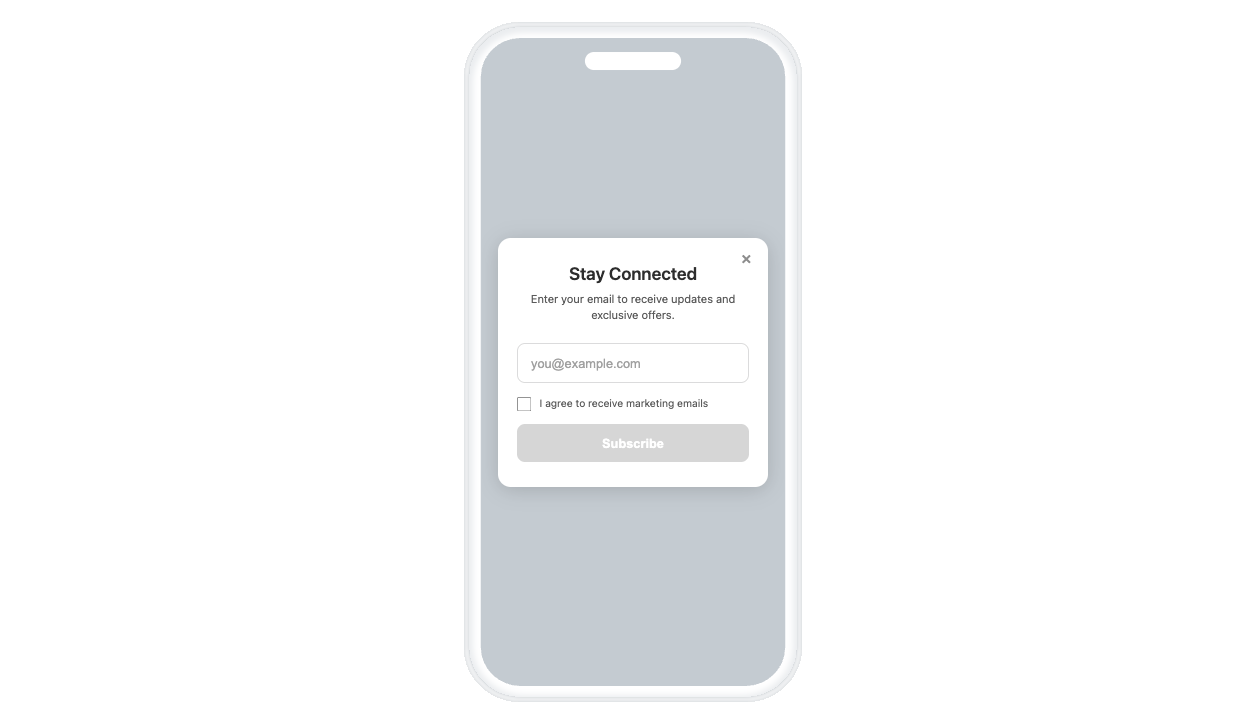
Collect Email Form
Ask for the user’s email and send it to your app via click name.
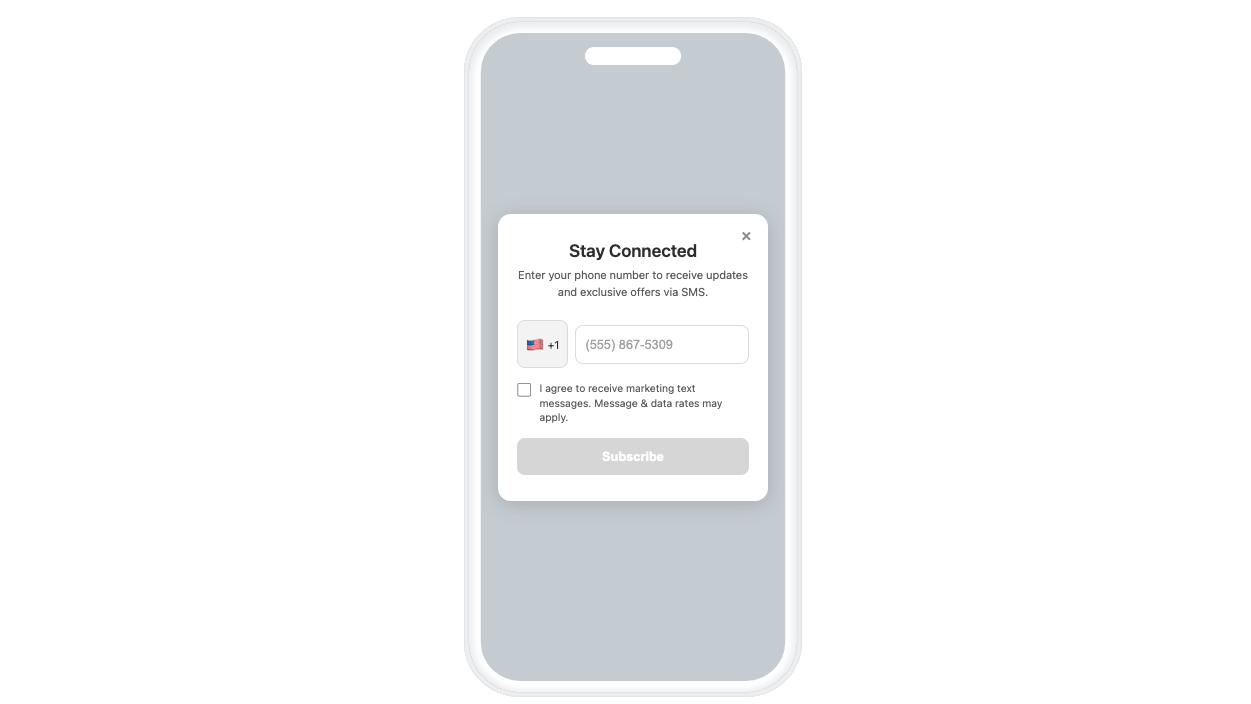
Collect Phone Numbers Form
Ask for and get consent to send SMS. Includes phone number in E.164 format and send it to your app via click name.
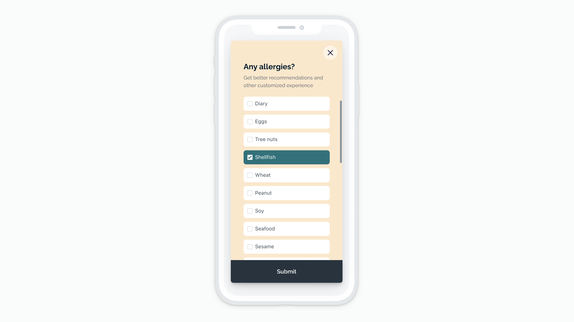
Checklist Survey
Multi-select survey you can send to your backend or convert to tags.
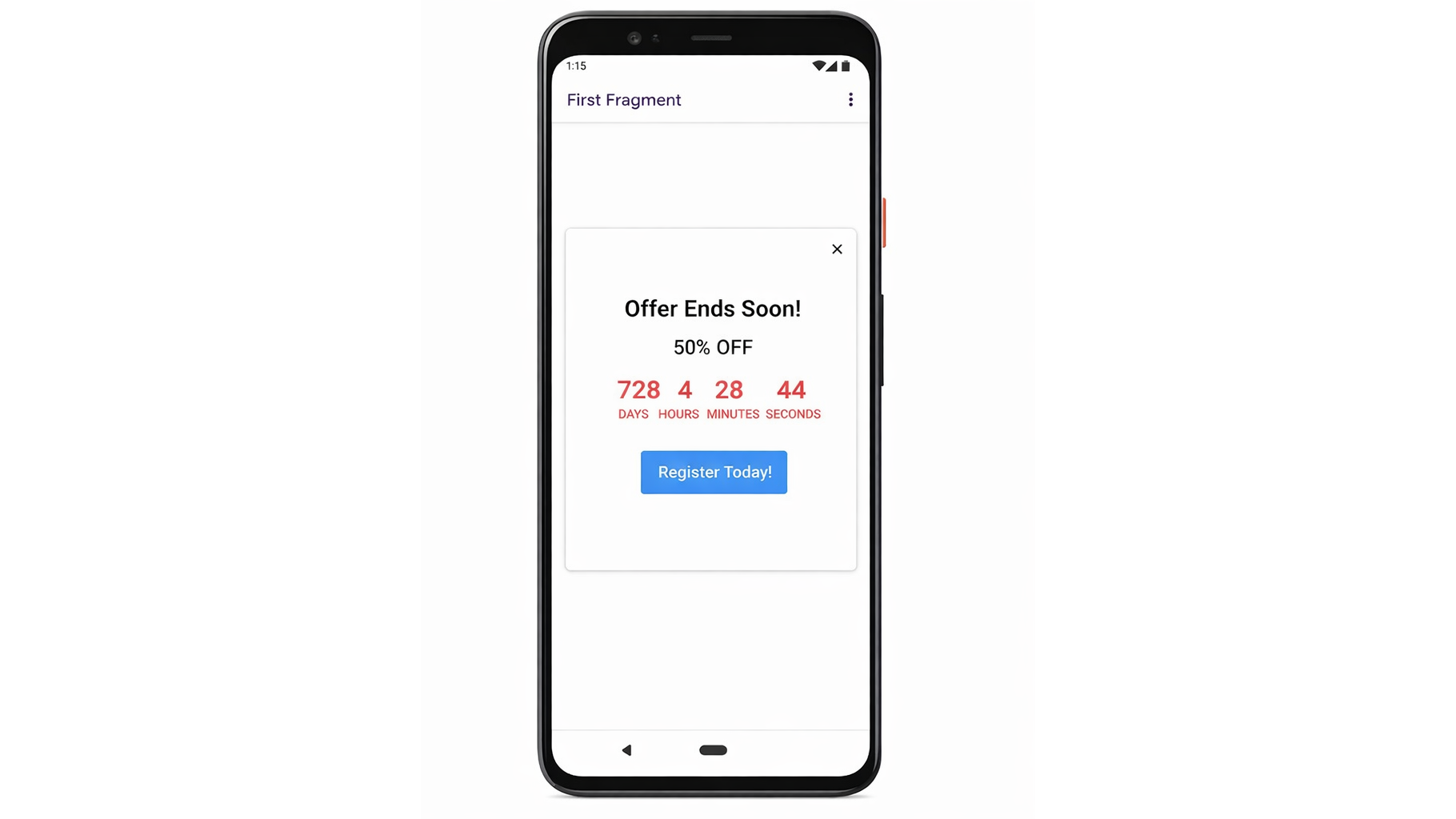
Countdown
Countdown timer for time-sensitive promotions.
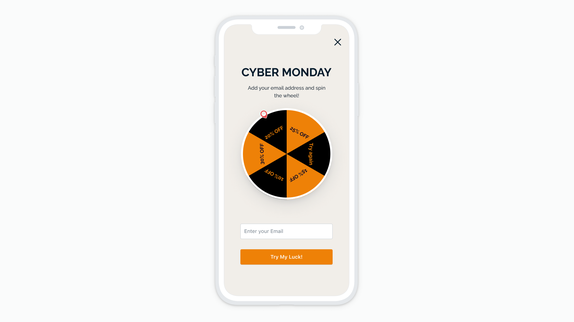
Promo Wheel
Spin-to-win promo experience (customize promo handling).
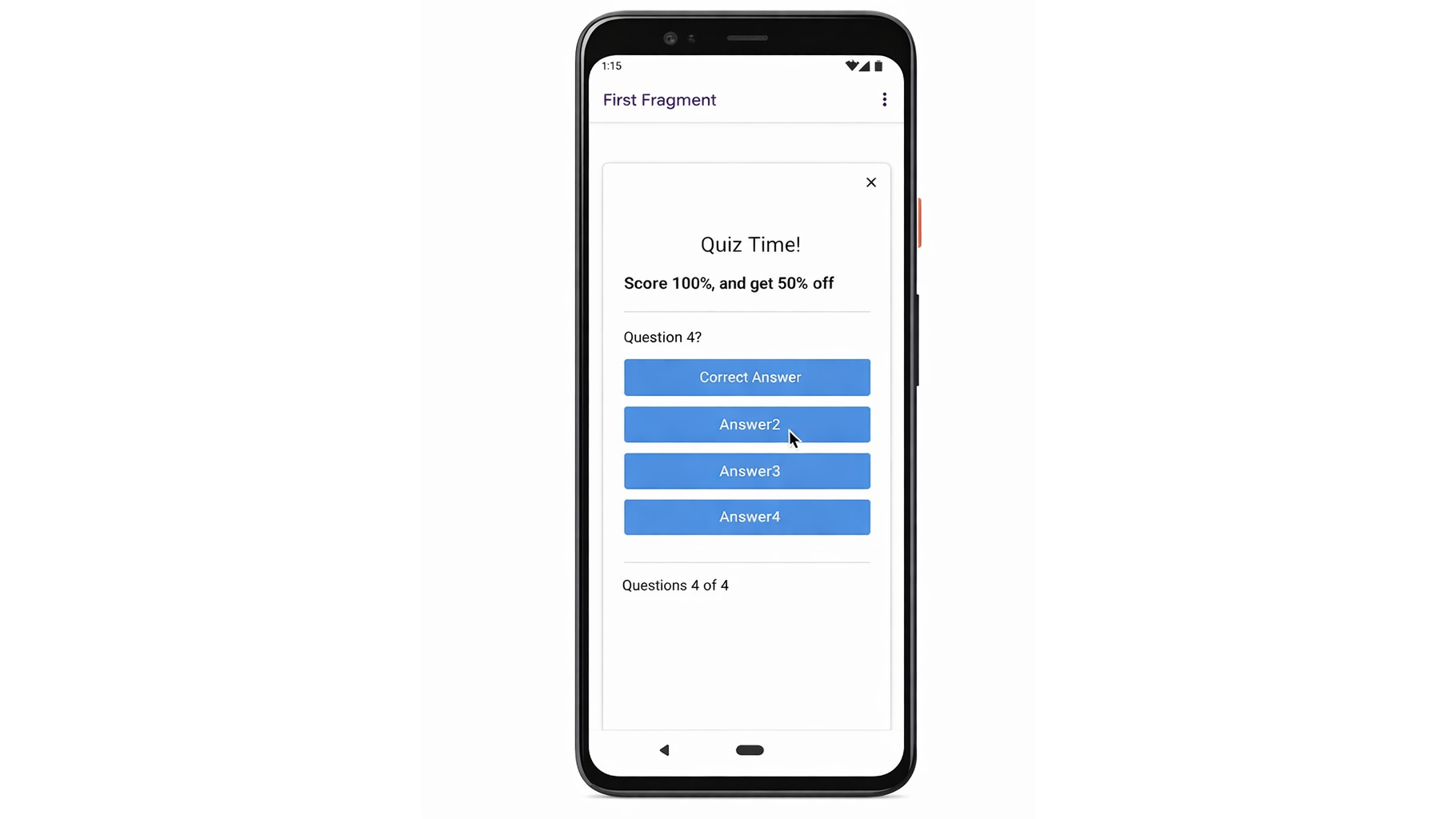
Quiz Modal
Quiz experience that can tag users with their score.
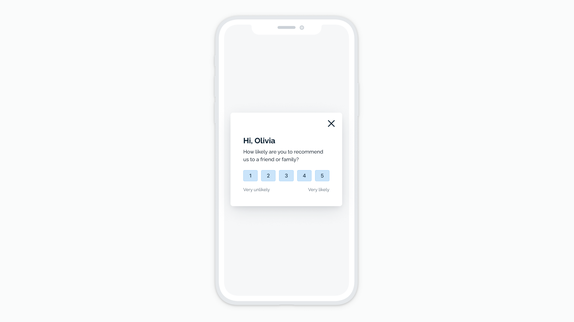
Ranking Survey
1–5 rating survey (send to your endpoint or tag user).
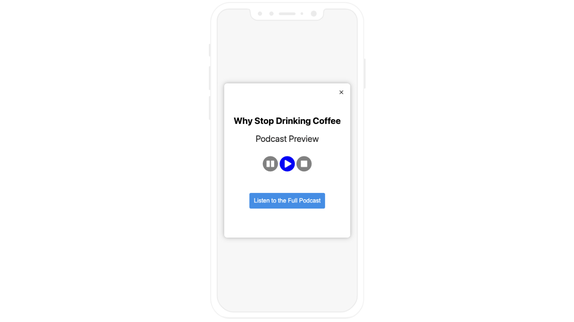
Audio/Video Player
Simple audio preview UI for a direct MP3 file.
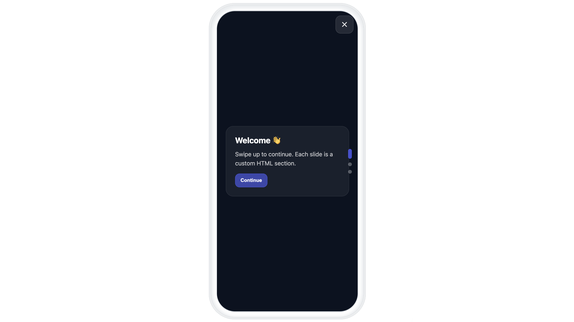
Vertical Swiping
Multi-slide vertical swipe onboarding or feature tour.
Email form
Gather Email Subscriptions through an in-app message. How this form works:- The user enters an email address and checks a consent box.
- On submit, OneSignal’s Create User API is called to create the email Subscription in your app.
- Also, the template calls
OneSignalIamApi.addClickName(e, email)which passes the email address to our SDK’s In-app Message Click Listener. - Within your app, you can add the In-App Message Click Listener to read the click name and pass the email into our SDK’s
addEmailmethod.
- Step 2 doesn’t require adding code directly into the app while but also, doesn’t add the email Subscription to the user if you called the
loginmethod. - Step 4 requires additional code (the In-App Message Click Listener) but also adds the email Subscription to the user if you called the
loginmethod.
Email Form HTML Code
Email Form HTML Code
**Replace
YOUR_APP_ID with your OneSignal App ID found in Settings > Keys & IDs.<!DOCTYPE html>
<html lang="en">
<head>
<meta charset="UTF-8">
<!-- Prevent iOS zoom on input focus -->
<meta name="viewport" content="width=device-width, initial-scale=1.0, maximum-scale=1.0, user-scalable=no">
<style>
/* ===== RESET ===== */
* {
box-sizing: border-box;
margin: 0;
padding: 0;
}
/* ===== BASE ===== */
body {
font-family: -apple-system, BlinkMacSystemFont, 'Segoe UI', Roboto, sans-serif;
background: transparent;
display: flex;
justify-content: center;
align-items: center;
min-height: 100vh;
padding: 20px;
}
/* ===== CARD ===== */
.container {
position: relative;
background: #ffffff;
border-radius: 16px;
padding: 32px 24px;
max-width: 340px;
width: 100%;
box-shadow: 0 4px 24px rgba(0, 0, 0, 0.15);
text-align: center;
}
/* ===== CLOSE BUTTON ===== */
.close-btn {
position: absolute;
top: 12px;
right: 12px;
background: none;
border: none;
font-size: 24px;
color: #999;
cursor: pointer;
padding: 4px 8px;
line-height: 1;
}
.close-btn:hover {
color: #333;
}
/* ===== TYPOGRAPHY ===== */
h1 {
font-size: 22px;
font-weight: 600;
color: #333;
margin-bottom: 8px;
}
p {
font-size: 14px;
color: #666;
margin-bottom: 24px;
line-height: 1.5;
}
/* ===== EMAIL INPUT ===== */
.email-input {
width: 100%;
padding: 14px 16px;
font-size: 16px; /* 16px prevents iOS auto-zoom */
border: 2px solid #e0e0e0;
border-radius: 10px;
margin-bottom: 16px;
outline: none;
transition: border-color 0.2s;
touch-action: manipulation;
}
.email-input:focus {
border-color: #007AFF;
}
.email-input::placeholder {
color: #aaa;
}
/* ===== CONSENT CHECKBOX ===== */
.consent-wrapper {
display: flex;
align-items: flex-start;
gap: 10px;
text-align: left;
margin-bottom: 16px;
}
.consent-wrapper input[type="checkbox"] {
width: 18px;
height: 18px;
margin-top: 2px;
cursor: pointer;
flex-shrink: 0;
}
.consent-wrapper label {
font-size: 13px;
color: #666;
line-height: 1.4;
cursor: pointer;
}
/* ===== SUBMIT BUTTON ===== */
.submit-btn {
width: 100%;
padding: 14px 24px;
font-size: 16px;
font-weight: 600;
color: #fff;
background: #007AFF;
border: none;
border-radius: 10px;
cursor: pointer;
transition: background 0.2s, opacity 0.2s;
}
.submit-btn:hover {
background: #0056b3;
}
.submit-btn:disabled {
background: #ccc;
cursor: not-allowed;
opacity: 0.7;
}
/* ===== STATUS MESSAGES ===== */
.error-msg,
.success-msg {
font-size: 12px;
margin-top: -12px;
margin-bottom: 12px;
display: none;
}
.error-msg {
color: #e53935;
}
.success-msg {
color: #4CAF50;
font-size: 14px;
}
/* ===== LOADING STATE ===== */
.loading {
pointer-events: none;
opacity: 0.7;
}
</style>
</head>
<body>
<div class="container">
<!-- Close Button -->
<button id="close-btn" class="close-btn" data-onesignal-unique-label="close-button">×</button>
<!-- Header -->
<h1>Stay Connected!</h1>
<p>Enter your email to receive updates and exclusive offers. You can unsubscribe anytime!</p>
<!-- Email Input -->
<input
type="email"
id="email-input"
class="email-input"
placeholder="you@example.com"
autocomplete="email"
autocapitalize="off"
>
<!-- Status Messages -->
<p id="error-msg" class="error-msg">Please enter a valid email address</p>
<p id="success-msg" class="success-msg">Thanks for subscribing!</p>
<!-- Consent Checkbox -->
<div class="consent-wrapper">
<input type="checkbox" id="consent-checkbox" name="consent">
<label for="consent-checkbox">I agree to receive marketing emails</label>
</div>
<!-- Submit Button -->
<button id="submit-btn" class="submit-btn" data-onesignal-unique-label="submit-email" disabled>
Subscribe
</button>
</div>
<script>
document.addEventListener("DOMContentLoaded", function() {
// ===== DOM REFERENCES =====
var emailInput = document.getElementById("email-input");
var submitBtn = document.getElementById("submit-btn");
var closeBtn = document.getElementById("close-btn");
var errorMsg = document.getElementById("error-msg");
var successMsg = document.getElementById("success-msg");
var consentCheckbox = document.getElementById("consent-checkbox");
// ===== HELPER FUNCTIONS =====
// Validate email format
function isValidEmail(email) {
return /^[^\s@]+@[^\s@]+\.[^\s@]+$/.test(email);
}
// Enable submit button only when email is valid AND consent is checked
function updateSubmitState() {
var email = emailInput.value.trim();
submitBtn.disabled = !(isValidEmail(email) && consentCheckbox.checked);
}
// Create email subscription via OneSignal API
async function createOneSignalUser(email) {
// ⚠️ Replace with your OneSignal App ID
var appId = "YOUR_APP_ID";
var url = "https://api.onesignal.com/apps/" + appId + "/users";
var payload = {
properties: {
tags: { email_created_from: "iam" },
language: "en"
},
subscriptions: [{
type: "Email",
token: email,
enabled: true
}]
};
var response = await fetch(url, {
method: "POST",
headers: { "Content-Type": "application/json" },
body: JSON.stringify(payload)
});
if (!response.ok) throw new Error("API request failed");
return response.json();
}
// ===== EVENT LISTENERS =====
// Close button - dismiss IAM
closeBtn.addEventListener("click", function(e) {
OneSignalIamApi.close(e);
});
// Checkbox - update button state
consentCheckbox.addEventListener("change", updateSubmitState);
// Email input - update button state and hide errors
emailInput.addEventListener("input", function() {
errorMsg.style.display = "none";
updateSubmitState();
});
// Email input - submit on Enter key
emailInput.addEventListener("keypress", function(e) {
if (e.key === "Enter" && !submitBtn.disabled) {
submitBtn.click();
}
});
// Submit button - handle subscription
submitBtn.addEventListener("click", async function(e) {
var email = emailInput.value.trim();
if (!isValidEmail(email) || !consentCheckbox.checked) {
errorMsg.textContent = "Please enter a valid email address";
errorMsg.style.display = "block";
return;
}
// Pass email to OneSignal click handler (must be called synchronously)
OneSignalIamApi.addClickName(e, email);
// Show loading state
errorMsg.style.display = "none";
submitBtn.textContent = "Subscribing...";
submitBtn.classList.add("loading");
try {
await createOneSignalUser(email);
// Success - show message and auto-close
successMsg.style.display = "block";
submitBtn.textContent = "Subscribed!";
setTimeout(function() {
closeBtn.click();
}, 1500);
} catch (error) {
// Error - reset and show message
submitBtn.textContent = "Subscribe";
submitBtn.classList.remove("loading");
errorMsg.textContent = "Something went wrong. Please try again.";
errorMsg.style.display = "block";
}
});
});
</script>
</body>
</html>
- Keep the addClickName call in your HTML submit handler.
- Read the input with our SDK’s In-app Message Click Listener
- When the click name looks like an email, call the addEmail method within the in-app message click listener.
// Example In-App Message Click Handler to capture email and phone from HTML in-app messages
class InAppMessageClickHandler: NSObject, OSInAppMessageClickListener {
    func onClick(event: OSInAppMessageClickEvent) {
        // Get the click name (action ID) from the event
        let clickName = event.result.actionId
        print("In-App Message clicked with actionId: \(clickName ?? "nil")")

        guard let value = clickName else { return }

        // Check if the click name looks like an email address
        if value.contains("@") && value.contains(".") {
            OneSignal.User.addEmail(value)
            print("Email added to OneSignal: \(value)")
        }
        // Check if the click name looks like a phone number in E.164 format (+1XXXXXXXXXX)
        else if value.hasPrefix("+") && value.count >= 11 {
            OneSignal.User.addSms(value)
            print("SMS added to OneSignal: \(value)")
        }
    }
}
SMS form
Gather SMS Subscriptions through an in-app message. How this form works:- The user selects their country code, enters a 10-digit number, and checks a consent box.
- On submit, OneSignal’s Create User API is called to create the SMS Subscription in your app.
- Also, the template calls
OneSignalIamApi.addClickName(e, e164Phone)which passes the phone number to our SDK’s In-app Message Click Listener. - Within your app, you can add the In-App Message Click Listener to read the click name and pass the phone number into our SDK’s
addSmsmethod.
- Step 2 doesn’t require adding code directly into the app but also, doesn’t add the SMS Subscription to the user if you called the
loginmethod. - Step 4 requires additional code (the In-App Message Click Listener) but also adds the SMS Subscription to the user if you called the
loginmethod.
SMS Form HTML Code
SMS Form HTML Code
**Replace
YOUR_APP_ID with your OneSignal App ID found in Settings > Keys & IDs.<!DOCTYPE html>
<html lang="en">
<head>
<meta charset="UTF-8">
<meta name="viewport" content="width=device-width, initial-scale=1.0, maximum-scale=1.0, user-scalable=no">
<style>
/* ===== RESET ===== */
* {
box-sizing: border-box;
margin: 0;
padding: 0;
}
/* ===== BASE ===== */
body {
font-family: -apple-system, BlinkMacSystemFont, 'Segoe UI', Roboto, sans-serif;
background: transparent;
display: flex;
justify-content: center;
align-items: center;
min-height: 100vh;
padding: 20px;
}
/* ===== CARD ===== */
.container {
position: relative;
background: #ffffff;
border-radius: 16px;
padding: 32px 24px;
max-width: 340px;
width: 100%;
box-shadow: 0 4px 24px rgba(0, 0, 0, 0.15);
text-align: center;
overflow: hidden;
}
/* ===== CLOSE BUTTON ===== */
.close-btn {
position: absolute;
top: 12px;
right: 12px;
background: none;
border: none;
font-size: 24px;
color: #999;
cursor: pointer;
padding: 4px 8px;
line-height: 1;
}
.close-btn:hover {
color: #333;
}
/* ===== TYPOGRAPHY ===== */
h1 {
font-size: 22px;
font-weight: 600;
color: #333;
margin-bottom: 8px;
}
p {
font-size: 14px;
color: #666;
margin-bottom: 24px;
line-height: 1.5;
}
/* ===== PHONE INPUT ===== */
.phone-input-wrapper {
display: flex;
align-items: center;
gap: 8px;
margin-bottom: 16px;
width: 100%;
}
.country-select {
display: flex;
align-items: center;
padding: 14px 8px;
background: #f5f5f5;
border: 2px solid #e0e0e0;
border-radius: 10px;
font-size: 14px;
color: #333;
flex-shrink: 0;
cursor: pointer;
outline: none;
appearance: none;
-webkit-appearance: none;
background-image: url("data:image/svg+xml,%3Csvg xmlns='http://www.w3.org/2000/svg' width='12' height='12' viewBox='0 0 12 12'%3E%3Cpath fill='%23666' d='M6 8L1 3h10z'/%3E%3C/svg%3E");
background-repeat: no-repeat;
background-position: right 8px center;
padding-right: 24px;
}
.country-select:focus {
border-color: #007AFF;
}
.phone-input {
flex: 1;
min-width: 0;
padding: 14px 12px;
font-size: 16px;
border: 2px solid #e0e0e0;
border-radius: 10px;
outline: none;
transition: border-color 0.2s;
width: 100%;
touch-action: manipulation;
}
.phone-input:focus {
border-color: #007AFF;
}
.phone-input::placeholder {
color: #aaa;
}
/* ===== CONSENT CHECKBOX ===== */
.consent-wrapper {
display: flex;
align-items: flex-start;
gap: 10px;
text-align: left;
margin-bottom: 16px;
}
.consent-wrapper input[type="checkbox"] {
width: 18px;
height: 18px;
margin-top: 2px;
cursor: pointer;
flex-shrink: 0;
}
.consent-wrapper label {
font-size: 13px;
color: #666;
line-height: 1.4;
cursor: pointer;
}
/* ===== SUBMIT BUTTON ===== */
.submit-btn {
width: 100%;
padding: 14px 24px;
font-size: 16px;
font-weight: 600;
color: #fff;
background: #007AFF;
border: none;
border-radius: 10px;
cursor: pointer;
transition: background 0.2s, opacity 0.2s;
}
.submit-btn:hover {
background: #0056b3;
}
.submit-btn:disabled {
background: #ccc;
cursor: not-allowed;
opacity: 0.7;
}
/* ===== STATUS MESSAGES ===== */
.error-msg,
.success-msg {
font-size: 12px;
margin-top: -12px;
margin-bottom: 12px;
display: none;
}
.error-msg {
color: #e53935;
}
.success-msg {
color: #4CAF50;
font-size: 14px;
}
/* ===== LOADING STATE ===== */
.loading {
pointer-events: none;
opacity: 0.7;
}
</style>
</head>
<body>
<div class="container">
<!-- Close Button -->
<button id="close-btn" class="close-btn" data-onesignal-unique-label="close-button">×</button>
<!-- Header -->
<h1>Stay Connected</h1>
<p>Enter your phone number to receive updates and exclusive offers via SMS.</p>
<!-- Phone Input with Country Selector -->
<div class="phone-input-wrapper">
<select id="country-select" class="country-select">
<option value="+1" data-length="10">🇺🇸 +1</option>
<option value="+1" data-length="10">🇨🇦 +1</option>
<option value="+44" data-length="10">🇬🇧 +44</option>
<option value="+61" data-length="9">🇦🇺 +61</option>
<option value="+49" data-length="11">🇩🇪 +49</option>
<option value="+33" data-length="9">🇫🇷 +33</option>
<option value="+34" data-length="9">🇪🇸 +34</option>
<option value="+39" data-length="10">🇮🇹 +39</option>
<option value="+81" data-length="10">🇯🇵 +81</option>
<option value="+86" data-length="11">🇨🇳 +86</option>
<option value="+91" data-length="10">🇮🇳 +91</option>
<option value="+52" data-length="10">🇲🇽 +52</option>
<option value="+55" data-length="11">🇧🇷 +55</option>
</select>
<input
type="tel"
id="phone-input"
class="phone-input"
placeholder="(555) 867-5309"
autocomplete="tel"
inputmode="numeric"
>
</div>
<!-- Status Messages -->
<p id="error-msg" class="error-msg">Please enter a valid phone number</p>
<p id="success-msg" class="success-msg">Thanks for subscribing!</p>
<!-- Consent Checkbox -->
<div class="consent-wrapper">
<input type="checkbox" id="consent-checkbox" name="consent">
<label for="consent-checkbox">I agree to receive marketing text messages from [COMPANY NAME]. Message frequency varies. Message & data rates may apply. Reply STOP to unsubscribe. View our Privacy Policy and Terms of Service.</label>
</div>
<!-- Submit Button -->
<button id="submit-btn" class="submit-btn" data-onesignal-unique-label="submit-phone" disabled>
Subscribe
</button>
</div>
<script>
document.addEventListener("DOMContentLoaded", function() {
// ===== DOM REFERENCES =====
var phoneInput = document.getElementById("phone-input");
var countrySelect = document.getElementById("country-select");
var submitBtn = document.getElementById("submit-btn");
var closeBtn = document.getElementById("close-btn");
var errorMsg = document.getElementById("error-msg");
var successMsg = document.getElementById("success-msg");
var consentCheckbox = document.getElementById("consent-checkbox");
// ===== HELPER FUNCTIONS =====
// Get expected phone length for selected country
function getExpectedLength() {
var selected = countrySelect.options[countrySelect.selectedIndex];
return parseInt(selected.getAttribute("data-length")) || 10;
}
// Extract digits only from input
function getDigitsOnly(value) {
return value.replace(/\D/g, "");
}
// Format phone number as user types (US format for +1, generic for others)
function formatPhoneNumber(value) {
var digits = getDigitsOnly(value);
var countryCode = countrySelect.value;
var maxLength = getExpectedLength();
digits = digits.substring(0, maxLength);
// US/Canada formatting
if (countryCode === "+1") {
if (digits.length === 0) return "";
if (digits.length <= 3) return digits;
if (digits.length <= 6) return "(" + digits.substring(0, 3) + ") " + digits.substring(3);
return "(" + digits.substring(0, 3) + ") " + digits.substring(3, 6) + "-" + digits.substring(6);
}
// Generic formatting for other countries (groups of 3-4)
if (digits.length === 0) return "";
if (digits.length <= 4) return digits;
if (digits.length <= 7) return digits.substring(0, 4) + " " + digits.substring(4);
return digits.substring(0, 4) + " " + digits.substring(4, 7) + " " + digits.substring(7);
}
// Convert to E.164 format
function toE164(value) {
var digits = getDigitsOnly(value);
var countryCode = countrySelect.value;
return countryCode + digits;
}
// Validate phone number
function isValidPhone(value) {
var digits = getDigitsOnly(value);
var expectedLength = getExpectedLength();
return digits.length === expectedLength;
}
// Enable submit only when phone is valid AND consent is checked
function updateSubmitState() {
var phone = phoneInput.value.trim();
submitBtn.disabled = !(isValidPhone(phone) && consentCheckbox.checked);
}
// Create SMS subscription via OneSignal API
async function createOneSignalUser(phone) {
// ⚠️ Replace with your OneSignal App ID
var appId = "YOUR_APP_ID";
var url = "https://api.onesignal.com/apps/" + appId + "/users";
var payload = {
properties: {
tags: { sms_created_from: "iam" },
language: "en"
},
subscriptions: [{
type: "SMS",
token: phone,
enabled: true
}]
};
var response = await fetch(url, {
method: "POST",
headers: { "Content-Type": "application/json" },
body: JSON.stringify(payload)
});
if (!response.ok) throw new Error("API request failed");
return response.json();
}
// ===== EVENT LISTENERS =====
// Close button - dismiss IAM
closeBtn.addEventListener("click", function(e) {
OneSignalIamApi.close(e);
});
// Country selector - update placeholder and reformat input
countrySelect.addEventListener("change", function() {
var countryCode = countrySelect.value;
// Update placeholder based on country
if (countryCode === "+1") {
phoneInput.placeholder = "(555) 867-5309";
} else {
phoneInput.placeholder = "Enter phone number";
}
// Reformat existing input
phoneInput.value = formatPhoneNumber(phoneInput.value);
updateSubmitState();
});
// Phone input - format as user types
phoneInput.addEventListener("input", function() {
var cursorPosition = phoneInput.selectionStart;
var oldLength = phoneInput.value.length;
phoneInput.value = formatPhoneNumber(phoneInput.value);
// Adjust cursor position
var newLength = phoneInput.value.length;
var newPosition = cursorPosition + (newLength - oldLength);
phoneInput.setSelectionRange(newPosition, newPosition);
errorMsg.style.display = "none";
updateSubmitState();
});
// Checkbox - update button state
consentCheckbox.addEventListener("change", updateSubmitState);
// Phone input - submit on Enter key
phoneInput.addEventListener("keypress", function(e) {
if (e.key === "Enter" && !submitBtn.disabled) {
submitBtn.click();
}
});
// Submit button - handle subscription
submitBtn.addEventListener("click", async function(e) {
var phone = phoneInput.value.trim();
if (!isValidPhone(phone) || !consentCheckbox.checked) {
errorMsg.textContent = "Please enter a valid phone number";
errorMsg.style.display = "block";
return;
}
// Convert to E.164 and pass to OneSignal click handler (must be synchronous)
var e164Phone = toE164(phone);
OneSignalIamApi.addClickName(e, e164Phone);
// Show loading state
errorMsg.style.display = "none";
submitBtn.textContent = "Subscribing...";
submitBtn.classList.add("loading");
try {
await createOneSignalUser(e164Phone);
// Success - show message and auto-close
successMsg.style.display = "block";
submitBtn.textContent = "Subscribed!";
setTimeout(function() {
closeBtn.click();
}, 1500);
} catch (error) {
// Error - reset and show message
submitBtn.textContent = "Subscribe";
submitBtn.classList.remove("loading");
errorMsg.textContent = "Something went wrong. Please try again.";
errorMsg.style.display = "block";
}
});
});
</script>
</body>
</html>
- Keep the addClickName call in your HTML submit handler.
- Read the input with our SDK’s In-app Message Click Listener
- When the click name is an E.164 number, call the addSms method within the in-app message click listener.
// In-App Message Click Handler to capture email and phone from HTML in-app messages
class InAppMessageClickHandler: NSObject, OSInAppMessageClickListener {
    func onClick(event: OSInAppMessageClickEvent) {
        // Get the click name (action ID) from the event
        let clickName = event.result.actionId
        print("In-App Message clicked with actionId: \(clickName ?? "nil")")

        guard let value = clickName else { return }

        // Check if the click name looks like an email address
        if value.contains("@") && value.contains(".") {
            OneSignal.User.addEmail(value)
            print("Email added to OneSignal: \(value)")
        }
        // Check if the click name looks like a phone number in E.164 format (+1XXXXXXXXXX)
        else if value.hasPrefix("+") && value.count >= 11 {
            OneSignal.User.addSms(value)
            print("SMS added to OneSignal: \(value)")
        }
    }
}
Checklist survey
Multi-select survey that posts results to your backend.- Set your endpoint in
handleSurveyAnswer(). - Update checkbox
namevalues and labels to match your question.
If you leave
var url = "", the request will fail. Set a real endpoint or replace fetch() with tagging (example below).HTML Code
HTML Code
<!DOCTYPE html>
<html lang="en">
  <head>
    <meta charset="UTF-8" />
    <meta name="viewport" content="width=device-width, initial-scale=1.0" />
    <meta http-equiv="X-UA-Compatible" content="ie=edge" />
    <title>Onesignal In-App Message</title>
    <!-- Google Fonts -->
    <link rel="preconnect" href="https://fonts.googleapis.com" />
    <link rel="preconnect" href="https://fonts.gstatic.com" crossorigin />
    <link
      href="https://fonts.googleapis.com/css2?family=Nunito+Sans:wght@500;700&family=Raleway:wght@500;700&display=swap"
      rel="stylesheet"
    />
    <style>
      * {
        box-sizing: border-box;
      }

      body {
        margin: 0;
        padding-top: var(--safe-area-inset-top);
        padding-right: var(--safe-area-inset-right);
        padding-bottom: calc(var(--safe-area-inset-bottom) + 20px);
        padding-left: var(--safe-area-inset-left);
        font-family: -apple-system, BlinkMacSystemFont, "Segoe UI", Roboto,
          Oxygen-Sans, Ubuntu, Cantarell, "Helvetica Neue", sans-serif;
        display: flex;
        align-items: center;
      }

      .center-modal {
        position: relative;
        background: #fae8cd;
        margin: 18px;
        border-radius: 8px;

        display: flex;
        flex-direction: column;
        justify-content: center;
        height: 85%;
        max-height: 640px;
        width: 100%;
        box-shadow: rgb(0 0 0 / 30%) 0px 0px 12.5px,
          rgb(0 0 0 / 15%) 0px 0px 2.5px;
      }

      .center-modal .close-button {
        position: absolute;
        top: 10;
        right: 10;
        background: rgba(255, 255, 255, 0.5);
        border: none;
        z-index: 1;
        display: flex;
        justify-content: center;
        flex-direction: column;
        align-items: center;
        /* Tip: Make your close-button relatively large so it's easy to click */
        min-width: 36px;
        min-height: 36px;
        border-radius: 50%;
      }

      .center-modal .headings {
        padding: 24px 24px 0 24px;
      }

      .center-modal h1 {
        margin: 32px 0 0 0;
        color: #222;
        text-decoration: none;
        font-family: Raleway;
        font-size: 24px;
        font-weight: 700;
        line-height: 28px;
        letter-spacing: 0px;
        text-align: left;
      }

      .center-modal h2 {
        font-family: Raleway;
        font-size: 16px;
        font-weight: 500;
        line-height: 24px;
        letter-spacing: 0px;
        text-align: left;
        color: #73777b;
      }

      form {
        overflow: auto;
        padding-bottom: 53px;
      }

      form div {
        display: flex;
        justify-content: flex-start;
        align-items: center;
        padding: 12px;
        gap: 8px;
        background: #ffffff;
        border-radius: 8px;
        border: none;
        margin: 12px 24px;
      }

      form input[type="checkbox"] {
        /* Add if not using autoprefixer */
        -webkit-appearance: none;
        outline: none !important;
        appearance: none;
        /* For iOS < 15 to remove gradient background */
        background-color: #fff;
        /* Not removed via appearance */
        margin-right: 6px;
        font: inherit;
        color: currentColor;
        width: 1.15em;
        height: 1.15em;
        border: 0.15em solid #cbd1d7;
        border-radius: 0.15em;
        transform: translateY(-0.075em);
        display: grid;
        place-content: center;
      }

      input[type="checkbox"]::before {
        content: "";
        width: 0.65em;
        height: 0.65em;
        transform: scale(0);
        transition: 120ms transform ease-in-out;
        box-shadow: inset 1em 1em #33717a;
        transform-origin: bottom left;
        clip-path: polygon(14% 44%, 0 65%, 50% 100%, 100% 16%, 80% 0%, 43% 62%);
      }

      input[type="checkbox"]:checked::before {
        transform: scale(1);
      }

      form input[type="submit"] {
        color: #fff;
        position: absolute;
        bottom: 0;
        width: 100%;
        left: 0;
        height: 70px;
        border: none;
        background: #28333e;

        font-family: "Raleway";
        font-style: normal;
        font-weight: 500;
        font-size: 18px;
        line-height: 21px;
      }

      .flex-container {
        display: flex;
        flex-direction: column;
      }

      @media screen and (min-width: 480px) {
        .flex-container {
          flex-direction: row;
          grid-gap: 12px;
          width: 100%;
        }
      }
    </style>
  </head>

  <body>
    <div class="center-modal">
      <div class="close-button" data-onesignal-unique-label="close-button">
        <svg
          width="10"
          height="10"
          preserveAspectRatio="none"
          viewBox="0 0 8 8"
          fill="none"
          xmlns="http://www.w3.org/2000/svg"
        >
          <path
            d="M7.80309 1.14768C8.06564 0.885137 8.06564 0.459453 7.80309 0.196909C7.54055 -0.0656362 7.11486 -0.0656362 6.85232 0.196909L4 3.04923L1.14768 0.196909C0.885137 -0.0656362 0.459453 -0.0656362 0.196909 0.196909C-0.0656362 0.459453 -0.0656362 0.885137 0.196909 1.14768L3.04923 4L0.196909 6.85232C-0.0656362 7.11486 -0.0656362 7.54055 0.196909 7.80309C0.459453 8.06564 0.885137 8.06564 1.14768 7.80309L4 4.95077L6.85232 7.80309C7.11486 8.06564 7.54055 8.06564 7.80309 7.80309C8.06564 7.54055 8.06564 7.11486 7.80309 6.85232L4.95077 4L7.80309 1.14768Z"
            fill="#111111"
          />
        </svg>
      </div>
      <div class="headings">
        <h1>Any allergies?</h1>
        <h2>Get better recommendations and other customized experience</h2>
      </div>
      <form>
        <div>
          <input type="checkbox" name="dairy" />
          <label for="dairy">Dairy</label>
        </div>
        <div>
          <input type="checkbox" name="eggs" />
          <label for="eggs">Eggs</label>
        </div>
        <div>
          <input type="checkbox" name="treeNuts"/>
          <label for="treeNuts">Tree Nuts</label>
        </div>
        <div>
          <input type="checkbox" name="shellfish" />
          <label for="shellfish">Shellfish</label>
        </div>
        <div>
          <input type="checkbox" name="wheat" />
          <label for="wheat">Wheat</label>
        </div>
        <div>
          <input type="checkbox" name="peanuts" />
          <label for="peanuts">Peanuts</label>
        </div>
        <div>
          <input type="checkbox" name="soy" />
          <label for="soy">Soy</label>
        </div>
        <div>
          <input type="checkbox" name="seafood" />
          <label for="seafood">Seafood</label>
        </div>
        <div>
          <input type="checkbox" name="sesame" />
          <label for="sesame">Sesame</label>
        </div>
        <div>
          <input type="checkbox" name="gluten" />
          <label for="gluten">Gluten</label>
        </div>
        <input type="submit" data-onesignal-unique-label="submit-button" />
      </form>
    </div>
    <script>
      if (iamInfo) {
        iamInfo.shouldVerticalDragDismissMessage = false;
      }
      // Your code here
      document
        .querySelector(".close-button")
        .addEventListener("click", function (e) {
          OneSignalIamApi.close(e);
        });

      document.querySelectorAll("input[type=checkbox").forEach(function (node) {
        node.addEventListener("click", function (e) {
          if (e.target.checked) {
            e.target.parentElement.style["background-color"] = "#33717A";
            e.target.parentElement.style["color"] = "#FFF";
            e.target.style["border"] = "none";
          } else {
            e.target.removeAttribute("style");
            e.target.parentElement.removeAttribute("style");
          }
        });
      });

      function handleSurveyAnswer(answers) {
        // Add your own survey api endpoint url here
        var url = "";
        var options = {
          method: "POST",
          headers: {
            Accept: "application/json",
            "Content-Type": "application/json",
          },
          body: JSON.stringify({
            value: answers,
          }),
        };
        fetch(url, options)
          .then((response) => response.json())
          .then((response) => console.log(response))
          .catch((err) => console.error(err));
      }

      document.querySelector("form").addEventListener("submit", function (e) {
        e.preventDefault();
        e.stopPropagation();
        var answers = {
          dairy: e.target.dairy.checked,
          eggs: e.target.eggs.checked,
          treeNuts: e.target.treeNuts.checked,
          shellfish: e.target.shellfish.checked,
          wheat: e.target.wheat.checked,
          peanuts: e.target.peanuts.checked,
          soy: e.target.soy.checked,
          seafood: e.target.seafood.checked,
          sesame: e.target.sesame.checked,
          gluten: e.target.gluten.checked,
        };
        handleSurveyAnswer(answers);
        OneSignalIamApi.close(e);
      });
    </script>
  </body>
</html>
handleSurveyAnswer(answers) call in the submit handler with:
OneSignalIamApi.tagUser(e, {
  allergies: JSON.stringify(answers)
});
Countdown
Create urgency with a countdown timer for limited-time offers and promotions. Customize the end date and redirect URL to match your campaign.- Update
endtimeto a future date/time. - Update
openUrldestination URL.
The sample
endtime in this template is in the past (Mar 25, 2025). If you don’t update it, users will immediately hit the “ended” logic.HTML Code
HTML Code
<!DOCTYPE html>
<html lang="en">
  <head>
    <meta charset="UTF-8" />
    <meta name="viewport" content="width=device-width, initial-scale=1.0" />
    <link
      rel="stylesheet"
      href="https://cdnjs.cloudflare.com/ajax/libs/font-awesome/4.7.0/css/font-awesome.min.css"
    />

    <meta http-equiv="X-UA-Compatible" content="ie=edge" />
    <title>Onesignal In-App Message</title>
    <style>
  body {
    margin: 0;
    padding-top: var(--safe-area-inset-top);
    padding-right: var(--safe-area-inset-right);
    padding-bottom: calc(var(--safe-area-inset-bottom) + 20px);
    padding-left: var(--safe-area-inset-left);
    font-family: -apple-system, BlinkMacSystemFont, "Segoe UI", Roboto, Oxygen-Sans, Ubuntu, Cantarell, "Helvetica Neue", sans-serif;
    display: flex;
    align-items: center;
  }

  .container {
    color: red;
    text-align: center;
    padding-right: 10%;
  }

  li {
    display: inline-block;
    font-size: 12px;
    list-style-type: none;
    text-transform: uppercase;
  }

  li span {
    display: block;
    font-size: 20px;
  }

  .center-modal {
    position: relative;
    background: #FFF;
    margin: 18px;
    padding: 24px;
    border-radius: 8px;
    display: flex;
    flex-direction: column;
    justify-content: center;
    align-items: center;
    height: 45%;
    width: 100%;
    box-shadow: rgb(0 0 0 / 30%) 0px 0px 12.5px, rgb(0 0 0 / 15%) 0px 0px 2.5px;
  }

  .center-modal .close-button {
    position: absolute;
    top: 0;
    right: 0;
    background: rgba(0, 0, 0, 0);
    border: none;
    z-index: 1;
    display: flex;
    justify-content: center;
    flex-direction: column;
    align-items: center;
    /* Tip: Make your close-button relatively large so it's easy to click */
    min-width: 48px;
    min-height: 48px;
  }

  .center-modal h1 {
    margin: 0;
    margin-bottom: 12px;
    color: #222;
    font-size: 24px;
    font-style: normal;
    font-weight: normal;
    text-align: center;
    text-decoration: none;
  }

  .center-modal button {
    font-size: 16px;
    color: #fff;
    background-color: #1F8FEB;
    width: 100%;
    padding: 12px;
    border-radius: 4px;
    border: none;
    margin-bottom: 12px;
  }

  .button-container {
    display: flex;
    flex-direction: column;
  }

  @media screen and (min-width: 480px) {
    .button-container {
      flex-direction: row;
      grid-gap: 12px;
      padding-left: 20%;
      width: 40%;
    }

    .button-column {
      width: 50%;
    }

    .center-modal {
      height: 80%;
    }
  }
</style>
  </head>

  <body>
    <div class="center-modal">
      <div class="close-button" data-onesignal-unique-label="close-button">
        <svg
          width="10"
          height="10"
          preserveAspectRatio="none"
          viewBox="0 0 8 8"
          fill="none"
          xmlns="http://www.w3.org/2000/svg"
        >
          <path
            d="M7.80309 1.14768C8.06564 0.885137 8.06564 0.459453 7.80309 0.196909C7.54055 -0.0656362 7.11486 -0.0656362 6.85232 0.196909L4 3.04923L1.14768 0.196909C0.885137 -0.0656362 0.459453 -0.0656362 0.196909 0.196909C-0.0656362 0.459453 -0.0656362 0.885137 0.196909 1.14768L3.04923 4L0.196909 6.85232C-0.0656362 7.11486 -0.0656362 7.54055 0.196909 7.80309C0.459453 8.06564 0.885137 8.06564 1.14768 7.80309L4 4.95077L6.85232 7.80309C7.11486 8.06564 7.54055 8.06564 7.80309 7.80309C8.06564 7.54055 8.06564 7.11486 7.80309 6.85232L4.95077 4L7.80309 1.14768Z"
            fill="#111111"
          />
        </svg>
      </div>

      <!-- Add notification details below -->


      <h2>Offer Ends Soon!</h2>
      <h1>50% OFF</h1>

      <div class="container">
        <div id="countdown">
          <ul>
            <li><span id="days"></span>Days</li>
            <li><span id="hours"></span>Hours</li>
            <li><span id="minutes"></span>Minutes</li>
            <li><span id="seconds"></span>Seconds</li>
          </ul>
        </div>
      </div>

      <br />

      <div class="button-container">
        <div class="button-column">
          <button
            class="open-url"
            data-onesignal-unique-label="my-open-url-button"
          >
            Register Today!
          </button>
        </div>
      </div>
    </div>

    <script>
  (function() {
    const second = 1000,
      minute = second * 60,
      hour = minute * 60,
      day = hour * 24;

    // Set the date and time below to which the in-app should countdown towards
    let endtime = "Mar 25, 2025 00:00:00";
    let countDown = new Date(endtime).getTime();

    const x = setInterval(function() {
      const now = new Date().getTime();
      const distance = countDown - now;

      document.getElementById("days").innerText = Math.floor(distance / day);
      document.getElementById("hours").innerText = Math.floor((distance % day) / hour);
      document.getElementById("minutes").innerText = Math.floor((distance % hour) / minute);
      document.getElementById("seconds").innerText = Math.floor((distance % minute) / second);

      // Action when end date/time is reached
      if (distance < 0) {
        const headline = document.getElementById("headline");
        const countdown = document.getElementById("countdown");
        const content = document.getElementById("content");

        headline.innerText = "This offer has ended..";
        countdown.style.display = "none";
        content.style.display = "block";

        clearInterval(x);
      }
    }, 1000);

    // Close the in-app message
    document.querySelector(".close-button").addEventListener("click", function(e) {
      OneSignalIamApi.close(e);
    });

    // Change the URL below to the URL which you would like to redirect users to
    document.querySelector(".open-url").addEventListener("click", function(e) {
      OneSignalIamApi.openUrl(e, "https://documentation.onesignal.com/docs/in-app-js-library");
    });
  })();
</script>

  </body>
</html>
Promo wheel
Spin-to-win promotion with a random outcome.- Replace hardcoded promo codes with server-generated or validated codes.
- Add your “Shop Now” URL or action.
Client-side randomness and hardcoded codes are easy to abuse. If a promo has value, generate/validate it server-side.
HTML Code
HTML Code
<!DOCTYPE html>
<html lang="en">
  <head>
    <meta charset="UTF-8" />
    <meta name="viewport" content="width=device-width, initial-scale=1.0" />
    <meta http-equiv="X-UA-Compatible" content="ie=edge" />
    <title>Onesignal In-App Message</title>
    <!-- Google Fonts -->
    <link rel="preconnect" href="https://fonts.googleapis.com" />
    <link rel="preconnect" href="https://fonts.gstatic.com" crossorigin />
    <link
      href="https://fonts.googleapis.com/css2?family=Nunito+Sans:wght@400;700&family=Raleway:wght@500;600&display=swap"
      rel="stylesheet"
    />
    <!-- CSS Reset -->
    <link
      href="https://cdnjs.cloudflare.com/ajax/libs/meyer-reset/2.0/reset.min.css"
      rel="stylesheet"
    />
    <!-- Google Fonts -->
    <link rel="preconnect" href="https://fonts.googleapis.com" />
    <link rel="preconnect" href="https://fonts.gstatic.com" crossorigin />
    <link
      href="https://fonts.googleapis.com/css2?family=Nunito+Sans:wght@500;700&family=Raleway:wght@500;700&display=swap"
      rel="stylesheet"
    />
    <style>
      body {
        margin: 0;
        font-family: -apple-system, BlinkMacSystemFont, "Segoe UI", Roboto,
          Oxygen-Sans, Ubuntu, Cantarell, "Helvetica Neue", sans-serif;
        display: flex;
        align-items: center;
        background: #e5e8eb;
        padding-top: var(--safe-area-inset-top);
        padding-right: var(--safe-area-inset-right);
        padding-bottom: calc(var(--safe-area-inset-bottom) + 20px);
        padding-left: var(--safe-area-inset-left);
        background: #f1eee9;
      }

      .close-button {
        position: absolute;
        top: 30;
        right: 15;
        background: rgba(0, 0, 0, 0);
        border: none;
        z-index: 1;
        display: flex;
        justify-content: center;
        flex-direction: column;
        align-items: center;
        /* Tip: Make your close-button relatively large so it's easy to click */
        min-width: 48px;
        min-height: 48px;
      }

      .flex-container {
        width: 100%;
        display: flex;
        flex-direction: column;
        align-items: center;
        justify-content: center;
        gap: 12px;
      }

      h1 {
        font-family: "Raleway";
        font-style: normal;
        font-weight: 700;
        font-size: 36px;
        line-height: 42px;
        display: flex;
        align-items: center;
        text-align: center;
        color: #051b2c;
      }

      h2 {
        font-family: "Raleway";
        font-style: normal;
        font-weight: 500;
        font-size: 16px;
        line-height: 24px;
        display: flex;
        align-items: center;
        text-align: center;
        color: #28333e;
        max-width: 270px;
        margin-bottom: 36px;
      }

      .wheel-container {
        position: relative;
        margin-bottom: 48px;
        height: calc(286px + (2 * 6px));
      }

      .stopper {
        position: absolute;
        top: 8px;
        z-index: 1;
        left: 62px;
        transform: rotate(323deg);
      }

      .wheel-container .promo-code-code-message {
        display: none;
        position: relative;
        top: calc(-286px - (2 * 6px));
        z-index: 1;
        /* display flex will be applied via javascript */
        flex-direction: column;
        justify-content: center;
        align-items: center;
      }

      .promo-code-code-message h1,
      .promo-code-code-message h2 {
        color: #fff;
        width: auto;
        margin: 12px;
      }

      .promo-code-code-message h2 {
        font-family: Raleway;
        font-size: 24px;
        font-weight: 700;
        line-height: 24px;
        letter-spacing: 0px;
      }

      .wheel {
        height: 286px;
        width: 286px;
        position: relative;
        border-radius: 50%;
        overflow: hidden;
        box-shadow: 0 0 10px gray;
        transition: 3s all;
        border: 6px solid #fff;
        background: #000;
        color: #fff;
      }

      .wheel div {
        height: 50%;
        width: 166px;
        clip-path: polygon(100% 0, 50% 100%, 0 0);
        transform: translateX(-50%);
        transform-origin: bottom;
        position: absolute;
        left: 21%;
        display: flex;
        align-items: center;
        justify-content: center;
        font-size: 20px;
        font-family: monospace;
        font-weight: 1000;
        writing-mode: vertical-rl;
      }

      .wheel > div:nth-child(odd) {
        background: #000;
        color: #ee8107;
      }

      .wheel > div:nth-child(even) {
        color: #000;
        background: #ee8107;
      }

      .wheel .one {
        transform: rotate(30deg);
      }
      .wheel .two {
        transform: rotate(90deg);
      }
      .wheel .three {
        transform: rotate(150deg);
      }
      .wheel .four {
        transform: rotate(210deg);
      }
      .wheel .five {
        transform: rotate(270deg);
      }
      .wheel .six {
        transform: rotate(330deg);
      }

      form {
        width: 286px;
      }

      input[type="email"] {
        background: #ffffff;
        border: 1px solid #cbd1d7;
        border-radius: 4px;
        width: 100%;
        height: 48px;
        padding: 12px;
        margin-bottom: 24px;
        border: none;
        box-shadow: 0px 1px 1px rgba(5, 27, 44, 0.16),
          inset 0px 2px 0px rgba(255, 255, 255, 0.05);
      }

      input[type="submit"] {
        background: #ee8107;
        color: #ffffff;
        border-radius: 4px;
        width: 100%;
        height: 48px;
        padding: 12px;
        border: none;
        box-shadow: 0px 1px 1px rgba(5, 27, 44, 0.16),
          inset 0px 2px 0px rgba(255, 255, 255, 0.05);
        font-family: "Raleway";
        font-weight: 500;
        font-size: 16px;
        line-height: 19px;
      }

      .shop-now-button {
        display: none;
        background: #ee8107;
        color: #ffffff;
        border-radius: 4px;
        width: 286px;
        height: 48px;
        padding: 12px;
        border: none;
        font-family: "Raleway";
        font-weight: 500;
        font-size: 16px;
        line-height: 19px;
        box-shadow: 0px 1px 1px rgba(5, 27, 44, 0.16),
          inset 0px 2px 0px rgba(255, 255, 255, 0.05);
        margin-top: 48px;
      }

      h2.deal {
        font-size: 36px;
      }

      @media screen and (min-width: 480px) {
      }
    </style>
  </head>

  <body>
    <div class="close-button" data-onesignal-unique-label="close-button">
      <svg
        width="16"
        height="16"
        preserveAspectRatio="none"
        viewBox="0 0 8 8"
        fill="none"
        xmlns="http://www.w3.org/2000/svg"
      >
        <path
          d="M7.80309 1.14768C8.06564 0.885137 8.06564 0.459453 7.80309 0.196909C7.54055 -0.0656362 7.11486 -0.0656362 6.85232 0.196909L4 3.04923L1.14768 0.196909C0.885137 -0.0656362 0.459453 -0.0656362 0.196909 0.196909C-0.0656362 0.459453 -0.0656362 0.885137 0.196909 1.14768L3.04923 4L0.196909 6.85232C-0.0656362 7.11486 -0.0656362 7.54055 0.196909 7.80309C0.459453 8.06564 0.885137 8.06564 1.14768 7.80309L4 4.95077L6.85232 7.80309C7.11486 8.06564 7.54055 8.06564 7.80309 7.80309C8.06564 7.54055 8.06564 7.11486 7.80309 6.85232L4.95077 4L7.80309 1.14768Z"
          fill="#111111"
        />
      </svg>
    </div>
    <div class="flex-container">
      <h1 class="primary-header">Cyber Monday</h1>
      <h2 class="secondary-header">
        Add your email address and spin the wheel!
      </h2>
      <div class="wheel-container">
        <div class="stopper">
          <svg
            width="23"
            height="29"
            viewBox="0 0 23 29"
            fill="none"
            xmlns="http://www.w3.org/2000/svg"
          >
            <path
              d="M11.6741 0.767822C8.69151 0.771461 5.83213 1.9579 3.72313 4.06688C1.61415 6.17588 0.42771 9.03526 0.424072 12.0178C0.424072 21.3541 10.5791 27.8078 11.0116 28.0778L11.6741 28.4928L12.3366 28.0778C12.7691 27.8078 22.9241 21.3541 22.9241 12.0178C22.9204 9.03526 21.7339 6.17588 19.6249 4.06688C17.5159 1.9579 14.6567 0.771461 11.6741 0.767822ZM11.6741 18.2678C10.4379 18.2678 9.22957 17.9013 8.20176 17.2144C7.17395 16.5277 6.37287 15.5516 5.89982 14.4096C5.42677 13.2676 5.30301 12.0109 5.54416 10.7985C5.78532 9.58612 6.38057 8.47249 7.25466 7.59841C8.12873 6.72432 9.24232 6.12907 10.4547 5.88791C11.6672 5.64676 12.9238 5.77052 14.0658 6.24357C15.2078 6.71662 16.1839 7.5177 16.8707 8.54551C17.5576 9.57331 17.9241 10.7817 17.9241 12.0178C17.9221 13.6748 17.2629 15.2633 16.0913 16.4351C14.9196 17.6067 13.3311 18.2658 11.6741 18.2678Z"
              fill="#E54B4D"
            />
            <path
              fill-rule="evenodd"
              clip-rule="evenodd"
              d="M12.3366 28.0778C12.7691 27.8078 22.9241 21.3541 22.9241 12.0178C22.9204 9.03526 21.7339 6.17588 19.6249 4.06688C17.5159 1.9579 14.6567 0.771461 11.6741 0.767822C8.69151 0.771461 5.83213 1.9579 3.72313 4.06688C1.61415 6.17588 0.42771 9.03526 0.424072 12.0178C0.424072 21.3541 10.5791 27.8078 11.0116 28.0778L11.6741 28.4928L12.3366 28.0778ZM11.6741 27.3128L11.807 27.2295C11.986 27.1178 14.5496 25.4917 17.0571 22.7701C19.5773 20.0346 21.9236 16.3213 21.9241 12.019C21.9208 9.30129 20.8396 6.69576 18.9178 4.77399C16.9964 2.85252 14.3915 1.77146 11.6741 1.76782C8.95675 1.77146 6.35172 2.85253 4.43024 4.77399M4.43024 4.77399C2.50863 6.69561 1.42754 9.3009 1.42407 12.0185C1.4243 16.3209 3.77074 20.0345 6.29108 22.7701C8.79858 25.4917 11.3621 27.1178 11.5411 27.2295L11.5424 27.2304L11.6741 27.3128M11.6741 18.2678C10.4379 18.2678 9.22957 17.9013 8.20176 17.2144C7.17395 16.5277 6.37287 15.5516 5.89982 14.4096C5.42677 13.2676 5.30301 12.0109 5.54416 10.7985C5.78532 9.58612 6.38057 8.47249 7.25466 7.59841C8.12873 6.72432 9.24232 6.12907 10.4547 5.88791C11.6672 5.64676 12.9238 5.77052 14.0658 6.24357C15.2078 6.71662 16.1839 7.5177 16.8707 8.54551C17.5576 9.57331 17.9241 10.7817 17.9241 12.0178C17.9221 13.6748 17.2629 15.2633 16.0913 16.4351C14.9196 17.6067 13.3311 18.2658 11.6741 18.2678ZM6.54755 6.89131C5.53361 7.90524 4.84312 9.19706 4.56337 10.6034C4.28364 12.0098 4.4272 13.4675 4.97595 14.7923C5.52468 16.117 6.45393 17.2493 7.6462 18.0459C8.8385 18.8427 10.2402 19.2678 11.6741 19.2678H11.6753C13.5971 19.2655 15.4394 18.501 16.7984 17.1422C18.1572 15.7832 18.9218 13.9408 18.9241 12.019V12.0178C18.9241 10.584 18.499 9.18224 17.7022 7.98995M6.54755 6.89131C7.56147 5.87738 8.85324 5.18688 10.2596 4.90713C11.6661 4.6274 13.1238 4.77095 14.4485 5.3197C15.7732 5.86842 16.9055 6.79771 17.7022 7.98995"
              fill="white"
            />
          </svg>
        </div>
        <div class="wheel">
          <div class="one">15% OFF</div>
          <div class="two">10% OFF</div>
          <div class="three">30% OFF</div>
          <div class="four">20% OFF</div>
          <div class="five">25% OFF</div>
          <div class="six">Try Again</div>
        </div>
        <div class="wheel promo-code-code-message">
          <h2 class="deal"></h2>
          <p>your next order</p>
          <p>Use Code</p>
          <h1 class="promo-code"></h1>
        </div>
      </div>
      <button class="shop-now-button">Shop Now</button>
      <form>
        <input
          type="email"
          name="email-address"
          placeholder="Enter your Email"
          required
        />
        <input
          type="submit"
          value="Try My Luck!"
          data-onesignal-unique-label="submit-button"
        />
      </form>
    </div>
    <script type="text/javascript">
      window.deal = "";
      window.promoCode = "";
      window.addEventListener("load", (event) => {
        document
          .querySelector(".close-button")
          .addEventListener("click", function (e) {
            OneSignalIamApi.close(e);
          });

        document
          .querySelector(".shop-now-button")
          .addEventListener("click", function (e) {
            // Redirect to shopping page
            OneSignalIamApi.close(e);
          });

        document.querySelector("form").addEventListener("submit", function (e) {
          e.preventDefault();
          e.stopPropagation();
          var emailAddress = e.target["email-address"].value;
          var wheel = document.querySelector(".wheel");
          var number = Math.ceil(Math.random() * 10000);
          var edges = [30, 90, 150, 210, 270, 330];
          if (edges.includes(number)) {
            // Add one so that the wheel never lands on an edge 🤫
            number += 1;
          }
          wheel.style.transform = "rotate(" + number + "deg)";
          var results = handlePromoReceived(number);
          var isPromoReceived = results.isPromoReceived;
          var shouldTryAgain = results.shouldTryAgain;

          var resultTimeout = 5000;

          if (isPromoReceived) {
            setTimeout(function () {
              document.querySelector(".shop-now-button").style["display"] =
                "block";
              document.querySelector(
                ".promo-code-code-message"
              ).style["display"] = "flex";
              document.querySelector(
                ".deal"
              ).innerText = window.deal;
              document.querySelector(
                ".promo-code"
              ).innerText = window.promoCode;
              document.querySelector(".wheel-container .stopper").style[
                "display"
              ] = "none";
              document.querySelector("form").style["display"] = "none";
              document.querySelector(".primary-header").innerText =
                "Congratulations";
              document.querySelector(".secondary-header").innerText =
                "You unlocked a good discount";
            }, resultTimeout);
          }

          if (shouldTryAgain) {
            setTimeout(function () {
              document.querySelector('input[type="submit"]').value = "Try Again!";
            }, resultTimeout)
          }
        });

        function handlePromoReceived(number) {
          var finalRotation = number % 360;
          var isPromoReceived;
          var shouldTryAgain;
          if (finalRotation < 30) {
            isPromoReceived = false;
            shouldTryAgain = true;
          }
          if (finalRotation >= 30 && finalRotation < 90) {
            window.deal = "25% Off!";
            window.promoCode = "58UYGD";
            isPromoReceived = true;
            shouldTryAgain = false;
          }
          if (finalRotation >= 90 && finalRotation < 150) {
            window.deal = "20% Off!";
            window.promoCode = "18RYBQ";
            isPromoReceived = true;
            shouldTryAgain = false;
          }
          if (finalRotation >= 150 && finalRotation < 210) {
            window.deal = "30% Off!";
            window.promoCode = "48YTGA";
            isPromoReceived = true;
            shouldTryAgain = false;
          }
          if (finalRotation >= 210 && finalRotation < 270) {
            window.deal = "10% Off!";
            window.promoCode = "78UUWL";
            isPromoReceived = true;
            shouldTryAgain = false;
          }
          if (finalRotation >= 270 && finalRotation < 330) {
            window.deal = "15% Off!";
            window.promoCode = "01RLPW";
            isPromoReceived = true;
            shouldTryAgain = false;
          }
          if (finalRotation >= 330) {
            isPromoReceived = false;
            shouldTryAgain = true;
          }

          return {
            isPromoReceived: isPromoReceived,
            shouldTryAgain: shouldTryAgain,
          }
        }
      });
    </script>
  </body>
</html>
Quiz modal
Interactive quiz that tracks score.- Update the questions array with real content.
- Decide when to tag users:
- current behavior tags on close
- you can tag immediately when the quiz ends
HTML Code
HTML Code
<!DOCTYPE html>
<html lang="en">
  <head>
    <meta charset="UTF-8" />
    <meta name="viewport" content="width=device-width, initial-scale=1.0" />
    <link
      rel="stylesheet"
      href="https://cdnjs.cloudflare.com/ajax/libs/font-awesome/4.7.0/css/font-awesome.min.css"
    />

    <meta http-equiv="X-UA-Compatible" content="ie=edge" />
    <title>Onesignal In-App Message</title>
    <style>

      body {
        margin: 0;
        padding-top: var(--safe-area-inset-top);
        padding-right: var(--safe-area-inset-right);
        padding-bottom: calc(var(--safe-area-inset-bottom) + 20px);
        padding-left: var(--safe-area-inset-left);
        font-family: -apple-system, BlinkMacSystemFont, "Segoe UI", Roboto, Oxygen-Sans, Ubuntu, Cantarell, "Helvetica Neue", sans-serif;
        display: flex;
        align-items: center;
      }

      .center-modal {
        position: relative;
        background: #FFF;
        margin: 18px;
        padding: 24px;
        border-radius: 8px;

        display: flex;
        flex-direction: column;
        justify-content: center;
        align-items: center;
        height:80%;
        width: 100%;
        box-shadow: rgb(0 0 0 / 30%) 0px 0px 12.5px, rgb(0 0 0 / 15%) 0px 0px 2.5px;
      }

      .center-modal .close-button {
        position: absolute;
        top: 0;
        right: 0;
        background: rgba(0, 0, 0, 0);
        border: none;
        z-index: 1;
        display: flex;
        justify-content: center;
        flex-direction: column;
        align-items: center;
        /* Tip: Make your close-button relatively large so it's easy to click */
        min-width: 48px;
        min-height: 48px;
      }


      .center-modal h1 {
        margin: 0px;
        margin-bottom: 12px;
        color: #222;
        font-size: 24;
        font-style: normal;
        font-weight: normal;
        text-align: center;
        text-decoration: none;
      }

      .center-modal button {
        font-size: 16px;
        color: #fff;
        background-color: #1F8FEB;
        width: 100%;
        padding: 12px;
        border-radius: 4px;
        border: none;
        margin-bottom: 12px;
      }

      .button-container {
        display: flex;
        flex-direction: column;
      }

      @media screen and (min-width: 480px) {
        .button-container {
          flex-direction: row;
          grid-gap: 12px;
          width: 100%;
        }

        .button-column {
          width: 50%;
        }

        .center-modal {
          height: 80%;
        }
      }
    </style>
  </head>

  <body>
    <div class="center-modal">
      <div class="close-button" data-onesignal-unique-label="close-button">
        <svg
          width="10"
          height="10"
          preserveAspectRatio="none"
          viewBox="0 0 8 8"
          fill="none"
          xmlns="http://www.w3.org/2000/svg"
        >
          <path
            d="M7.80309 1.14768C8.06564 0.885137 8.06564 0.459453 7.80309 0.196909C7.54055 -0.0656362 7.11486 -0.0656362 6.85232 0.196909L4 3.04923L1.14768 0.196909C0.885137 -0.0656362 0.459453 -0.0656362 0.196909 0.196909C-0.0656362 0.459453 -0.0656362 0.885137 0.196909 1.14768L3.04923 4L0.196909 6.85232C-0.0656362 7.11486 -0.0656362 7.54055 0.196909 7.80309C0.459453 8.06564 0.885137 8.06564 1.14768 7.80309L4 4.95077L6.85232 7.80309C7.11486 8.06564 7.54055 8.06564 7.80309 7.80309C8.06564 7.54055 8.06564 7.11486 7.80309 6.85232L4.95077 4L7.80309 1.14768Z"
            fill="#111111"
          />
        </svg>
      </div>

      <!-- Add notification details below -->

      <div id="quiz">
        <h1>Quiz Time!</h1>
        <h3>Score 100%, and get 50% off</h3>

        <hr style="margin-bottom: 20px" />

        <p id="question"></p>

        <div class="button-grp">
  <button id="btn0">
    <span id="choice0"></span>
  </button>
  <button id="btn1">
    <span id="choice1"></span>
  </button>
  <button id="btn2">
    <span id="choice2"></span>
  </button>
  <button id="btn3">
    <span id="choice3"></span>
  </button>
</div>

        <hr style="margin-top: 40px" />

        <footer>
          <p id="Qnumber">Question x of y</p>
        </footer>
      </div>
    </div>

    <script>
class Quiz {
  constructor(questions) {
    this.score = 0;
    this.questions = questions;
    this.questionIndex = 0;
  }

  isEnded() {
    return this.questions.length === this.questionIndex;
  }

  getQuestionIndex() {
    return this.questions[this.questionIndex];
  }

  guess(answer) {
    if (this.getQuestionIndex().correctAnswer(answer)) {
      this.score++;
    }
    this.questionIndex++;
  }
}

class Question {
  constructor(text, choices, answer) {
    this.text = text;
    this.choices = choices;
    this.answer = answer;
  }

  correctAnswer(choice) {
    return choice === this.answer;
  }
}

function populate() {
  if (quiz.isEnded()) {
    showScores();
    return;
  }

  const questionElement = document.getElementById('question');
  questionElement.textContent = quiz.getQuestionIndex().text;

  // Show choices
  const choices = quiz.getQuestionIndex().choices;
  for (let i = 0; i < choices.length; i++) {
    const choiceElement = document.getElementById(`choice${i}`);
    choiceElement.textContent = choices[i];

    guess(`btn${i}`, choices[i]);
  }

  showQnumber();
}

function guess(id, guess) {
  const button = document.getElementById(id);
  button.onclick = function () {
    quiz.guess(guess);
    populate();
  };
}

function showQnumber() {
  const currentQuestionNumber = quiz.questionIndex + 1;
  const element = document.getElementById('Qnumber');
  element.innerHTML = `Questions ${currentQuestionNumber} of ${quiz.questions.length}`;
}

function showScores() {
  const gameOverHTML = "<h1>Result</h1>";
  const scoreHTML = `<h2 id='score'> Here's Your final Score: ${quiz.score}/${quiz.questions.length}</h2>`;
  const element = document.getElementById('quiz');
  element.innerHTML = gameOverHTML + scoreHTML;
}

// First set the questions, then set 4 potential answers for each question, lastly set the correct answer on the last column.
const questions = [
  new Question('Question 1?', ['Answer1', 'Answer2', 'Correct Answer', 'Answer4'], 'Correct Answer'),
  new Question('Question 2?', ['Answer1', 'Correct Answer', 'Answer3', 'Answer4'], 'Correct Answer'),
  new Question('Question 3?', ['Answer1', 'Answer2', 'Answer3', 'Correct Answer'], 'Correct Answer'),
  new Question('Question 4?', ['Correct Answer', 'Answer2', 'Answer3', 'Answer4'], 'Correct Answer'),
];

const quiz = new Quiz(questions);

populate();

//tags user with their score once they close the in-app notification
document.querySelector('.close-button').addEventListener('click', function (e) {
  OneSignalIamApi.tagUser(e, { score: quiz.score });
  OneSignalIamApi.close(e);
});

    </script>
  </body>
</html>
Ranking survey
1–5 rating survey.- Set your url in
handleSurveyAnswer(). - Update question text and labels.
HTML Code
HTML Code
<!DOCTYPE html>
<html lang="en">
  <head>
    <meta charset="UTF-8" />
    <meta name="viewport" content="width=device-width, initial-scale=1.0" />
    <meta http-equiv="X-UA-Compatible" content="ie=edge" />
    <title>Onesignal In-App Message</title>
    <!-- Google Fonts -->
    <link rel="preconnect" href="https://fonts.googleapis.com" />
    <link rel="preconnect" href="https://fonts.gstatic.com" crossorigin />
    <link
      href="https://fonts.googleapis.com/css2?family=Nunito+Sans:wght@500;700&family=Raleway:wght@500;700&display=swap"
      rel="stylesheet"
    />
    <!-- CSS Reset -->
    <link
      href="https://cdnjs.cloudflare.com/ajax/libs/meyer-reset/2.0/reset.min.css"
      rel="stylesheet"
    />
    <style>
      body {
        margin: 0;
        padding-top: var(--safe-area-inset-top);
        padding-right: var(--safe-area-inset-right);
        padding-bottom: calc(var(--safe-area-inset-bottom) + 20px);
        padding-left: var(--safe-area-inset-left);
        font-family: -apple-system, BlinkMacSystemFont, "Segoe UI", Roboto,
          Oxygen-Sans, Ubuntu, Cantarell, "Helvetica Neue", sans-serif;
        display: flex;
        align-items: center;
      }

      .center-modal {
        position: relative;
        background: #fff;
        margin: 18px;
        padding: 72px 24px 40px;
        border-radius: 8px;
        height: min-content;
        width: 100%;
        box-shadow: rgb(0 0 0 / 30%) 0px 0px 12.5px,
          rgb(0 0 0 / 15%) 0px 0px 2.5px;
      }

      .center-modal .close-button {
        position: absolute;
        top: 0;
        right: 0;
        background: rgba(0, 0, 0, 0);
        border: none;
        z-index: 1;
        display: flex;
        justify-content: center;
        flex-direction: column;
        align-items: center;
        /* Tip: Make your close-button relatively large so it's easy to click */
        min-width: 48px;
        min-height: 48px;
      }

      h1 {
        font-family: Raleway;
        font-size: 24px;
        font-weight: 700;
        line-height: 28px;
        letter-spacing: 0px;
        text-align: left;
        color: #051b2c;
      }

      h2 {
        font-family: Raleway;
        font-size: 16px;
        font-weight: 500;
        line-height: 24px;
        letter-spacing: 0px;
        text-align: left;
        color: #28333e;
        margin-bottom: 22px;
      }

      @media screen and (min-width: 480px) {
        .center-modal {
          height: 80%;
        }
      }

      .survey-form ul {
        display: grid;
        grid-auto-flow: column;
        margin-bottom: 14px;
      }

      .survey-form li button {
        background: #cae4fa;
        border: 1px solid #aad4f7;
        border-radius: 4px;
        width: 45px;
        height: 35px;
      }

      .legend {
        display: flex;
        justify-content: space-between;
        color: #74808b;
        font-family: "Raleway";
        font-style: normal;
        font-weight: 500;
        font-size: 14px;
        line-height: 24px;
      }
    </style>
  </head>

  <body>
    <div class="center-modal">
      <div class="close-button" data-onesignal-unique-label="close-button">
        <svg
          width="10"
          height="10"
          preserveAspectRatio="none"
          viewBox="0 0 8 8"
          fill="none"
          xmlns="http://www.w3.org/2000/svg"
        >
          <path
            d="M7.80309 1.14768C8.06564 0.885137 8.06564 0.459453 7.80309 0.196909C7.54055 -0.0656362 7.11486 -0.0656362 6.85232 0.196909L4 3.04923L1.14768 0.196909C0.885137 -0.0656362 0.459453 -0.0656362 0.196909 0.196909C-0.0656362 0.459453 -0.0656362 0.885137 0.196909 1.14768L3.04923 4L0.196909 6.85232C-0.0656362 7.11486 -0.0656362 7.54055 0.196909 7.80309C0.459453 8.06564 0.885137 8.06564 1.14768 7.80309L4 4.95077L6.85232 7.80309C7.11486 8.06564 7.54055 8.06564 7.80309 7.80309C8.06564 7.54055 8.06564 7.11486 7.80309 6.85232L4.95077 4L7.80309 1.14768Z"
            fill="#111111"
          />
        </svg>
      </div>
      <h1>Hi, Olivia</h1>
      <h2>How likely are you to recommend us to a friend or family?</h2>
      <div class="survey-form">
        <ul>
          <li>
            <button id="option_1">1</button>
          </li>
          <li>
            <button id="option_2">2</button>
          </li>
          <li>
            <button id="option_3">3</button>
          </li>
          <li>
            <button id="option_4">4</button>
          </li>
          <li>
            <button id="option_5">5</button>
          </li>
        </ul>
        <div class="legend">
          <div>Very unlikely</div>
          <div>Very likely</div>
        </div>
      </div>
    </div>
    <script>
      function handleSurveyAnswer(answer) {
        // Add your own survey api endpoint url here
        var url = "https://example.com/survey";
        var options = {
          method: "POST",
          headers: {
            Accept: "application/json",
            "Content-Type": "application/json",
          },
          body: JSON.stringify({
            value: answer,
          }),
        };
        fetch(url, options)
          .then((response) => response.json())
          .then((response) => console.log(response))
          .catch((err) => console.error(err));
      }

      window.addEventListener("load", (event) => {
        document
          .querySelector(".close-button")
          .addEventListener("click", function (e) {
            OneSignalIamApi.close(e);
          });

        document
          .querySelector("#option_1")
          .addEventListener("click", function (e) {
            handleSurveyAnswer(1);
            OneSignalIamApi.close(e);
          });

        document
          .querySelector("#option_2")
          .addEventListener("click", function (e) {
            handleSurveyAnswer(2);
            OneSignalIamApi.close(e);
          });

        document
          .querySelector("#option_3")
          .addEventListener("click", function (e) {
            handleSurveyAnswer(3);
            OneSignalIamApi.close(e);
          });

        document
          .querySelector("#option_4")
          .addEventListener("click", function (e) {
            handleSurveyAnswer(4);
            OneSignalIamApi.close(e);
          });

        document
          .querySelector("#option_5")
          .addEventListener("click", function (e) {
            handleSurveyAnswer(5);
            OneSignalIamApi.close(e);
          });
      });
    </script>
  </body>
</html>
Audio/video player
Audio preview UI. For video details, see the HTML Design guide for embedding videos.- Replace the
<audio> srcwith a direct MP3 URL. - Update the CTA
openUrldestination URL.
Do not use a streaming page URL in
<audio>. The <audio> element requires a direct audio file URL (like .mp3). HTML Code
HTML Code
<!DOCTYPE html>
<html lang="en">
  <head>
    <meta charset="UTF-8" />
    <meta name="viewport" content="width=device-width, initial-scale=1.0" />
    <link
      rel="stylesheet"
      href="https://cdnjs.cloudflare.com/ajax/libs/font-awesome/4.7.0/css/font-awesome.min.css"
    />

    <meta http-equiv="X-UA-Compatible" content="ie=edge" />
    <title>Onesignal In-App Message</title>
    <style>
      body {
        margin: 0;
        padding-top: var(--safe-area-inset-top);
        padding-right: var(--safe-area-inset-right);
        padding-bottom: calc(var(--safe-area-inset-bottom) + 20px);
        padding-left: var(--safe-area-inset-left);
        font-family: -apple-system, BlinkMacSystemFont, "Segoe UI", Roboto, Oxygen-Sans, Ubuntu, Cantarell, "Helvetica Neue", sans-serif;
        display: flex;
        align-items: center;
      }

      .center-modal {
        position: relative;
        background: #FFF;
        margin: 18px;
        padding: 24px;
        border-radius: 8px;

        display: flex;
        flex-direction: column;
        justify-content: center;
        align-items: center;
        height:45%;
        width: 100%;
        box-shadow: rgb(0 0 0 / 30%) 0px 0px 12.5px, rgb(0 0 0 / 15%) 0px 0px 2.5px;
      }

      .center-modal .close-button {
        position: absolute;
        top: 0;
        right: 0;
        background: rgba(0, 0, 0, 0);
        border: none;
        z-index: 1;
        display: flex;
        justify-content: center;
        flex-direction: column;
        align-items: center;
        /* Tip: Make your close-button relatively large so it's easy to click */
        min-width: 48px;
        min-height: 48px;
      }

      .center-modal img {
        min-height: 10px;
        margin-bottom: 12px;
        width: 100%;
        height: 100%;
        object-fit: contain;
      }

      .center-modal h1 {
        margin: 0px;
        margin-bottom: 12px;
        color: #222;
        font-size: 24;
        font-style: normal;
        font-weight: normal;
        text-align: center;
        text-decoration: none;
      }

      .center-modal button {
        font-size: 16px;
        color: #fff;
        background-color: #1F8FEB;
        width: 100%;
        padding: 12px;
        border-radius: 4px;
        border: none;
        margin-bottom: 12px;
      }

      .button-container {
        display: flex;
        flex-direction: column;
      }

      @media screen and (min-width: 480px) {
        .button-container {
          flex-direction: row;
          grid-gap: 12px;
          padding-left: 20%;
          width: 40%;
        }

        .button-column {
          width: 50%;
        }

        .center-modal {
          height: 80%;
        }
      }
    </style>
  </head>

  <body>
    <div class="center-modal">
      <div class="close-button" data-onesignal-unique-label="close-button">
        <svg
          width="10"
          height="10"
          preserveAspectRatio="none"
          viewBox="0 0 8 8"
          fill="none"
          xmlns="http://www.w3.org/2000/svg"
        >
          <path
            d="M7.80309 1.14768C8.06564 0.885137 8.06564 0.459453 7.80309 0.196909C7.54055 -0.0656362 7.11486 -0.0656362 6.85232 0.196909L4 3.04923L1.14768 0.196909C0.885137 -0.0656362 0.459453 -0.0656362 0.196909 0.196909C-0.0656362 0.459453 -0.0656362 0.885137 0.196909 1.14768L3.04923 4L0.196909 6.85232C-0.0656362 7.11486 -0.0656362 7.54055 0.196909 7.80309C0.459453 8.06564 0.885137 8.06564 1.14768 7.80309L4 4.95077L6.85232 7.80309C7.11486 8.06564 7.54055 8.06564 7.80309 7.80309C8.06564 7.54055 8.06564 7.11486 7.80309 6.85232L4.95077 4L7.80309 1.14768Z"
            fill="#111111"
          />
        </svg>
      </div>
      <h2>Why Stop Drinking Coffee</h2>
      <h1>Podcast Preview</h1>

      <br />

      <div>
        <i
          onclick="pauseaudio()"
          class="fa fa-pause-circle"
          style="font-size:48px;color:grey"
        ></i>
        <i
          onclick="playaudio()"
          class="fa fa-play-circle"
          style="font-size:48px;color:blue"
        ></i>
        <i
          onclick="stopaudio()"
          class="fa fa-stop-circle"
          style="font-size:48px;color:grey"
        ></i>
      </div>

      <br />
      <br />

      <div class="button-container">
        <div class="button-column">
          <button
            class="open-url"
            data-onesignal-unique-label="my-open-url-button"
          >
            Listen to the Full Podcast
          </button>
        </div>
      </div>
    </div>

    <!--Update the Audio file source below. Please make sure that you're linking to a direct file and not to a streaming service. -->

    <audio id="idAudio">
      <source
        src="https://SiteURL.com/YOUR_AUDIO_FILE_HERE.mp3"
        type="audio/ogg"
      />
      <source
        src="https://SiteURL.com/YOUR_AUDIO_FILE_HERE.mp3"
        type="audio/mpeg"
      />
      Audio file not supported..
    </audio>

    <script>

           var a = document.getElementById("idAudio");
      	function playaudio() {
      		a.play();
      	}
      	function pauseaudio() {
      		a.pause();
      	}
      	function stopaudio() {
      		a.pause();
      		a.currentTime = 0;
      	}

           document.querySelector(".close-button").addEventListener("click", function(e) {
             stopaudio();
             OneSignalIamApi.close(e);
           });

      // Change the URL below to the URL which you would like to re-direct users


           document.querySelector(".open-url").addEventListener("click", function(e) {
             OneSignalIamApi.openUrl(e, "https://documentation.onesignal.com/docs/in-app-js-library");
           });
    </script>
  </body>
</html>
Vertical swiping
Multi-slide vertical onboarding or feature tour. Why this template works well on mobile:- Uses a hidden OneSignal-labeled close button for reliable dismissal.
- Places the visible close button in the safe area and uses a large tap target.
- Disables swipe when interacting with buttons/inputs.
HTML Code
HTML Code
<!doctype html>
<html lang="en">
<head>
<meta charset="utf-8" />
<meta name="viewport" content="width=device-width, initial-scale=1" />
<title>OneSignal Vertical Carousel</title>

<style>
  * { box-sizing: border-box; }
  html, body {
    height: 100%;
    margin: 0;
    overflow: hidden;
    background: #0b1220;
    font-family: system-ui, -apple-system, Segoe UI, Roboto, Helvetica, Arial;
    color: #fff;
  }

  .carousel{
    position: relative;
    width: 100%;
    height: 100%;
    overflow: hidden;
    background: #0b1220;
    touch-action: none;
    -webkit-user-select: none;
    user-select: none;

    /* optional: avoids content underlapping system bars on some webviews */
    padding-top: env(safe-area-inset-top, 0px);
    padding-right: env(safe-area-inset-right, 0px);
  }

  .track{
    height: 100%;
    width: 100%;
    display: flex;
    flex-direction: column;
    transform: translate3d(0,0,0);
    transition: transform 320ms cubic-bezier(.2,.9,.2,1);
    will-change: transform;
  }

  .slide{
    flex: 0 0 100%;
    height: 100%;
    width: 100%;
    padding: 24px;
    display: flex;
    align-items: center;
    justify-content: center;
  }

  .card{
    width: 100%;
    max-width: 520px;
    background: rgba(255,255,255,0.06);
    border: 1px solid rgba(255,255,255,0.12);
    border-radius: 20px;
    padding: 24px;
  }

  h2 { margin: 0 0 10px; font-size: 22px; }
  p  { margin: 0 0 16px; color: rgba(255,255,255,0.75); line-height: 1.5; }

  .actions{
    display: flex;
    gap: 10px;
    flex-wrap: wrap;
  }

  button{
    border-radius: 12px;
    border: 1px solid rgba(255,255,255,0.2);
    background: rgba(255,255,255,0.08);
    color: #fff;
    padding: 10px 14px;
    font-weight: 600;
    cursor: pointer;
  }

  .primary{
    background: rgba(82,97,255,.6);
    border-color: rgba(82,97,255,.8);
  }

  /* Bigger, safer tap target for Android */
  .close{
    position: absolute;
    z-index: 10;

    /* SAFE AREA + extra padding so it’s never “too high” */
    top: calc(env(safe-area-inset-top, 0px) + 12px);
    right: calc(env(safe-area-inset-right, 0px) + 12px);

    width: 48px;
    height: 48px;
    padding: 0;

    display: grid;
    place-items: center;

    border-radius: 14px;
    border: 1px solid rgba(255,255,255,0.2);
    background: rgba(255,255,255,0.10);
    font-size: 18px;
    line-height: 1;
  }

  .nav{
    position: absolute;
    right: calc(env(safe-area-inset-right, 0px) + 16px);
    top: 50%;
    transform: translateY(-50%);
    display: flex;
    flex-direction: column;
    gap: 10px;
    z-index: 10;
  }

  .dot{
    width: 10px;
    height: 10px;
    border-radius: 999px;
    background: rgba(255,255,255,0.3);
    border: none;
    padding: 0;
    cursor: pointer;
  }

  .dot[aria-current="true"]{
    height: 26px;
    background: rgba(82,97,255,.8);
  }

  /* Hidden but real OneSignal close button */
  #close-button {
    position: absolute;
    width: 1px;
    height: 1px;
    padding: 0;
    margin: -1px;
    overflow: hidden;
    clip: rect(0,0,0,0);
    white-space: nowrap;
    border: 0;
  }
</style>
</head>

<body>
<div class="carousel" id="carousel">

  <!-- Real OneSignal close button (Android-safe) -->
  <button id="close-button" data-onesignal-unique-label="iam-close">Close</button>

  <!-- Visible X (safe-area positioned, big tap target) -->
  <button class="close" id="closeBtn" type="button" aria-label="Close">✕</button>

  <div class="track" id="track">
    <section class="slide">
      <div class="card">
        <h2>Welcome 👋</h2>
        <p>Swipe up to continue. Each slide is a custom HTML section.</p>
        <div class="actions">
          <button class="primary" type="button" data-next>Continue</button>
        </div>
      </div>
    </section>

    <section class="slide">
      <div class="card">
        <h2>Feature Highlight ✨</h2>
        <p>Vertical swipe + dots + buttons.</p>
        <div class="actions">
          <button class="primary" type="button" data-next>Next</button>
          <button type="button" data-prev>Back</button>
        </div>
      </div>
    </section>

    <section class="slide">
      <div class="card">
        <h2>All Set ✅</h2>
        <p>Done / X will dismiss the IAM properly.</p>
        <div class="actions">
          <button class="primary" type="button" id="doneBtn">Done</button>
          <button type="button" data-prev>Back</button>
        </div>
      </div>
    </section>
  </div>

  <div class="nav" id="dots" aria-label="Slide dots"></div>
</div>

<script>
(function () {
  const carousel = document.getElementById('carousel');
  const track = document.getElementById('track');
  const slides = Array.from(track.querySelectorAll('.slide'));
  const dots = document.getElementById('dots');

  let index = 0;
  let height = 1;
  const clamp = (n, min, max) => Math.max(min, Math.min(max, n));

  function measure() {
    height = carousel.getBoundingClientRect().height || 1;
    snap(index, false);
  }

  function snap(i, animate = true) {
    index = clamp(i, 0, slides.length - 1);
    track.style.transition = animate ? '' : 'none';
    track.style.transform = `translate3d(0, ${-index * height}px, 0)`;
    updateDots();
    if (!animate) requestAnimationFrame(() => (track.style.transition = ''));
  }

  function next() { snap(index + 1); }
  function prev() { snap(index - 1); }

  slides.forEach((_, i) => {
    const d = document.createElement('button');
    d.className = 'dot';
    d.type = 'button';
    d.setAttribute('aria-label', `Go to slide ${i + 1}`);
    d.onclick = () => snap(i);
    dots.appendChild(d);
  });

  function updateDots() {
    Array.from(dots.children).forEach((d, i) => {
      d.setAttribute('aria-current', i === index ? 'true' : 'false');
    });
  }

  document.addEventListener('click', (e) => {
    if (e.target.matches('[data-next]')) next();
    if (e.target.matches('[data-prev]')) prev();
  });

  // Swipe (Pointer + Touch fallback)
  let startY = 0, currentY = 0, dragging = false, startTranslate = 0;

  function getTranslateY() {
    const m = (track.style.transform || '').match(/translate3d\(0,\s*([-0-9.]+)px/);
    return m ? parseFloat(m[1]) : 0;
  }

  function beginDrag(y) {
    dragging = true;
    startY = y;
    currentY = y;
    startTranslate = getTranslateY();
    track.style.transition = 'none';
  }

  function moveDrag(y) {
    if (!dragging) return;
    currentY = y;
    const dy = currentY - startY;

    const atStart = index === 0 && dy > 0;
    const atEnd = index === slides.length - 1 && dy < 0;
    const resistance = (atStart || atEnd) ? 0.35 : 1;

    track.style.transform = `translate3d(0, ${startTranslate + dy * resistance}px, 0)`;
  }

  function endDrag() {
    if (!dragging) return;
    dragging = false;

    const dy = currentY - startY;
    const threshold = Math.min(90, height * 0.22);

    track.style.transition = '';
    if (dy < -threshold) return next();
    if (dy > threshold) return prev();
    snap(index);
  }

  carousel.addEventListener('pointerdown', (e) => {
    if (e.target.closest('button, a, input, textarea, select, label')) return;
    beginDrag(e.clientY);
    carousel.setPointerCapture?.(e.pointerId);
  });
  carousel.addEventListener('pointermove', (e) => moveDrag(e.clientY));
  carousel.addEventListener('pointerup', endDrag);
  carousel.addEventListener('pointercancel', endDrag);

  carousel.addEventListener('touchstart', (e) => {
    if (e.target.closest('button, a, input, textarea, select, label')) return;
    if (e.touches && e.touches.length) beginDrag(e.touches[0].clientY);
  }, { passive: true });

  carousel.addEventListener('touchmove', (e) => {
    if (!dragging) return;
    e.preventDefault();
    if (e.touches && e.touches.length) moveDrag(e.touches[0].clientY);
  }, { passive: false });

  carousel.addEventListener('touchend', endDrag, { passive: true });
  carousel.addEventListener('touchcancel', endDrag, { passive: true });

  new ResizeObserver(measure).observe(carousel);

  // OneSignal close: bind to the real OneSignal-labeled button
  const closeButton = document.getElementById("close-button");
  closeButton.addEventListener("click", function(e) {
    const api = window.OneSignalIamApi || (typeof OneSignalIamApi !== "undefined" ? OneSignalIamApi : null);
    if (api && typeof api.close === "function") api.close(e);
    else carousel.style.display = "none"; // preview fallback
  });

  // X and Done trigger the OneSignal close button click (Android-safe)
  document.getElementById("closeBtn").addEventListener("click", () => closeButton.click());
  document.getElementById("doneBtn").addEventListener("click", () => closeButton.click());

  // Init
  measure();
  updateDots();
})();
</script>
</body>
</html>