

What are message events?
A message event is recorded each time something happens between a message and a user: a push notification is delivered, an email is opened, an SMS is clicked, and so on. OneSignal records these events automatically across push, email, SMS, and in-app for every user in your app. Message events give you a timestamped, per-user record of your messaging history. They are not the same as message reports — reports are campaign-level totals, while message events are per-user, per-message records.When to use message events
- Support and investigation: Look up a specific user to confirm whether and when a message was sent, delivered, or opened.
- Journey debugging: Trace a user’s progress through a multi-step Journey by reviewing what they received and when.
- Engagement context: Understand a user’s recent interaction history before contacting them or making a product decision about their experience.
- Segmentation: Target audiences based on message event behavior — for example, users who received but did not click a push in the last 30 days. See Segmentation for full details.
- Conversion attribution: Message events are the basis for conversion attribution. When a user completes a conversion event, OneSignal checks their recent message history to determine which message, if any, influenced the action. See Conversions for details.
View message events for a user
To view message events for a specific user:1
Open the user's profile
Go to Audience > Users & subscriptions in the OneSignal dashboard, then find and open the user’s profile.
2
Select the Event log tab
The event log shows each message event associated with that user, in reverse chronological order.
3
Filter the log
Narrow results by:
- Time range — a specific date range, up to your plan’s full retention window.
- Channel — push, email, SMS, or in-app events.
Events can take up to 5 minutes from when they occur to appear in a user’s event log.
Segment users by message events
You can build audience segments based on message event behavior — for example, targeting users who clicked a push notification in the last 7 days, or who received an email but did not open it.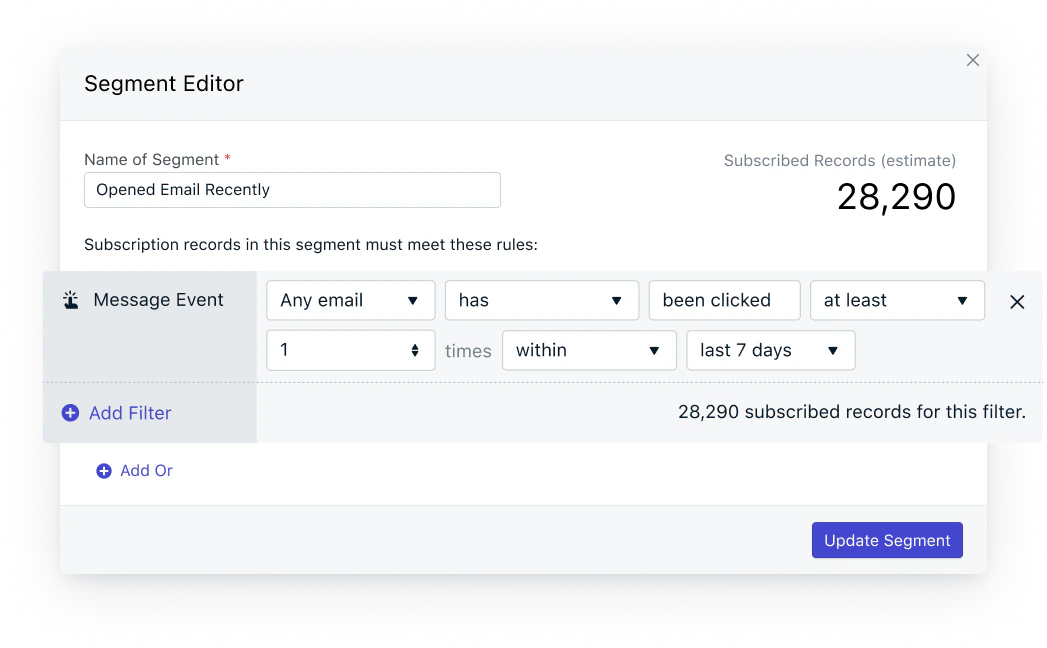
Example of an email message event filter in segments
Segmentation
Build segments based on message event behavior across push, email, SMS, and in-app.
Retention
How far back you can view message events depends on your plan.OneSignal began storing message events to support extended retention on April 14, 2026. Events before that date are not available to view on the user profile, regardless of plan.Older events remain available for segmentation — they just won’t appear in the event log view.
Message events vs. Event Streams
Message events and Event Streams both involve the same underlying data, but they serve different purposes.
Use message events when you need to look up or segment users within OneSignal. Use Event Streams when you need messaging data flowing into your own systems, especially when long-term storage of events is required.
Event Streams
Forward message events to an external destination in near real-time.
FAQ
Why don’t I see message events for a user on the Free plan?
Message event retention is not available on the Free plan. To view per-user event history in the dashboard, you’ll need to upgrade to Growth, Pro, or Enterprise. Message events still feed segmentation regardless of plan.How long does it take for a message event to appear in the event log?
Up to 5 minutes from when the event occurs. If you need lower latency or external storage, use Event Streams instead.Can I see message events from before April 14, 2026?
Not on the user profile. OneSignal began storing message events for extended retention on that date, so earlier events do not appear in the event log. They remain available for segmentation.How do message events relate to conversion attribution?
When a user completes a conversion event, OneSignal looks back through their recent message events to determine which message influenced the action. Without message events, OneSignal cannot attribute conversions to specific messages. See Conversions for the full attribution model.Can I export message events to my own data warehouse?
Yes — use Event Streams to forward message events to a destination like Snowflake, BigQuery, or a CDP in near real-time. Event Streams is the right tool when you need long-term storage or want to combine messaging data with your own analytics.Related pages
Segmentation
Build segments based on message event behavior across push, email, SMS, and in-app.
Event Streams
Forward message events to an external destination in near real-time.
Conversions
Attribute downstream user actions back to the messages that influenced them.
Session events
See every session a user or subscription had, with start time, end time, and duration.
Billing FAQ
How retention windows and event volume affect your plan.