

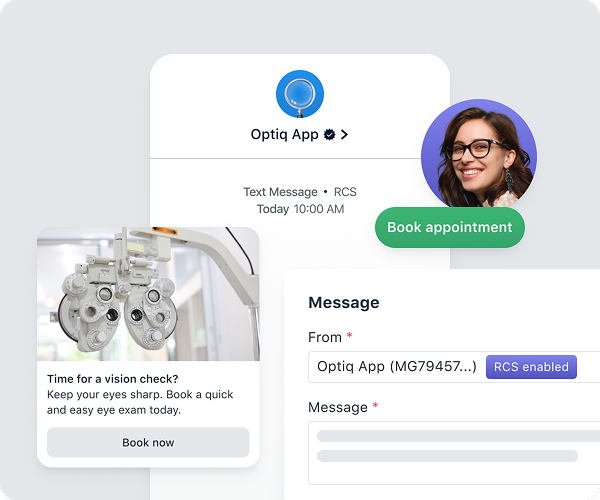
RCS delivers media-rich, interactive content from a branded sender directly in the messaging app.
How RCS compares to SMS
Rich content types
If your sender includes an RCS sender resource, the message editor unlocks these capabilities:- Text only: Plain branded RCS text with no media or actions. Links in the body remain tappable. Text-only messages always use their own RCS text as the fallback and do not use the SMS fallback field.
- Cards: Standalone rich messages with an image, title, description, and up to three actions.
- Carousels: Horizontally scrollable sets of rich cards. Useful for showcasing multiple products, locations, or options in a single message.
- Actions: Tappable buttons attached to cards. Three types are supported:
- Link buttons: Open any http or https URL. Supports iOS Universal Links and Android App Links, which deep link into your app when it’s installed.
- Keyword replies: Send a keyword back as the subscriber’s response without requiring them to type.
- Phone number: Initiates a phone call directly from the message.
Composing messages
Full RCS editor reference, including image aspect ratios, action configuration, and billing categories.
SMS fallback
OneSignal automatically sends an SMS fallback when RCS fails to deliver — for example, when the recipient’s device or carrier doesn’t support RCS.SMS fallback
Configure the fallback message and review the rules for text-only RCS messages.
Setup
RCS requires a premium RCS sender resource in addition to an SMS sender resource. The RCS sender resource must be approved separately. Approval timelines are typically 8–16 weeks. During the application process, you will need to provide additional brand assets beyond the standard sender resource application:- Brand logo: The image carriers display as your sender identity.
- Brand color: The accent color used alongside your brand in the messaging app.
- Agent description: A short paragraph carriers display alongside your brand identity, describing what subscribers should expect from your messages. “Agent” is the carrier term for the business identity that sends RCS messages.
- Launch URL: Your business homepage or marketing page for your messaging program.
Try RCS before approval with test sends
You don’t have to wait for carrier approval to start working with RCS. Once you begin the application process for an RCS sender resource, your sender includes a test RCS sender resource that is available immediately — while carrier approval is still pending. With the test sender resource you can:- Compose RCS content (text, cards, carousels, and actions) in the RCS editor
- Send test RCS messages to your own devices to see how your content renders
- Iterate on rich content so your messaging program is ready the day approval lands
Test sends are for previewing and validating content only. Production RCS sending still requires carrier approval of your RCS sender resource.
In the U.S., carriers currently prioritize notable brands (Fortune 1000), high-quality rich content experiences, and established SMS sending volume (100K+ SMS messages/month through OneSignal) for RCS approval.
Analytics
RCS messages include all standard SMS metrics plus:- Read: The number of subscribers who read the RCS message (available because RCS supports read receipts).
SMS message reports
Full metrics reference for delivery, click, and read events across SMS, MMS, and RCS.