

- Select an audience.
- Select the sender for your use case.
- Compose your message.
SMS and MMS
The SMS editor lets you write plain text and optionally attach media.- SMS: Text-only. Character limits depend on encoding (see below).
- MMS: Triggered when you attach an image, GIF, video, or audio file. Key limits:
- Up to 1,600 characters of text
- Up to 10 media attachments per message (5MB total across all attachments)
- Supported formats: JPEG, PNG, GIF, video, and audio
- Available only in the US, Canada, and Australia
- Billed at a flat per-message MMS rate (not by segment)
Encoding and character limits
SMS messages use one of two encodings, determined automatically by the characters in your message:
When a message exceeds the per-segment limit, it splits into multiple segments, each billed separately. Multi-segment messages reserve a small header per segment for reassembly, which is why the limit is slightly lower for longer messages.
The editor shows a live character count and segment estimate as you type. A single emoji can push a one-segment message to three segments, so check the counter before sending.
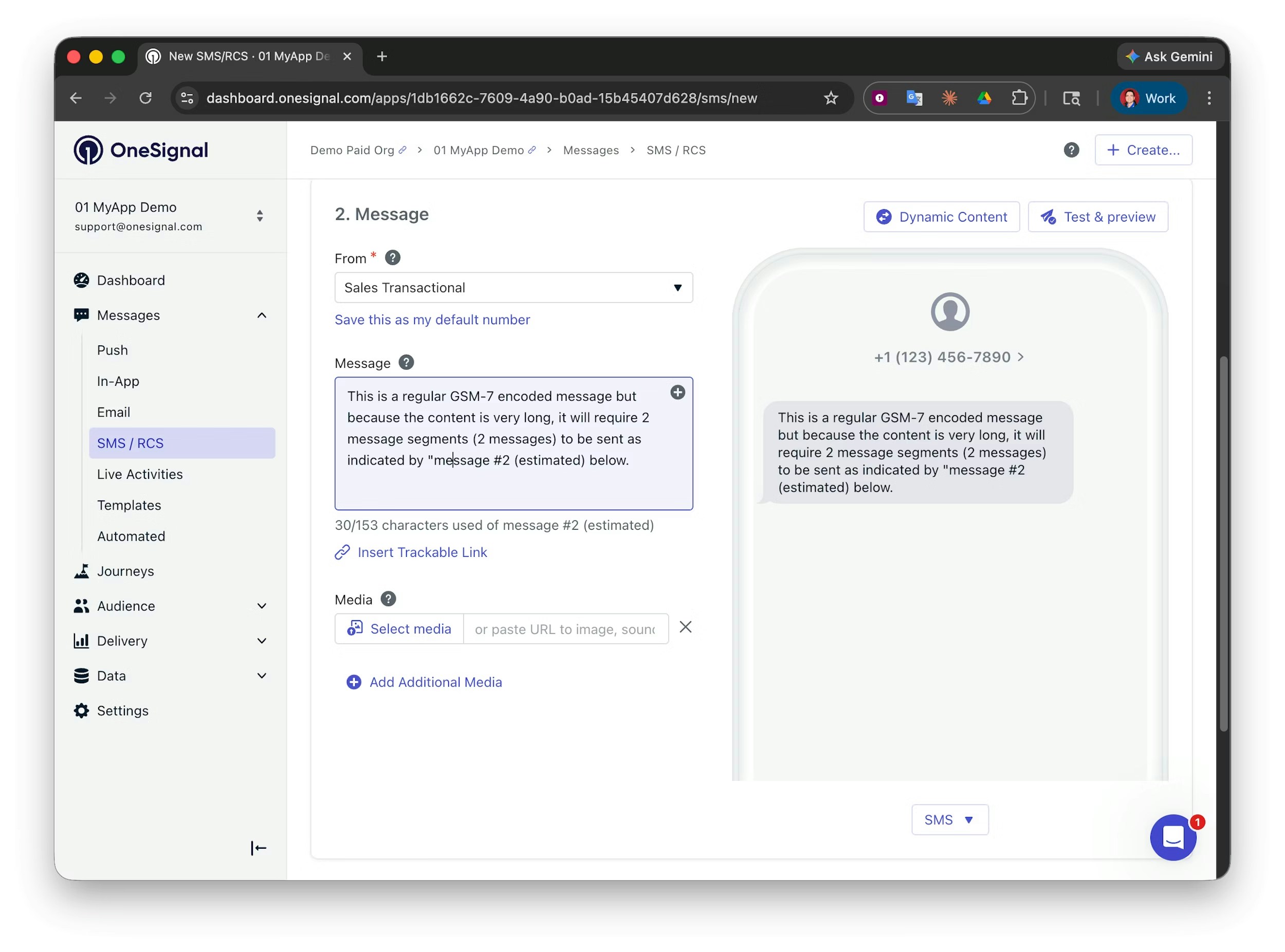
GSM-7 encoded message: likely 2 message segments.
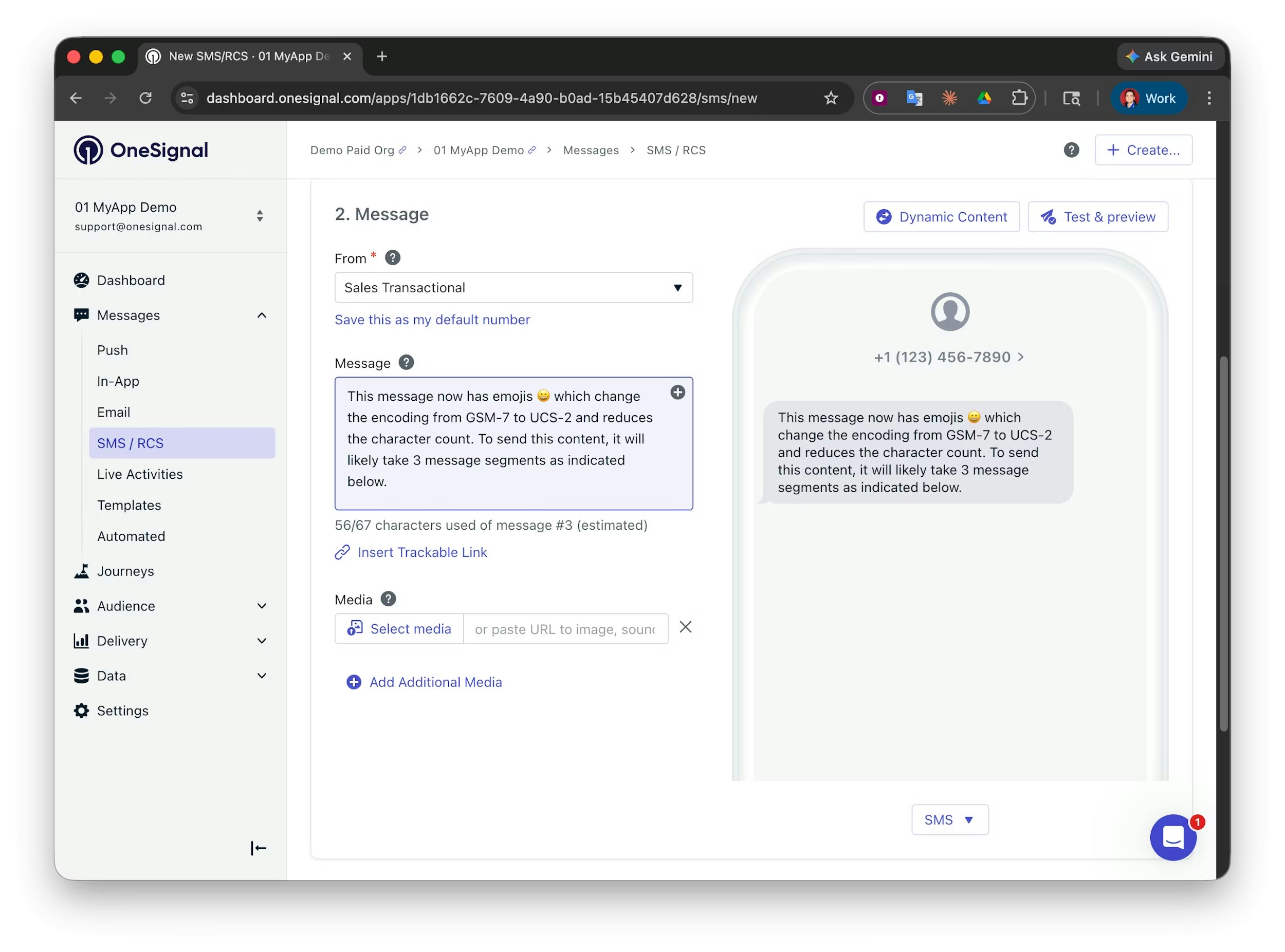
UCS-2 encoded message: likely 3 message segments.
Adding a trackable link
You can add trackable links to your messages to measure click-through rates and attribute conversions back to a specific campaign. When you insert a URL, OneSignal can automatically shorten and wrap it in a tracking link. Clicks are reported in your message analytics.Create links in the Dashboard
Generate carrier-safe, trackable shortened URLs from the dashboard.
Create links via the API
Shorten and track URLs programmatically using the OneSignal API.
Tracking multiple or personalized links
OneSignal supports one trackable link per SMS message and does not support personalization in tracked links. If you need to track more than one link or a personalized link, use one of these options: Option 1: UTM parameters Append UTM parameters to your URLs to track each link individually in Google Analytics (GA4). Since the URL is plain text in the message body, Liquid tags work directly inside it. You can personalize the URL with subscriber-specific values like{{ subscription_id }} and OneSignal renders the actual value per recipient at send time.
https://go.yourbrand.com/offer?sub_id={{ subscription_id }}).
Option 3: Website-side click tracking
Track SMS link clicks by instrumenting your website to send data back to OneSignal when a subscriber lands on your page from an SMS link.
- Include a URL in your SMS that identifies the subscriber using Liquid tags (e.g.,
https://yourbrand.com/offer?uid={{ onesignal_id }}). - When the subscriber clicks the link and lands on your website, fire a call to the OneSignal API to record the engagement:
- Custom event: Send a custom event (e.g.,
sms_click) tied to the subscriber. Use as a trigger in Journeys or as a segmentation filter. - User tag: Update the subscriber’s profile with a tag (e.g.,
last_sms_click = <unix_timestamp>). Use to segment by recency of engagement.
- Custom event: Send a custom event (e.g.,
RCS content
If your sender includes an RCS sender resource (including a test RCS sender resource, available once your RCS application is underway), the editor unlocks rich content capabilities:- Text only: Plain branded RCS text with no media or actions. Links in the body remain tappable.
- Cards: A standalone rich card with an image, title, description, and up to three actions.
- Carousels: A horizontally scrollable set of cards. Each card can have its own image, text, and buttons. Useful for showcasing multiple products, locations, or options in a single message.
- Actions: Tappable buttons attached to cards. Three types are supported:
- Link buttons: Open any http or https URL. You can set whether it opens in the messaging app or a new tab. This includes iOS Universal Links and Android App Links, which open directly in your app when it is installed.
- Keyword replies: When a subscriber taps a keyword reply action, it sends that text back as their response without requiring them to type. Simplifies two-way interactions.
- Phone number: Initiates a phone call directly from the message.
RCS image aspect ratios
When adding an image to a rich card, the recommended aspect ratios depend on the card layout:- Media on top (vertical card): 2:1, 16:9, or 7:3
- Media on the left (horizontal card): 3:4
SMS fallback
You can set an SMS fallback message for when RCS fails to deliver — for example, when the recipient’s device or carrier does not support RCS. OneSignal automatically sends the fallback. Note that text-only RCS messages always use the text set by the RCS message and do not use the SMS fallback text.Upgrading existing automations to RCS
When a sender gains an approved RCS sending resource, OneSignal automatically prefers RCS for all existing automations using that sender, with no manual rework. Existing SMS content is mapped to RCS automatically:
Because a link in the body of a card is not tappable, consider upgrading these automations to richer RCS content, such as cards, carousels, and action buttons, to take full advantage of RCS.
Personalization
Promotional and transactional messages are most effective when they include individualized information, such as discount codes, a user’s name, an appointment time, or an order number.Message personalization
Use Liquid tags to insert subscriber-specific data into SMS and RCS messages.
How content affects billing
The type of content you send directly affects your messaging costs.SMS segments
SMS messages are billed by the number of segments sent, not per message. The per-segment character limit depends on encoding — see Encoding and character limits above for the GSM-7 and UCS-2 math. Example billing:- 200-character GSM-7 message = 2 segments
- 500-character GSM-7 message = 4 segments
- 100-character message with an emoji = 2 segments (encoding switches to UCS-2)
MMS
MMS is billed at a flat per-message rate regardless of text length. See SMS and MMS above for media limits and supported regions.RCS
RCS messages are grouped into four billing categories based on content and length:The billing table uses carrier-invoice vocabulary: quick replies are keyword reply actions, dials are phone number actions, and links are link buttons in the OneSignal editor.