Passer au contenu principal

Setup & debugging

These methods are a reference for integrating the OneSignal SDK into your app. For full platform-specific setup instructions, see Mobile SDK setup.

initialize()

Initializes the OneSignal SDK. This should be called during application startup. The ONESIGNAL_APP_ID can be found in Keys & IDs.
If you want to delay initialization of the OneSignal SDK, we recommend using our Privacy methods.
OneSignal.initWithContext(this, ONESIGNAL_APP_ID)
OneSignal.initWithContext(this, ONESIGNAL_APP_ID);
import OneSignalFramework

OneSignal.initialize("ONESIGNAL_APP_ID", withLaunchOptions: launchOptions)
#import <OneSignalFramework/OneSignalFramework.h>

[OneSignal initialize:@"ONESIGNAL_APP_ID" withLaunchOptions:launchOptions];
OneSignal.Initialize("ONESIGNAL_APP_ID");
OneSignal.initialize("ONESIGNAL_APP_ID");
// Ionic
OneSignal.initialize("ONESIGNAL_APP_ID");

// Cordova
window.plugins.OneSignal.initialize("ONESIGNAL_APP_ID");

setLogLevel()

Set the logging to print additional logs to Android LogCat or Xcode logs. Call this before initializing OneSignal. See Getting a Debug Log for more details.
// LogLevel: .None | .Fatal | .Error | .Warn | .Info | .Debug | .Verbose
OneSignal.Debug.logLevel = LogLevel.Verbose
// LogLevel: NONE | FATAL | ERROR | WARN | INFO | DEBUG | VERBOSE
OneSignal.getDebug().setLogLevel(OneSignal.LOG_LEVEL.VERBOSE);
// LogLevel: ONE_S_LL_NONE | ONE_S_LL_FATAL | ONE_S_LL_ERROR | ONE_S_LL_WARN | ONE_S_LL_INFO | ONE_S_LL_DEBUG | ONE_S_LL_VERBOSE
OneSignal.Debug.setLogLevel(.LL_VERBOSE)
// LogLevel: ONE_S_LL_NONE | ONE_S_LL_FATAL | ONE_S_LL_ERROR | ONE_S_LL_WARN | ONE_S_LL_INFO | ONE_S_LL_DEBUG | ONE_S_LL_VERBOSE
[OneSignal.Debug setLogLevel:ONE_S_LL_VERBOSE];
// LogLevel: None | Fatal | Error | Warn | Info | Debug | Verbose
OneSignal.Debug.LogLevel = LogLevel.Verbose;
OneSignal.Debug.setLogLevel(LogLevel.Verbose);
OneSignal.Debug.setLogLevel(OSLogLevel.verbose);
// Ionic
// 0 = None, 1 = Fatal, 2 = Errors, 3 = Warnings, 4 = Info, 5 = Debug, 6 = Verbose
OneSignal.Debug.setLogLevel(6);

// Cordova
// 0 = None, 1 = Fatal, 2 = Errors, 3 = Warnings, 4 = Info, 5 = Debug, 6 = Verbose
window.plugins.OneSignal.Debug.setLogLevel(6);

setAlertLevel()

Sets the logging level to show as alert dialogs in your app. Make sure to remove this before submitting to the app store.
OneSignal.Debug.alertLevel = LogLevel.Exception
OneSignal.getDebug.setAlertLevel(LogLevel.Exception);
OneSignal.Debug.setAlertLevel(.LL_NONE)
[OneSignal.Debug setAlertLevel:ONE_S_LL_NONE];
// LogLevel: None | Fatal | Error | Warn | Info | Debug | Verbose
OneSignal.Debug.AlertLevel = LogLevel.None;
OneSignal.Debug.setAlertLevel(LogLevel.Verbose);
OneSignal.Debug.setAlertLevel(OSLogLevel.none);
// Ionic
// 0 = None, 1 = Fatal, 2 = Errors, 3 = Warnings, 4 = Info, 5 = Debug, 6 = Verbose
OneSignal.Debug.setAlertLevel(0);

// Cordova
// 0 = None, 1 = Fatal, 2 = Errors, 3 = Warnings, 4 = Info, 5 = Debug, 6 = Verbose
window.plugins.OneSignal.Debug.setAlertLevel(0);

User identity & properties

When users open your app, OneSignal automatically creates a OneSignal ID (user-level) and a Subscription ID (device-level). You can associate multiple subscriptions (e.g., devices, emails, phone numbers) with a single user by calling login() with your unique user identifier.
See Users and Aliases for more details.

login(external_id)

Sets the user context to the provided external_id. Ensures that all subscriptions and properties associated with this external_id are unified under a single onesignal_id. See Users for more details. Key behaviors:
  • If the external_id already exists, the SDK switches to that user. Anonymous data collected before login is not merged and will be discarded.
  • If the external_id does not exist, the local state will be saved under the current onesignal_id. Any data collected while the user was anonymous will be kept.
  • SDK retries automatically on network failure or server error.
Call this method every time the user opens the app to make sure the External ID is set and the subscription is linked to the user.
OneSignal.login("external_id")
OneSignal.login("external_id");
OneSignal.login("external_id")
[OneSignal login:@"external_id"];
OneSignal.Login("external_id");
OneSignal.login("external_id");
// Ionic
OneSignal.login("external_id");

// Cordova
window.plugins.OneSignal.login("external_id");

logout()

Unlinks the current user from the subscription.
  • Removes the external_id from the current push subscription.
  • Resets the OneSignal ID to a new anonymous user.
  • Any new data (e.g tags, Subscriptions, session data, etc.) will now be set on the new anonymous user until they are identified with the login method.
Use this when a user signs out of your app if you want to set the subscription to a new anonymous user.
OneSignal.logout()
OneSignal.logout();
OneSignal.logout()
[OneSignal logout]
OneSignal.Logout();
OneSignal.logout();
OneSignal.logout();
// Ionic
OneSignal.logout();

// Cordova
window.plugins.OneSignal.logout();

getOnesignalId()

Retrieve the current user’s OneSignal ID saved locally on the device. May be null if called before user state is initialized. Instead, use User State addObserver() to listen for user state changes.
val id = OneSignal.User.onesignalId
String id = OneSignal.getUser().getOnesignalId();
let id = OneSignal.User.onesignalId

//Example
func getOneSignalId() async {
    if let id = OneSignal.User.onesignalId {
        print("OneSignal ID:", id)
    } else {
        print("OneSignal ID not available, try again.")
    }
}
NSString* id = OneSignal.User.onesignalId
OneSignal.User.OneSignalId;
await OneSignal.User.getOnesignalId();

//Example
const getOneSignalId = async () => {
  try {
    const id = await OneSignal.User.getOnesignalId();
    console.log('OneSignal ID:', id);
    Alert.alert('OneSignal ID', id || 'No ID available');
  } catch (error) {
    console.error('Error getting OneSignal ID:', error);
    Alert.alert('Error', 'Failed to get OneSignal ID');
  }
};
await OneSignal.User.getOnesignalId();
// Ionic
await OneSignal.User.getOnesignalId();

// Cordova
await window.plugins.OneSignal.User.getOnesignalId();

getExternalId()

Retrieve the current user’s External ID saved locally on the device. May be null if not set via the login method or called before user state is initialized. Instead, use User State addObserver() to listen for user state changes.
  val id = OneSignal.User.externalId
String id = OneSignal.getUser().getExternalId();
let id: String? = OneSignal.User.externalId
NSString* id = OneSignal.User.externalId
OneSignal.User.ExternalId
await OneSignal.User.getExternalId();

//Example
const getExternalId = async () => {
  try {
    const id = await OneSignal.User.getExternalId();
    console.log('External ID:', id);
    Alert.alert('External ID', id || 'No ID available');
  } catch (error) {
    console.error('Error getting External ID:', error);
    Alert.alert('Error', 'Failed to get External ID');
  }
};
await OneSignal.User.getExternalId();
// Ionic
await OneSignal.User.getExternalId();

// Cordova
await window.plugins.OneSignal.User.getExternalId();

addObserver() user state

Listen for changes in the user context (e.g., login, logout, ID assignment).
OneSignal.User.addObserver(object : IUserStateObserver {
    override fun onUserStateChange(state: UserChangedState) {
        println("User State Changed: onesignalId=${state.current.onesignalId}, externalId=${state.current.externalId}")
    }
})
OneSignal.getUser().addObserver(userChangedState -> {
	Log.d("User State Changed", String.valueof(userChangedState.toJSONObject()));
});
// AppDelegate.swift
// Add OSUserStateObserver after UIApplicationDelegate
class AppDelegate: UIResponder, UIApplicationDelegate, OSUserStateObserver {

    func application(_ application: UIApplication, didFinishLaunchingWithOptions launchOptions: [UIApplicationLaunchOptionsKey: Any]?) -> Bool {
        // Add your AppDelegate as an observer
        OneSignal.User.addObserver(self)
    }

    // Add this new method
    func onUserStateDidChange(state: OSUserChangedState) {
        // prints out all properties
        print("OSUserChangedState: \n\(state.jsonRepresentation())")
        print(state.current.externalId)
        print(state.current.onesignalId)
    }
}

// Remove the observer
OneSignal.User.removeObserver(self)
// AppDelegate.h
// Add OSUserStateObserver after UIApplicationDelegate
@interface AppDelegate : UIResponder <UIApplicationDelegate, OSUserStateObserver>
@end

// AppDelegate.m
@implementation AppDelegate

- (BOOL)application:(UIApplication*)application didFinishLaunchingWithOptions:(NSDictionary *)launchOptions {
    // Add your AppDelegate as an observer
    [OneSignal.User addObserver:self];
}

// Add this new method
- (void)onUserStateDidChangeWithState:(OSUserChangedState * _Nonnull)state {
    // prints out all properties
    NSLog(@"OSUserChangedState:\n%@", [state jsonRepresentation]);
    NSLog(@"current externalId: %@", state.current.externalId);
    NSLog(@"current onesignalId: %@", state.current.onesignalId);
}
@end

// Remove the observer
[OneSignal.User removeObserver:self];
OneSignal.User.Changed += _userStateChanged;

private void _userStateChanged(object sender, UserStateChangedEventArgs e) {
    ...
}
const listener = (event: UserChangedState) => {
    console.log("User changed: " + (event));
};

OneSignal.User.addEventListener("change", listener);
// Remove the listener
OneSignal.User.removeEventListener("change", listener);
OneSignal.User.addObserver((state) {
	var userState = state.jsonRepresentation();
    print('OneSignal user changed: $userState');
});

/// Remove a user state observer that has been previously added.
OneSignal.User.removeObserver(observer);
// Ionic
const listener = (event: UserChangedState) => {
    console.log("User changed: " + (event));
};
OneSignal.User.addEventListener("change", listener);
// Remove the listener
OneSignal.User.removeEventListener("change", listener);

// Cordova
window.plugins.OneSignal.User.addEventListener("change", listener);
window.plugins.OneSignal.User.removeEventListener("change", listener);

addAlias(), addAliases(), removeAlias(), removeAliases()

Aliases are alternative identifiers (like usernames or CRM IDs).
  • Set external_id with login() before adding aliases. Aliases added to subscriptions without external_id will not sync across multiple subscriptions.
  • See Aliases for details.
// Add a single alias
OneSignal.User.addAlias("ALIAS_LABEL", "ALIAS_ID")

// Add multiple aliases
var aliases = mapOf("ALIAS_LABEL_01" to "ALIAS_ID_01", "ALIAS_LABEL_02" to "ALIAS_ID_02")
OneSignal.User.addAliases(aliases)

// Remove a single alias
OneSignal.User.removeAlias("ALIAS_LABEL")

// Remove multiple aliases
OneSignal.User.removeAliases(["ALIAS_LABEL_01", "ALIAS_LABEL_02"])
// Add a single alias
OneSignal.getUser().addAlias("ALIAS_LABEL", "ALIAS_ID");

// Add multiple aliases
HashMap<String, String> aliases = new HashMap<String, String>();
aliases.put("ALIAS_LABEL_01", "ALIAS_ID_01");
aliases.put("ALIAS_LABEL_02", "ALIAS_ID_02");
OneSignal.getUser().addAliases(aliases);

// Remove a single alias
OneSignal.getUser().removeAlias("ALIAS_LABEL")

// Remove multiple aliases
HashSet<String> labels = new HashSet<String>();
labels.add("ALIAS_LABEL_01");
labels.add("ALIAS_LABEL_02");
OneSignal.getUser().removeAliases(labels);
// Add a single alias
OneSignal.User.addAlias(label: "ALIAS_LABEL", id: "ALIAS_ID")

// Add multiple aliases
OneSignal.User.addAliases(["ALIAS_LABEL_01": "ALIAS_ID_01", "ALIAS_LABEL_02": "ALIAS_ID_02"])

// Remove a single alias
OneSignal.User.removeAlias("ALIAS_LABEL")

// Remove multiple aliases
OneSignal.User.removeAliases(["ALIAS_LABEL_01", "ALIAS_LABEL_02"])
// Add a single alias
[OneSignal.User addAliasWithLabel:@"ALIAS_LABEL" id:@"ALIAS_ID"];

// Add multiple aliases
[OneSignal.User addAliases:@{@"ALIAS_LABEL_01": @"ALIAS_ID_01", @"ALIAS_LABEL_02": @"ALIAS_ID_02"}]

// Remove a single alias
[OneSignal.User removeAlias:@"ALIAS_LABEL"]

// Remove multiple aliases
[OneSignal.User removeAliases:@[@"ALIAS_LABEL_01", @"ALIAS_LABEL_02"]]
// Add a single alias
OneSignal.User.AddAlias("ALIAS_LABEL", "ALIAS_ID");

// Add multiple aliases
OneSignal.User.AddAliases(new Dictionary<string, string> {
  { "ALIAS_LABEL_01", "ALIAS_ID_01" },
  { "ALIAS_LABEL_02", "ALIAS_ID_02" }
});

// Remove a single alias
OneSignal.User.RemoveAlias("ALIAS_LABEL");

// Remove multiple aliases
OneSignal.User.RemoveAliases(new[] {"ALIAS_LABEL_01", "ALIAS_LABEL_02"});
// Add a single alias
OneSignal.User.addAlias("ALIAS_LABEL", "ALIAS_ID");

// Add multiple aliases
OneSignal.User.addAliases({ALIAS_LABEL_01: "ALIAS_ID_01", ALIAS_LABEL_02: "ALIAS_ID_02"});

// Remove a single alias
OneSignal.User.removeAlias("ALIAS_LABEL");

// Remove multiple aliases
OneSignal.User.removeAliases(["ALIAS_LABEL_01", "ALIAS_LABEL_02"]);
// Add a single alias
OneSignal.User.addAlias("ALIAS_LABEL", "ALIAS_ID");

// Add multiple aliases
var aliases = <String, String>{
  "alias_key_1": "alias_id_1",
  "alias_key_2": "alias_id_2"
};
OneSignal.User.addAliases(aliases);

// Remove a single alias
OneSignal.User.removeAlias("ALIAS_LABEL");

// Remove multiple aliases
var aliases = <String>["alias_key_1", "alias_key_2"];
OneSignal.User.removeAliases(aliases);
// Add a single alias - Ionic
OneSignal.User.addAlias("ALIAS_LABEL", "ALIAS_ID");
// Add a single alias - Cordova
window.plugins.OneSignal.User.addAlias("ALIAS_LABEL", "ALIAS_ID");

// Add multiple aliases - Ionic
OneSignal.User.addAliases({ALIAS_LABEL_01: "ALIAS_ID_01", ALIAS_LABEL_02: "ALIAS_ID_02"});
// Add multiple aliases - Cordova
window.plugins.OneSignal.User.addAliases({ALIAS_LABEL_01: "ALIAS_ID_01", ALIAS_LABEL_02: "ALIAS_ID_02"});

// Remove a single alias - Ionic
OneSignal.User.removeAlias("ALIAS_LABEL");
// Remove a single alias - Cordova
window.plugins.OneSignal.User.removeAlias("ALIAS_LABEL");

// Remove multiple aliases - Ionic
OneSignal.User.removeAliases(["ALIAS_LABEL_01", "ALIAS_LABEL_02"]);
// Remove multiple aliases - Cordova
window.plugins.OneSignal.User.removeAliases(["ALIAS_LABEL_01", "ALIAS_LABEL_02"]);

setLanguage()

Overrides the auto-detected language of the user. Use ISO 639-1 language code.
OneSignal.User.setLanguage("en")
OneSignal.getUser().setLanguage("en");
OneSignal.User.setLanguage("en")
[OneSignal.User setLanguage:@"en"]
OneSignal.User.Language = "en";
OneSignal.User.setLanguage("en");
window.plugins.OneSignal.User.setLanguage("en");

Custom events

Suivez les actions des utilisateurs avec des propriétés associées. Voir Custom Events pour plus de détails.
Les événements personnalisés nécessitent les versions minimales suivantes du SDK : iOS 5.4.0, Android 5.6.1, React Native 5.3.0, Flutter 5.4.0, Unity 5.2.0.
Track and send a custom event performed by the current user.
  • name - Required. The name of the event as a string.
  • properties - Optional. Key-value pairs to add to the event. The properties dictionary or map must be serializable into a valid JSON Object. Supports nested values.
The SDK automatically includes app-specific data into the properties payload under the reserved key os_sdk that will be available to consume. For example, to target events by device type, you would access os_sdk.device_type.
json
{ 
  "os_sdk": { 
    "sdk": "050213", 
    "device_os": "18.5", 
    "type": "iOSPush", 
    "device_model": "iPhone14,4", 
    "device_type": "ios", 
    "app_version": "5.4.0" 
  }
}

trackEvent()

See Custom Events for more details.
// Track an event, by name, without additional properties
OneSignal.User.trackEvent("my_event_name")

// Track an event, by name, with additional properties
OneSignal.User.trackEvent(
   name = "started_free_trial",
   properties = mapOf(
       "promo_code" to "NEW50",
       "membership_details" to mapOf(
           "vip" to true,
           "products_viewed_count" to 15
       )
   )
)

// Track an event, by name, without additional properties
OneSignal.getUser().trackEvent("my_event_name", null);

// Track an event, by name, with additional properties
Map<String, Object> membershipDetails = new HashMap<>();
membershipDetails.put("vip", true);
membershipDetails.put("products_viewed_count", 15);

Map<String, Object> properties = new HashMap<>();
properties.put("promo_code", "NEW50");
properties.put("membership_details", membershipDetails);

OneSignal.getUser().trackEvent("started_free_trial", properties);

// Track an event, by name, without additional properties
OneSignal.User.trackEvent(name: "my_event_name", properties: nil)

// Track an event, by name, with additional properties
// The properties dictionary must be serializable into a valid JSON Object.
let myProperties = [
  "promo_code": "NEW50",
  "membership_details": [
    "vip": true,
    "products_viewed_count": 15
  ]
]
OneSignal.User.trackEvent(name: "started_free_trial", properties: myProperties)

// Track an event, by name, without additional properties
[OneSignal.User trackEventWithName:@"my_event_name" properties:nil];

// Track an event by name, with additional properties
// The properties dictionary must be serializable into a valid JSON Object.
NSDictionary *myProperties = @{
  @"promo_code" : @"NEW50",
  @"membership_details" : @{
    @"vip" : @true,
    @"products_viewed_count" : @15
  } 
};
[OneSignal.User trackEventWithName:@"started_free_trial" properties:myProperties];

// Track an event, by name, without additional properties
OneSignal.User.TrackEvent("my_event_name")

// Track an event, by name, with additional properties
OneSignal.User.TrackEvent("started_free_trial", new Dictionary<string, object> {
    { "promo_code", "NEW50" },
    { "membership_details", new Dictionary<string, object> {
        { "vip", true },
        { "products_viewed_count", 15 }
    }}
});
// Track an event, by name, without additional properties
OneSignal.User.trackEvent("my_event_name")

// Track an event, by name, with additional properties
OneSignal.User.trackEvent("started_free_trial", {
  "promo_code": "NEW50",
  "membership_details": {
    "vip": true,
    "products_viewed_count": 15 
  }
})
// Track an event, by name, without additional properties
OneSignal.User.trackEvent("my_event_name")

// Track an event, by name, with additional properties
OneSignal.User.trackEvent("started_free_trial", {
  "promo_code": "NEW50",
  "membership_details": {
    "vip": true,
    "products_viewed_count": 15 
  }
})
// Track an event, by name, without additional properties
OneSignal.User.trackEvent("my_event_name")

// Track an event, by name, with additional properties
OneSignal.User.trackEvent("started_free_trial", {
  "promo_code": "NEW50",
  "membership_details": {
    "vip": true,
    "products_viewed_count": 15 
  }
})

Tags

Tags are custom key : value pairs of string data you set on users based on events or user properties. See Tags for more details.

addTag(), addTags()

Set a single or multiple tags on the current user.
  • Values will be replaced if the key already exists.
  • Exceeding your plan’s tag limit will cause the operations to fail silently.
OneSignal.User.addTag("KEY", "VALUE")

OneSignal.User.addTags(mapOf("KEY_01" to "VALUE_01", "KEY_02" to "VALUE_02"))
OneSignal.getUser().addTag("KEY", "VALUE");

OneSignal.getUser().addTags(new HashMap<String, String>() {{
  put("KEY_01", "VALUE_01");
  put("KEY_02", "VALUE_02");
}});
OneSignal.User.addTag(key: "KEY", value: "VALUE")

OneSignal.User.addTags(["KEY_01": "VALUE_01", "KEY_02": "VALUE_02"])
[OneSignal.User addTag:@"KEY" value:@"VALUE"];

[OneSignal.User addTags:@{@""KEY_01"": @""VALUE_01"", @""KEY_02"": @""VALUE_02""}];
OneSignal.User.AddTag("KEY", "VALUE");

OneSignal.User.AddTags(new Dictionary<string, string> {
  { "KEY_01", "VALUE_01" },
  { "KEY_02", "VALUE_02" }
});
OneSignal.User.addTag('KEY', 'VALUE');

OneSignal.User.addTags({my_tag1: 'my_value', my_tag2: 'my_value2'});
OneSignal.User.addTagWithKey("KEY", "VALUE");

var tags = {'test': 'value', 'test2': 'value2'};
OneSignal.User.addTags(tags);
// Ionic
OneSignal.User.addTag("KEY", "VALUE");

OneSignal.User.addTags({"KEY_01": "VALUE_01", "KEY_02": "VALUE_02"});

// Cordova
window.plugins.OneSignal.User.addTag("KEY", "VALUE");

window.plugins.OneSignal.User.addTags({"KEY_01": "VALUE_01", "KEY_02": "VALUE_02"});

removeTag(), removeTags()

Delete a single or multiple tags from the current user.
OneSignal.User.removeTag("KEY")

OneSignal.User.removeTags(listOf("KEY_01", "KEY_02"))
OneSignal.getUser().removeTag("KEY");

OneSignal.getUser().removeTags(Arrays.asList("KEY_01", "KEY_02"));
OneSignal.User.removeTag("KEY")

OneSignal.User.removeTags(["KEY_01", "KEY_02"])
[OneSignal.User removeTag:@"KEY"];

[OneSignal.User removeTags:@[@""KEY_01"", @""KEY_02""]]
OneSignal.User.RemoveTag("KEY");

OneSignal.User.RemoveTags(new string[] { "KEY_01", "KEY_02" });
OneSignal.User.removeTag('my_tag1');

OneSignal.User.removeTags(['my_tag1', 'my_tag2']);
OneSignal.User.removeTag("test");

OneSignal.User.removeTags(["test", "test2"]);
// Ionic
OneSignal.User.removeTag("KEY");

OneSignal.User.removeTags(["KEY_01", "KEY_02"]);

// Cordova
window.plugins.OneSignal.User.removeTag("KEY");

window.plugins.OneSignal.User.removeTags(["KEY_01", "KEY_02"]);

getTags()

Returns the local copy of the user’s tags. Tags are updated from the server during login() or new app sessions.
val tags: Map<String, String> = OneSignal.User.getTags()
Map<String, String> tags = OneSignal.getUser().getTags();
let tags = OneSignal.User.getTags()
NSDictionary<NSString*, NSString*> *tags = [OneSignal.User getTags]
Dictionary<string, string> tags = OneSignal.User.GetTags();
const getTags = async () => {
    const tags = await OneSignal.User.getTags();
    console.log('Tags:', tags);
};
const getTags = async () async {
    final tags = await OneSignal.User.getTags();
    print('Tags: $tags');
};
// Ionic
const getTags = async () => {
    const tags = await OneSignal.User.getTags();
    console.log('Tags:', tags);
};
// Cordova
const getTags = async () => {
    const tags = await window.plugins.OneSignal.User.getTags();
    console.log('Tags:', tags);
};

Privacy

setConsentRequired()

Enforces user consent before data collection begins. Must be called before initializing the SDK.
OneSignal.consentRequired = true
OneSignal.setConsentRequired(true);
OneSignal.setConsentRequired(true)
[OneSignal setConsentRequired:true];
OneSignal.ConsentRequired = true;
OneSignal.setConsentRequired(true);
OneSignal.consentRequired(true);
// Ionic
OneSignal.setConsentRequired(true);
// Cordova
window.plugins.OneSignal.setConsentRequired(true);

setConsentGiven()

Grants or revokes user consent for data collection. Without consent, no data is sent to OneSignal and no subscription is created.
  • If setConsentRequired() is true, our SDK will not be fully enabled until setConsentGiven is called with true.
  • If setConsentGiven is set to true and a Subscription is created, then later it is set to false, that Subscription will no longer receive updates. The current data for that Subscription remains unchanged until setConsentGiven is set to true again.
  • If you want to delete the User and/or Subscription data, use our Delete user or Delete subscription APIs.
OneSignal.consentGiven = true
OneSignal.setConsentGiven(true);
OneSignal.setConsentGiven(true)
[OneSignal setConsentGiven:true];
OneSignal.ConsentGiven = true;
OneSignal.setConsentGiven(true);
OneSignal.consentGiven(true);
// Ionic
OneSignal.setConsentGiven(true);
// Cordova
window.plugins.OneSignal.setConsentGiven(true);

Location

Tracking location points requires 3 steps:
  1. Add location tracking permissions and dependencies to your app.
You may get the following errors:
LocationManager.startGetLocation: not possible, no location dependency found
Check your App’s dependencies. A common solutions is in you app/build.gradle add: implementation 'com.google.android.gms:play-services-location:21.0.1'
  1. Enable your app to share location with OneSignal using the Location.setShared() method.
  2. Request permission from the user for location tracking with the Location.requestPermission method or use in-app messages.

setShared() location

Use this method to allow our SDK to start tracking the Subscription’s latitude and longitude. Make sure you set the proper location permissions in your app first.
// Enable your app to share location with OneSignal
OneSignal.Location.isShared = true

// Returns true if your app is sharing location with OneSignal
var isShared: Boolean = OneSignal.isShared
// Enable your app to share location with OneSignal
OneSignal.getLocation().setShared(true);

// Returns true if your app is sharing location with OneSignal
boolean isShared = OneSignal.Location.isShared();
// Enable your app to share location with OneSignal
OneSignal.Location.isShared = true

// Returns true if your app is sharing location with OneSignal
let locationShared = OneSignal.Location.isShared
// Enable your app to share location with OneSignal
[OneSignal.Location setShared:true]4

// Returns true if your app is sharing location with OneSignal
BOOL locationShared = [OneSignal isLocationShared];
// Enable your app to share location with OneSignal
OneSignal.Location.IsShared = true;

// Returns true if your app is sharing location with OneSignal
bool isShared = OneSignal.Location.IsShared;
// Enable your app to share location with OneSignal
OneSignal.Location.setShared(true);

// Returns true if your app is sharing location with OneSignal
OneSignal.Location.isShared();
// Enable your app to share location with OneSignal
OneSignal.Location.setShared(true);

// Returns true if your app is sharing location with OneSignal
OneSignal.Location.isShared();
// Ionic
// Enable your app to share location with OneSignal
OneSignal.Location.setShared(true);

// Returns true if your app is sharing location with OneSignal
OneSignal.Location.isShared(isShared => {
  console.log("Location shared: ", isShared);
});
// Cordova
// Enable your app to share location with OneSignal
window.plugins.OneSignal.Location.setShared(true);

// Returns true if your app is sharing location with OneSignal
window.plugins.OneSignal.Location.isShared(isShared => {

requestPermission() location

Use this method to display the system-level location permission prompt to your users or instead use in-app messages. Make sure you set the proper location permissions in your app and enabled your app to share location with OneSignal.
// Request location tracking permissions
OneSignal.Location.requestPermission(true)
// Request location tracking permissions
OneSignal.getLocation().requestPermission(Continue.none());
// Request location tracking permissions
OneSignal.Location.requestPermission()
// Request location tracking permissions
[OneSignal.Location requestPermission];
// Request location tracking permissions
OneSignal.Location.RequestPermission();
// Request location tracking permissions
OneSignal.Location.requestPermission();
// Request location tracking permissions
OneSignal.Location.requestPermission();
// Ionic
// Request location tracking permissions
OneSignal.Location.requestPermission();

// Cordova
// Request location tracking permissions
window.plugins.OneSignal.Location.requestPermission();

Subscriptions

See Subscriptions for more details.

User.pushSubscription.id

Retrieve the current user’s push Subscription ID saved locally on the device. May return null if called too early. Its recommended to get this data within the subscription observer to react to changes.
val id = OneSignal.User.pushSubscription.id
String id = OneSignal.getUser().getPushSubscription().getId();
let id: String? = OneSignal.User.pushSubscription.id
NSString* id = OneSignal.User.pushSubscription.id
OneSignal.User.PushSubscription.Id;
await OneSignal.User.pushSubscription.getIdAsync();

//Example
const getPushId = async () => {
  try {
    const id = await OneSignal.User.pushSubscription.getIdAsync();
    console.log('Push Subscription ID:', id);
    Alert.alert('Push Subscription ID', id || 'No ID available');
  } catch (error) {
    console.error('Error getting push ID:', error);
    Alert.alert('Error', 'Failed to get push subscription ID');
  }
};
OneSignal.User.pushSubscription.id;
// Ionic
await OneSignal.User.pushSubscription.getIdAsync();

// Cordova
await window.plugins.OneSignal.User.pushSubscription.getIdAsync();

User.pushSubscription.token

Returns the current push subscription token. May return null if called too early. Its recommended to get this data within the subscription observer to react to changes.
val pushToken = OneSignal.User.pushSubscription.token
String pushToken = OneSignal.getUser().getPushSubscription().getToken();
let token: String? = OneSignal.User.pushSubscription.token
NSString* token = OneSignal.User.pushSubscription.token
OneSignal.User.PushSubscription.Token;
await OneSignal.User.pushSubscription.getTokenAsync();
OneSignal.User.pushSubscription.token;
// Ionic
await OneSignal.User.pushSubscription.getTokenAsync();

// Cordova
await window.plugins.OneSignal.User.pushSubscription.getTokenAsync();

addObserver() push subscription changes

Use this method to respond to push subscription changes like:
  • The device receives a new push token from Google (FCM) or Apple (APNs)
  • OneSignal assigns a subscription ID
  • The optedIn value changes (e.g. called optIn() or optOut())
  • The user toggles push permission in system settings, then opens the app
When this happens, the SDK triggers the onPushSubscriptionChange event. Your listener receives a state object with the previous and current values so you can detect exactly what changed. To stop listening for updates, call the associated removeObserver() or removeEventListener() method.
class MyObserver : IPushSubscriptionObserver {
  init {
    OneSignal.User.pushSubscription.addObserver(this)
  }

  override fun onPushSubscriptionChange(state: PushSubscriptionChangedState) {
    if (state.current.optedIn) {
      println("User is now opted-in with push token: ${state.current.token}")
    }
  }
}

// Remove the observer
OneSignal.User.pushSubscription.removeObserver(this)
//Add the IPushSubscriptionObserver
public class MainActivity extends Activity implements IPushSubscriptionObserver {
  protected void onCreate(Bundle savedInstanceState) {
    //Add the addObserver method
    OneSignal.getUser().getPushSubscription().addObserver(this);
  }

  // This method will be fired when a subscription property changes
  @Override
   public void onPushSubscriptionChange(@NotNull PushSubscriptionChangedState pushSubscriptionChangedState) {
     //Example getting the subscription ID
      Log.i("OneSignal", "current subscription ID: " + pushSubscriptionChangedState.getCurrent().getId() );
   }
}
// Remove the observer
OneSignal.getUser().getPushSubscription().removeObserver(this);
// AppDelegate.swift
// Add OSPushSubscriptionObserver after UIApplicationDelegate
class AppDelegate: UIResponder, UIApplicationDelegate, OSPushSubscriptionObserver {

   func application(_ application: UIApplication, didFinishLaunchingWithOptions launchOptions: [UIApplicationLaunchOptionsKey: Any]?) -> Bool {
      // Add your AppDelegate as an observer
      OneSignal.User.pushSubscription.addObserver(self)
   }

   // Add this new method, which will be fired when a subscription property changes
   func onPushSubscriptionDidChange(state: OSPushSubscriptionChangedState) {
       // respond to state change
   }
}
// Remove the observer
OneSignal.User.pushSubscription.removeObserver(self)
// AppDelegate.h
// Add OSPushSubscriptionObserver after UIApplicationDelegate
@interface AppDelegate : UIResponder <UIApplicationDelegate, OSPushSubscriptionObserver>
@end

// AppDelegate.m
@implementation AppDelegate

- (BOOL)application:(UIApplication*)application didFinishLaunchingWithOptions:(NSDictionary *)launchOptions {
  // Add your AppDelegate as an obsserver
  [OneSignal.User.pushSubscription addObserver:self];
}

// Add this new method, which will be fired when a subscription property changes
- (void)onPushSubscriptionDidChangeWithState:(OSPushSubscriptionChangedState *)state {
   // respond to new state
}

@end

// Remove the observer
[OneSignal.User.pushSubscription removeObserver:self];
OneSignal.User.PushSubscription.Changed += (sender, e) =>
  {
    if (e.State.Current.Id != e.State.Previous.Id)
    {
      // OneSignal Subscription id changed.
    }
  };
OneSignal.User.pushSubscription.addEventListener('change', (subscription) => {
  console.log('OneSignal: subscription changed:', subscription);
});

// Removes the previously added listener
OneSignal.User.pushSubscription.removeEventListener('change', myListener);
OneSignal.User.pushSubscription.addObserver((state) {
  if (state.current.optedIn) {
  	/// respond to new state
	}
});

// Removes the previously added observer
OneSignal.User.pushSubscription.removeObserver(myObserver);
const listener = (event: PushSubscriptionChangedState) => {
  console.log("Push subscription changed: " + (event));
};

// Add the listener - Ionic
OneSignal.User.pushSubscription.addEventListener("change", listener);

// Remove the listener - Ionic
OneSignal.User.pushSubscription.removeEventListener("change", listener);

// Add the listener - Cordova
window.plugins.OneSignal.User.pushSubscription.addEventListener("change", listener);

// Remove the listener - Cordova
window.plugins.OneSignal.User.pushSubscription.removeEventListener("change", listener);

optOut(), optIn(), optedIn

Control the subscription status (subscribed or unsubscribed) of the current push Subscription. Use these methods to control the push subscription status within your app. Common use cases: 1) Prevent push from being sent to users that log out. 2) Implement a notification preference center within your app.
  • optOut(): Sets the current push subscription status to unsubscribed (even if the user has a valid push token).
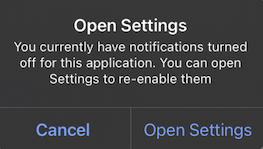
  • optIn(): Does one of three actions:
    1. If the Subscription has a valid push token, it sets the current push subscription status to subscribed.
    2. If the Subscription does not have a valid push token, it displays the push permission prompt.
    3. If the push permission prompt has been displayed more than the operating system’s limit (once iOS, twice Android), it displays the fallback prompt.
  • optedIn: Returns true if the current push subscription status is subscribed, otherwise false. If the push token is valid but optOut() was called, this will return false.
OneSignal.User.pushSubscription.optOut()

OneSignal.User.pushSubscription.optIn()

val optedIn = OneSignal.User.pushSubscription.optedIn
OneSignal.getUser().getPushSubscription().optOut();

OneSignal.getUser().getPushSubscription().optIn();

Boolean optedIn = OneSignal.getUser().getPushSubscription().getOptedIn();
OneSignal.User.pushSubscription.optOut()

OneSignal.User.pushSubscription.optIn()

let optedIn: Bool = OneSignal.User.pushSubscription.optedIn
[OneSignal.User.pushSubscription optOut];

[OneSignal.User.pushSubscription optIn];

Boolean optedIn = OneSignal.User.subscriptions.push.optedIn;
OneSignal.User.PushSubscription.OptOut();

OneSignal.User.PushSubscription.OptIn();

OneSignal.User.PushSubscription.OptedIn;
OneSignal.User.pushSubscription.optOut();

OneSignal.User.pushSubscription.optIn();

await OneSignal.User.pushSubscription.getOptedInAsync();
OneSignal.User.pushSubscription.optOut();

OneSignal.User.pushSubscription.optIn();

OneSignal.User.pushSubscription.optedIn;
// Ionic
OneSignal.User.pushSubscription.optOut();

OneSignal.User.pushSubscription.optIn();

await OneSignal.User.pushSubscription.getOptedInAsync();

// Cordova
window.plugins.OneSignal.User.pushSubscription.optOut();

window.plugins.OneSignal.User.pushSubscription.optIn();

await window.plugins.OneSignal.User.pushSubscription.getOptedInAsync();

addEmail(), removeEmail()

Adds or removes an email Subscription (email address) to/from the current user. Call addEmail after login() to set the correct user context. Compatible with Identity Verification.
OneSignal.User.addEmail("example@email.com")

OneSignal.User.removeEmail("example@email.com")
OneSignal.getUser().addEmail("example@email.com")

OneSignal.getUser().removeEmail("example@email.com")
OneSignal.User.addEmail("example@email.com")

OneSignal.User.removeEmail("example@email.com")
[OneSignal.User addEmail:@"example@email.com"];

[OneSignal.User removeEmail:@"example@email.com"];
OneSignal.User.AddEmail("example@email.com");

OneSignal.User.RemoveEmail("example@email.com");
OneSignal.User.addEmail("example@email.com");

OneSignal.User.removeEmail("example@email.com");
OneSignal.User.addEmail("example@email.com");

OneSignal.User.removeEmail("example@email.com");
// Ionic
OneSignal.User.addEmail("example@email.com");

OneSignal.User.removeEmail("example@email.com");

// Cordova
window.plugins.OneSignal.User.addEmail("example@email.com");

window.plugins.OneSignal.User.removeEmail("example@email.com");

addSms(), removeSms()

Adds or removes an SMS Subscription (phone number) to/from the current user. Requires E.164 format. Call addSms after login() to set the correct user context. Compatible with Identity Verification.
OneSignal.User.addSms("+15558675309")

OneSignal.User.removeSms("+15558675309")
OneSignal.getUser().addSms("+15558675309")

OneSignal.getUser().removeSms("+15558675309")
OneSignal.User.addSms("+15558675309")

OneSignal.User.removeSms("+15558675309")
[OneSignal.User addSms:@"+15558675309"];

[OneSignal.User removeSms:@"+15558675309"];
OneSignal.User.AddSms("+15558675309");

OneSignal.User.RemoveSms("+15558675309");
OneSignal.User.addSms("+15558675309");

OneSignal.User.removeSms("+15558675309");
OneSignal.User.addSms("+15558675309");

OneSignal.User.removeSms("+15558675309");
// Ionic
OneSignal.User.addSms("+15558675309");

OneSignal.User.removeSms("+15558675309");

// Cordova
window.plugins.OneSignal.User.addSms("+15558675309");

window.plugins.OneSignal.User.removeSms("+15558675309");

Push permissions

requestPermission(fallbackToSettings) push

Shows the native system prompt asking the user for push notification permission. Optionally enable a fallback prompt that links to the settings app.
  • fallbackToSettings: If true, the fallback prompt will be displayed if the user denied push permissions more than the operating system’s limit (once iOS, twice Android).
See Prompt for Push Permissions for more information.
// We recommend removing this method after testing and instead use In-App Messages to prompt for notification permission.
// Passing true will fallback to setting prompt if the user denies push permissions
OneSignal.Notifications.requestPermission(true)
// We recommend removing this method after testing and instead use In-App Messages to prompt for notification permission.
// Passing true will fallback to setting prompt if the user denies push permissions
OneSignal.getNotifications().requestPermission(Continue.with(r -> {
    if (r.isSuccess()) {
      if (r.getData()) {
        // `requestPermission` completed successfully and the user has accepted permission
      }
      else {
        // `requestPermission` completed successfully but the user has rejected permission
      }
    }
    else {
      // `requestPermission` completed unsuccessfully, check `r.getThrowable()` for more info on the failure reason
    }
}));
// We recommend removing this method after testing and instead use In-App Messages to prompt for notification permission.
// Passing true will fallback to setting prompt if the user denies push permissions
OneSignal.Notifications.requestPermission({ accepted in
  print("User accepted notifications: \(accepted)")
}, fallbackToSettings: true)
// We recommend removing this method after testing and instead use In-App Messages to prompt for notification permission.
// Passing true will fallback to setting prompt if the user denies push permissions
[OneSignal.Notifications requestPermission:^(BOOL accepted) {
  NSLog(@"User accepted notifications: %d", accepted);
} fallbackToSettings:true];
// We recommend removing this method after testing and instead use In-App Messages to prompt for notification permission.
// Passing true will fallback to setting prompt if the user denies push permissions
var result = await OneSignal.Notifications.RequestPermissionAsync(true);

if (result)
{
  // Notification permission was accepted.
}
else
{
  // Notification permission was denied.
}
// We recommend removing this method after testing and instead use In-App Messages to prompt for notification permission.
// Passing true will fallback to setting prompt if the user denies push permissions
OneSignal.Notifications.requestPermission(true);
// We recommend removing this method after testing and instead use In-App Messages to prompt for notification permission.
// Passing true will fallback to setting prompt if the user denies push permissions
OneSignal.Notifications.requestPermission(true);
// Ionic
// We recommend removing this method after testing and instead use In-App Messages to prompt for notification permission.
// Passing true will fallback to setting prompt if the user denies push permissions
OneSignal.Notifications.requestPermission(true).then((accepted) => {
    console.log("User accepted notifications: " + accepted);
});

// Cordova
// We recommend removing this method after testing and instead use In-App Messages to prompt for notification permission.
// Passing true will fallback to setting prompt if the user denies push permissions
window.plugins.OneSignal.Notifications.requestPermission(true).then((accepted) => {
    console.log("User accepted notifications: " + accepted);
});

addPermissionObserver() push

Use this method to track push permission changes like:
  • The notification permission prompt is displayed to the user.
  • The user accepts or declines the permission prompt.
  • The user enables or disables notifications for your app in the device’s app settings and then returns to your app.
When this happens, the SDK triggers the onOSPermissionChanged event. Your listener receives a state object with the from and to values so you can detect exactly what changed. To stop listening for updates, call the associated removePermissionObserver() method.
class MyObserver : IPermissionObserver {
  init {
    OneSignal.Notifications.addPermissionObserver(this)
  }

  override fun onNotificationPermissionChange(granted: Boolean) {
    if (granted) {
      // Notifications are now enabled
    }
  }

  fun cleanup() {
    OneSignal.Notifications.removePermissionObserver(this)
  }
}
public class MainActivity extends Activity implements IPermissionObserver {
  protected void onCreate(Bundle savedInstanceState) {
    OneSignal.getNotifications().addPermissionObserver(this);
  }

  @Override
  public void onNotificationPermissionChange(boolean granted) {
    if (granted) {
      // Notifications are now enabled
    }
  }

  @Override
  protected void onDestroy() {
    OneSignal.getNotifications().removePermissionObserver(this);
    super.onDestroy();
  }
}
class AppDelegate: UIResponder, UIApplicationDelegate, OSNotificationPermissionObserver {
  func application(_ application: UIApplication,
                  didFinishLaunchingWithOptions launchOptions: [UIApplication.LaunchOptionsKey: Any]?) -> Bool {
    OneSignal.Notifications.addPermissionObserver(self)
    return true
  }

  func onNotificationPermissionDidChange(_ granted: Bool) {
    print("Notification permission changed: \(granted)")
  }

  func cleanup() {
    OneSignal.Notifications.removePermissionObserver(self)
  }
}
// AppDelegate.h
@interface AppDelegate : UIResponder <UIApplicationDelegate, OSNotificationPermissionObserver>
@end

// AppDelegate.m
@implementation AppDelegate

- (BOOL)application:(UIApplication *)application didFinishLaunchingWithOptions:(NSDictionary *)launchOptions {
  [OneSignal.Notifications addPermissionObserver:self];
  return YES;
}

- (void)onNotificationPermissionDidChange:(BOOL)granted {
  NSLog(@"Permission changed: %d", granted);
}

- (void)cleanup {
  [OneSignal.Notifications removePermissionObserver:self];
}
@end
OneSignal.Notifications.PermissionChanged += (sender, e) =>
  {
    // Respond to permission change
  };
const onPermissionChange = (granted) => {
  console.log('Permission changed:', granted);
};

OneSignal.Notifications.addEventListener('permissionChange', onPermissionChange);

// Remove later if needed
OneSignal.Notifications.removeEventListener('permissionChange', onPermissionChange);
final observer = (bool hasPermission) {
  print("Notification permission: $hasPermission");
};

OneSignal.Notifications.addPermissionObserver(observer);

// Remove later if needed
OneSignal.Notifications.removePermissionObserver(observer);
const listener = (granted) => {
  console.log("Push permission changed:", granted);
};
// Ionic
OneSignal.Notifications.addEventListener("permissionChange", listener);

// Remove later if needed
OneSignal.Notifications.removeEventListener("permissionChange", listener);

// Cordova
window.plugins.OneSignal.Notifications.addEventListener("permissionChange", listener);

// Remove later if needed
window.plugins.OneSignal.Notifications.removeEventListener("permissionChange", listener);

getPermission(), getCanRequestPermission()

getPermission() returns the current push permission status at the app-level. It does not consider the OneSignal-level subscription status if you changed it via optOut() or the enabled parameter in the Users and Subscriptions APIs. Instead of using getPermission(), we recommend using the Push Permission Observer to track changes in the device’s notification permission status while the app is running or the Push Subscription Observer to track changes in the push subscription status. getCanRequestPermission() returns whether attempting to request permission will result in a prompt being displayed to the user. If false, the user has already denied permission and can either be shown the fallback prompt or no prompt at all. See Prompt for push permissions for more information.
// true if the app has permission to display notifications
OneSignal.Notifications.permission

// true if the device can display system notification permission prompt
val canRequest: Boolean = OneSignal.Notifications.canRequestPermission
// true if the app has permission to display notifications
OneSignal.getNotifications().getPermission();

// true if the device can display system notification permission prompt
OneSignal.getNotifications().getCanRequestPermission();
// true if the app has permission to display notifications
OneSignal.Notifications.permission

// true if the device can display system notification permission prompt
OneSignal.Notifications.canRequestPermission
// true if the app has permission to display notifications
[OneSignal.Notifications permission];

// true if the device can display system notification permission prompt
[OneSignal.Notifications canRequestPermission];
// true if the app has permission to display notifications
bool permission = OneSignal.Notifications.Permission;

// true if the device can display system notification permission prompt
bool canRequest = OneSignal.Notifications.CanRequestPermission;
// true if the app has permission to display notifications
await OneSignal.Notifications.getPermissionAsync();

// true if the device can display system notification permission prompt
await OneSignal.Notifications.canRequestPermissionAsync();
// true if the app has permission to display notifications
var permission = OneSignal.Notifications.permission;

// true if the device can display system notification permission prompt
var canRequest = OneSignal.Notifications.canRequestPermission;
// Ionic
// true if the app has permission to display notifications
await OneSignal.Notifications.getPermissionAsync();

// true if the device can display system notification permission prompt
await OneSignal.Notifications.canRequestPermissionAsync();

// Cordova
// true if the app has permission to display notifications
await window.plugins.OneSignal.Notifications.getPermissionAsync();

// true if the device can display system notification permission prompt
await window.plugins.OneSignal.Notifications.canRequestPermissionAsync();

permissionNative iOS

Returns an enum for the native permission of the iOS device. It will be one of:
  • 0 = NotDetermined
  • 1 = Denied
  • 2 = Authorized
  • 3 = Provisional (only available in iOS 12+)
  • 4 = Ephemeral (only available in iOS 14+)
let permissionNative: OSNotificationPermission = OneSignal.Notifications.permissionNative.rawValue
OSNotificationPermission permissionNative = [OneSignal.Notifications permissionNative]
NotificationPermission PermissionNative
await OneSignal.Notifications.permissionNative()
var permissionNative = await OneSignal.Notifications.permissionNative()
// Ionic
await OneSignal.Notifications.permissionNative()

// Cordova
await window.plugins.OneSignal.Notifications.permissionNative()

Push notification events

addClickListener() push

Set a callback that runs when a user clicks a push notification that opens the app. The app’s activity or scene is already launched by the time this event fires. Use this handler to perform any custom logic — do not relaunch or duplicate app navigation manually.
For Flutter Apps, if the app is force-closed and you click a notification, the app will not open and the Click Listener will not register in Debug mode. To fix this, you can either:
  • Use a release build via Flutter e.g. flutter run --release (requires a physical device)
  • Update the Xcode scheme to be Release not Debug
Use removeClickListener() or removeEventListener() to stop listening when the handler is no longer needed.
val clickListener = object : INotificationClickListener {
  override fun onClick(event: INotificationClickEvent) {
    Log.d("OneSignal", "Notification clicked: ${event.notification.title}")
  }
}
OneSignal.Notifications.addClickListener(clickListener)
OneSignal.getNotifications().addClickListener(event -> {
  Log.v(Tag.LOG_TAG, "INotificationClickListener.onClick fired" +
          " with event: " + event);
});
class AppDelegate: UIResponder, UIApplicationDelegate, OSNotificationClickListener {
  func application(_ application: UIApplication,
                  didFinishLaunchingWithOptions launchOptions: [UIApplication.LaunchOptionsKey: Any]?) -> Bool {
    OneSignal.Notifications.addClickListener(self)
    return true
  }

  func onClick(event: OSNotificationClickEvent) {
    print("Notification clicked: \(event.jsonRepresentation())")
  }
}
// AppDelegate.h
@interface AppDelegate : UIResponder <UIApplicationDelegate, OSNotificationClickListener>
@end

// AppDelegate.m
@implementation AppDelegate

- (BOOL)application:(UIApplication*)application didFinishLaunchingWithOptions:(NSDictionary *)launchOptions {
  [OneSignal.Notifications addClickListener:self];
  return YES;
}

- (void)onClickNotification:(OSNotificationClickEvent *)event {
  NSLog(@"Notification clicked: %@", [event jsonRepresentation]);
}
@end
OneSignal.Notifications.Clicked += (sender, e) => {
  var title = e.Notification.Title;
  Console.WriteLine("Notification clicked: " + title);
};
OneSignal.Notifications.addEventListener('click', (event) => {
  console.log('OneSignal: notification clicked:', event);
});
OneSignal.Notifications.addClickListener((event) {
  print('Notification clicked: ${event}');
});
const myClickListener = (event) => {
  console.log("Notification clicked:", JSON.stringify(event));
};
// Ionic
OneSignal.Notifications.addEventListener("click", myClickListener);

// Cordova
window.plugins.OneSignal.Notifications.addEventListener("click", myClickListener);

addForegroundLifecycleListener() push

Allows you to intercept and control how notifications behave when the app is in the foreground. By default, OneSignal automatically displays the notification. You can override this behavior using event.preventDefault() to:
  • Suppress the notification
  • Customize it
  • Delay display for async logic (e.g., fetch user state, log events)
Call event.notification.display() to manually show it later.
This runs after Notification Service Extensions, which modify the payload before display.
Use removeForegroundLifecycleListener() or removeEventListener() to stop listening when the handler is no longer needed.
val lifecycleListener = object : INotificationLifecycleListener {
  override fun onWillDisplay(event: INotificationWillDisplayEvent) {
    Log.d("OneSignal", "Foreground notification: ${event.notification.title}")
    // Uncomment to prevent the notification from being displayed while in the foreground
    // event.preventDefault()
  }
}
OneSignal.Notifications.addForegroundLifecycleListener(lifecycleListener)
OneSignal.getNotifications().addForegroundLifecycleListener(new INotificationLifecycleListener() {
  @Override
  public void onWillDisplay(@NonNull INotificationWillDisplayEvent event) {
    Log.d("OneSignal", "Foreground notification received: " + event.getNotification().getTitle());

    // Uncomment to prevent the notification from being displayed while in the foreground
    // event.preventDefault();
  }
});
class AppDelegate: UIResponder, UIApplicationDelegate, OSNotificationLifecycleListener {
  func application(_ application: UIApplication,
                  didFinishLaunchingWithOptions launchOptions: [UIApplication.LaunchOptionsKey: Any]?) -> Bool {
    OneSignal.Notifications.addForegroundLifecycleListener(self)
    return true
  }

  func onWillDisplay(event: OSNotificationWillDisplayEvent) {
    print("Foreground notification: \(event.notification.title ?? "No Title")")
    // Uncomment to prevent the notification from being displayed while in the foreground
    // event.preventDefault()
  }
}
@implementation AppDelegate

- (BOOL)application:(UIApplication*)application didFinishLaunchingWithOptions:(NSDictionary *)launchOptions {
  [OneSignal.Notifications addForegroundLifecycleListener:self];
  return YES;
}

- (void)onWillDisplayNotification:(OSNotificationWillDisplayEvent *)event {
  NSLog(@"Foreground notification: %@", event.notification.title);
  // Uncomment to prevent the notification from being displayed while in the foreground
  // [event preventDefault];
}
@end
OneSignal.Notifications.ForegroundWillDisplay += (sender, e) =>
{
  Console.WriteLine("Foreground notification: " + e.Notification.Title);
  // Uncomment to prevent the notification from being displayed while in the foreground
  // e.PreventDefault();
};
OneSignal.Notifications.addEventListener('foregroundWillDisplay', (event) => {
  console.log("Foreground notification:", event.getNotification().title);
  // Uncomment to prevent the notification from being displayed while in the foreground
  // event.preventDefault();
});

OneSignal.Notifications.addForegroundWillDisplayListener((event) {
  print("Foreground notification: ${event.notification.title}");
  // Uncomment to prevent the notification from being displayed while in the foreground
  // event.preventDefault();
});

const myLifecyleListener = function(event) {
  console.log("Foreground notification:", event.notification.title);
  // Uncomment to prevent the notification from being displayed while in the foreground
  // event.preventDefault();
};
// Ionic
OneSignal.Notifications.addEventListener("foregroundWillDisplay", myLifecyleListener);

// Cordova
window.plugins.OneSignal.Notifications.addEventListener("foregroundWillDisplay", myLifecyleListener);

clearAllNotifications()

Removes all OneSignal notifications from the Notification Shade. Use instead of Android’s android.app.NotificationManager.cancel. Otherwise, the notifications will be restored when your app is restarted.
OneSignal.Notifications.clearAllNotifications()
OneSignal.getNotifications.clearAllNotifications();
OneSignal.Notifications.clearAll()
[OneSignal.Notifications clearAll];
OneSignal.Notifications.ClearAllNotifications();
OneSignal.Notifications.clearAll();
// Ionic
OneSignal.Notifications.clearAll();

// Cordova
window.plugins.OneSignal.Notifications.clearAll();

removeNotification() Android

Cancel a single notification based on its Android notification ID. Use instead of Android’s android.app.NotificationManager.cancel. Otherwise, the notification will be restored when your app is restarted.
OneSignal.Notifications.removeNotification(id)
OneSignal.getNotifications().removeNotification(id);
OneSignal.Notifications.RemoveNotification(id);
OneSignal.Notifications.removeNotification(id);
// Ionic
OneSignal.Notifications.removeNotification(id);

// Cordova
window.plugins.OneSignal.Notifications.removeNotification(id);

removeGroupedNotifications() Android

Cancel a group of OneSignal notifications with the provided group key. Grouping notifications is a OneSignal concept. There is no android.app.NotificationManager equivalent.
OneSignal.Notifications.removeGroupedNotifications("GROUP_KEY")
OneSignal.getNotifications().removeGroupedNotifications("GROUP_KEY");
OneSignal.Notifications.RemoveGroupedNotifications("GROUP_KEY");
OneSignal.Notifications.removeGroupedNotifications("GROUP_KEY");
// Ionic
OneSignal.Notifications.removeGroupedNotifications("GROUP_KEY");

// Cordova
window.plugins.OneSignal.Notifications.removeGroupedNotifications("GROUP_KEY");

In-App Messages

In-app messages do not require any code; however, the SDK enables you to customize when messages are presented and handle lifecycle events.

addTrigger(), addTriggers()

Decide when to display an In-App Message based on a single or multiple triggers. See Triggers for more information. Triggers are not persisted to the backend. They only exist on the local device and apply to the current user.
OneSignal.InAppMessages.addTrigger("KEY", "VALUE")

OneSignal.InAppMessages.addTriggers(mapOf("KEY_01" to "VALUE_01", "KEY_02" to "VALUE_02"))
OneSignal.getInAppMessages().addTrigger("KEY", "VALUE");

OneSignal.getInAppMessages().addTriggers(new HashMap<String, String>() {{
  put("KEY_01","VALUE_01");
  put("KEY_02", "VALUE_02");
}});
OneSignal.InAppMessages.addTrigger("KEY", withValue: "VALUE")

OneSignal.InAppMessages.addTriggers(["KEY_01": "VALUE_01", "KEY_02": "VALUE_02"])
[OneSignal.InAppMessages addTrigger:@"KEY" withValue:@"VALUE"];

[OneSignal.InAppMessages addTriggers:@{@"KEY_01": @"VALUE_01", @"KEY_02": @"VALUE_02"}];
OneSignal.InAppMessages.AddTrigger("KEY", "VALUE");

OneSignal.InAppMessages.AddTriggers(new Dictionary<string, string> {
  { "KEY_01", "VALUE_01" },
  { "KEY_02", "VALUE_02" }
});
OneSignal.InAppMessages.addTrigger("KEY", "VALUE");

OneSignal.InAppMessages.addTriggers({
  "KEY_01": "VALUE_01",
  "KEY_02": "VALUE_02"
});
OneSignal.InAppMessages.addTrigger("KEY", "VALUE");

OneSignal.InAppMessages.addTriggers({
  "KEY_01": "VALUE_01",
  "KEY_02": "VALUE_02"
});
// Ionic
OneSignal.InAppMessages.addTrigger("KEY", "VALUE");

OneSignal.InAppMessages.addTriggers({"KEY_01":"VALUE_01", "KEY_02":"VALUE_02"});

// Cordova
window.plugins.OneSignal.InAppMessages.addTrigger("KEY", "VALUE");

window.plugins.OneSignal.InAppMessages.addTriggers({"KEY_01":"VALUE_01", "KEY_02":"VALUE_02"});

removeTrigger(), removeTriggers(), clearTriggers()

Remove a single, multiple, or all triggers with the provided key from the current user.
OneSignal.InAppMessages.removeTrigger("KEY")

OneSignal.InAppMessages.removeTriggers(setOf("KEY_01", "KEY_02"))

OneSignal.InAppMessages.clearTriggers()
OneSignal.getInAppMessages().removeTrigger("KEY");

OneSignal.getInAppMessages().removeTriggers(Arrays.asList("KEY_01", "KEY_02"));

OneSignal.getInAppMessages().clearTriggers();
OneSignal.InAppMessages.removeTrigger("KEY")

OneSignal.InAppMessages.removeTriggers(["KEY_01", "KEY_02"])

OneSignal.InAppMessages.clearTriggers()
[OneSignal.InAppMessages removeTrigger:@"KEY"];

[OneSignal.InAppMessages removeTriggers:@[@"KEY_01", @"KEY_02"]];

[OneSignal.InAppMessages clearTriggers];
OneSignal.InAppMessages.RemoveTrigger("KEY");

OneSignal.InAppMessages.RemoveTriggers(new List<string> { "KEY_01", "KEY_02" });

OneSignal.InAppMessages.ClearTriggers();
OneSignal.InAppMessages.removeTrigger("KEY");

OneSignal.InAppMessages.removeTriggers(["KEY_01", "KEY_02"]);

OneSignal.InAppMessages.clearTriggers();
OneSignal.InAppMessages.removeTrigger("KEY");

OneSignal.InAppMessages.removeTriggers(["KEY_01", "KEY_02"]);

OneSignal.InAppMessages.clearTriggers();
// Ionic
OneSignal.InAppMessages.removeTrigger("KEY");

OneSignal.InAppMessages.removeTriggers(["KEY_01", "KEY_02"]);

OneSignal.InAppMessages.clearTriggers();

// Cordova
window.plugins.OneSignal.InAppMessages.removeTrigger("KEY");

window.plugins.OneSignal.InAppMessages.removeTriggers(["KEY_01", "KEY_02"]);

window.plugins.OneSignal.InAppMessages.clearTriggers();

paused

Prevent In-app messages from being displayed to the user. When set to true, no in-app messages will be presented. When set to false, any messages the user qualifies for will be presented to them at the appropriate time.
OneSignal.InAppMessages.paused = true
OneSignal.getInAppMessages().setPaused(true);
OneSignal.InAppMessages.paused = true

// Get `paused` state
let paused = OneSignal.InAppMessages.paused
[OneSignal.InAppMessages paused:true];

// Get `paused` state
BOOL paused = [OneSignal.InAppMessages paused];
OneSignal.InAppMessages.Paused = true;
OneSignal.InAppMessages.setPaused(true);
OneSignal.InAppMessages.paused(true);
// Ionic
OneSignal.InAppMessages.setPaused(true);

// Cordova
window.plugins.OneSignal.InAppMessages.setPaused(true);

addLifecycleListener()

Respond to or track In-App Messages being displayed and dismissed.
val lifecycleListener = object : IInAppMessageLifecycleListener {
  override fun onWillDisplay(event: IInAppMessageWillDisplayEvent) {
    print(event.message.messageId)
  }

  override fun onDidDisplay(event: IInAppMessageDidDisplayEvent) {
    print(event.message.messageId)
  }

  override fun onWillDismiss(event: IInAppMessageWillDismissEvent) {
    print(event.message.messageId)
  }

  override fun onDidDismiss(event: IInAppMessageDidDismissEvent) {
    print(event.message.messageId)
  }
}
OneSignal.InAppMessages.addLifecycleListener(lifecycleListener)
OneSignal.InAppMessages.removeLifecycleListener(lifecycleListener)
OneSignal.getInAppMessages().addLifecycleListener(new IInAppMessageLifecycleListener() {
  @Override
  public void onWillDisplay(@NonNull IInAppMessageWillDisplayEvent event) {
      Log.v(Tag.LOG_TAG, "onWillDisplayInAppMessage");
  }

  @Override
  public void onDidDisplay(@NonNull IInAppMessageDidDisplayEvent event) {
      Log.v(Tag.LOG_TAG, "onDidDisplayInAppMessage");
  }

  @Override
  public void onWillDismiss(@NonNull IInAppMessageWillDismissEvent event) {
      Log.v(Tag.LOG_TAG, "onWillDismissInAppMessage");
  }

  @Override
  public void onDidDismiss(@NonNull IInAppMessageDidDismissEvent event) {
      Log.v(Tag.LOG_TAG, "onDidDismissInAppMessage");
  }
});
// AppDelegate.swift
// Add OSInAppMessageLifecycleListener as an implemented protocol of the class that will handle the In-App Message lifecycle events.
class AppDelegate: UIResponder, UIApplicationDelegate, OSInAppMessageLifecycleListener {

  func application(_ application: UIApplication, didFinishLaunchingWithOptions launchOptions: [UIApplicationLaunchOptionsKey: Any]?) -> Bool {
    // Add your implementing class as the listener
    OneSignal.InAppMessages.addLifecycleListener(self)
  }
  // Add one or more of the following optional lifecycle methods
  func onWillDisplay(event: OSInAppMessageWillDisplayEvent) {
    print("OSInAppMessageLifecycleListener: onWillDisplay Message: \(event.message.messageId)")
  }
  func onDidDisplay(event: OSInAppMessageDidDisplayEvent) {
    print("OSInAppMessageLifecycleListener: onDidDisplay Message: \(event.message.messageId)")
  }
  func onWillDismiss(event: OSInAppMessageWillDismissEvent) {
    print("OSInAppMessageLifecycleListener: onWillDismiss Message: \(event.message.messageId)")
  }
  func onDidDismiss(event: OSInAppMessageDidDisplayEvent) {
    print("OSInAppMessageLifecycleListener: onDidDismiss Message: \(event.message.messageId)")
	}
}
// AppDelegate.h
// Add OSInAppMessageLifecycleListener as an implemented protocol of the class that will handle the In-App Message lifecycle events.
@interface AppDelegate : UIResponder <UIApplicationDelegate, OSInAppMessageLifecycleListener>
@end

// AppDelegate.m
@implementation AppDelegate

- (BOOL)application:(UIApplication*)application didFinishLaunchingWithOptions:(NSDictionary *)launchOptions {
    // Add your implementing class as the listener.
    [OneSignal.InAppMessages addLifecycleListener:self];
}

// Add one or more of the following optional lifecycle methods
- (void)onWillDisplayInAppMessage:(OSInAppMessageWillDisplayEvent *)event {
  NSLog(@"OSInAppMessageLifecycleListener: onWillDisplay Message: %@", event.message.messageId);
}

- (void)onDidDisplayInAppMessage:(OSInAppMessageDidDisplayEvent *)event {
  NSLog(@"OSInAppMessageLifecycleListener: onDidDisplay Message: %@", event.message.messageId);
}

- (void)onWillDismissInAppMessage:(OSInAppMessageWillDismissEvent *)event {
  NSLog(@"OSInAppMessageLifecycleListener: onWillDismiss Message: %@", event.message.messageId);
}

- (void)onDidDismissInAppMessage:(OSInAppMessageDidDismissEvent *)event {
  NSLog(@"OSInAppMessageLifecycleListener: onDidDismiss Message: %@", event.message.messageId);
}
OneSignal.InAppMessages.WillDisplay += (sender, e) =>
  {
    // Access the in-app message with e.Message
  };

OneSignal.InAppMessages.DidDisplay += (sender, e) =>
  {
    // Access the in-app message with e.Message
  };

OneSignal.InAppMessages.WillDismiss += (sender, e) =>
  {
    // Access the in-app message with e.Message
  };

OneSignal.InAppMessages.DidDismiss += (sender, e) =>
  {
    // Access the in-app message with e.Message
  };
OneSignal.InAppMessages.addEventListener('willDisplay', (event) => {
  console.log('OneSignal: will display IAM: ', event);
});

OneSignal.InAppMessages.addEventListener('didDisplay', (event) => {
  console.log('OneSignal: did display IAM: ', event);
});

OneSignal.InAppMessages.addEventListener('willDismiss', (event) => {
  console.log('OneSignal: will dismiss IAM: ', event);
});

OneSignal.InAppMessages.addEventListener('didDismiss', (event) => {
  console.log('OneSignal: did dismiss IAM: ', event);
});
OneSignal.InAppMessages.addWillDisplayListener((event) {
	print("ON WILL DISPLAY IN APP MESSAGE ${event.message.messageId}");
});
OneSignal.InAppMessages.addDidDisplayListener((event) {
	print("ON DID DISPLAY IN APP MESSAGE ${event.message.messageId}");
});
OneSignal.InAppMessages.addWillDismissListener((event) {
	print("ON WILL DISMISS IN APP MESSAGE ${event.message.messageId}");
});
OneSignal.InAppMessages.addDidDismissListener((event) {
	print("ON DID DISMISS IN APP MESSAGE ${event.message.messageId}");
});
// Define the lifecycle listener functions
let willDisplayListener = async function(event) {
  console.log("OneSignal: will display IAM: "+ event.messageId);
};
let didDisplayListener = async function(event) {
  console.log("OneSignal: did display IAM: "+ event.messageId);
};
let willDismissListener = async function(event) {
  console.log("OneSignal: will dismiss IAM: "+ event.messageId);
};
let didDismissListener = async function(event) {
  console.log("OneSignal: did dismiss IAM: "+ event.messageId);
};

// Listeners for each event added separately
// Ionic
OneSignal.InAppMessages.addEventListener("willDisplay", willDisplayListener);
OneSignal.InAppMessages.addEventListener("didDisplay", didDisplayListener);
OneSignal.InAppMessages.addEventListener("willDismiss", willDismissListener);
OneSignal.InAppMessages.addEventListener("didDismiss", didDismissListener);

// Cordova
window.plugins.OneSignal.InAppMessages.addEventListener("willDisplay", willDisplayListener);
window.plugins.OneSignal.InAppMessages.addEventListener("didDisplay", didDisplayListener);
window.plugins.OneSignal.InAppMessages.addEventListener("willDismiss", willDismissListener);
window.plugins.OneSignal.InAppMessages.addEventListener("didDismiss", didDismissListener);

addClickListener() in-app

Respond to in-app message click events. The event contains the following click action metadata:
  • actionId: A custom identifier you set on the element.
  • urlTarget: An enum specifying how the launch URL for the message will be presented.
  • url: The launch URL for the action, if any.
  • closingMessage: A boolean value indicating if the action resulted in the message being closed.
val clickListener = object : IInAppMessageClickListener {
  override fun onClick(event: IInAppMessageClickEvent) {
    print(event.result.actionId)
  }
}
OneSignal.InAppMessages.addClickListener(clickListener)
OneSignal.getInAppMessages().addClickListener(new IInAppMessageClickListener() {
  @Override
  public void onClick(@Nullable IInAppMessageClickEvent event) {
    Log.v(Tag.LOG_TAG, "INotificationClickListener.inAppMessageClicked");
  }
});
class MyInAppMessageClickListener : NSObject, OSInAppMessageClickListener {
    func onClick(event: OSInAppMessageClickEvent) {
        let messageId = event.message.messageId
        print("Message ID: \(messageId)")
        let result: OSInAppMessageClickResult = event.result
        let actionId = result.actionId
        print("Action ID: ",(actionId ?? "no actionId"))
        let url = result.url
        print("URL: ", (url ?? "No URL"))
        let urlTarget: OSInAppMessageActionUrlType = result.urlTarget
        print("URL Target: \(urlTarget)")
        let closingMessage = result.closingMessage
        print("Closing Message: \(closingMessage)")
    }
}

// Add your object as a listener
let myListener = MyInAppMessageClickListener()
OneSignal.InAppMessages.addClickListener(myListener)
// Add this method to object implementing the OSInAppMessageClickListener protocol
- (void)onClickInAppMessage:(OSInAppMessageClickEvent * _Nonnull)event {
    NSLog(@"onClickInAppMessage event: %@", [event jsonRepresentation]);
    NSString *message = [NSString stringWithFormat:@"In App Message Click Occurred: messageId: %@ actionId: %@ url: %@ urlTarget: %@ closingMessage: %i",
                        event.message.messageId,
                        event.result.actionId,
                        event.result.url,
                        @(event.result.urlTarget),
                        event.result.closingMessage];
}

// Add your object as a listener
[OneSignal.InAppMessages addClickListener:self];
OneSignal.InAppMessages.Clicked += (sender, e) =>
  {
    // Access the in-app message with e.Message and the click result with e.Result
  };
OneSignal.InAppMessages.addEventListener('click', (event) => {
  console.log('OneSignal IAM clicked:', event);
});
OneSignal.InAppMessages.addClickListener((event) {
	print("In App Message Clicked: \n${event.result.jsonRepresentation().replaceAll("\\n", "\n")}");
});
let inAppClickListener = async function(event) {
  let clickData = JSON.stringify(event);
  console.log("In-App Message Clicked: "+ clickData);
};

// Ionic
OneSignal.InAppMessages.addEventListener("click", inAppClickListener);

// Cordova
window.plugins.OneSignal.InAppMessages.addEventListener("click", inAppClickListener);

Live Activity

Applications should allow users to opt-in to Live Activities. For example, your app gives the user the option to start the Live Activity within your US using a button or presenting an IAM. You may start and update a Live Activity via any method without an explicit prompt, unlike Notification Permission or Location Permission. Live Activities appear with the iOS Provisional Authorization UI. Live Activities must be started when your application is in the foreground. We recommend reading Apple’s developer guidelines to learn more about Live Activities.

setup()

Allows OneSignal to manage the lifecycle of a LiveActivity on behalf of the application. This includes listening for both pushToStart token updates and pushToUpdate token updates.
//... your app's code
OneSignal.LiveActivities.setup(MyWidgetAttributes.self);

setupDefault()

Allows cross platform SDK’s to manage the lifecycle of a LiveActivity by eliminating the need for a customer app to define and manage their own ActivityAttributes. See Cross-platform setup for further details.
using OneSignalSDK;

//Push To Start
OneSignal.LiveActivities.SetupDefault();

//Launching the Live Activity from within the app (not needed for push to start)
string activityId = "my_activity_id";

OneSignal.LiveActivities.StartDefault(
  activityId,
  new Dictionary<string, object>() {
      { "title", "Welcome!" }
  },
  new Dictionary<string, object>() {
      { "message", new Dictionary<string, object>() {
          { "en", "Hello World!"}
      }},
  });
import { OneSignal } from 'react-native-onesignal'

//Push To Start
OneSignal.LiveActivities.setupDefault()

//Launching the Live Activity from within the app (not needed for push to start)
const activityId = "my_activity_id"
const attributes = { title: "Sample Title" } ;
const content = { message: { en: "message" } };
OneSignal.LiveActivities.startDefault(activityId, attributes, content);
import 'package:onesignal_flutter/onesignal_flutter.dart';

OneSignal.LiveActivities.setupDefault()

//Launching the Live Activity from within the app (not needed for push to start)
const String activityId = "my_activity_id";
OneSignal.LiveActivities.startDefault(activityId!, {
  "title": "Welcome!"
  }, {
  "message": {"en": "Hello World!"},
});
//Ionic
import OneSignal from "onesignal-cordova-plugin";

//Push To Start
OneSignal.LiveActivities.setupDefault();

//Launching the Live Activity from within the app (not needed for push to start)
const activityId = "my_activity_id";
const attributes = { title: "Sample Title" };
const content = { message: { en: "message" } };
OneSignal.LiveActivities.startDefault(activityId, attributes, content);

//Cordova
//Push To Start
window.plugins.OneSignal.LiveActivities.setupDefault();

//Launching the Live Activity from within the app (not needed for push to start)
const activityId = "my_activity_id";
const attributes = { title: "Sample Title" };
const content = { message: { en: "message" } };
window.plugins.OneSignal.LiveActivities.startDefault(
  activityId,
  attributes,
  content
);

enter()

Entering a Live Activity associates an activityId with a Live Activity Temporary Push Token on our server. Specify this identifier when using the Update Live Activities REST API to update one or multiple Live Activities simultaneously.
// ... your app's code
let activity = try Activity<MyWidgetAttributes>.request(
  attributes: attributes,
  contentState: contentState,
  pushType: .token)
Task {
  for await data in activity.pushTokenUpdates {
      let token = data.map {String(format: "%02x", $0)}.joined()
      // ... required code for entering a live activity
      // Activity ID cannot contain "/" characters
      OneSignal.LiveActivities.enter("ACTIVITY_ID", withToken: token)
  }
}
OneSignal.LiveActivities.EnterAsync("ACTIVITY_ID", token);
var result = OneSignalSDK.DotNet.OneSignal.Default.EnterLiveActivity("ACTIVITY_ID", token);
if(result) {
    Console.WriteLine("Success");
}
OneSignal.LiveActivities.enter('ACTIVITY_ID', token, (result) => {
  console.log('Results of entering live activity: ', result);
});
OneSignal.LiveActivities.enterLiveActivity("ACTIVITY_ID", token).then((result) {
    print("Successfully enter live activity");
}).catchError((error) {
    print("Failed to enter live activity with error: $error");
});
//Ionic
OneSignal.LiveActivities.enter("ACTIVITY_ID", token, (result) => {
  console.log("Results of entering live activity: ", result);
});

//Cordova
window.plugins.OneSignal.LiveActivities.enter("ACTIVITY_ID", token, (result) => {
  console.log("Results of entering live activity: ", result);
});

exit()

Exiting a Live activity deletes the association between an Activity Identifier with the Live Activity push token on our server.
OneSignal.LiveActivities.exit("ACTIVITY_ID")
OneSignal.LiveActivities.ExitAsync("ACTIVITY_ID");
OneSignalSDK.DotNet.OneSignal.Default.ExitLiveActivity("ACTIVITY_ID");
OneSignal.LiveActivities.exit('ACTIVITY_ID', (result) => {
  console.log('Results of exiting live activity: ', result);
});
OneSignal.LiveActivities.exit("ACTIVITY_ID").then((result) {
    print("Successfully exit live activity");
}).catchError((error) {
    print("Failed to exit live activity: $error");
});
window.plugins.OneSignal.LiveActivities.exit("ACTIVITY_ID", (result) => {
  console.log("Results of exiting live activity: ", result);
});

setPushToStartToken()

Optional “low-level” approach to push to start live activities. Offers fine-grained control over the LiveActivity start and update tokens without altering the ActivityAttribute structure. Additional details available here
if #available(iOS 17.2, *) {
  // Setup an async task to monitor and send pushToStartToken updates to OneSignalSDK.
  Task {
      for try await data in Activity<MyWidgetAttributes>.pushToStartTokenUpdates {
          let token = data.map {String(format: "%02x", $0)}.joined()
          OneSignal.LiveActivities.setPushToStartToken(MyWidgetAttributes.self, withToken: token)
      }
  }
  // Setup an async task to monitor for an activity to be started, for each started activity we
  // can then set up an async task to monitor and send updateToken updates to OneSignalSDK.
  Task {
      for await activity in Activity<MyWidgetAttributes>.activityUpdates {
        Task {
            for await pushToken in activity.pushTokenUpdates {
                let token = pushToken.map {String(format: "%02x", $0)}.joined()
                OneSignal.LiveActivities.enter("my-activity-id", withToken: token)
            }
        }
      }
  }
}

removePushToStartToken()

Called per-activity-type whenever that activity type should no longer be registered against the current subscription
OneSignal.LiveActivities.removePushToStartToken(MyWidgetAttributes.self)

Outcomes

Track actions taken by users and attribute them to messages. See Outcomes for more details.

addOutcome()

Add an outcome with the provided name, captured against the current session.
OneSignal.Session.addOutcome("OUTCOME_NAME")
OneSignal.getSession().addOutcome("OUTCOME_NAME");
OneSignal.Session.addOutcome("OUTCOME_NAME")
[OneSignal.Session addOutcome:@"OUTCOME_NAME"];
OneSignal.Session.AddOutcome("OUTCOME_NAME");
OneSignal.Session.addOutcome("OUTCOME_NAME");
//Ionic
OneSignal.Session.addOutcome("OUTCOME_NAME");

//Cordova
window.plugins.OneSignal.Session.addOutcome("OUTCOME_NAME");

addUniqueOutcome()

Add a unique outcome with the provided name, captured against the current session.
OneSignal.Session.addUniqueOutcome("OUTCOME_NAME")
OneSignal.getSession().addUniqueOutcome("OUTCOME_NAME");
OneSignal.Session.addUniqueOutcome("OUTCOME_NAME")
[OneSignal.Session addUniqueOutcome:@"OUTCOME_NAME"];
OneSignal.Session.AddUniqueOutcome("OUTCOME_NAME");
OneSignal.Session.addUniqueOutcome("OUTCOME_NAME");
//Ionic
OneSignal.Session.addUniqueOutcome("OUTCOME_NAME");

//Cordova
window.plugins.OneSignal.Session.addUniqueOutcome("OUTCOME_NAME");

addOutcomeWithValue()

Add an outcome with the provided name and value captured against the current session.
OneSignal.Session.addOutcomeWithValue("OUTCOME_NAME", 3.14)
OneSignal.getSession().addOutcomeWithValue("OUTCOME_NAME", 3.14);
OneSignal.Session.addOutcomeWithValue("OUTCOME_NAME", 3.14)
[OneSignal.Session addOutcomeWithValue:@"OUTCOME_NAME" value: 3.14];
OneSignal.Session.AddOutcomeWithValue("OUTCOME_NAME", 3.14);
OneSignal.Session.addOutcomeWithValue("OUTCOME_NAME", 3.14);
//Ionic
OneSignal.Session.addOutcomeWithValue("OUTCOME_NAME", 3.14);

//Cordova
window.plugins.OneSignal.Session.addOutcomeWithValue("OUTCOME_NAME", 3.14);