跳转到主要内容
使用 Create Message API 中的 custom_data 字段从后端发送动态数据,并使用 Liquid 语法在模板中渲染。 custom_data
  • 消息级别
  • 不会被存储
  • 仅在 API 请求期间存在
  • 必须与 template_id 配合使用
在模板中引用值:
Liquid
{{ message.custom_data.key_name }}
custom_data 是临时性的。数据不会保存到用户配置文件中,也无法在后续消息中重复使用。如果您需要持久化数据,请参阅消息个性化

何时使用 custom_data

在以下情况下使用 custom_data
  • 数据随消息变化(订单总额、购物车商品、余额)
  • 您需要数组(产品列表、订单明细、推荐内容)
  • 数据不应持久化(一次性验证码、临时 URL)
  • 您从后端触发消息发送
  • 您希望在一个 API 请求中实现批量个性化

custom_data 个性化的工作原理

向消息添加 custom_data 需要以下几个步骤:
1

创建模板

在仪表板中或通过 Create Template API 创建推送、邮件或短信 Templates
2

添加 Liquid 占位符

使用必需的前缀插入引用:
Liquid
Hi {{ message.custom_data.first_name }},
Order {{ message.custom_data.order_id }} is confirmed.
3

在 API 请求中发送 custom_data

调用 Create Message API,包含以下内容:
  • template_id - 模板的 ID
  • custom_data - 数据对象
  • 受众定向(include_player_idsinclude_aliases 或 segments)
OneSignal 在发送时使用您的数据渲染模板。如果 Liquid 语法无效或键不存在,这些字段将渲染为空字符串,但消息仍会发送。

数据模式

可与 custom_data 配合使用的常见数据模式示例。

扁平 JSON 示例

使用简单的键值对进行基本个性化,如姓名、ID、URL 或任何单值数据。 使用场景: 事务性消息(发票、收据、确认通知),其中每个字段包含单个值。 模板:
Liquid
Invoice {{ message.custom_data.invoice_id }} for {{ message.custom_data.product_name }} is ready.
API 请求:
JSON
{
  "app_id": "YOUR_APP_ID",
  "template_id": "YOUR_TEMPLATE_ID",
  "include_email_tokens": ["user@example.com"],
  "custom_data": {
    "invoice_id": "463246732",
    "product_name": "Widget"
  }
}
客户看到的内容:
Text
Invoice 463246732 for Widget is ready.

数组数据示例

传递对象数组以处理多个项目,如购物车产品、订单明细或推荐内容。数组支持直接访问(索引)和迭代(循环)。 使用场景: 展示产品列表、排行榜、订单摘要或任何多项数据。 索引模板(访问第一个项目):
Liquid
Your {{message.custom_data.cart_items[0].item_name}} is waiting for you!
Image: {{message.custom_data.cart_items[0].img_url}}
数组索引从 0 开始,而不是 1。第一个项目是 [0],第二个是 [1],以此类推。访问不存在的索引将返回空值(不会抛出错误)。
循环模板(访问所有项目):
Liquid
{% for item in message.custom_data.cart_items %}
- {{ item.item_name }}{{ item.img_url }}
{% endfor %}
API 请求:
{
  "app_id": "YOUR_APP_ID",
  "template_id": "YOUR_TEMPLATE_ID",
  "include_email_tokens": ["user@example.com"],
  "custom_data": {
    "cart_items": [
      {
        "item_name": "sweater",
        "img_url": "https://.../sweater.png"
      },
      {
        "item_name": "socks",
        "img_url": "https://.../socks.png"
      }
    ]
  }
}
客户看到的内容:
Text
Your sweater is waiting for you!
Image: https://.../sweater.png

- sweater — https://.../sweater.png
- socks — https://.../socks.png
实用的数组属性:
  • {{message.custom_data.cart_items.size}} — 数组中的项目数量(此示例返回 2
  • {{message.custom_data.cart_items.first.item_name}} — 第一个项目的名称(等同于 [0]
  • {{message.custom_data.cart_items.last.item_name}} — 最后一个项目的名称

批量个性化示例

发送单个 API 请求给多个用户,每个收件人根据其 external_id 看到个性化内容。 工作原理:
  1. custom_data 构造为一个对象,其中键是 external_id值是用户特定的数据
  2. 在模板中,使用 subscription.external_id 查找当前收件人的数据
  3. OneSignal 为每个收件人使用其特定数据渲染一次模板
模板:
{% assign user = message.custom_data.users[subscription.external_id] %}
Hi {{ user.first_name }}, you have {{ user.points }} points. Your level is {{ user.level }}.
详细说明:
  • subscription.external_id 包含当前收件人的 external_id(例如 “user123”)
  • message.custom_data.users[subscription.external_id] 从 custom_data 对象中查找该用户的数据
  • user 成为该用户数据的简写变量
  • 每个收件人只能看到自己的个性化内容
API 请求:
{
  "app_id": "YOUR_APP_ID",
  "template_id": "YOUR_TEMPLATE_ID",
  "include_aliases": {
    "external_id": ["user123", "user456"]
  },
  "custom_data": {
    "users": {
      "user123": { "first_name": "John", "points": "150", "level": "Gold" },
      "user456": { "first_name": "Sarah", "points": "200", "level": "Platinum" }
    }
  }
}
每个用户看到的内容:
  • John (user123):“Hi John, you have 150 points. Your level is Gold.”
  • Sarah (user456):“Hi Sarah, you have 200 points. Your level is Platinum.”
批量个性化的要求:
  • 所有收件人必须在 OneSignal 中设置了 external_id
  • include_aliases 中的每个 external_id 必须在 custom_data.users 中有对应的键
  • 如果收件人的 external_id 在 custom_data 中不存在,其消息中的字段将为空

示例:使用 custom_data 的弃购挽回消息

如何使用 custom_data 为邮件和推送构建弃购挽回消息。 何时使用此方法:
  • 您的服务器检测到购物车放弃行为(例如,最后一次活动后 1 小时)
  • 实时购物车数据存储在您的数据库中
  • 您希望展示多个产品及其图片、名称和价格
  • 每个用户可能有不同的商品和数量
  • 您希望从后端编排消息发送

示例 custom_data 有效负载

这是此示例的 Create Message API 请求。
JSON
{
  "custom_data": {
    "cart_url": "https://yourdomain.com/cart",
    "cart": [
      {
        "product_name": "24 Pack of Acorns",
        "product_image": "https://i.imgur.com/ssPCfbC.png",
        "product_price": "$12.99",
        "product_quantity": "1"
      },
      {
        "product_name": "Fancy Sweater",
        "product_image": "https://i.imgur.com/8QWTfV4.png",
        "product_price": "$9.99",
        "product_quantity": "1"
      }
    ]
  },
  "app_id": "YOUR_APP_ID",
  "template_id": "YOUR_TEMPLATE_ID",
  "include_aliases": {
    "external_id": ["YOUR_EXTERNAL_ID"]
  }
}
字段说明:
字段类型用途
cart_urlstring客户的唯一购物车链接(用于按钮/启动 URL)
cartarray产品列表——支持计数、循环和详情展示
product_imagestring产品图片(数组中每个项目)
product_namestring产品名称(每个项目)
product_quantitystring数量(每个项目)
product_pricestring带格式的价格(每个项目)
您可以随意命名字段——只需确保模板中的 Liquid 语法与之匹配即可。
保持在 2KB 以内: 如果购物车商品较多,建议限制为前 3-5 个商品,或仅发送必要字段,以避免超出大小限制。

邮件模板

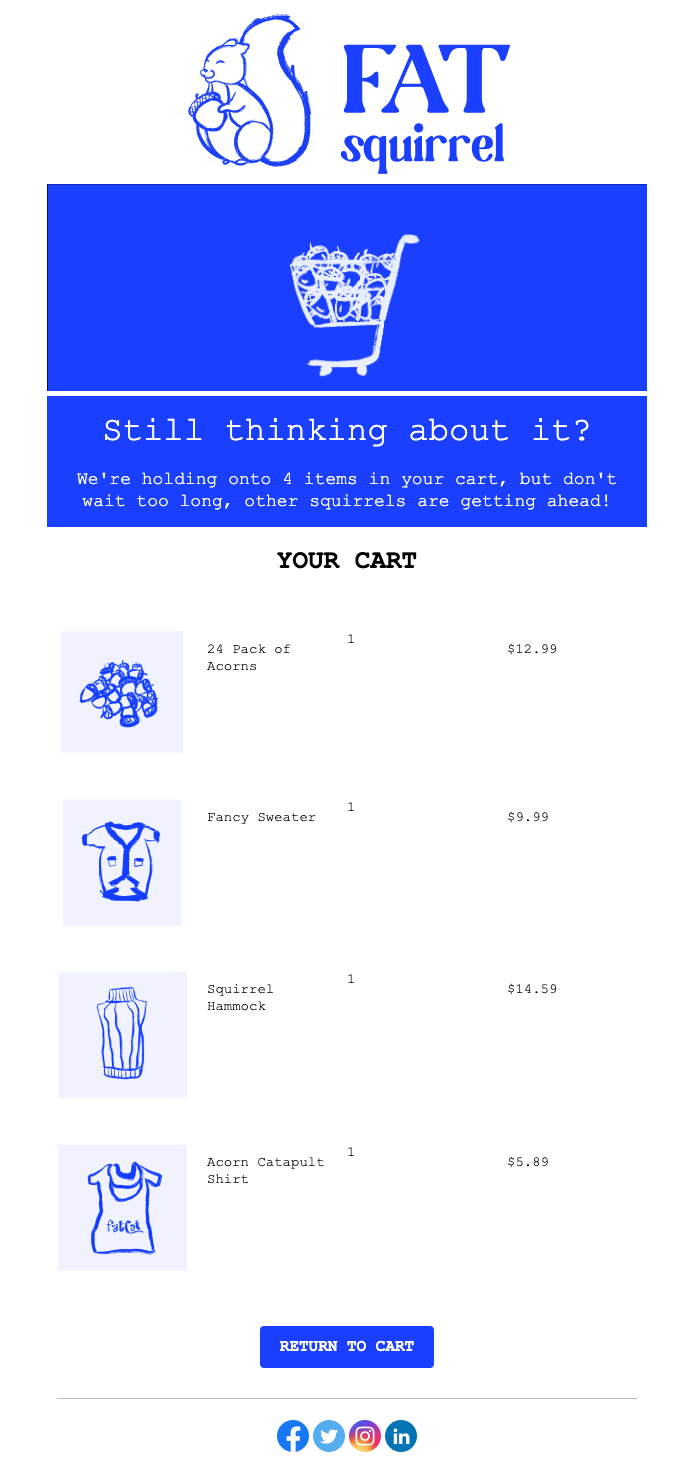
此示例展示如何构建一个邮件模板,显示:
  • 购物车商品数量
  • 使用 for 循环展示每个产品的图片、名称、数量和价格
  • 链接到客户唯一购物车 URL 的按钮
1

创建邮件模板

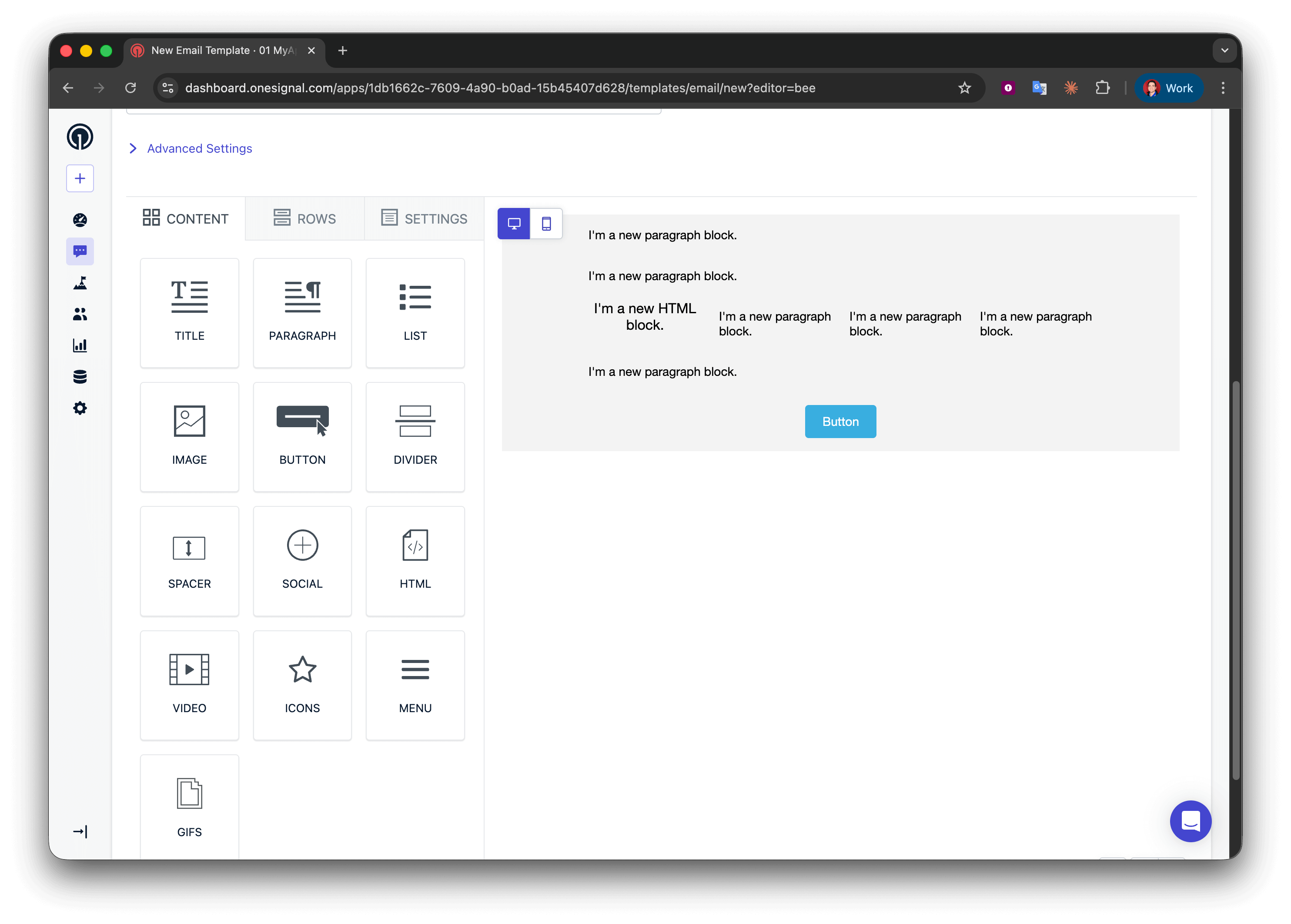
导航到 Messages > Templates > New Email Template,然后打开拖放编辑器。
2

添加布局结构

创建五行:
  • 第 1、2 和 4 行:一列,包含一个 Paragraph
  • 第 3 行:四列,包含 HTML | Paragraph | Paragraph | Paragraph
  • 第 5 行:一列,包含一个 Button
3

显示商品数量

在第 1 行中添加:
Liquid
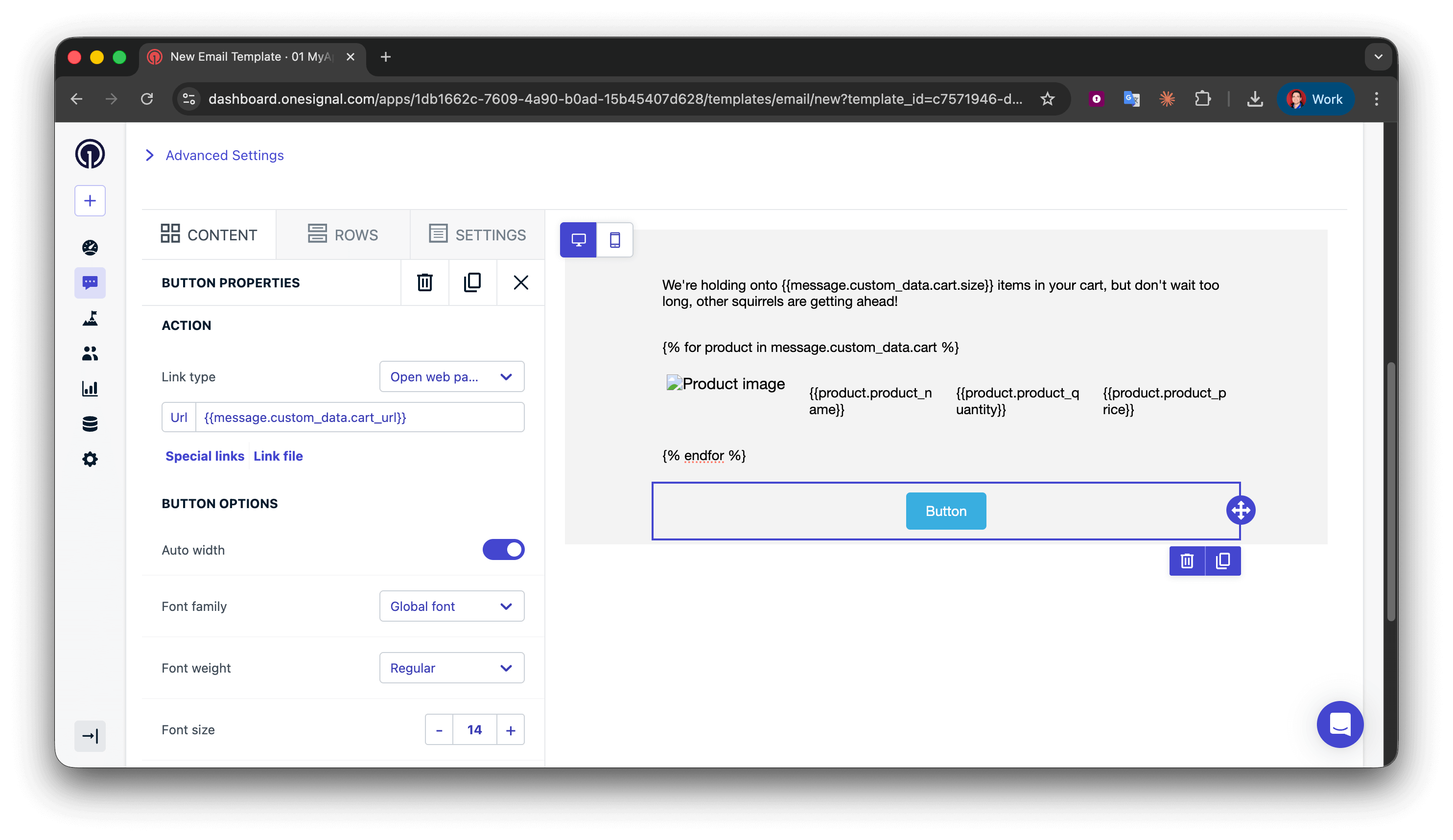
We're holding onto {{message.custom_data.cart.size}} items in your cart, but don't wait too long, other squirrels are getting ahead!
为了更好的语法表达,您可以使用条件语句来区分 “1 item” 和 “2 items”,但对于弃购挽回邮件,使用复数形式通常是可以接受的。
Liquid
{% assign cart = message.custom_data.cart %}
{% assign item_count = cart.size | plus: 0 %}
{% if item_count == 1 %}
We're holding onto {{item_count}} item in your cart, but don't wait too long, other squirrels are getting ahead!
{% endif %}
{% if item_count > 1 %}
We're holding onto {{item_count}} items in your cart, but don't wait too long, other squirrels are getting ahead!
{% endif %}
4

开始循环

使用 for 循环为购物车中的每个商品重复产品展示行。在第 2 行(循环开始),将以下内容添加到文本块中:
Text
{% for product in message.custom_data.cart %}
这段代码的作用:
  • 开始一个循环,遍历 cart 数组中的每个对象
  • 创建一个名为 product 的临时变量,代表当前项目
  • {% for %}{% endfor %} 之间的所有内容会为每个购物车项目重复一次
  • 您可以将 product 命名为任何名称(例如 itemcartItem)——保持一致即可
for 循环的位置:确保 {% for %} 语法位于其单独的文本块行中。不要将其放在包含其他内容的多列行中,因为这可能会导致某些邮件客户端的渲染问题。
5

显示产品详情

这个 4 列行展示图片、名称、数量和价格。由于它在循环内,会为每个购物车商品重复。在第 3 行(产品详情),配置:第 1 列 - HTML 块(产品图片):
HTML
<img src="{{product.product_image}}" alt="Product image" style="max-width:100%;" />
第 2-4 列 - 文本块(产品名称、数量、价格):
  • 第 2 列:{{product.product_name}}
  • 第 3 列:{{product.product_quantity}}
  • 第 4 列:{{product.product_price}}
循环的工作原理:
  • 在第一次迭代中,product = 购物车数组中的第一个对象
  • {{product.product_image}} 获取第一个商品的图片 URL
  • 在第二次迭代中,product = 第二个对象
  • 此行会自动为所有购物车商品重复
字段名称匹配:product_image 这样的键必须与事件有效负载完全匹配(区分大小写)。不匹配将渲染为空字符串。
6

结束循环

关闭循环以标记重复停止的位置。在第 4 行(循环结束),添加:
Liquid
{% endfor %}
每个 {% for %} 必须有一个匹配的 {% endfor %}。缺少它将导致邮件渲染出错。
7

添加购物车链接按钮

在第 5 行的 Button 块中,将 Action URL 设置为:
Text
{{message.custom_data.cart_url}}
8

测试模板

成功!现在您可以为模板应用自己的样式。请参阅使用拖放设计邮件

推送模板

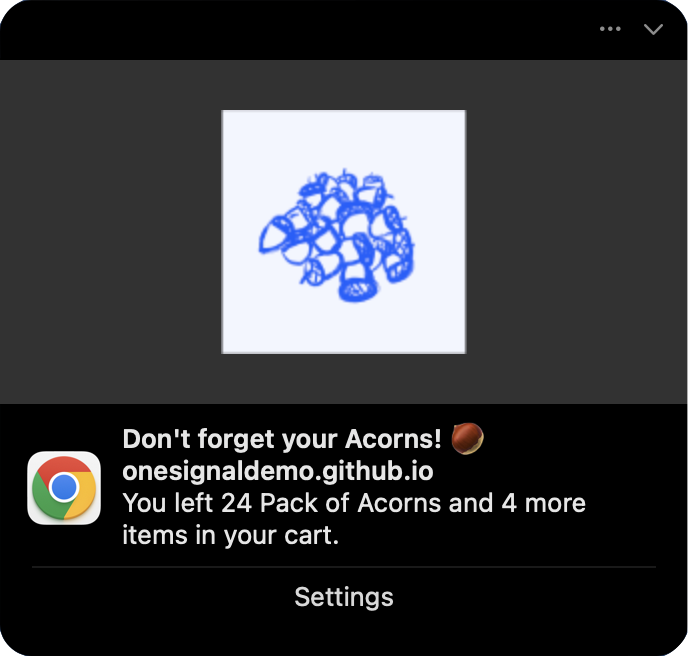
推送通知有字符限制和操作系统限制,因此不要展示所有商品,而是显示第一个产品并用正确的语法标示总数量。 以下是我们将构建的推送通知示例:
消息字段:
Liquid
{% assign cart = message.custom_data.cart %}
{% assign item_count = cart.size | plus: 0 %}
{% if item_count == 1 %}
You left {{cart.first.product_name}} in your cart.
{% endif %}
{% if item_count == 2 %}
You left {{cart.first.product_name}} and {{item_count | minus: 1}} more item in your cart.
{% endif %}
{% if item_count > 2 %}
You left {{cart.first.product_name}} and {{item_count | minus: 1}} more items in your cart.
{% endif %}
请参阅使用 Liquid 语法了解更多信息。
图片字段:
Liquid
{{message.custom_data.cart.first.product_image | default: "https://i.imgur.com/ssPCfbC.png"}}
请参阅通知图片和富媒体了解更多信息。
启动 URL 字段:
Liquid
{{cart_url | default: "https://yourdomain.com/cart"}}
成功!保存模板并在 Create message API 请求中使用其 template_idcustom_data 属性进行测试。

故障排除和最佳实践

  • 保持简单:仅包含您在模板中实际使用的数据
  • 保持在 2KB 以内:监控有效负载大小,特别是使用数组时
  • 使用一致的命名:全程坚持使用 snake_casecamelCase
  • 发送前验证:检查空值、空数组和必填字段
模板设计:
  • 始终为可选字段使用 default 过滤器
    Liquid
    {{message.custom_data.user_name | default: "there"}}
    
  • 循环前检查数组大小
    Liquid
    {% if message.custom_data.items.size > 0 %}
      {% for item in message.custom_data.items %}
        {{item.name}}
      {% endfor %}
    {% endif %}
    
  • 使用边界情况测试:空数组、缺失字段、最大项目数量
错误处理:
  • 在服务器端记录 API 响应以捕获验证错误
  • 监控消息送达率——突然下降可能表示 Liquid 错误
  • 为关键的事务性消息准备备用模板
性能:
  • 在后端预格式化复杂数据,而不是使用复杂的 Liquid 逻辑
  • 缓存模板并在多个 API 调用中重复使用
  • 考虑将高频事务性消息与营销活动分开
原因: Liquid 语法错误或字段名称不匹配解决方案:
  • 验证 custom_data 和模板之间的字段名称完全匹配(区分大小写)
  • 检查拼写错误:{{message.custom_data.name}} 而不是 {{message.custm_data.name}}
  • 使用 default 过滤器来捕获缺失字段
  • 在生产环境使用前,使用实际的 custom_data 结构测试模板
原因: custom_data 超过 2KB 限制解决方案:
  • 从有效负载中移除不必要的字段
  • 尽可能缩短字段名称和值
  • 将数组限制为前 3-5 个项目
  • 将大型静态内容(如完整 HTML)移至模板中

相关页面

需要帮助?与我们的支持团队聊天或发送邮件至 support@onesignal.com请包含以下信息:
  • 您遇到的问题详情以及复现步骤(如有)
  • 您的 OneSignal 应用 ID
  • 外部 ID 或订阅 ID(如适用)
  • 您在 OneSignal 控制台中测试的消息 URL(如适用)
  • 任何相关的日志或错误信息
我们很乐意为您提供帮助!