

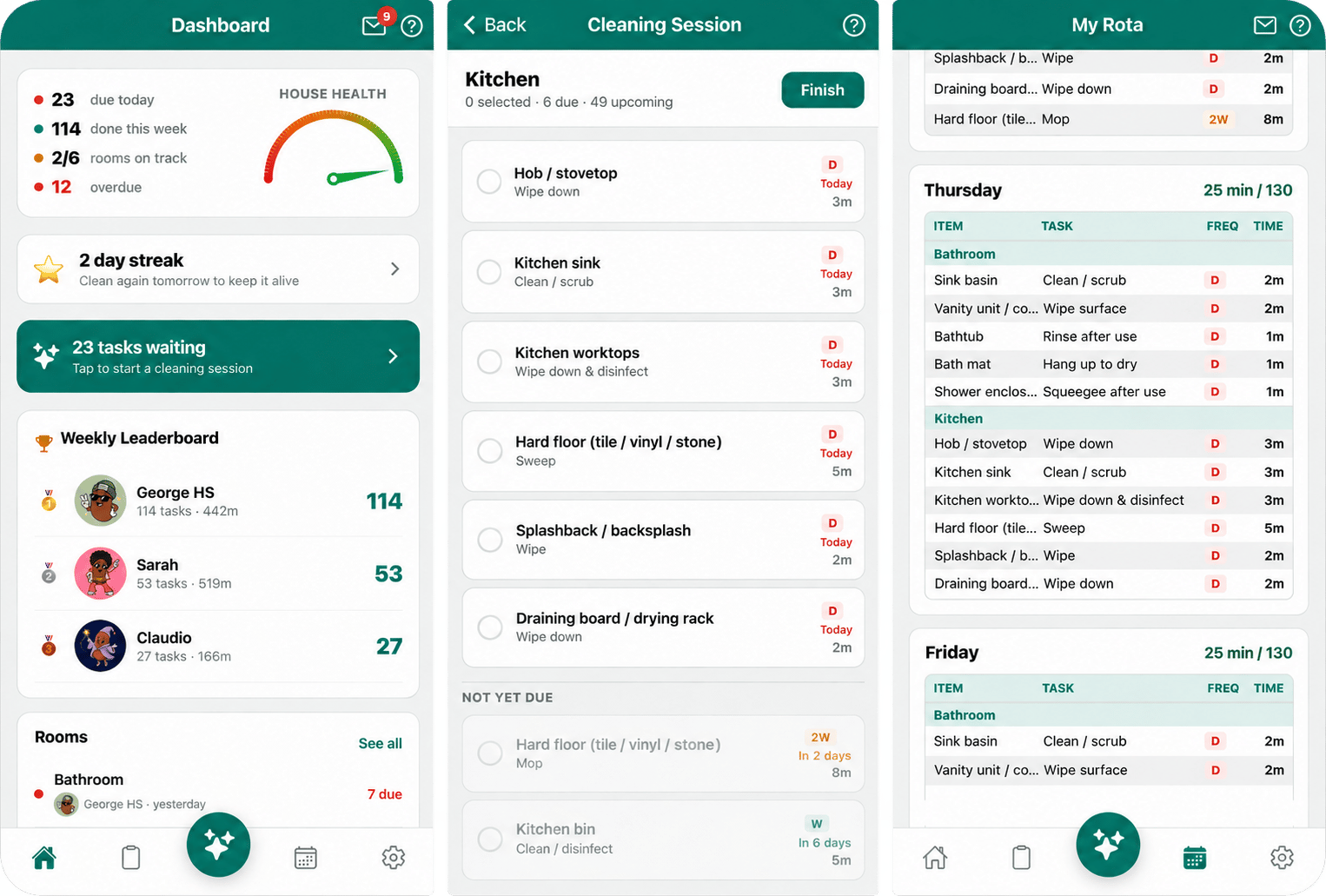
Clean Beans: the dashboard, a cleaning session, and the weekly rota.
What Clean Beans does
A household adds its rooms, and the app turns them into a list of cleaning tasks with sensible frequencies. A rota generator spreads those tasks across the week to fit each person’s time budget. Members run cleaning sessions, tick off tasks, build daily streaks, send each other kudos, and compete on a weekly leaderboard. Cleaning is shared, recurring, and time-bound, which makes it a good fit for almost every kind of message: reminders, social updates, countdowns, recaps, and coaching.Why this guide exists
Use it to answer three questions:- Which OneSignal feature fits which job? Each page starts from something the app needed to do, then shows the feature that does it.
- Where does the code go? Some work belongs in the app, some on your backend, and some in the OneSignal dashboard. Every example says which.
- What goes wrong? Warnings and notes on each page record what was learned by shipping it. One setting,
collapse_id, was tried and then removed, and Reliable, well-behaved push explains why.
How to read it
The guide is a set of pages, one per topic. You do not need to read them in order. SDK setup and user identity is the foundation for everything else. After that, each page stands on its own. Most features are presented the same way:- What the user sees, usually with a screenshot.
- How it works, as a short sequence of who does what.
- The code, taken from the app. The title of each code block is the file it comes from.
- Dashboard setup, where the feature needs configuring in OneSignal.
The code is real, but identifiers are replaced with placeholders such as
YOUR_ONESIGNAL_APP_ID and YOUR_PROJECT_REF. Long files are trimmed to the lines that matter. A line containing only // ... marks where code was left out.How the pieces fit together
The External ID connects all three. Clean Beans sets it to the Supabase user ID at sign-in, so the backend can address any person using an ID it already stores.
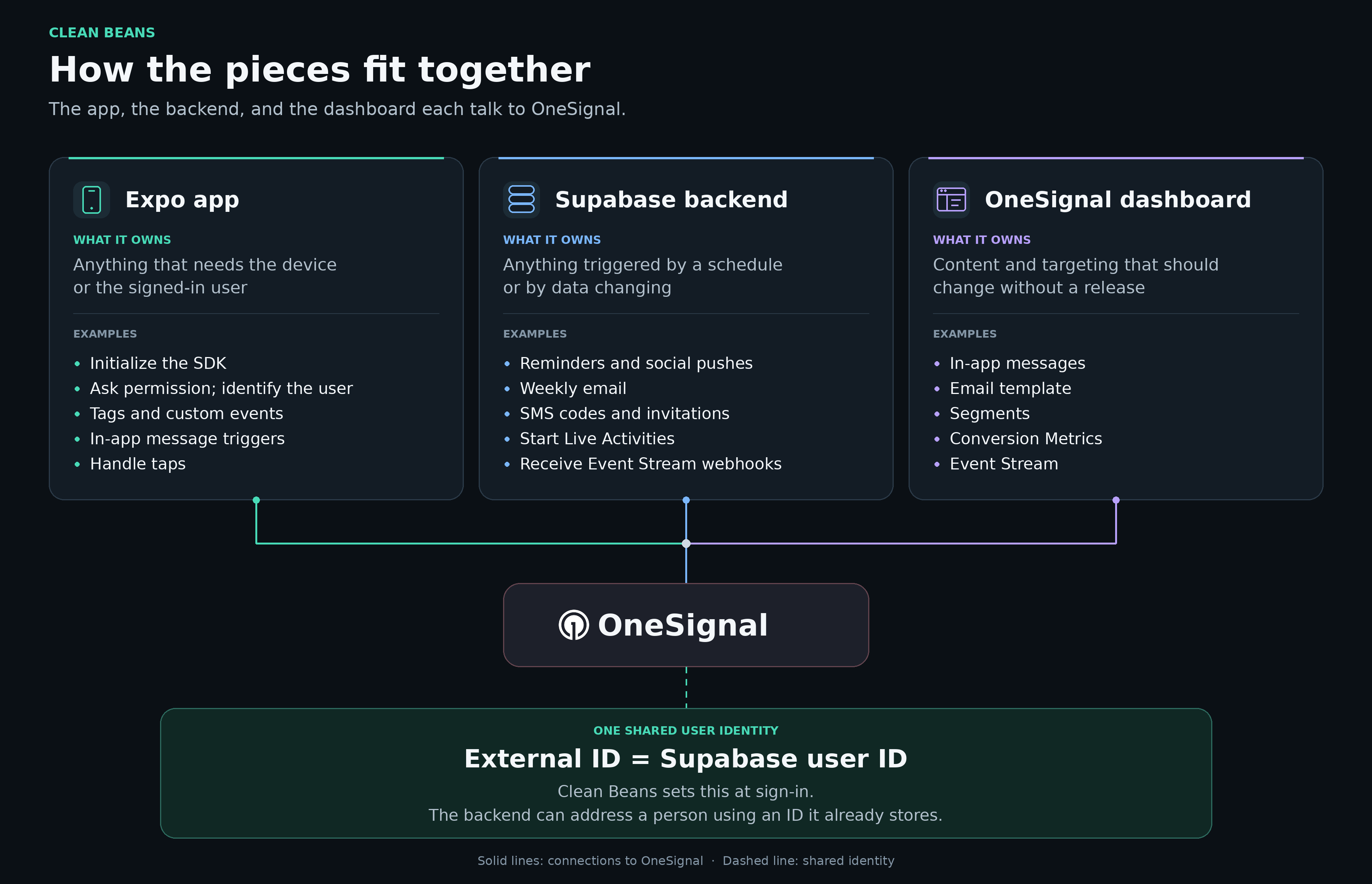
The app, the backend, and the dashboard each talk to OneSignal. The External ID ties them to one user.
Feature map
What you need
- A OneSignal app with push configured for iOS and Android, and email and SMS set up. See Channel setup.
- An Expo app built with EAS Build. The OneSignal SDK needs native code, so Expo Go is not enough. See Expo SDK setup.
- Your App ID and an App API key. See Keys & IDs.
- A backend that can run code on a schedule and in response to requests. Clean Beans uses Supabase Edge Functions with
pg_cron. The same patterns apply to any backend.
Principles that held up
- Set the External ID first. Almost every feature here depends on it. Use an ID your backend already stores.
- Put each job where it belongs. The app handles the device and the signed-in user. The backend handles schedules and data changes. The dashboard holds anything you want to change without a release.
- Check before you send. Every backend send checks the user’s preferences and confirms there is something worth saying.
- Make scheduled sends repeatable. An idempotency key built from the type, the recipient, and the date turns a retry into a no-op.
- Route on a type, not a URL. A
data.typefield keeps old notifications working when screens move. - Verify what callers tell you. A function that sends messages should confirm the facts in your own database first.