

Both are sent to a raw contact, a phone number or email address, not to an External ID. That is the main difference from every other send in this guide.
Verify a phone number with a one-time code
In User Profile, a user can add a mobile number. The app asks the backend to text a 6-digit code, the user types it in, and the backend checks it. Only then does the number count as verified.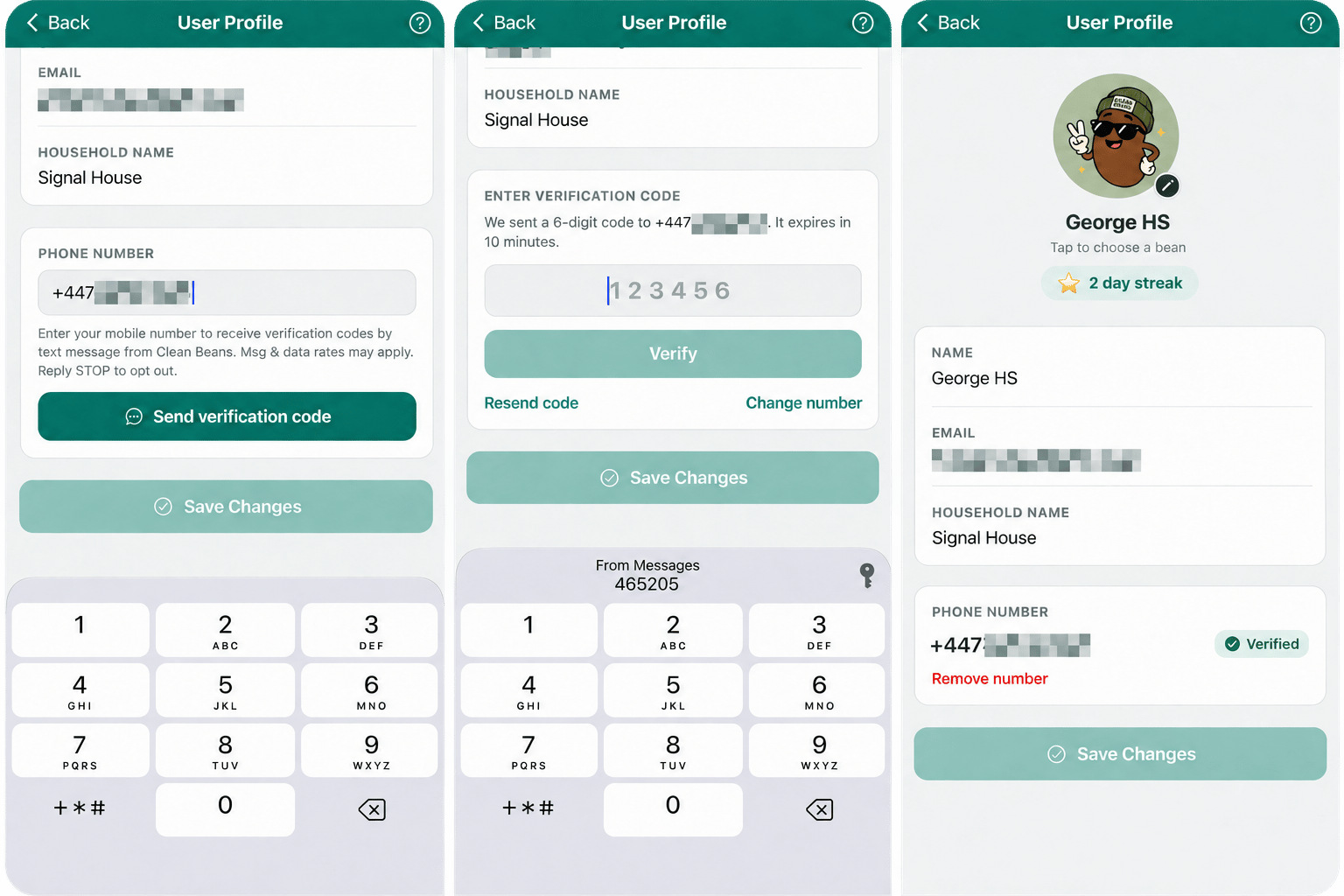
Adding a phone number: enter the number, enter the code, verified.
1
Generate a code and store it hashed
The code comes from a cryptographic random source. Only a keyed hash is stored, bound to the user and the phone number, so the table alone cannot be turned back into codes. The key is a dedicated secret,
OTP_HASH_SECRET, used for nothing else. Both functions refuse to run if it is not set.supabase/functions/_shared/otp.ts
supabase/functions/send-otp/index.ts
2
Send it by SMS through OneSignal
include_phone_numbers targets the number directly. If OneSignal has never seen it, it creates an SMS subscription for it.supabase/functions/send-otp/index.ts
3
Check the code
The backend hashes what the user typed and compares it with the stored hash. A wrong guess is counted. After five, the code is dead and a new one must be requested.
supabase/functions/verify-otp/index.ts
4
Register the number as an SMS subscription
Once the backend confirms the code, the app adds the number to the signed-in user.The app repeats this after every sign-in, so a verified number follows the user to a new device.
src/lib/phone.ts
src/lib/phone.ts
Call
addSms() after login(), as with email. A send to a raw phone number creates a subscription that belongs to no one. addSms() from a signed-in app attaches that subscription to the user. Until then, it appears in the dashboard as a separate user record.Protect the endpoint
A function that sends a text message on request costs money each time it runs, and it is a target for abuse. Clean Beans applies these limits.supabase/functions/send-otp/index.ts
supabase/migrations/028_phone_verification_and_invites.sql
Ask for consent where the number is entered
A phone number on its own is not permission to text it. For verification codes, a disclosure next to the phone field is enough, and it must say who is sending, what they will send, that rates may apply, and how to stop.src/components/PhoneVerificationCard.tsx
Invite someone who is not a user yet
On the Household screen, a member can invite someone by text or by email. The invitee has no account, no device registered, and no External ID. The backend sends to the raw contact, with a link that opens the app’s join screen.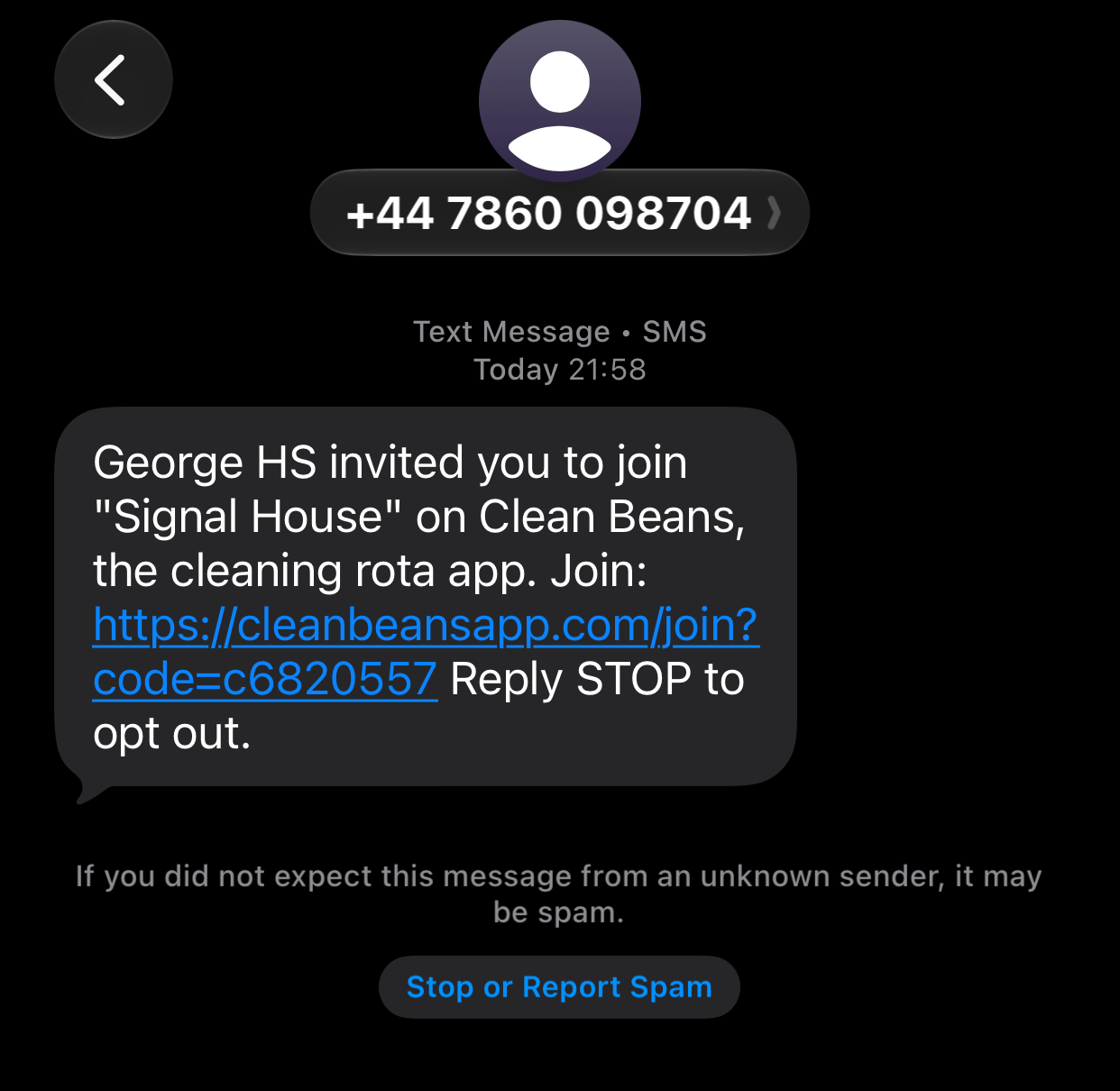
Inviting a housemate by text or email, and the message they receive.
include_phone_numbers. Email uses email_to, with the subject and HTML body passed inline.
supabase/functions/send-invite/index.ts
- Email click tracking is turned off. Tracking rewrites links to pass through a tracking domain, and a rewritten link no longer opens the app.
- The SMS does not use a tracked short link, for the same reason.
login() and addEmail() or addSms() calls attach the subscription that the invitation created to their new user.
Things to know
- A sender is required. Choose a default sender in Settings > SMS, or pass
sms_fromwith each request. With neither, the request is rejected with “A valid number is required for ‘From’ field”. - A
200response does not always mean a message was sent. Check for a messageidin the response, not only the status code. - Store numbers in E.164 format, a plus sign followed by the country code and number, and reject anything else before calling the API.
- OneSignal Verify is the managed alternative. It generates and checks codes for you. Clean Beans builds its own to show the whole flow.
One-time passwords
OneSignal Verify and building your own.
SMS opt-in and collection
Consent and disclosure requirements.
SMS API reference
Every SMS parameter.