

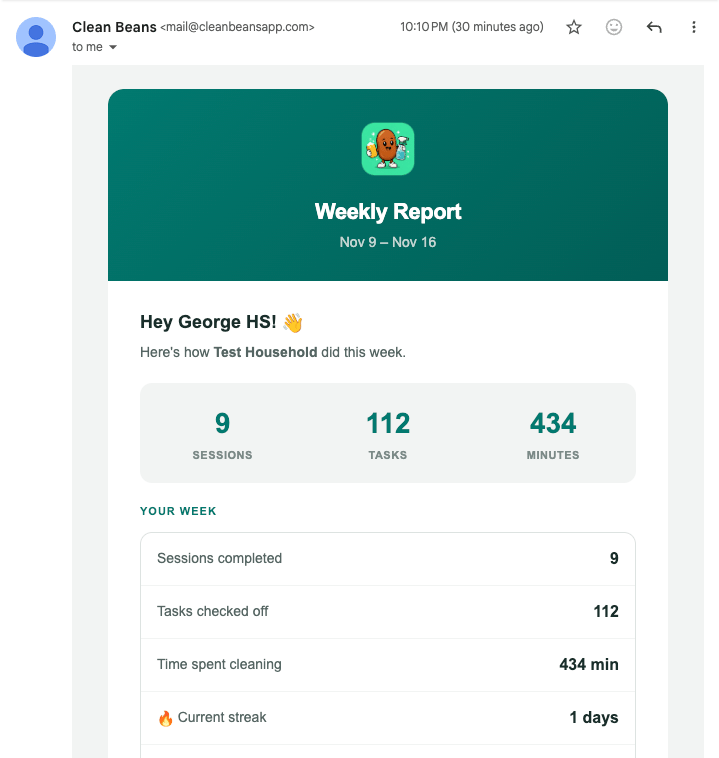
The weekly report: household totals, your own week, and the leaderboard.
One request per household, personalized per person
The function sends one request per household. It passes all the data incustom_data, including a users object keyed by External ID. The template then picks out the right entry for whoever it is rendering for.
supabase/functions/weekly-report/index.ts
email-templates/weekly-report.html
user holds this person’s stats, and anything read from message.custom_data directly is shared by the household.
email-templates/weekly-report.html
The second Liquid example is simplified from the template to show the logic without the table markup.
Stay inside the size limit
custom_data for email is limited to 10 KB. A large household could exceed that, so the function measures the payload and trims the leaderboard if it has to.
supabase/functions/weekly-report/index.ts
Schedule and preferences
A weekly schedule calls the function every Sunday at 09:00 UTC, using the samepg_cron pattern as the push reminders with the expression 0 9 * * 0. Only users with Weekly Email Summary switched on are included.
Dashboard setup. In Messages > Templates, create an email template, paste in the HTML, and copy the template ID into your backend’s secrets. custom_data only works with a template, so template_id is required.
The alternative: Data Feeds
There is a second way to get per-person data into an email, and Clean Beans chose not to use it. It is worth understanding, because for some apps it is the better fit. Withcustom_data, your backend pushes the data to OneSignal when it sends. With a Data Feed, OneSignal pulls the data from your API at the moment each email is sent. The send itself is started by a Journey, not by your backend.
The examples in this subsection are illustrative. They show how the weekly report would have been built with a Data Feed. They are not taken from the app.
1
Expose an endpoint that returns one person's week
A backend function takes a user ID and returns that user’s stats and their household’s leaderboard as JSON.
Response from your API
2
Create the Data Feed in the dashboard
In Settings > Data feeds, give the feed an alias and point it at the endpoint. The URL and headers accept Liquid, so the recipient’s External ID can be passed in.
Data Feed configuration
3
Attach the feed to the email template and read from it
In the template, values come from
data_feed, followed by the alias.Email template
4
Send it from a recurring Journey
A Journey with a time window of Sunday morning as its first step, and a re-entry rule, sends the template every week. No schedule or send code lives in your backend.
Which one to use
Choose
custom_data when your backend is already the thing that decides to send. That is the case for the weekly report. The backend runs on a schedule, knows which households opted in, and has every number in hand, so passing the data along costs nothing extra. One request covers a whole household, there is no endpoint to protect, and a failure shows up in your own logs. The price is that timing and audience live in code, and the payload has a fixed size limit.
Choose a Data Feed when the send belongs to a Journey. A Journey decides for itself when to message someone, days after an event or once a wait condition is met, and your backend is not there to supply data at that moment. A Data Feed fills that gap, and it means the people who run messaging can change the schedule, add a branch, or test variants without a deploy. The price is that your API is called once per recipient and should answer in about a quarter of a second, each template can use only one feed, and a failed call means that person silently gets nothing.
For Clean Beans the deciding factors were simple. The backend already had the data and the schedule, the leaderboard is shared by a household so one request is far cheaper than one call per person, and preferences are stored in the app’s database, where the backend can check them directly.
Personalize with custom_data
Size limits and Liquid access patterns.
Data feeds
Pull live data into Journey emails and SMS.
Using Liquid syntax
Filters, loops, and conditions.